
Visual Strategy Builder: creating advisors for MT4 without programming

We all know that the main advantage of the Metatrader 4 terminal is the ability to create robots and trade with their help.
Far from all traders know how to program in mql4/5. The developers of the Forex Tester program managed to solve this problem. Now you can create a robot or implement a trading idea in the form of an indicator on the Visual Strategy Builder resource. Without programming skills.
How to do this, and the pros and cons of the free (at the moment) robot builder, are covered in our article.
Regular readers of our site are familiar with Forex Tester 4, a unique trading simulator that acts as a trainer, tester, and analyzer. The program had a function for custom writing indicators and expert advisors compatible with Metatrader. Now the platform's developers have decided to give every trader a chance to independently create their own strategies.
Scripts constructed with the help of ready-made command modules are also compatible with Metatrader 4, and their creation is completely free during the beta testing period. So let's hurry to read the article and bring to life all the ideas for indicators and expert advisors that had been postponed until better times.
The Visual Strategy Builder service is located at: https://tools.forextester.com/
Why is Visual Strategy Builder needed?

Visual Strategy Builder (VSB) is a software shell with a set of technical analysis tools that are well known to users of Metatrader 4. Unlike this trading platform, VSB allows you to set in indicators the rules for opening a position and placing take-profit and stop-loss orders.
Any beginner can choose a signal for opening a position from a set of ready-made options (crossovers, level crossings, greater/less than, etc.). These settings open up the ability, unavailable in Metatrader 4, to test the operation of one or several indicators.
For example, you can get a real trading result for a strategy based on the crossing of moving average lines. Such an expert advisor is created in VSB in 5 minutes, after which it can be exported to Metatrader 4 or Forex Tester.
Having figured out how to create one indicator in Visual Strategy Builder, a trader can create a working automated strategy in a few clicks and also test it in the tester. If the expert advisor shows positive results, then its signals can be traded on a real account through Metatrader 4.
By the way, it is definitely better to test a strategy through Forex Tester because it has more accurate quotes and you can quickly emulate a session for any trading day. For example, by choosing some kind of "black Tuesday" to clearly understand how abnormal volatility will affect money management settings.
Professional traders can export expert advisor code directly into VSB, connect it with programs created there, or edit it in Metaeditor and send it back to Metatrader 4.
Visual Strategy Builder will be useful for those looking for new ideas because the program supports a library of user strategies. Anyone without programming skills will immediately understand the "inner workings of the algorithm" by the composition of indicators and the described rules of trading signals. Right there you can independently verify the effectiveness of a trading system.
How to work on the Visual Strategy Builder platform

The Visual Strategy Builder service is located at: https://tools.forextester.com/
Using VSB requires registration; this is a quick and simple procedure. Enter your email address and come up with a password to log in. It must be at least 8 characters, contain letters in different cases, and it is better to use a gmail mailbox.
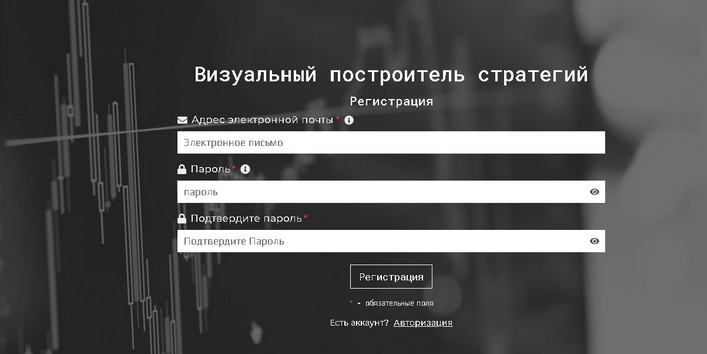
After filling in the above lines, the program immediately opens the strategy builder window, automatically switching to the Russian-language version.
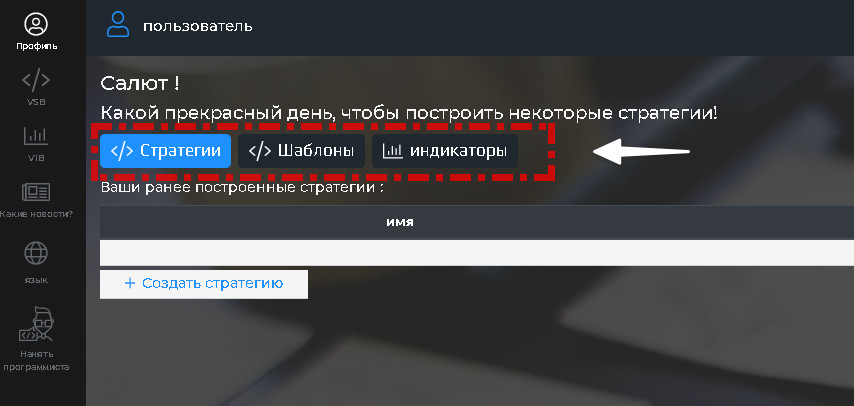
Currency speculators have access to strategy creation, using a template from the developers or other VSB users, as well as creating their own "dream indicator." If the user plans to assemble a trading system, they need to click the "Strategies" icon.
The platform conveniently saves them under a user-selected name with a brief description of the system's essence. The page provides a return button in case the trader made a mistake at the previous stage.
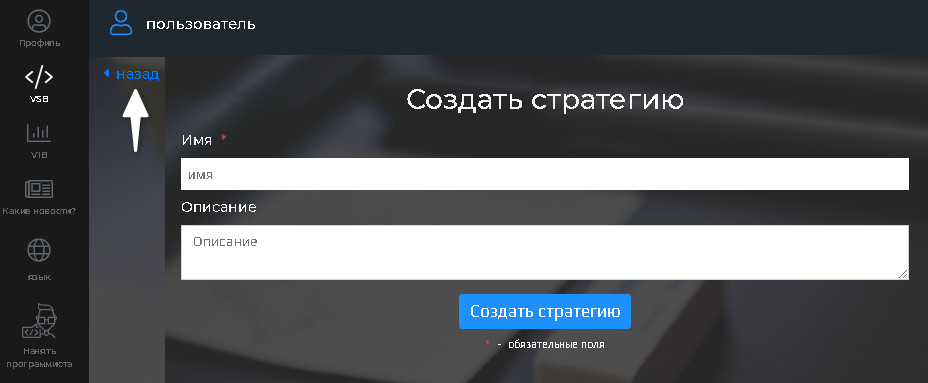
After the "Create strategy" step, there is no way back. However, it is not at all necessary to rush into building complex trading systems. The program, for example, is capable of greatly simplifying life for intraday traders by automating some indicators. They are listed on the panel to the left under the "Elements" option. Above this list are various targets for use in strategies:
- Levels (Value);
- Specific price;
- Range (open, close, candle highs and lows);
- Opening by days of the week or month (time option);
- By a specific volume or its abstract criterion;
- Timeframe.
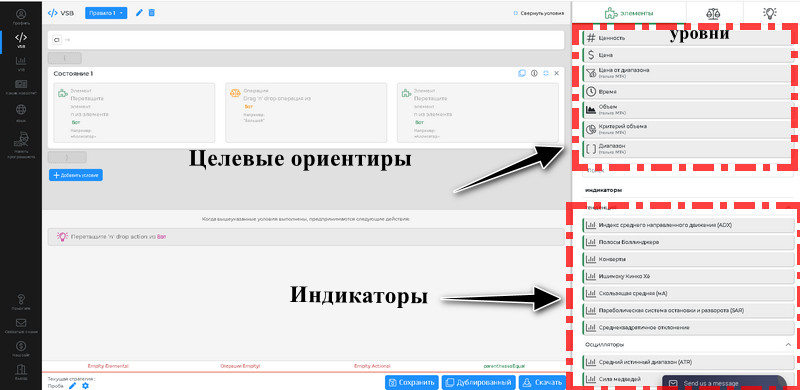
The listed options can be combined with each other, applying various conditions for executing a trade, for example, a level breakout only before the American session, etc. Decide on the main tool of your strategy and drag it into the "State 1" window.
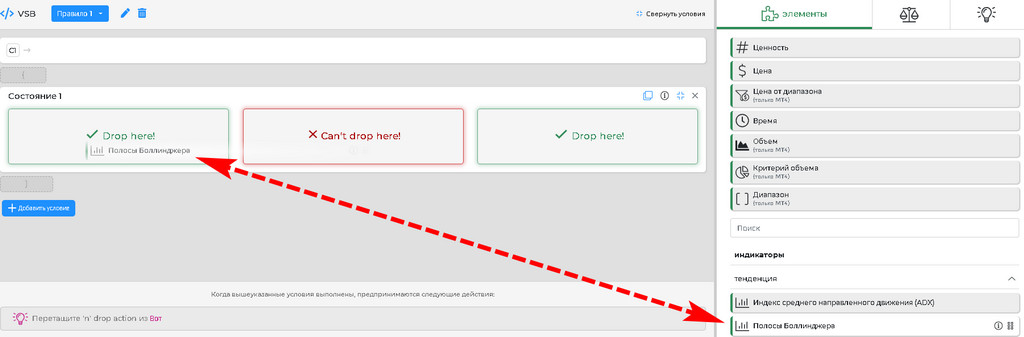
As soon as it is displayed there, you can start editing the parameters. Hover the cursor over the field of the attached Bollinger Bands (BB) to see this option.
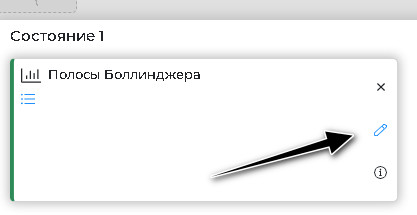
After clicking it, a table with the standard settings of the BB lines will appear. One feature is worth noting: for each of them, the signals for opening positions are prescribed separately.
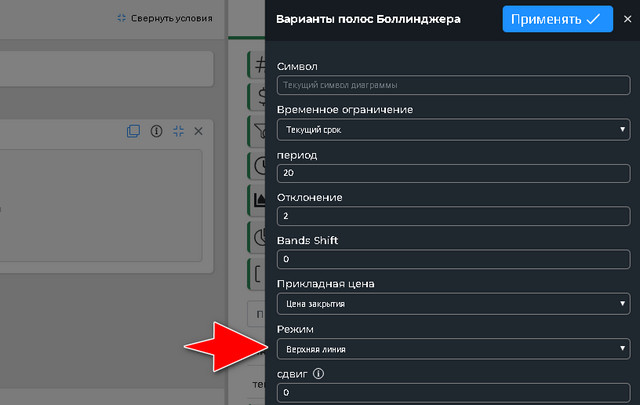
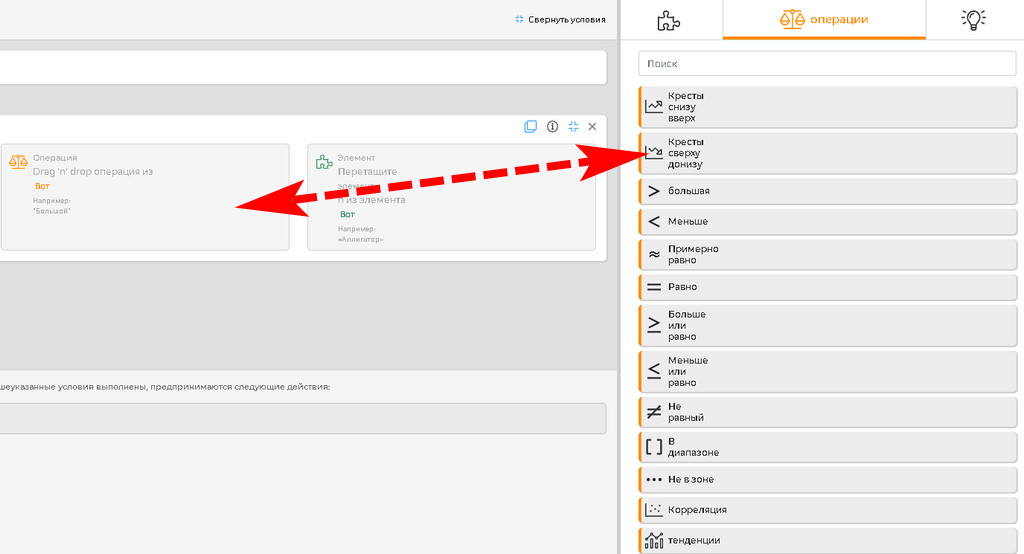
The set of rules for entering a position is available after clicking next to the "Operations" window, together with which a similar option on the left with a list of templates is activated. Considering that the work is being done with the upper line, and market entry is planned on a countertrend, we select a top-down crossover.
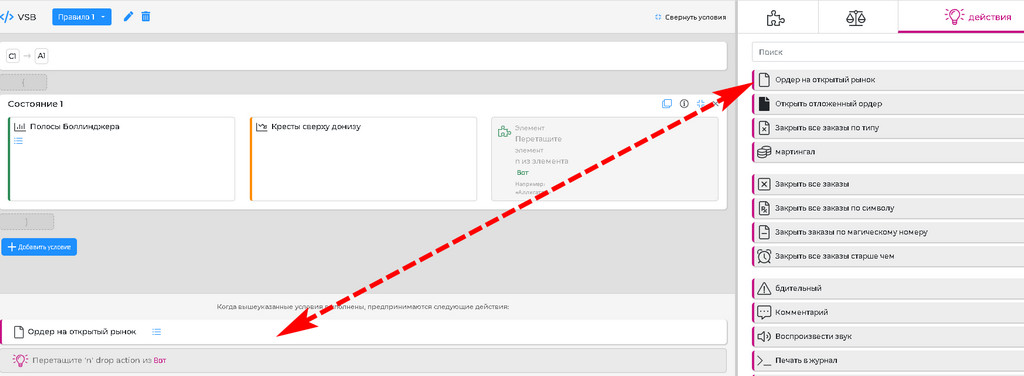
Now let us specify the position type and the money management conditions using the "Actions" menu item on the left panel. Drag a sell order into the field and edit its parameters.
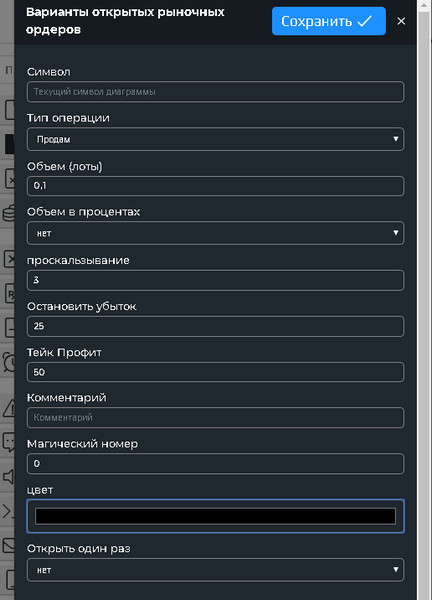
Let us go through the items from bottom to top: the indicator on the chart allows multiple position openings, so we set "No" for the suggestion to open the order one time. A magic number is necessary, if opening positions on Bollinger Bands signals will intersect with other Expert Advisors running on the chart.
The remaining options are clear; you only need to pay close attention to the points: 25 is for a four-digit quote system. With five digits, multiply the point values by 10.
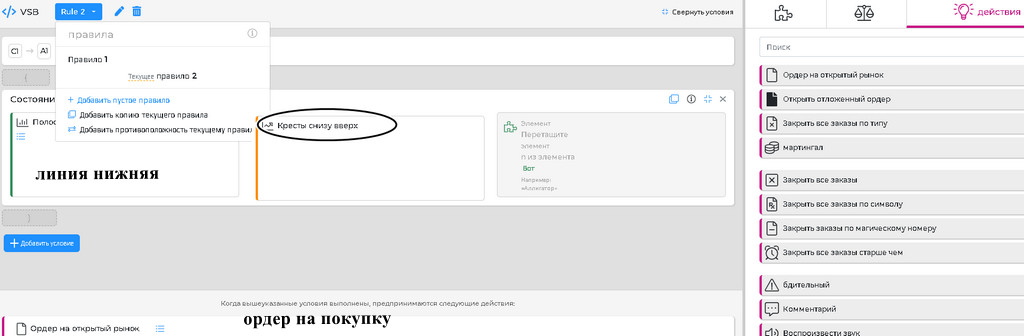
For the lower Bollinger line, you will need to create a second rule; the option can be selected at the upper left, repeating all the operations described above with the following changes:
- In the indicator settings, select the lower line;
- Crossover - bottom-up;
- Order type opened at market - "Buy".
The resulting strategy can be saved and exported to ForexTester or Metatrader 4. In the latter case, use Latin letters in the file name. The strategy is saved as an ex4 file in the folder chosen by the trader.
You can launch the written Expert Advisor immediately after installing it in Metatrader 4. This is done in the usual way, described on our website.
Conclusion

The main advantage of the Strategy Builder from Forex Tester is the simplicity of the interface and the functionality of the templates. This allows the trader to partially automate strategies or supplement manual trading with additional signals that previously had to be searched for visually on the chart.
Fans of grids will be especially pleased by the presence of the "Martingale" option, as well as commands to close all orders by condition. Among the disadvantages of VSB, it is worth noting the bugs of the beta version and the future planned fee for the option. So let us hurry to write and export Expert Advisors while the platform still has an open license.
On it, you can try to create a prototype of your trading idea and, if it turns out to be profitable, turn to programmers for its full implementation.
Respectfully, Alexey Vergunov
Tlap.io