
Forex & CFD Lot Size Calculator
How the lot calculator helps
The lot calculator helps choose a position size before opening a trade: it links the account balance, risk percentage, stop loss distance and currency pair into one clear volume value.
Enter the deposit, select the trading instrument and account currency, set the acceptable risk and stop loss. The result shows the lot size that keeps the planned loss inside the selected risk limit.
Forex Lot Size Calculator: How to Use the Tool
Why Use a Lot Size Calculator?
A Lot Size Calculator helps you calculate the appropriate position size before entering a trade. Based on your account balance, risk per trade, stop-loss distance, and selected instrument, it determines how large your position can be while staying within your predefined risk limit.
Using a consistent position size helps control risk, protect your trading capital, and eliminate guesswork from every trade.
What Is the TLAP Lot Size Calculator?
The TLAP Lot Size Calculator automatically calculates the appropriate position size using your account balance, risk per trade, stop-loss distance, and selected instrument. This ensures every trade follows the same risk management rules, regardless of market conditions.
How to Use the TLAP Lot Size Calculator
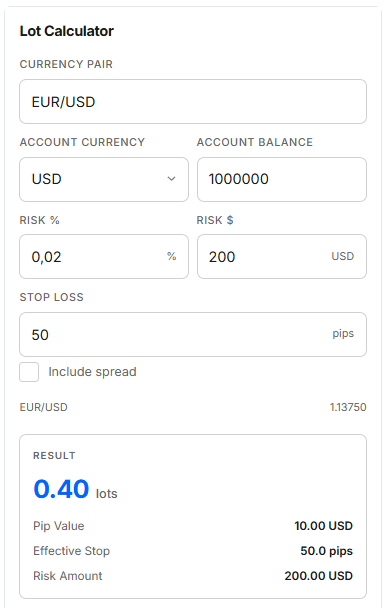
To calculate your position size:
Select a Trading Instrument. Choose from Forex currency pairs, stocks, or cryptocurrencies. The calculator uses the instrument's pip value and contract size to calculate the recommended position size.
Choose Your Account Currency. Select your account currency (USD, EUR, GBP, CHF, JPY, AUD, CAD, NZD, SGD, HKD, NOK, SEK, RUB, and others). Any required currency conversions are performed automatically.
Set Your Risk per Trade. Enter either a percentage of your account balance (for example, 1–2%) or a fixed amount. This is the maximum amount you are willing to risk on a single trade.
Enter the Stop-Loss Distance. Specify the distance between your entry price and stop-loss level in pips. You can also include the spread by enabling the spread option and entering its value in pips for a more conservative calculation.
Review the Recommended Lot Size. The calculator instantly displays the recommended lot size to keep your potential loss within your specified risk limit.
All calculations are performed automatically, helping you avoid manual calculation errors.
Benefits of the TLAP Lot Size Calculator
The TLAP Lot Size Calculator helps you:
calculate the appropriate position size for every trade;
maintain consistent risk across your trading strategy;
protect your account from excessive drawdowns;
save time by eliminating manual calculations;
reduce emotional decision-making through disciplined risk management.
Consistent position sizing leads to more disciplined trading and more reliable long-term results.
Using the TLAP Lot Size Calculator for Strategy Analysis
The Lot Size Calculator is valuable for both live trading and strategy development. Applying the same position sizing rules throughout backtesting provides a more accurate picture of strategy performance by removing inconsistencies caused by changing trade sizes.
The calculator helps you:
compare the performance of different trading strategies;
evaluate maximum drawdowns using a fixed level of risk;
identify an appropriate risk percentage per trade;
assess the long-term reliability of your strategy.