
VelociRaptor Grid Expert Advisor: A Careful Grid Trader with a Good Track Record

Hello everyone.
I present to your attention the multicurrency Forex expert advisor VelociRaptor Grid (Velocigrid), developed by traders from our forum. This advisor is a powerful grid robot with trading parameter adjustment capabilities, convincing tests and an excellent 5-year independent monitoring record.
In this review, we will examine its characteristics, analyze the tests and trading results from independent monitoring, and also give recommendations for its use.
Expert Advisor Characteristics
Platform: Metatrader 4
Advisor version: v3.14.761
Currency pairs: EURUSD, AUDUSD, NZDUSD, USDCAD, AUDJPY, EURJPY, EURGBP, AUDCAD, GBPCAD, NZDCAD, EURAUD, AUDNZD, EURCAD (but it can also be used on other pairs)
Timeframe: depends on the set file
Operating time: around the clock
Recommended brokers: Roboforex, Forex4you, NPBFX (Cent accounts)
Leverage: 1:500 and higher
Risk size per pair: 15-20% for conservative trading, 20-30% for increased risk
Installation Guide
Install the advisor as usual. If this is your first time dealing with robots on Forex and you have a lot of questions, download and watch the Forex on Autopilot course.
In this advisor, the settings significantly affect trading results, so use tested set files (see the archive at the end of this article).
Attention! Since the advisor is potentially dangerous, be sure to read the article about the basic principles of trading robots based on averaging.
Expert Advisor Strategy
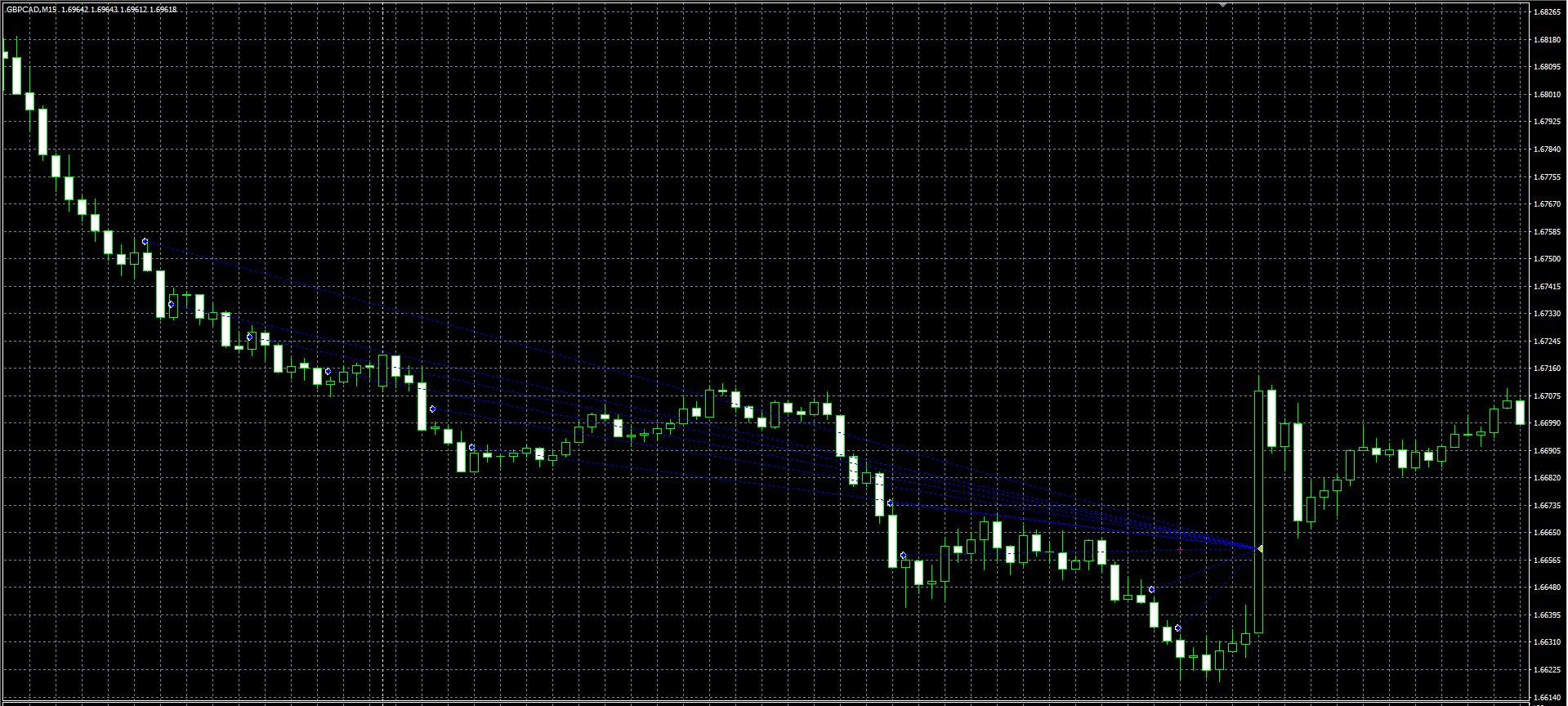
VelociRaptor Grid is a grid trader with martingale elements. The first order is placed based on the standard RSI indicator. Then, if the drawdown grows (that is, at a loss), it places new orders with a gradually increasing lot size. This continues until, due to wave-like fluctuations in Forex quotes, the grid orders are closed at a profit or at breakeven (depending on the settings).
In the advisor, the distance between grid orders (the so-called "geometry") and the order number from which the size of subsequent lots begins to increase can be adjusted.
Thus, VelociRaptor Grid combines the strategies of a grid trader (when at the beginning of grid construction the lots do not increase and only the number of open orders grows) and martingale (when the order lots have already started to grow).
A distinctive feature of VelociRaptor Grid is that it opens each next new position not simply at a certain grid step, as is customary with most advisors, but at the opening of each new candle, if the distance to the previous order is not less than the one specified in the settings, thus creating a dynamic grid of orders, which increases the strategy's reliability.
There is no stop loss in the advisor, which means the advisor is potentially dangerous.
Disclaimer
The VelociRaptor Grid advisor uses an averaging strategy through an order grid. Strict adherence to money management is required!
Attention! Since a large number of pairs are involved in trading, it is recommended to manually stop trading on inactive pairs when significant drawdown appears (the StopTradeAfterTP parameter) in order to reduce the risks of its increase during important news releases and also avoid correlation.
What to read on the topic of martingale:
Ilan Advisor: the father of martingale, and his children. Theory and practice of averaging on Forex
Expert Advisor Backtests
Backtests were done for each pair separately, since the Metatrader 4 platform does not allow multicurrency testing.
First, we will test the main set collection from the developers.
VelociGrid AUDCAD 01_01_2018 20_07_2023
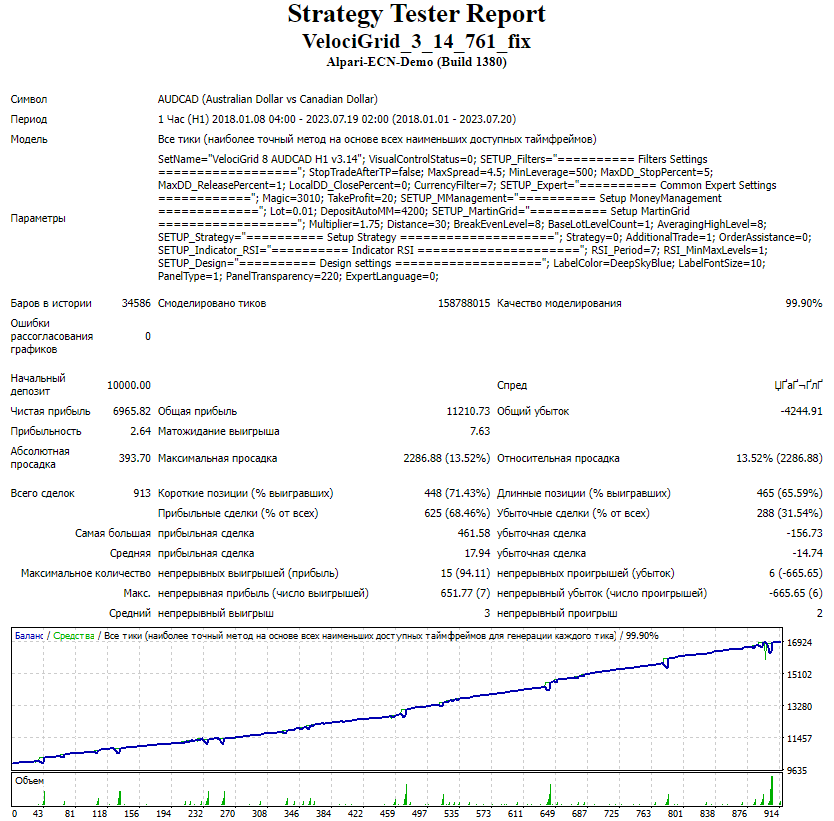
The test results are good
VelociGrid AUDNZD 01_01_2018 20_07_2023
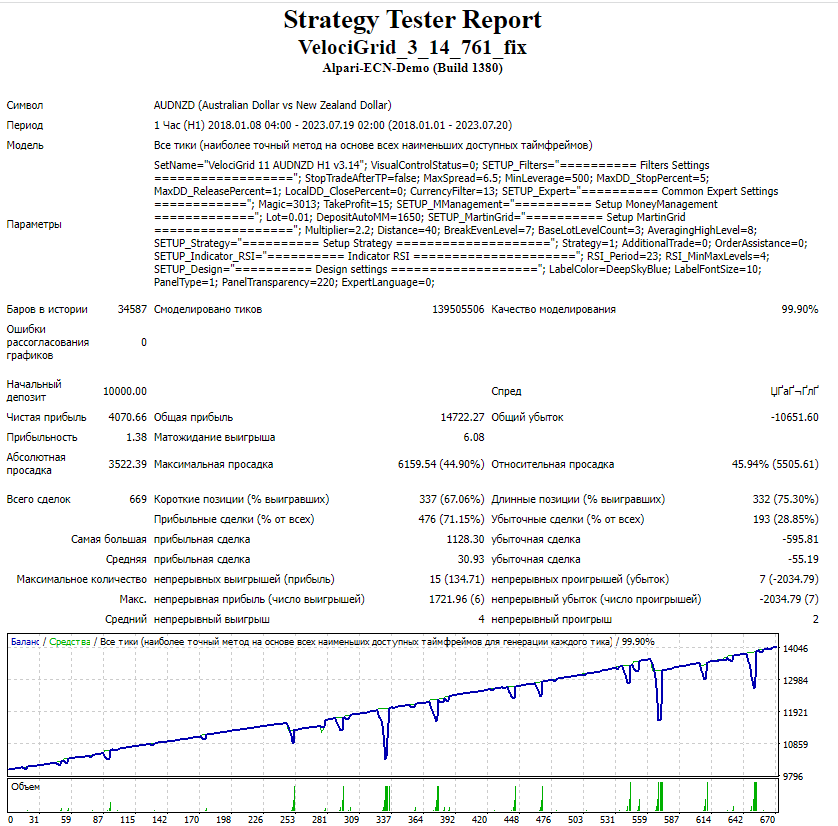
The test results are acceptable
VelociGrid AUDUSD 01_01_2018 20_07_2023
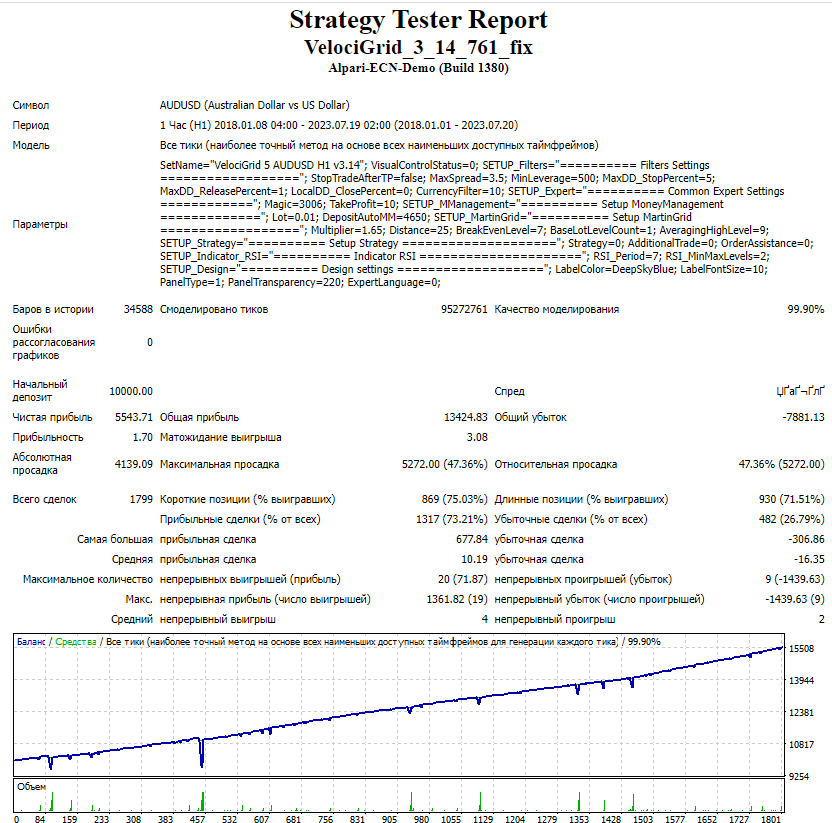
The test results are acceptable
VelociGrid EURAUD 01_01_2018 20_07_2023
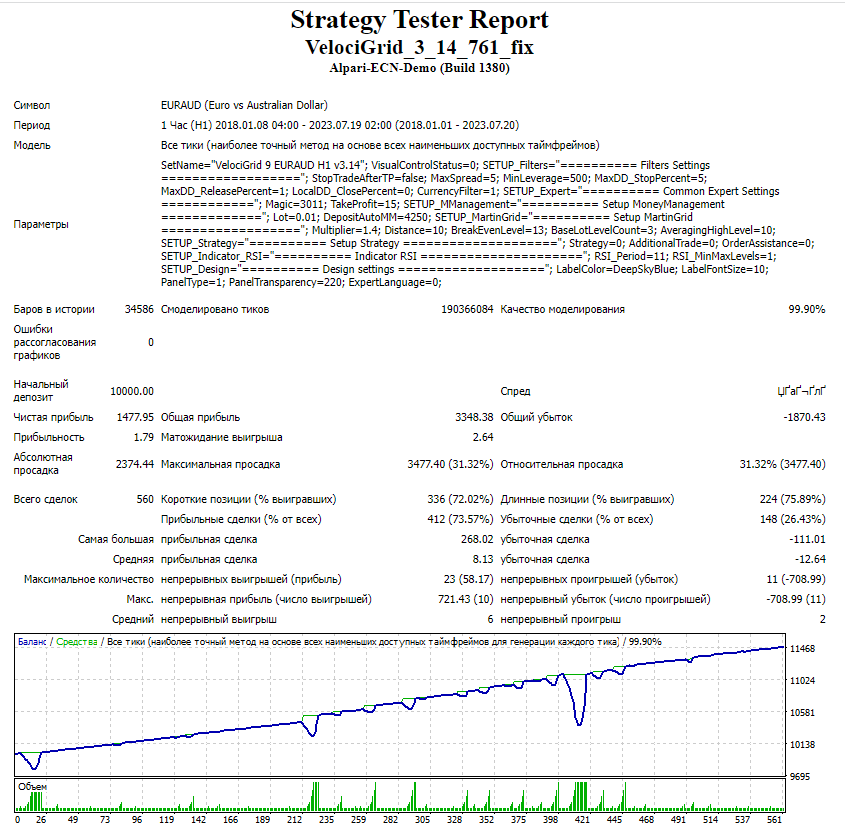
The test results are acceptable
VelociGrid EURCAD 01_01_2018 20_07_2023
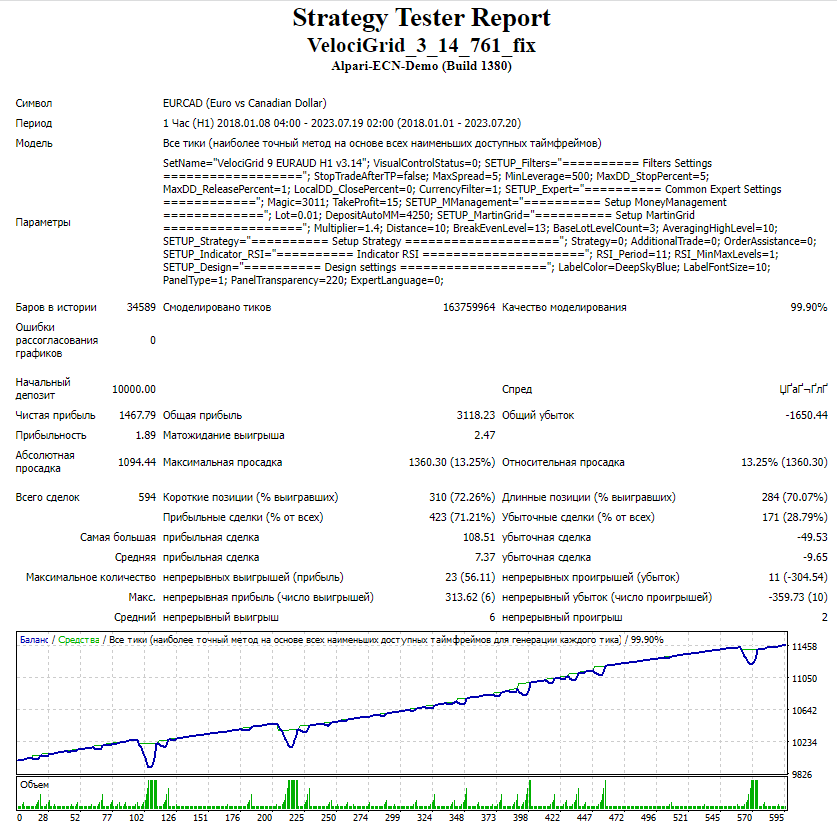
The test results are acceptable
VelociGrid VelociGrid EURGBP 01_01_2018 20_07_2023
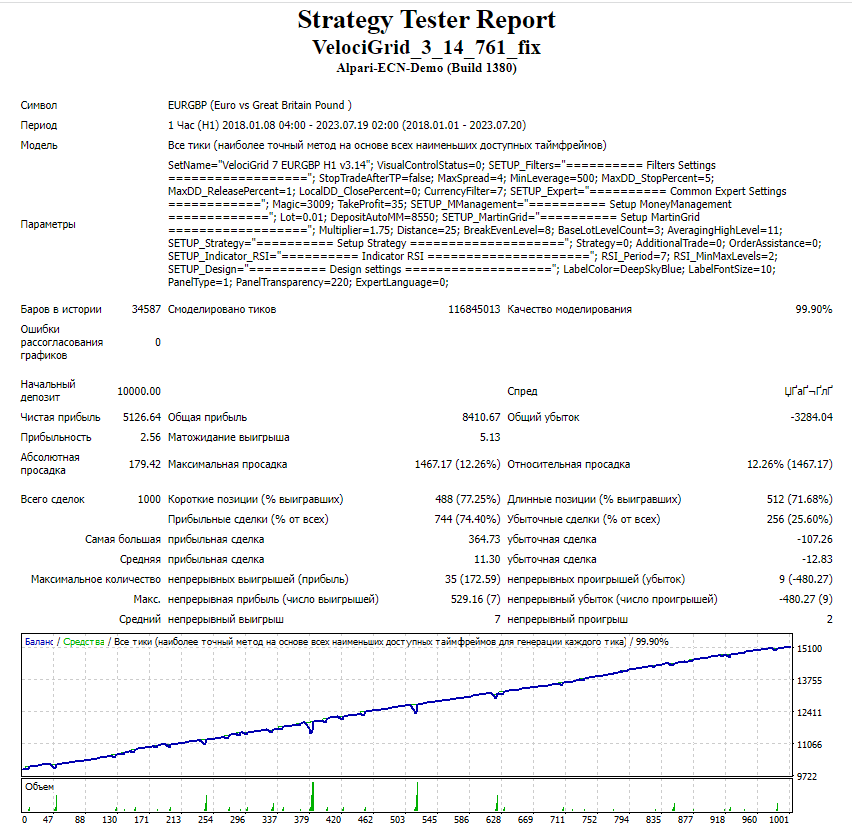
The test results are good
VelociGrid EURUSD 01_01_2018 20_07_2023
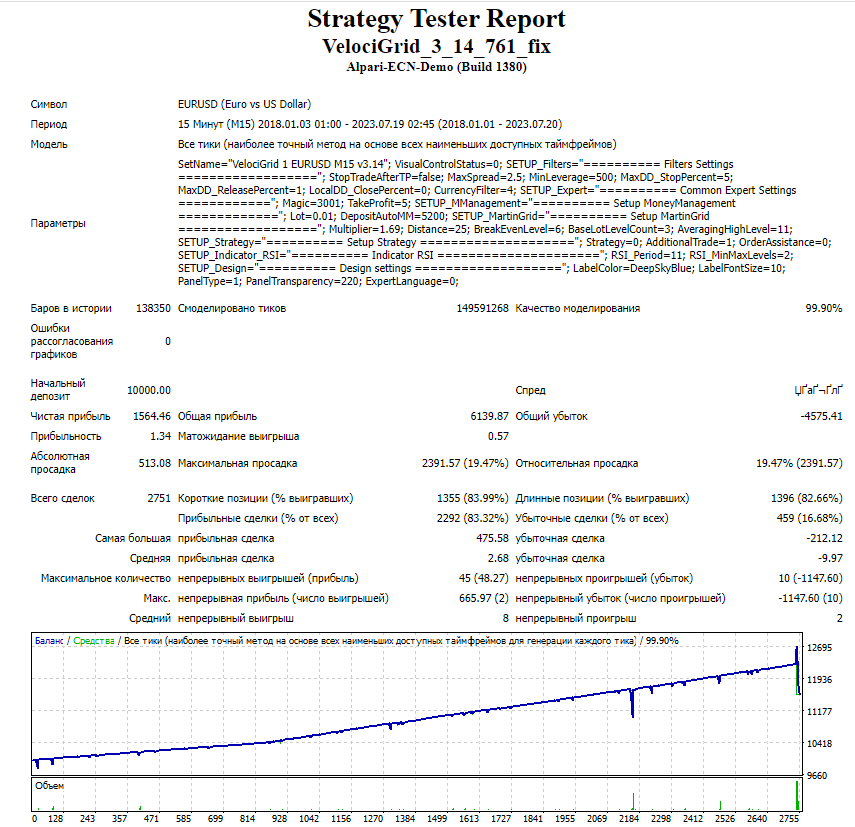
The test results are acceptable, but at the end of the chart we see an edge effect that resulted from closing a large number of orders first in one direction and then in the other, so this test should be redone by shifting the test end date slightly
VelociGrid EURUSD 01_01_2018 01_07_2023
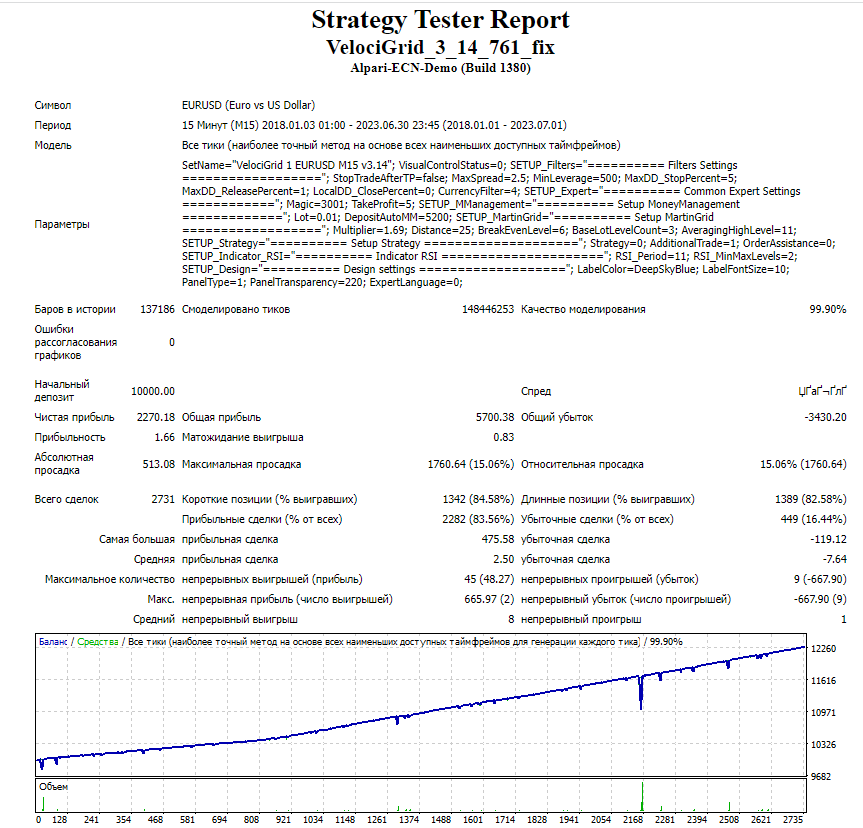
Now the test results are good :)
VelociGrid GBPCAD 01_01_2018 20_07_2023
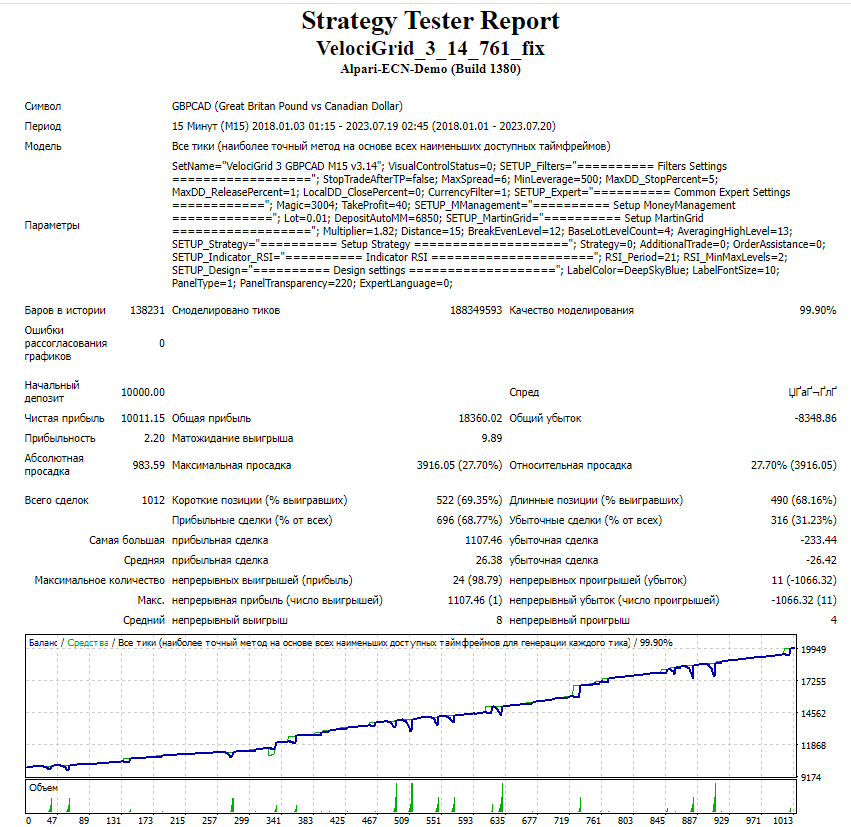
The test results are good
VelociGrid NZDCAD 01_01_2018 20_07_2023
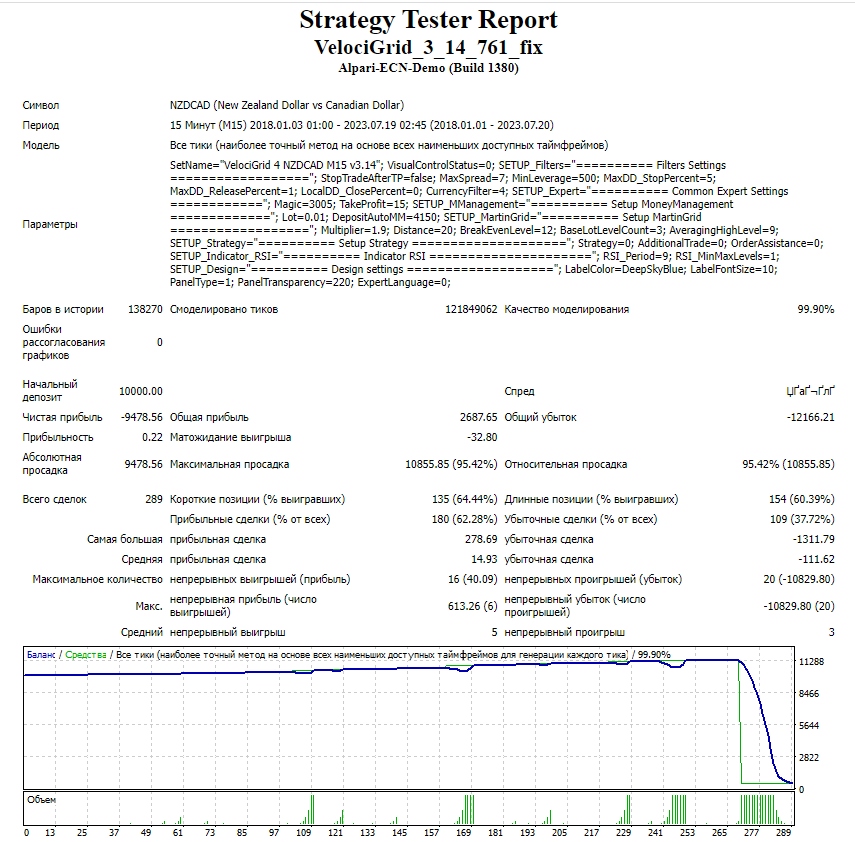
In this case, the EA blows the account at the very beginning of testing, so it makes sense to shift the testing start date
VelociGrid NZDCAD 01_01_2019 20_07_2023
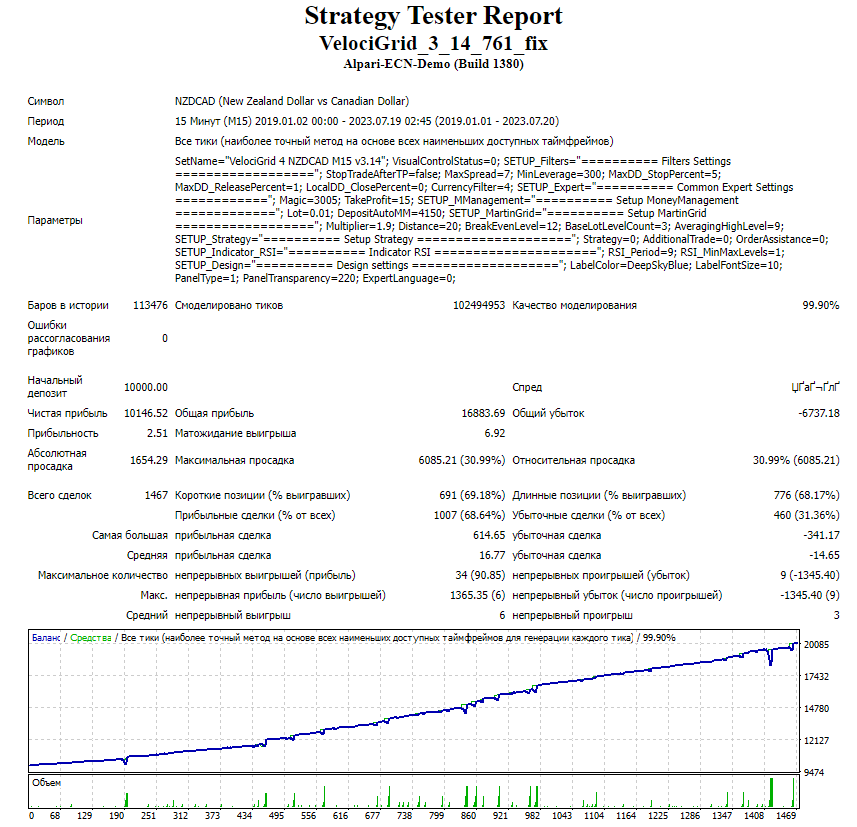
The test results are good
VelociGrid NZDUSD 01_01_2018 20_07_2023
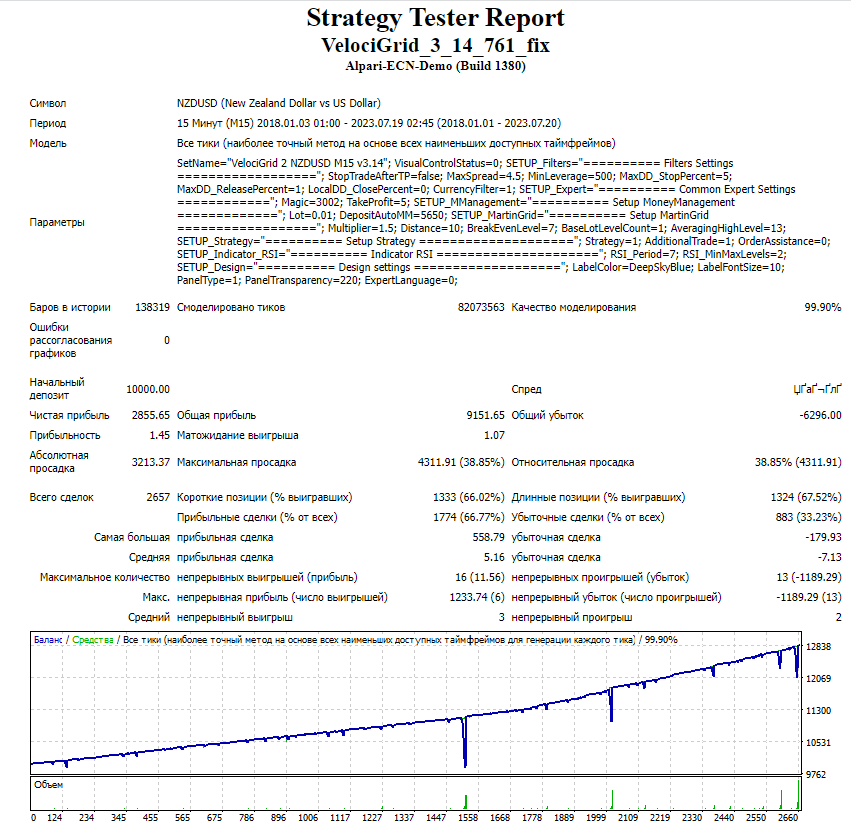
The test results are acceptable
VelociGrid USDCAD 01_01_2018 20_07_2023
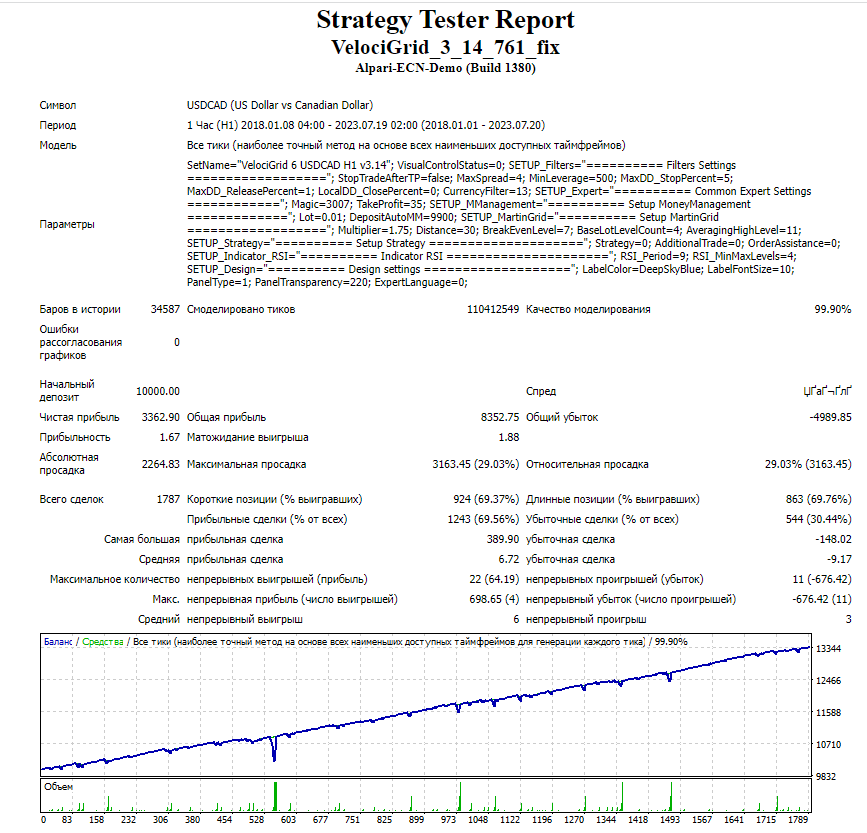
The test results are good
Now we will test the Extra set collection
VelociGrid EURCAD Extra 01_01_2018 20_07_2023
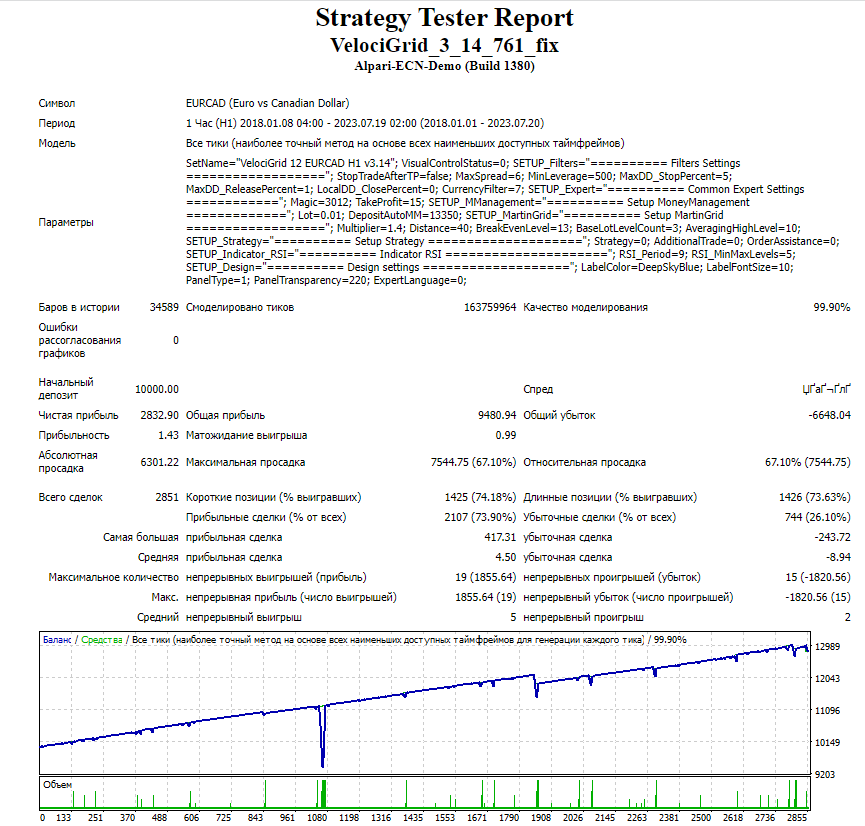
The test results are acceptable
VelociGrid USDCAD Extra 01_01_2018 20_07_2023
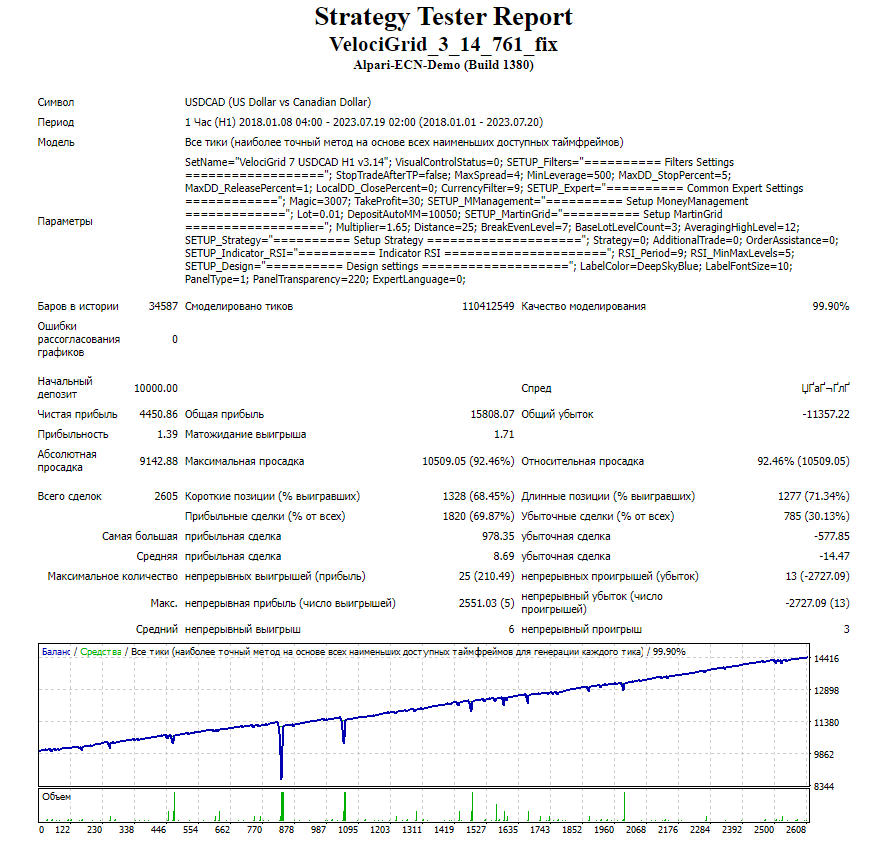
The test results are unsatisfactory
Now we will test the set collection from valerii.badaev
VelociGrid EURCAD by valerii.badaev 01_01_2018 20_07_2023
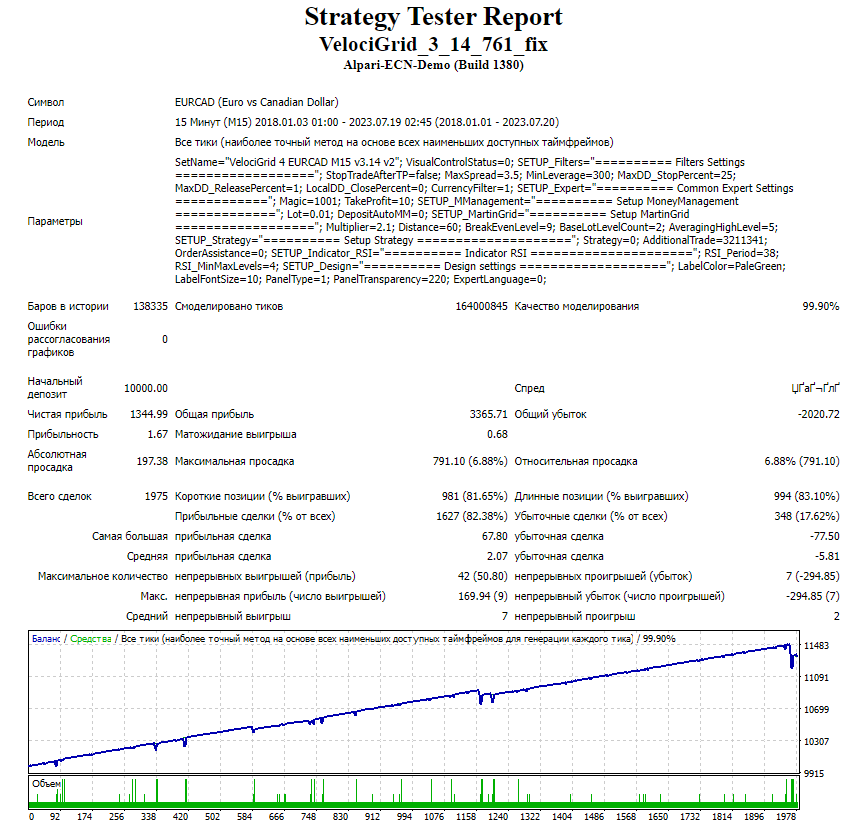
The test results are acceptable
VelociGrid GBPCAD by valerii.badaev 01_01_2018 20_07_2023
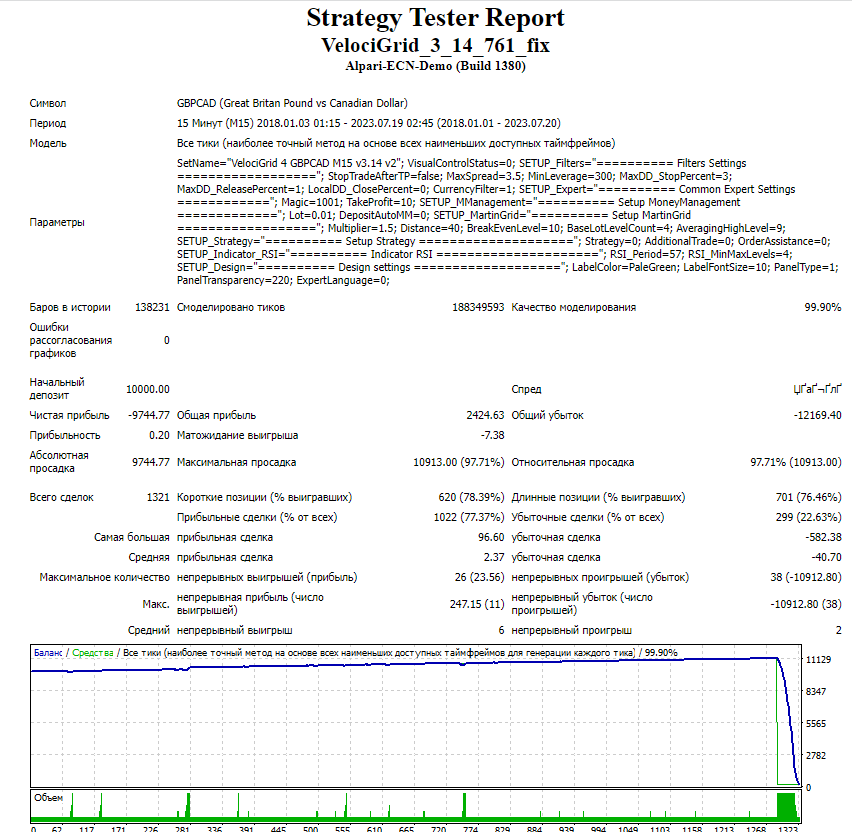
The test result is unsatisfactory because the "blowup" occurred in the middle of the tested period
VelociGrid USDJPY by valerii.badaev 01_01_2018 20_07_2023
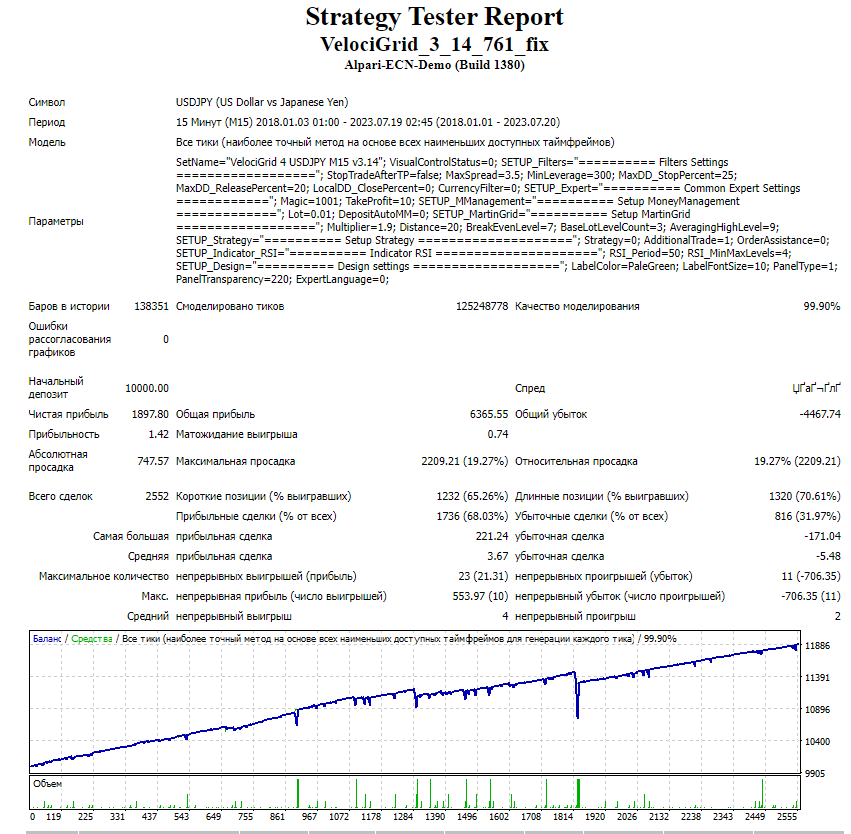
The test results are acceptable
Using the program EA Analyzer, let us make a consolidated statement for the tests of pairs from the main set collection (EURUSD, AUDUSD, NZDUSD, USDCAD, AUDJPY, EURJPY, EURGBP, AUDCAD, GBPCAD, NZDCAD, EURAUD, AUDNZD, EURCAD).
VelociGrid Portfolio from EA Analizer
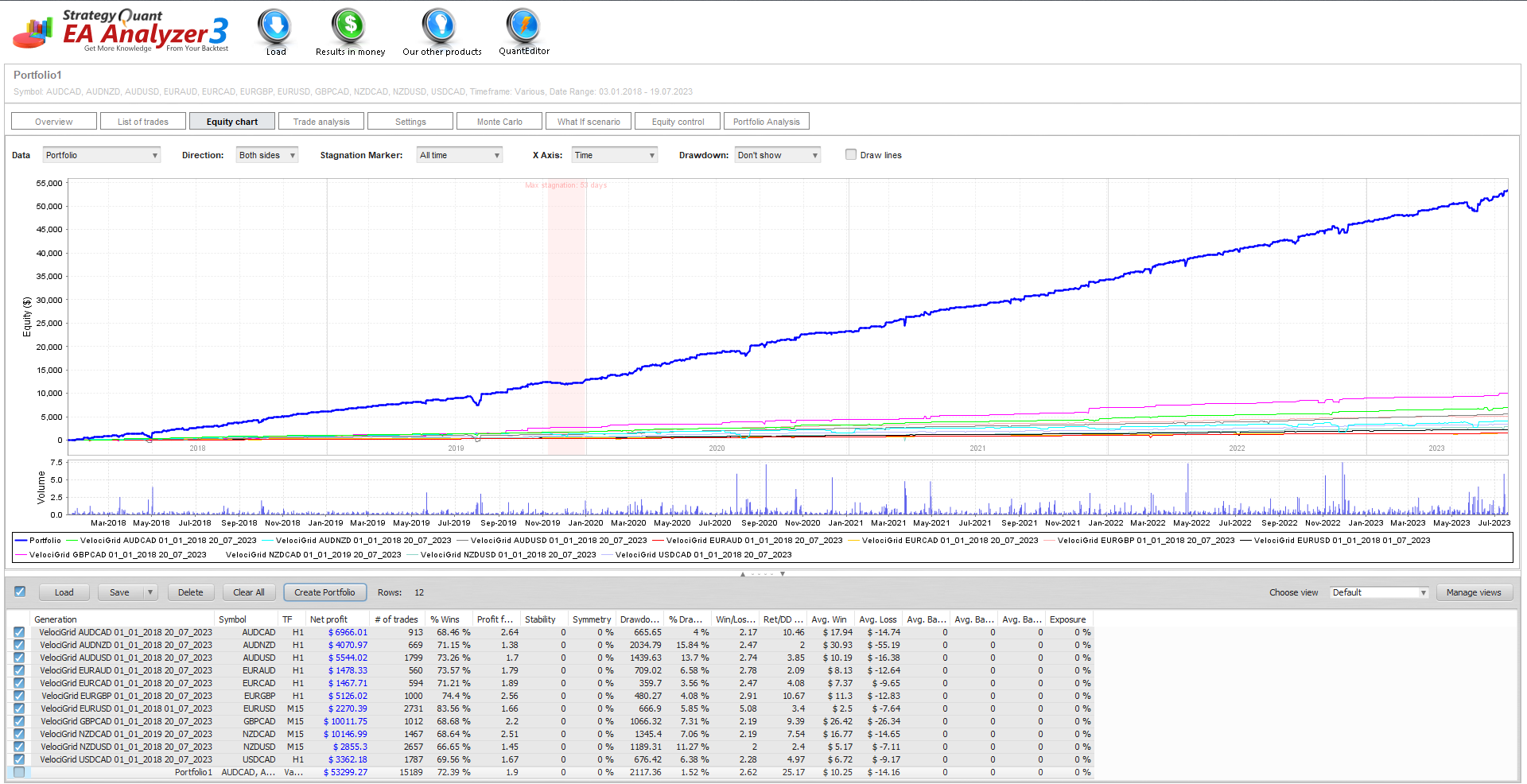
Conclusion: the VelociRaptor Grid (Velocigrid) EA, when working with sets from the main collection on 11 pairs (EURUSD, AUDUSD, NZDUSD, USDCAD, AUDJPY, EURJPY, EURGBP, AUDCAD, GBPCAD, NZDCAD, EURAUD, AUDNZD, EURCAD), shows stable profit growth.
(!) Links to all backtests used in the article (for independent analysis) can be found in the EA thread on the forum (link at the end of the article).
Independent account monitoring from Tlap.io
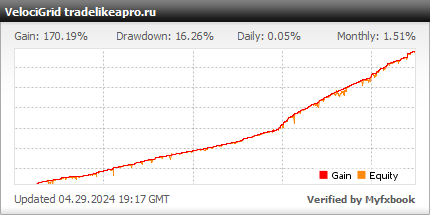
Next, we will analyze the monitoring statistics by year and month to determine the seasonality of the EA's operation, and then we will review the profit charts for each pair to see the empirical effectiveness of the pairs and their actual launch time.
Trading results by year
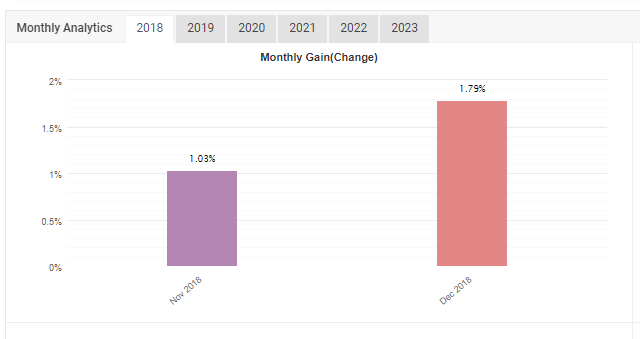
VelociGrid myfxbook 2018
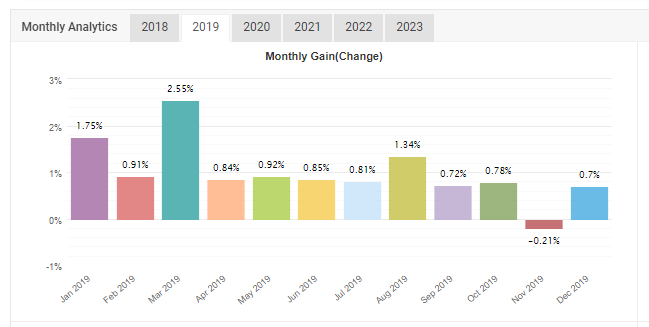
VelociGrid myfxbook 2019
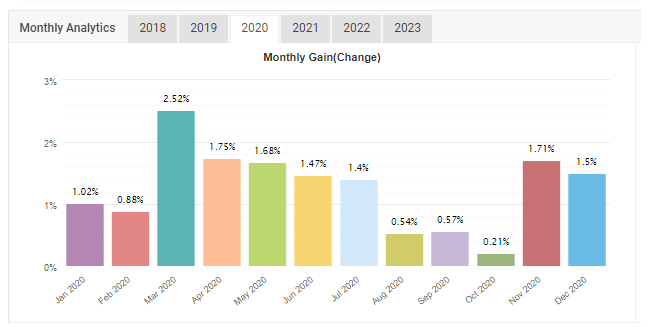
VelociGrid myfxbook 2020
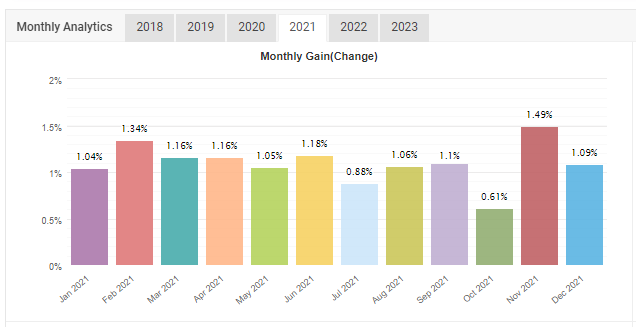
VelociGrid myfxbook 2021
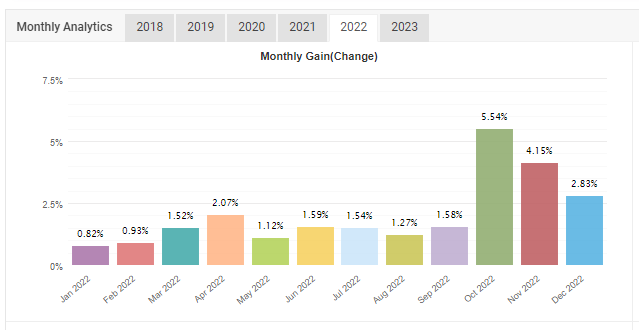
VelociGrid myfxbook 2022
VelociGrid myfxbook 2023
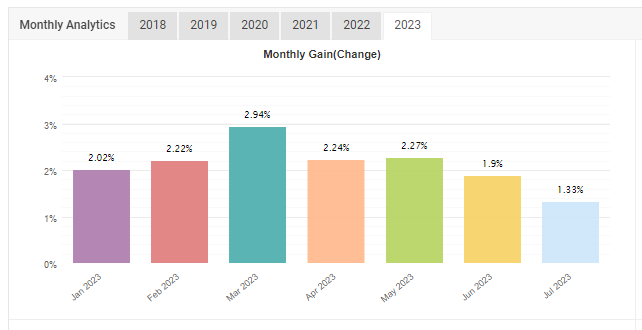
Thus, we can conclude that the EA trades most effectively in spring and at the end of the year.
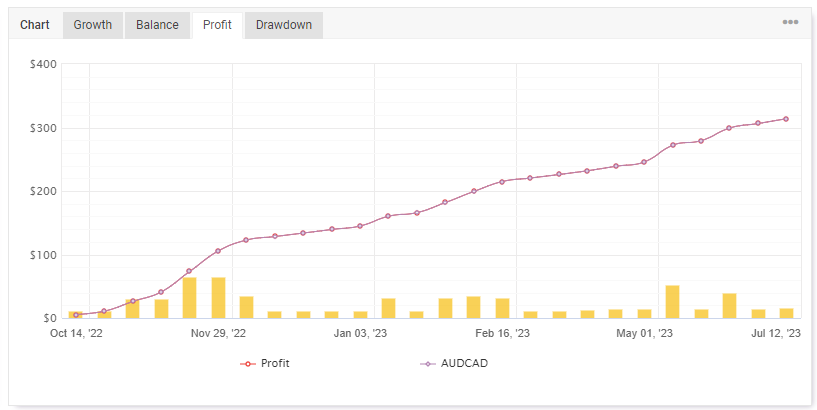
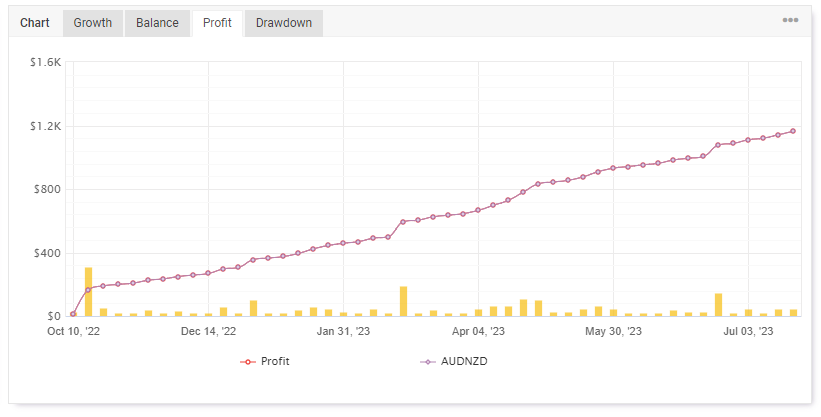
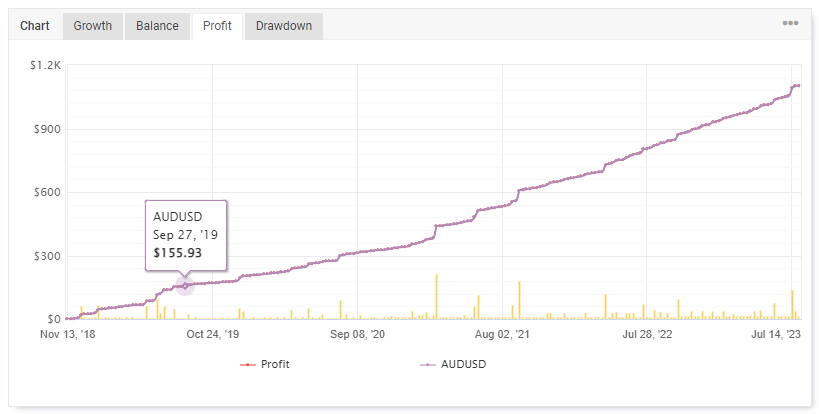
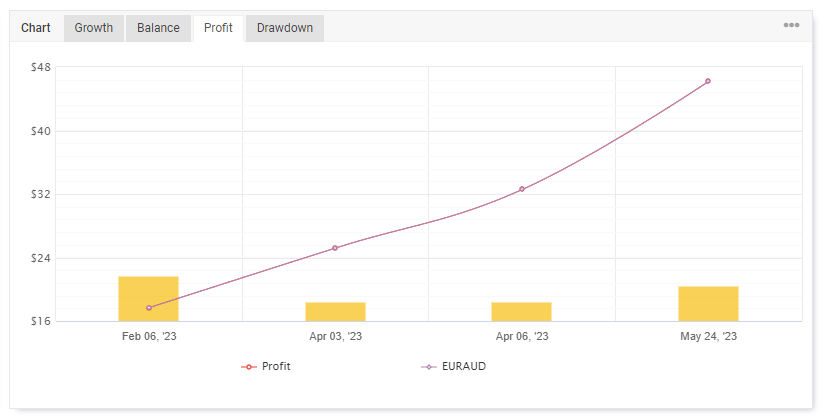
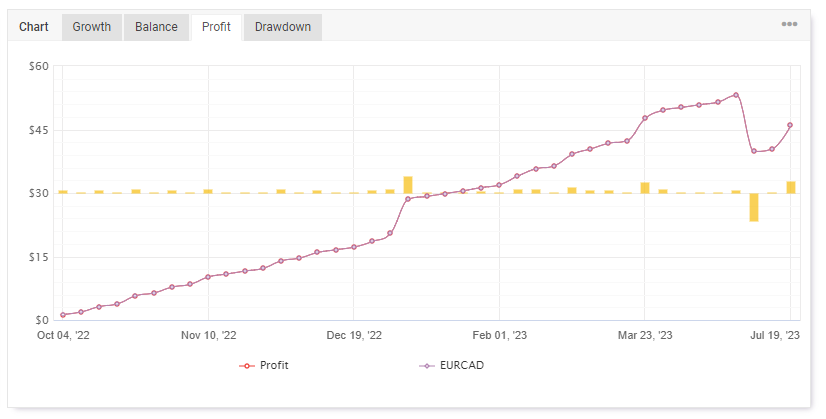
Trading results by pairs (profit)
VelociGrid myfxbook profit AUDCAD
VelociGrid myfxbook profit AUDNZD
VelociGrid myfxbook profit AUDUSD
VelociGrid myfxbook profit EURAUD
VelociGrid myfxbook profit EURCAD
VelociGrid myfxbook profit EURGBP
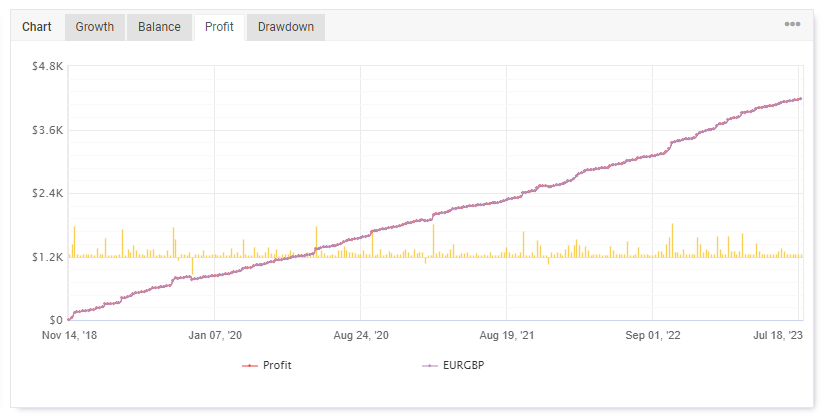
VelociGrid myfxbook profit EURUSD
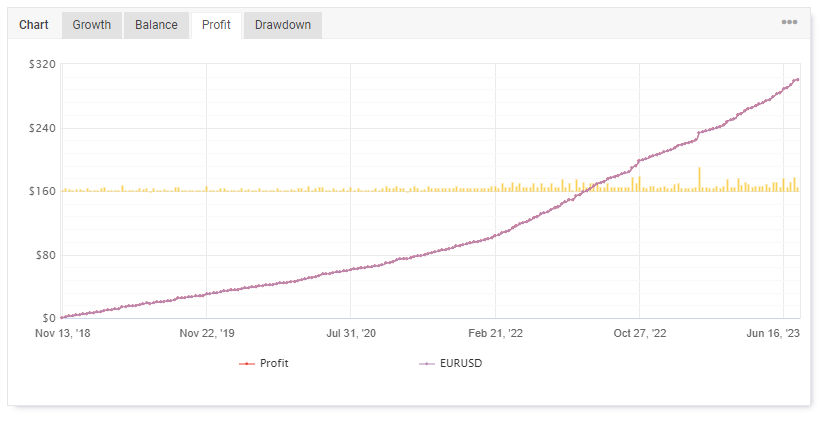
VelociGrid myfxbook profit GBPCAD
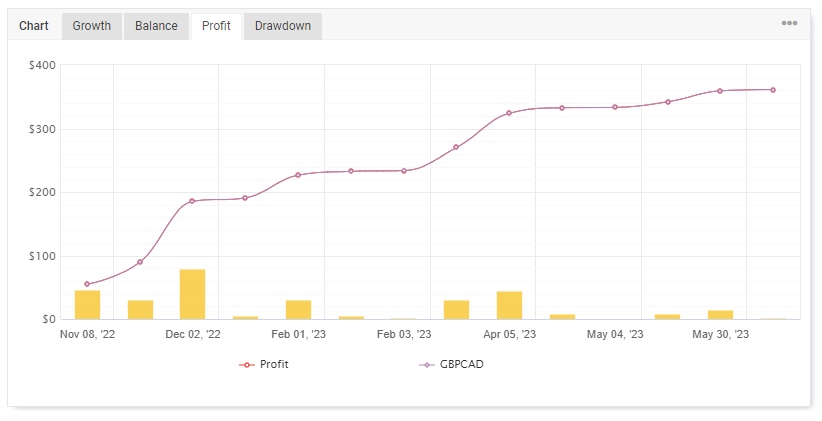
VelociGrid myfxbook profit NZDCAD
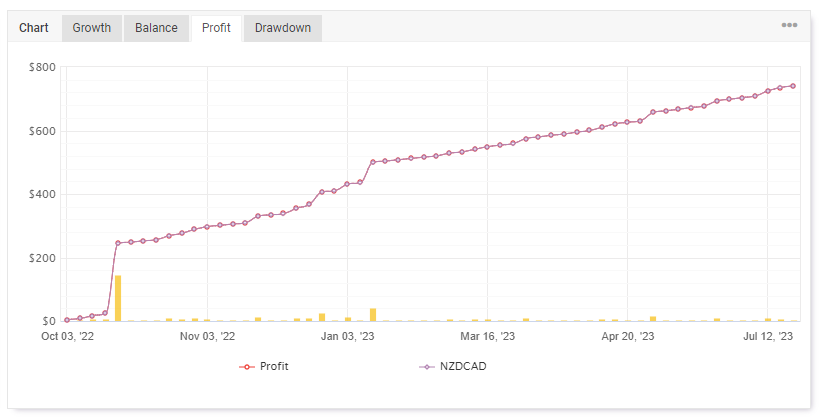
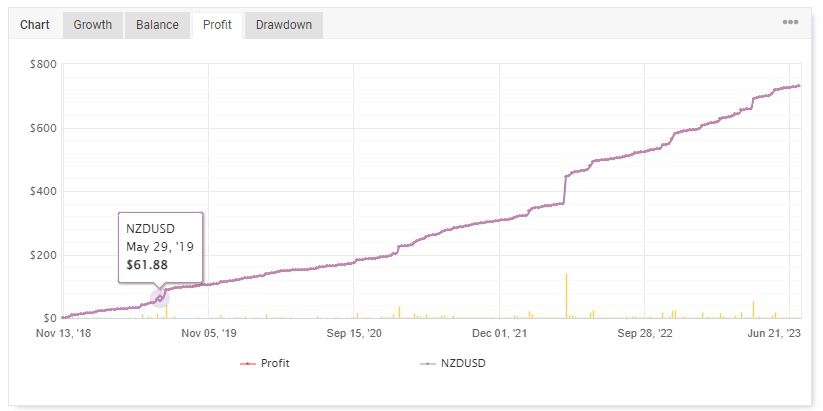
VelociGrid myfxbook profit NZDUSD
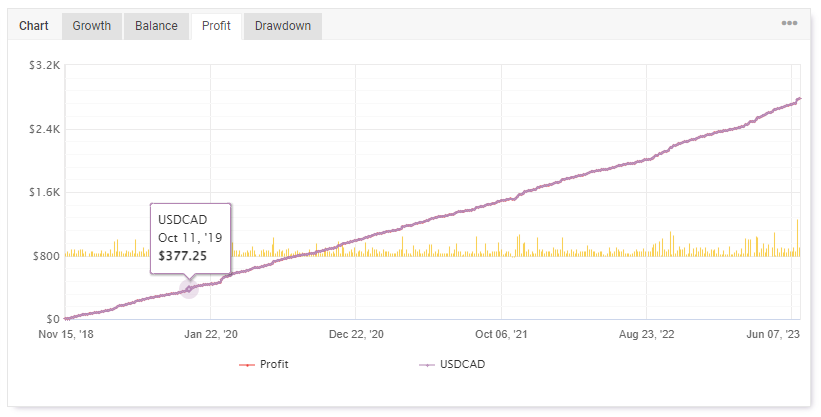
VelociGrid myfxbook profit USDCAD
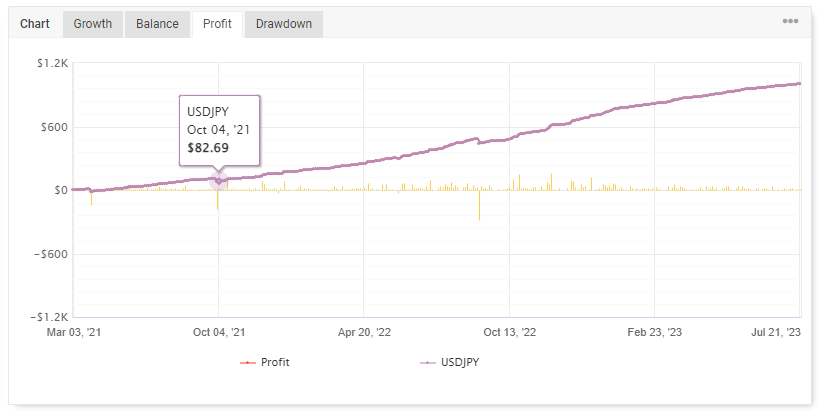
VelociGrid myfxbook profit USDJPY
Description of settings
The advisor settings look as follows:
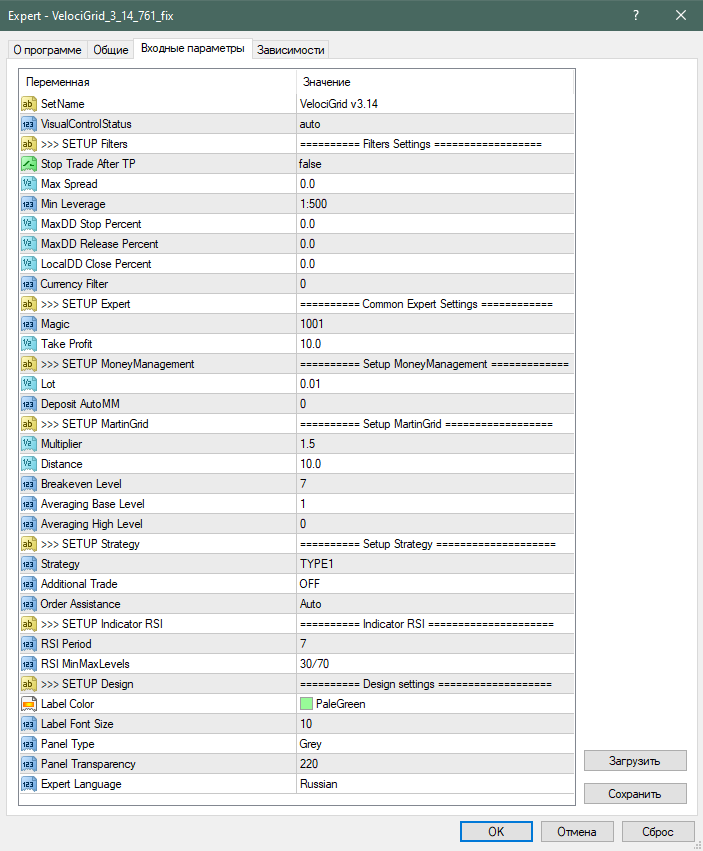
SetName - Name of the current set file
VisualControlStatus - Panel display mode
>>> SETUP Filters - filter settings section
Stop Trade After TP - If True, the advisor will stop opening new positions after the active grid is closed.
Max Spread - Setting of the maximum allowable spread for opening the first order of the grid. If MaxSpread > 0, the filter is activated.
If at the moment a signal is received the current spread is greater than the MaxSpread value, then the entry is postponed and an entry attempt is made on the next tick. If the entry was not made during the current candle, then entry on the next one is possible only if the signal remains.
Min Laverage - Leverage filter: new grid orders will not be opened if the leverage for the current symbol is lower than the one specified in the settings.
MaxDD Stop Percent - Maximum open drawdown (in %), at which opening a new basket is allowed.
MaxDD Release Percent - Drawdown level upon reaching which the block prohibiting trading is removed.
LocalDD Close Percent - Forced closing of all orders when the specified drawdown percentage is reached.
Currency Filter - Suspends the opening of trades by currency if there are already trades on it in this direction. It is intended to signal the need to stop / resume trading in the direction of existing trades on the currency when a new trade is opened.
If CurrencyFilter > 0, a delay before entry after the signal appears in seconds will be activated.
If CurrencyFilter = 0, the filter does not work.
For example, if a BUY on EURUSD has been opened, it means we freeze the opening of trades on EUR for BUY, and on USD for SELL. That is, USDCAD on BUY will open, but GBPUSD on BUY will not open (only on SELL). But on EURUSD a new BUY trade will open to continue building the grid. SELL trades on this pair will be allowed, since they have the opposite direction.
>>> SETUP Expert - section of general parameters
Magic - Individual Magic number. Needed so that the advisor can distinguish its own trading orders from third-party advisors or manual trading.
Take Profit - Take profit
>>> SETUP MoneyManagement - money management settings section
Lot - Lot with which the first trade of the grid will be opened. If DepositAutoMM > 0, then the Lot value is not taken into account.
DepositAutoMM - Setting the value of the allocated deposit per 0.01 trading (minimum) lot. If the value is 0, the lot size is taken from the Lot variable.
>>> SETUP MartinGrid - grid parameter section
Multiplier - Value by which the lot of the current open grid order will be multiplied. Needed to calculate the lot of the next leg.
Example: The lot of the current open position is 0.1, Multiplier= 1.6, then the next grid order will be opened with a lot of 0.16.
Distance - Minimum distance from the current price to the nearest open grid order in points, below which the next grid leg will not open on the next bar.
BreakEvenLevel - Leg number at which the TakeProfit of all open positions will be moved to break-even.
Averaging Base Level - Averaging parameter. Equal to the number of legs that will be opened sequentially with the base lot.
Example: Averaging Base Level = 3, Lot = 0.1, Multiplier = 1.6. The grid will be built with lots: 0.1 - 0.1 - 0.1 - 0.16 - 0.25 …
With Averaging Base Level = 1 averaging is not taken into account.
Averaging High Level - Leg from which the grid is averaged using the last opened lot.
>>> SETUP Strategy - strategy parameter section
Strategy - 5 strategies for entering the market with the first order based on RSI, WPR indicators, and candlestick analysis.
Additional Trade - when selecting the value BothDirectionTrade entry into the market is carried out on every indicator signal. That is, if there is already a Buy grid and a Sell signal appears, we open an additional grid.
Order Assistance - Support of the order grid, manual or automatic.
>>> SETUP Indicator RSI - RSI indicator parameter section
RSI Period - The number of candles from the current bar for calculating the RSI indicator value.
RSI MinMaxLevels - Setting the overbought/oversold levels of the RSI indicator.
>>> SETUP Design - section of beauty and design settings
Label Color - Color of the information panel text
Label FontSize - Size of the information panel text
Panel Type - Three options for choosing the background color of the information panel
Panel Transparency - Setting the panel transparency value from 0 to 255
Expert language - Language of the descriptions on the information panel, Russian or English.
Attention! All settings must be specified in "old" points.
That is, if you want to set Take Frofit = 100 on a five-digit account or Take Frofit = 10 on a four-digit one, in both cases you need to specify Take Profit = 10.
It is recommended to use the main set of settings from the developers.
Attention! Do not change anything in the expert advisor parameters and use only the recommended values if you do not clearly understand what you are doing!
Recommended money management
It is recommended to calculate risks in a special Excel table. For this we need tests of the expert advisor sets made with a fixed lot.
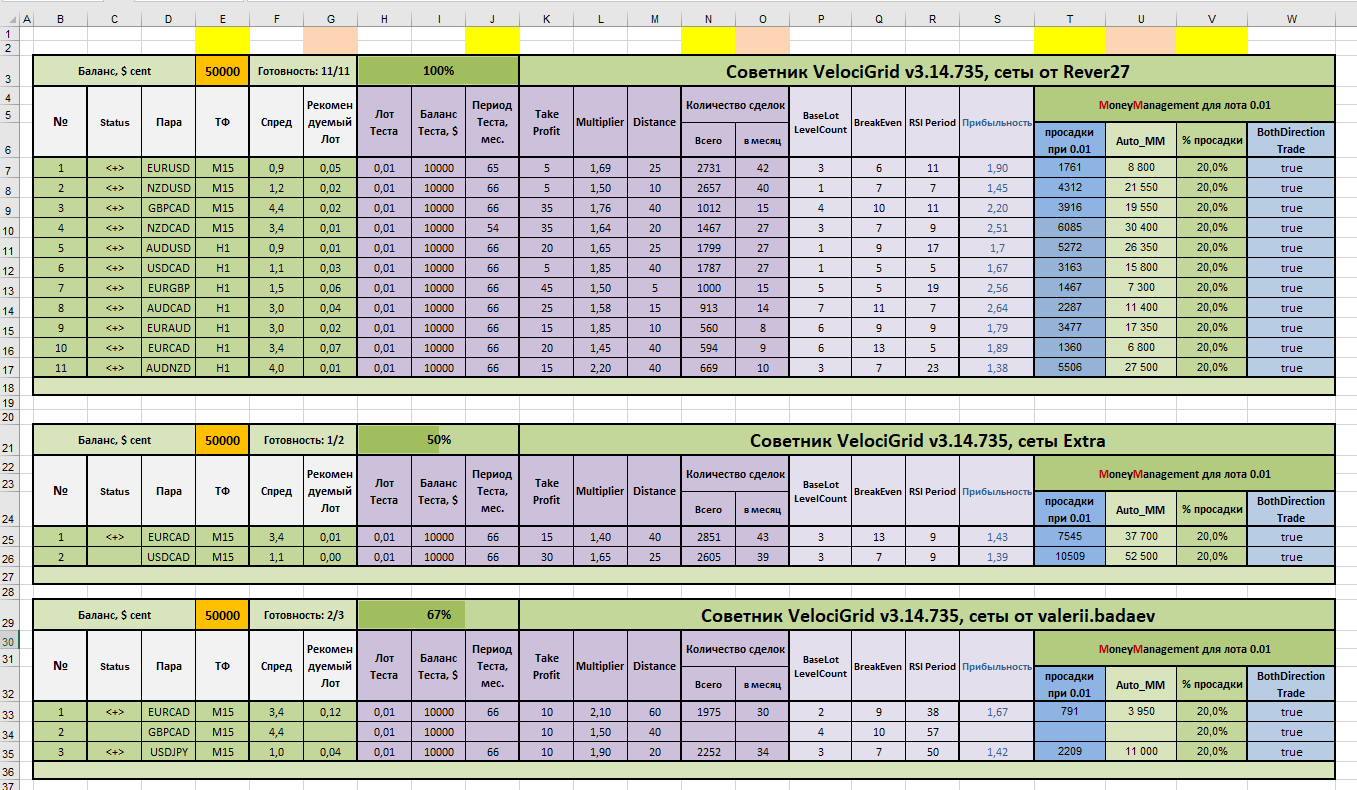
Explanation of the table:
Balance, $ cent - the estimated balance of your account, for example in the table the balance is 50000
No. - serial number
Status - the status of the pair, that is, whether you will use it in trading or not
<+> - status indicator
Pair - tested pair
TF - timeframe of the set
Spread - average spread. This parameter does not affect anything, but serves for convenience of orientation.
The average spread for the pair can be viewed here: Forex broker spreads
It is best to look at the average spread over the longest possible sample; in this table the average spreads of broker Alpari for the last 160 days are entered.
Recommended Lot - the recommended lot for the pair calculated by the table
Readiness: - counts the number of <+> indicators in the list
100% - the same Readiness, only in percent
Test Lot - the Lot parameter in the expert advisor
Test Balance, $ - the balance in your test file
Test Period, months - the number of months in the test
Take Profit, Multiplier, Distance - set parameters, shown in the table for illustration and not used in the calculations
Number of trades
Total - the total number of trades from the testing results
Per month - the calculated number of trades per month, obtained by dividing the number of trades by the number of months in the test
BaseLot LevelCount, BreakEven, RSI Period, Profitability - values from the test results file, shown in the table for illustration and not used in the calculations
drawdown at 0.01 - the maximum relative drawdown from the test results with the initial fixed lot set to 0.01
Auto_MM - the calculated drawdown value depending on "drawdown at 0.01" and "% drawdown" (see below)
% drawdown - the desired drawdown percentage for this pair; 20% is used everywhere as an example
Both Direction Trade - shows whether trading in both directions (buy and sell) was allowed during testing. By default, it is allowed.
How to use the table
First, set the desired risk.
For example, you want to set a 20% risk for the EURUSD pair.
Open the attached Excel table. Set 20% in column V.
The balance for Auto_MM changes to 8800. This means that to trade with the minimum lot of 0.01, you need 8800 units of balance (88 dollars on a cent account).
If your balance is 50 000, then the first order will be opened with a lot of 0.05, as can be seen in column G.
The attached table already contains all the test data discussed in this article.
Conclusions

The multicurrency forex expert advisor VelociRaptor Grid (Velocigrid) is a profitable trading robot based on averaging, which is confirmed by both tests and many years of monitoring.
VelociRaptor Grid is a powerful and flexible software product, and it can bring profit to its owner for many years, naturally, with strict adherence to the rules for working with potentially dangerous expert advisors.
Important!!!
For the expert advisor to work correctly, the trading terminal must be turned on from the market opening on Sunday evening until its close on Friday evening. If you do not have the ability to keep your computer running 24/5, it is recommended to use a VPS server service.
Download the VelociRaptor Grid Expert Advisor
P.S. More trading materials are in our Telegram channel.
Subscribe.