
ArgoGuardian - the utility that will keep your fear and greed under TIGHT control

You open a trade, set a stop loss at 3% of the deposit, everything according to the textbook. The price goes against you, you decide to move the stop, and then once more and again... And in the end the planned 3% loss turns into a 20% loss. Sound familiar?
Or an expert advisor goes off the rails and, because of a system error, opens a trade without a stop. And the next morning you discover that the price has gone somewhere far against your order...
Let us admit it: we all lack a stern black man with a club who will smack our hands when we do stupid things on the account. However, it is possible to fight psychological problems with the help of technology.
Today we will talk about the helper EA ArgoGuardian from our friends at ArgoLab, which will not let you take pointless risks and will also help you overcome greed when taking profit.
Typical Trader Behavior
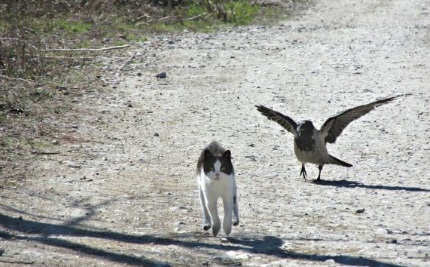
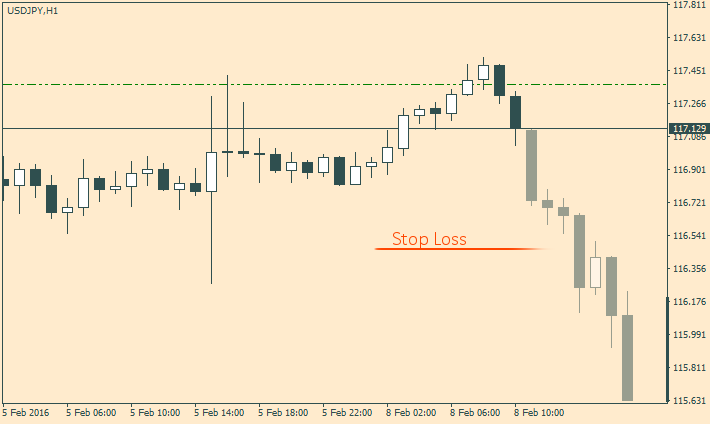
How do forex traders usually behave during a drawdown? Let us consider a typical situation. For example, you decided to trade with a 3% risk on the deposit. You open a buy position, but the price starts moving in the opposite direction and is already near the stop. At this moment, a "brilliant" idea comes to you: why not remove the stop loss, just in case you get lucky and the price still turns around. Naturally, this usually does not happen, and a quite acceptable 3% loss turns into 10% or even 20%. Unfortunately, this problem concerns not only beginners, but also advanced traders.
Obviously, we lack control. It is all about human nature, there is nothing to be done about it. But what an expert advisor helps with is taking over the duty of limiting losses on your account. You can specify any limit, 5%, 10%, or 20%. Suppose you opened a position and decided to remove the stop loss. Then the advisor will still close the positions when the maximum loss is reached. Thus, the advisor preserves your deposit and, at the same time, teaches control over losses.
Working with Expert Advisors and Locking
Sometimes a situation arises when several different expert advisors working on one account begin to conflict. To protect yourself from various force majeure situations, you can set a limit on the maximum total loss on the account, say 20%. After the loss reaches 20% of the deposit, the advisor will close all open positions. Set the CloseCharts flag so that the advisor also closes all active charts, and the AutotradeOFF flag so that it turns off the auto-trading button after recording a profit or loss. Thus, the trading activity of all expert advisors on the account is completely blocked, and this makes it possible to regain control over the account.
Argoguardian also has an order locking function. In this case, instead of closing a losing trade, the advisor will simply open the opposite one. Suppose we have a losing buy position. Then the advisor will open a sell position with the same volume, thereby fixing the loss at one level. Of course, the most difficult part is getting out of the lock. There is a lot of debate about this. It is a big topic and requires a separate discussion. Whether to use locking or not is for you alone to decide.
Installation
Unpack the contents of the archive into the terminal data directory.
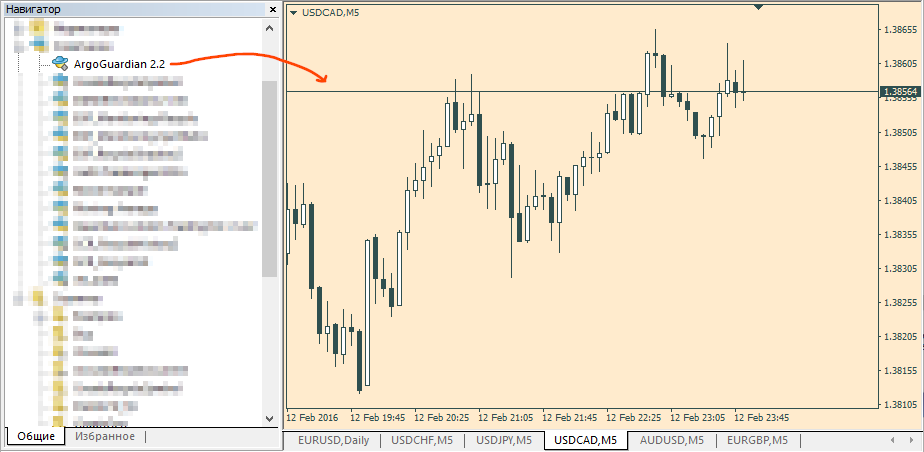
After the advisor appears in the navigator window, launch it by dragging it from the navigator window onto the chart.
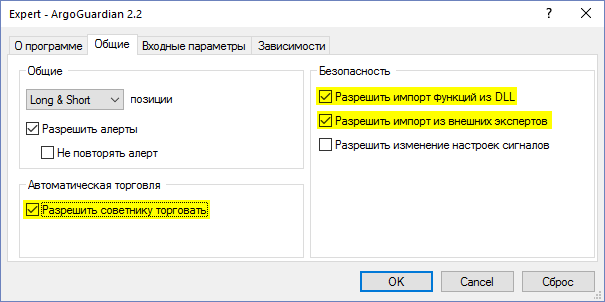
Do not forget to specify permissions for trading and library imports in the settings.
Expert Advisor Settings
- Logic
Here you need to specify which pairs to take into account and what actions to perform after recording profits or losses.
Symbols – which symbols' positions to take into account: All – track drawdown across all symbols; ThisSymbol – take into account only the current symbol; MaxDDSymbol – take into account the symbol with the maximum drawdown.
Magic – specify here the magic number of the advisor whose orders you want to track. In this case, positions of other advisors will not be taken into account. If you set 0, only manual orders will be taken into account, and orders placed automatically will be ignored. To remove the restrictions, set a value below zero.
UseLock – use locking.
AutotradeOFF - switch off the auto-trading button after locking in profit/loss.
CloseCharts - close all active charts after locking in profit/loss.
- Target profit
Setting a profit limit.
TProfit - the profit level in money.
TProfitPerCent - the profit level as a % of the deposit.
TProfitEquity - a specific equity value at which profit will be locked in.
SendEmailOnTP - send an email notification if profit was locked in.
- Stop Loss
Setting a loss limit.
MaxDD - the maximum drawdown level in money.
MaxDDPerCent - the maximum drawdown level as a % of the deposit.
MaxDDEquity - a specific equity value at which the loss will be locked in.
SendEmailOnSL - send an email notification if a loss was locked in.
- Equity trail
Setting up a trailing stop.
EquityStartTrial - the profit value after which to start trailing.
RollBackPercent - the pullback level after which the expert advisor closes trades.
RollBackEquity - the equity value at which the expert advisor closes trades.
- Email notification
Settings for email notifications.
MaxDD_Email - the drawdown level in money.
MaxDDPerCent_Email - the drawdown level as a % of the deposit.
MaxDDEquity_Email - a specific equity value upon reaching which an email will be sent.
- Miscellanea
RefreshSec - the refresh frequency in seconds.
MagicLock - the magic number of the locking order.
Conclusion

The ArgoGuardian advisor will be interesting not only to beginners, but also to professional market participants. The product opens up broad opportunities for experiments with martingale and various grid strategies. Argoguardian helps reduce the time spent monitoring charts. Therefore, it will be a good assistant for long-term traders trading with the trend. For beginners, the advisor will help get rid of the human factor, as well as overcome fear and greed.
Examples of using the ArgoGuardian advisor in practice can be found in the video review at the beginning of this post.
Download the ArgoGuardian advisor

Sincerely, Pavel Vlasov
TradeLikeaPro.ru
