
Wall Street Forex Robot Evolution - the return of a legendary expert advisor

Hello, dear forex traders! We present to your attention the Wall Street Forex Robot expert advisor, Evolution version. This is a new version of a legendary expert advisor without exaggeration, from which very many traders began their acquaintance with the world of trading robots, and which, what is even more interesting, over all the years of its long existence has never "blown up" on official monitorings.
In this review, we will test it on the currency pairs and settings recommended by the manufacturer and choose the optimal set.
Expert advisor characteristics

Platform: Metatrader 4
Expert advisor version: 1.0
Currency pairs: EURUSD, GBPUSD, USDJPY, AUDUSD, USDCHF, USDCAD, NZDUSD, EURJPY
Timeframe: M15
Operating time: around the clock
Recommended brokers: Alpari (ECN accounts), Roboforex (ECN accounts), TickMill
Installation guide

We install the expert advisor as usual. If this is your first time encountering robots in Forex and you have a lot of questions, download and watch the course Forex on Autopilot.
In this expert advisor, the settings for each pair are already specified in the code itself, so we simply open the corresponding pairs on the M15 timeframe. In addition, the personal account mentions alternative settings from the bot's authors. To use them, in the expert advisor you need to set UseCustomPair to true and set UseSettingsFrom to the name of the setting (for example, EUR33).
Expert advisor strategy

The expert advisor is historically the first competently implemented trend scalper, which opens on "pullbacks" from the main trend (there were even rumors that WallStreet Forex Robot was based on a "leak" of a strategy from the largest investment bank). As trend indicators, it uses Moving Averages, CCI, ATR, WPR and its own calculations. The expert advisor has spread control, a "stealth" mode, an hourly filter, a "recovery" mode in case of drawdown, news avoidance from news, as well as the Broker Spy module, which monitors and records the broker's trading conditions online. This expert advisor does not use order grids, averaging, or martingale; it trades perfectly without this dangerous "doping".
In this article, we will test the main and alternative settings proposed by the expert advisor developers on tick data from Ducascopy using the Tick Data Suite program, evaluate the results obtained, and examine the settings of the Wall Street Forex Robot v.2.0 Evolution expert advisor.
Many years of successful operation of the Wall Street Forex Robot expert on real accounts confirms the reliability and profitability of the expert advisor in the long term.
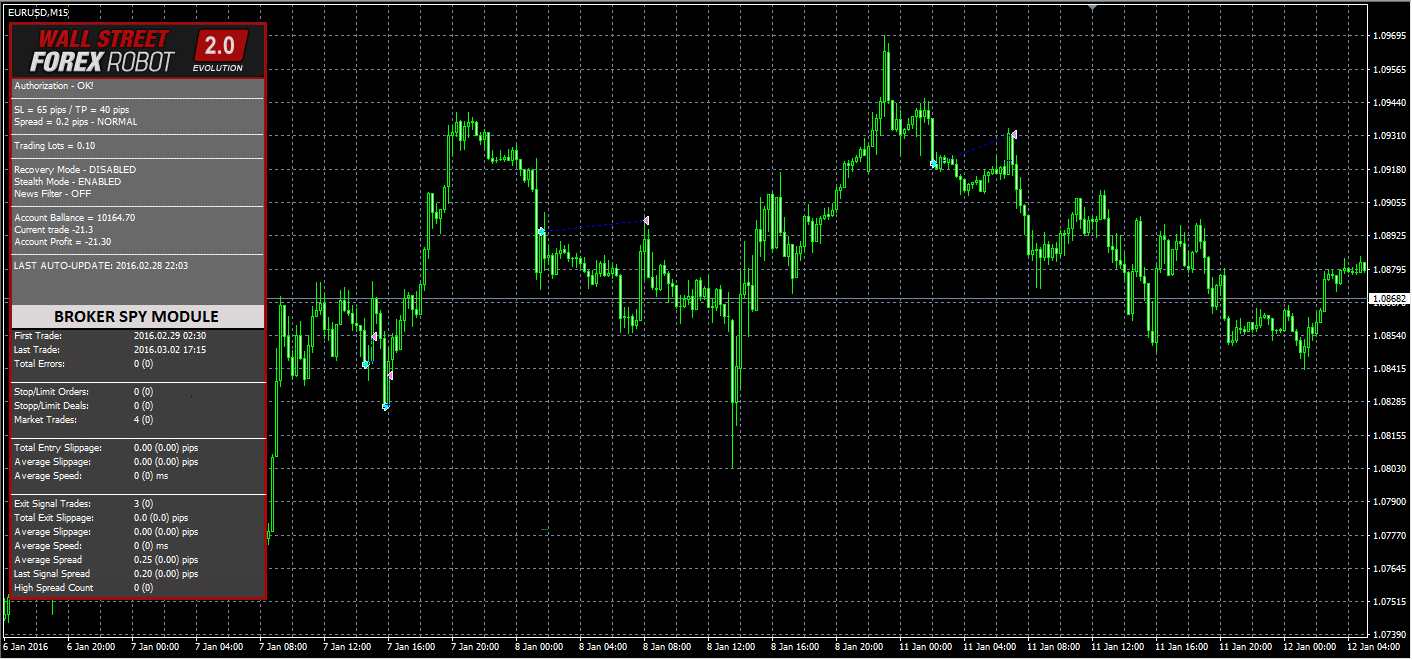
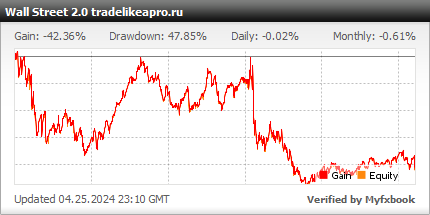
An example of the Wall Street Forex Robot v.2.0 Evolution expert advisor at work
Expert advisor backtests

Backtests were done for each pair separately, since the Metatrader 4 platform does not allow multi-currency testing.
The tests were done using the Tick Data Suite program on quotes from Dukascopy, with a real variable spread.
The first series of tests is done with a fixed lot. This makes it possible to evaluate the testing results without taking money management into account.
WSFR Evo AUDUSD 2012 2016 lot 0.1
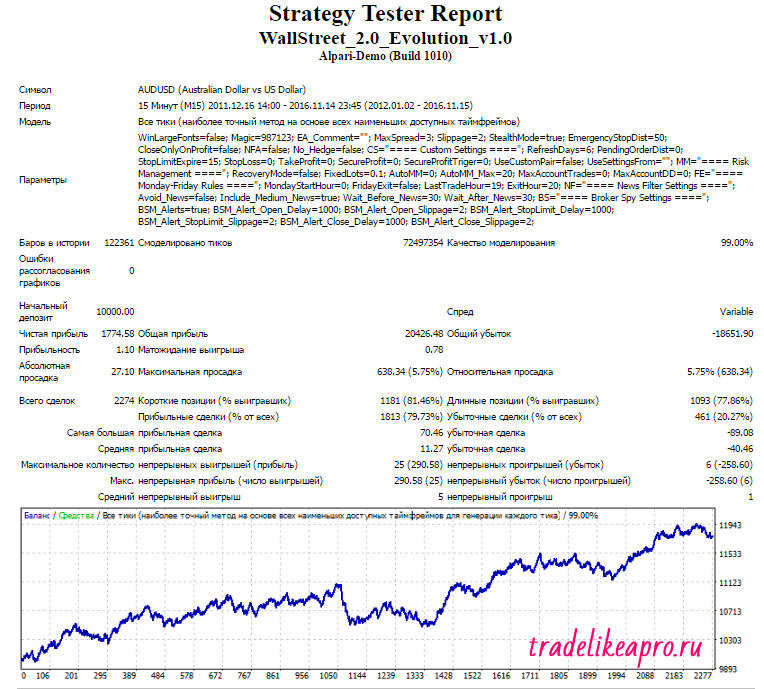
The test results are acceptable
WSFR Evo EURUSD 2012 2016 lot 0.1
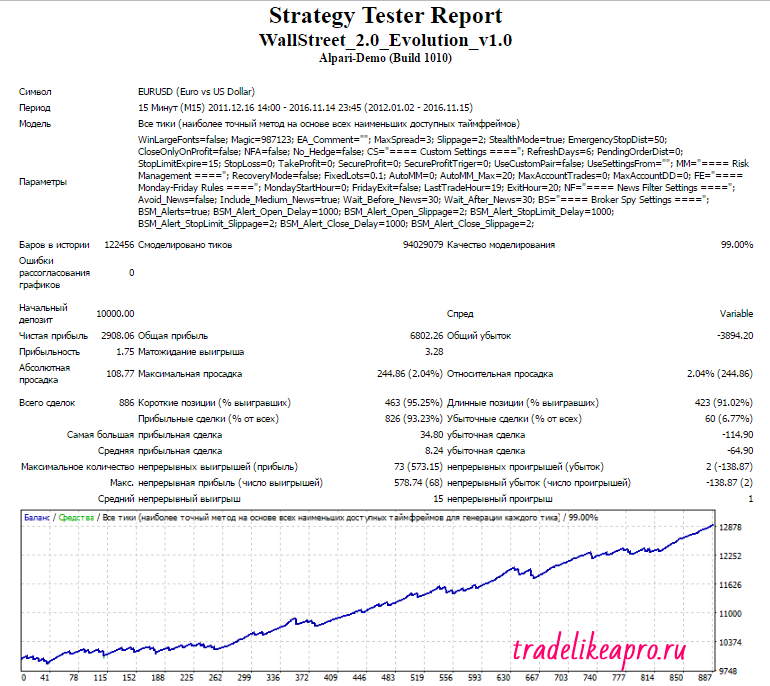
The test results are very good
WSFR Evo GBPUSD 2012 2016 lot 0.1
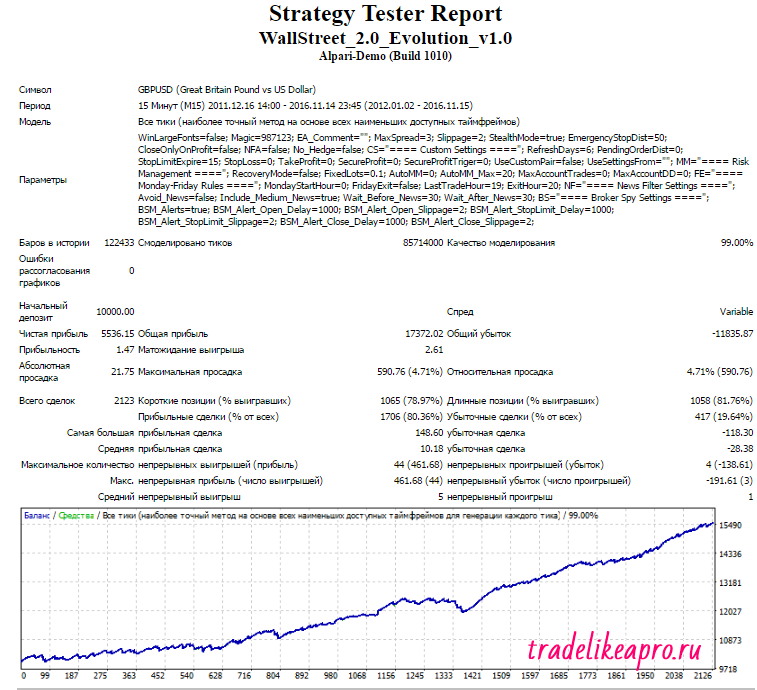
The test results are very good
WSFR Evo NZDUSD 2012 2016 lot 0.1
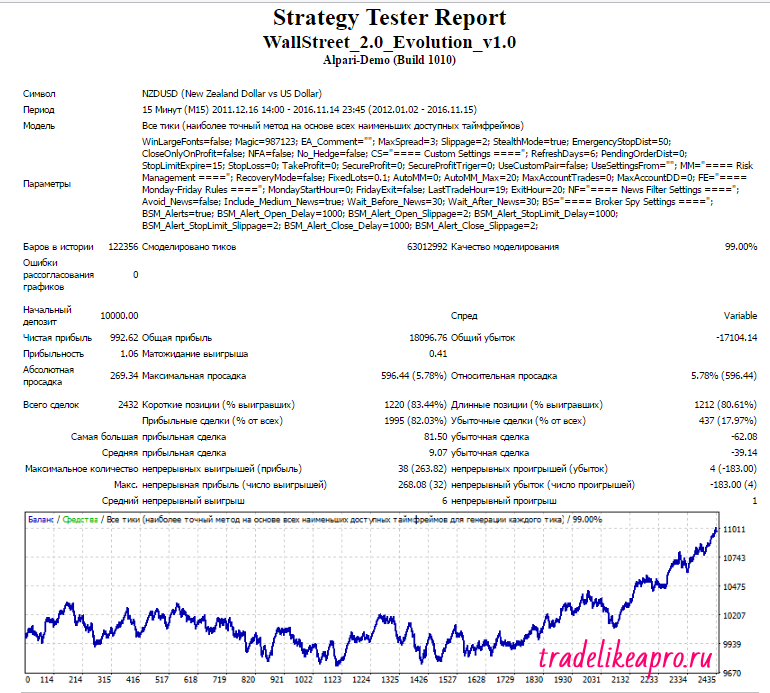
The test results are unstable
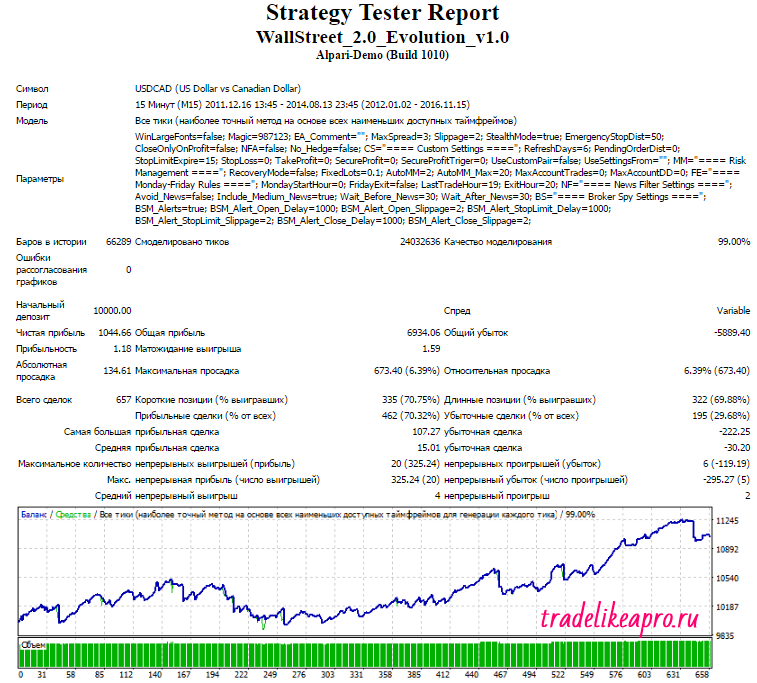
WSFR Evo USDCAD 2012 2016 lot 0.1
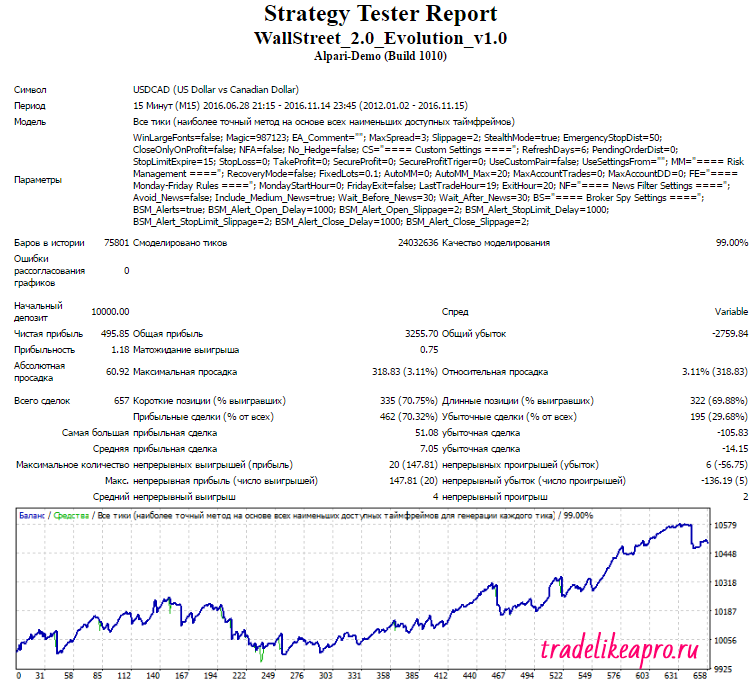
The test results are unstable
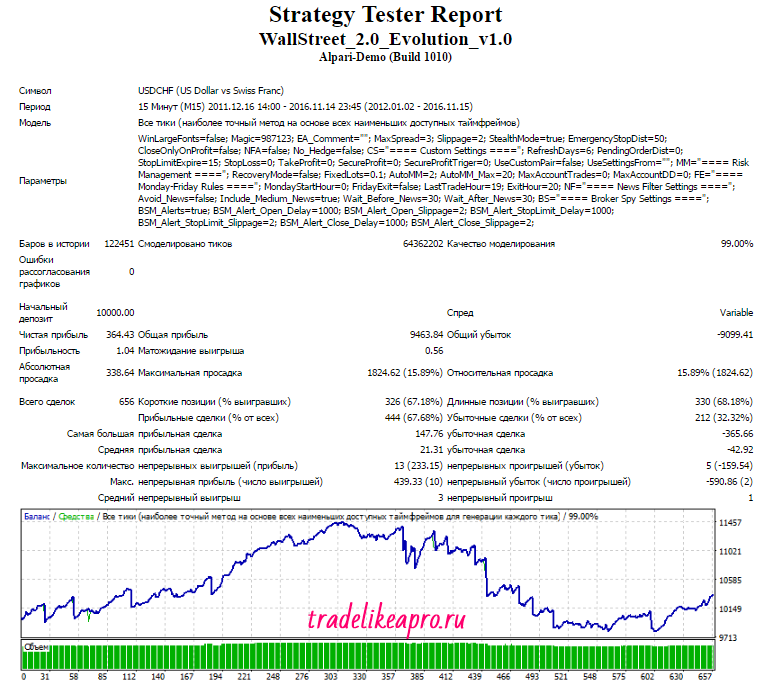
WSFR Evo USDCHF 2012 2016 lot 0.1
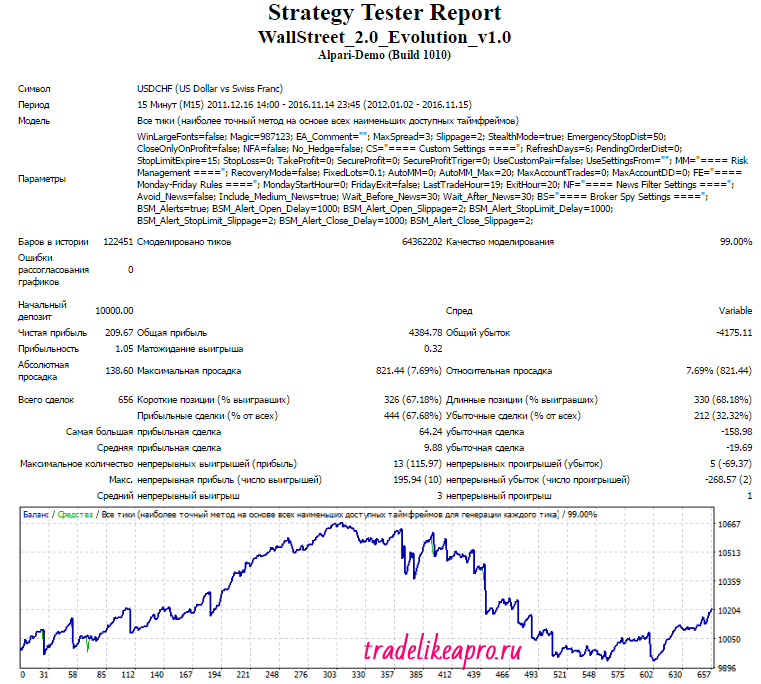
The test results are unstable
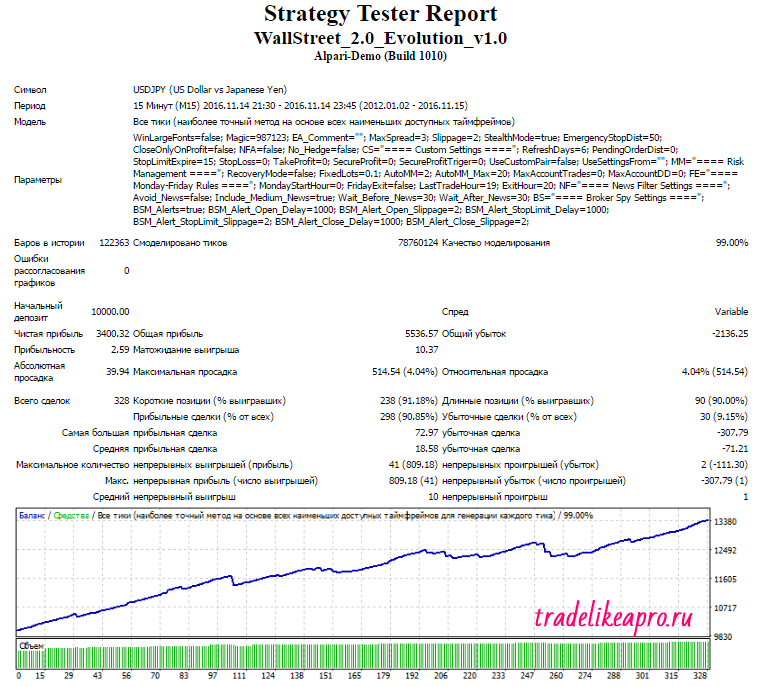
WSFR Evo USDJPY 2012 2016 lot 0.1
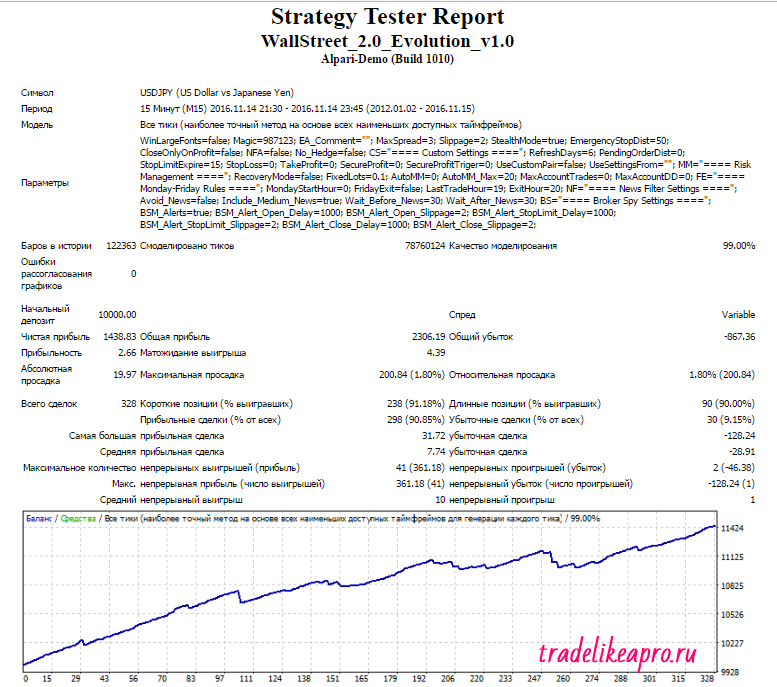
The test results are very good
The second series of tests is done with a dynamic (proportional) lot. This makes it possible to evaluate the testing results taking into account money management.
WSFR Evo AUDUSD 2012 2016 lot MM2
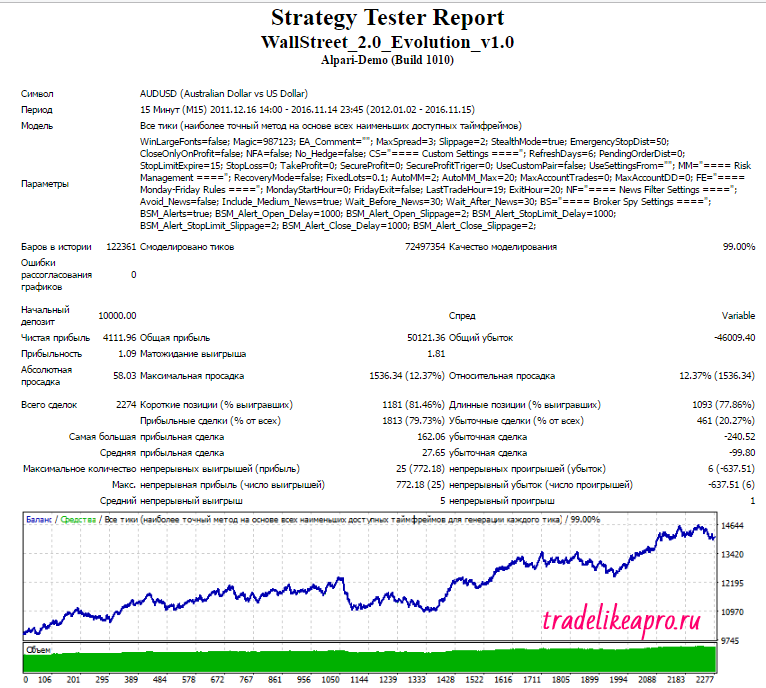
WSFR Evo EURUSD 2012 2016 lot MM2
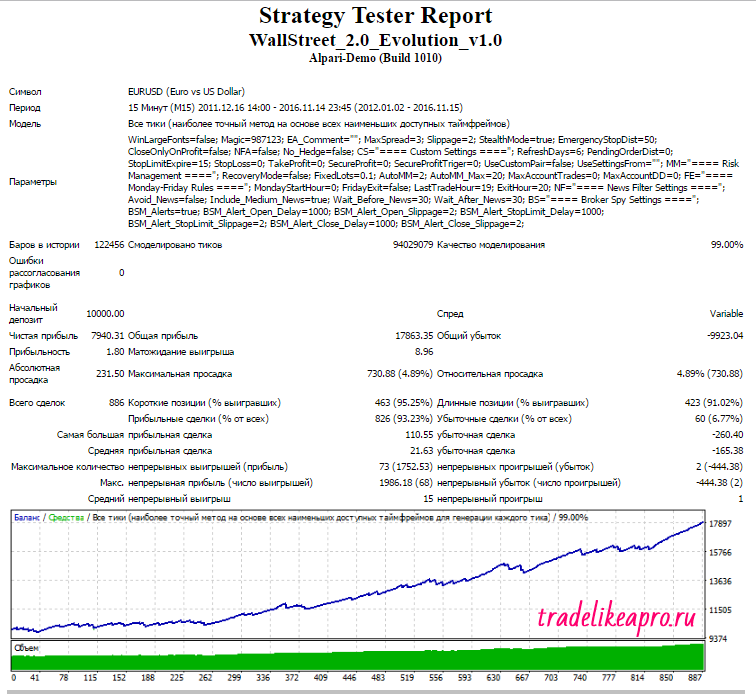
WSFR Evo GBPUSD 2012 2016 lot MM2
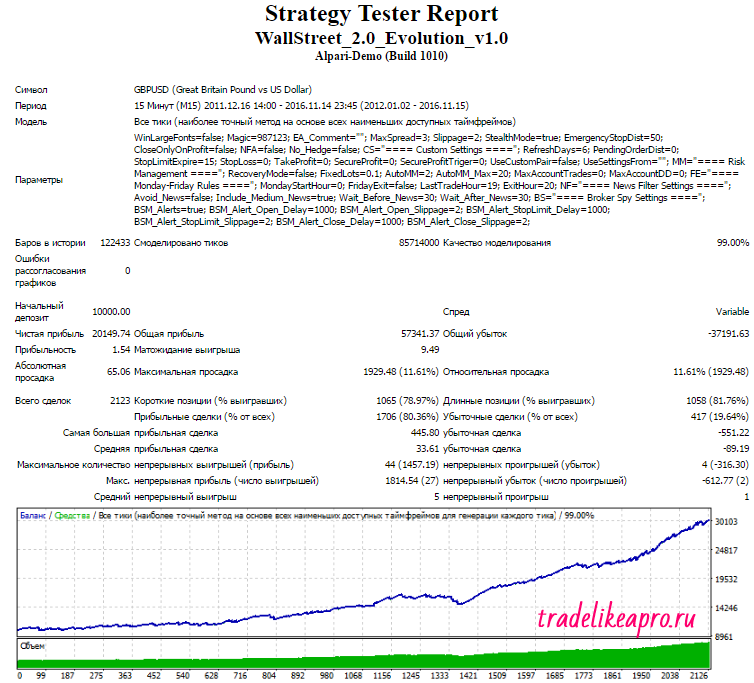
WSFR Evo NZDUSD 2012 2016 lot MM2
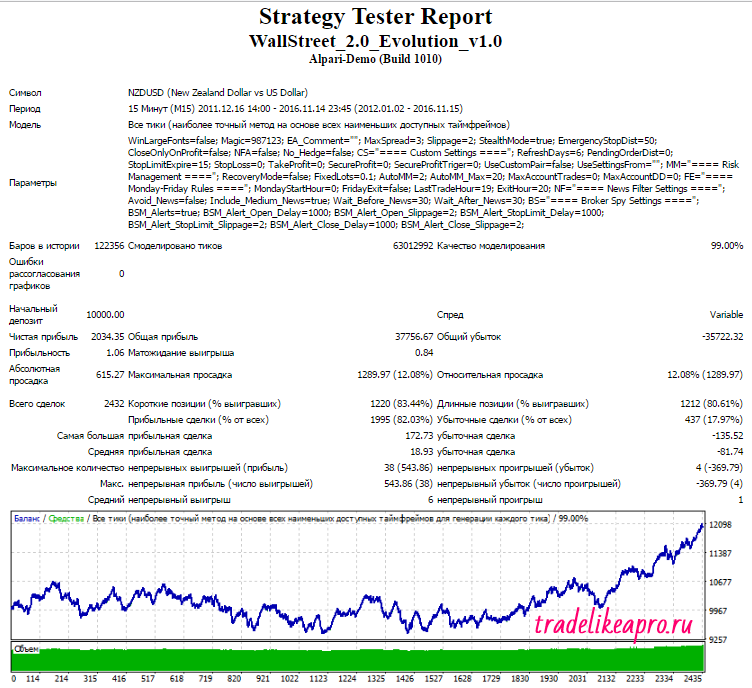
WSFR Evo USDCAD 2012 2016 lot MM2
WSFR Evo USDCHF 2012 2016 lot MM2
WSFR Evo USDJPY 2012 2016 lot MM2
Backtests of the "alternative" settings
(EUR33, GBP30, GBP52T, EURJPY)
The first series of tests is performed with a fixed lot. This makes it possible to evaluate the test results without taking money management into account.
WSFR Evo EURUSD EUR33 2012 2016 lot 0.1
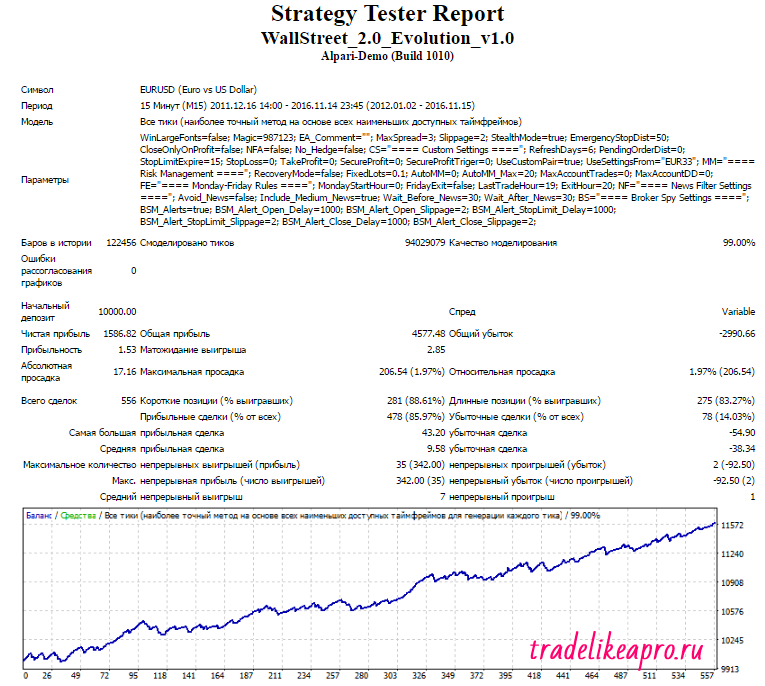
The test results are very good
WSFR Evo GBPUSD GBP30 2012 2016 lot 0.1
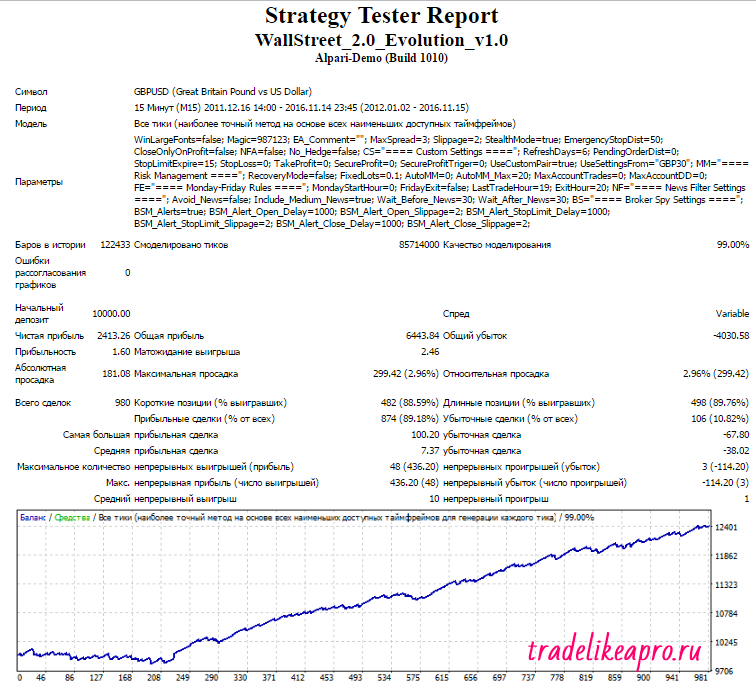
The test results are good
WSFR Evo GBPUSD GBP52T 2012 2016 lot 0.1
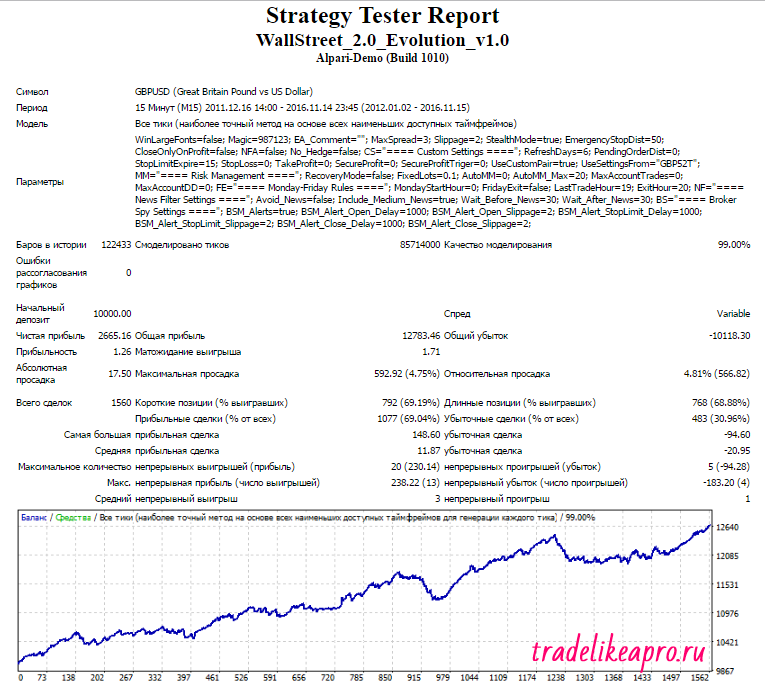
The test results are acceptable
WSFR Evo EURJPY 2012 2016 lot 0.1
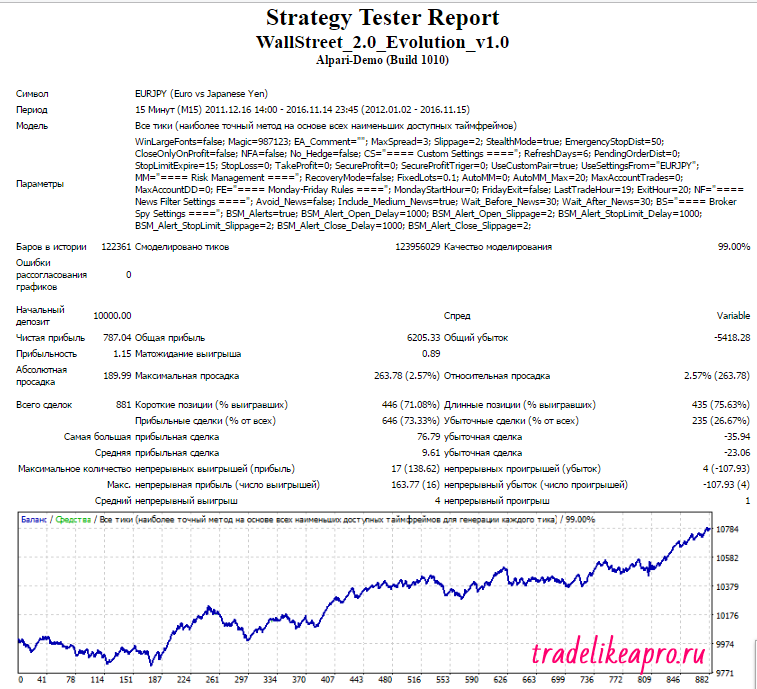
The test results are acceptable
The second series of tests is performed with a dynamic (proportional) lot. This makes it possible to evaluate the test results taking money management into account.
WSFR Evo EURUSD EUR33 2012 2016 lot MM2
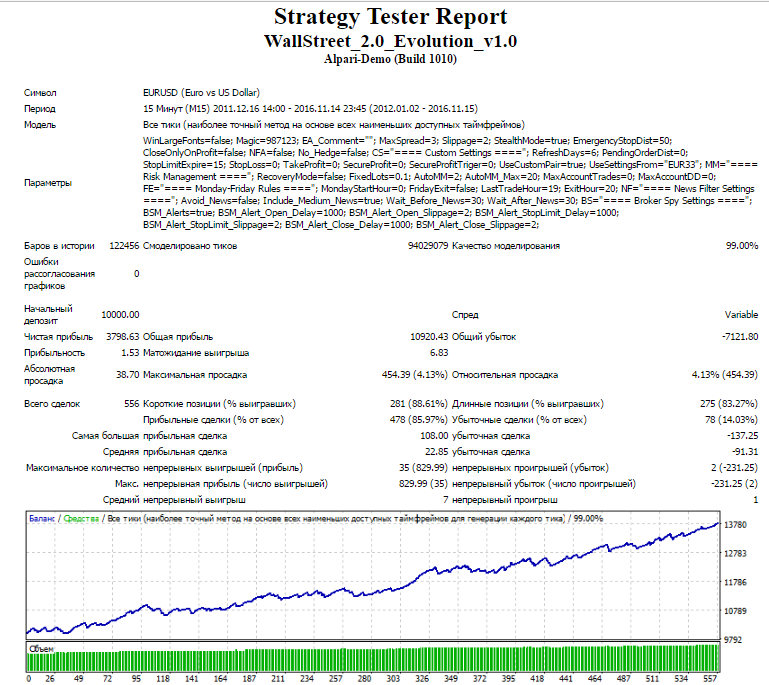
WSFR Evo GBPUSD GBP30 2012 2016 lot MM2
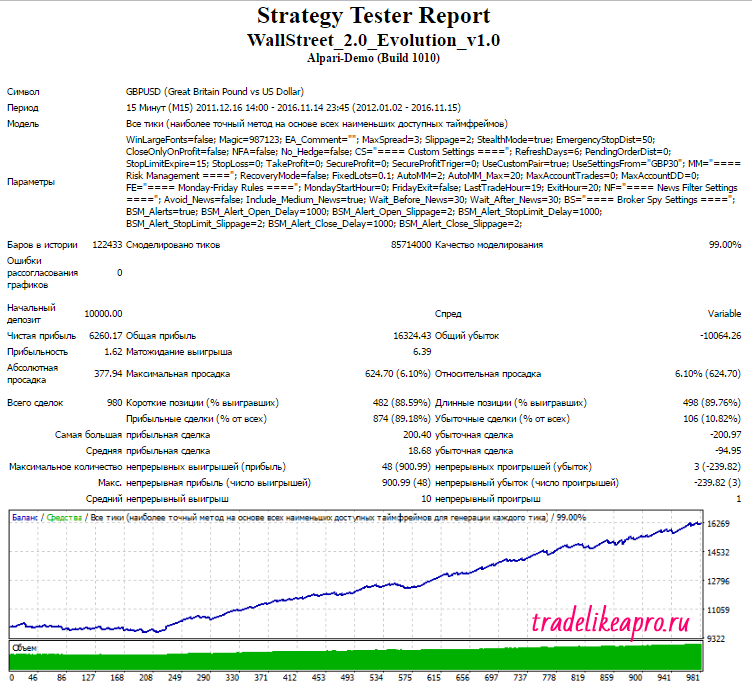
WSFR Evo GBPUSD GBP52T 2012 2016 lot MM2
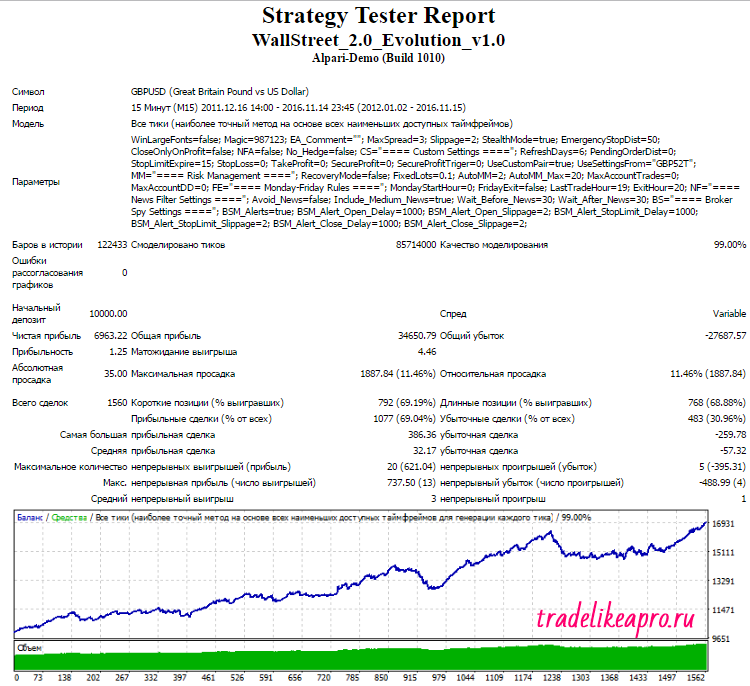
WSFR Evo EURJPY 2012 2016 lot MM2
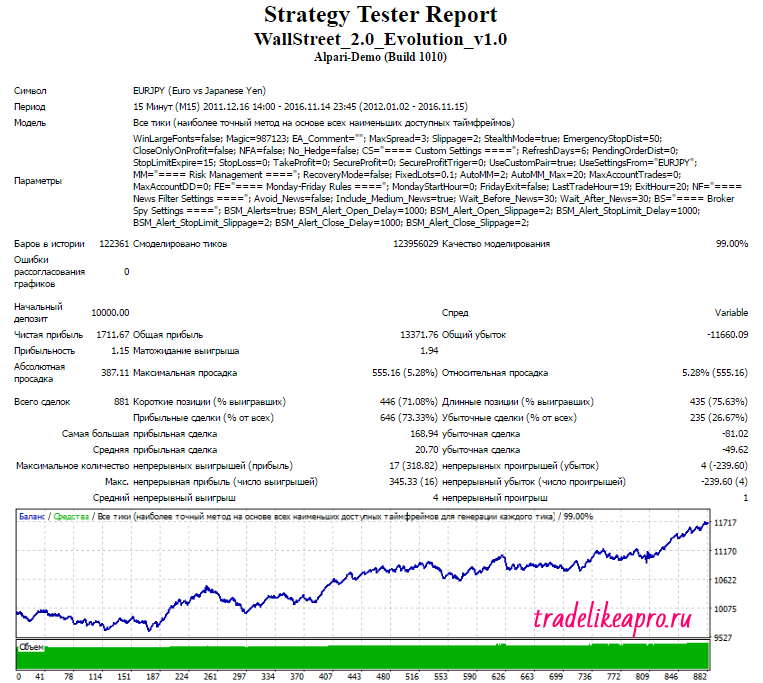
Using the program EA Analyzer, we will make a consolidated statement for the most convincing tests (the AUDUSD, EURJPY, EURUSD, GBPUSD, USDJPY pairs were selected) with a proportional lot .
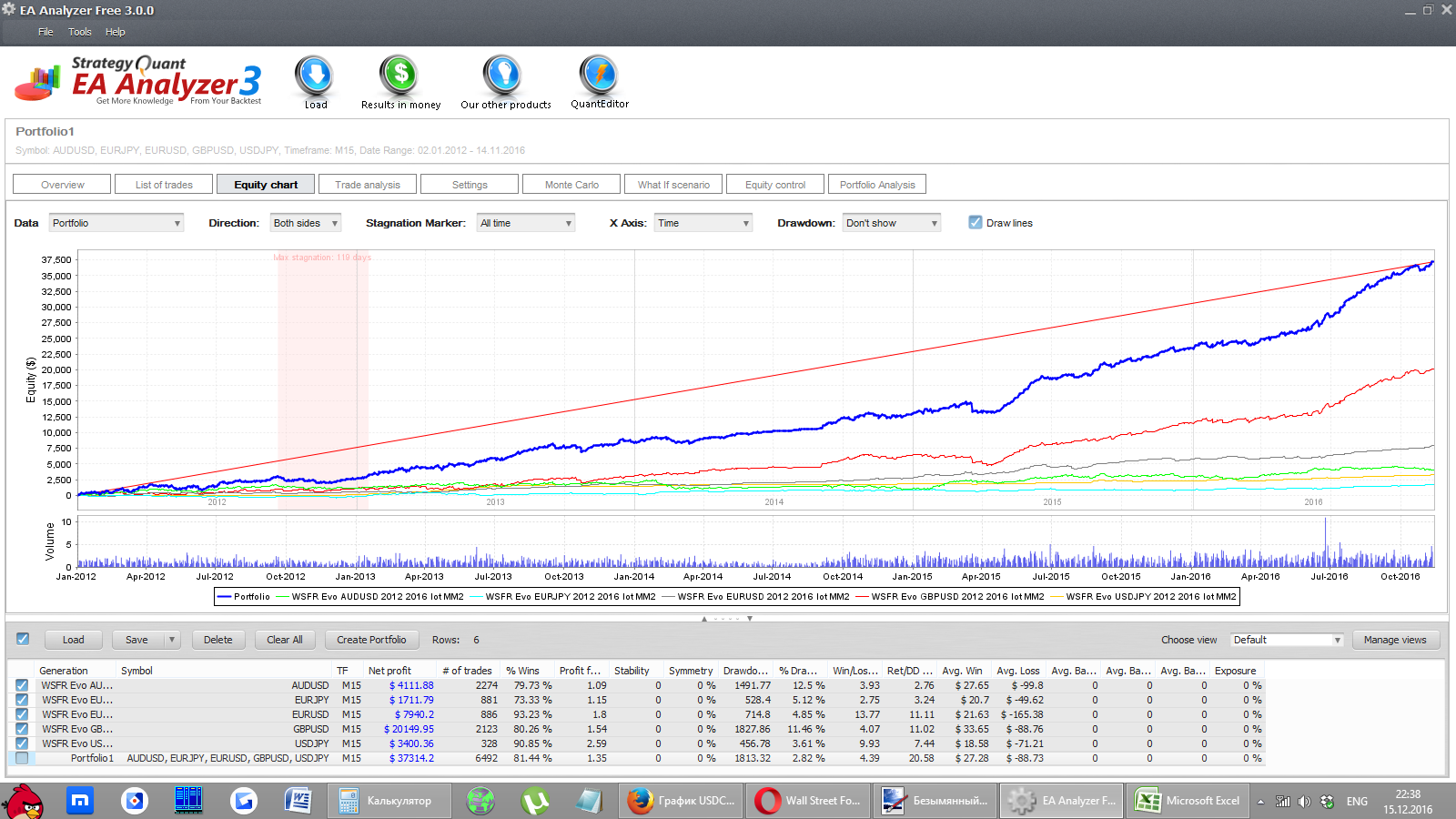
Conclusion: The WallStreet Forex Robot 2.0 Evolution expert advisor, when working with a proportional lot, generally shows steady profit growth, however periods without noticeable profit growth are possible.
⇒Links to all backtests used in the article (for independent analysis) can be found in the forum thread "Evolution"
Real Account Monitoring

Settings Description

- Magic - the magic number of orders on this currency pair
- EA_Comment - comments for orders
- MaxSPREAD - the maximum allowable spread
- Slippage - slippage
- StealthMode true/false - "stealth" mode, when the advisor does not explicitly set stops and profits, i.e. hides them from the broker
- EmergencyStopDist - emergency stop, works when StealthMode=true and is added to the virtual stop; for example, if the StopLoss parameter is 60 pips and EmergencyStopDist is 100 pips, then the emergency stop loss equals 160 pips
- CloseOnlyOnProfit true/false - close orders only in profit (not earlier)
- NFA true/false - enables compatibility with brokers operating under regulation by the National Futures Association of the USA (National Futures Association)
- No_Hedge true/false - disables the placement of hedging orders, i.e. open positions of both buy and sell at the same time
- WinLargeFonts true/false - the advisor info panel is displayed in a larger font
- RefreshDays - after how many days the licensed advisor will go to the server for updates (auto-update)
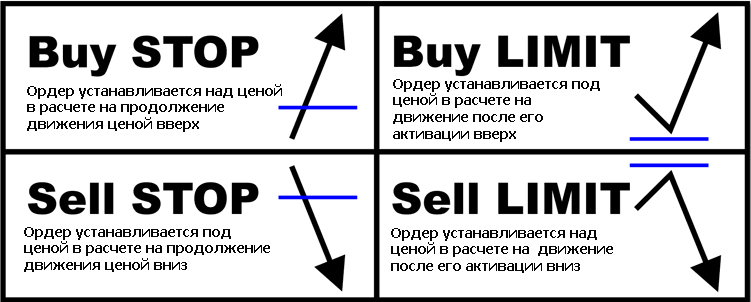
- PendingOrderDist - use of pending orders instead of market orders: if the parameter equals 0, then normal market execution; if PendingOrderDist>0, then a limit order is placed at a distance of PendingOrderDist pips from the market price, and if PendingOrderDist<0, then a stop order is placed at a distance of PendingOrderDist pips from the market price (recommended only for experienced traders and researchers)
⇒A brief illustration of the essence of pending orders:
- StopLimitExpire - lifetime of pending orders
- StopLoss - stop loss
- TakeProfit - take profit
- SecureProfit - guaranteed profit level (if the regular one did not trigger)
- SecureProfitTrigger - switch for the SecureProfit parameter
- UseCustomPair true/false - if you use the advisor on unsupported pairs, then set it to true
- UseSettingsFrom - settings from which supported pair to apply to the unsupported one.
Attention! The advisor has so-called "alternative" sets from the developers, for which you need to select the corresponding pair, then set UseCustomPair=true and in the UseSettingsFrom line enter the name of the alternative set.
Names of the alternative sets: EUR33, GBP30, GBP52T, EURJPY.
- FixedLots - fixed lot size
- AutoMM -dynamic lot size
- RecoveryMode true/false - enables recovery mode, that is, during drawdown the lot is not reduced
- AutoMM_Max - maximum allowed risk, affects the size of the lot set by the advisor; the risk is calculated for a stop loss of 100 pips
- MaxAccountTrades - maximum number of orders simultaneously opened by the advisor on the account; with a value of "0" the number of orders is unlimited
- MaxAccountDD - maximum allowed drawdown on the account; with a value of "0" the drawdown is not limited
- MondayStartHour - from what hour to trade on Mondays. If you do not like trading on Mondays, set MondayStartHour=24
- FridayExit true/false - trade on Fridays yes/no
- LastTradeHour - the last trading hour on Fridays (inclusive)
- ExitHour - if set, the robot will close all open positions at this hour on Friday
- GMT_Offset - the broker time offset from GMT
- DST_Usage true/false - use of the broker's daylight saving time (Daylight Saving Time)
- Include_Medium_News true/false - enables filtering for news of "medium" danger level (in addition to protection from news of "high" danger level)
- Wait_Before_News - time in minutes before news when trading is forbidden for the advisor
- Wait_After_News - time in minutes after news when trading is forbidden for the advisor New! BROKER SPY MODULE
The WallStreet Forex Robot v.2.0 Evolution advisor has an added "spy" module BROKER SPY MODULE, which, besides showing trade flow parameters and order execution quality, also writes all these parameters to an external file. This can be useful for quantitative analysis of broker performance quality and statistics collection.
The external file is located in the MT4 Data Folder->MQL 4->Files folder.
Description of the BROKER SPY MODULE panel indicators

- First Trade – date and time of the first order in the statistics
- Last Trade – date and time of the last order in the statistics
- Total Errors – total number of recorded errors of all order types in the statistics
- Stop/Limit Orders - number of placed pending orders in the statistics
- Stop/Limit Deals - number of activated pending orders in the statistics
- Market Trades - total number of market execution orders in the statistics
- Total Entry Slippage –sum of slippage of all orders in the statistics
- Average Slippage – average slippage
- Average Speed – average execution time of market orders in milliseconds
- Exit Signal Trades – total number of executed exit signals (closing)
- Total Exit Slippage - sum of slippage for all exit signals (pips in 4-digit quotes)
- Average Slippage – average slippage for all exit signals (pips in 4-digit quotes)
- Average Speed - average execution speed of market orders
- Average Spread – average spread of all robot trading signals
- Last Signal Spread – spread at the robot's last trading signal
- High Spread Count – number of canceled signals due to too large a spread (see the MaxSPREAD parameter in the advisor's BROKER SPY MODULE settings)
Description of the BROKER SPY MODULE panel parameters in the advisor settings

- BSM_Alerts true/false - set True if you want to receive alerts (notifications) from the module's operation
- BSM_Alert_Open_Delay - the size of the permissible delay in milliseconds when opening an order; if the time is exceeded, an alert will pop up
- BSM_Alert_Open_Slippage - the size of the permissible slippage in 4-digit pips when opening an order; if the slippage is higher than allowed, there will be an alert
- BSM_Alert_StopLimit_Delay - the size of the permissible delay in milliseconds for the broker to accept a pending order; if the time is exceeded, an alert will pop up
- BSM_Alert_StopLimit_Slippage - the size of the permissible slippage in 4-digit pips when the broker accepts a pending order; if the slippage is higher than allowed, an alert will pop up
- BSM_Alert_Close_Delay - the size of the permissible delay in milliseconds when closing an order; if the time is exceeded, an alert will pop up
Attention! Do not change anything in the expert advisor settings and use only the recommended values if you do not fully understand what you are doing!
The Simple version of the expert advisor has even fewer settings:
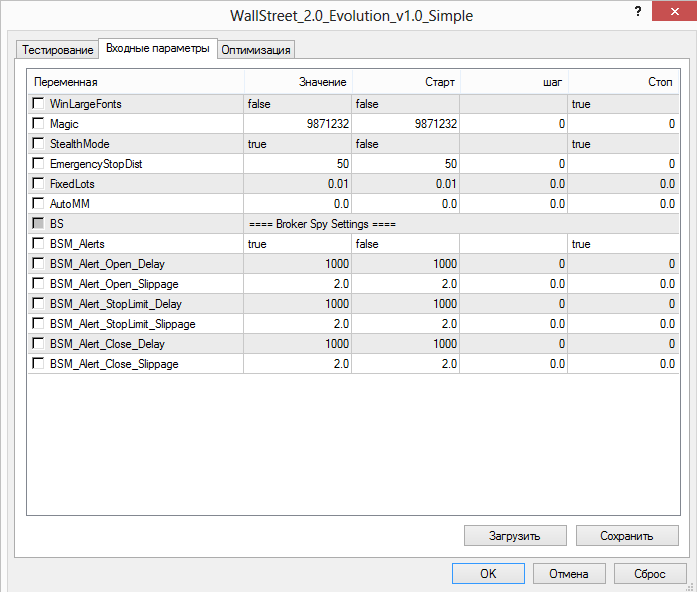
Attention! The Simple version can be installed only on the recommended pairs.
Bonus from the developers: the Recovery Pro Evo expert advisor
Together with the license, bundled with the WallStreet Forex Robot v.2.0 Evolution expert advisor, the developers offer the Recovery Pro Evo expert advisor. This is a separate martingale-class expert advisor with the BROKER SPY MODULE attached.
Attention! Using the Recovery Pro Evo martingale together with the trend-following WallStreet Forex Robot significantly increases the risks!
Monitoring of the Recovery Pro Evo expert advisor from TradeLikeaPro.ru
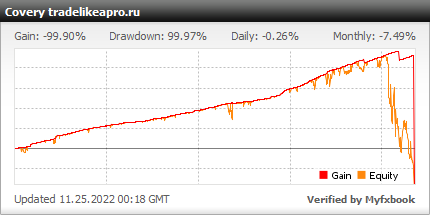
Using the WallStreet Forex Robot and Recovery Pro Evo expert advisors on one account is generally not recommended, but everyone decides questions of overall risk for themselves.
Recommended money management

A risk per trade of 2 percent of the deposit for each pair is recommended. The lot can be calculated using a special table, or you can simply set the risk level in the expert advisor parameters, and everything will be calculated automatically.
Conclusions

The Wall Street Forex Robot v.2.0 Evolution expert advisor is one of the best paid trend-following trading robots. Out of all the junk sold across the internet, it really belongs to the top 0.1% of worthwhile robots. And the years have proven it.
Using the WallStreet Forex Robot v.2.0 Evolution is profitable over the long term, which is confirmed by tests and monitoring, but in the short term profitability may remain in the neutral zone for some time. Also note that this expert advisor, like other trend robots, does not trade often. The most profitable pairs are EURUSD, GBPUSD and USDJPY.
Important!
For the expert advisor to work correctly, the trading terminal must remain switched on from the market opening on Sunday evening until its closing on Friday evening. If you do not have the ability to keep your computer running 24/5, it is recommended to use a VPS server service.
Download the expert advisor " WallStreet Forex Robot v.2.0 Evolution "

Best regards, Alexey aka Merlin Tlap.io