
Trading Signals - A New Feature in Your Metatrader Terminal
 Hello, friends! Many of you have probably noticed the "Trading Signals" tab appearing in the latest builds of the MetaTrader trading terminal. What kind of service is this? How is it different from other similar ones, like Zulutrade? How do you subscribe to signals or become a seller yourself? You will learn all this from this article.
What Is This Service?
"Trading Signals" - in essence, the name speaks for itself. You subscribe to another trader's signals and his trades are copied to your terminal, with a pre-set risk. And you pay the signal provider trader a certain commission for the ability to copy his trades. As a result, everyone remains a winner.
But the fact is that many similar services had problems precisely with the technical part. Most often, various trade copiers were used, which did not always work well, and as a result trades were copied with delays, which led to requotes on the client's account and loss of profit. And sometimes even completely, if the signal provider's strategy is scalping, with targets of only a few points.
The solution from Metaquotes has a great advantage. Since the signal service is provided by the developers of the Metatrader 4 / 5 trading terminal themselves, the entire necessary technical foundation has ALREADY been built into MT and works perfectly, since it is part of the program itself. There are practically no delays.
How to Buy Signals?
Since the service is already integrated into the terminal, everything is very simple. Below is a detailed guide (all screenshots enlarge on click).
1. Of course, you must have the MetaTrader terminal (4 or 5) installed.
2. Next, you need to register at http://www.mql5.com/ru . Registration is similar to other sites - you will need to specify your mailbox, come up with a login and password. After registration, they will send you an email with a confirmation link, which you need to follow to complete the account opening process.
3. Now open our trading terminal and go to the Tools->Options->Community tab.
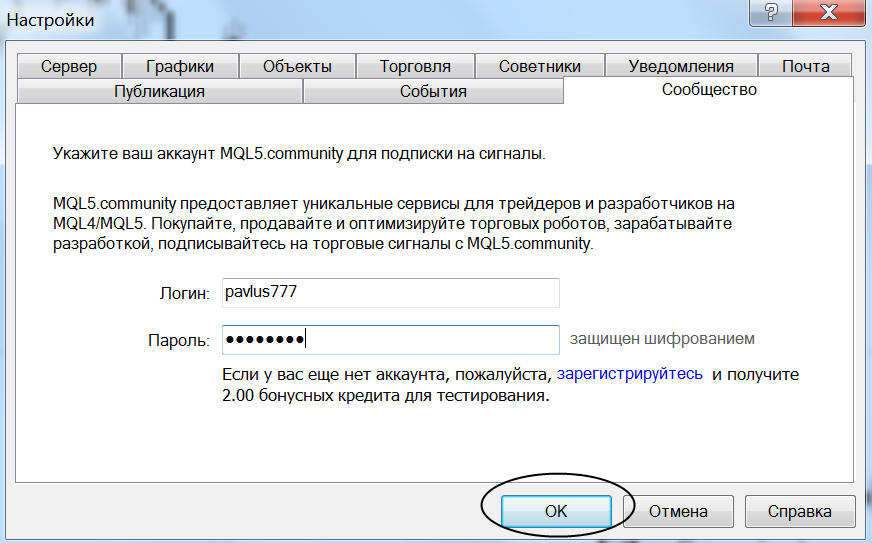 Here we enter our login and password from the account on mql5.com (see point 2) and click OK.
4. Then we need to choose a signal provider. This can be done directly from the trading terminal, in the Terminal window (where your account balance and open trades are), on the Signals tab.
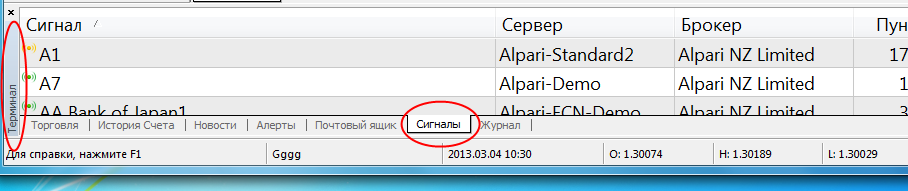 And by right-clicking on the signal provider you are interested in, select "Subscribe".
But in my opinion, it is more convenient to choose providers on the page http://www.mql5.com/ru/signals . The information is presented more clearly.
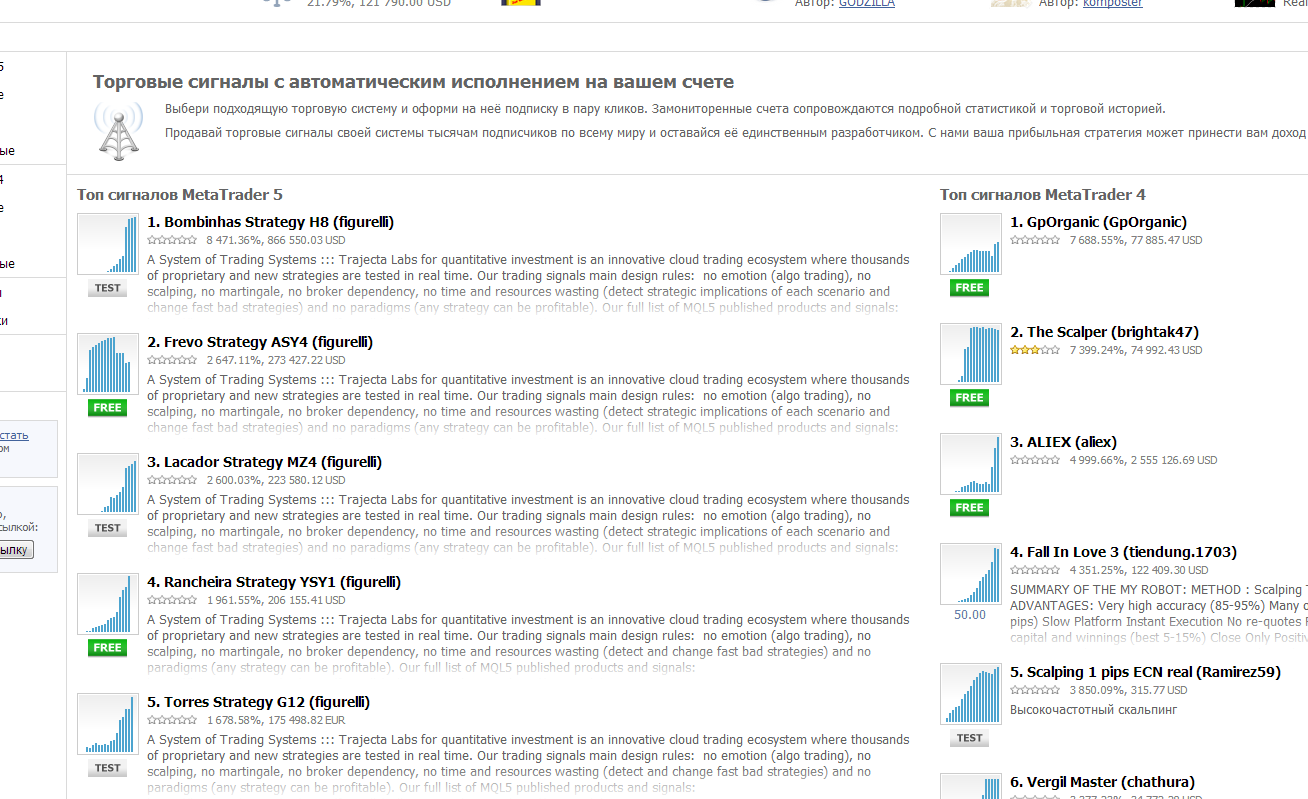
Please note that signal providers for MT4 and MT5 are different!
By clicking on the trader you are interested in, you can get account statistics, its balance, the number of subscribers, the type (real or demo), and the cost of subscription. There are also subscriber reviews.
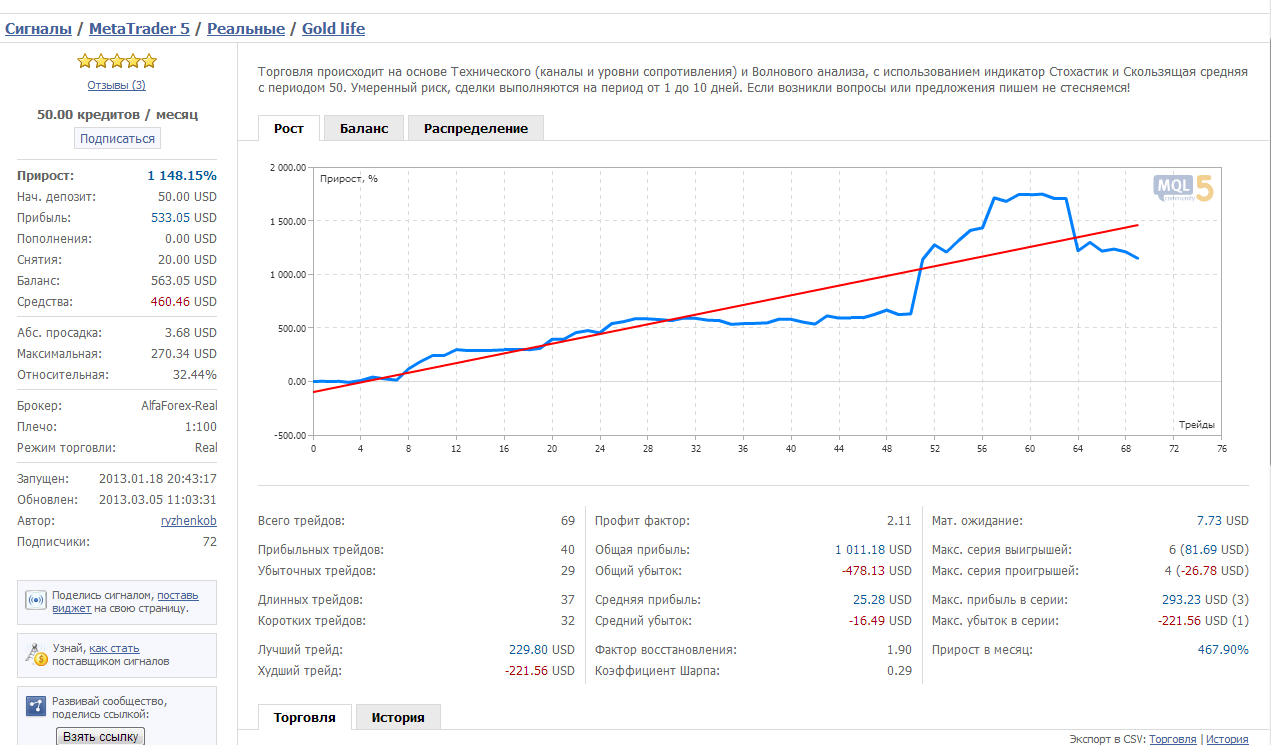
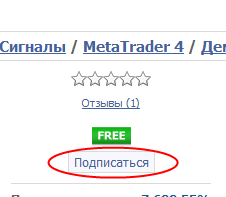
On the page of each signal seller there is a "Subscribe" button, by clicking which we show our desire to arrange a subscription for trade copying. For some providers, the subscription cost says FREE. This means the subscription is free.
After clicking the button, you will get to a screen where you need to choose the duration of the subscription (a week or a month) and when to start copying signals. And also enter the name of your broker and account number (you can copy signals to both a real and a demo account). No account passwords need to be specified.
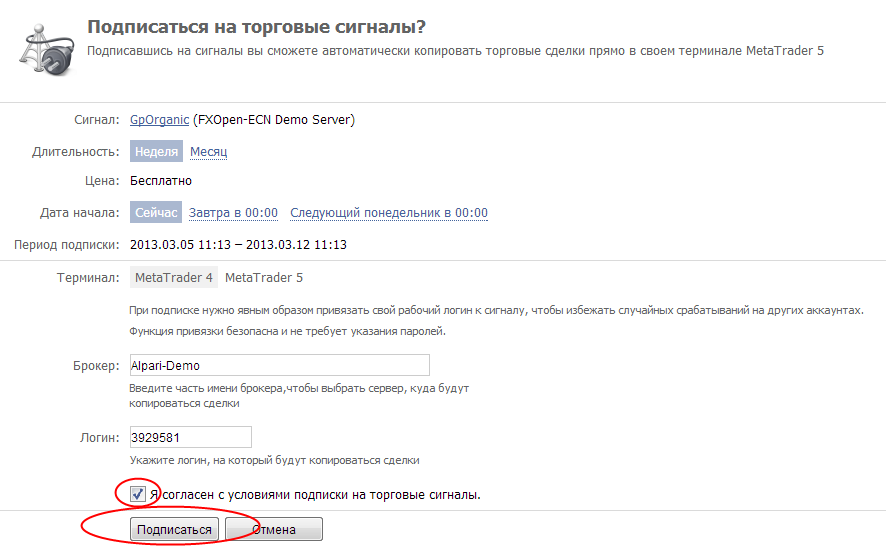 Check the box "I agree with the subscription terms" and click "Subscribe".
Note: if you subscribe to paid signals, then naturally you first need to top up the balance of your account. This can be done on your profile page on MQL5.com in the "payments" section.
5. Restart your terminal and, going to the Tools->Options->Signals tab, you will see that you are now subscribed to a certain signal seller. We need to enable trade copying.
To copy signals, your terminal must be constantly turned on! If you do not have the ability to keep your computer online 24/5, install a VPS server.
Check the boxes as in the screenshot below, optionally change the risk level settings (more on that below), and click OK.
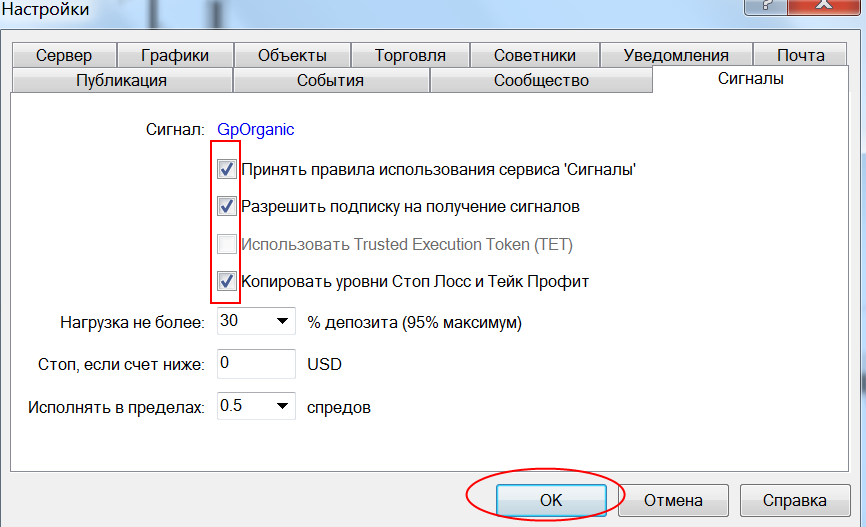
That's all. Now the signal provider's trades will be copied to your account automatically.
About Risk Settings
In the signal subscription settings in the trading terminal there are several items that allow you to set the risk level.
Stop if below - specify the balance value, upon reaching which all trades will be closed and copying of new signals suspended.
Execute within N spreads - specify by how many points in the form of part of the spread the price may differ from the price of the copied order for execution. The quote stream differs slightly among different brokers, so such a setting is necessary.
Load no more than N% of deposit - specify what percentage of the deposit you allocate to signal trading. Not to one trade, but overall. Then the system will correlate the part of the deposit allocated to signals with the deposit of the signal seller (leverage, different balance currencies - all this is taken into account automatically). And it will set the corresponding lot for copying trades.
That is, if the signal provider loses his entire deposit, and you allocated 30% of the deposit to signal trading, then you will lose only 30%, and not your entire account.
Interesting Features of the Metaquotes Signal Service
1) The technical side is built into the terminal
I already mentioned this at the very beginning. The Metaquotes signal service is built into the Metatrader terminal by default, so everything works clearly and quickly. You will not have to deal with bugs in external software.
2) Synchronization of the subscriber's and seller's accounts
A very interesting feature that tries to protect the subscriber from his own stupidity. The point is that during the initial synchronization there must not be any orders on the subscriber's account. Otherwise the system will not work.
Also at first, the orders present on the signal provider's account will be copied only if their profit is negative or equal to zero. And there is a rule: one account=1 subscription to the signals of 1 seller.
Such restrictions were made so that the subscriber would not, through his manual trades or subscription to one more signal provider, bring his account to a margin call.
If you want to subscribe to several signal providers, then you need to open several accounts. In my opinion, very reasonable restrictions.
3) All signal providers are checked
Before one or another signal provider appears in the list, he must go through a month of probation. If the provider shows a loss of 60 percent or more, his signals remain unavailable for subscription. Of course, in forex past profitability does not guarantee future profitability, but it is still some kind of insurance.
How to Become a Signal Provider?
This is not difficult to do, it is described at:
http://www.mql5.com/ru/articles/591
You can sell signals even with a small amount in your account and thus increase your overall trading income by giving access to your trades. As I wrote above, you will need to show profitable trading for a month for your account to become available for subscription.
Result
Is it worth paying attention to the signal service from Metaquotes? I think yes. As of today, from a technical point of view this is, perhaps, the most advanced solution on the market. And the global reach (the Metatrader terminal is used by most traders) will soon ensure a large number of both signal providers and subscribers.
In addition, the service is gradually developing and soon they promise to implement the TET (Trusted Execution Token) function - a special authorization that will allow you to copy trades directly through your broker. That is, it will no longer be necessary to keep the terminal turned on.
Best regards, Pavel Vlasov
TradeLikeaPro.ru