
TLAP CAPITAL Expert Advisor - Detailed Review of Operating Mechanics

We present to your attention the TLAP CAPITAL forex expert advisor, developed by traders from our forum. This expert advisor is a universal robot with the ability to trade on any instruments (that is, on currency pairs, US stocks, indices, etc.) and with the ability to customize the trading style (martingale, grid, without averaging). The expert advisor has independent monitoring and tests corresponding to actual trading results.
In this review, we will examine its characteristics, analyze the tests and trading results on the independent monitoring, and also provide recommendations for safe use.
(!) In this review, we will consider only the recommended settings set for the latest current version of the expert advisor.
Expert Advisor Characteristics
Platform: Metatrader 4 / MetaTrader 5
Expert advisor version: 2.4
Currency pairs: AUDNZD+AUDCAD+NZDCAD
Timeframe: any
Operating time: around the clock
Recommended brokers: Roboforex, Forex4you, NPBFX (Cent accounts)
Leverage: 1:500 and higher
Risk size per pair: 15-20% for conservative trading, 20-30% for increased risk
Installation Guide

If you are encountering Forex robots for the first time and have a lot of questions, watch the course Forex on Autopilot.
The expert advisor is installed in the standard way. In the archive at the end of the article, you will find two folders: Mql4 and Mql5. As is easy to guess, the contents of the MQL4 folder are for MT4, and the MQL5 folder is for MT5.
- Instructions for installing expert advisors in MT4
- Instructions for installing expert advisors in MT5
Features of Installing the TLAP CAPITAL Expert Advisor
(!) The special feature of the TLAP CAPITAL expert advisor is that it works without using external set files.
To select the operating mode, you just need to choose the appropriate item in the settings.
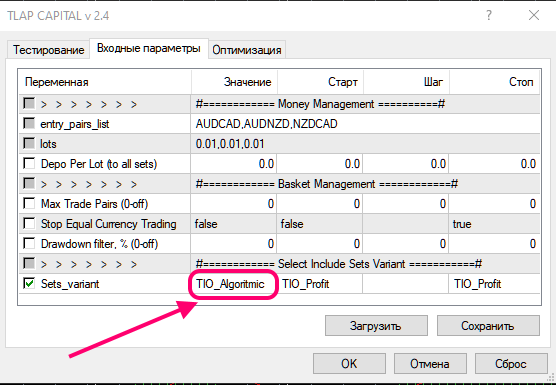
The TLAP CAPITAL expert advisor contains sets that were loaded at the compilation stage from the source code. Therefore, there is no need to load sets manually, all the settings are already inside the expert advisor; we only choose an item in the menu, and the expert advisor works strictly on the pairs and according to the logic of that item. The parameters that can be changed are shown in the expert properties on the "Input Parameters" tab.
At the moment, in the latest version of the expert advisor "TLAP CAPITAL v 2.4.ex4," only the item named Tio_Algoritmic works; the other settings have not yet been finalized, therefore they are blocked from operation.
Expert advisor installation algorithm:
Install the expert advisor in the terminal.
- In the "Market Watch" window, there must be the instruments AUDNZD, AUDCAD, NZDCAD. If they are not active (they are not in the list), press Ctrl+U and add these instruments manually.
- Install the expert advisor on any of the three pairs on any timeframe.
- In the expert advisor settings window, select Set_variant as TIO_Algoritmic for each pair.
- If necessary, change the parameters that can be changed (for example, the lot size), and press OK.
Attention! Since the expert advisor is potentially dangerous, be sure to read the article about the basic principles of trading robots based on averaging.
Expert Advisor Strategy

The TLAP Capital expert advisor is a universal "constructor" that can be programmed for different "behavior" depending on the chosen strategy - it can be, for example, a scalper, a trend-following robot, a countertrend robot, a grid bot, a medium-term system, or a martingale.
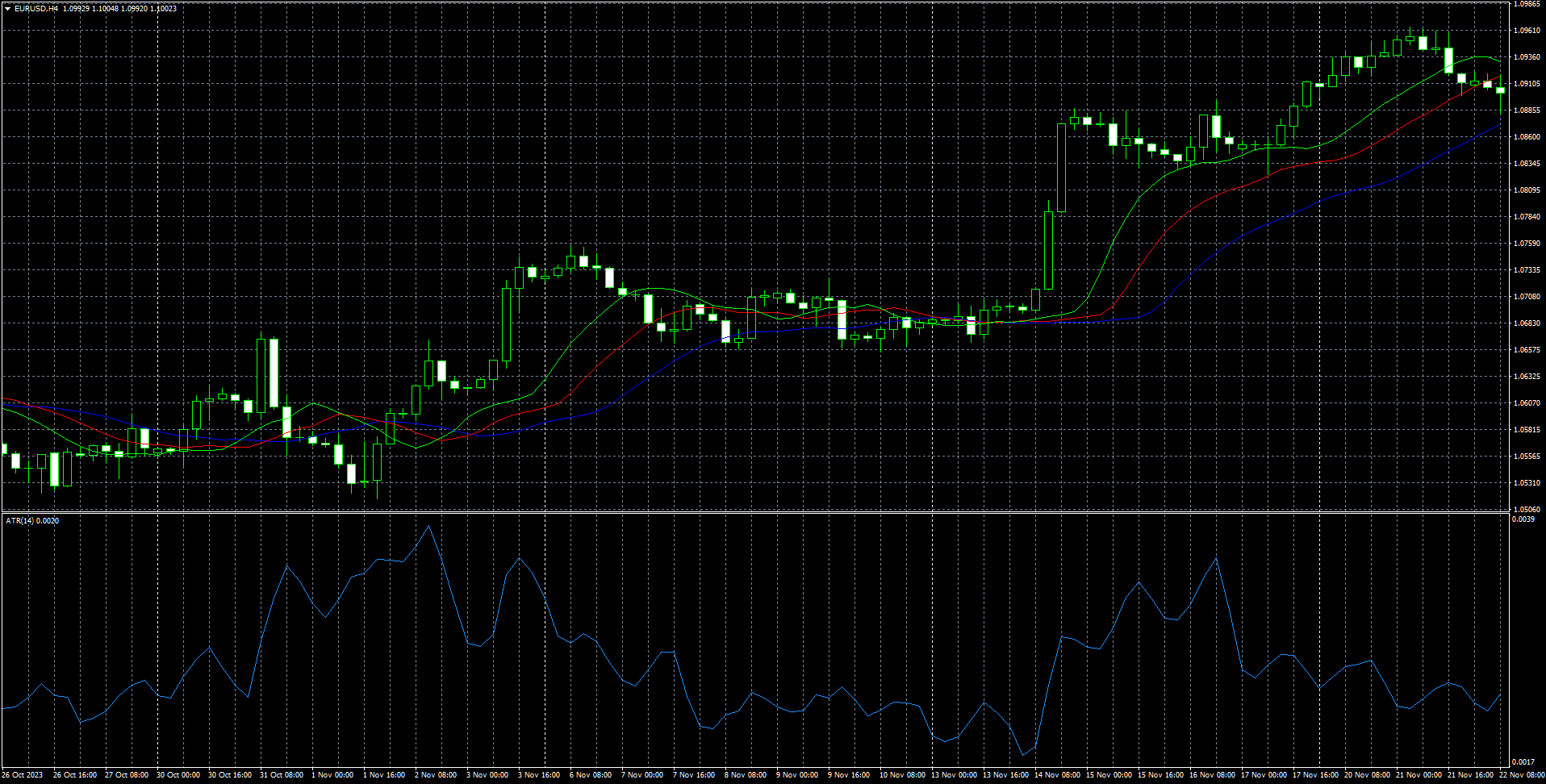
The basis of the TLAP Capital expert advisor is the standard ATR (Average True Range) and MA (Moving Average) indicators built into the terminal.
Several Moving Average indicators (there can be up to 15), arranged in a certain way, can serve as a trend signal (similar to the opening of the "jaws" in Bill Williams's famous Alligator indicator) and as an addition to ATR for opening or closing an order. By applying ATR and Moving Average and taking into account their mutual position and distance from each other, it is possible to create several set files for a variety of strategies.
Example of the placement of the standard Average True Range and Alligator indicators on the chart
The number of trading settings in the set files is significantly greater than in the user settings of the TLAP Capital robot itself, so developers of new sets need to refer to the source code of the expert advisor (it is available on our forum).
In this review of the TLAP Capital expert advisor, the package of sets for three pairs that the author of the expert advisor called Algoritm 15 is analyzed.
Example of the expert advisor working with TLAP Algoritm 15 sets (Tio Algoritmic)
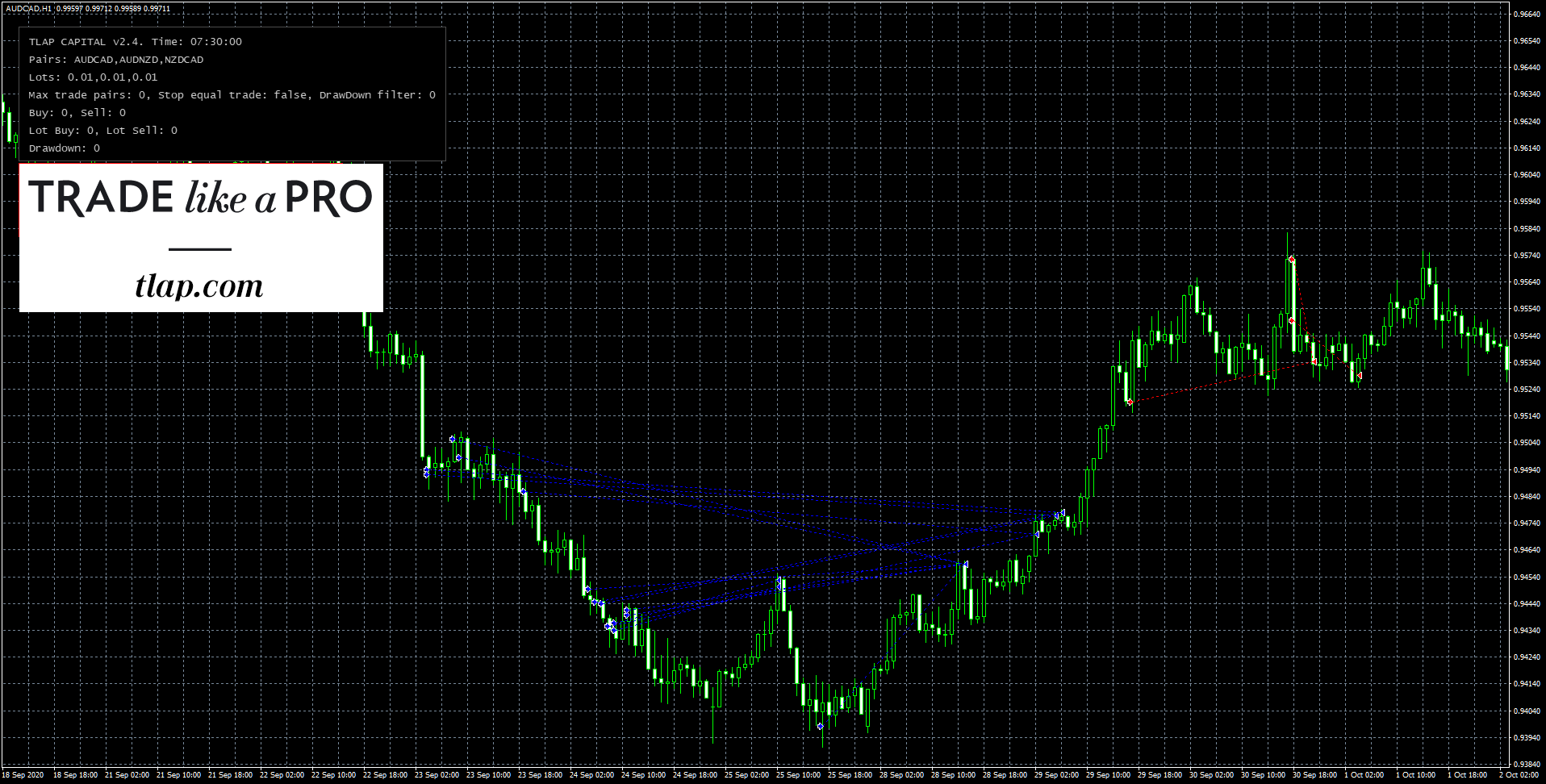
In the TIO_Algoritmic set, the TLAP Capital expert advisor behaves like a typical grid bot, that is, if the drawdown increases after the first order is placed, new orders with the same lot are opened and an order grid is formed.
A distinctive feature of the TLAP Capital expert advisor with the TIO_Algoritmic sets is that it can close sequentially opened orders not simultaneously, as a typical grid bot does, but independently of one another, which increases the flexibility and reliability of operation.
There is no stop loss in the expert advisor, that is, the expert advisor is potentially dangerous.
Disclaimer
The TLAP Capital expert advisor uses an averaging strategy. Strict compliance with money management is required!
What to read on the topic of martingale:
The Ilan Expert Advisor - the father of martingale, and its children. Theory and practice of averaging in Forex
Backtests of the Expert Advisor
Backtests were done for each pair separately, since the Metatrader 4 platform does not allow multi-currency tests.
The tests were done using the Tick Data Suite program on quotes from Dukascopy, with a real floating spread.
We test sets from the TIO_Algoritmic package
TLAP CAPITAL AUDCAD 01_01_2018 23_11_2023
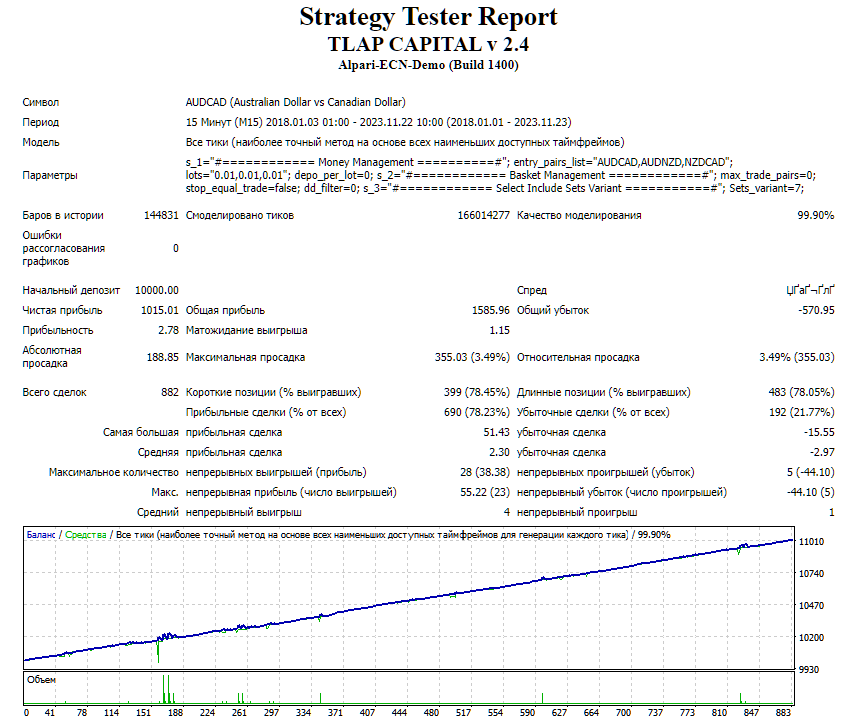
The test results are very good
TLAP CAPITAL AUDNZD 01_01_2018 23_11_2023
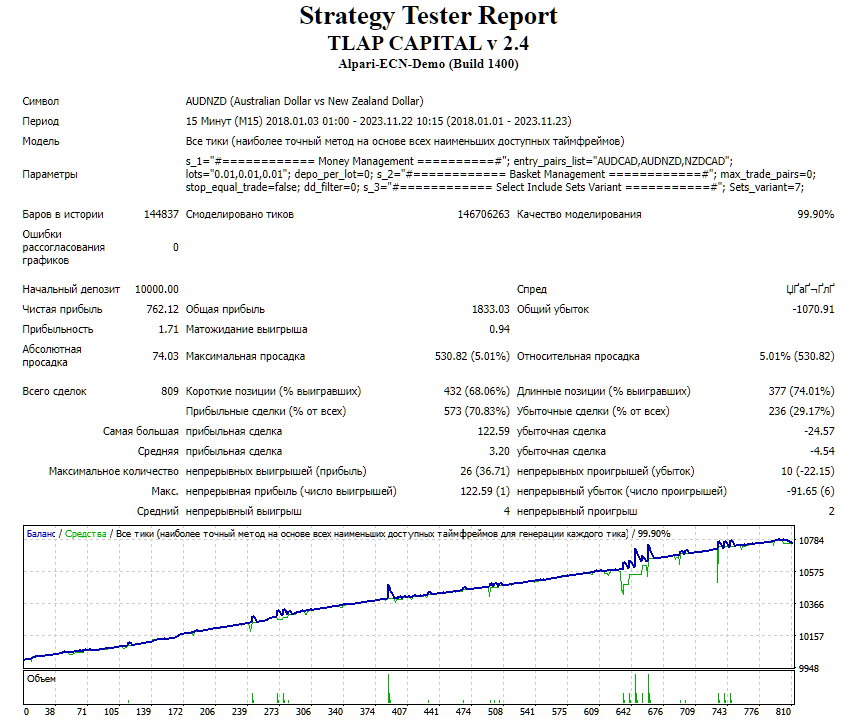
The test results are acceptable
TLAP CAPITAL NZDCAD 01_01_2018 23_11_2023
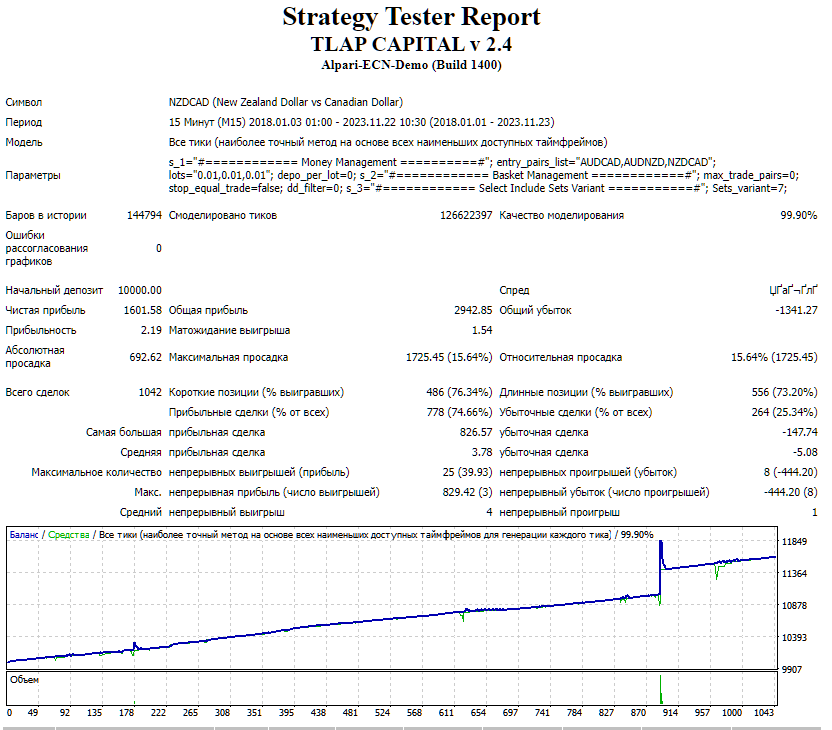
The test results are good
Using the EA Analyzer program, we will make a consolidated statement for the tests of the pairs from the recommended set package (AUDCAD, AUDNZD, NZDCAD).
TLAP Capital Portfolio from EA Analizer
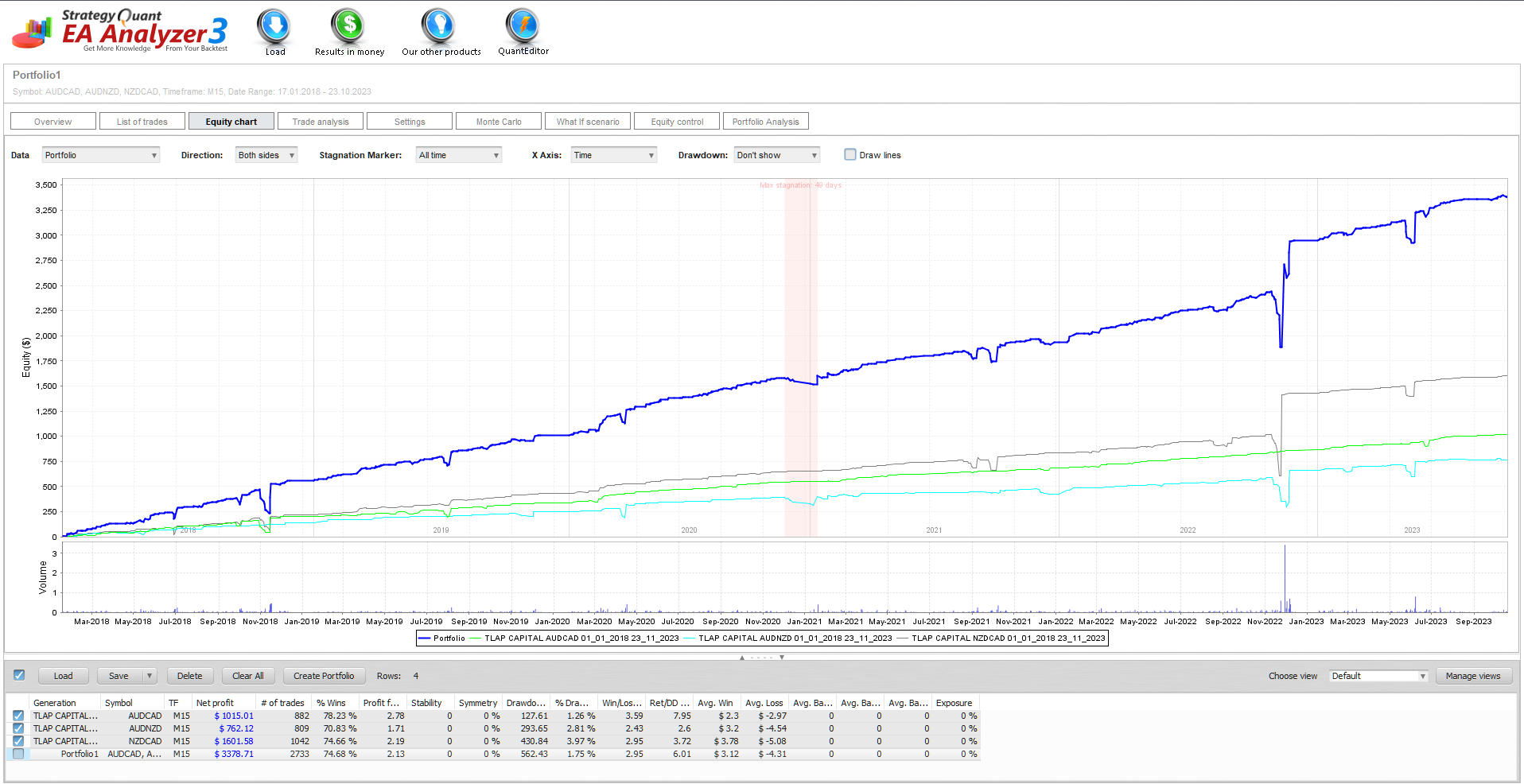
Conclusion: the TLAP Capital expert advisor, when working with sets from the recommended (TIO_Algoritmic) package on three pairs (AUDCAD, AUDNZD, NZDCAD), shows confident and stable profit growth without critical drawdowns.
(!) Links to all backtests used in the article (for independent analysis) can be found in the expert advisor thread on the forum (link at the end of the article).
Independent account monitoring from the Tlap.io website
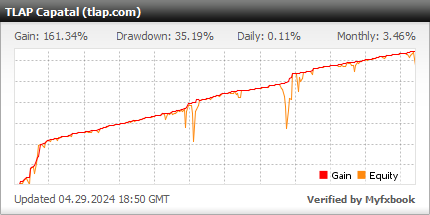
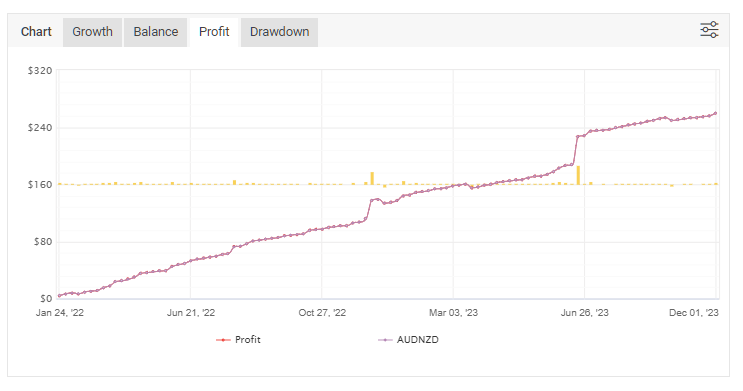
Next, we will analyze the monitoring statistics by year and month to determine possible seasonality in the expert advisor's performance, and then we will examine the profit charts for each pair to see the effectiveness of the currency pairs used.
Trading results by year
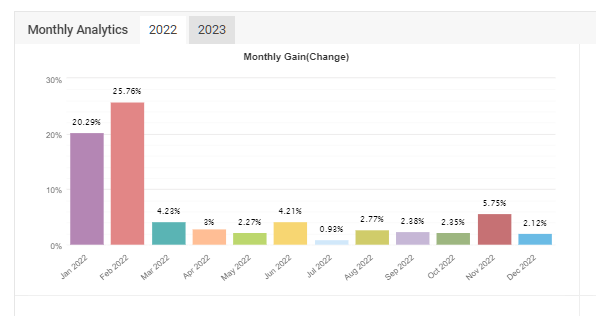
TLAP Capital Myfxbook 2022
TLAP Capital Myfxbook 2023
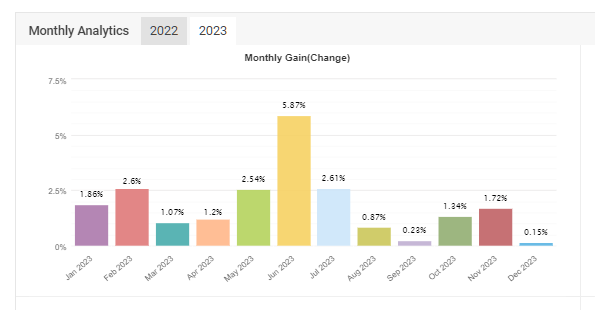
Thus, we can conclude that the expert advisor trades effectively without pronounced preferences throughout the year.
Trading results by pairs (profit)
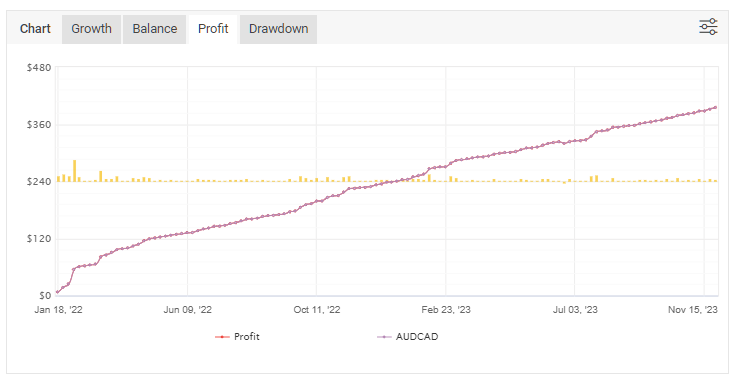
TLAP CAPITAL myfxbook profit AUDCAD
TLAP CAPITAL myfxbook profit AUDNZD
TLAP CAPITAL myfxbook profit NZDCAD
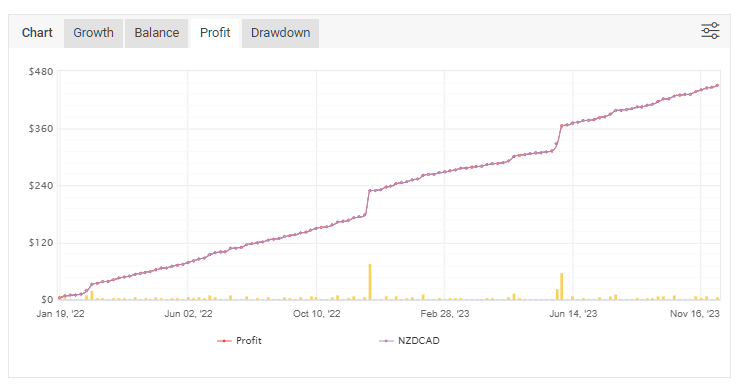
We can conclude that profit on the trading pairs is growing normally.
Description of Settings
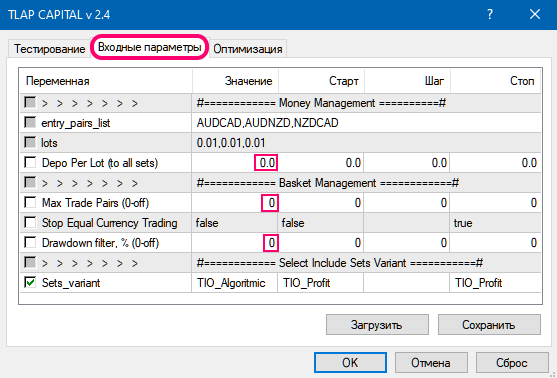
The expert advisor settings look as follows:
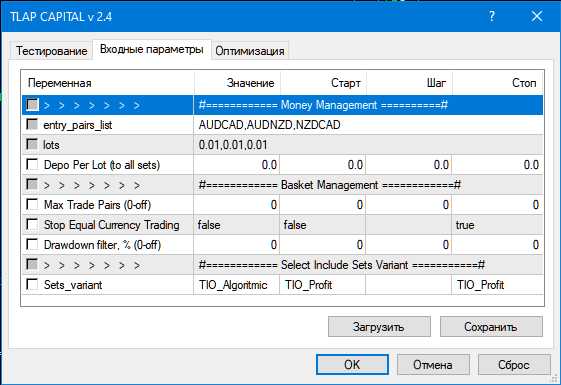
Money Management – The money management settings section
entry_pair_list – Select which currency pairs (instruments) to trade. They are written separated by commas.
lots – Trading lots for the selected instruments, also separated by commas.
Depo Per Lot (to all sets) – Automatic lot calculation for the specified deposit for the minimum lot (for all sets).
Max Trade Pairs (0-off) – The maximum number of pairs traded simultaneously. Zero means no limits.
Stop Equal Currency Trading – Do not allow simultaneous trading of same-direction pairs.
Drawdown filter, % (0-off) – At what drawdown percentage not to open new pairs. Zero means no limits.
Sets variant – Select the trading mode in the set bundle variant.
It is recommended to use the main set bundle from the developers (Tio Algoritmic).
Attention! Do not change anything in the expert advisor parameters and use only the recommended values unless you understand exactly what you are doing!
It is recommended to use the TIO_Algoritmic set bundle.
Attention! This review covers the built-in TIO_Algoritmic set bundle. All other set bundles in the current version of the expert advisor TLAP Capital 2.4 are locked by the developer. To develop and use any other pairs, set bundles, and settings, it is necessary to make changes to the expert advisor source code.
Attention! Do not change anything in the expert advisor parameters and use only the recommended values unless you understand exactly what you are doing!
Recommended money management
For conservative long-term trading of the pairs from the TIO_Algoritmic set, the following money management is recommended:
- For the AUDCAD pair, at least 500 units of currency per 0.01 lot.
- For the AUDNZD pair, at least 700 units of currency per 0.01 lot.
- For the NZDCAD pair, at least 2000 units of currency per 0.01 lot. To trade all three pairs, taking into account that drawdowns do not occur simultaneously, at least 3000 units of currency per 0.01 lot is recommended. For clarity, see the table below.
| Account type | Minimum lot and lot step | Min. starting deposit | Examples of brokers |
|---|---|---|---|
| Cent (with mini-lots) | 0.01 | 30$ (3000 cents) | Forex4you |
| Cent account | 0.1 | $300 (30000 cents) | Roboforex |
| Standard | 0.01 | $3000 | Alpari |
| Pro accounts | 0.10 | $30000 | AMarkets |
Results

The TLAP Capital 2.4 multi-currency forex expert advisor with the TIO_Algoritmic set is a profitable trading robot based on averaging, which is confirmed by both tests and monitoring.
It is necessary to remember that the TIO_Algoritmic sets are potentially dangerous, and not to raise risks that seem insignificant. A bird in the hand is worth two in the bush.
Important!!!
For the expert advisor to work correctly, the trading terminal must be on from the market opening on Sunday evening until its closing on Friday evening. If you do not have the ability to keep your computer running 24/5, then it is recommended to use a VPS server service.
Download the TLAP Capital expert advisor
P.S. More trading materials are available in our Telegram channel.
Subscribe.