
Testing Manual Trading Systems

How to test expert advisors (EAs) we have already covered. But what about strategies for manual trading? Simply scrolling the chart back and looking for entries is inconvenient, and the readings of some indicators shift compared with the moment when the signal appeared. So what should you do? Fortunately, there are special programs, and today we will look at one of them in the video review below.
Installing the Simple Forex Tester Expert Advisor
0. Download and install the Metatrader 4 terminal
1. Copy the contents of folder 1 to the folder with the installed Metatrader 4 program, agreeing to replace files if the names match.
2. Copy the contents of folder 2 to the terminal data directory.
How to get there?
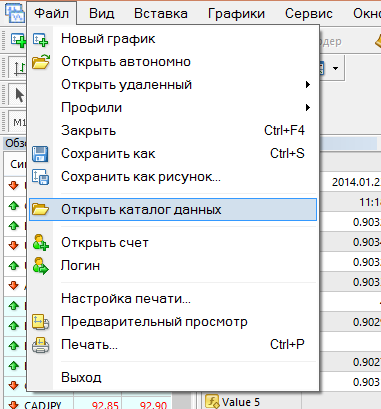
To access the data directory, in the terminal click File -> Open Data Folder
3. Restart the terminal.
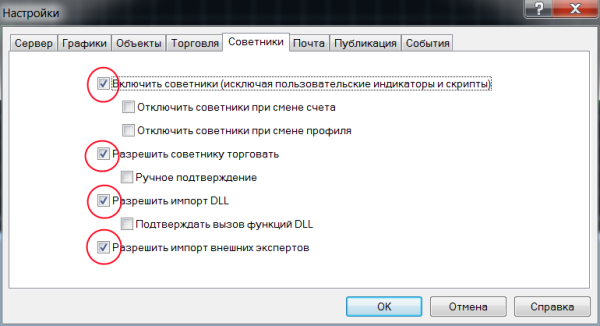
4. Open the Metatrader 4 terminal, go to Tools->Options
Select the Expert Advisors tab and check the boxes as shown in the figure below. Click OK .
5. Launch the strategy tester and follow the instructions from the video.
Download Forex Tester

Respectfully, Pavel TradeLikeaPro.ru