
Spread & Sessions Indicator
 A small indicator for displaying the history of spread changes during different trading sessions.
On accounts with a floating (non-constant) spread value, during news releases, as well as at night in thin-market periods, most dealing centers widen the spread. With this indicator, you can find out how much the spread increases or decreases during trading. And you do not need to be constantly at the monitor, the spread history is displayed on the chart. The indicator also highlights trading session changes in different colors.
Installation
As usual (see How to install a forex indicator) we install the indicator on the chart with the pair we need (any timeframe).
In the settings, set the GMT offset (see How to set the GMT offset) and specify whether daylight saving time is active (DST On/Off).
After that, we get the following picture:
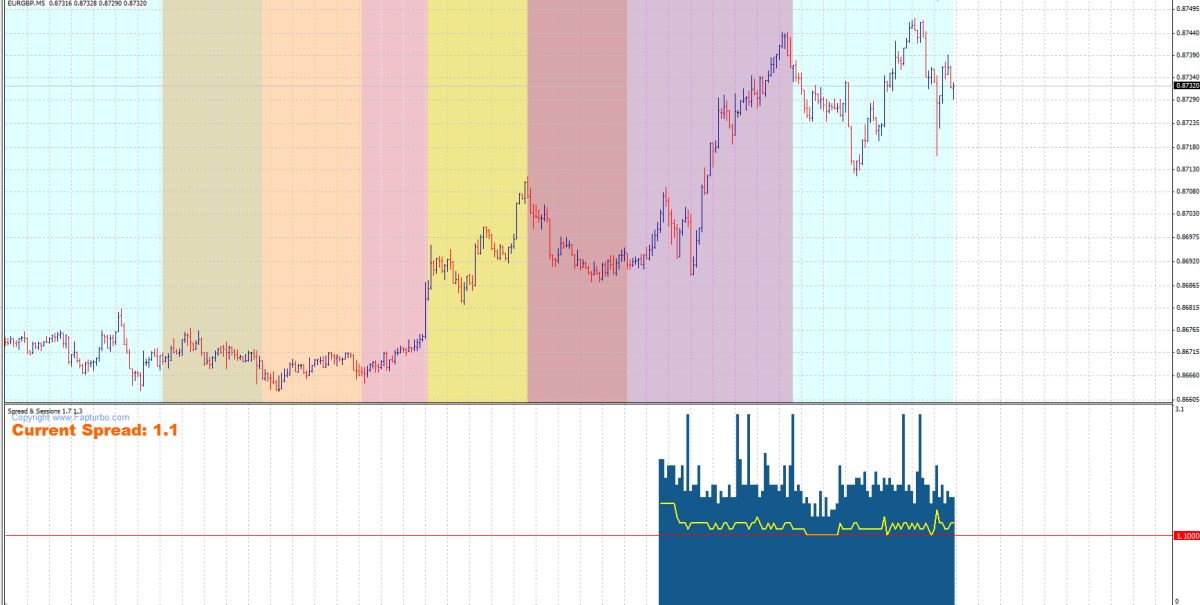 Trading sessions are displayed in different colors, and at the bottom of the screen the current spread value (Current Spread) and a graph of its changes are shown. The history starts being recorded from the moment you install the indicator on the chart with the currency pair.