
Scripts in Metatrader 4
 Hello, friends! In addition to expert advisors, indicators and trading systems, the Metatrader 4 forex terminal has such a thing as scripts. And in the instructions below, we will learn how to install them, configure them, and apply them in practice.
What are scripts?
A script is a program written in the MetaQuotes Language 4 (MQL 4) language and intended for one-time execution of any actions. A script can perform both analytical and trading functions. Unlike expert advisors, scripts are executed on request, not tick by tick. In other words, if an expert advisor works almost constantly, then a script, having worked once, finishes its operation on its own.
Roughly speaking, a forex script is a small utility that performs some one-time function (for example, opening a grid of pending orders or building some graphical figure) when attached to a chart.
How to use scripts?
Metatrader 4 already has several standard scripts, such as opening and deleting positions. You can find them in the Scripts section in the Navigator window (usually located at the bottom left). After clicking the + button opposite the Scripts section, a list of available algorithms will appear.
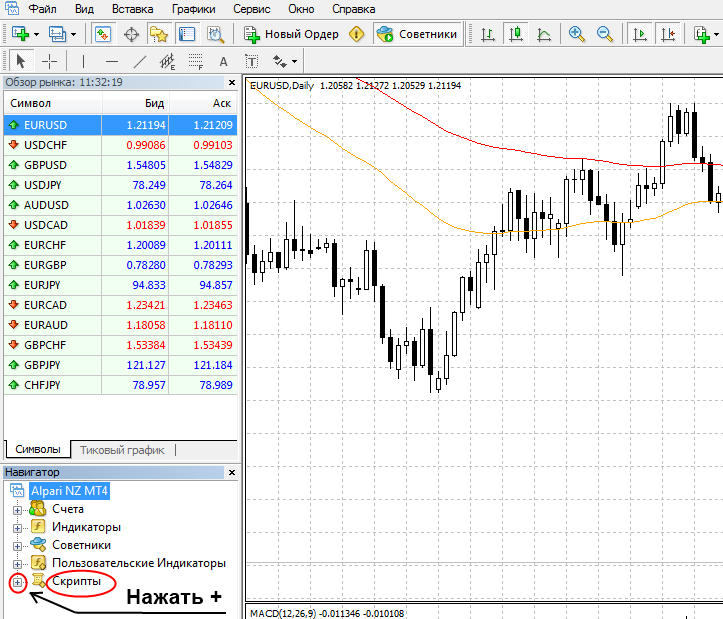
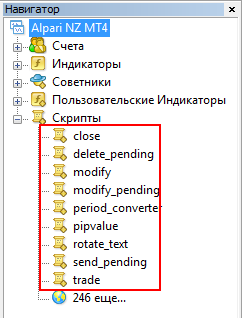
To launch it, drag the desired script onto the chart or simply double-click it with the mouse. A window confirming script activation will appear, for example like this:
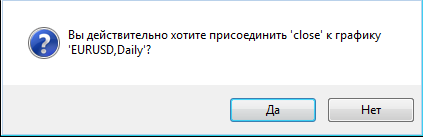
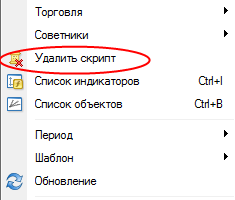
Click Yes and the script will start its work. After performing its function, the script will be automatically removed from the chart. But if you suddenly want to stop its work immediately, this can be done by right-clicking anywhere on the chart and selecting Delete script.
Installing additional scripts in MT4
Scripts can be downloaded in the corresponding section on the forum.
- You must have the Metatrader 4 program installed
- Download the archive with the script, unpack it, and get an ex4 and/or mql file. These files need to be copied into the MQL4 / scripts folder in the data directory of your terminal.
- To get to the data directory, in the terminal click File -> Open Data Folder
- A folder will open; in it we go to the MQL4 section, to the Scripts directory. And copy the files of our scripts there. Close the folder, restart MT4.
- Then go back into our Metatrader 4 terminal, click Tools -> Options on the top panel of the program, and on the Expert Advisors tab, check the boxes as in the screenshot below. Then click OK.
- Open the chart of the desired currency pair and drag the installed script onto it with the mouse (see Applying scripts at the beginning of this article)
How to change script parameters?
Sometimes it is necessary to change the parameters of a script, for example to change the size of the lot being opened (if it is an order placement script) or some other setting. To do this, we will need to change the script code (possible only if the source code is available in the form of an MQL file).
1. In the terminal, right-click the script and select the Modify item.
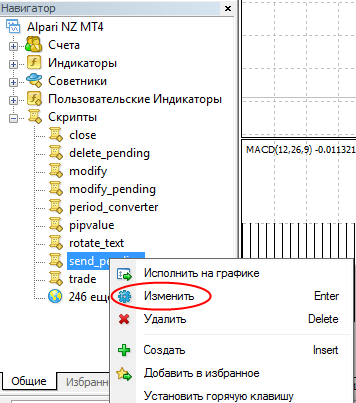
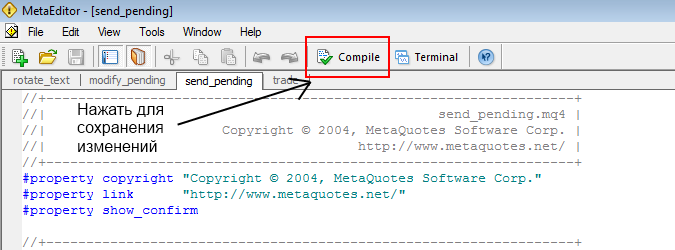
2. The MetaEditor application window will open, where you can change the script parameters. Be careful and do not change anything unnecessary, otherwise the script may stop working!!!
3. To save changes in the code, you need to click the Compile button, then the MetaEditor window can be closed.
That is all. As you can see, there is nothing complicated about using forex scripts in Metatrader 4.
P.S. Subscribe to blog updates via the RSS feed or twitter so as not to miss the appearance of new materials from the world of forex trading.
Sincerely, Pavel TradeLikeaPro.ru