
How to run 2 terminals from one broker at the same time
Task: there are 2 accounts opened with one broker. You want to use one account for trading with advisors, and trade manually on the other one, without being distracted by EA positions. What should you do? After all, when installing a second terminal from the same DC, the installer only offers to check the first installation? There is a way, and it is very simple.
1. Install the first terminal as usual.
2. And now begin installing the second MT4.
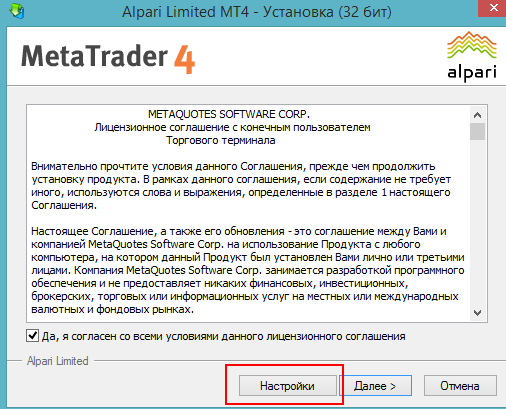
Run the .exe installer, click the "Settings" button, where you will be asked to choose the installation directory.
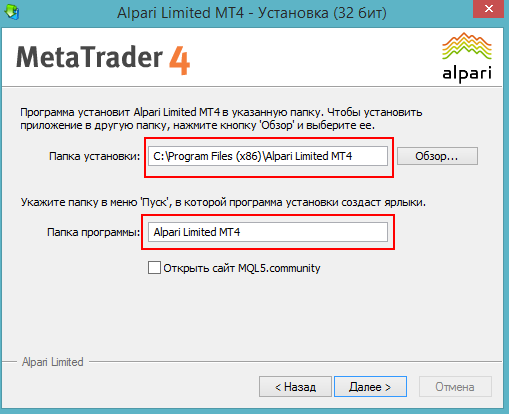
3. In the directory selection line, change the name of the folder where the terminal will be installed to any other name, but of course one that you will later be able to remember what kind of folder it is :) .
For example, by default the installation folder is called Alpari Mt4, and we will change it to Alpari MT4 - 2 to clearly separate the second terminal.
It was like this:
Do this:
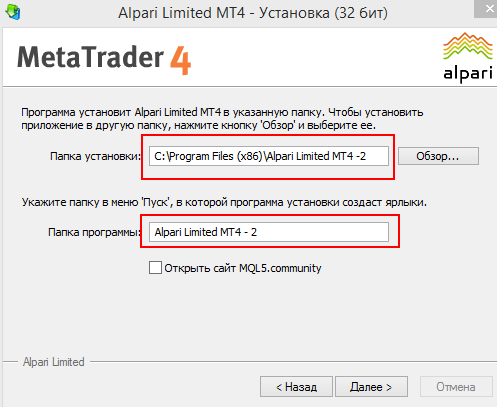
You will also be asked to choose a group in the "Programs" menu. Enter the same thing that you entered in the installation directory name (in our example Alpari MT4 - 2)
Click "Next" and complete the installation.
5. Now you can find both terminals via Start->Programs and use them simultaneously.
Respectfully, Pavel Vlasov TradeLikeaPro.ru