
Report Manager

Everyone knows how to do simple backtests of expert advisors (and if you do not, watch the video lesson). We have also covered how to perform the most accurate tests.
But what if you want to put several advisors on one account at once, or the same expert on 2-3 currency pairs? How do you calculate the possible drawdown in that case?
To test the combined operation of advisors on one account, we will need a special program: Report Manager.
What does it do? It "combines" the backtests of 2, 3, or more advisors and produces a consolidated report where we can see what would have happened to the balance, drawdown, and so on if the advisors had been running simultaneously.
Everything is simple here. Extract the EXE file from the archive and install it like a regular PC program (on Windows 7, run the installer as administrator).
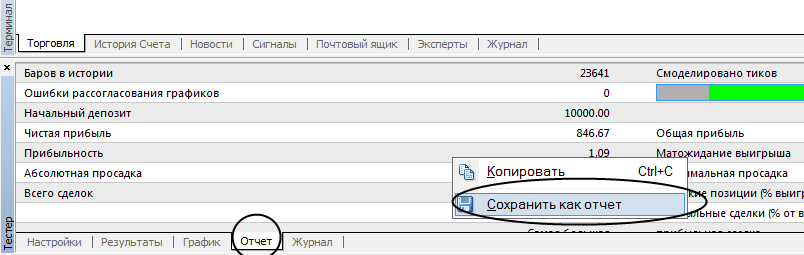 Give the report a name and save it.
2) Click File->Open Reports.
Hold down Ctrl, select all the HTML files of our reports, then click Open.
3) Next, press Shift+Enter and you will see that another report, highlighted in blue, has appeared in the list on the left side of the program window.
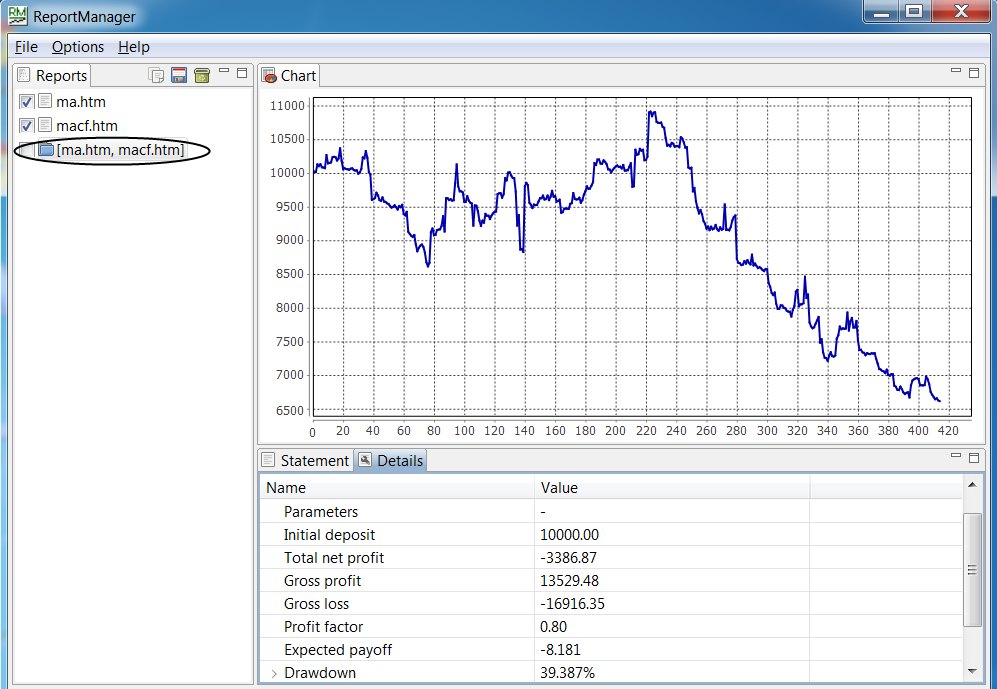 4) This is our combined report. Double-click it to open it in the program window. Now we can view the balance chart, profits/losses, and so on as if several advisors had been tested simultaneously on one account.
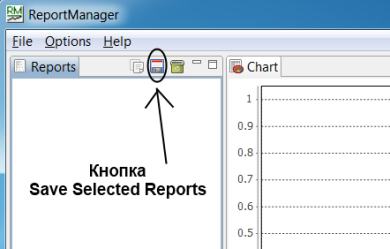
The resulting report can be saved by checking the box next to it and clicking the Save Selected Report icon in the program menu.

Best regards, Pavel
TradeLikeaPro.ru
Poluchennyy otchet mozhno sokhranit, postaviv vozle nego galochku i nazhav ikonku Save Selected Report v menyu programmy.
Skachat programmu Report Manager

S uvazheniem, Pavel
TradeLikeaPro.ru