
Possibly the Best Trade Copier
Pavel // '); // ]]>
We have already looked at how and why to copy trades from account to account in the Trade Copying article. Today I want to present to you a more advanced signal copier (or as some say, a copying machine :) ).
So how is it better than the copier posted earlier?
- The ability to copy trades from one terminal to several accounts at once. It is also possible to copy signals from several terminals to one account.
- You can open positions in reverse. That is, if a buy is opened on the signal account, a sell will be copied to the client terminal. And vice versa.
- Simple installation
- There is a time offset from Greenwich parameter, which helps bring the time in terminals of different brokers to a common denominator and use the trade "expiration" parameter correctly (so that old trades are not copied).
- Flexible settings
Installation
- Download the archive at the end of the article and unpack it.
- Copy the GlobalVariable.dll file to the Windows/system32 folder if you have WinXP, or to windows/system if you have Win7/Vista.
- Copy the AccountExport-EA.ex4 file to the metatrader4/experts folder of the master terminal(s) from which trades will be copied.
- Copy the AccountImport-EA.ex4 file to the metatrader4/experts folder of the client terminal(s) to which trades will be copied.
- In all MetaTraders go to Tools->Options->Expert Advisors and check the boxes as in the screenshot below
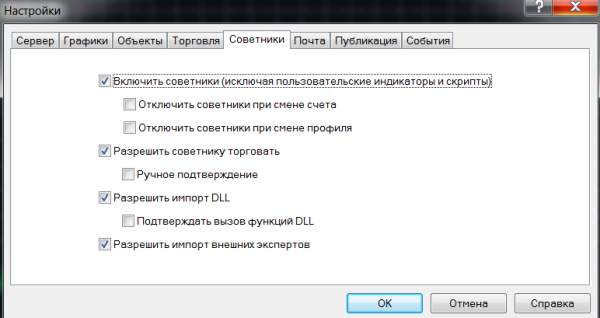 6. Click OK.
7. Attach the installed advisors in each terminal with the mouse (the pair and timeframe can be any). Configure the experts (see the settings description below). Now the trades made on the terminal with the advisor AccountExport-EA will be copied to the terminal(s) with the expert AccountImport-EA . installed
Description of parameters
AccountImport:
- SlaveNames names of the terminal(s) from which trades will be copied. You can assign a name to a terminal in the settings of the master advisor (AccountEaxport.ex4).
- MyMagic magic number for copied trades.
- HourShiftGMT time offset from Greenwich, see How to set the correct GMT offset
- PairPrefix if your broker uses a prefix in pair names, for example mEURUSD, then in this setting specify this prefix, for example m
- PairSuffix if your broker uses a suffix in pair names, for example EURUSDfx, then in this parameter specify the added ending, for example fx
- Lots trading lot with which trades will be copied
- LotDigits number of digits after the decimal point in the trading lot (if your minimum lot is 0.1 then set 1. If 0.01 then 2)
- MinLots minimum lot that will be used for trading
- MaxLots maximum lot that will be used for trading
- ExportLots when this parameter is enabled, the lot size will be copied from the master terminal
- ExportLotMultiply multiplier for the ExportLots parameter
- MaximumRisk money management (risk per trade in %) if FixedLot =false
- FixedLot - if you disable this parameter (false), money management will be used instead of a fixed lot.
- Slippage allowed slippage (in points)
- MaxMarketDiff allowed deviation of the trade opening price from the price of the copied order (in points)
- Wait4ValidMarketDiff if this parameter is enabled, then when the MaxMarketDiff level is exceeded the advisor will try to open the trade later, if the price returns again to the opening price of the copied order
- ExpireMinutes time in minutes for how long the signal from the master terminal will remain valid (so as not to copy outdated trades). At 0 this function is disabled
- NumberTries number of attempts to close/open an order
- StopLimitOrders whether to copy limit orders or not
- PendingSLTP similar to the ECN parameter, that is, when enabled the advisor will first open an order and only then add TP and SL.
- Wait4TPSL when enabled (true), do not close positions if TP or SL was triggered on the master account (but not on the client account)
- Wait4TPSLMktClose when enabled (true), do not close positions if the order on the master account was closed at the market price (wait until TP or SL is triggered)
- SL_InPoints when this parameter is enabled (true), N points specified in the SL_adjust parameter will be added to the SL of the order from the master terminal
- TP_InPoints when this parameter is enabled (true), N points specified in the TP_adjust parameter will be added to the TP of the order from the master terminal
- TP_adjust see TP_InPoints
- SL_adjust see SL_InPoints
- Own_TPSL when enabled (true), the advisor will set its own SL and TP
- OwnTP take-profit for the Own_TPSL function
- OwnSL stop-loss for the Own_TPSL function
- TradeBuySide allow copying buy trades
- TradeSellSide allow copying sell trades
- closeAllNow if enabled, the advisor will immediately close all orders
Account Export:
- System name of the master terminal (can be any)
- HourShiftGMT time offset from Greenwich, see How to set the correct GMT offset
- PairPrefix if your broker uses a prefix in pair names, for example mEURUSD, then in this setting specify this prefix, for example m
- PairSuffix if your broker uses a suffix in pair names, for example EURUSDfx, then in this parameter specify the added ending, for example fx
- ReverseTrades when enabled, the advisor will send opposite signals for copying (instead of buys, sells; instead of sells, buys)
The best way to understand how the system works is to actively test it on demo accounts.
Download the archive with files

Important! Nuances of installation in new builds of Metatrader 4
Sincerely, Pavel TradeLikeaPro.ru
#expert advisors#free download#download#metatrader 4#forex