
Optimizing Work with VPS
Hello, ladies, gentlemen, allies, and simply fellow forex traders! As is known, if you use expert advisors in your trading, that is, the same robots, then you simply cannot do without a VPS server. A basic guide is already available on our website, so today we will talk about how you can optimize working with a VPS server a little. What programs are needed for this, what "hacks" can be used so that the server works a little faster and managing it becomes a little more convenient.
System Optimization

The first program we will need is Auslogics BoostSpeed Premium (it can be downloaded on any torrent tracker). The program cleans the disk of unnecessary files, defragments the registry, and removes excess junk.
The program is installed like any other one for Windows, nothing complicated. In version 9, immediately after launching the executable file, installation of the program into the default directory begins; there is no need to confirm anything additionally. There is no fundamental difference between the new and old versions, the essence is the same. First, it cleans the computer of junk and, second, performs a little optimization in real time.
When the program starts, an automatic check is carried out. The program gives an assessment of the system state (everything is bad) and determines how much and what can be removed. To fix the detected problems, click "Repair all".
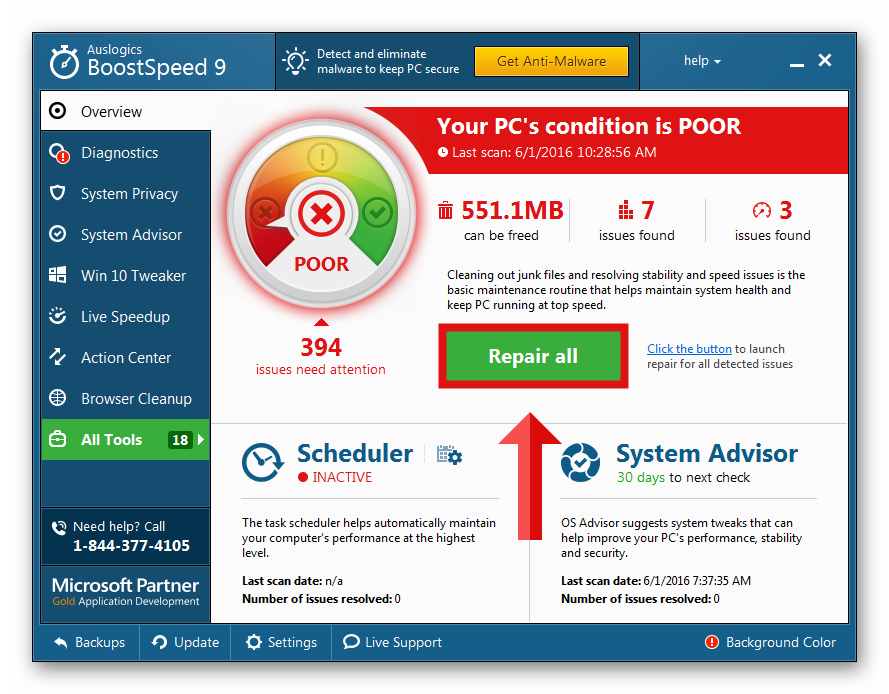
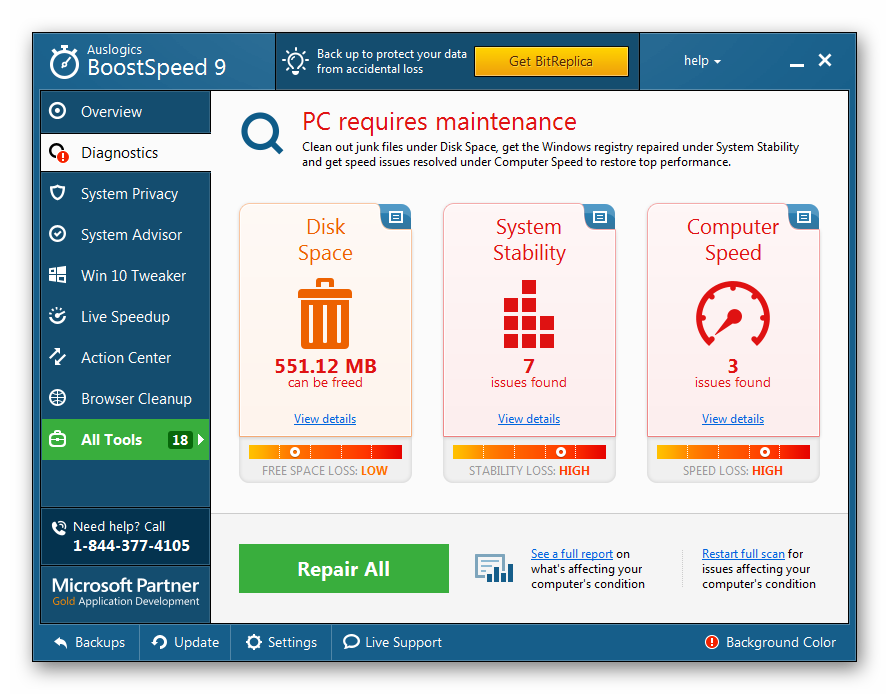
The program strikes on three fronts at once: disk size, work stability, and PC speed. If you want to restart the computer check, this can be done from the "Diagnostics" tab. Fortunately, this does not need to be done so often; the program itself performs analysis and reminds you about the need for a check about once a week.
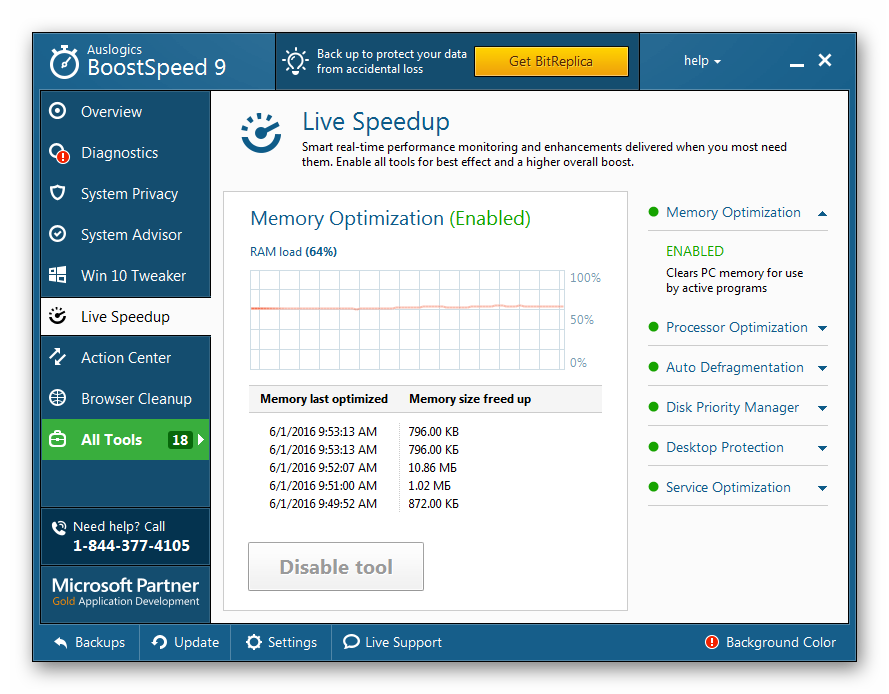
After minimizing the program to the tray, it will continue working on RAM optimization, which can be verified by going to the "Live Speedup" tab. To the right of the memory load graph, you can enable or disable additional acceleration settings such as: memory optimization, processor operation optimization, automatic defragmentation, and service optimization.
In addition to the main functions of the program, the "All Tools" tab contains many useful utilities. Here is a list of auxiliary tools for optimizing system operation.
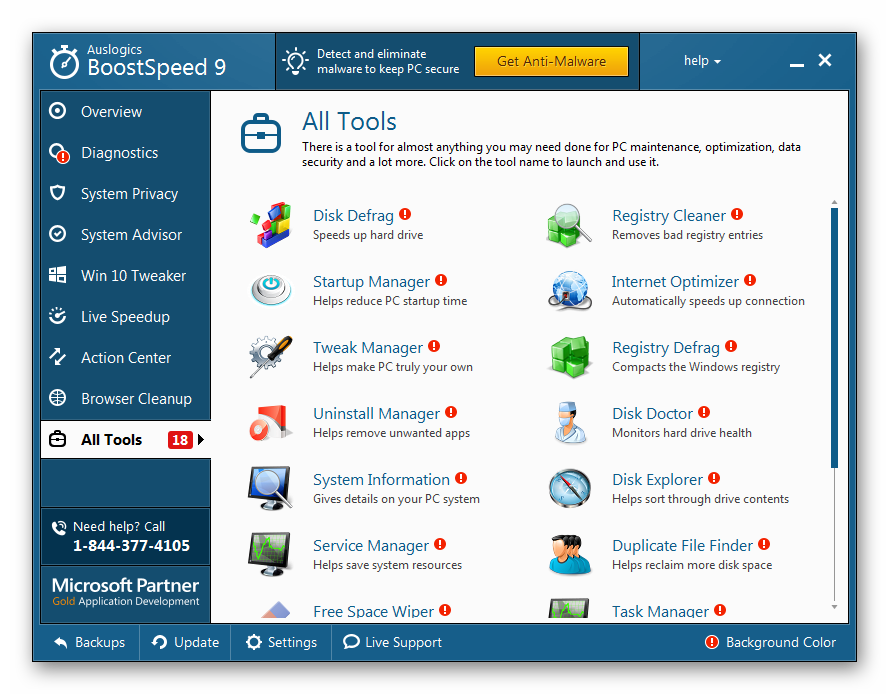
- Disk Defrag is a disk defragmentation tool. This operation can speed up the hard drive a tiny bit.
- Internet Optimizer is internet connection optimization. This function should not be used on a VPS server. If you do not know what kind of internet connection there is, you can only make it worse.
- Registry Cleaner is system registry cleanup. There is no need to clean too often, but periodic checks will not hurt.
- Registry Defrag also allows you to increase computer performance a little, but this should not be done especially often either. For most users, once every six months will be quite enough.
- Unistall Manager is an application removal manager. If some program is not removed completely or leaves behind a pile of junk, this tool will help clean it from the computer completely.
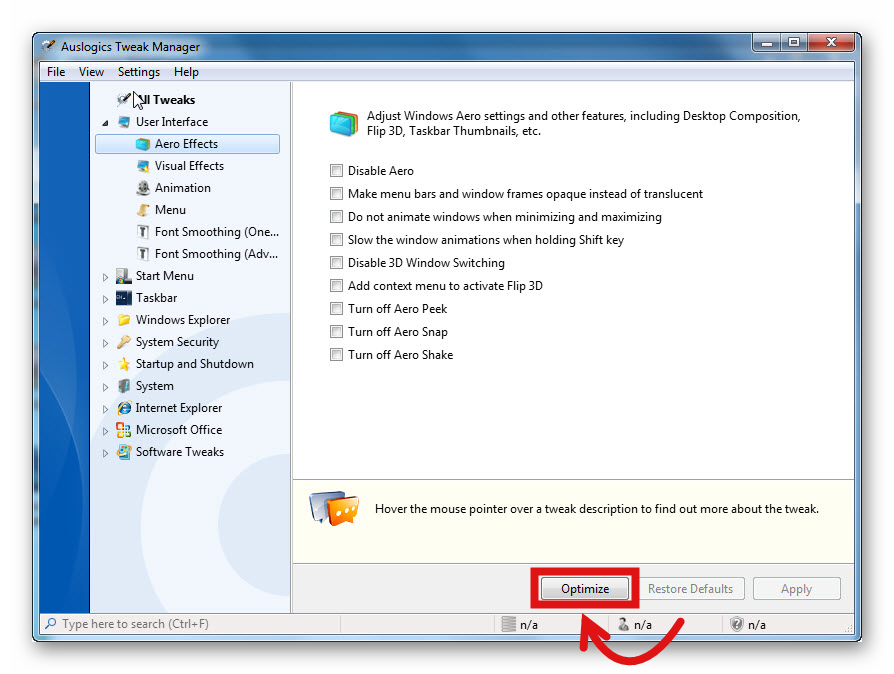
- Tweak Manager gives you the ability to optimize the visual interface to achieve maximum speed: visual effects, submenu appearance delay, animations, and font smoothing. To avoid configuring everything manually, click "Optimize" at the bottom of the window and, when the program checks the needed boxes, click "Apply". Besides the visual interface, there is an option to optimize system startup and shutdown, but as a rule, the server is constantly in working mode and it does not need to be rebooted that often.
A Proper Browser
Another thing you should install is a proper browser. The lightest option is Google Chrome. This is especially convenient if you use Chrome on your home computer, because then, by logging into the same account, all your bookmarks, passwords, and tab history will be synchronized on both devices. If you prefer some other browser, feel free to install it. The same Opera or Mozilla Firefox will do.
WinRAR Archiver
It also would not be superfluous to download the WinRAR archiver. Especially if you constantly download some files of strategies and expert advisors that need to be unpacked beforehand. If you do not install WinRAR, you will have to unpack the archive first on your home computer and then repack it into zip to transfer it to the VPS server, which is not convenient at all. It is better to make life easier for yourself and install the archiver directly on the VPS. A fresh version can also be found online without difficulty.
Cloud Storage
Also, it would be a good solution to install a cloud storage client on your own computer and on the VPS. Most likely, you already use some solution for storing files in the cloud, for example, Yandex Disk, the most popular solution in Russia. A small amount of space, as with the others, is provided for free. It can also be Dropbox, Google Drive, OneDrive from Microsoft, and others; there is no fundamental difference.
The only thing is that during installation on the VPS you will need to choose for synchronization not the whole system, but one separate folder, for example, "Files for VPS." This is needed so that, say, your hundreds of photos are not uploaded to the VPS, but only the files needed for trading are uploaded (expert advisors, templates, indicators). That is, you put files into the folder on your computer, and they appear on the VPS: everything is simple and even faster than copying files directly.
Conclusion

Of course, you should not expect that a minimally configured server will turn into an incredibly powerful machine. But improving performance a little is within our power. In any case, there is no point in installing a huge number of programs on a VPS, since the server's resources are quite limited. Therefore, we install only the bare essentials.
Sometimes the question arises: is it necessary to install an antivirus? As for me, it is absolutely unnecessary, and an antivirus will only eat up system resources. It is unlikely that you need a VPS in order to surf dubious websites with adult content. For all other tasks, the firewall built into the system is enough.
Sincerely, Pavel Vlasov TradeLikeaPro.ru
