
Night Owl Expert Advisor - Makes Money While You Sleep!

Hello, dear traders. We present to your attention the profitable forex expert advisor Night Owl. Its distinguishing feature is multi-currency scalping during the nighttime hours. While you are dreaming, this robot earns profit for you.
Expert Advisor Characteristics
Platform: Metatrader 4
Expert advisor version: 3.02
Currency pairs: EURUSD, GBPUSD, USDCHF, EURGBP, EURCHF, EURCAD, USDCAD
Timeframe: M15 (for EURUSD M30)
Operating time: Asian session
Recommended broker: Alpari (ECN accounts)
Installation Guide
We install the expert advisor as usual. If you are encountering Forex robots for the first time and have a lot of questions, download and watch the course Forex on Autopilot.
In this expert advisor, the settings for each pair are already specified in the code itself, so simply open the required pairs on the required timeframe and attach the expert advisor to each chart. On each chart, set the correct GMT offset for each attached expert advisor (how to do this, read here and here).
Expert Advisor Strategy
Trading style: scalping in a limited range. The expert advisor works during the Asian session, when trading activity is minimal, and is a range scalper.
Expert Advisor Backtest
Backtests were made for each pair separately, since the Metatrader 4 platform does not allow multi-currency tests.
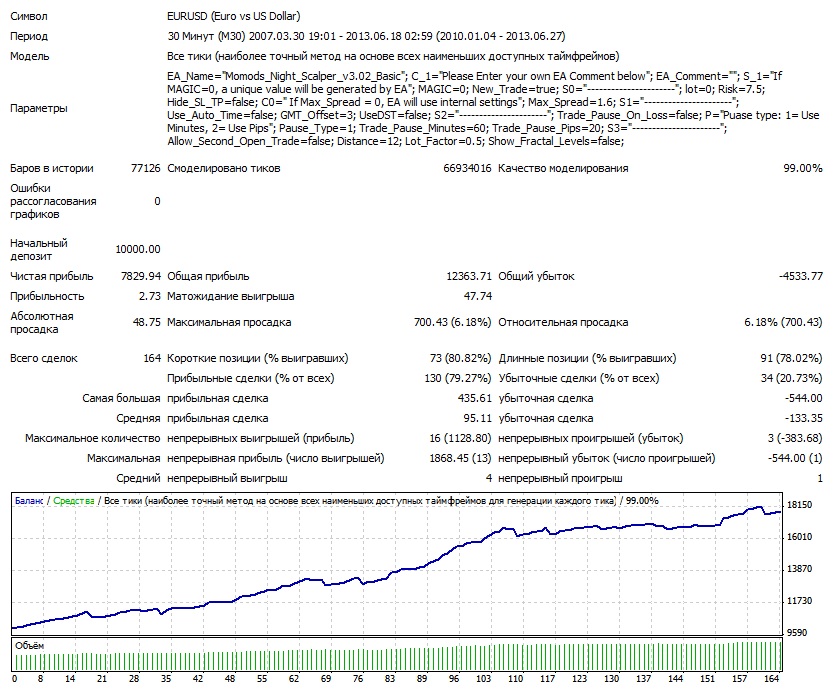
EURUSD
2010-2013
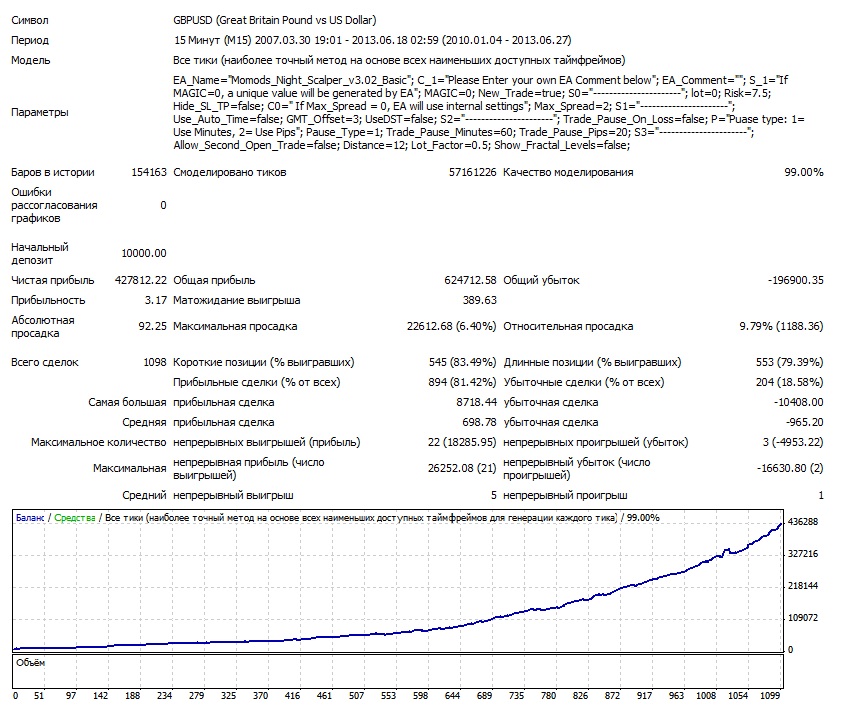
GBPUSD
2010-2013
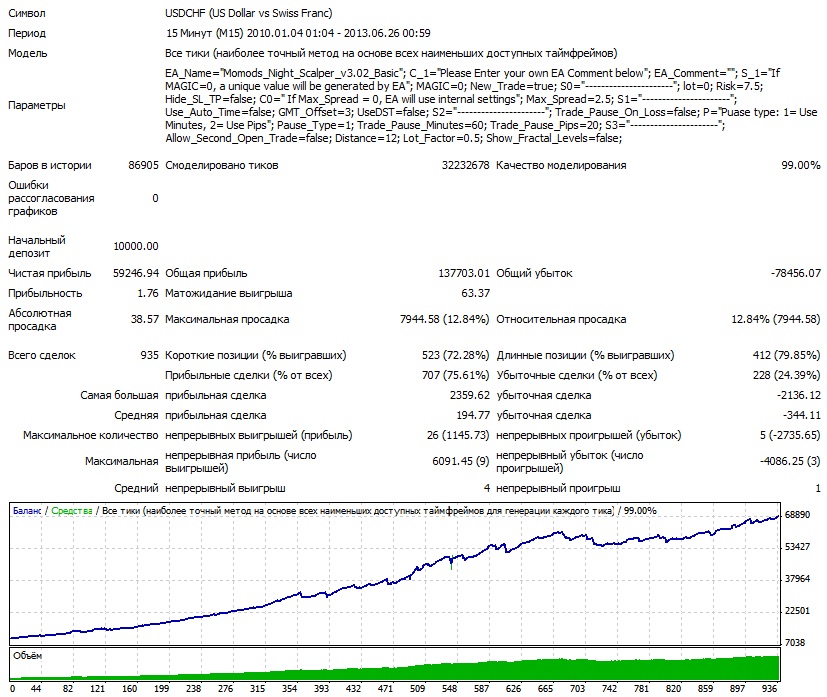
USDCHF
2010-2013
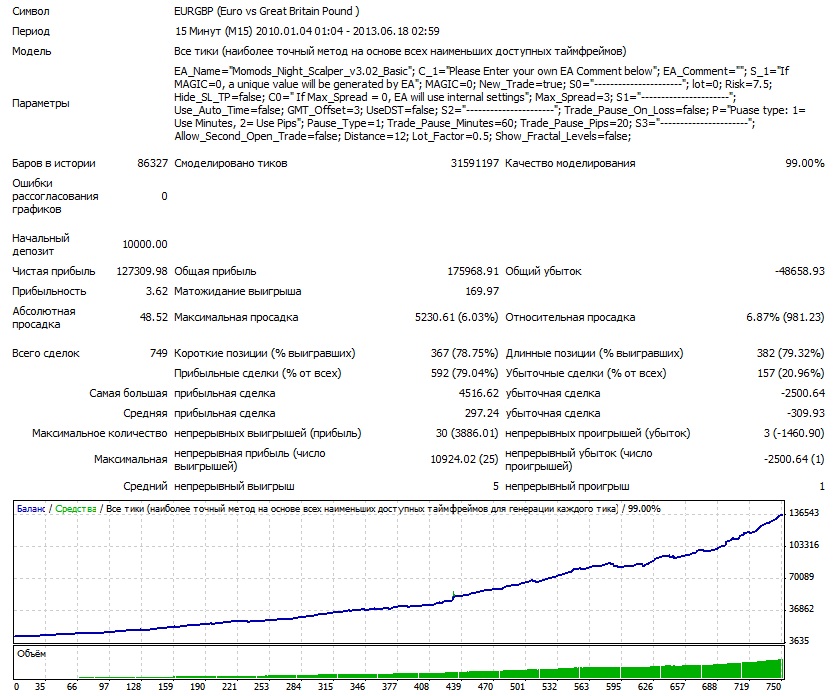
EURGBP
2010-2013
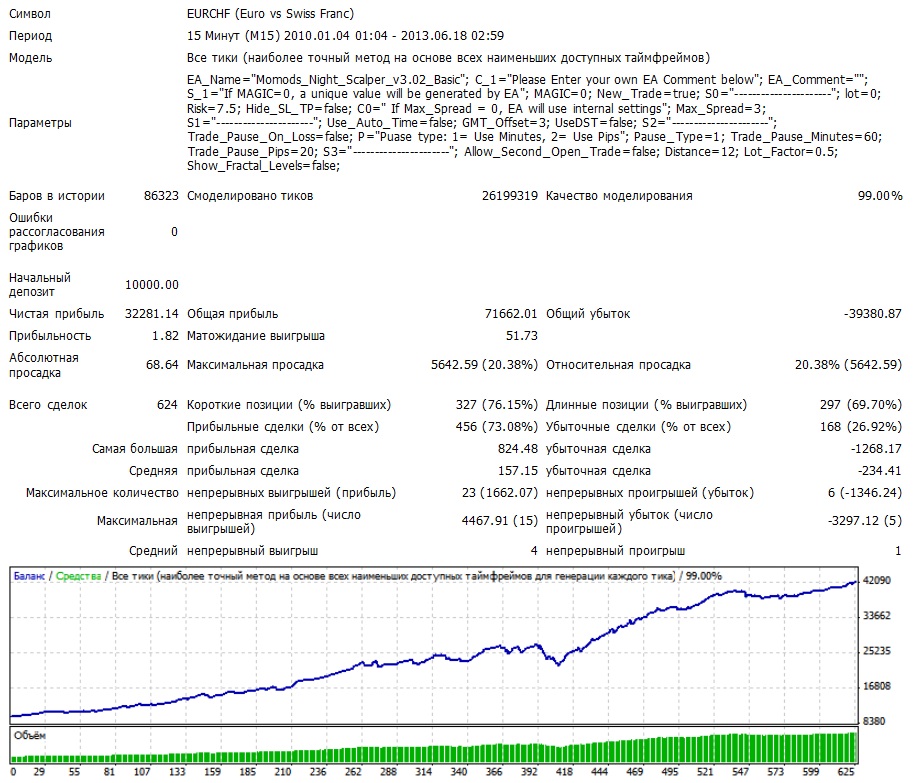
EURCHF
2010-2013
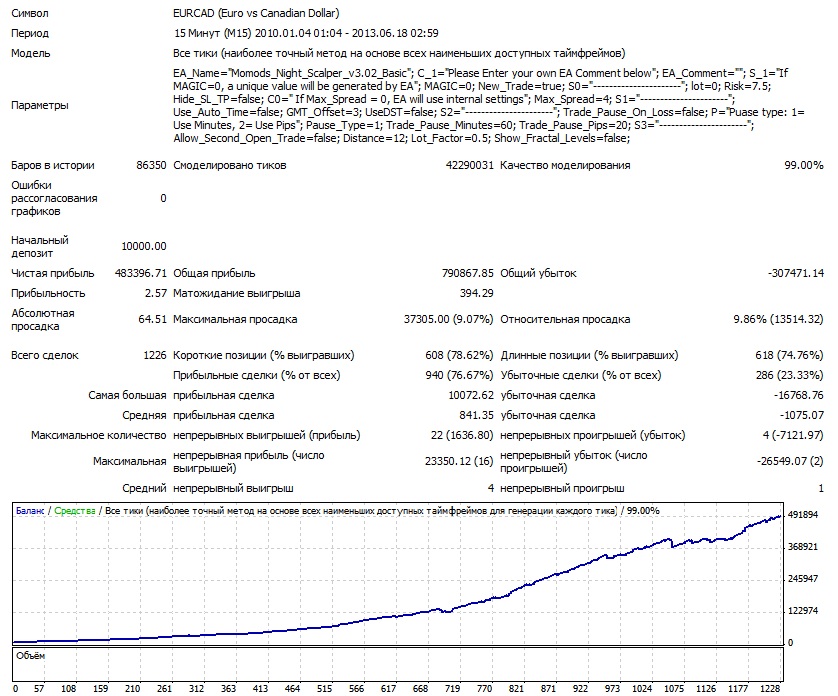
EURCAD
2010-2013
USDCAD
2010-2013
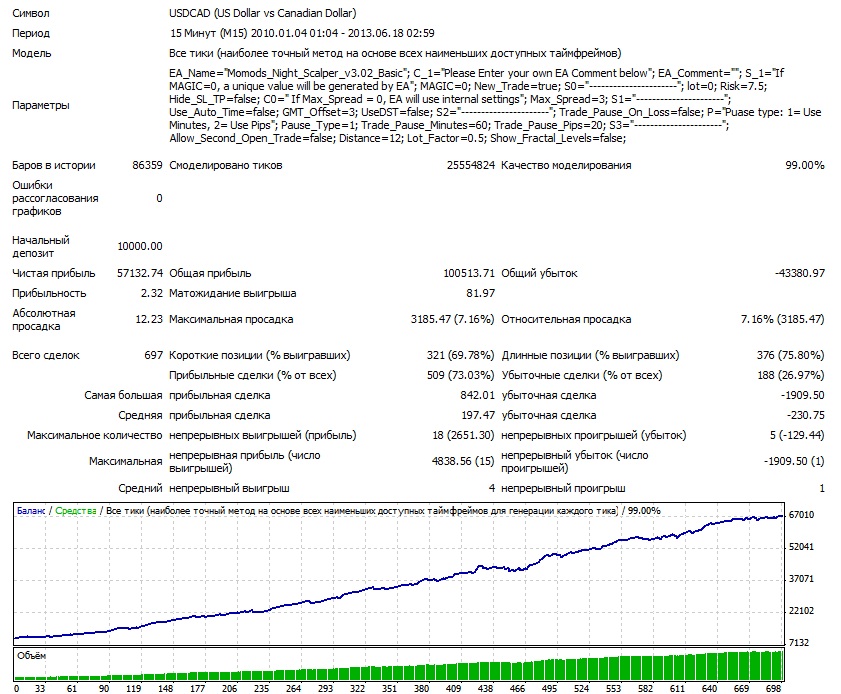
As we can see, drawdown periods do not occur simultaneously across all the pairs used, which increases trading safety, and when several profitable currency pairs are used at the same time, we get highly efficient trading with low drawdowns.
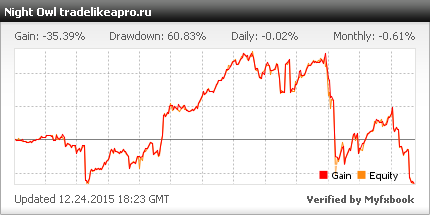
Live account monitoring
Settings description
- EA_Name - the name of the expert advisor
- C_1 - explains the meaning of the EA_Comment field
- EA_Comment - a field for setting a comment on the expert advisor's orders
- S_1 - explains the meaning of the MAGIC field
- MAGIC - you can set the magic number for orders. If the value is 0, the expert advisor's own set is used for each pair
- New_Trade - the switch for placing new orders, by default True (trading enabled)
- S0 - a row in the settings "for beauty", carrying no meaning
- lot - the lot size. If absent, the calculation based on the Risk variable is used
- Risk - the risk in percent for each trade
- Hide_SL_TP - hide stop losses and take profits from the broker, by default False (do not hide)
- Slippage - slippage in points
- C0 - explains the meaning of the Max_Spread field
- Max_Spread - you can set the maximum spread. If the value is 0, the expert advisor's own set is used for each pair.
Recommended spread values for the expert advisor:
1. EURUSD - spread 1,6
2. GBPUSD - spread 2,0,
3. USDJPY - spread 2,0,
4. USDCHF - spread 2,5,
5. EURGBP - spread 3,0,
6. EURCHF - spread 3,0,
7. EURCAD - spread 4,0,
8. USDCAD - spread 3,0
- S1 - a row in the settings "for beauty", carrying no meaning
- Use_Auto_Time - automatic GMT detection, default FALSE
- GMT_Offset - manual setting of server time ( what GMTOffset is )
- UseDST - account for so-called daylight saving time, by default FALSE (do not account for it)
- S2 - a row in the settings "for beauty", carrying no meaning
- Trade_Pause_On_Loss - the switch for a trading pause after receiving a loss on a trade, by default FALSE (do not account for it)
- P - explains the meaning of the Pause_Type field
- Pause_Type - the type of pause after a loss: 1 - in minutes, 2 - in pips
- Trade_Pause_Minutes - pause after a loss in minutes
- Trade_Pause_Pips - pause after a loss in pips
- S3 - a row in the settings "for beauty", carrying no meaning
- Allow_Second_Open_Trade - the switch for placing a second order after opening the first one, by default false (not used)
- Distance - the distance in pips for placing the second order
- Lot_Factor - the size ratio of the second order relative to the first
- Show_Fractal_Levels - show fractal levels on the chart, by default False (not used)
Attention! Do not change anything in the expert advisor parameters and use only the recommended spread values unless you understand exactly what you are doing!
Recommended money management
It is not worth setting trade risks above 7%. If you use a fixed lot, the recommended level is approximately as follows: a 0.01 lot for every 200 units of currency in the account.
Conclusion
The Night Owl night expert advisor is a steadily profitable multi-currency scalping robot. Without a doubt, this expert deserves close attention and is recommended for use on live accounts.
Important !!!
For the expert advisor to work correctly, the trading terminal must be turned on from the market opening on Sunday evening until its closing on Friday evening. If you do not have the ability to keep your computer running 24/5, then I recommend using a VPS server service.
Download the "Night Owl" expert advisor
Important! Installation nuances for new Metatrader 4 builds
Respectfully, Alexey aka Merlin TradeLikeaPro.ru