
MQL5 Cloud Network or How to Speed Up Expert Advisor Optimization in MT5

We all know the situation when, after starting expert advisor optimization, the optimization completion counter discouragingly shows weeks, months, and years until completion. In the MetaTrader 5 terminal, they tried to solve this problem with the help of a special service, MQL5 Cloud Network, which is designed to increase the optimization speed of your forex expert advisors.
Traders sometimes need to perform optimization over tens and hundreds of thousands of passes within a reasonable time. With the multi-threaded strategy tester and the MQL5 Cloud Network cloud, you can run calculations in an hour that would take you several days on your own. The computing power of thousands of cores is available right in the trading platform. That is the service we will talk about today.
Using the Network

If you need additional computing power to optimize your expert advisors, you can get it with the help of the trading platform.
You only need to open the Strategy Tester window, and you will see that, in addition to local and remote agents, agents from the MQL5 Cloud Network are also available. The MQL5 Cloud Network cloud computing network makes it possible to optimize an expert advisor in the shortest possible time by using the power of thousands of computers. The network combines users' remote agents and distributes optimization tasks among them. The strategy tester connects to the cloud computing network through several access points distributed by territory (for example, MQL5 Cloud Europe). For fast access and better cloud load balancing, all agents are registered at the nearest MQL5 Cloud Network access point. MQL5 Cloud Network gives traders the opportunity to optimize automated trading systems written in the MQL5 programming language in a short time, and gives owners of idle resources a way to earn from them. This is a special system designed to combine remote agents into a single cloud computing network. Its key advantages are:
- The ability to provide your own and use third-party computing power on both a free and a commercial basis.
- No need for complex network setup to access agents - MetaTester and the MQL5 Cloud Network organize access and distribute incoming tasks among agents on their own.
- The full power of the MQL5 Cloud Network is used only during a complete parameter sweep (slow optimization). During genetic optimization of expert advisors, only agents from one access point are used, which is related to the specifics of the genetic algorithm itself. Genetic optimization mode is enabled automatically if the total number of optimization steps exceeds 100,000,000. The MQL5 Cloud Network can only be used on 64-bit systems. In addition to using the MQL5 Cloud Network, you can provide your own computing power to the network and earn money from it.
MT5 Agent Manager
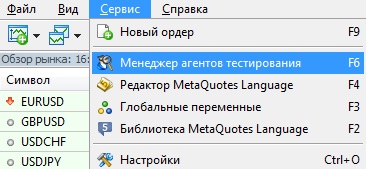
To open the agent manager, in the MT5 terminal just press the F6 key or choose the Service tab from the main menu and select Agent Manager for Testing from the drop-down list:
On the manager's main tab, useful information about agent usage is displayed. Statistical data on the number of tests performed with the help of agents, as well as the time spent on them, is also shown here.
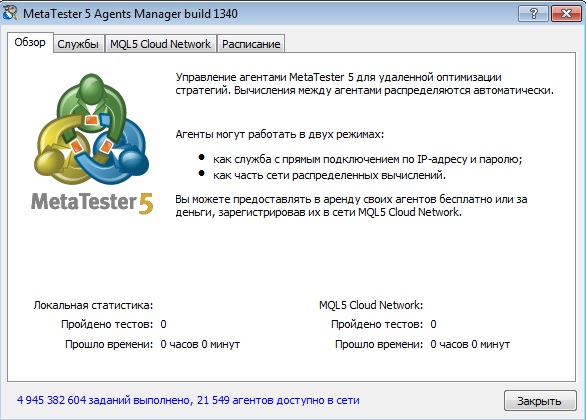
Statistics are provided for two agent operating modes:
- Local statistics. In local mode, agents are used as services installed on the computer, which are connected to using the specified address and password.
- Statistics for MQL5 Cloud Network. In this operating mode, agents work as part of the specialized MQL5 Cloud Network.
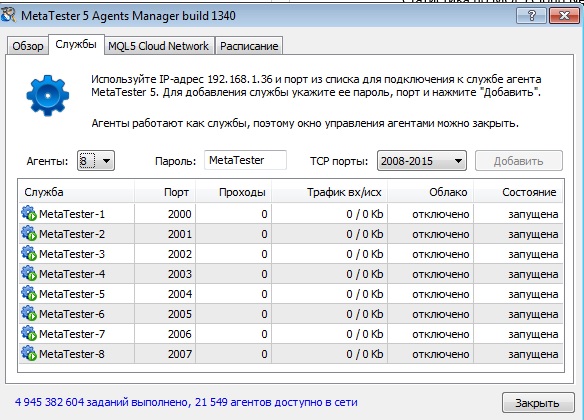
The Services tab is intended for managing agents on the computer. To install testing agents, specify:
Agents - the number of agents that need to be installed. It is recommended to install as many agents as there are logical cores in the computer's processor.
Password - the password for connecting to the agents. This password must be specified when adding agents in the strategy tester.
TCP Ports - the range of ports (or one port when installing a single agent) on which the agents will operate. The port number is also specified when connecting to the agents from the strategy tester.
To install agents, click Add. Agents are installed at the IP address shown in the upper part of the tab. Use this address to connect to them.
To install and manage agents, the user must have administrator rights in the system.
Below is a list of agents that have already been installed:
Service - the name of the service under which the agent is running in the operating system; this name is assigned automatically.
Port - the port number on which the agent is running.
Passes are the number of testing passes performed by the agent.
Incoming/outgoing traffic is the volume of the agent's incoming and outgoing traffic.
Cloud is the network connection status. This parameter makes it easy to make sure that agents can receive tasks from the cloud computing network.
Status is the current state of the agent: running, stopped.
Context menu
You can manage installed agents using the context menu commands:
Start launches the selected agent.
Stop stops the selected agent process. The corresponding service will be stopped in the system, and connection to the agent will become impossible.
Restart stops and then starts the selected agent again.
Refresh updates the list of installed agents.
Export exports the agent settings to an *.mt5 file. These settings can be imported into the trading platform to connect to the installed agents.
Delete removes the selected agent.
When the MetaTester window is closed, running agents are not stopped. To stop an agent, execute the corresponding command in its context menu.
The MQL5 Cloud Network cloud computing network makes it possible to organize the exchange of computing resources between those who need them and those who can provide spare processor time on their computers.
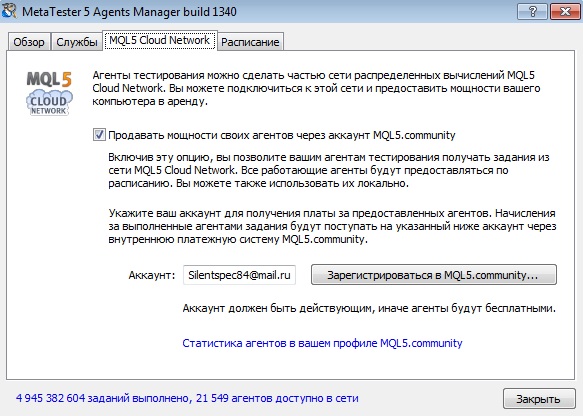
The tab contains an option for managing participation in the distributed computing network MQL5 Cloud Network: Sell the power of your agents through an MQL5.community account. When this option is enabled, the user allows their remote agents to be used through MQL5 Cloud Network. Each agent service will be available on the network according to the specified schedule. When connected to MQL5 Cloud Network, the agent remains available for regular remote connections via IP address and password.
To provide agent computing power for money, specify your MQL5.community account in the corresponding field. Funds for the use of agents by other users will be credited to the specified account through the internal payment system of MQL5.community. If you do not have an account, you can create one by clicking the "Register at MQL5.community..." button. You must enter a valid account carefully, otherwise the agent services will be provided to other users free of charge. You can view the availability of agents on the network and manage them on the "Agents" tab in the MQL5.community user profile.
To participate in MQL5 Cloud Network, you cannot install more agents than the logical CPU cores. To connect agents to MQL5 Cloud Network, the computer on which the agents are installed must have at least 2048 MB of RAM. If Internet access is through a proxy server, specify its settings either in the trading platform or in Internet Explorer. If the MQL5.community account is incorrect or not specified at all, the computing power of the agents will be provided free of charge!
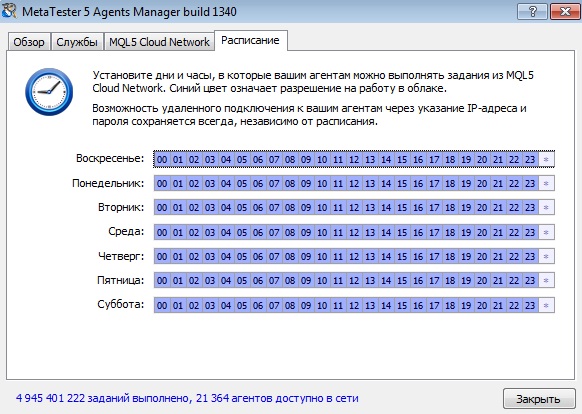
Using the "Schedule" tab, you can set a schedule according to which remote agents will be available on the MQL5 Cloud Network. For example, you can forbid task execution during working hours if you need the computer's power yourself during the day. The hours when agents are available are marked in blue, and the hours when they are unavailable are marked in light color. To switch between a working and non-working hour, click the corresponding square. To switch all hours of a particular day, click the asterisk at the end of the row. This schedule does not affect the availability of agents for regular remote connection via IP address and password.
This completes agent setup. You can now close the MetaTrader 5 Agents Manager window; the agents are running as services and do not require your attention. If necessary, you can change their settings at any time by running the MetaTrader 5 Strategy Tester program.
Payment for Using MQL5 Cloud Network

Using agents of the MQL5 Cloud Network is a paid service. The current balance of the MQL5.community account is displayed above the list of cloud agents. To use MQL5 Cloud Network, the MQL5.community account must have at least US $1 on the balance. Tasks are distributed in batches to several access points at once, so the user must be able to pay for these services. The network cannot calculate in advance how much time and resources will be required to process these tasks. To activate the network agents, enable them with the "Enable" command in the context menu of the "Agents" tab in the strategy tester. Since the MQL5 Cloud Network service is paid, the user must have an account on the MQL5.community website through which all settlements are made. Account information is specified on the "MQL5.community" tab in the platform settings. If information about the MQL5.community account has not previously been specified, you will be prompted to do so when enabling MQL5 Cloud Network agents.
Using MQL5 Cloud Network for Optimization

As with regular optimization, specify the required testing settings and the expert's input parameters, then click "Start". On the "Agents" tab you can see how the strategy tester distributes tasks to the available agents. For each access point, the number of currently available and engaged agents is displayed.
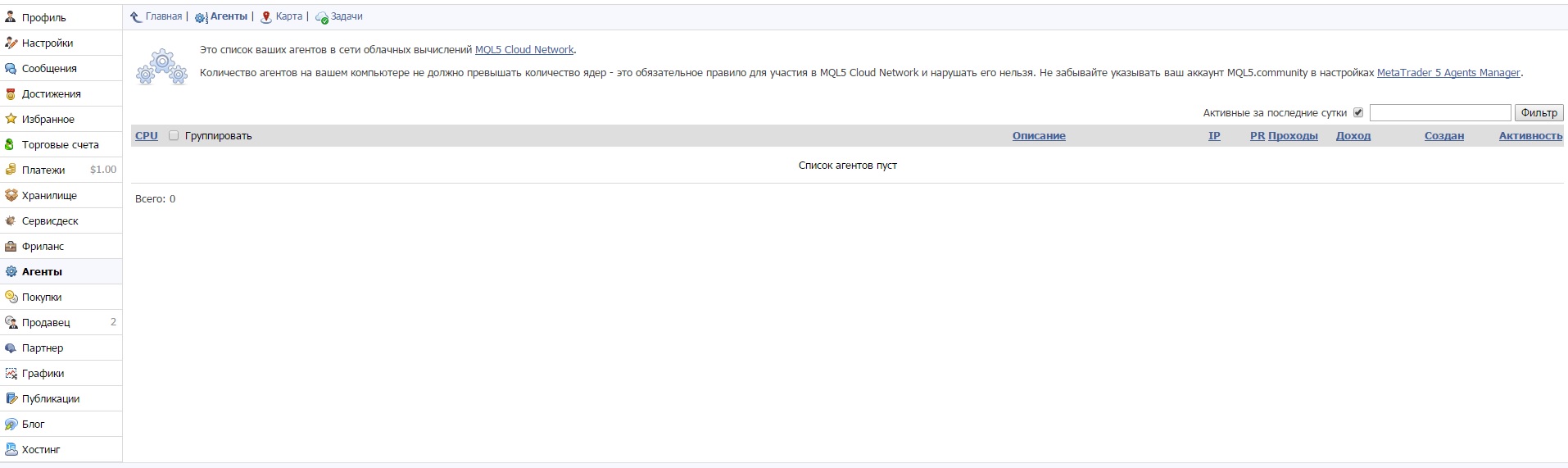
How to earn money by sharing your computing power

In addition to using the computing power of the MQL5 Cloud Network, you can provide your own resources and earn money in the process.
Even so, there are a number of restrictions for agents on participating in the MQL5 Cloud Network. To take part in computations, an agent must have at least 768 MB of physical memory available. To connect agents to the MQL5 Cloud Network, the computer on which the agents are installed must have at least 2048 MB of RAM. To participate in computations, an agent's performance rating (PR) must be at least 50. Agents installed on a virtual server cannot participate in computations. Agents with a performance rating (PR) below 100 are not used in genetic optimization so as not to slow down the calculation process. This is because in genetic optimization, calculation is performed by generations (256 passes), and until one generation has been computed, the next generation does not begin. If even one of the 256 passes is calculated by an agent with low performance, the overall calculation speed decreases. If less than 500 MB of free disk space remains on the computer where the agent is installed, the agent will no longer be able to receive tasks from the MQL5 Cloud Network. Agents do not receive tasks from the network if the computer on which they are installed is running on battery power (relevant for laptops).
Participation in the MQL5 Cloud Network is absolutely safe. Agents cannot be connected to the MQL5 Cloud Network remotely. The user independently decides to participate in the network and enters their MQL5.community account, to which funds will be credited, through the MetaTester application interface. All calculations related to the MQL5 Cloud Network are carried out through the internal payment system of the MQL5.community website. All financial operations can be viewed via the MQL5.community website in the profile of the account that is used to work in the MQL5 Cloud Network.
When making monetary settlements, the performance of the testing agent and the time it spent completing the task are taken into account. Each testing agent has its own performance index, PR. The higher the processor performance, the higher this indicator, and the more calculations it can perform per unit of time. At the moment, the accounting of funds for completed calculations is based on the following considerations. The cost of operating a testing agent with PR=100 for one hour is 0,02 USD. One unit of work is taken to be one quant, which is equal to the work of an agent with PR=100 for 1 ms (1 millisecond). Thus, the cost of one quant is:
QuantPrice=0,02 USD/(100PR*3 600 000ms)=5,55556E-11 USD
For example, let us calculate the cost of one month of work for a single-core testing agent with PR=100: (0,02 USD/(100PR*3 600 000ms))*2 592 000 000 = 14,40 USD
Conclusion

Using a service such as the MQL5 Cloud Network to optimize expert advisors significantly simplifies a trader's work with automated trading systems. Instead of optimizing an expert advisor for an entire month, with the help of this service you can cope with this task in just three to four days. At the same time, having saved a month of time, you will pay only some 1,5-2 dollars for this service. If you are completely broke or simply want to open a cent account without taking money out of your own pocket, there is a real opportunity to earn a couple dozen dollars while essentially doing nothing.
Respectfully, Dmitry aka Silentspec TradeLikeaPro.ru