
Mobile Forex
 Greetings to all forex traders! This time we will talk about mobile forex, namely about ways of trading when you are away from a desktop computer, specifically with the help of mobile phones, smartphones, tablets, and the like. After all, these days the entire arsenal of Forex strategies and indicators can be used even away from home.
Let us begin. If you carry a laptop or Windows tablet with you everywhere, then I think everything is clear here: simply install Metatrader the same way as on your home PC and trade. The purpose of this article, however, is to cover terminals intended specifically for mobile operating systems, as well as alternative ways of trading with portable devices.
In general, trading from smartphones and tablets is possible in 3 ways:
- Using special mobile terminals
- Through connection to a VPS server
- Through an online service via a browser.
Accordingly, the article will be divided into three parts, where we will consider each method separately. Of course, you can also call your broker and, by naming your telephone password, open/close trades by phone, but I think no one will have any problems with that :)
Mobile Terminals for Trading on Forex
Below we will examine trading platforms for the main operating systems on modern devices, namely for Ios and Android. I know that there are also Windows Phone, Symbian, and Blackberry (a dead platform, but people still have the phones), but they are not very widespread and I simply do not have devices on those platforms, so I will not mention them here.
And right away I will answer the question that is asked quite often: "How do I install additional indicators and advisors into a mobile terminal?"
My answer is: NO WAY. You can use only the tools that the developers added to the program.
IOS
Metatrader 4
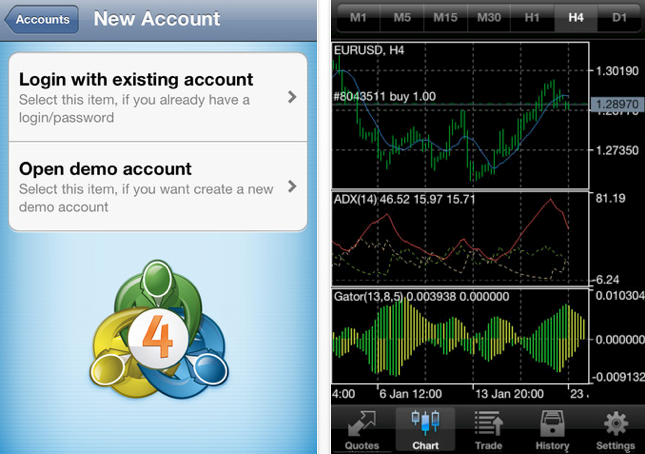
The company MetaQuotes released Metatrader 4 for Ios. The application is developing slowly, but it is developing. There is an version for Ipad; many graphic-analysis features are implemented, but much is still missing. There is a chart (candles, bars, lines), indicators, and opening/closing of orders. Work with orders is done in a fairly convenient form.
Interestingly, the MT4 application is unified: there is no need to download a version for your broker, the program has the ability to choose any dealing center and the corresponding trading server. That is, you can immediately log in to a real account and trade. I checked, it works.
Metatrader 5
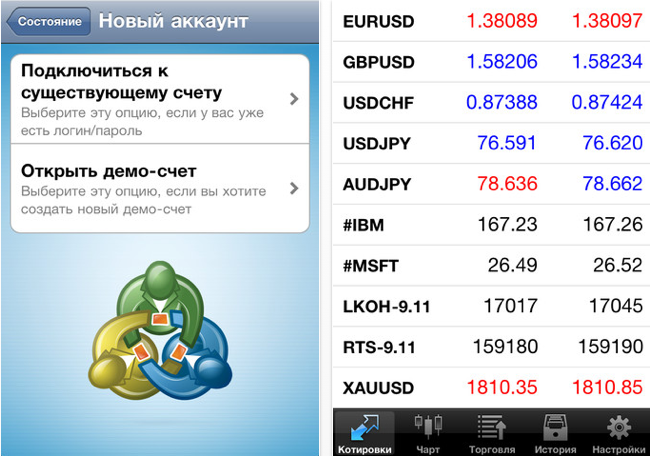
A weakly developing application from MetaQuotes. It differs from MT4 by the absence of some options and a slightly changed interface. It gives the impression that the program was abandoned. But well, time will tell, perhaps MetaQuotes will remember this terminal and in the future we will see some differences from the fourth version.
Android
Metatrader 4/5
These terminals for Android are a complete copy of the versions for Ios (see above).
For technical analysis it is also convenient to use the Trade Interceptor application, which is available for both Ios and Android.
Connecting to a VPS Server from Mobile Devices
Vps server is a remote Windows computer with uninterrupted power and internet. It allows you to install MT4 terminals on it and they will keep working even when your PC is turned off. Modern portable devices allow you to connect to a VPS and perform actions (for example, open trades) directly from the screen of a mobile phone or tablet.
1. Install a VPS server.
2. Using special software, connect to our server directly from the smartphone.
3. Gain the ability to use any indicators, advisors, scripts, etc. in trading without having a desktop PC at hand.
If you do not want to limit yourself in tools for forex trading, then using a vps+smartphone/tablet combination will be the best option for you.
List of programs for connecting to a remote desktop (VPS):
For IOS:
For Android
see Here (section "Remote access and PC management")
Online Clients for Trading on Forex
Many brokers provide the ability to trade directly from a browser. You go to a special page, enter your login/password, and get the ability to execute trades through a secure connection and even carry out simple technical analysis on charts (the functionality of online trading depends on the specific broker). All of this, naturally, can only come in handy if you are somewhere far from your PC and need to urgently check/close positions from, say, an internet cafe or from acquaintances' computer. You can also access such a service from any mobile phone without installing additional software, which is also a definite plus.
Not so long ago a web version of Metatrader appeared; the functionality is severely limited, but you can trade.
It is also worth noting the widespread TradingView service intended for technical analysis. That is, you can perform analysis in this service, and trade directly from the mobile terminal.
That is all, thank you for your attention. Stay with us :)
Respectfully, Pavel Vlasov TradeLikeaPro.ru