
MindTheGap Expert Advisor - Trading Weekly Gaps

Hello, dear forex traders!
One of the most popular strategies in Forex is trading Monday price gaps (Gaps). Between the quotes at the end of Friday and the start of Monday, a Gap (break) may occur on some pairs, which often tends to "close", that is, with a gap, quotes often tend to return to the Friday level.
However, not everything is so simple, as certain signal filtering is required. We present to your attention the most advanced forex expert advisor in its category for trading Monday gaps - MindTheGap, from our forum member SilentSpec, who also periodically writes reviews for the site. In this article, we will test the trading expert on several pairs and evaluate the results obtained.
Expert Advisor Characteristics
Platform: Metatrader 4
Expert advisor version: 3.0
Currency pairs: AUDCAD, AUDCHF, AUDNZD, EURAUD, EURJPY, EURNZD, EURUSD, GBPCHF, GBPJPY
Timeframe: M15
Working time: on Mondays
Recommended brokers: Alpari (ECN accounts), Roboforex (ECN accounts)
Installation Guide

We install the expert advisor as usual. If this is your first time dealing with robots on Forex and you have a lot of questions, download and watch the Forex on Autopilot course.
Attention! In this expert advisor, the settings significantly affect trading results, use the recommended set files (see the archive at the end of this article).
Expert Advisor Strategy

The expert advisor's operating algorithm is unusual, so let us look at it in more detail.
1. On Monday at 00:05, at market open, the expert advisor looks at the candles and searches for a gap with certain parameters:
The distance from the Low of the Friday candle to Monday Open must be no less than MinGap and no more than MaxGap points for buys, and from High to Open for sells.
If it does not find the required gap, we wait for the next Monday.
2. We check the distance from the current price to the Low or High of the last Friday candle. It must also be no less than MinGap. If it is smaller, we switch to waiting mode.
3. If a gap is found and the filter is passed, the expert advisor looks at where the first, "Monday" candle closed. Below I will consider an example for buys.
4. The candle closed downward.
4.1. We look for an opportunity to place a pending order at the Monday opening price. If the distance is too small, we move to point 4.2.
4.2. We check whether we can enter at market. For this, we have two oscillators, enabled with UseWPREnter=true, UseCCIEnter=true. If both are disabled, the expert advisor simply will not check their readings and, if it is impossible to place a pending order, will enter at market. If at least one of the oscillator filters is enabled, the levels WPREnterLevel and CCIEnterLevel are checked.
If the filters are not passed, we switch to waiting mode.
4.2.1. Immediately after the oscillator filters, we check the spread. If the current spread is less than MaxSpread, a market entry occurs; if it is greater, we switch to waiting mode. By the way, the current average spread value over a period of 100 candles is compared.
4.3. If all checks fail (at least one), we switch to waiting mode.
5. The candle closed upward.
5.1. Here pending orders are not provided, only oscillator checks and a maximum spread check.
5.2. If something is not passed, we switch to waiting mode.
6. Working in waiting mode. In this mode, on every tick the expert advisor checks the following conditions:
6.1. The oscillator filter discussed above.
6.2. Spread check.
6.3. Signal waiting mode works for exactly CandlesToWait candles. If the number of waiting candles is exceeded, we ignore the signal.
7. When entering at market, pending orders are deleted. When a pending order is activated, waiting mode is canceled.
8. With positions opened at market, on every tick the conditions for exit are checked using the same oscillators. At the same time, it is enough for at least one of the indicators to reach the CCIExitLevel or WPRExitLevel level respectively. If false, all of them must reach the required levels simultaneously. At the same time, if ExitInLoss is enabled, the expert advisor will exit the trade when exit conditions appear even at a loss. If ExitInLoss is disabled, a certain minimum profit must be accumulated in the trade for exit, and it must be no less than MinExitTP of the order take profit.
9. The order take profit is calculated simply:
9.1. We have TP in points, and it is used by default.
9.2. But if TP is suddenly less than MinTP of the gap (for example, 0.5 of the gap), then we use MinTP of the gap for TP.
9.3. If it turns out that TP is greater than MaxTP of the gap (for example, 2.5 of the gap), then we use MaxTP of the gap for TP.
10. The stop is set in points by the SL variable.
11. MM is switched by the LotVariant variable, the choice is small: either a fixed FixLot lot, or a fixed Risk as a percentage of the deposit. Recommended level: no more than 3% per trade
12. Orders use slippage control; Magic is set for all orders. If Magic=0, the expert advisor will generate a unique magic number for a specific pair, a specific chart, a specific terminal, a specific account, and a specific broker - well, you get the idea)
Orders will be opened NumOfTry times in case of any problems - the internet went down, the broker glitched, etc., etc.
13. All positions are trailed by a simple trailing stop (enabled by TralOnPips), at a distance of TrailingStop from the current price.
At the same time, if TrailingFromBE is enabled, trailing will work only from break-even; if disabled, from the stop loss.
The expert does not use martingale or order grids, but it can apply a double entry mode with the lot reduced by half (depends on the sets).
The robot has many settings, which makes it easier to create profitable sets for different currency pairs.
Example of the expert advisor in action
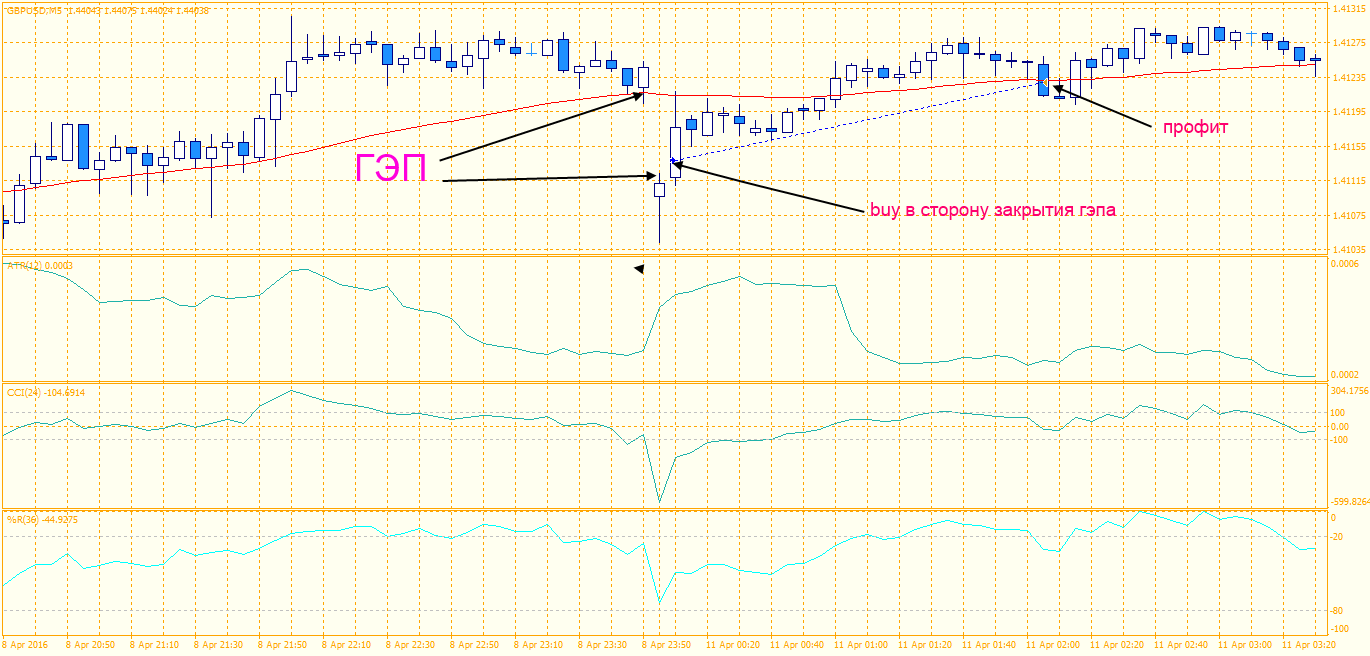
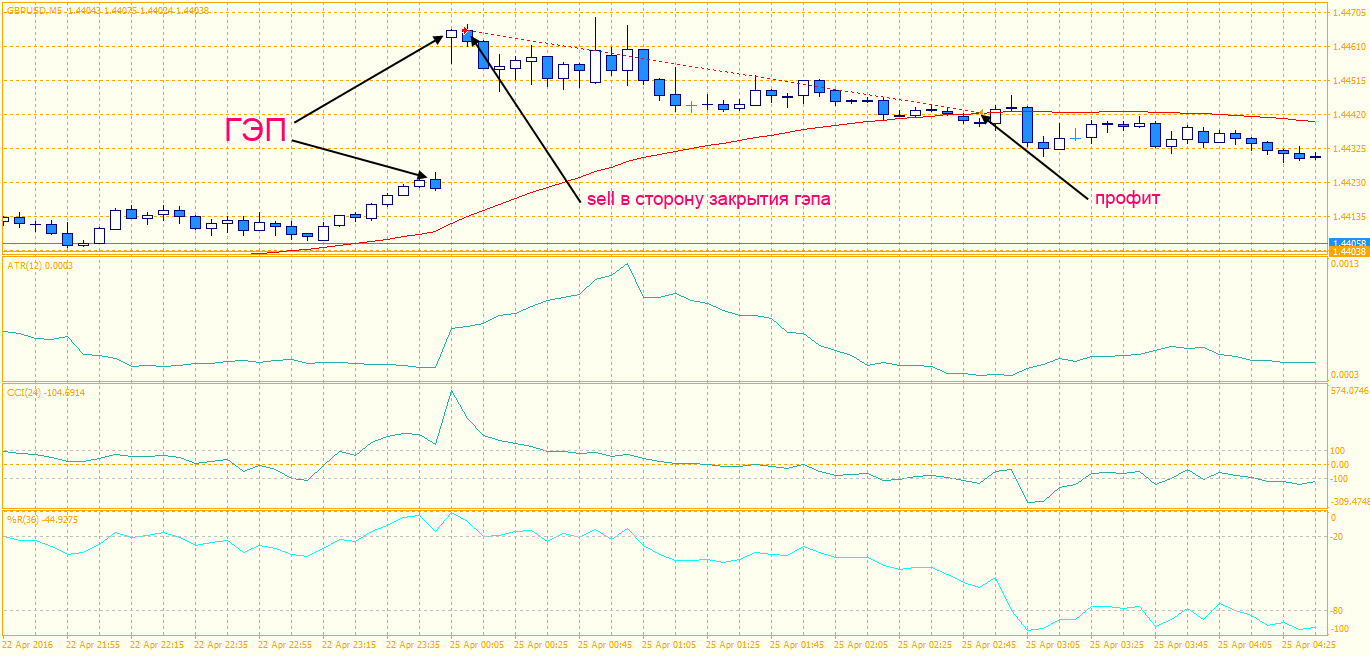
Backtests of the expert advisor
The backtests were done for each pair separately, since the Metatrader 4 platform does not allow multicurrency testing.
The first series of tests is performed with a fixed lot. This makes it possible to evaluate the testing results without taking money management into account.
Mind the Gap 3.0 2007 2016 AUDCHF lot 0.1
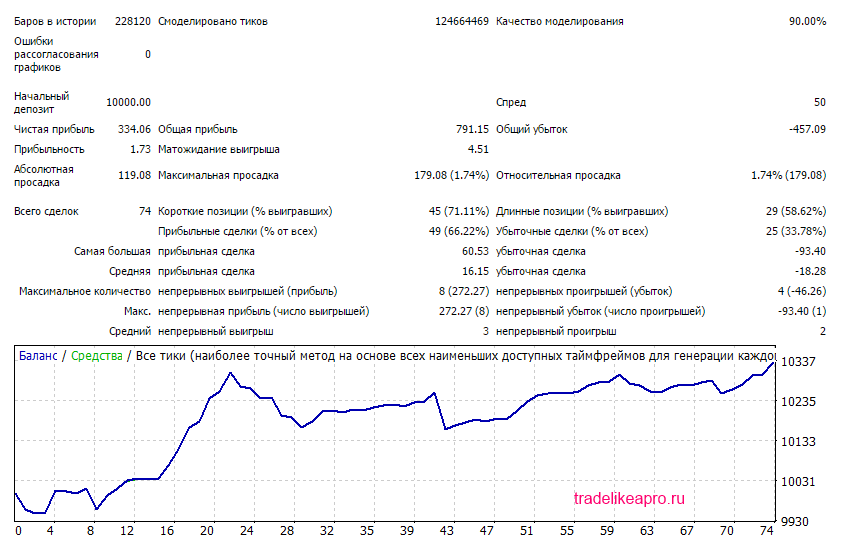
The test results are acceptable
Mind the Gap 3.0 2007 2016 EURAUD lot 0.1
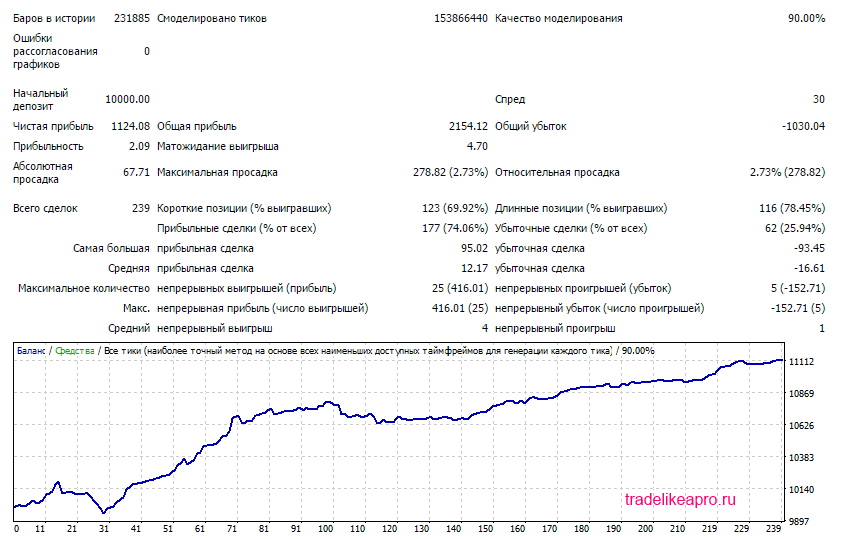
The test results are good
Mind the Gap 3.0 2007 2016 EURJPY lot 0.1
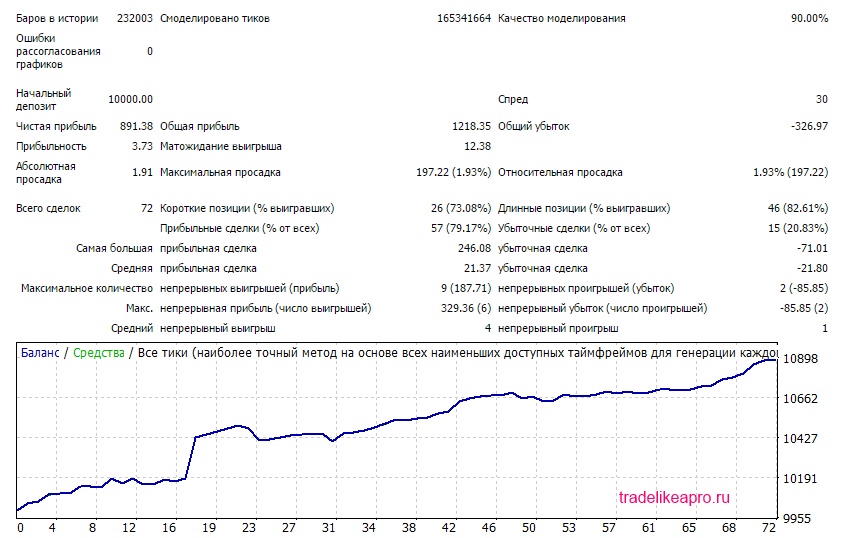
The test results are good
Mind the Gap 3.0 2007 2016 EURUSD lot 0.1
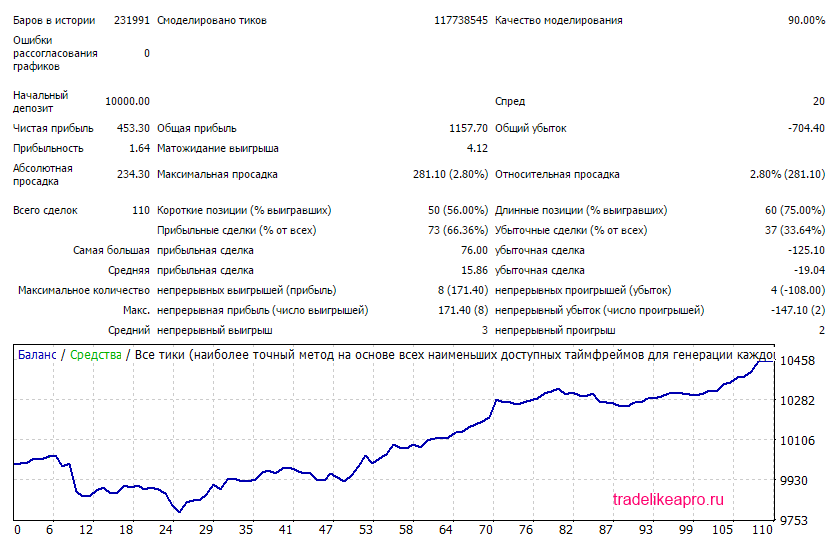
The test results are good
Mind the Gap 3.0 2007 2016 GBPCHF lot 0.1
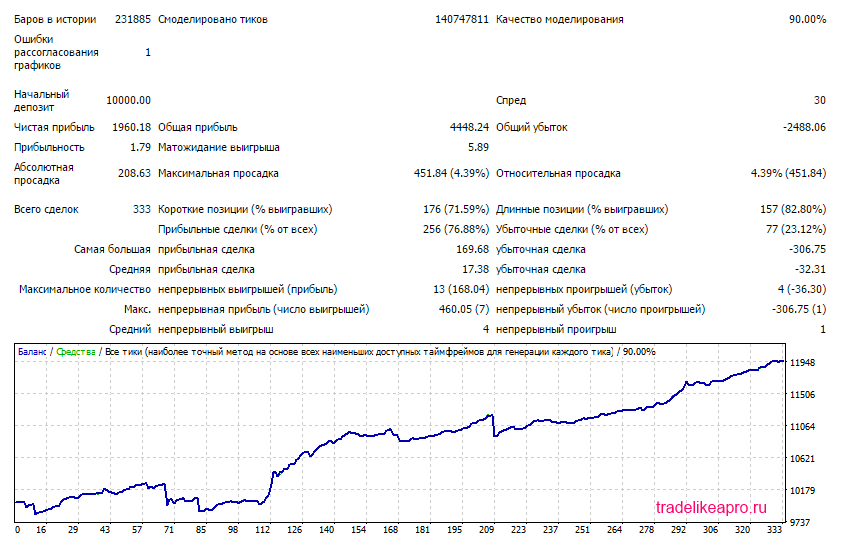
The test results are good
Mind the Gap 3.0 2007 2016 GBPJPY lot 0.1
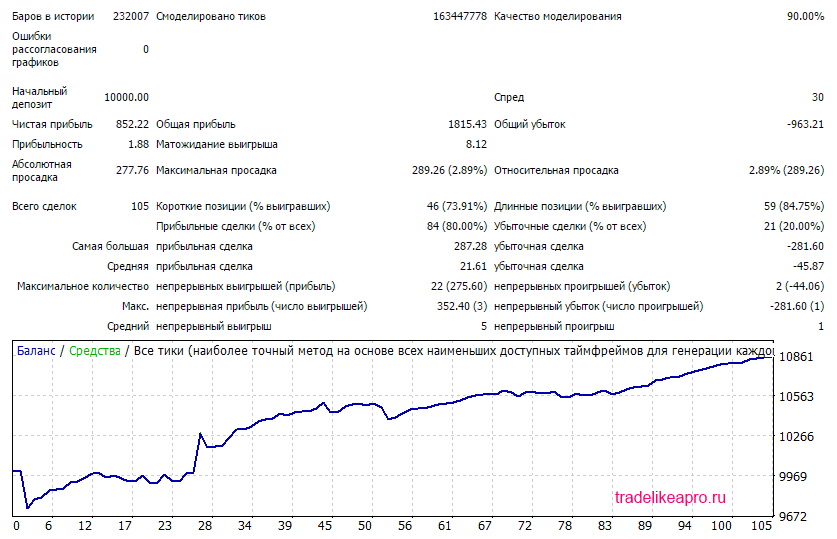
The test results are good
Mind the Gap 3.0 2007 2016 AUDCAD lot 0.1
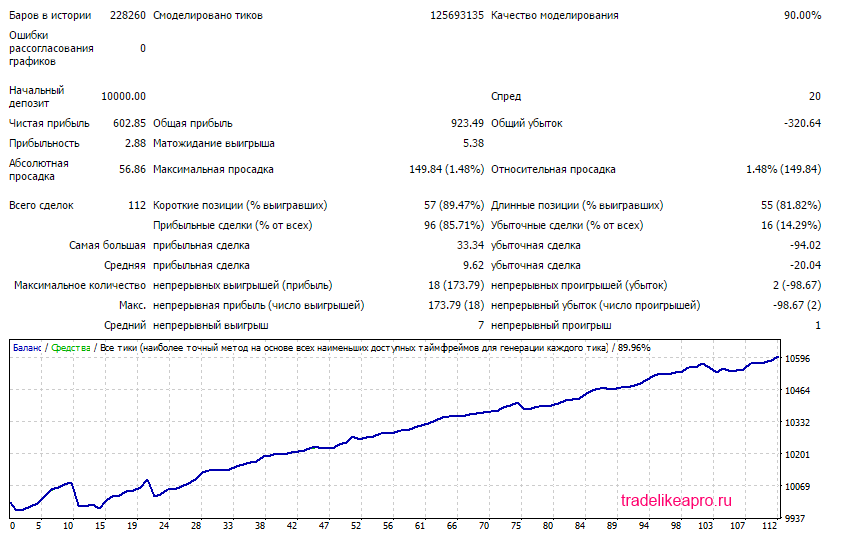
The test results are very good
Mind the Gap 3.0 2007 2016 AUDNZD lot 0.1
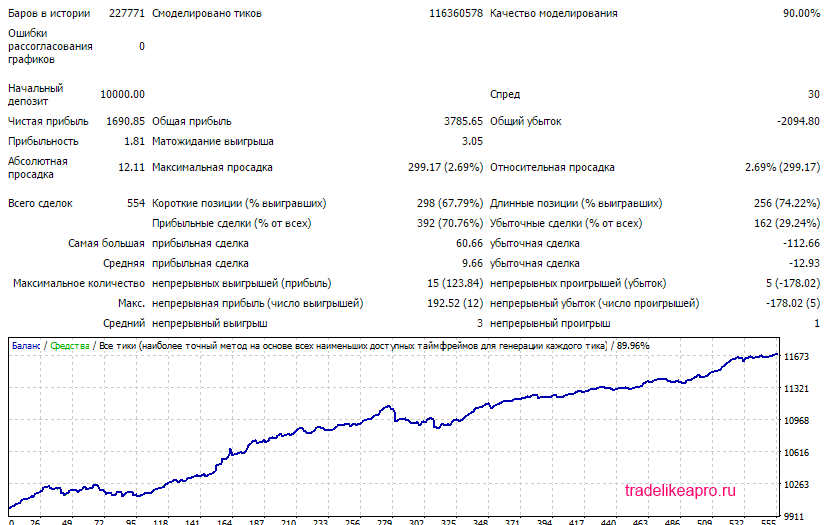
The test results are very good
Mind the Gap 3.0 2007 2016 EURNZD lot 0.1
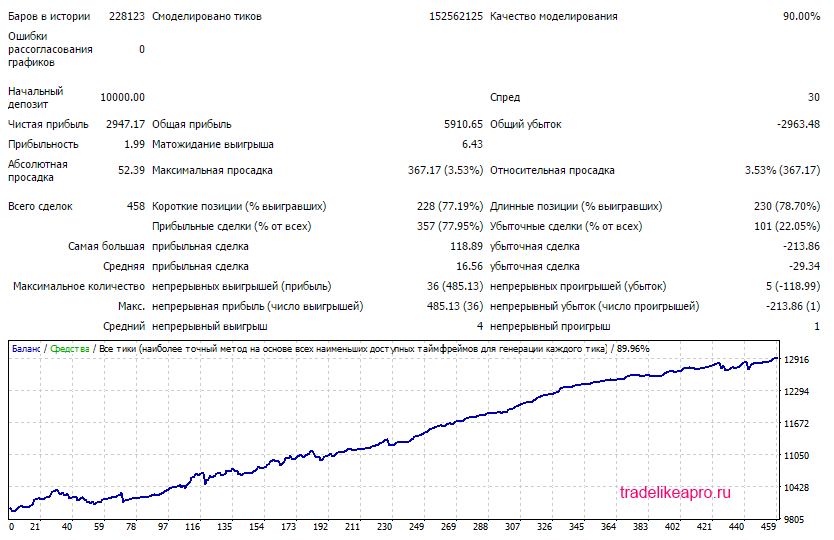
The test results are very good
The second series of tests is done with a proportional lot. This makes it possible to evaluate the testing results while taking money management into account.
Mind the Gap 3.0 2007 2016 AUDCHF lot MM
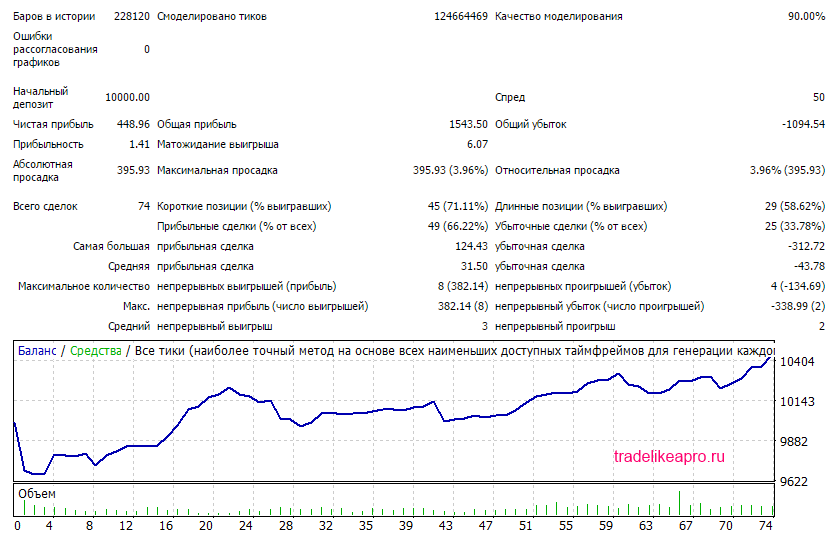
Mind the Gap 3.0 2007 2016 EURAUD lot MM
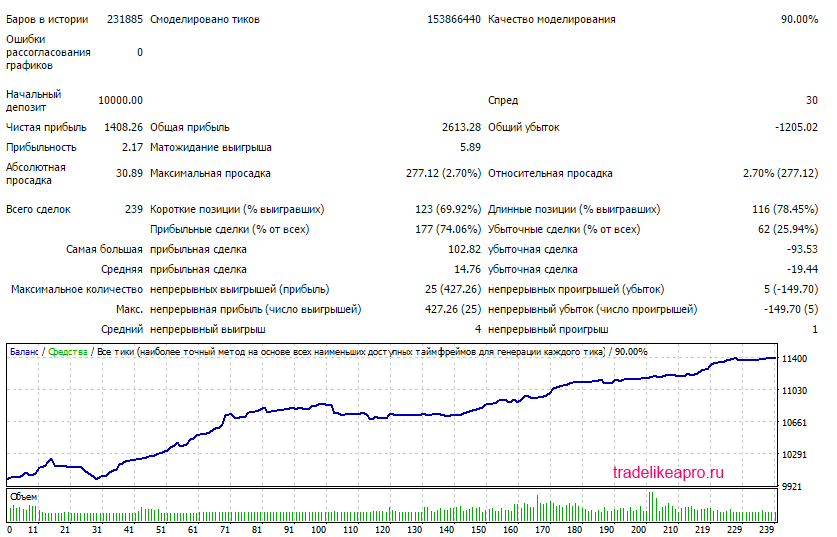
Mind the Gap 3.0 2007 2016 EURJPY lot MM
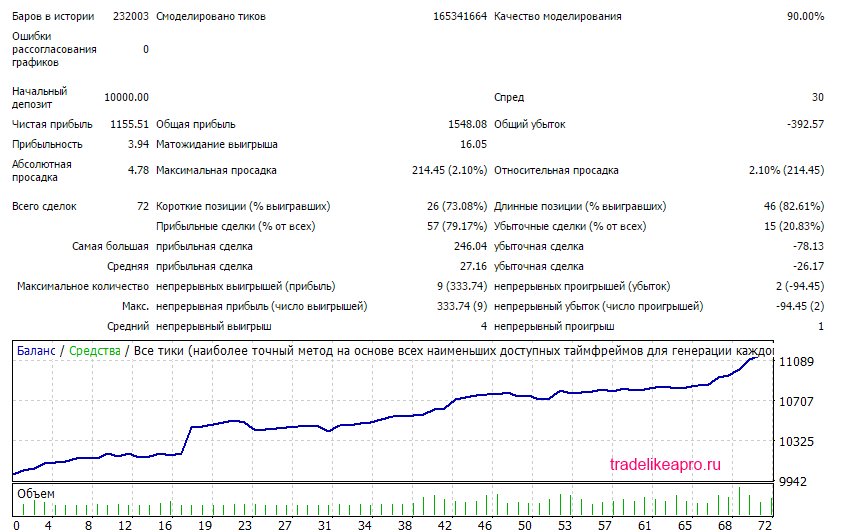
Mind the Gap 3.0 2007 2016 EURUSD lot MM
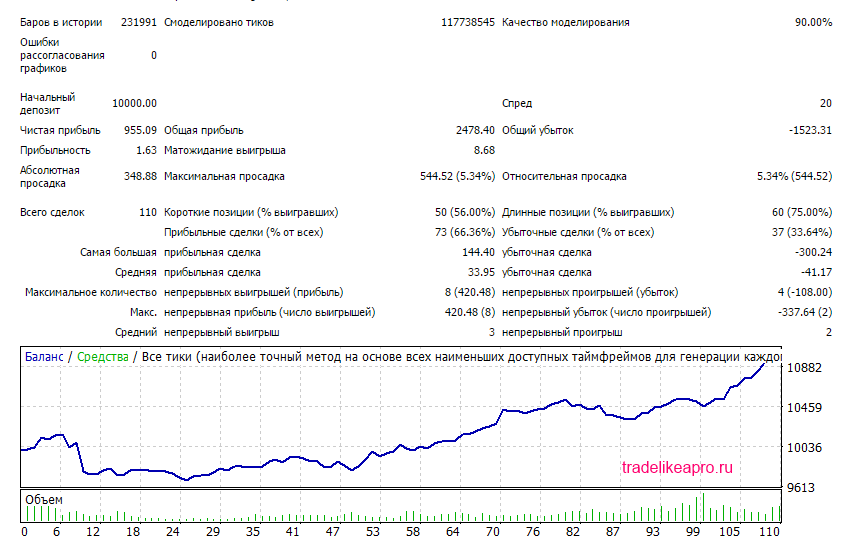
Mind the Gap 3.0 2007 2016 GBPCHF lot MM
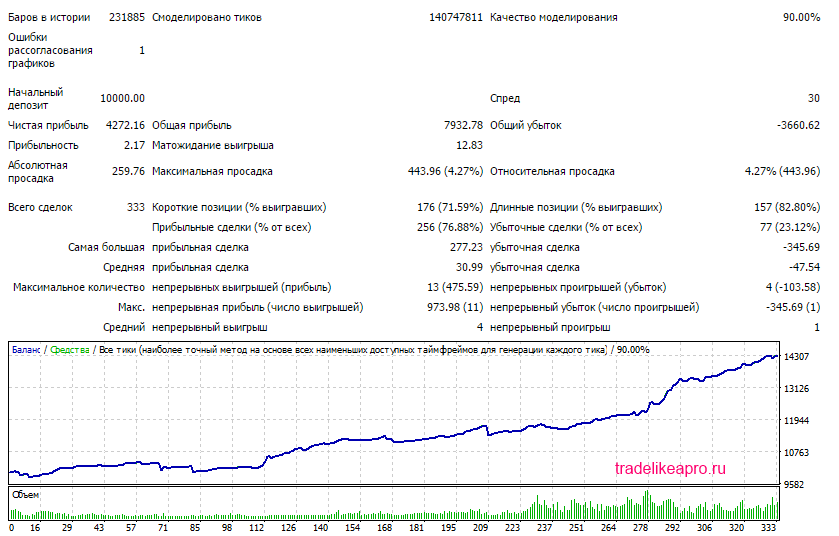
Mind the Gap 3.0 2007 2016 GBPJPY lot MM
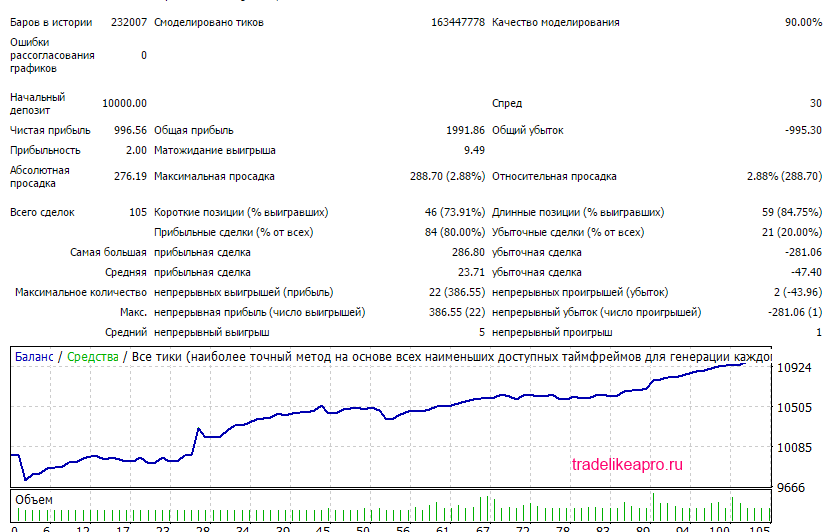
Mind the Gap 3.0 2007 2016 AUDCAD lot MM
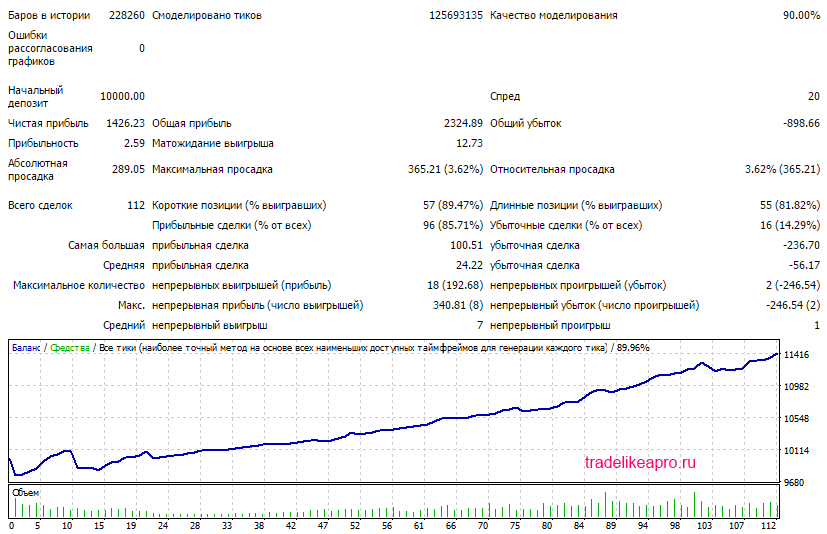
Mind the Gap 3.0 2007 2016 AUDCAD lot MM
Mind the Gap 3.0 2007 2016 AUDNZD lot MM
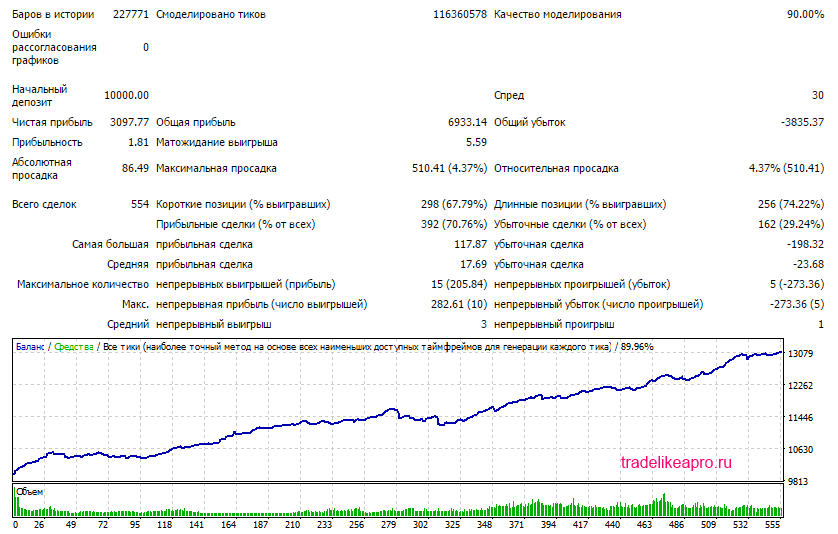
Mind the Gap 3.0 2007 2016 EURNZD lot MM
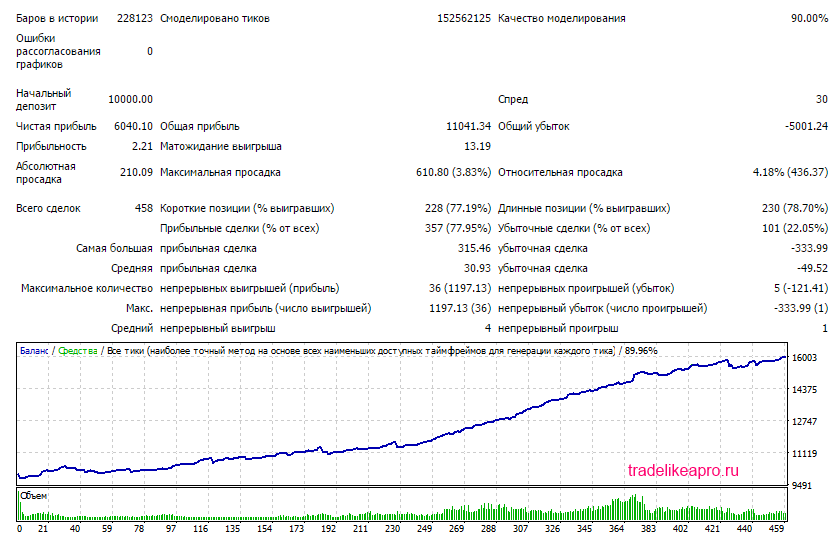
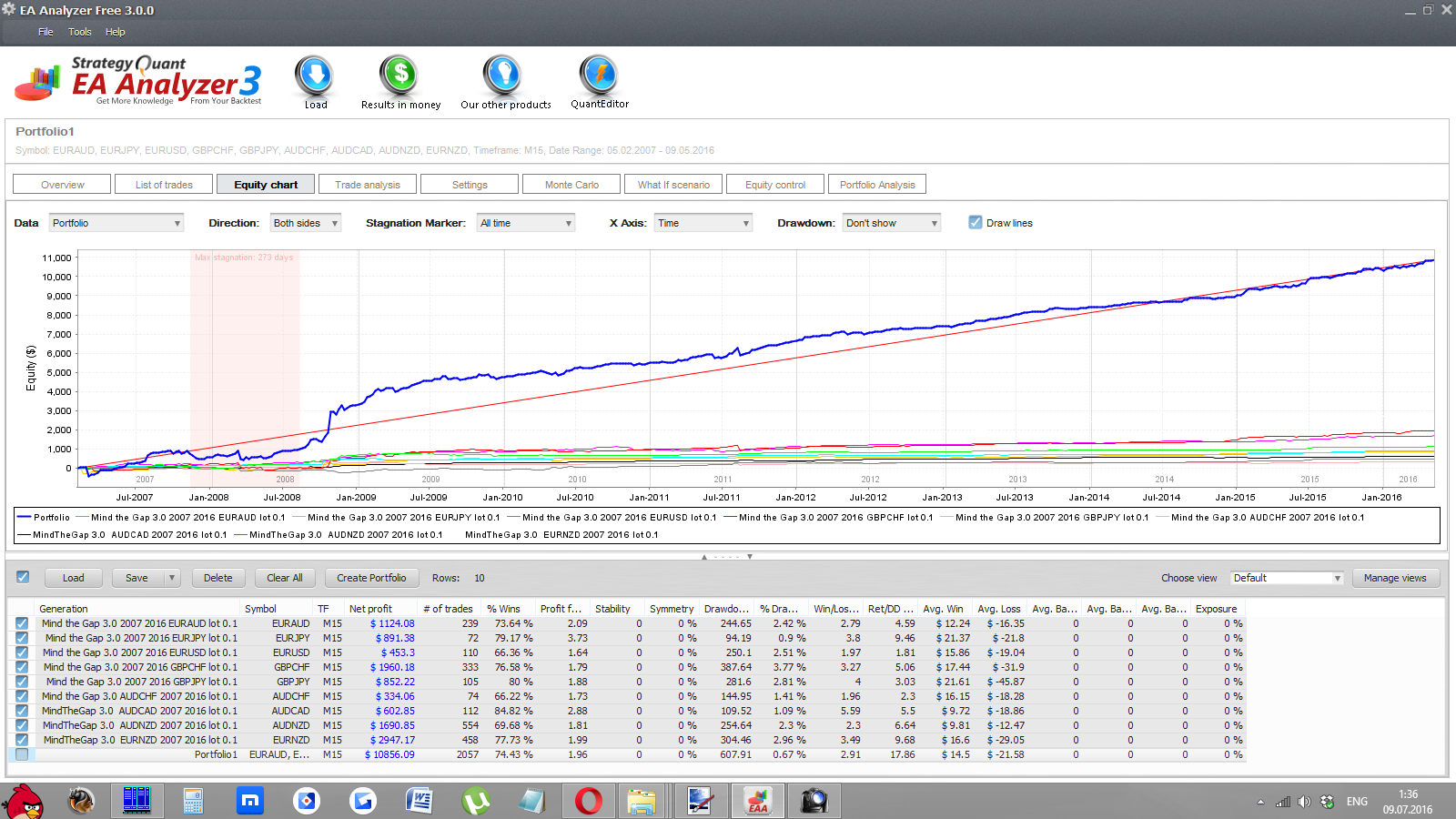
Using the EA Analyzer program, let us make a consolidated statement from the tests of all pairs with a fixed lot and with a proportional one.
Portfolio MindTheGap 3. 0 2007 2016 lot 0.1
Portfolio MindTheGap 3.0 2007 2016 lot MM
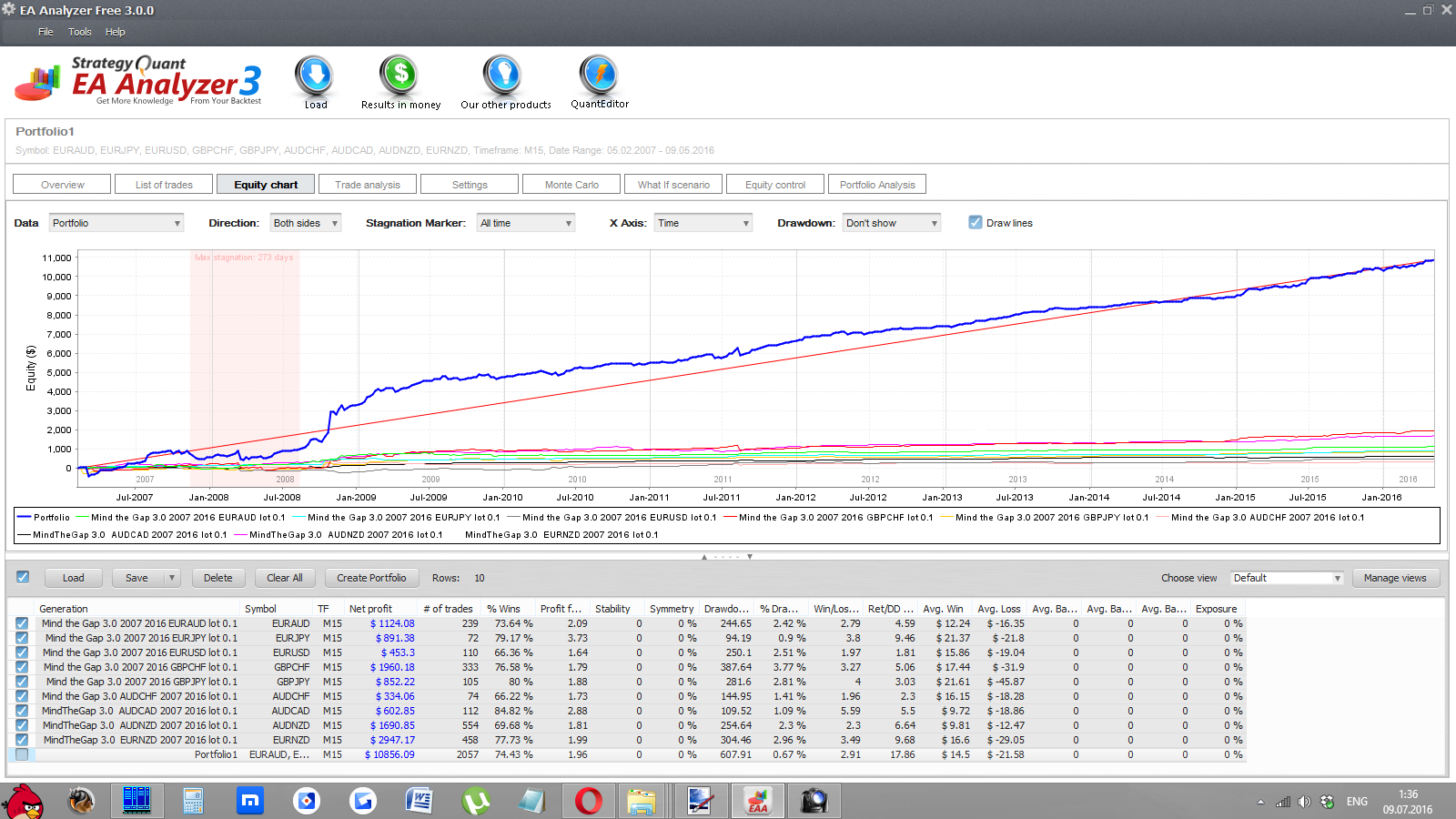
Conclusion: The MindTheGap expert advisor, when operating with a proportional lot on 9 pairs, shows many years of stable profit growth without critical drawdowns.
⇒Links to all the backtests used in the article (for independent analysis) can be found in the forum thread MindTheGap
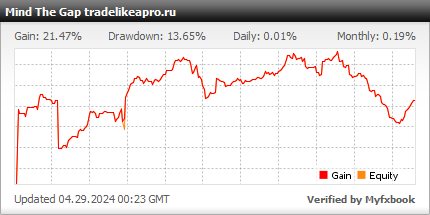
Account Monitoring
Description of Settings
- Service settings
- SetPeriod - period of automatic installation on the chart
- WorkPeriod - period of operation of the expert advisor
- TralPeriod - period of operation of trailing stops, breakeven, and tracking of exit conditions from trades
- DataRefreshPeriod - frequency at which the expert advisor updates the pair quotes
- MinTradesOpt - parameter for the custom optimization criterion
- CalculateDST - calculate DST automatically. Serves to calculate the operation timer.
- Manual_GMT_Offset - deviation of server time from GMT. Serves to calculate the operation timer.
- ExpertName - name of the expert advisor
- Magic - magic number; if 0, it generates one independently
- Spread filter
- MaxSpread - maximum tick spread
- MaxAvSpread - maximum average spread for the pair
- Entry signal settings
- FinishHour - hour at which the search for an entry point from the Monday open ends
- MinGapSize - minimum gap size in relative volatility units
- MaxGapSize - maximum gap size in relative volatility units
- UseMAFilter - use the moving average filter: when the moving average is directed upward, signals are taken only for buying
- MAPeriod - moving average period
- MAMethod - calculation method
- MAPrice - price for calculation
- MAHistory - how far back in history to look at the slope of the moving average
- Oscillator filters
- DeMarker filter
- UseDemFilter - use the filter
- DemFilterPer - indicator period
- DemFilterLevel - minimum and maximum level
- WPR filter
- UseWPRFilter - use the filter
- PRFilterPer - indicator period
- WPRFilterLevel - minimum and maximum level
- Stochastic filter
- UseStochFilter - use the filter
- StochFilterKPer, StochFilterSPer - indicator periods
- StochFilterLevel - minimum and maximum level
- CCI filter
- UseCCIFilter - use the filter
- CCIFilterPer - indicator period
- CCIFilterLevel - minimum and maximum level
- Fractal filter
- UseFractalFilter - on/off
- MidFractalDist, OppositFractalDist - minimum distance to the fractals above and below.
- Volatility filter
- UseMaxDRangeFilter - filter for the maximum size of the previous daily candle
- MaxDRange - maximum day size in conditional volatility units
- MinDRange - minimum day size in conditional volatility units
- UseVolaFilter - on/off
- VolFilterHist - history
- MaxCandle1, MinCandle1, MaxCandle2, MinCandle2, MaxCandle3, MinCandle3 - min and max candle values in conditional volatility units
- News filter
- AvoidNews - on/off
- AvoidHighImpactNews - on/off processing of high-impact news
- AvoidMediumImpactNews - on/off processing of medium-impact news
- AvoidLowImpactNews - on/off processing of low-impact news
- MinsBeforeNews - how many minutes before the news to stop trading
- MinsAfterNews - how many minutes after the news to start trading
- Money management filters
- MaxRisk filter
- UseMaxRiskFilter - maximum risk filter across all EAs
- MaxRisk - maximum percentage of the deposit at risk
- Correlation filter
- BalancePairFilter - on/off filter prohibiting entry on correlated pairs
- Filter for the minimum distance between trades
- SafetyViolation - Enable control of the time between trades
- MinMinutesBetweenTrades - Minimum time between trades in minutes
- MinBarsBetweenTrades - Minimum time between trades in bars
- Exit signal settings
- ExitProfitCoef - minimum profit for exit
- ExitMinutes - minimum time from the start of the trade for exit
- ExitSignal1 - on/off
- ExitOnStoByTime - exit after the minimum time
- ExitOnStoInProfit - exit only with profit not less than the minimum
- StochExitPer - stochastic period
- Stoh_Close_Level - level
- ExitSignal2 - on/off
- ExitOnExtrByTime - exit after the minimum time
- ExitOnExtrInProfit - exit only with profit not less than the minimum
- X3, X4 - extremum settings for exit
- ExitSignal3 - on/off
- ExitOnWPRByTime - exit after the minimum time
- ExitOnWPRInProfit - exit only with profit not less than the minimum
- CCIExitPeriod - CCI period
- WPRExitPeriod - WPR period
- CCIExitLevel - exit level for CCI
- WPRExitLevel - exit level for WPR
- Stoploss settings
- MinSL, MaxSL - minimum and maximum stop in points
- StopVariant - Fixed stop, ATR stop, Fractal stop
- Fixed - SL stop in points
- ATR stop
- ATR_SL_TF - ATR calculation period
- ATR_SL_Coeff - ATR coefficient
- Fractal stop
- Fract_SL_TF - fractal search period
- Fract_SL_History - history for fractal search
- Fract_SL_Delta - offset from the fractal in points
- TakeProfit settings
- TPVar - Fixed TP or TP as % of the stop
- TP - Take value in points for fixed
- TPProc - Value as % of the stop
- VirtualTP - virtual TP (in the full version)
- MM settings
- LotVariant - Fixed lot, Fixed percentage, Fixed Ralph Vince proportion
- FixLot - Fixed lot
- Risk - Risk as a percentage of the deposit
- MoneyForMinLot - Deposit money for the minimum lot
- General trailing settings
- UseTralInLoss - use trailing in the loss zone
- TralStep - minimum trailing step in points
- MinTral - minimum distance from price for placing a stop order
- Standard trailing
- UseTralOnPip s - Standard trailing on/off
- TrailingStop - trailing level (distance from the current price) in points
- Trailing by candle shadows
- UseTrailingByShadows - trailing by candle shadows on/off
- Shadow_TR_TF - high/low search period
- Shadow_TR_History - history
- Trailing by fractals
- TralFraktalOn - on/off
- FraktalTF - fractal search period
- FraktalBars - fractal search history
- FraktalOtstup - offset
- BE (break-even)
- UseBE - on/off
- BELevel - profit level for break-even in points
- BEPlusPips - offset from the opening price in points
- Break-even as a percentage of take-profit
- UsePercBE - on/off
- BEPerc - percentage of take-profit covered by price, after which break-even is set
- Other trading settings
- VolHist - history for volatility calculation
- Slippage - max slippage
- RetryAttempts - number of attempts to open/close/modify an order
- SleepTime - time between attempts in seconds
- SleepMaximum - maximum time in seconds
- ECNAccount - enable if the account is ECN
- UseComments - output comments to the log
- UsePanel - show the panel on the screen
Attention! Do not change anything in the expert advisor parameters and use only the recommended values if you do not clearly understand what you are doing!
Recommended Money Management

A risk per trade of 3 percent of the deposit is recommended. The lot can be calculated using a special calculator, or you can simply set the risk level in the expert advisor parameters, and everything will be calculated automatically.
Summary

The MindTheGap expert advisor is a complex multi-currency robot that trades the many decades-popular strategy of trading the closing of Monday gaps.
However, it uses the very latest achievements in the field of trading automation and expert advisor programming. The expert advisor can be used as part of a portfolio of reliable robots, and also as an addition to manual trading (with strict observance of money management).
Overall, we have before us a reliable classic strategy with modern improvements. You should not expect 100500%, but if you have been in the market for a long time, you will understand the true value of this robot: a reliable, decades-tested system that gives confidence during drawdowns and decent income over the long term.
Important!
For the expert advisor to work correctly, the trading terminal must be turned on from the market opening on Sunday evening until its closing on Friday evening. If you do not have the ability to keep your computer running 24/5, then it is recommended to use a VPS server service.
Download the MindTheGap Expert Advisor

Respectfully, Alexey aka Merlin Tlap.io
