
Milky Way Expert Advisor: Trend-Following, Safe, Calm

Hello, dear forex traders. We present to your attention the forex expert advisor Milky Way from our forum member SilentSpec, who also periodically writes reviews for the site. A distinctive feature of the robot is trading pullbacks against the trend on several currency pairs. The expert advisor is designed for many years of operation on a "set and forget" basis. The trading results are confirmed by independent monitoring. In this review, we will test it on several currency pairs and evaluate the results obtained.
Expert Advisor Specifications
Platform: Metatrader 4
Expert advisor version: 3.24
Currency pairs: AUDUSD, EURGBP, EURJPY, EURUSD, GBPUSD, USDCAD, USDCHF, USDJPY
Timeframe: H4
Operating time: around the clock
Recommended brokers: Alpari (ECN accounts), Roboforex, NPBFX
Installation Guide

Install the expert advisor as usual. If this is your first time dealing with robots on Forex and you have a lot of questions, download and watch the course Forex on Autopilot.
Attention! In this expert advisor, the settings significantly affect trading results, use the recommended set files (see the archive at the end of this article).
Expert Advisor Strategy

The expert advisor belongs to trend-following robots that trade during increased volatility. Trading method: determining the trend using the Bollinger Bands indicator and entering after pullbacks. The type and position of the candle when Bollinger Bands are broken are taken into account, as well as its maximum size. The DeMarker and Ozymandias indicators are used as filters; in addition, local extrema in the form of maximum or minimum candle values over a specified history are taken into account. Stop loss and take profit are set for the placed order and trailed with a certain step. Orders are closed by take profit or stop loss, or by indicator signals (Stochastic, MACD, ATR, as well as coefficients for candle parameters). Martingale, position averaging, order grids, variable lot sizing, locks, and similar techniques are not used in this expert advisor. The robot has many flexible settings and can be profitable on several currency pairs.
Expert Advisor Backtests
Backtests were done for each pair separately, since the Metatrader 4 platform does not allow multi-currency tests.
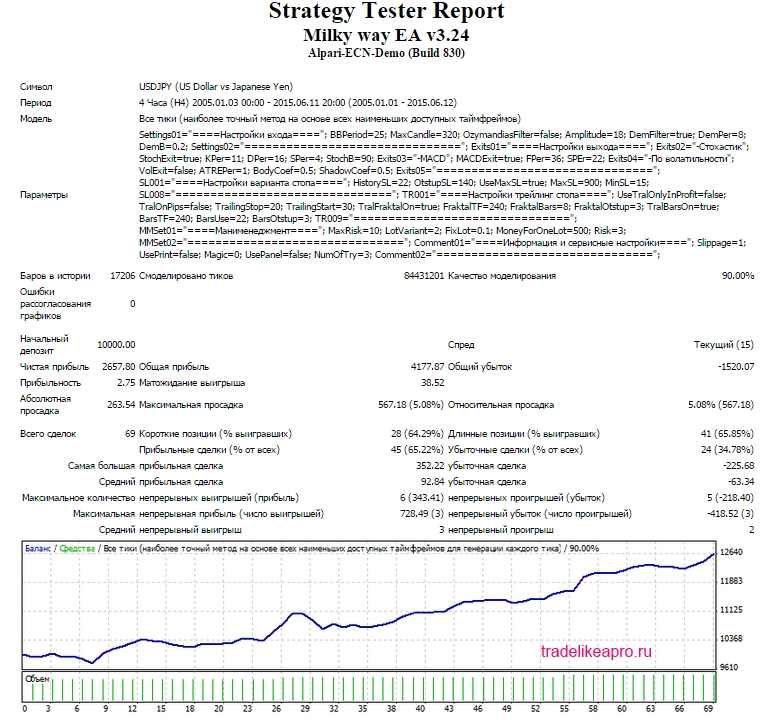
The first series of tests is done with a fixed lot. This makes it possible to evaluate the testing results without taking money management into account.
Milky Way AUDUSD 2005 2015 lot 0.1
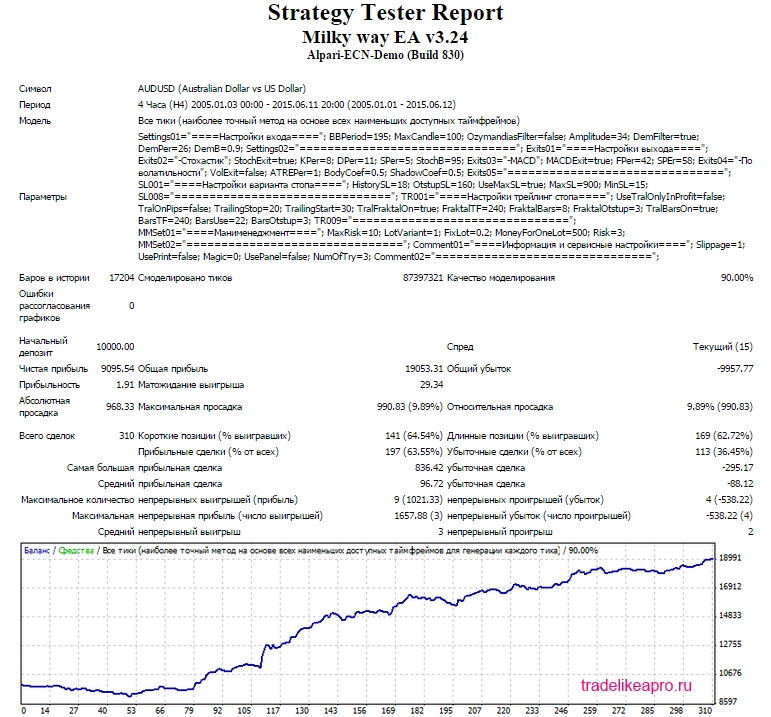
The test results are very good
Milky Way EURGBP 2005 2015 lot 0.1
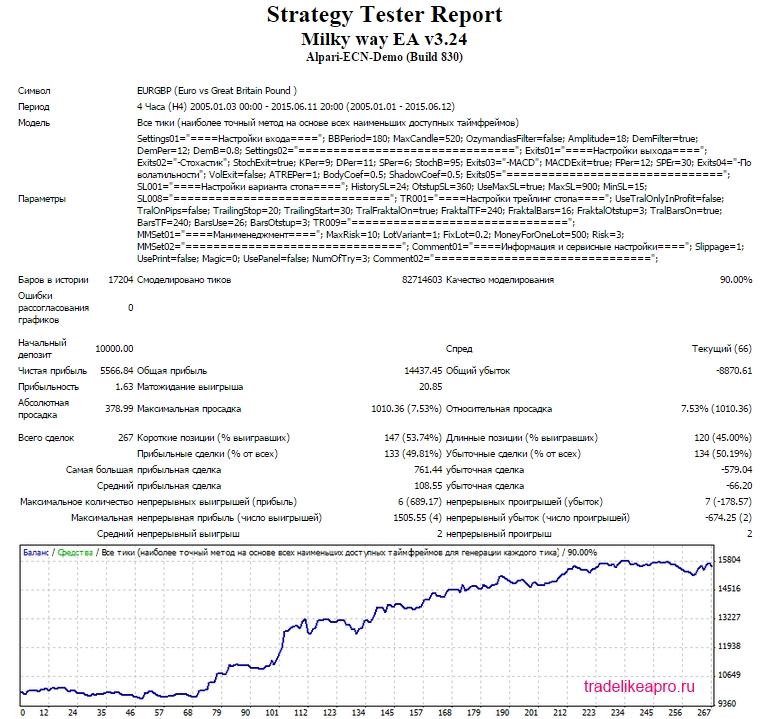 The test results are good
Milky Way EURJPY 2005 2015 lot 0.1
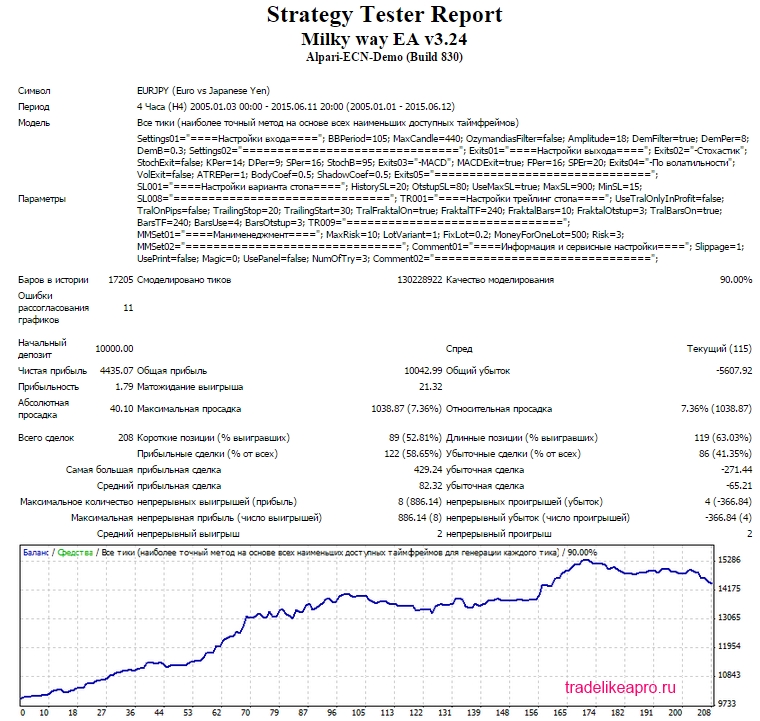 The test results are good
Milky Way EURUSD 2005 2015 lot 0.1
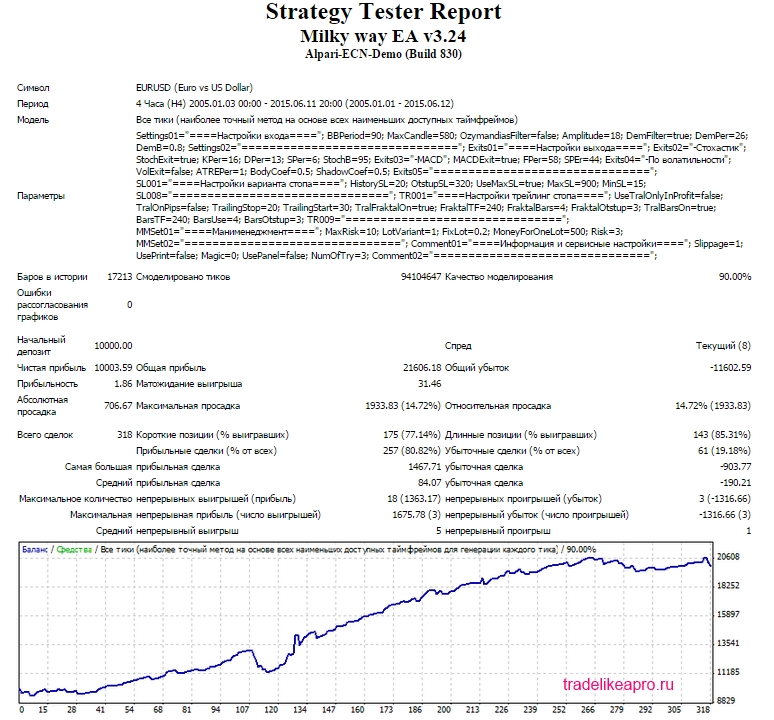 The test results are acceptable
Milky Way GBPUSD 2005 2015 lot 0.1
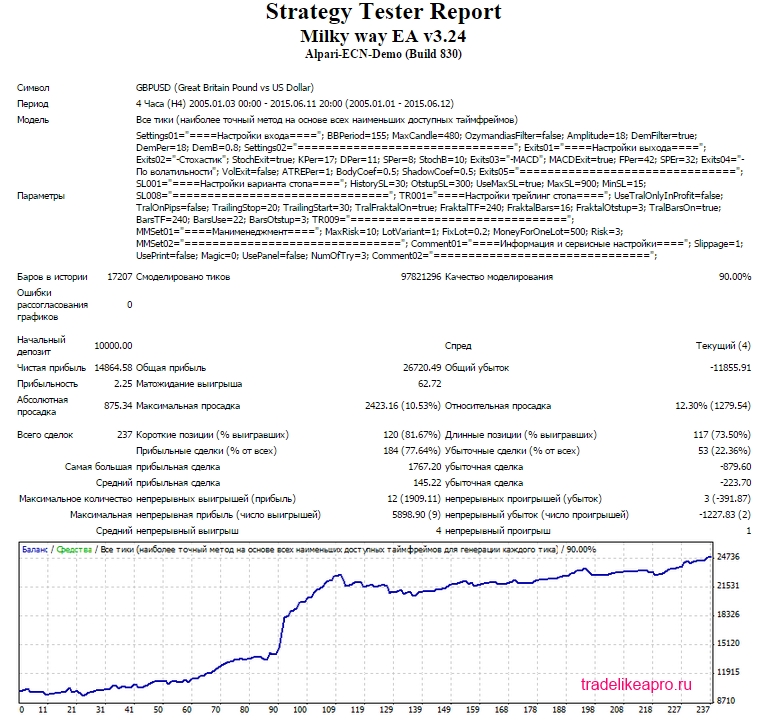 The test results are acceptable
Milky Way USDCAD 2005 2015 lot 0.1
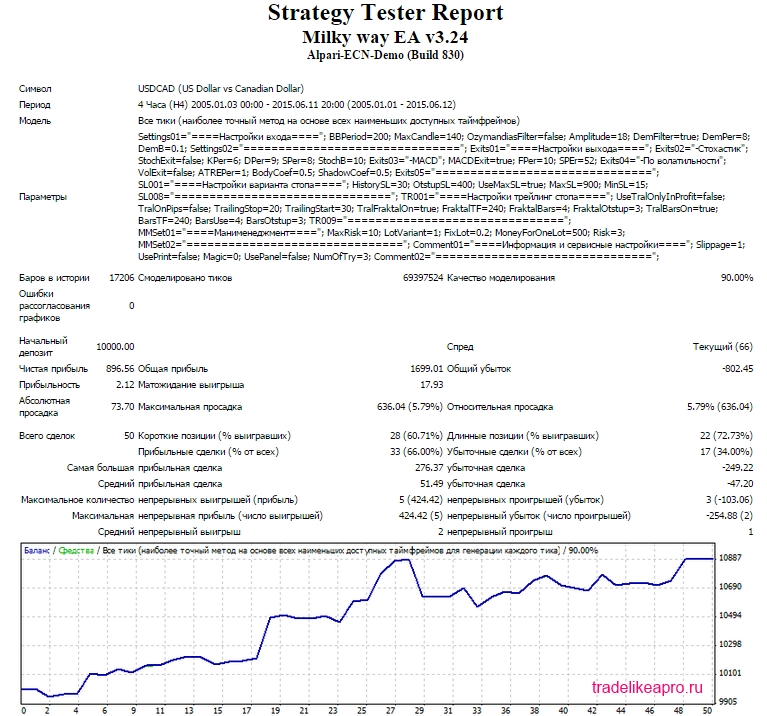 Test results are acceptable
Milky Way USDCHF 2005 2015 lot 0.1
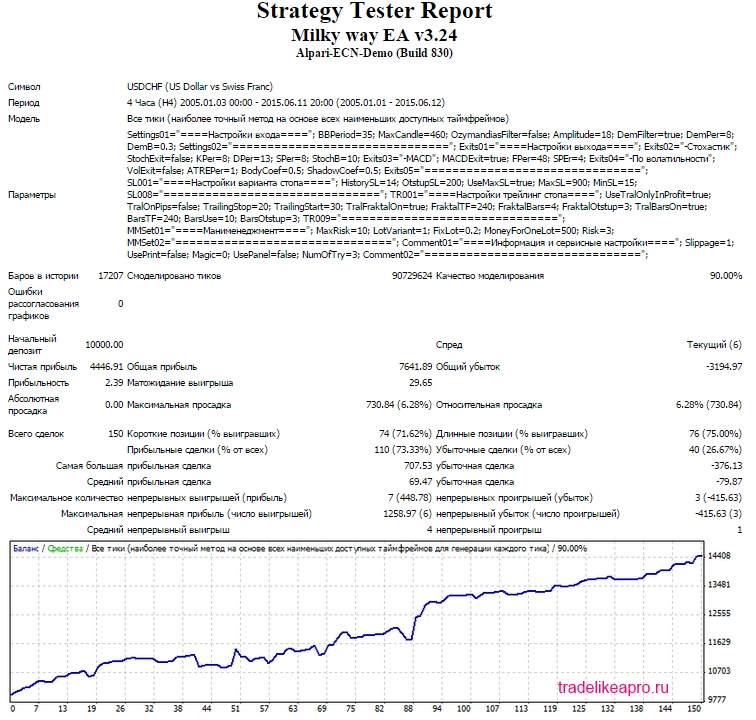 Test results are good
Milky Way USDJPY 2005 2015 lot 0.1
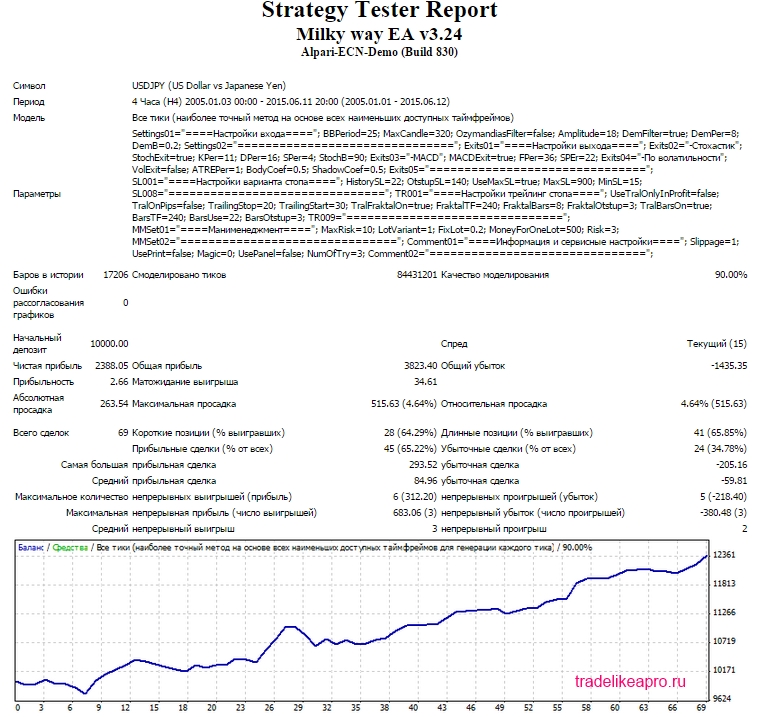 Test results are good
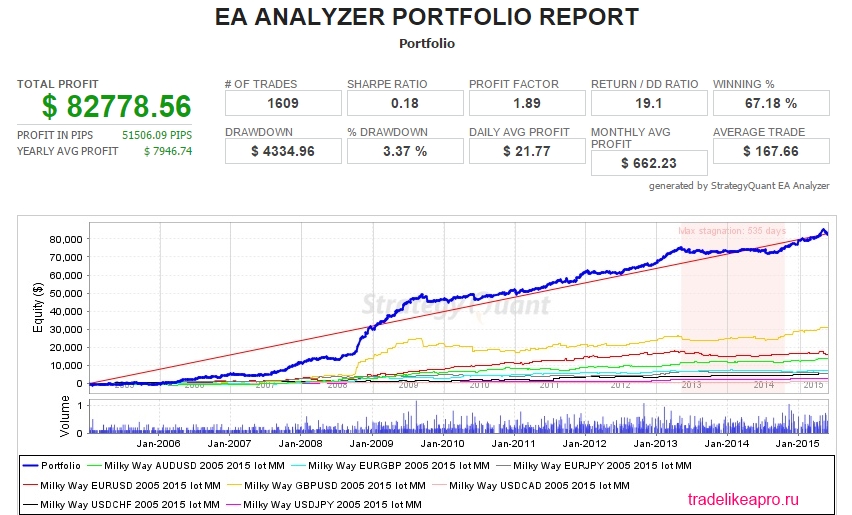
Using the EA Analyzer program, let us make a consolidated statement based on the tests of all pairs with a fixed lot.
Portfolio Milky Way 2005 2015 lot 0.1
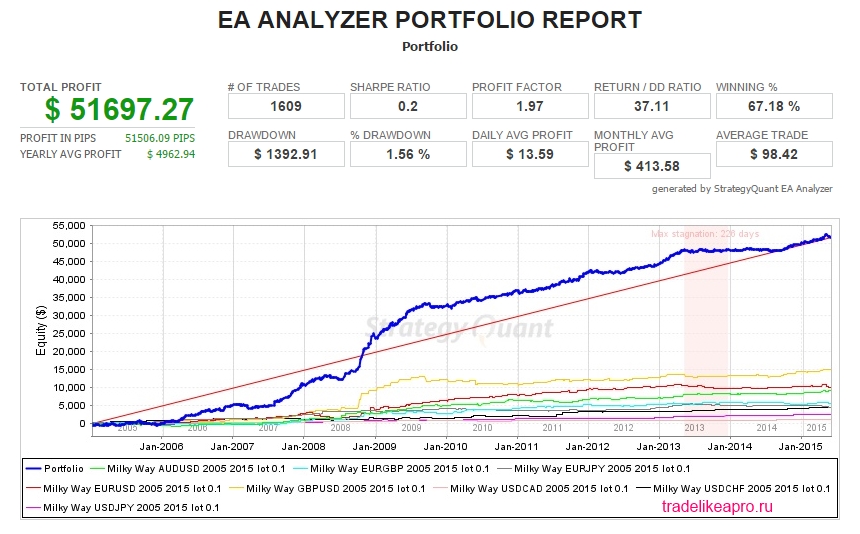
Conclusion: The Milky Way expert advisor on all 8 pairs shows profit growth without serious drawdowns. However, you need to be prepared for the fact that for some time the profitability of the advisor may "mark time".
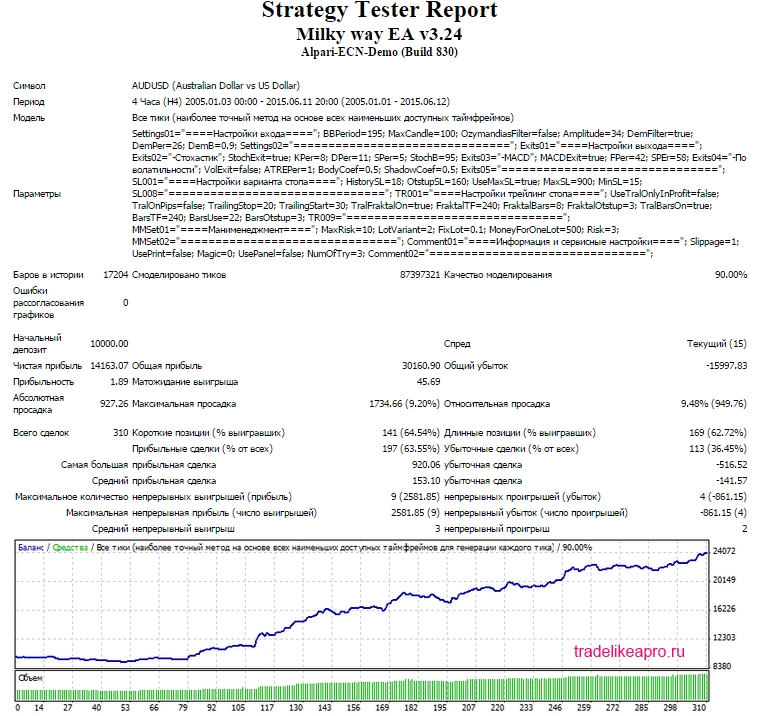
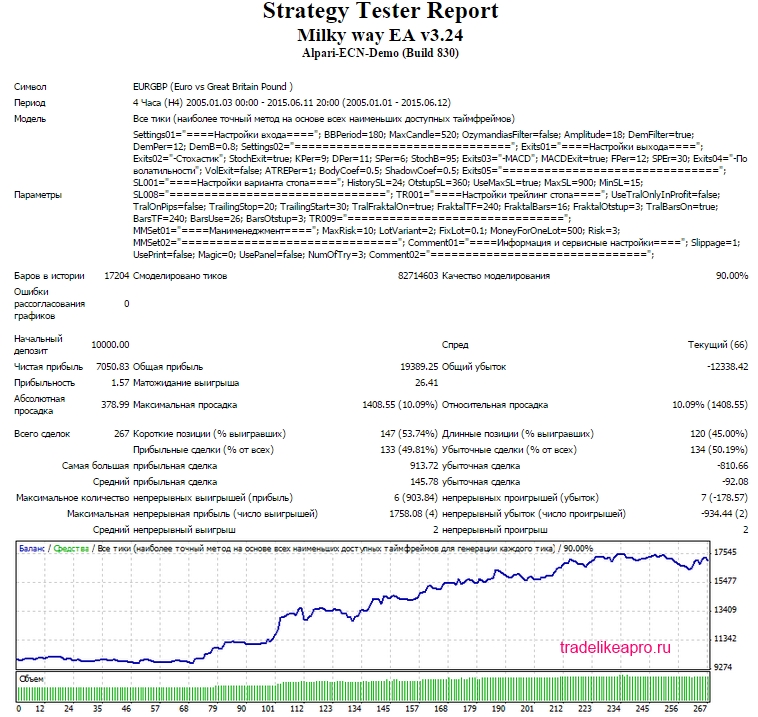
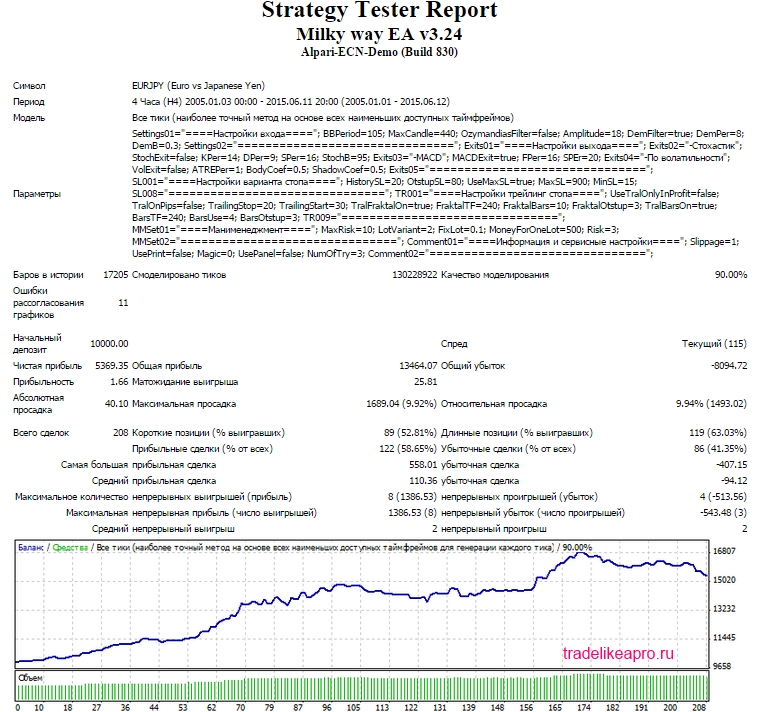
The second series of tests is done with a proportional lot. This makes it possible to evaluate the testing results taking money management into account.
Milky Way AUDUSD 2005 2015 Risk=3
Milky Way EURGBP 2005 2015 Risk=3
Milky Way EURJPY 2005 2015 Risk=3
Milky Way EURUSD 2005 2015 Risk=3
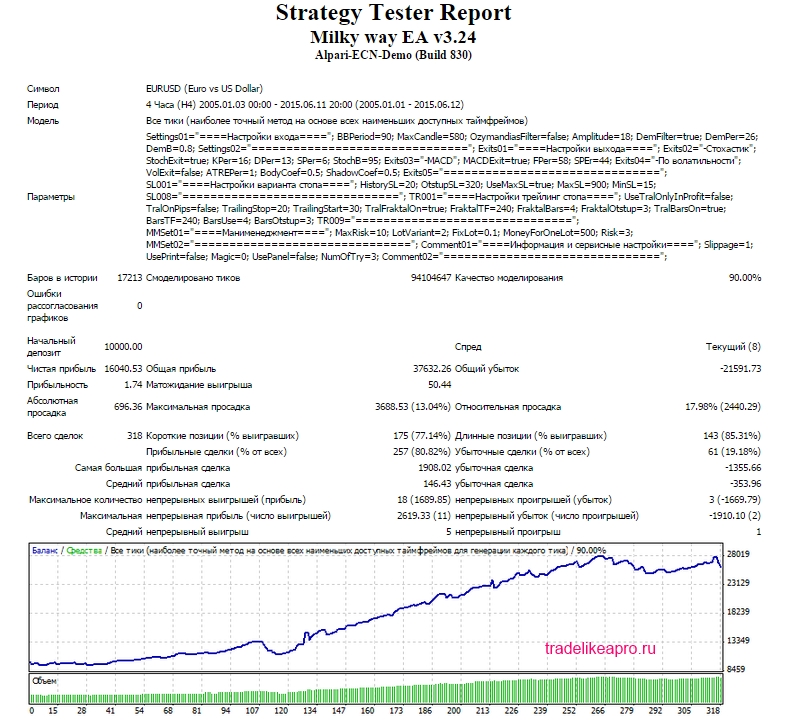
Milky Way GBPUSD 2005 2015 Risk=3
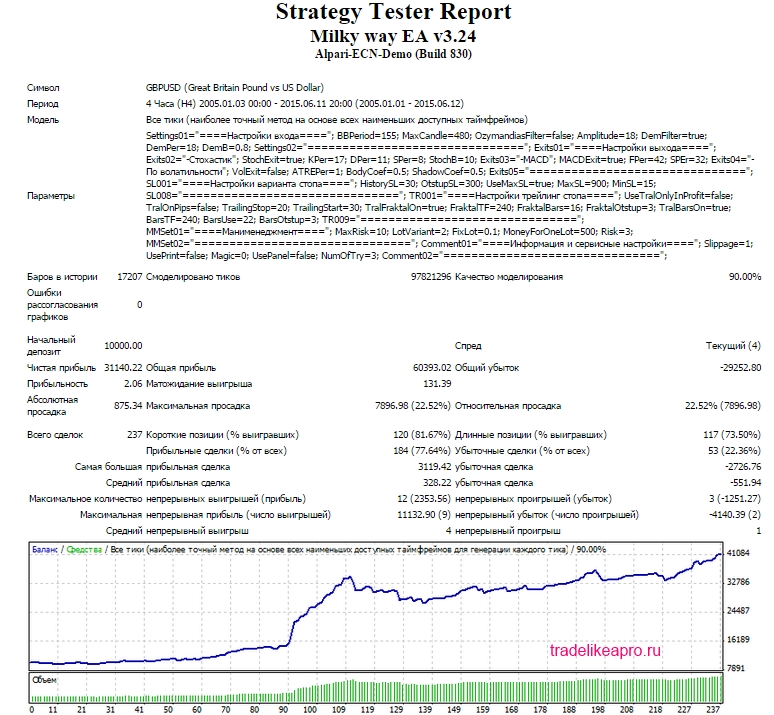
Milky Way USDCAD 2005 2015 Risk=3
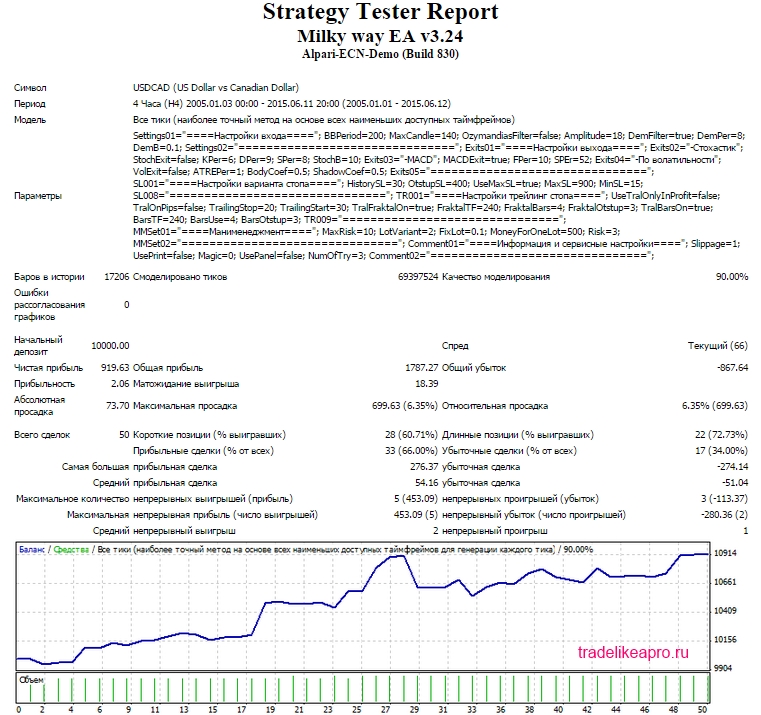
Milky Way USDCHF 2005 2015 Risk=3
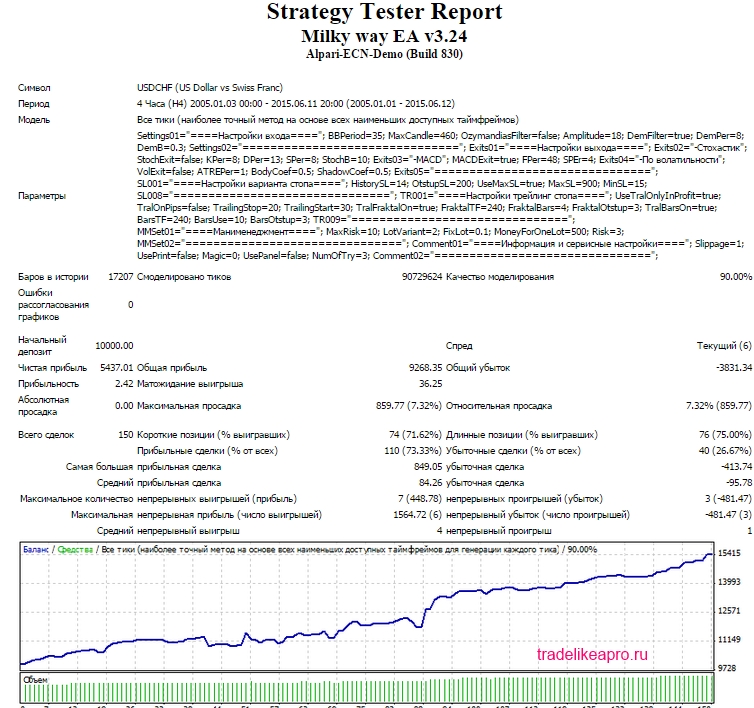
Milky Way USDJPY 2005 2015 Risk=3
Using the EA Analyzer program, we will make a consolidated statement for tests of all pairs with a proportional lot.
Portfolio Milky Way 2005 2015 Risk=3
Conclusion: The Milky Way EA, when operating with a proportional lot, also shows steady profit growth on all 8 pairs without significant drawdowns.
⇒Links to all the backtests used in the article (for independent analysis) can be found in the forum thread Milky Way.
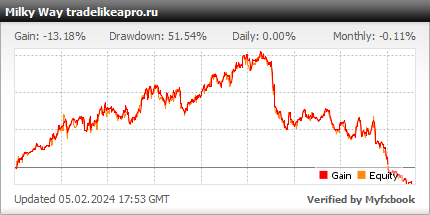
Real account monitoring
Description of settings

The robot settings look as follows:
Entry settings
- BBPeriod - Bollinger Bands period
- MaxCandle - Maximum allowable signal candle (and the previous one before it). Height in points.
The Ozymandias filter is needed so that entries are made in the trend direction.
- OzymandiasFilter - Enable the Ozymandias filter
- OzymandiasTF - Timeframe for the Ozymandias filter
- Amplitude - Ozymandias amplitude
The DeMarker filter is needed to wait for a pullback sufficient for entry
- DemFilter - Enable the DeMarker indicator filter
- DemPer - DeMarker indicator period
- DemB - Indicator boundary; for buys we compare the indicator reading with DemB, for sells with 1-DemB
Exit settings
Stochastic
- StochExit - enable exit by stochastic
- KPer, DPer, SPer - k, d, and slowing.
- StochB - stochastic boundary, when crossed an exit will occur.
MACD
- MACDExit - enable exit by MACD
- FPer - fast period
- SPEr - slow period
By volatility
- VolExit - enable exit by volatility
- ATREPer - ATR period for calculation
- BodyCoef - coefficient for the candle body
- ShadowCoef - coefficient for the candle shadow
Stop option settings
- ExtrTimeframe - Timeframe for searching the extremum for the stop loss
- HistorySL - Search for the extremum for the stop loss in history (in bars)
- OtstupSL - Distance from the extremum in points
- UseMaxSL - Set the maximum stop loss (if yes, then if the stop exceeds the maximum, the maximum is set, otherwise the trade is skipped).
- MaxSL - Maximum stop loss
- MinSL - Minimum stop loss
Settings for the trailing stop
- UseTralOnlyInProfit - Trail only in profit
- TralOnPips - enable standard trailing
- TrailingStop - Trailing level (distance from the current price)
- TrailingStart - Profit level for enabling trailing
- TralFraktalOn - enable fractal trailing
- FraktalTF - timeframe
- FraktalBars - candles for the fractal
- FraktalOtstup - offset from the fractal
- TralBarsOn - trailing by bars
- BarsTF - timeframe
- BarsUse - history for searching extremes
- BarsOtstup - offset from extremes
Money management
- MaxRisk - Maximum risk in percent for all positions on the account (if exceeded, there will be no entries)
- LotVariant - Lot calculation variant (1-fixed, 2-0.01 lots per MoneyForOneLot dollars, 3-fixed risk (in %))
- FixLot - fixed lot
- MoneyForOneLot - money for the minimum lot
- Risk - risk as a percentage of the deposit
Information and service settings
- Slippage - slippage
- UsePrint - print to the log
- Magic - Magic number, if 0, the expert advisor generates it itself
- UsePanel - panel on the chart
- NumOfTry - number of attempts to open, close, modify an order
Attention! Do not change anything in the expert advisor parameters and use only the recommended values unless you understand exactly what you are doing!
Recommended money management

A risk per trade of 3 percent of the deposit is recommended for each pair. The lot can be calculated using a special table, or you can simply set the risk level in the expert advisor parameters, and everything will be calculated automatically.
Results

The Milky Way expert advisor is a multi-currency, conservative, and safe trend-following trading robot, the use of which is profitable over the long term. However, in the short term, profitability may remain in the neutral zone for some time. Also note that the expert advisor does not trade often.
Important !
For the expert advisor to work correctly, the trading terminal must be turned on from the market opening on Sunday evening until its closing on Friday evening. If you do not have the ability to keep your computer running 24/5, it is recommended to use the VPS server service.
Download the "Milky Way" expert advisor

Respectfully, Aleksey aka Merlin Tlap.io