
Metatrader 4 build 604+, why you shouldn't update and how to return build 509

Hello everyone. Metaquotes was not satisfied with build 574, which caused confusion in the installation of indicators and expert advisors, so they released build 604, on which a huge amount of old software simply does not work. Why this had to be done is not a simple question. Mostly, of course, to make traders' lives harder.
But what should concern us is something else: what should we, ordinary users, do in the current situation? Naturally, stay on the old build 509, where everything works, for as long as possible. In this article we will look at a way to disable automatic terminal updates, as well as how to roll back to the old version if you have already updated.
For what purpose was build 604+ released?

MetaQuotes, the company that developed MetaTrader 4, has over the last 2-3 years been persistently working on developing the next generation of its trading platform (MetaTrader 5), trying to keep pace with the more modern and complex trading terminals available from some brokers. However, MT5 differs significantly from MT4, and only a few traders chose this new platform.
At present, MetaQuotes is trying to channel all the effort spent on developing the MT5 platform into releasing a new MT4 build that includes many MT5 features. The problem is that most traders did not ask for and were not ready for such a major update. As a result, we are dealing with a mass of discussions and complaints that you have probably come across on many forums over the last couple of weeks.
There are also hidden financial motives. Namely, to destroy support for part of the software in order to lure traders into buying scams through the built-in market in MT4. And from every purchase, commission goes to the obvious party.
Why is it worth staying on build 509?

First, the new 604+ build is still very raw: there are many problems not only with software, but also with basic order execution. Bugs, bugs, and more bugs. Second, you may have to wait a very long time for the necessary indicators and trading experts compatible with 604+ builds to appear....
And third: I think you already have enough problems in life and in trading, so why do you need extra hassle with a half-working forex terminal?
How to disable automatic Metatrader 4 updates?

Method 1
Enable "User Account Control"
If you have the Windows Vista operating system or higher (Windows 7, Windows 8), you should enable the "User Account Control" option (if you do not know how to enable this option, you can find it in the Google search engine). The operating system will automatically block the update to build 604 until you allow it yourself. For example, in Windows 7, when MT4 tries to update the system to build 604 or higher, you should see the following pop-up window:
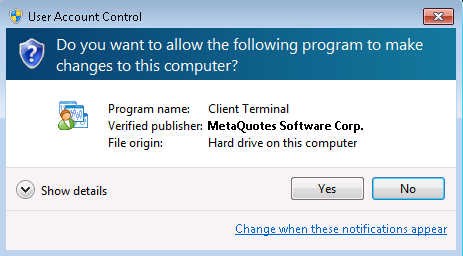
Unfortunately, some traders reported that even though they had enabled the "User Account Control" option, their platform still updated automatically to build 604. That is why we also suggest using another workaround, which I will mention below.
Method 2
Deleting Webinstall
MetaTrader 4 contains functionality for upcoming updates, in the folder:
C:ProgramDataMetaQuotesWebInstall
You may not find this folder right away because it is hidden. In that case, to locate it you can try using the search function across the entire C drive. After you find the "Webinstall" folder, you should delete all of its contents. This will help prevent the MT4 update from being executed. However, this will only work once, because while it operates the MT4 platform will again download the update file and create the "Webinstall" folder. This means that you must periodically delete this folder, especially immediately after closing all your MT4 platforms before the weekend.
How to roll the platform back to build 509

If you still use at least one platform running build 509, then you need to back it up into an archive file. You can use this backup copy to create any number of MT4 Build 509 terminals for all the brokers you are interested in.
Unpack the backup copy into the directory you need (preferably outside of "C:Program Files"), and then copy into it all the Expert Advisors, custom indicators, and also files with the .srv extension into the "config" folder, which contains the IP addresses of the servers of the brokers you are interested in.
When finished, double-click the "terminal.exe" file. The first time you do this, the system will ask you for "Login", "Password", and "Server" (do not forget to check the box in the "Save account information" window). After that, you will once again be working on MT4 Build 509.
If the update has already reached you, you can download the archive with MT4 build 509 from the links below.
If the download link for build 509 for your broker is not on the list, do not worry. You can make MT 509 for your own broker from any MT 509!
For this:
1) Install MT 604+ (or any build) for your broker.
2) Copy from it the folder C:Program Files (x86)\____Alpari Limited MT4 (for example)___config
3) Delete the contents of the config folder of another broker and paste in your own config. And also the terminal shortcut and icon.
Download Metatrader 4 build 509
- Alpari MT4 509
- InstaForex MT4 509
- Forex4you MT4 509
- Roboforex MT4 509
Respectfully, Pavel
TradeLikeaPro.ru