
Laguerre scalper - expert advisor based on the Laguerre indicator

Hello, dear Forex traders. We are often asked how applicable the theoretical concepts and indicators posted on the site are to real trading. Questions also arise about how relevant the informational materials are for the ever-changing Forex market, and how indicator systems can be "converted" into profitable robots. Of course they can! With the right approach, the materials on the site can be turned into a profitable expert advisor. This is confirmed, among other things, by the Laguerre scalper expert advisor, which uses the Laguerre indicator discussed in the article by our colleague SilentSpec, who then realized the potential of this indicator in an expert advisor. In this review, we will test and examine this profitable but free expert advisor.
Expert Advisor Characteristics
Platform: Metatrader 4
Expert advisor version: 1.05
Currency pairs: EURUSD
Timeframe: M15
Operating time: around the clock
Recommended brokers: TickMill, Roboforex, AMarkets
Installation Guide

We install the expert advisor as usual. If you are encountering robots on Forex for the first time and have a lot of questions, download and watch the Forex on Autopilot course.
Attention! In this expert advisor, the settings significantly affect trading results, so use the recommended set file (see the archive at the end of this article).
Expert Advisor Strategy

The expert advisor belongs to trend-following robots that trade during increased volatility. The trend is determined using the Laguerre indicator, then the entry is filtered by the LaguerreMA and Williams Percent Range (WPR) indicators. The placed order is given a stop-loss and take-profit, which are trailed with a certain step and can be closed by a signal from the Laguerre indicator. The expert advisor can skip entries based on the FFcal news indicator, but it can also "not be afraid" of them. The expert advisor uses scaling in when an open order moves toward the stop-loss. If an open order goes into drawdown, then a second additional order is placed, but with a reduced lot size, and with the same stop-loss and take-profit as the first one. This small trick can increase profitability.
Martingale in this expert advisor is not used.
Backtests of the Expert Advisor
First, the test is done with a fixed lot. This makes it possible to evaluate the testing results without taking money management into account.
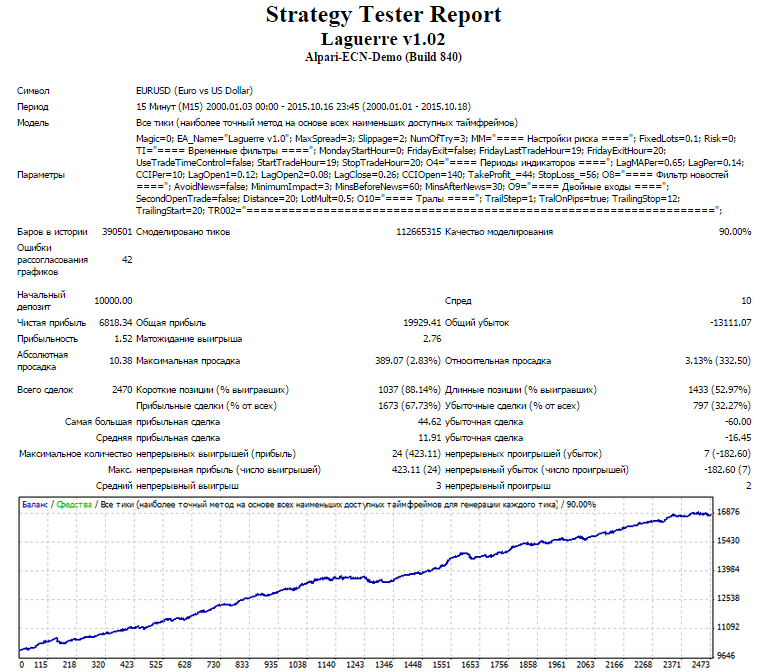
The testing result looks good.
The second test is done with a dynamic lot. This makes it possible to evaluate the testing results while taking money management into account.
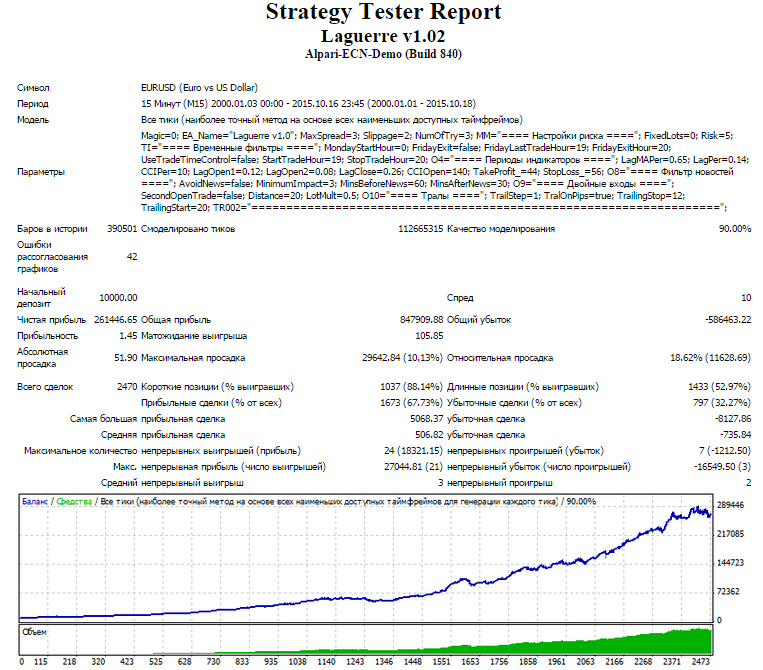
Let us consider the results for each month:
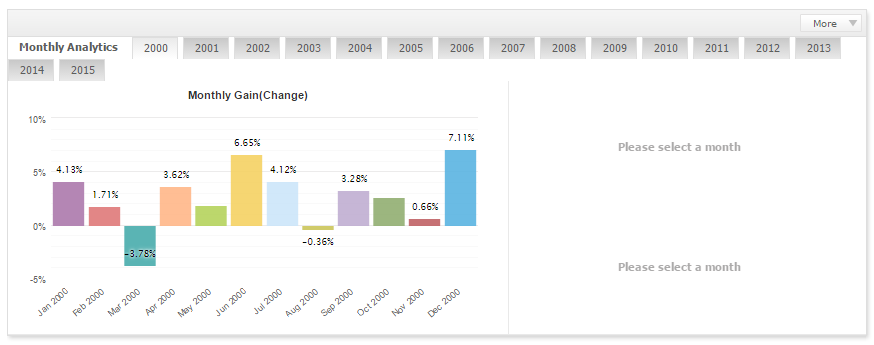
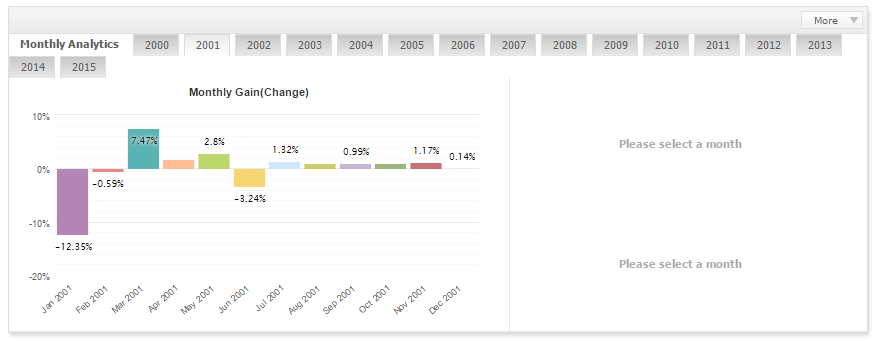
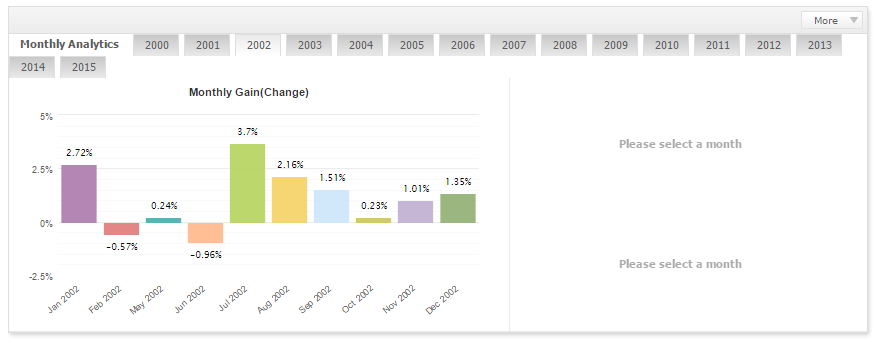
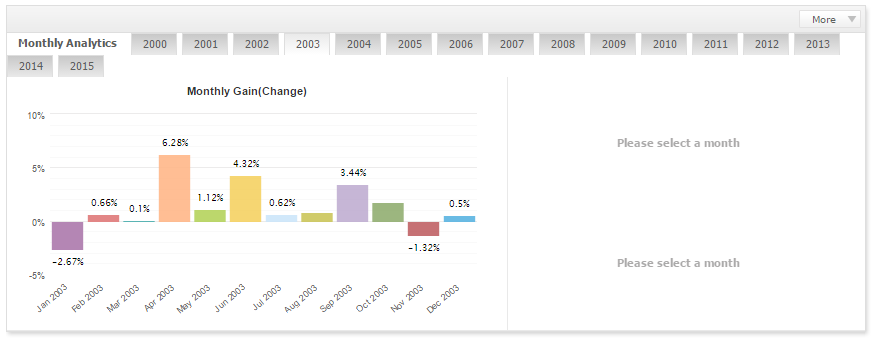
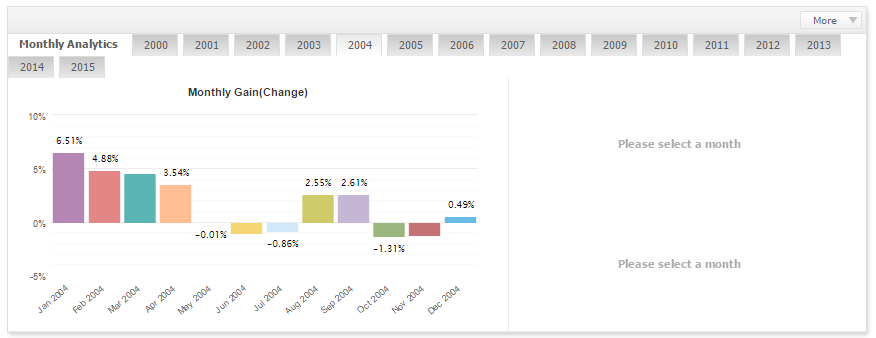
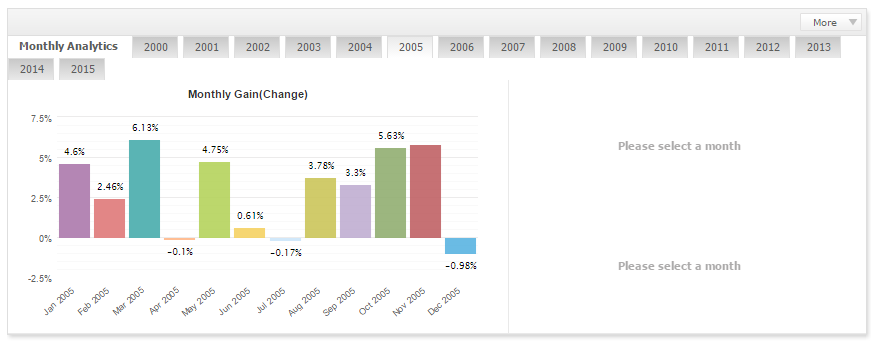
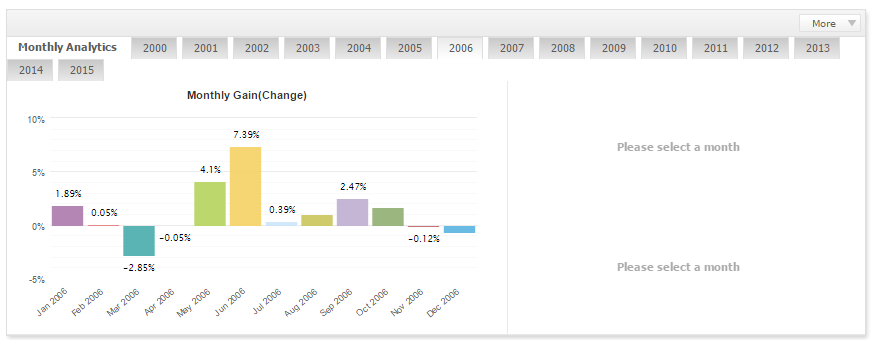
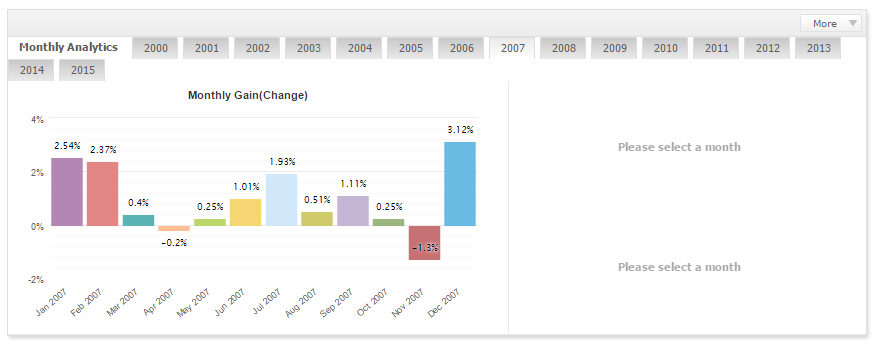
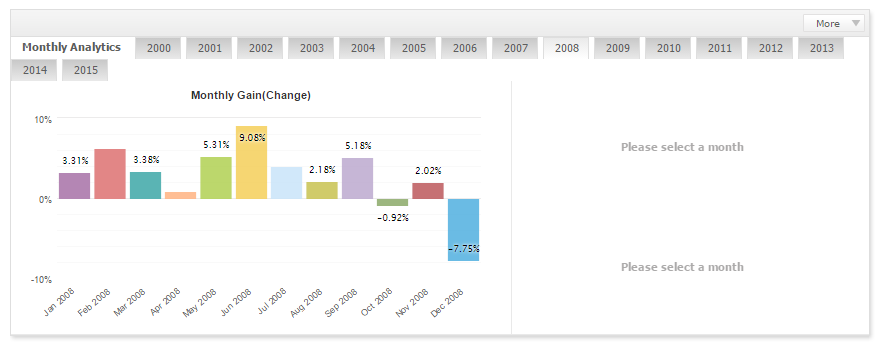
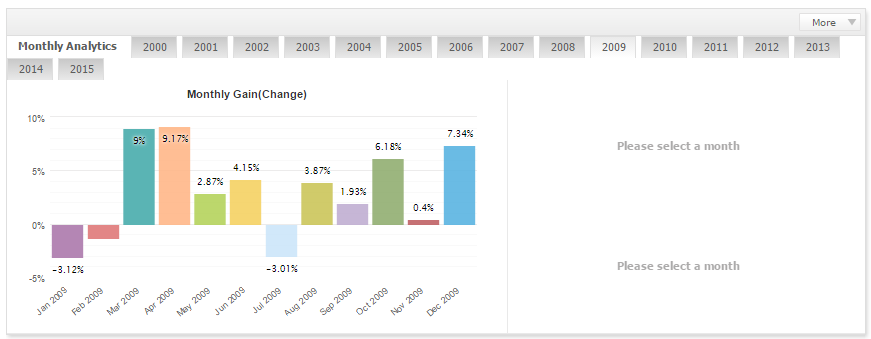
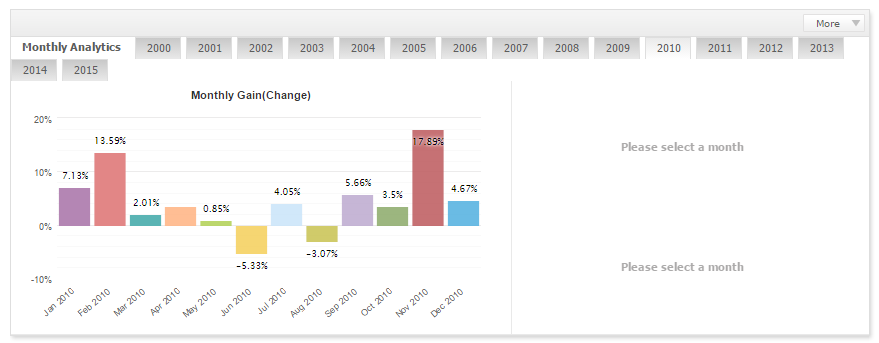
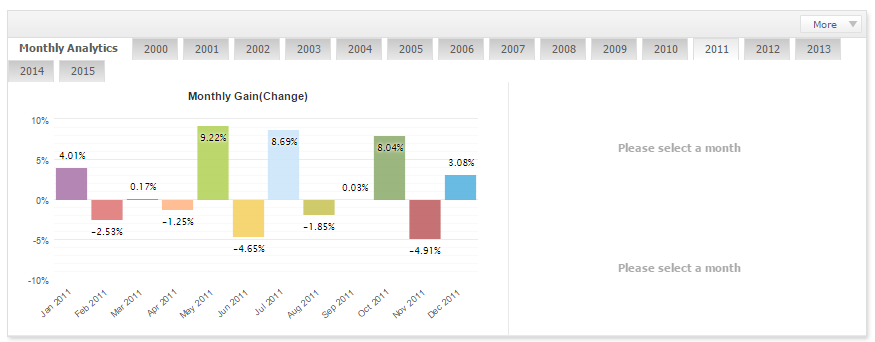
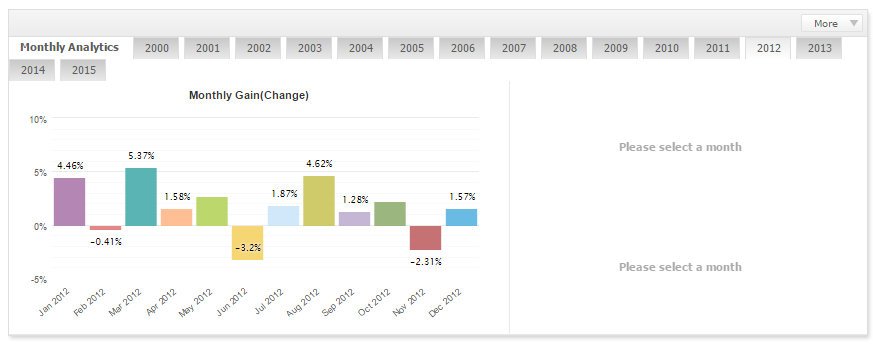
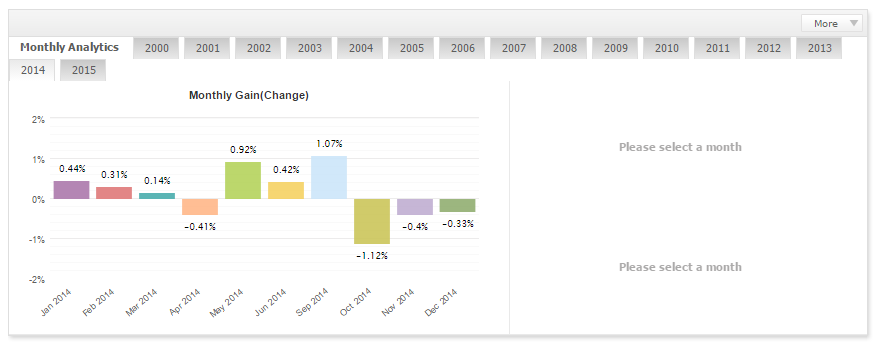
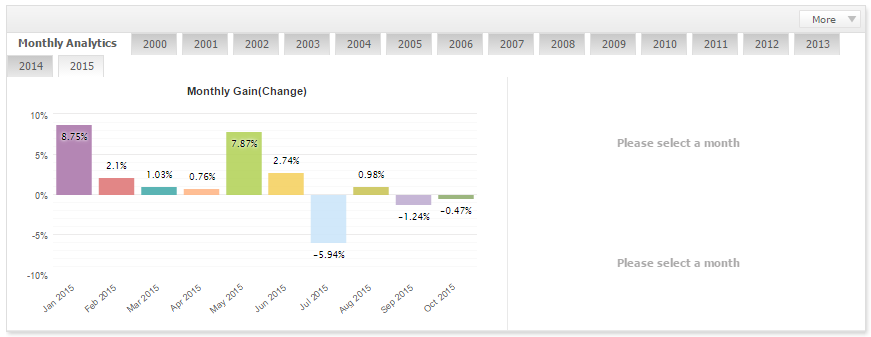
Conclusion: Over the long term, the expert advisor shows profit growth with small drawdowns. However, you need to be prepared for the fact that for some time the advisor may bring no profit or even be in the red. The advisor is suitable for use in a portfolio of conservative expert advisors.
Links to the backtests used in the article (for independent analysis):
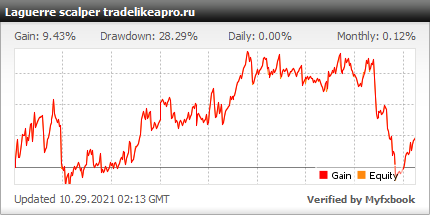
Live account monitoring
Settings description
Signal settings
- CandlesToWait - waiting time in bars for suitable conditions after the signal appears
- MinVol - minimum volatility for entering a position
- MinExitTP - minimum % of take profit for exit
- ExitInLoss - exit at a loss
- MinExitSL - minimum % of stop loss for exit
- NumOfTry - number of entry attempts when Slippage is exceeded
- LagPeriod - Laguerre period
- LagPeriod - Laguerre period
- WPRPeriod - WPR period
- LagMAPeriod - LaguerreMA period
- LagEnterLevel - entry level for Laguerre
- LagExitLevel - exit level for Laguerre
- WPRMinEnterLevel - minimum entry level for WPR
- WPRMaxEnterLevel - maximum entry level for WPR
- WPRExitLevel - exit level for WPR
- MinLagMA - minimum offset from LaguerreMA
- MaxLagMA - maximum offset from LaguerreMA
- PriceFilter - price filter for entry
Stoploss settings
- SLVariant - initial stop calculation variant, can be:
- Fixed stop
- Stop by the shadows of HistorySL candles
- Stop by ATR
- Stop by SAR
- SL - size of the fixed stop
- OtstupSL - offset from the candle
- HistorySL - search for candles in history
- ATRSLCoef - ATR coefficient
- SarStepSL - SAR step
- SarMaxSL - maximum SAR
- MinSL - minimum stop in points
- MaxSL - maximum stop in points
Takeprofit settings
- TPVariant - take profit calculation variant, can be:
- Fixed take profit
- Take profit by ATR
- TP - size of the fixed take profit
- ATRTPCoef - ATR coefficient
- MinTP - minimum take profit as a percentage of the gap
- MaxTP - maximum take profit as a percentage of the gap
MM settings
- LotVariant - lot calculation variant, can be:
- Fixed lot
- Fixed percentage
- Fixed proportion
- Lot calculation depending on volatility
- FixLot - Fixed lot
- Risk - Risk as a percentage of the deposit
- MoneyForMinLot - Deposit money for the minimum lot
- VolRisk - Coefficient for volatility risk
- VolHistBars - History in bars for calculating volatility risk
- UseDynamicDecrease - Use dynamic lot reduction during drawdown
- DynamicDecreaseFactor - Dynamic lot reduction coefficient
Double entries
- Allow_Second_Open_Trade - Entry with an add-on order during drawdown
- Distance - distance from the entry for the add-on in % of the stop
- Lot_Factor - % of the initial lot
Partial exit
- AllowPartialExit - Partial exit upon reaching ExitDistance percent of take profit
- ExitDistance - % of take profit after which to exit partially
- ClosePercent - % of the lot that will be closed
Trailing general settings
- TrailingFromBE - Trail from the common breakeven level (when false, it trails from the open order closest to the price - when adding on in the trend direction)
Standard trailing
- TralOnPips - Standard trailing
- TrailingStop - Trailing level (distance from the current price)
Trailing by candle shadows
- UseTrailingByShadows - Trailing by candle shadows
- BarsUse - how many bars to use
- BarsOtstup - offset from the shadow
Trailing by ATR
- UseTrailingByATR - Trailing by ATR
- AtrPeriod - ATR period
- AtrShift - ATR shift
- AtrCoeff - ATR coefficient
BE (breakeven)
- UseBE - use breakeven
- BELevel - profit level in points at which to move to breakeven
- BEPlusPips - how many points to add to the zero level
BE as a percentage of the gap
- UsePercBE - use breakeven
- BEPerc - % of take profit at which to move to breakeven
News filter
- AvoidHighImpactNews - avoid high-impact news
- AvoidMediumImpactNews - avoid medium-impact news
- AvoidLowImpactNews - avoid low-impact news
- MinsBeforeNews - stop trading before news in minutes
- MinsAfterNews - start trading after news in minutes
Gap protection
- UseGapProtection - use gap protection
- LastFridayTradeHour - last Friday hour for opening trades
- UseForceClose - use forced closing on Friday evening
- ForceCloseHour - what time to close
Service settings
- CandlesToDelete - number of candles for pending orders to exist
- BarPeriod - tick emulation period
- WorkPeriod - expert advisor operating period
Other settings
- ExpertName - comment to the order
- Slippage - slippage
- Magic - magic number, if zero it is generated automatically
- MaxSpread - maximum spread for entry
- NumOfTry - number of attempts for entry/modification/exit
- SleepTime - time between attempts in seconds
- SleepMaximum - maximum time in seconds
- ECNAccount - ECN account
- UsePanel - info panel
- TopField, DataField, ExpNameCol - panel colors
- UseComments - comments in the log
- UseSnapShot - screenshot
- UseSendMail - send mail
- UseSendPush - send push notifications
- UseLog - keep a separate log
Time filter
- MondayTrade, TuesdayTrade, WednesdayTrade, ThursdayTrade, FridayTrade - whether to trade on Monday through Friday
- MondayTimeFilter_1, MondayTimeFilter_2, MondayTimeFilter_3, MondayTimeFilter_4 - enable trading in periods 1,2,3,4 on Monday
- MondayStartHour_1,2,3,4, MondayStartMinute_1,2,3,4 - trading start hours and minutes for periods 1,2,3,4
- MondayStopHour_1,2,3,4, MondayStopMinute_1,2,3,4 - trading end hours and minutes for periods 1,2,3,4. The same applies to the other days.
Attention! Do not change anything in the expert advisor parameters and use only the recommended values unless you know exactly what you are doing!
Recommended Money Management

A risk per trade of 3 percent of the deposit is recommended. The lot can be calculated using a special table, or you can simply set the risk level in the expert advisor parameters, and everything will be calculated automatically.
Results

The Laguerre scalper expert advisor is a conservative trend-following scalper that is profitable over a long period. This expert advisor can be used in a portfolio of conservative expert advisors. Also note that the expert advisor does not trade often.
Important!
For the expert advisor to work correctly, the trading terminal must be turned on from the market opening on Sunday evening until its closing on Friday evening. If you do not have the ability to keep the computer running 24/5, then it is recommended to use a VPS server service.
Download the "Laguerre scalper" Expert Advisor

Best regards, Alexey aka Merlin Tlap.io