
Instructions for Installing Trading Strategies

I was told several times that in videos about forex strategies I needlessly go over the process of installing indicators and system templates every time. Supposedly everyone already knows that :) . But believe me, quite a few beginners visit this site, and even the routine process of installing a trading system into the terminal can cause difficulties for them. So, to avoid covering this very installation in all videos, I decided to make a short guide to installing trading strategies (systems) into the MetaTrader 4 terminal. And if beginners run into problems, I will simply give them a link to this article.
It is worth noting that these instructions are intended for those strategies that come with some files to install into the terminal; if the strategy is indicator-free, for example based entirely on combinations of Japanese candlesticks, then in that case you do not need to install anything :)
Well, if the strategy does include some files, then follow the guide below.
1. You must have the MetaTrader 4 trading terminal downloaded and installed
2. Look at which files are included in the archive with the trading system. Usually these are indicator(s), a template, and sometimes there are strategies with auxiliary EAs included as well (for working with EAs read the FAQ on installing and trading with EAs).
Indicator files (.ex4 or .mq4) need to be copied to the MQL4/indicators folder in the terminal Data Folder.
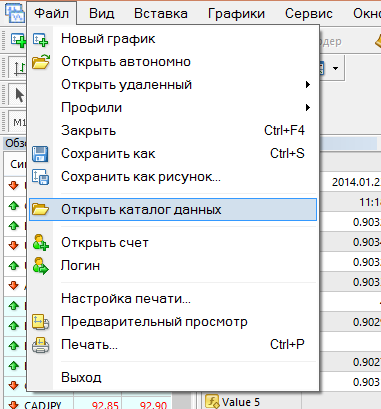
To get to this folder, launch the terminal and click File -> Open Data Folder
There is also often a strategy template file for quickly applying it to a chart. This file has the .tpl extension; copy it to the Templates folder of the terminal data directory.
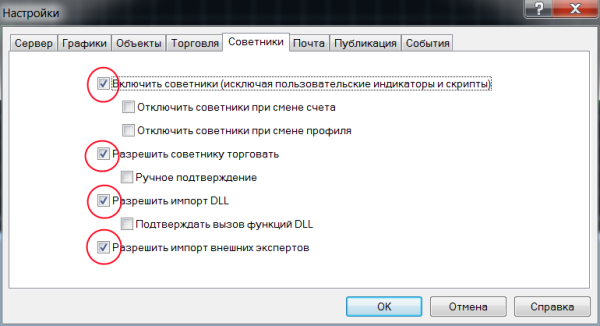
3. Next, restart your MetaTrader 4 terminal, click Tools->Options on the top panel of the program, and on the Expert Advisors tab, check the boxes as shown in the screenshot below. Then click OK.
4. In the "Market Watch" window, right-click the name of the currency pair for which the system is intended and choose "Chart Window".
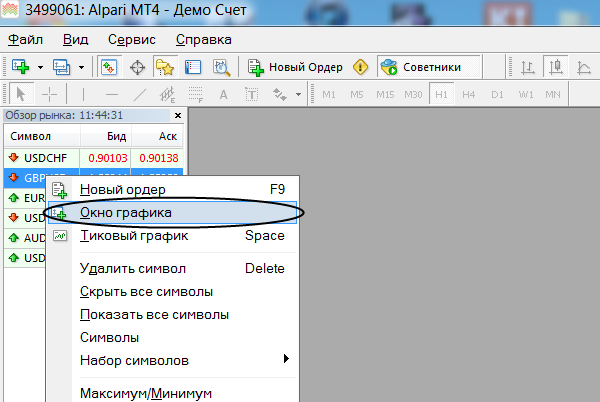
Note: if the required instrument is not in the "Market Watch" window, right-click any pair and choose "Show All Symbols".
5. Now we need to change the chart timeframe (time interval) to the one required for trading this system. Right-click anywhere on the open chart and choose Period->the required timeframe from the list.
6. If your system came with a template, then right-click on the chart and choose Template->Strategy template name. After that, the system is ready to work. If there was no template, then you need to install the indicators on the chart manually. Installing and configuring indicators is covered in detail here.
Note: After installing indicators on the chart, you can save your own template. Right-click on the chart ->Template->Save Template
7. Repeat steps 4-6 to install the system on other currency pairs.
That is all, as you can see, it is very simple.
Best regards, Pavel TradeLikeaPro.ru