
How to Build Trend Lines Automatically?
 Every experienced trader knows that when trading forex, it is worth paying attention to trend lines. But drawing trend lines takes time, and there can even be several of them on charts... Horror!!! Want to know how you can easily and simply automate this process? Then read on.
There is a solution: the smart and reliable True Trendline trend line indicator. All that is required from you is to attach the indicator to the chart, and it will draw all possible trend lines for you. You will only have to admire the result (as in the picture below) and apply it in your trading strategy.
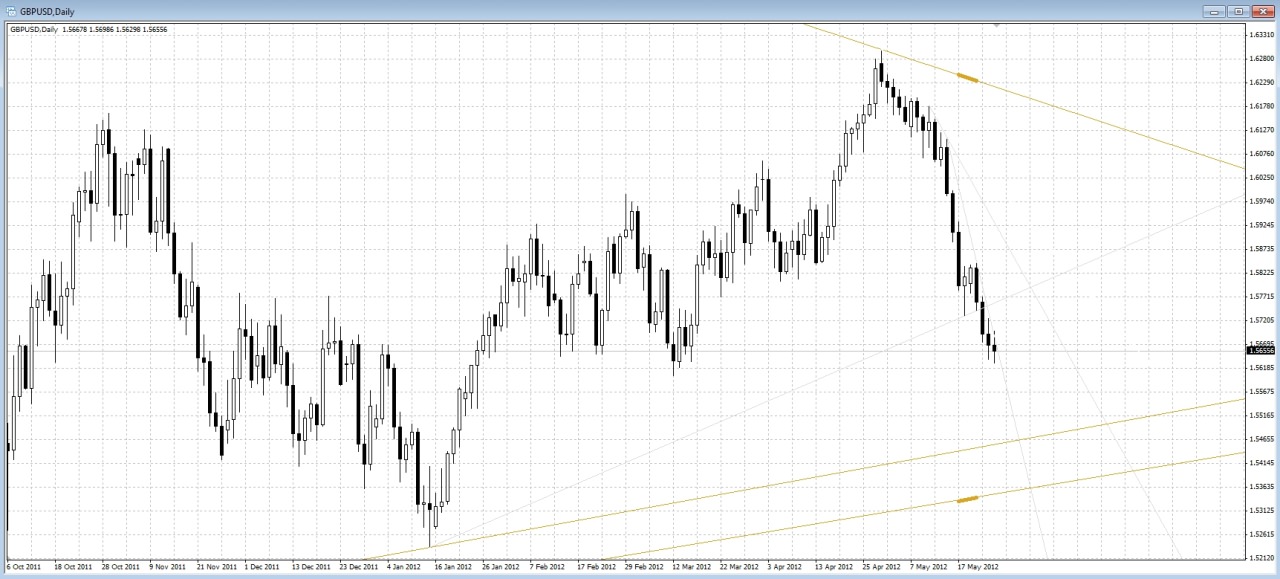
Now you may have asked yourself: "Why do I need a trend line indicator if I know how to draw them myself?" I answer:
- the indicator saves your time
- it does not get tired, its eye does not get "blurred"
- the indicator can give sound signals when the trend line is touched or broken
Installing and Configuring the True Trendline Indicator
1. Download the archive from the link at the end of the article. Unpack it.
2. Install the files into the Metatrader 4 terminal, following the special instructions.
3. Attach the TrueTL indicator to any chart (if desired), and it will start working.
4. You can also use the additional indicator (it is in the installation archive) TrueTL Alert, which is intended to give signals when the price breaks/touches the trend line. Depending on how you configure it.
Our True Trendline indicator has a number of settings that affect its operation:
Auto_Refresh - automatically refresh trend lines when the symbol, timeframe, and the closing of the current candle change.
Normal_TL_Period - over how many recent bars to search for lines for the main timeframe.
Three_Touch - turn on/off highlighting trend lines with 3 support points in a separate color.
M1/M5_Fast_Analysis - the possibility of accelerated analysis of M1/M5 timeframes for owners of weak computers.
Mark_Highest_and_Lowest_TL - turn on/off highlighting the very top and the very bottom TL with a bold dash.
The remaining parameters are responsible for the line colors.
Configuring the True_TL_Alert Signal Indicator
Break_Alert_After_Close - turn on/off a signal about a trend line break only after the candle closes.
Break_Alert_Before_Close - turn on/off a signal about a trend line break without waiting for the candle to close.
Touch_Alert - turn on/off a signal when the trend line is touched
Touch_Distance - minimum distance to the TL in points for the Touch_Alert function to trigger.
All_TrendLine_Alert - turn on/off tracking of all TLs on the chart.
High_TL_Name/Low_TL_Name - if All_TrendLine_Alert is disabled, then in these parameters you need to set the names of the upper and lower trend lines so that the signal indicator takes them into account.
Email_Alert - turn on/off an e-mail signal
PopUp_Alert - turn on/off a pop-up window on signal
Sound_Alert - turns sound on/off when a signal appears
Sound_File - which audio file will be played (it must be located in the Sounds folder in the terminal)
Download the True Trendline trendline indicator

Respectfully, Pavel
TradeLikeaPro.ru