
How to Block MetaTrader 4 Auto-Update

Hello friends, fellow forex traders! Unfortunately, our beloved MetaTrader 4 trading terminal has a habit of updating its build (version) without the user noticing. And new MT4 builds rarely bring anything good: mostly bugs, and besides that your old indicators and advisors may "suddenly" stop working.
Sad, agree. Who is to blame and what should be done? Fortunately, there is a way to prohibit the automatic update of the trading terminal and protect your trading at least from software problems.
How does auto-update happen?

One fine day, the running terminal will start downloading something, and then it will automatically restart. After reopening the program and clicking "Help" - "About", you will learn that your favorite build, for example, 762, has become 840:
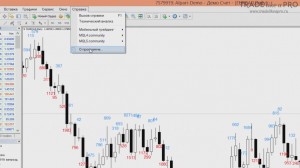
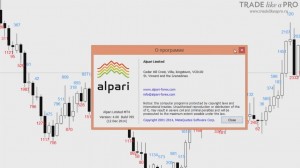
If you have several terminals on your computer and auto-update started on one of them, then the next time they are launched they will all be updated.
After the update, some trading utilities will quite likely stop working.
How to disable terminal auto-update?

To do this, you need to perform a series of simple actions.
- Go to the folder C:/Users/User Name/AppData/Roaming/MetaQuotes
- Delete the WebInstall folder entirely with all its contents.
- Create a file with any content named WebInstall. For example, you can create a text document in Notepad and rename it, making sure to remove the .txt ending. At the same time, file extension display must be enabled in Explorer.
Now the terminal (or more precisely all terminals installed under this user on the PC) will not update automatically. The build that existed at the moment these actions were performed will remain unchanged for you.
Note: the AppData folder may be hidden; to see it, in Explorer click View and check the box next to Hidden items.

To restore the possibility of auto-update, simply reinstall the terminal again by downloading the installation file from your broker's website.
Conclusion

Unfortunately, over time old builds stop being supported by the developer. This is done in order to force traders to switch to new builds. Therefore, at one fine moment your terminal may stop working. If that happens, you will have to download the new version and work with it.
Nevertheless, the described method of disabling auto-updates helps protect you from early unstable build versions that contain numerous errors. If you do update, then do it to a stable version.
That is all from me. In such a simple and straightforward way, you will be able to disable auto-update in your terminal.
Respectfully, Pavel Vlasov Tlap.io
