
Generic v14 Expert Advisor - a Night Scalper on Steroids
 Good day, dear fellow traders!
Scalping during the Asian session is one of the most stable algorithms that brings profit on Forex. However, the biggest drawback of such robots is the large stop-losses, which can take up to several months to recover. How can this disadvantage be mitigated?
The bright minds of our forum developed an improved version of the Generic A-TLP expert advisor with the addition of an order grid. And for more than a year now, this "pumped-up" advisor has been trading profitably. In this review, we will examine the pros and cons of the "steroid-enhanced" night scalper Generic V14.
What is the main difference of Generic V14?

I would like to express special thanks to our forum member Rever27 for developing the expert advisor.
The Generic v14 version still tracks and trades signals of an expected trend reversal, but the algorithm is optimized for a more "precise entry." A grid of orders that average the loss is built dynamically against the movement of quotes beyond the upper and lower Bollinger Bands in zones where the probability of a price return increases.
To avoid excessive trade frequency (grid legs) and thereby reduce the burden of the current loss on the deposit, the distance between them is chosen with the help of the indicator ATR, which helps account for the size of current trading volatility.
Expert Advisor Characteristics
Platform: Metatrader 4
Expert Advisor version: 14.01.64
Currency pairs: GBPUSD, USDJPY, GBPCAD, GBPCHF, EURGBP, EURCHF, USDCAD, USDCHF
Timeframe: M15
Operating time: Asian session
Recommended brokers: Roboforex, Forex4You, Exness
Installing the Expert Advisor

Detailed installation instructions are described in the article on the website.
After restarting Metatrader, find Generic v14 in the "Navigator" panel and drag it into the selected currency pair window on the M15 timeframe.
Attention!
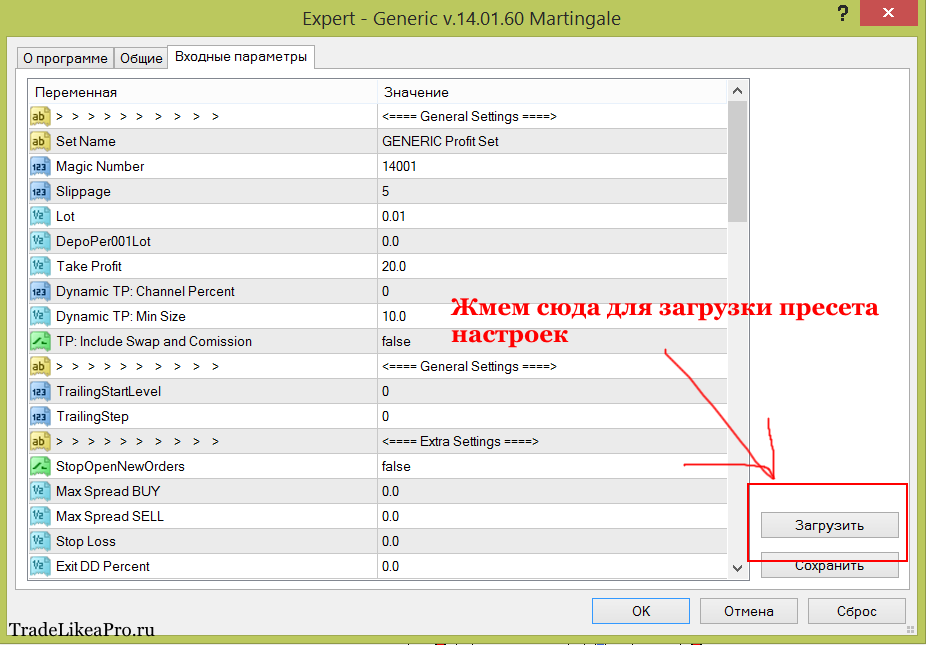
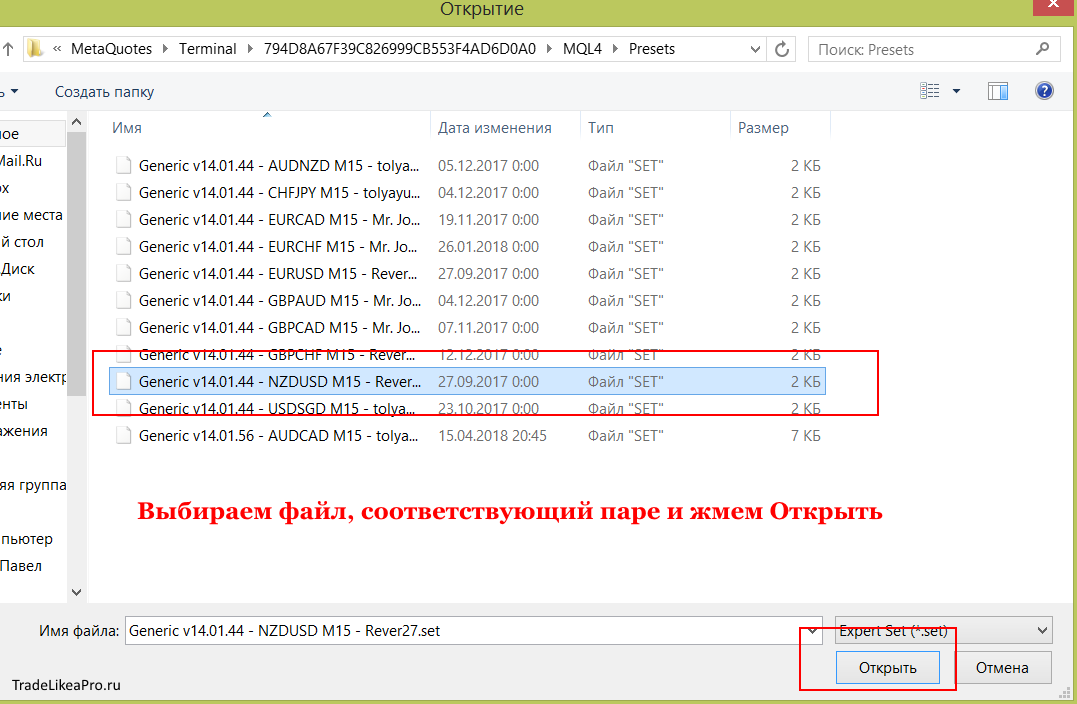
Do not forget to load the settings preset corresponding to the traded pair. For example, for the AUDCAD pair you need to load the preset named "Generic v14.01.56 - AUDCAD M15".
To load a preset, when installing the expert advisor on the chart, in the settings window you need to click the Load button and select the desired set.
The Expert Advisor's Trading Strategy

Trades are opened on rebounds from the borders of the Bollinger price channel formed by three moving averages according to the principle implemented in earlier versions of Generic. The advisor builds these lines independently, without marking the middle of the range.
- A long is opened automatically when an M15 candle crosses the lower band of the indicator;
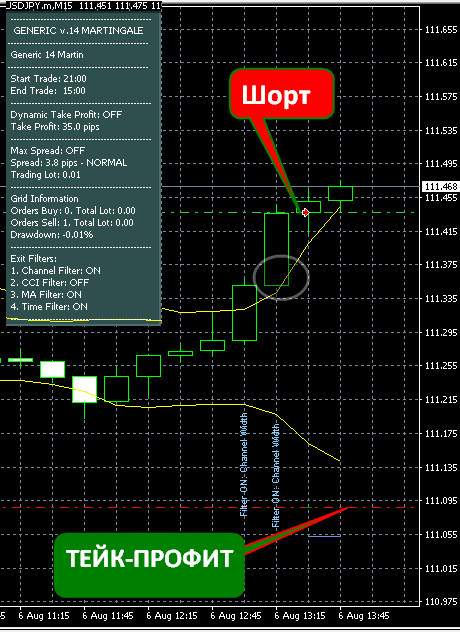
- A short is opened automatically based on similar conditions, except that in this case the candle goes beyond the upper Bollinger Band.
 The trading algorithm is based on the principle of Gaussian distribution, founded on the high probability of finding a random variable within a deviation interval of up to 2 sigma, which is dynamically outlined by the upper and lower Bollinger lines. They are represented by two moving averages, with entries below and above them made in expectation of a pullback and price movement toward the opposite side.
The strategy includes a number of filters:
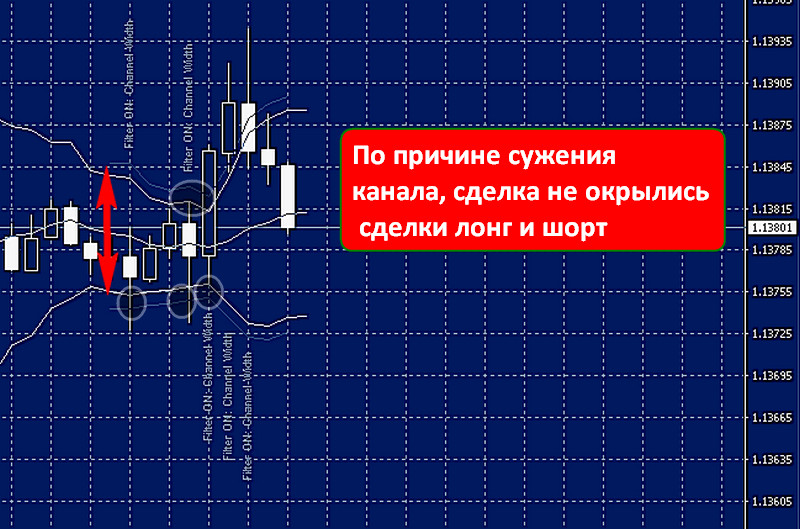
- Range width (the spread between the indicator's moving averages);
- Indicators: CCI, IMA, ATR, StDev;
- A limit on the time spent in a profitable trade;
- A ban on entry when the spread between the pair's bid/ask price increases;
- A ban on entry based on the size of the candle's maximum price range.
 Until the moment of drawdown, the size of which is determined by the stop-loss level under the "old system," the strategy works in the "traditional mode." A positive trade result is closed according to user settings tied either to the channel width or to specific values in points defined in the take-profit functionality. In order not to miss "paper profit," once 50% of its expected value is reached, filters that track a trend change are activated so that profit can be closed when the trend reverses.
The first grid leg opens at a distance equal to the current ATR range multiplied by the coefficient chosen by the user. The same coefficient also determines the spacing between subsequent orders, entries into the market as losses increase.
Martingale, the increase of each subsequent order, starts from the second leg. The settings provide for a limitation of the "grid depth," tied to the maximum deviation in pips from the initial entry, and a dynamic move of the take profit into breakeven.
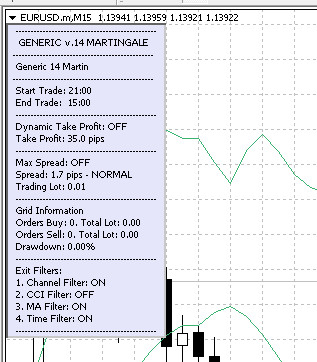
The values of the main strategy settings are placed on the information panel for prompt monitoring: the take-profit level and the number of its filters, the set trading time, the spread, lot size, and open trades:
Monitoring

As usual, in the expert advisor review we present the results of the forex robot's "field tests" on an account verified by the myfxbook service. Below is the report on the use of Generic v14 based on the tests from our site:
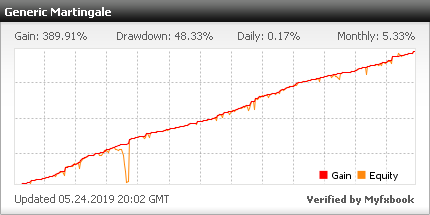
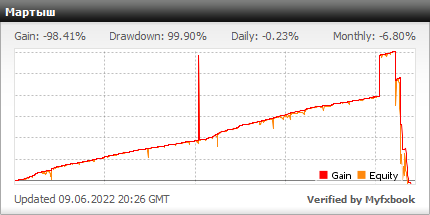
Testing the Generic v14 Expert Advisor

Testing is a mandatory process before launching any Expert Advisor in demo and live trading. It is intended to ensure financial safety, as it can preliminarily reveal blowout strategies and also point out errors or optimization methods for improving trading results.
To make the test as close as possible to "field conditions":
- Reproduce quotes with maximum accuracy (use the Dukascopy quote database whenever possible);
- Be sure to take the spread size into account during the "runs";
- Choose a section of historical quotes with the presence of flat, trend, and volatility spikes.
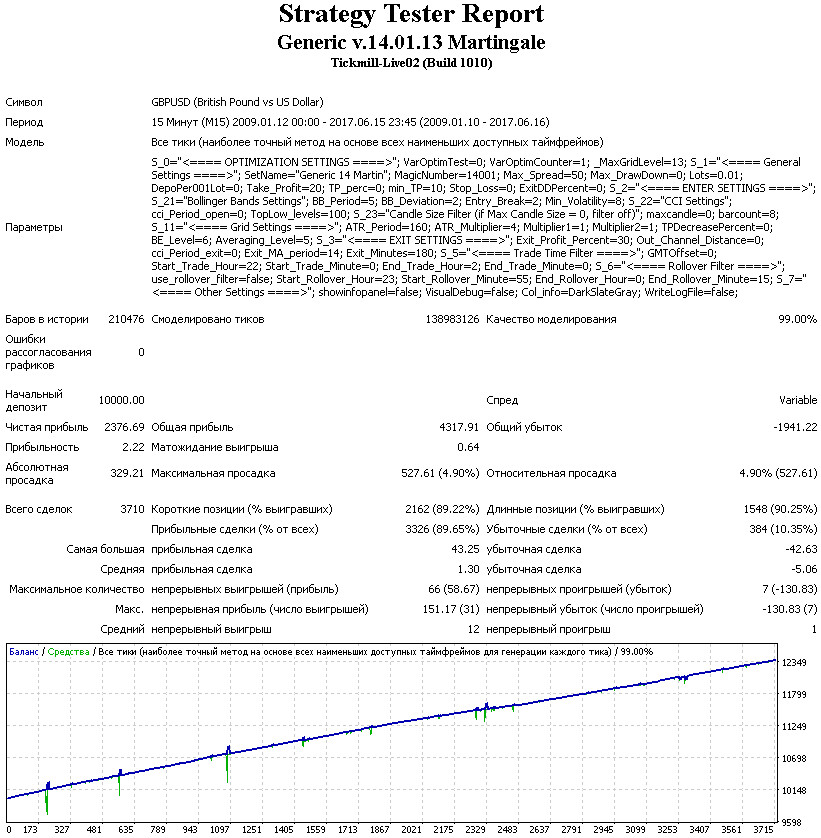
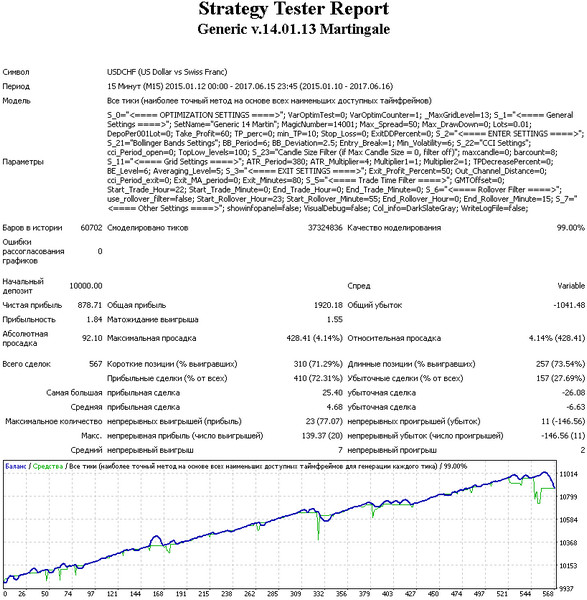
Taking the above into account, let us conduct a series of tests in Metatrader using the all-ticks generation method and the current spread. We carry out all tests with a fixed lot, which simplifies further calculations of the "deposit cushion" based on the maximum drawdown figures and the grid "depth."
Generic v14 Lot 0.01 test of the GBPUSD pair:
 Generic v14 Lot 0.01 test of the USDCHF pair:
 Generic v14 Lot 0.01 test of the EURUSD pair:
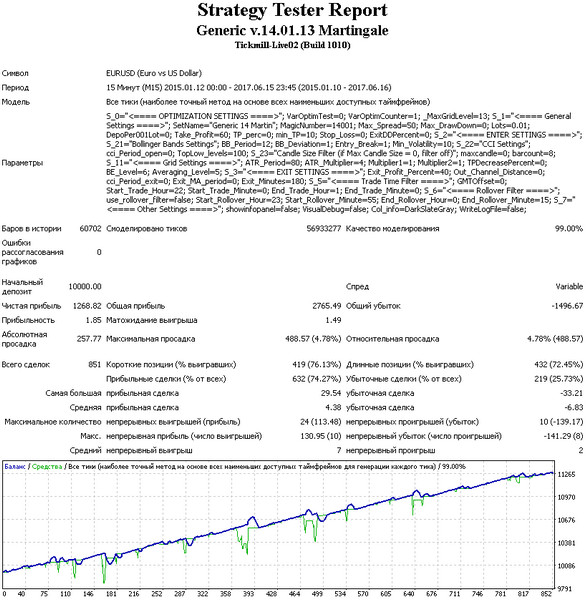 Generic v14 Lot 0.01 test of the USDCAD pair:
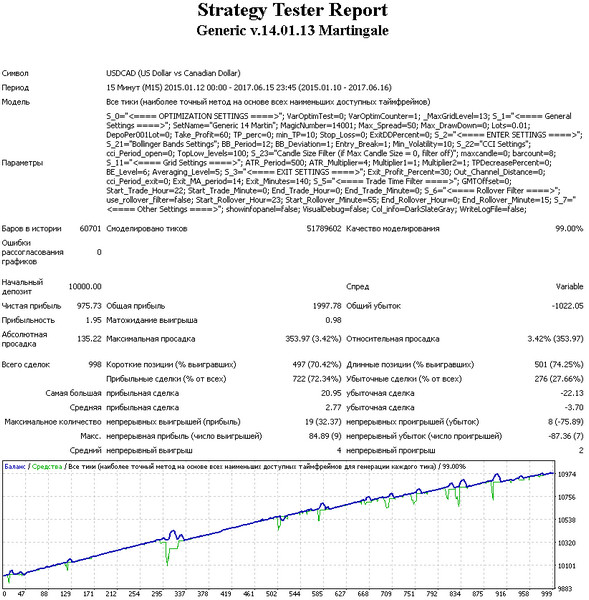 Generic v14 Lot 0.01 test of the NZDUSD pair:
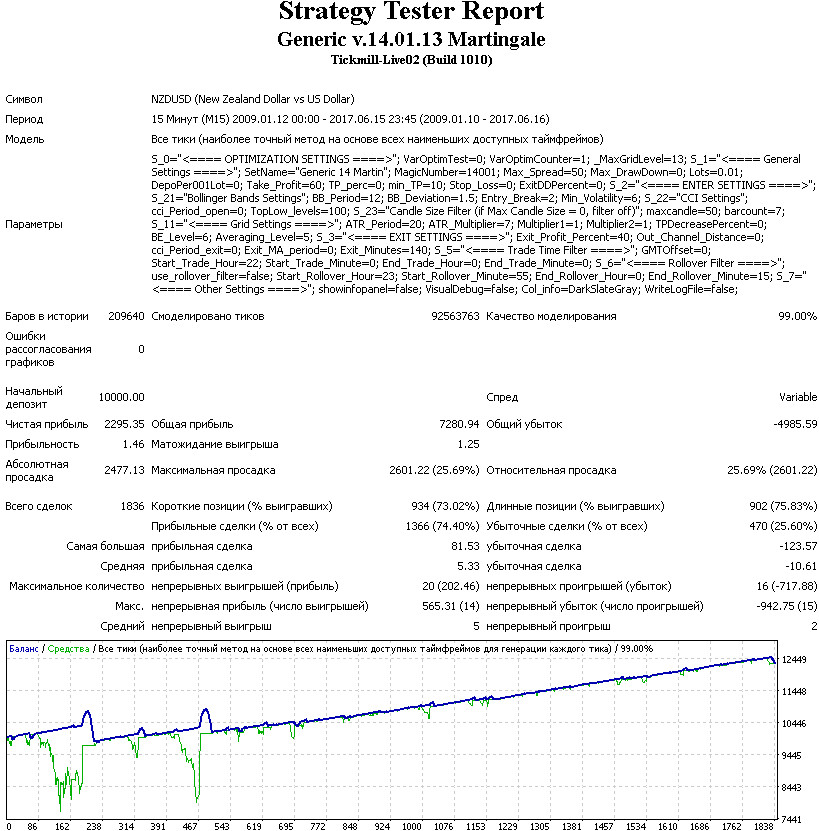 Generic v14 Lot 0.01 test of the AUDUSD pair:
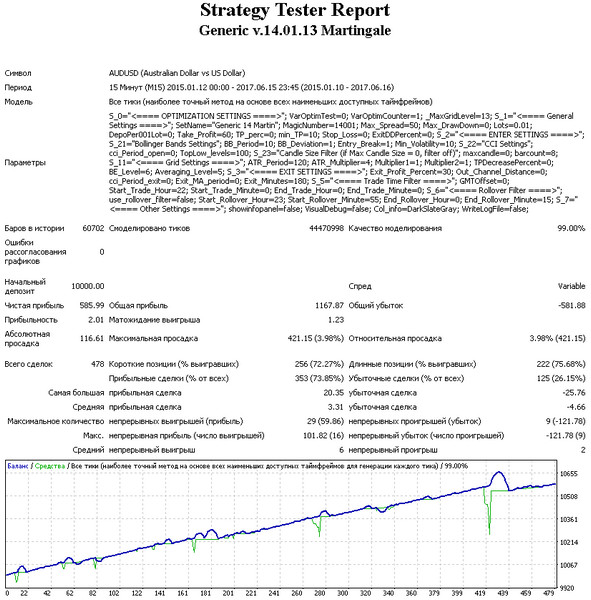 Generic v14 Lot 0.01 test of the EURAUD pair:
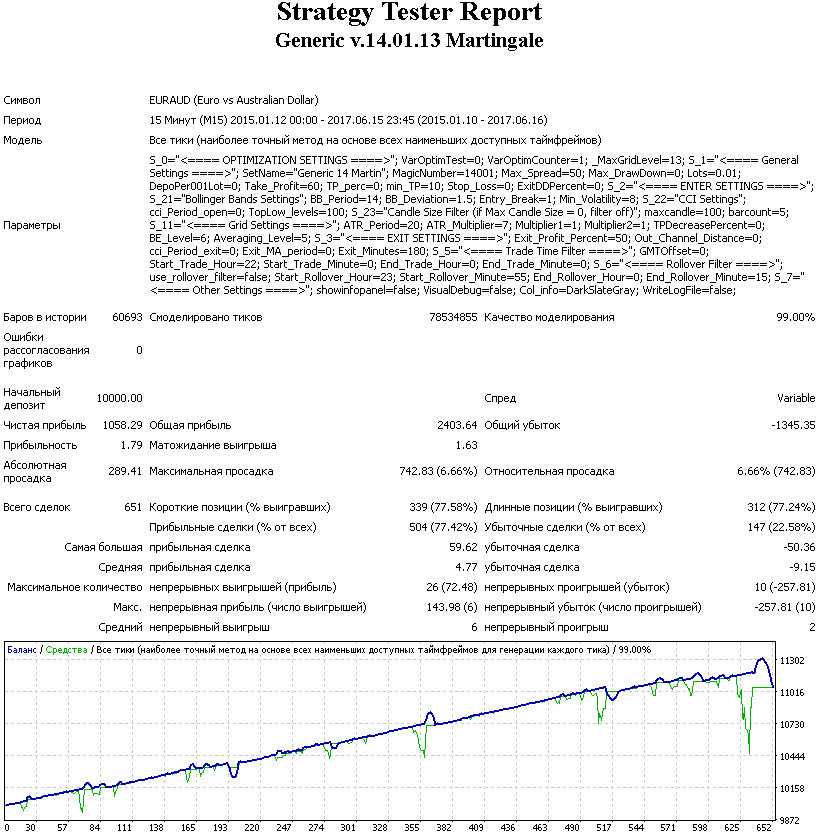 The expert advisor showed fairly stable results on the major currency pairs, while in combination with the JPY currency it was not possible to achieve acceptable results. This is due to the strategy's sensitivity to volatility and the condition of "working off the minus" - that is, trading will be conducted around the clock until all grid trades are closed.
Therefore, the Martingale strategy can accumulate an increasing loss during a directional trend, which will lead to a stop-out because the deposit is insufficient to maintain a large combined open position.
To assess the resulting profitability of multi-currency trading, let us combine the obtained reports into one using EA Analyzer.
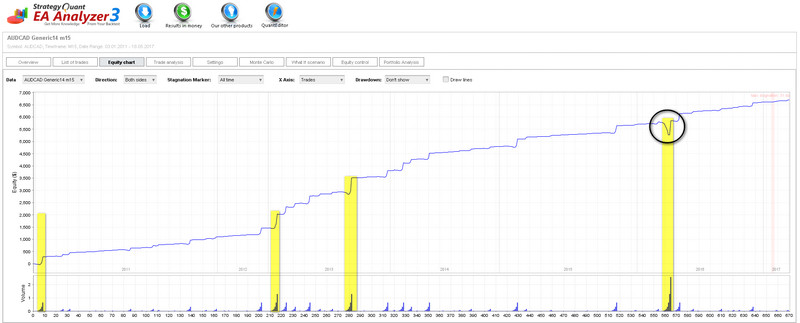
Pay attention to how the EA Analyzer tester more clearly shows the visualization of the use of leverage on the uploaded AUDCAD statement - a run from 2011 to 2018 showed that during the 7-year period, drawdown problems arose only at the beginning of 2016:
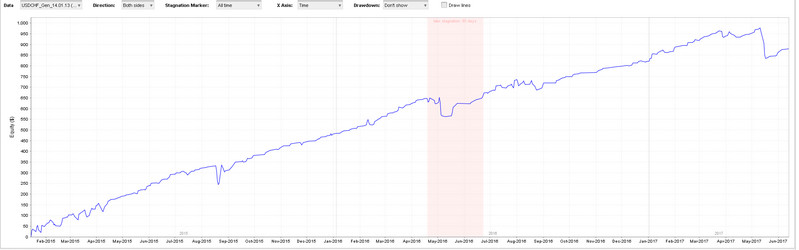
 The clarity of diversification is shown by combining in the analyzer two reports, the one described above with the USDCHF pair, whose statement revealed a "problem area" in May 2016:
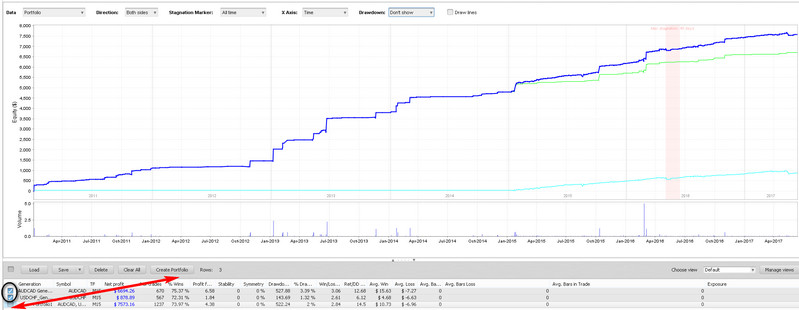
 The drawdown is neutralized if two pairs are considered within a single portfolio:
 In 2016, the Forex market experienced a volatility spike due to the 2016 events of Brexit, the historic Fed rate reversal, and the election of Donald Trump as president of the United States. Therefore, a continuous test of the scalper on the GBPUSD pair will be indicative for assessing how the order grid "takes the punch" in a mode of significant market rises and falls.
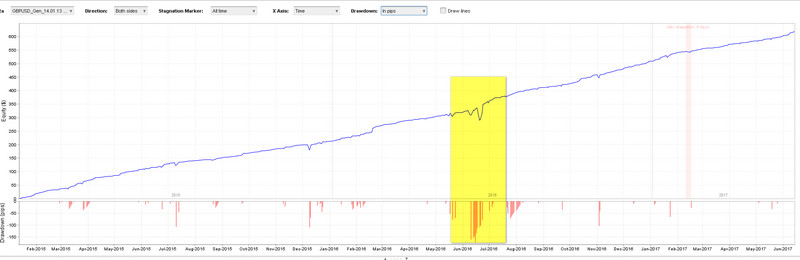 By combining three instruments together, we get a diversified, constantly rising chart:
You will find other tests in the archive with the expert advisor at the end of the article.
Description of Generic v14 Parameters and Settings

At the stage of attaching Generic v14 to the chart, the trader will gain access to the Expert Advisor settings window. Do not forget to load the required settings preset!
If you are going to let the robot trade, check the corresponding box on the "Common" tab and enable automated trading in the terminal itself on the quick access panel:
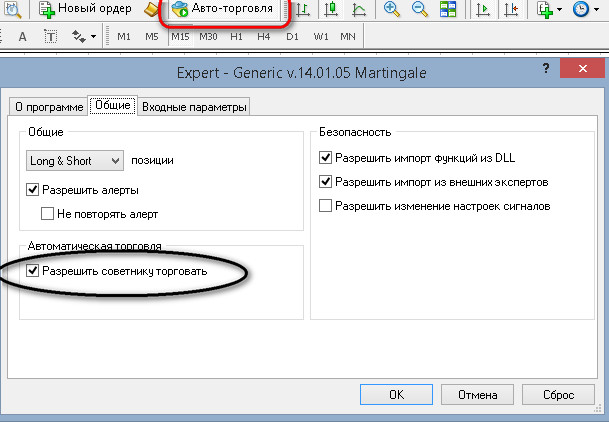 Input parameters are divided into several blocks: separate settings for the indicators included in the trading system, money management settings, carrying positions over to the next day, and active management of the order grid using the Martingale tactic.
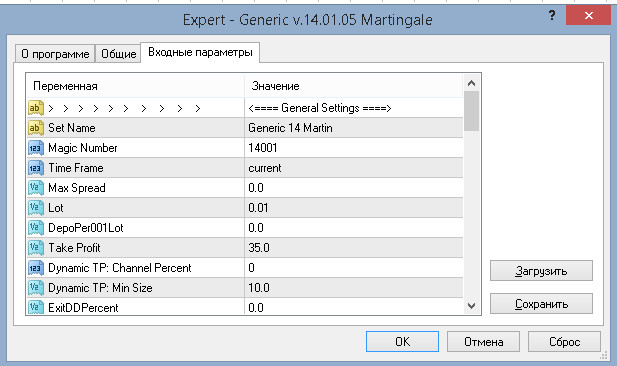
The main settings block "General Settings" includes:
Set Name - the name of the preset;
Magic Number - a unique number used to identify the algorithm, so that several robots running on the same chart do not intercept control of each other's orders;
Time Frame - this option allows the user to scale the strategy to any time interval (we remind you that the recommended period is M15). By default, the value is current: the algorithm will start working with the current value set on the open chart;
Max Spread - a parameter measured in points ("pips"), indicating the size of the maximum deviation from the entry point, after which no new "legs" - grid orders - are opened. By default, it is set to zero, since it has been empirically proven that in intraday (night) trading this restriction makes no sense;
Lot - the position size depends on the deposit amount; by default the minimum is 0.01 lot;
DepoPer001Lot - automatic linking of the deposit size to a 0.01 lot. For example, a value of 300 will prohibit any trades if the deposit size drops below $300. The same function will start opening 0.02 lots when the account grows to $600, and so on;
Take Profit - a fixed profit size; the baseline settings, based on empirical observations, provide for an optimal value of 35 points;
Dynamic_TP: Channel_Percent - a dynamic method for calculating trade profit as a percentage of the total size between the bands. By default, it is set to zero, which means the strategy works according to the previously set constant profit size;
Dynamic_TP: Min_Size - the lower threshold of the variable, trailing take profit (it decreases together with the channel);
ExitDDPercent - the threshold for automatic exit from all trades, set as a percentage of the deposit;
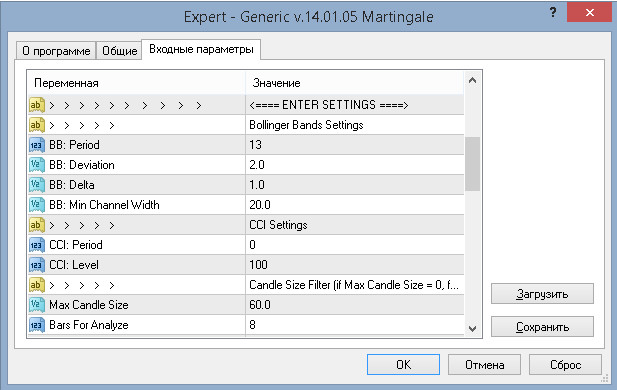
 The indicator parameter block "ENTER SETTING" includes the settings of two indicators and a candle price range analysis filter for the user-specified period:
Bollinger Bands and deviation parameter settings - Bollinger Bands Setting
Indicator period - BB: Period;
Channel size by deviation - BB: Deviation;
The "depth" of moving beyond the Bollinger Bands boundaries required to open a trade (measured in points) - BB: Delta;
The threshold distance between the bands above which the Expert Advisor opens trades (measured in points) - BB: Min Channel Width;
 CCI Settings indicator settings
The period for calculating the indicator curve. By default, it is set to zero, i.e. the filter is not used in the strategy - CCI: Period;
Overbought/oversold zones - CCI: Level (set with one number, symmetrically);
Candle price range filter - Candle Size Filter;
The extreme candle range value (from the minimum to the maximum of the "tails") that occurred over the specified interval, prohibiting entry into a position - Max Candle Size;
The period over which the extreme candle range value is determined - Bars For Analyze (both values are set in points);
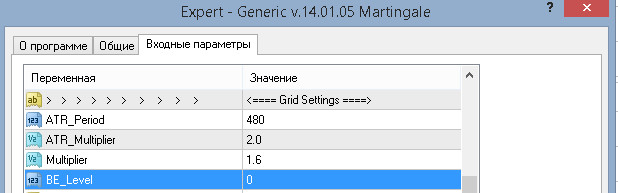
 Order grid construction condition settings – GRID SETTINGS
Period – ATR Period;
ATR indicator value multiplier for calculating the step between trades – ATR Multiplier;
Martingale coefficient for the grid orders following the first one – Multiplier (works starting from the second trade);
Number of open trades determining the constant movement of take-profit to breakeven – BE_Level;
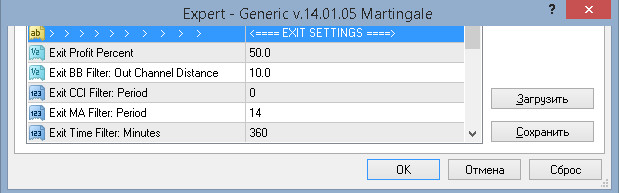
 Expert Advisor stop parameters with forced closing of all trades – EXIT SETTINGS
The size of the “planned” take-profit, including 4 filters for early profit locking (described below) – Exit Profit Percent (in percent);
Maximum distance from the opposite indicator band for dynamic trade closing (in points) – Exit BB Filter: Out Channel Distance (if the parameter value is zero, the filter is disabled);
Signal to close by overbought/oversold levels (specify the period value – Exit CCI Filter: Period - the filter is disabled at zero value);
Closing the position when the trend of the simple moving average changes, the period value of which is specified in the settings line – Exit MA Filter: Period;
Number of minutes limiting the holding of a profitable position – Exit Time Filter: Minutes;
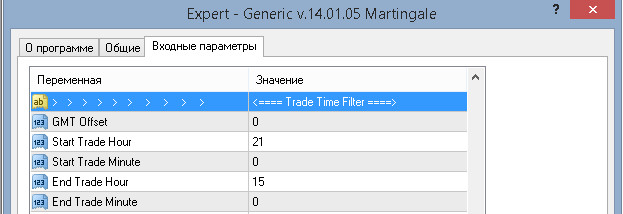
 Trading strategy time filter – TRADE TIME FILTER
The time difference between GMT and the current data in the broker's terminal – GMT Offset (in hours);
Trading start hour for the Expert Advisor – Start Trade Hour;
Trading start minutes – Start Trade Minute;
Trading session end hour – End Trade Hour;
Trading session end minutes – End Trade Minute;
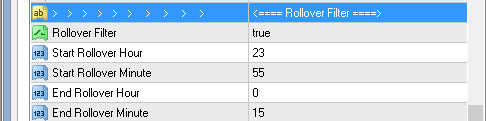
 Position rollover – ROLLOVER FILTER
Enable (true) disable (false) the position rollover filter -– Rollover Filter;
Filter start hour – Start Rollover Hour;
Start time minutes – Start Rollover Minute;
Filter stop time – End Rollover Hour (in hours);
Filter stop time – End Rollover Minute (in minutes);
 Other settings – OTHER SETTINGS;
Display/hide the Generic v14 information panel in the chart area of the selected instrument – Show Panel;
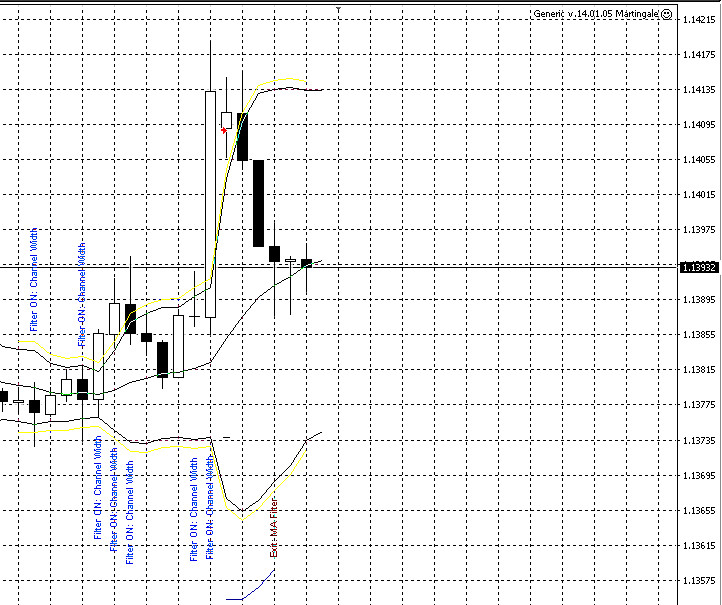
 Additional signal markings of the indicator on the chart – Show Signal Points
 Color of the information panel field – Panel Color
Log journals maintenance mode – Logging Mode
- Full-featured mode – All;
- Selective display (errors only) – Only Errors;
- Disable registration of Generic v14 operation reports – Off;
- Write the operation report to a text file – Write Log File (the path where it can be found: MQL4/Files or Tester/Files during testing).
Calculating deposit size with regard to the maximum possible losses when trading Generic v14 in Martingale mode

In the Generic v14 settings by default, the second grid leg will open with a position increase factor of 1.6; note that this value is tied to the size of the fixed take profit. To calculate this multiplier for other parameters, use the formula:
K= 1 + (Stop Loss/Take Profit)
To calculate the amount of deposit per one lot, it is necessary to determine the grid depth, that is, the number of possible open orders. Taking into account the tests carried out and the selected working timeframe, the total number of trades will not exceed 10 legs. At the same time, let us set the condition that the total risk for a series of trades should not exceed 20%.
A multitude of tests and live trading with the strategy show that the optimal option is to keep $ 3000 per 0.01 lot for one pair.
The table below will help you understand the deposit size for different account types.
| Account type | Minimum lot and lot step | Min. starting deposit | Examples of Brokers |
|---|---|---|---|
| Cent (with mini-lots) | 0.01 | 30$ (3000 cents) | Forex4you |
| Cent account | 0.1 | $300 | Roboforex |
| Standard | 0.01 | $3000 | Alpari |
| Pro accounts | 0.1 | $30000 | Classic account type with most brokers |
That is, if you are going to use the expert advisor on, say, 3 pairs, then you will need $9000 to trade with a 0.01 lot. Fortunately, there are cent accounts that make trading possible even with a very small deposit.
Conclusion

The trading principle based on the expectation of the price returning to the Bollinger range is strategically justified only during the Asian session and is most likely in moments when there is no significant news. If a trader wants to improve trading performance, they should avoid volatility spikes on the news and strictly adhere to the nighttime trading period.
Some trader-practitioners using Generic v14 in multicurrency strategies note the greater profitability of the Expert Advisor on cross pairs, but as tests and practical trading show, it is better to distribute risks evenly by including the major currency pairs allowed by the strategy in the portfolio.
And remember that, despite the tests, the expert advisor remains potentially dangerous. Do not forget the rules for working with dangerous expert advisors.
Important!
For the expert advisor to work correctly, the trading terminal must be turned on from the market opening on Sunday evening until its closing on Friday evening. If you do not have the ability to keep the computer running 24/5, it is recommended to use a VPS server service.
Download the Generic v14 Expert Advisor

P.S. Also, you can invest in the PAMM accounts of the author of the robot that this expert advisor trades:
Respectfully, Alexey Vergunov TradeLikeaPro.ru
