
Generic A-TLP: an expert advisor created by traders for traders

Hello, dear fellow forex traders.
As is known, the most attractive trading robots are commercial expert advisors. They have beautiful tests, the developers promise you millions of percent in profit and a yacht with beauties. Usually, this is an outright lie, but sometimes there are genuinely interesting ideas, or a good implementation of classic approaches. One such example is the Asia advisor, where we encountered a fresh take on night scalping that armchair experts have been "burying" since 2009.
Traders from our forum took the idea of this commercial robot as a basis, completely reworked it, improved it, and expanded it - as a result, we got an excellent bot, created by ordinary traders like you and me to make a profit from trading (and not from selling the bot to the public), with fully open source code, exquisitely fine-tuned settings and, of course, absolutely free.
The Generic A-TLP Development Team

Sergey5 - initiator and project leader
yur4ello - Senior Programmer (lead programmer of the project)
nixxer - reverse engineering, algorithms expert
master_255 - programming
grabli - programming, testing
LeoK - testing
Mamotaro - testing
Starik - solution-search algorithm, notation system
Expert Advisor Characteristics
Platform: Metatrader 4
Advisor version: 11.94.9
Currency pairs: GBPUSD, USDJPY, GBPCAD, GBPCHF, EURGBP, EURCHF, USDCAD, USDCHF
Timeframe: M15
Working time: Asian session
Recommended brokers: Alpari (ECN accounts), Roboforex (ECN accounts), TickMill
Installation Guide

Install the advisor as usual. If this is your first time dealing with robots in Forex and you have a lot of questions, download and watch the Forex on Autopilot course.
Attention! In this expert advisor, the settings significantly affect trading results, use the recommended set files (see the archive at the end of this article).
Expert Advisor Strategy

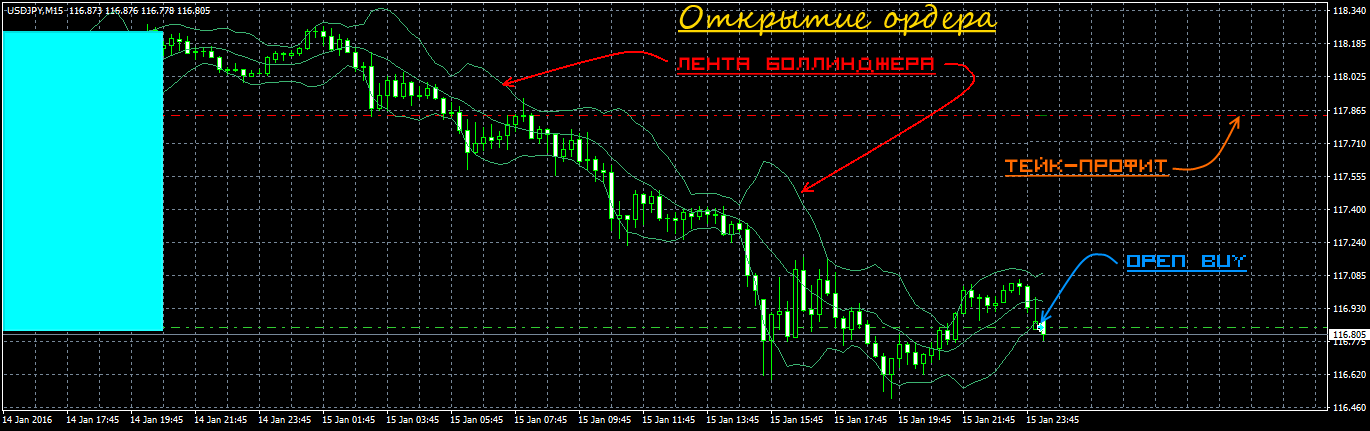
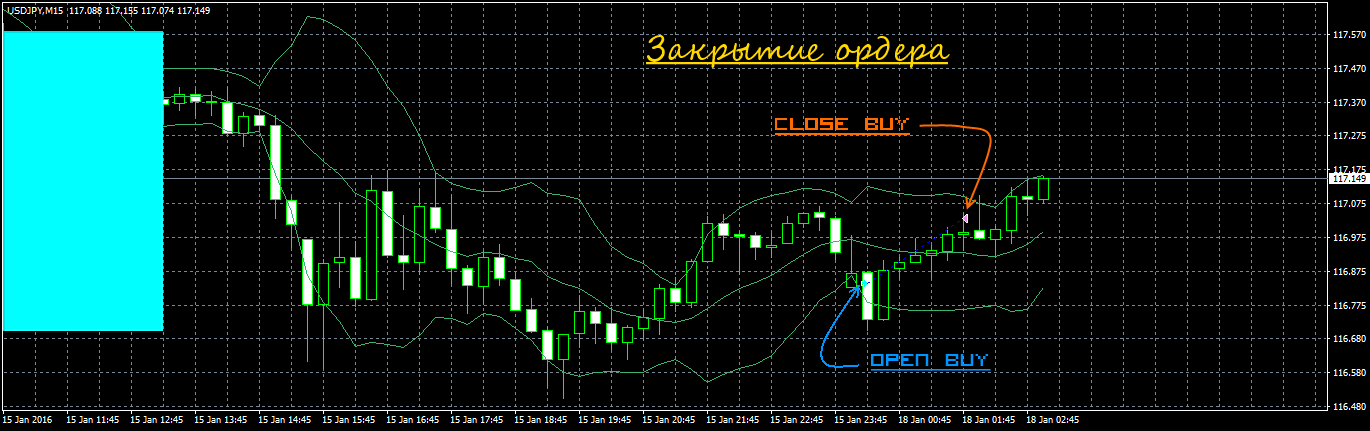
The advisor is a trend scalper. Entry into a trade occurs on pullbacks from the main trend. The "Bollinger Bands" indicator (Bollinger Bands) is both trend-following and channel-based at the same time. Orders are opened when the channel boundaries are broken by a certain specified number of points. Orders can be closed by stop-loss, take-profit, and also by offsets from the Bollinger Bands boundary.
The expert does not use martingale or order grids. It is possible to set time restrictions for the advisor separately for each day.
The expert is a very reliable and profitable robot, as confirmed both by tests and by results on real accounts.
Example of the Advisor at Work
Backtests of the expert advisor
Backtests were done for each pair separately, since the Metatrader 4 platform does not allow multicurrency tests.
The first series of tests is done with a fixed lot. This makes it possible to evaluate the testing results without taking money management into account.
Generic ATLP 9.0 2000 2016 EURCHF lot 0.1
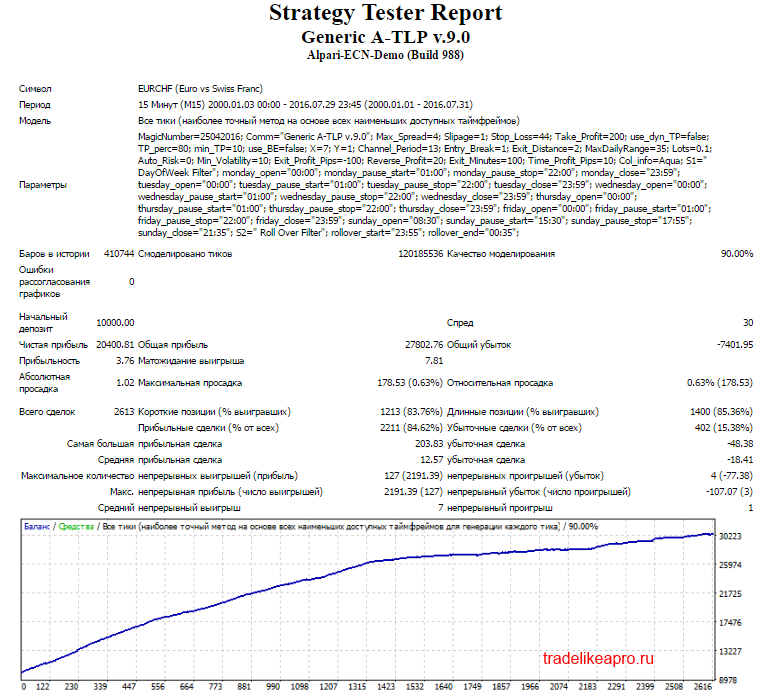
The test results are good
Generic ATLP 9.0 2000 2016 EURGBP lot 0.1
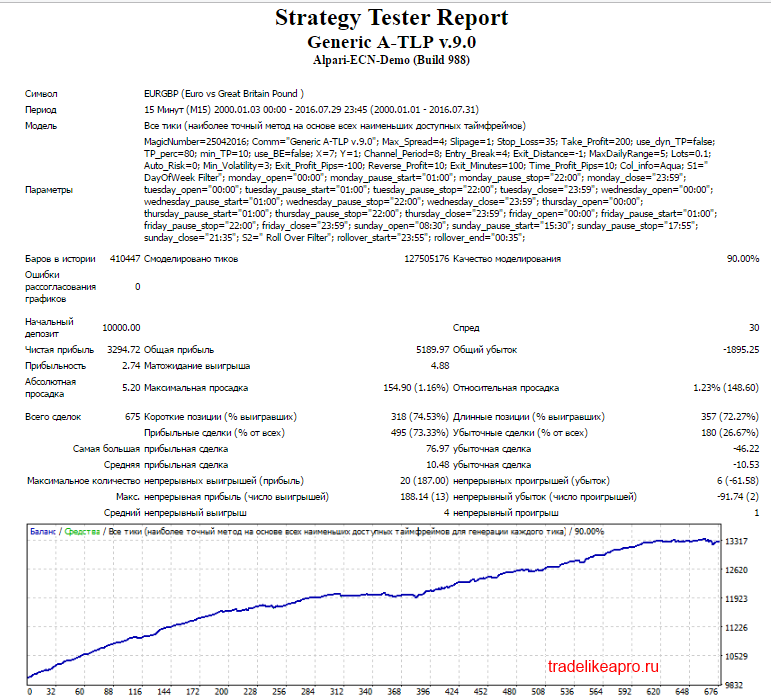
The test results are acceptable
Generic ATLP 9.0 2000 2016 GBPCAD lot 0.1
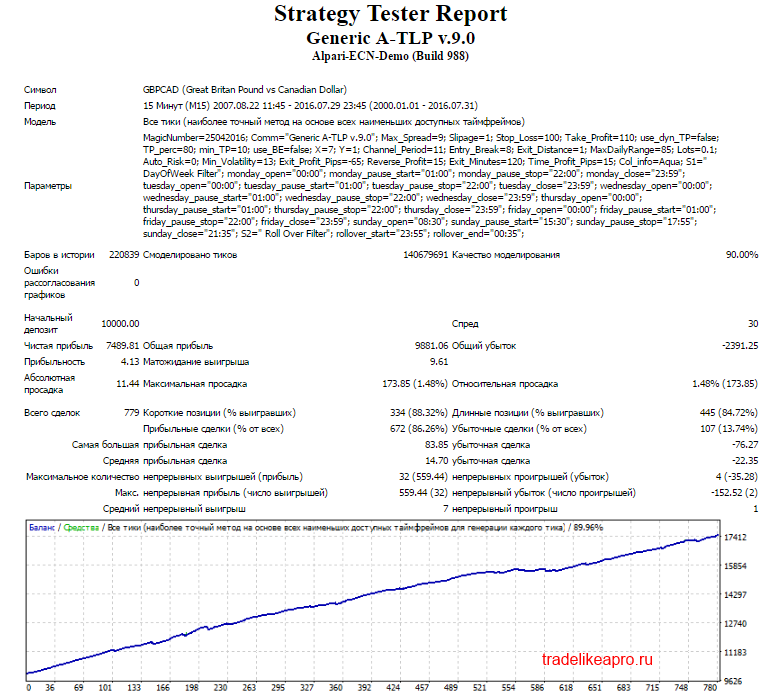
The test results are acceptable
Generic ATLP 9.0 2000 2016 GBPCHF lot 0.1
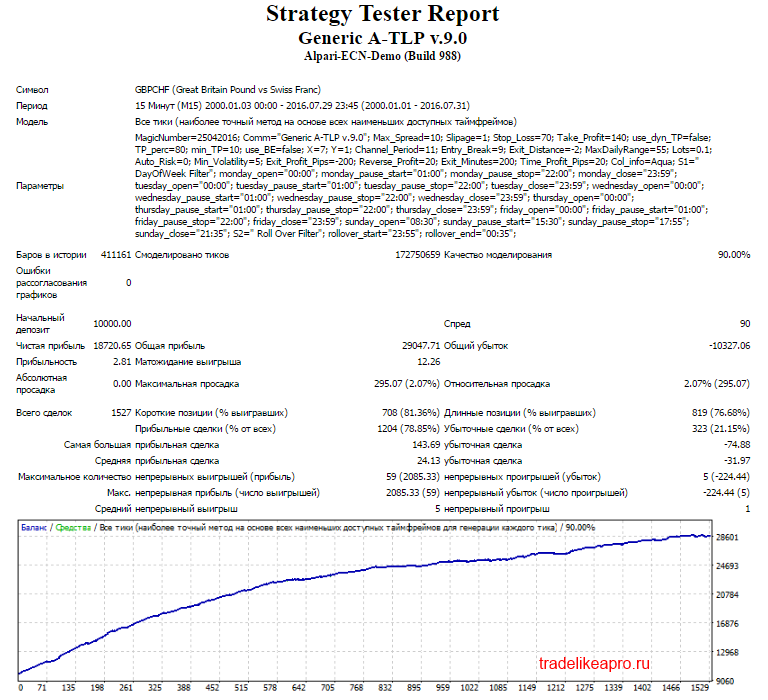
The test results are good
Generic ATLP 9.0 2000 2016 GBPUSD lot 0.1
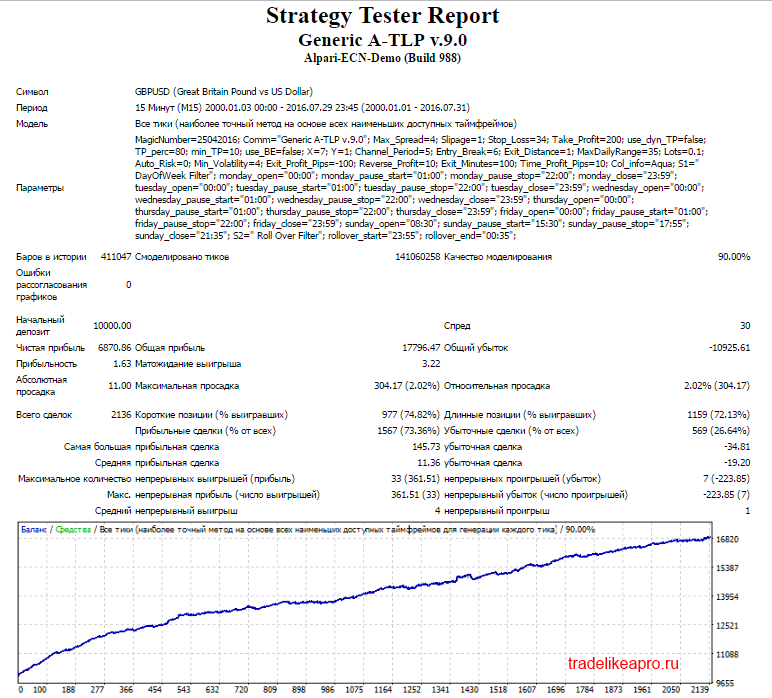
The test results are good
Generic ATLP 9.0 2000 2016 USDCAD lot 0.1
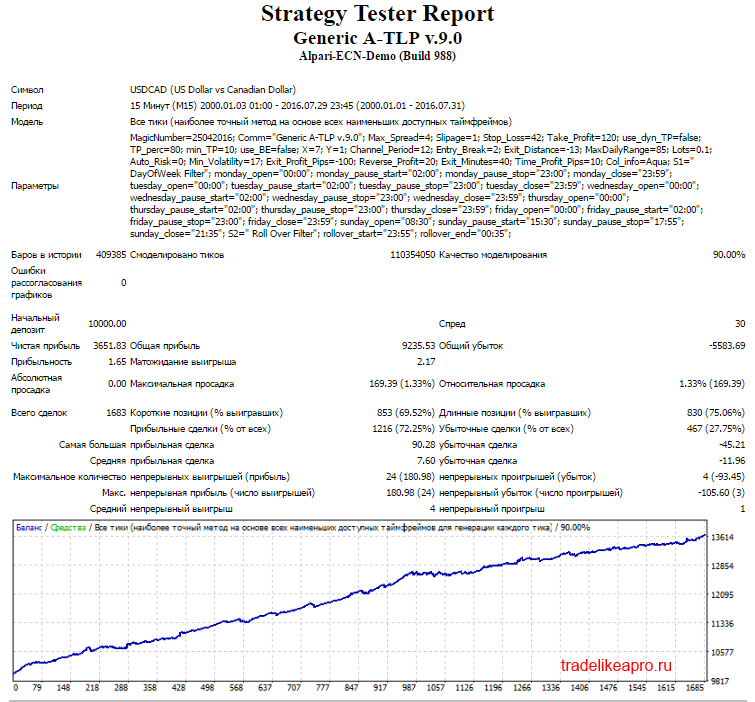
The test results are acceptable
Generic ATLP 9.0 2000 2016 USDCHF lot 0.1
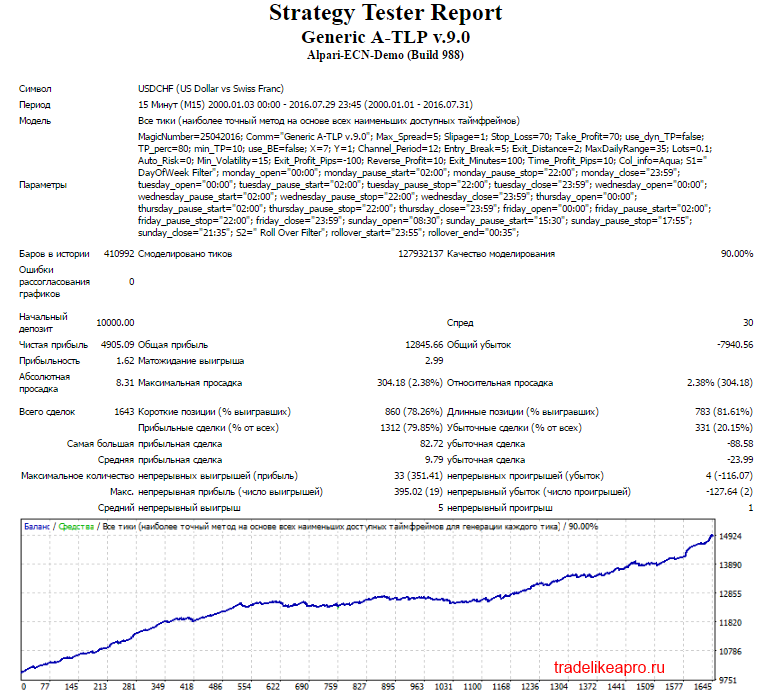
The test results are good
Generic ATLP 9.0 2000 2016 USDJPY lot 0.1
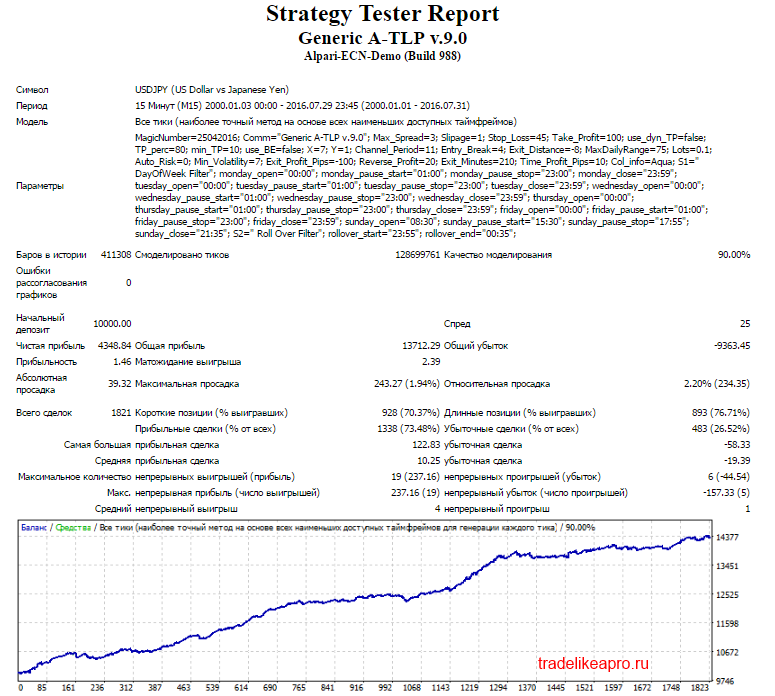
The test results are good
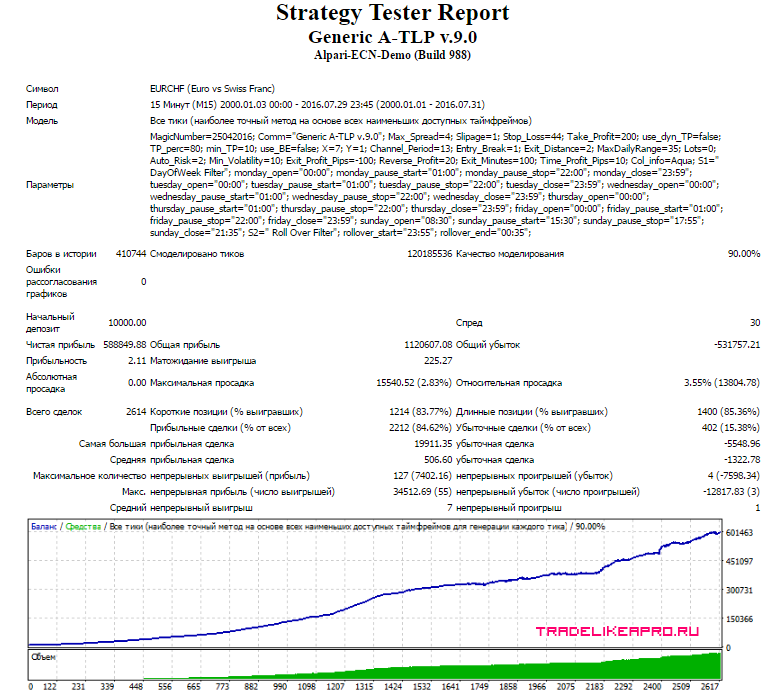
The second series of tests is done with a dynamic proportional lot. This makes it possible to evaluate the testing results taking money management into account.
Generic ATLP 9.0 2000 2016 EURCHF lot MM2
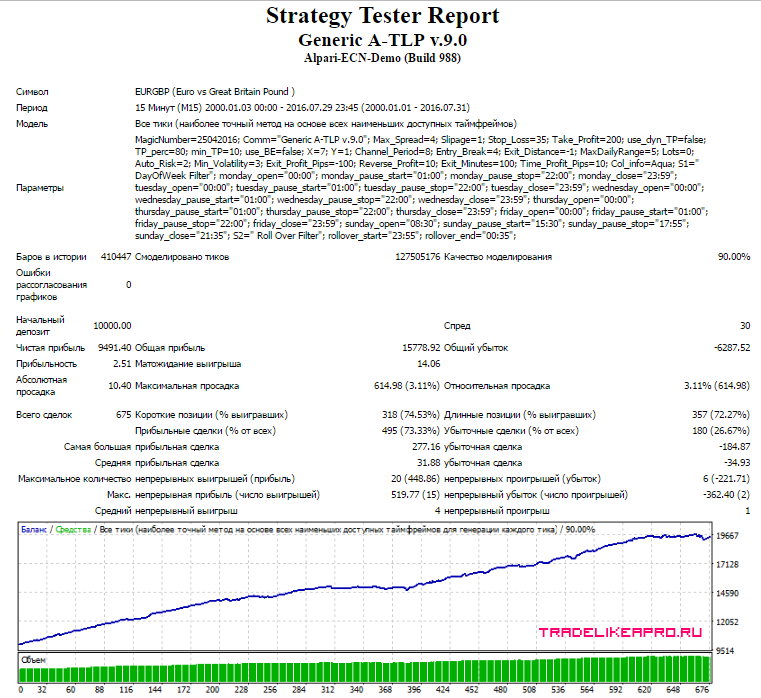
Generic ATLP 9.0 2000 2016 EURGBP lot MM2
Generic ATLP 9.0 2000 2016 GBPCAD lot MM2
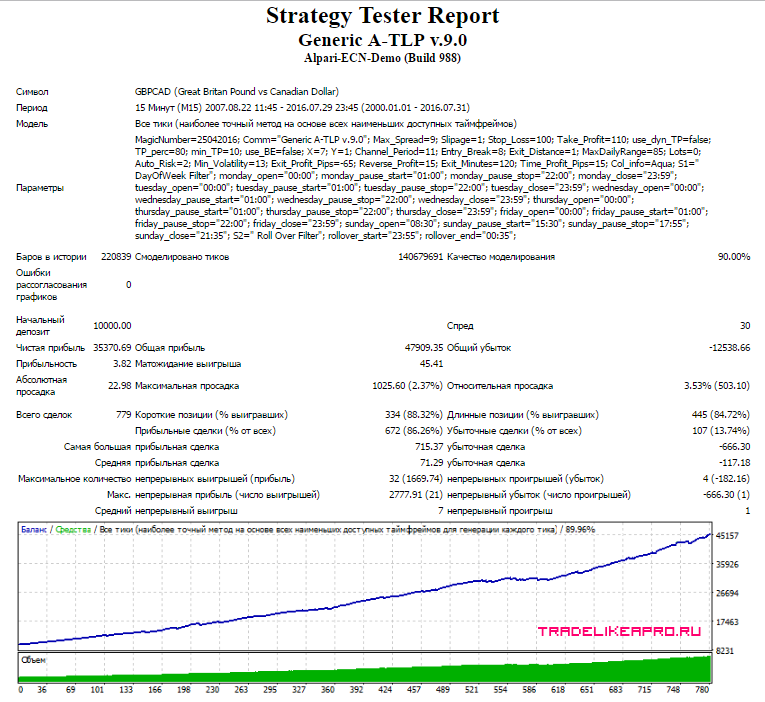
Generic ATLP 9.0 2000 2016 GBPCHF lot MM2
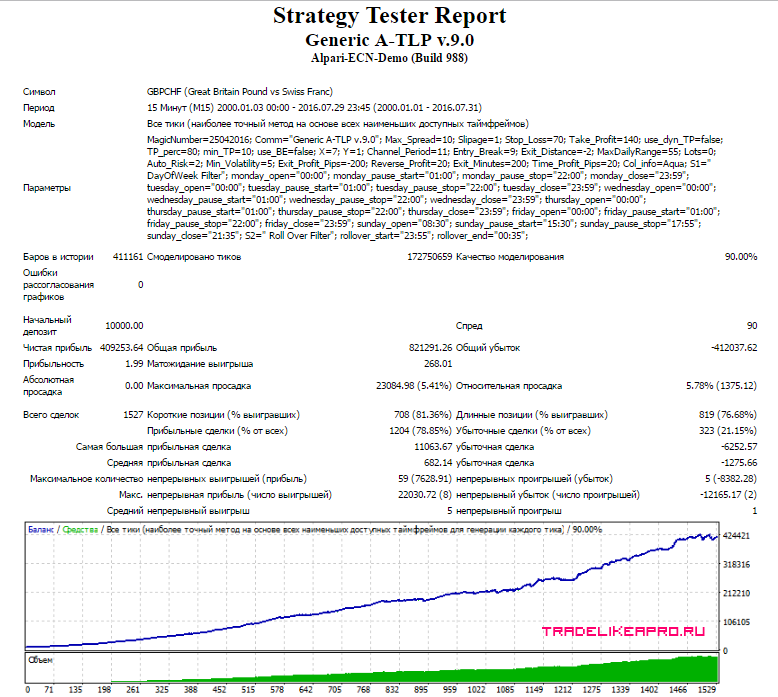
Generic ATLP 9.0 2000 2016 GBPUSD lot MM2
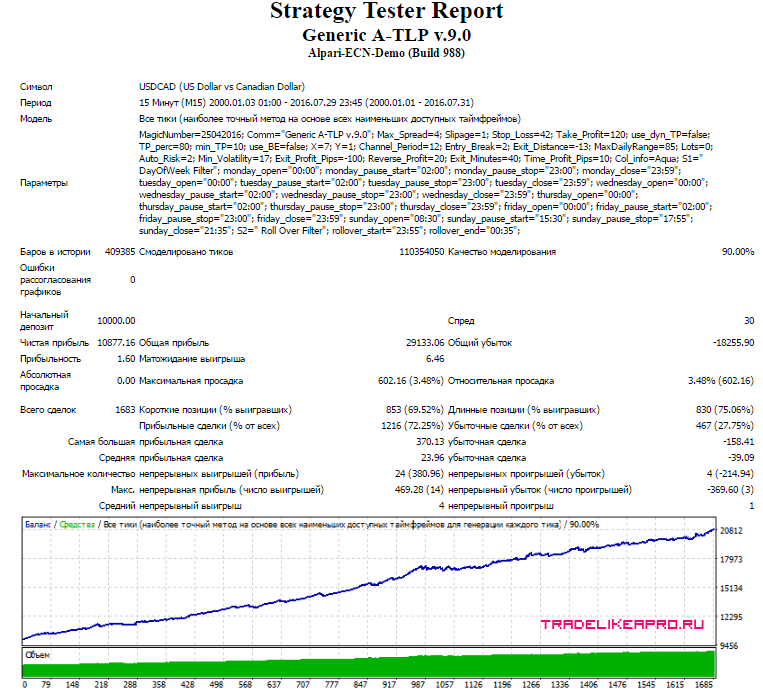
Generic ATLP 9.0 2000 2016 USDCAD lot MM2
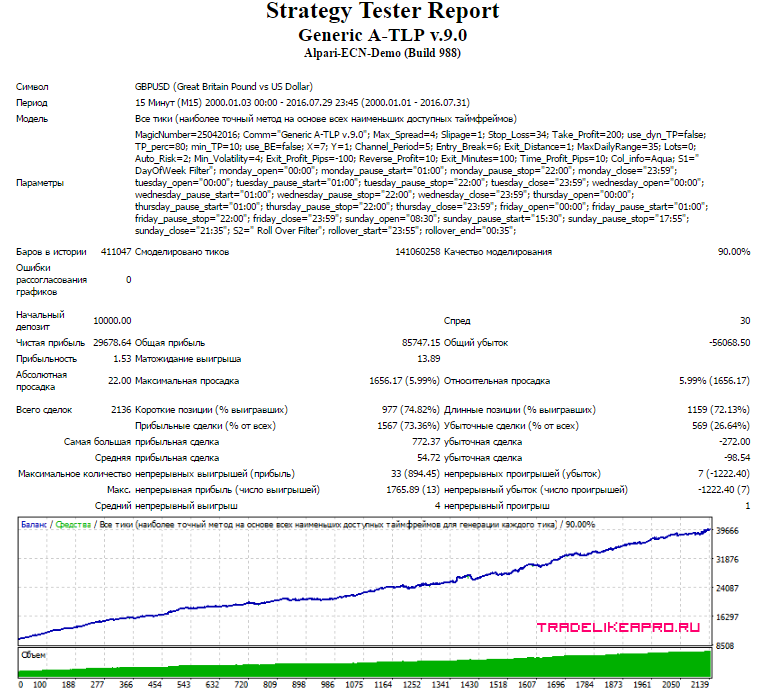
Generic ATLP 9.0 2000 2016 USDCHF lot MM2
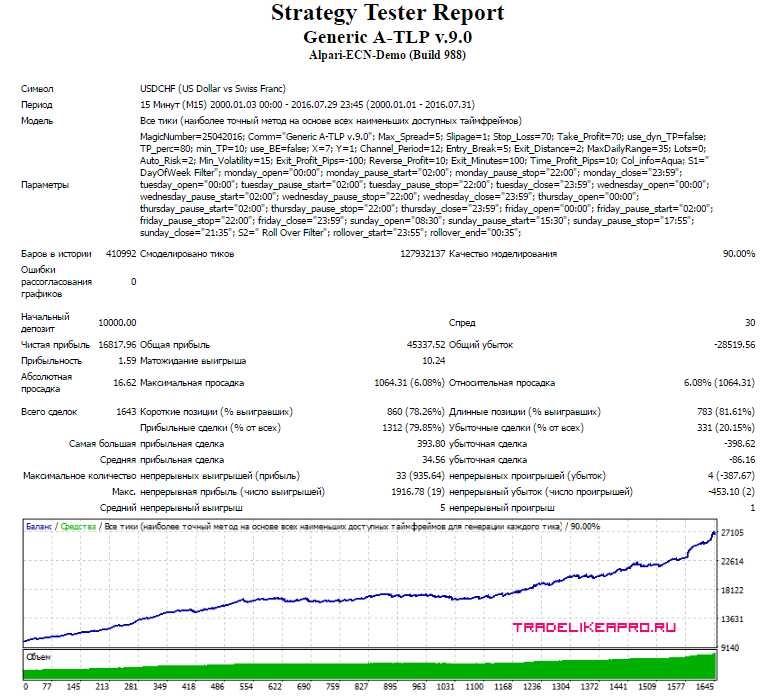
Generic ATLP 9.0 2000 2016 USDJPY lot MM2
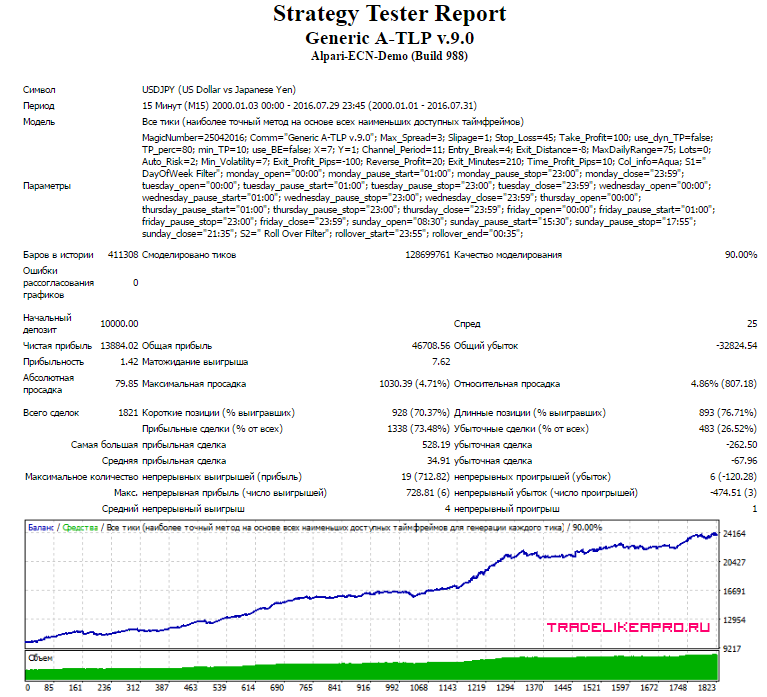
Using the EA Analyzer program, let us make a summary statement for the tests of all pairs with a proportional lot.
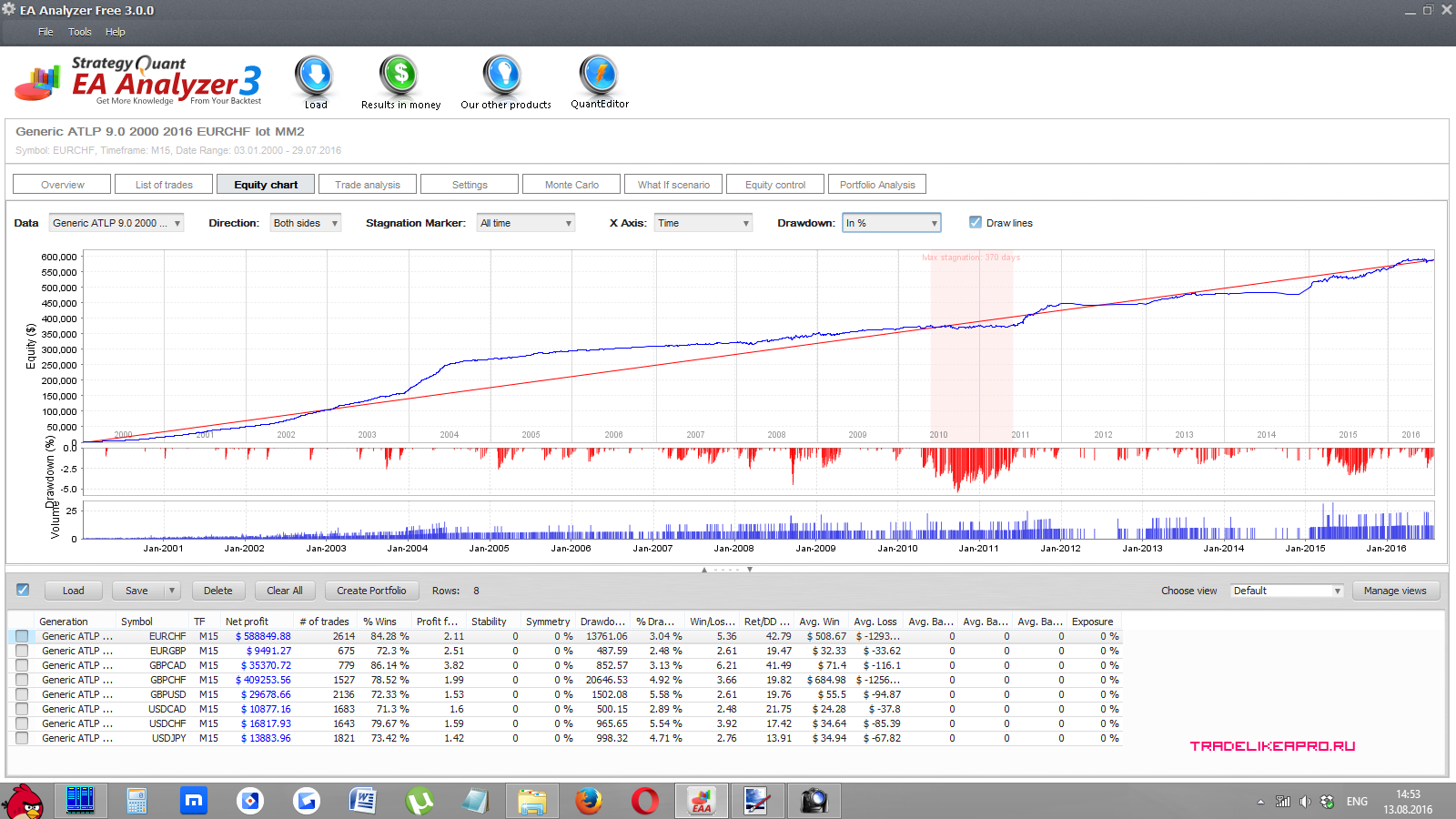
Conclusion: The Generic A-TLP advisor, when working with a proportional lot on 8 pairs, shows confident profit growth.
⇒Links to all the backtests used in the article (for independent analysis) can be found in the forum thread Generic A-TLP.
Account Monitoring
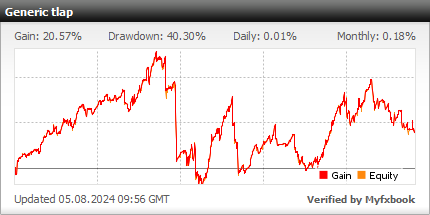
Settings Description
- MagicNumber - magic number of orders on this currency pair
- Comment - comments to orders
- Max_Spread - maximum allowed spread; at a value of -1.0 it is not limited
- Slippage - slippage
- Stop_Loss - stop loss
- Take_Profit - take profit
- use dynamic TP - enables dynamic take profit (calculated from the channel width)
- %% TP from channel width - see the previous item
- min_TP - minimum take profit
- use move to break-even - switch for the break-even function
- If the current price is better than the entry price by X points - sets the size of the offset from price X in points
- move SL by Y points into profit - amount of stop-loss adjustment in points
- Channel_Period - period of the channel indicator based on volatility
- Entry_Break - size of the offset from the channel walls in pips when entering
- Exit_Distance - size of the offset from the channel walls in pips for closing the order
- MaxDailyRange - size of the filter by maximum daily values, affects entry frequency
- Lots - fixed lot size
- Auto_Risk - dynamic lot size
- Min_Volatility - minimum volatility
- Exit_Profit_Pips - amount of floating profit, used in exit filter No. 2
- Reverse_Profit - amount of floating profit, used in exit filter No. 3
- Exit_Minutes - lifetime of the open order, used in exit filter No. 1
- Time_Profit_Pips - amount of floating profit, used in exit filter No. 1
- Filter No. 1 (for trade exit) - enables exit filter No. 1: if the order has been open longer than Exit_Minutes minutes and floating profit is greater than Time_Profit_Pips
- Filter No. 2 (for trade exit) - enables exit filter No. 2: if the price moved beyond the upper channel boundary and floating profit is greater than Exit_Profit_Pips
- Filter No. 3 (for trade exit) - enables exit filter No. 3: if the moving average is declining and floating profit is greater than Exit_Profit_Pips
- Info panel color - sets the color of the information panel
DayOfWeek Filter - day-of-week trading time filters
*using Monday as an example
trade on MONDAY? - YES/NO
- monday_open - trading opens on Monday (new orders may be opened)
- monday_pause_start - start of the trading pause
- monday_pause_stop - end of the trading pause
- monday_close - end of trading on Monday (no new orders are opened)
*the parameters for the remaining days of the week are set in the same way
Attention! The trading time filters are configured for the recommended brokers! If you want to use the Generic A-TLP expert advisor with other brokers, you need to adjust the time settings according to the terminal time. For the recommended brokers it is GMT+3 in summer and GMT+2 in winter. That is, if for example your broker has GMT+2 in summer and GMT+1 in winter, then the time settings should be reduced by 1 hour.
See more here:
Roll Over Filter - rollover filter
- close trades during rollover - YES/NO
- rollover start time - sets the end of the trading hour during the day; at the value "-1" it does not work
- rollover end time - size of the filter by maximum daily values, affects entry frequency
It is recommended to use the sets provided at the end of the article.
Attention! Do not change anything in the advisor parameters and use only the recommended values unless you clearly understand what you are doing!
Recommended Money Management

A recommended risk per trade is 2 percent of the deposit for each pair. The lot can be calculated using a special calculator, or you can simply set the risk level in the advisor parameters, and everything will be calculated automatically.
Results

The Generic A-TLP expert advisor is a truly people's creation. When self-interest and greed are not involved, when there is enthusiasm and sincere love for one's work, masterpieces are born.
The stability and profitability of trading are confirmed by tests and monitoring on a live account. Over the long term, returns may remain in the neutral zone for some time. Also note that the advisor does not trade often.
Important!
For the advisor to work correctly, the trading terminal must be turned on from the market open on Sunday evening until its close on Friday evening. If you do not have the ability to keep your computer running 24/5, then it is recommended to use a VPS server service.
Download the expert advisor " Generic A-TLP 11.94.9 "

Best regards, Alexey aka Merlin Tlap.io
