
FxMath DailyTrader Expert Advisor - multi-currency, trend-following, safe

Hello, dear fellow forex traders. We present to your attention the forex expert advisor FxMath DailyTrader. Its distinctive feature is trading several pairs along the trend using an interesting algorithm. In this review, we will test it on many currency pairs (each pair has its own version of the expert advisor) and evaluate the results obtained.
Expert Advisor Characteristics
Platform: Metatrader 4
Expert advisor version: 1.0
Currency pairs: EURUSD, EURJPY, GBPUSD, USDCAD, USDJPY
Timeframe: D1
Operating time: around the clock
Recommended brokers: Forex4You
Installation Guide

We install the expert advisor as usual. If this is your first time dealing with robots on Forex and you have a lot of questions, download and watch the course Forex on Autopilot.
Attention! In this expert advisor, the settings for each pair and timeframe are identical. The settings for each pair are already built into the code, so you simply open the necessary pairs on the required timeframe (D1) and attach the expert advisor to each chart.
Expert Advisor Strategy

The expert advisor belongs to trend-following robots that trade during increased volatility. The trading method is entering the trend on large moves after pullbacks. Classical indicators are used to calculate signals for opening and closing: RSI, CCI, Momentum. A distinctive feature of the expert advisor is that it opens new orders exactly at 00.00 and closes at 23h 59m broker time. Therefore, with brokers that have a significant difference in server time, trading results will differ.
The expert does not use loss-averaging methods such as martingale, and is a stable trading robot designed for long-term operation. The advantages of the FxMath DailyTrader expert advisor also include working on the D1 timeframe, which means that you can monitor the advisor's operation at any convenient time.
Expert Advisor Backtests
Backtests were done for each pair separately, since the Metatrader 4 platform does not allow multi-currency testing.
EURUSD 2012-2015
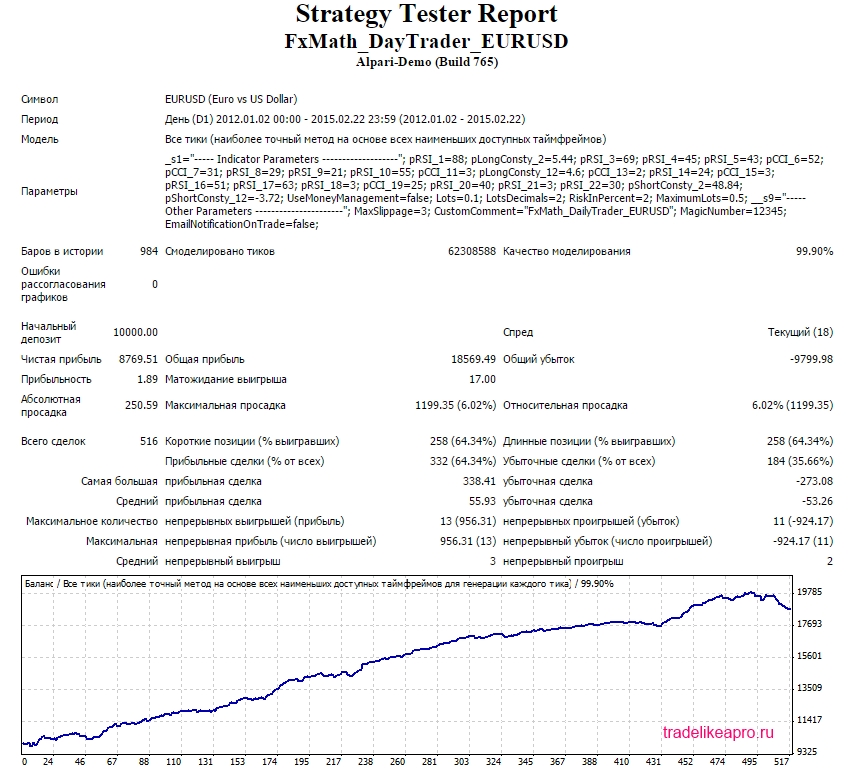
Let us look at the results for each month:
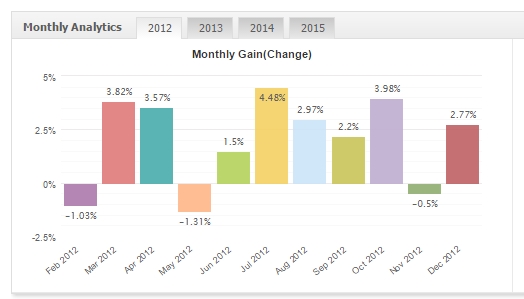
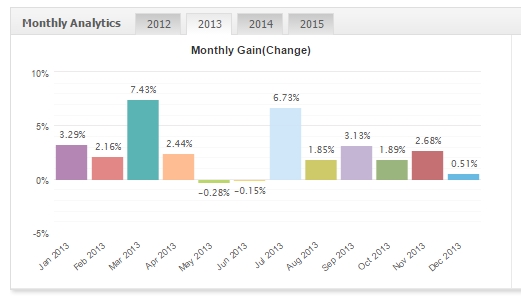
,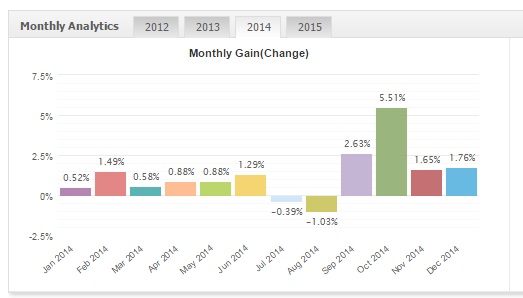
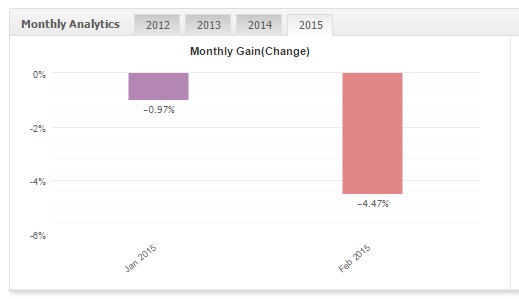
The test results are acceptable.
EURJPY 2012-2015
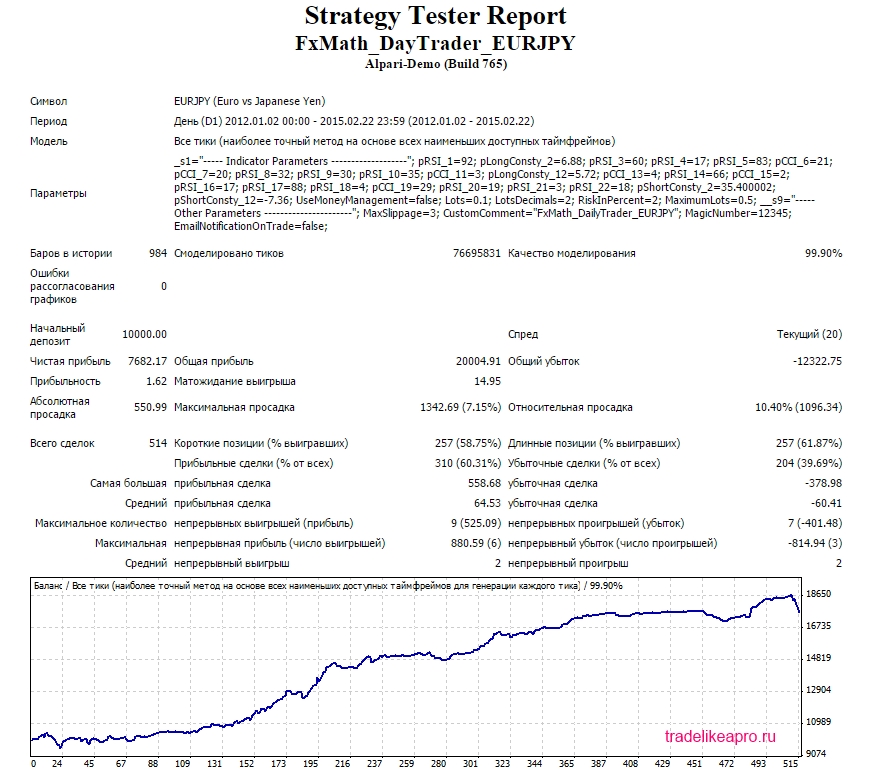
Let us look at the results for each month:
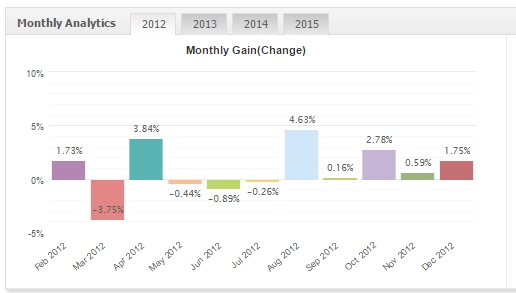
The test results are acceptable.
GBPUSD 2012-2015
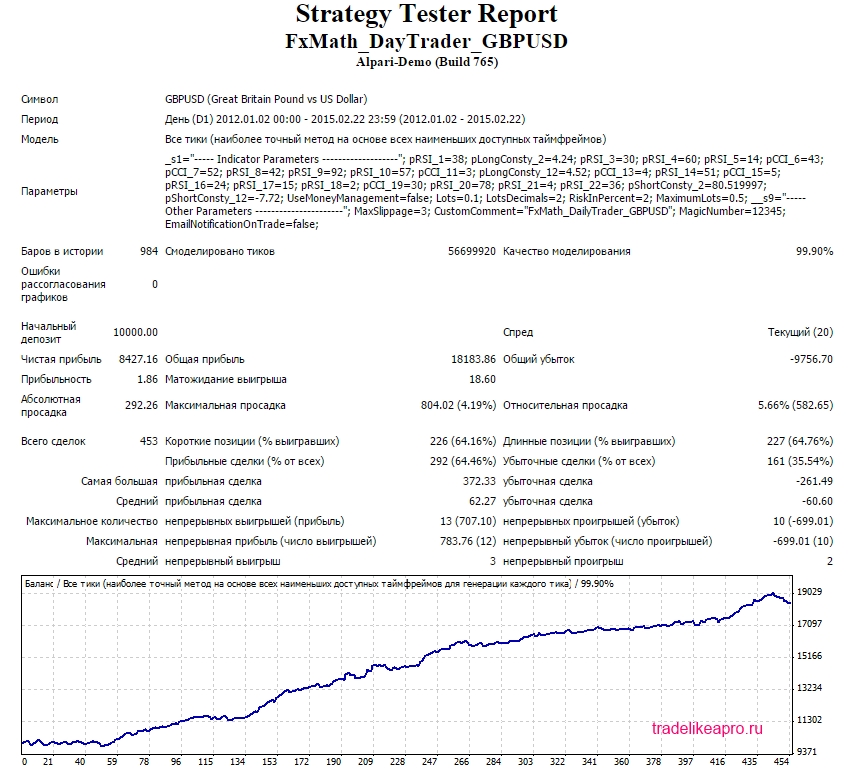
Let us consider the results for each month:
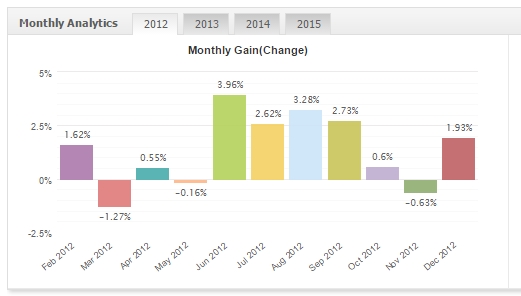
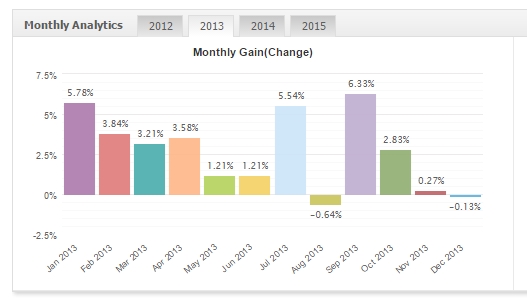
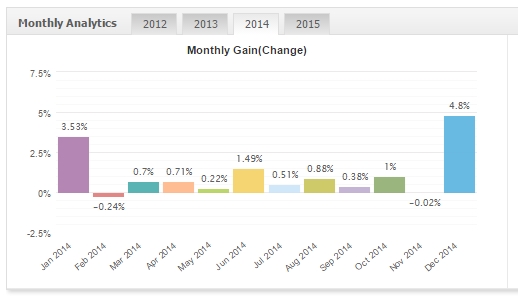
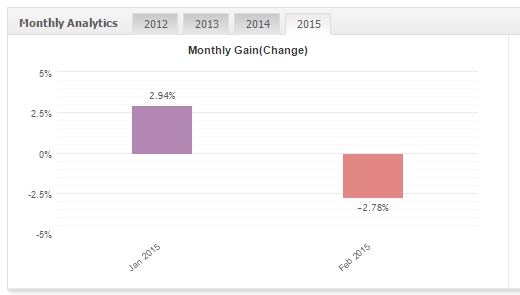
The test results are acceptable.
USDCAD 2012-2015
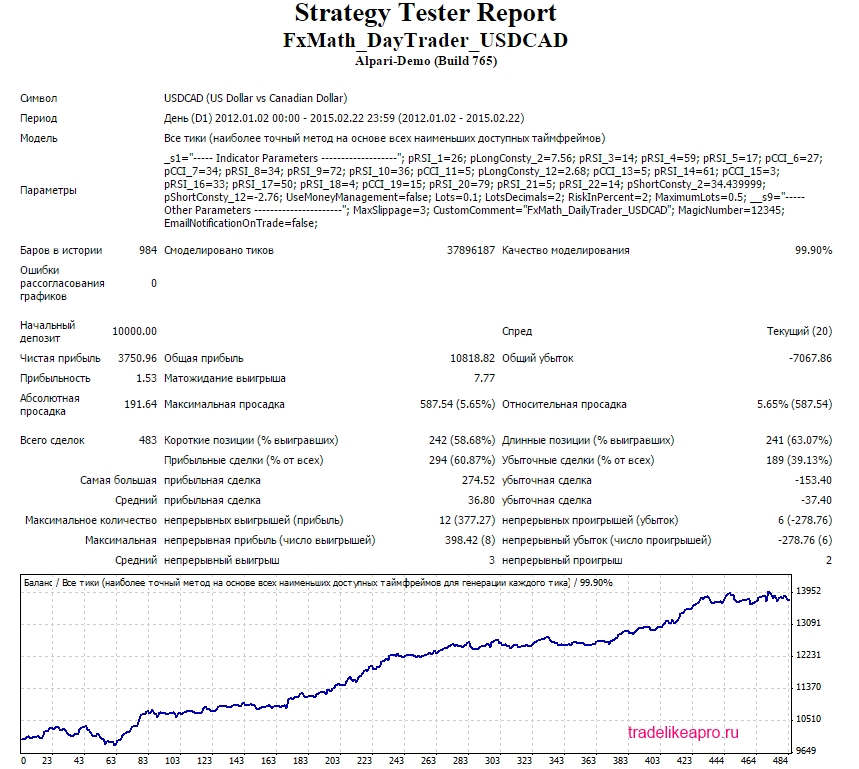
Let us consider the results for each month:
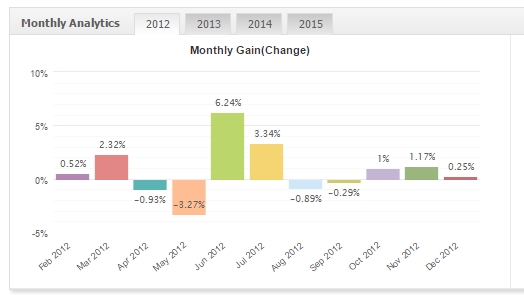
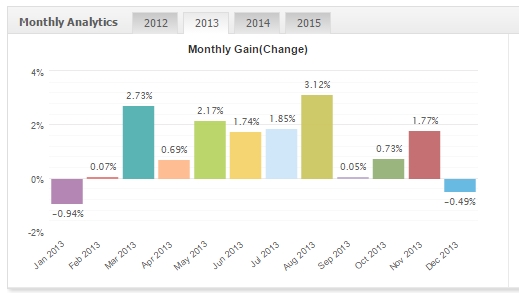
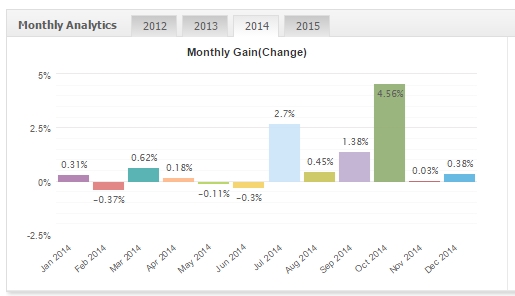
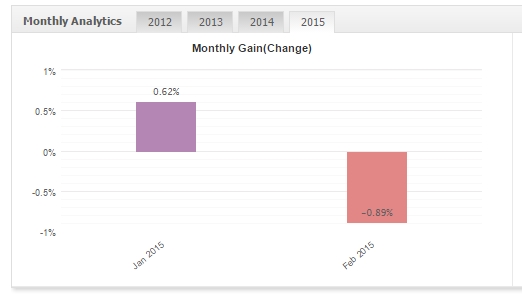 The test results are acceptable.
USDJPY 2012-2015
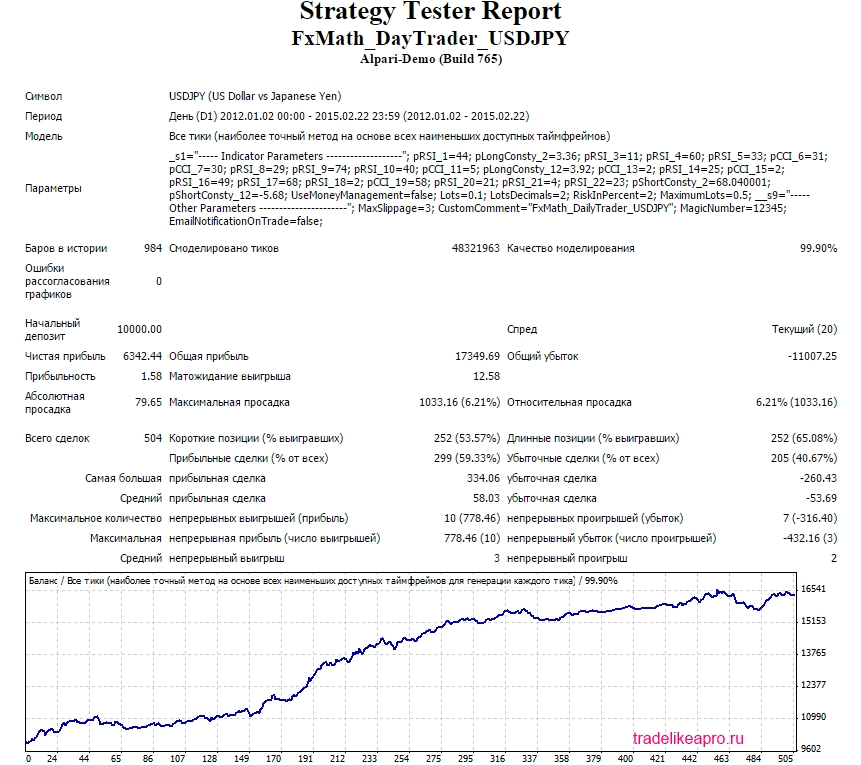 Let us consider the results for each month:
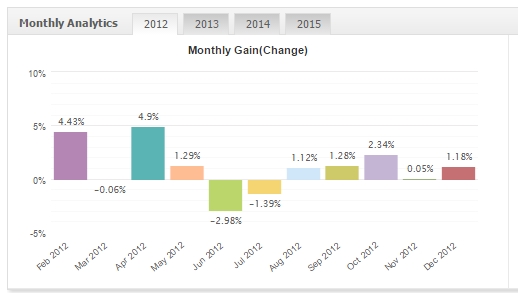
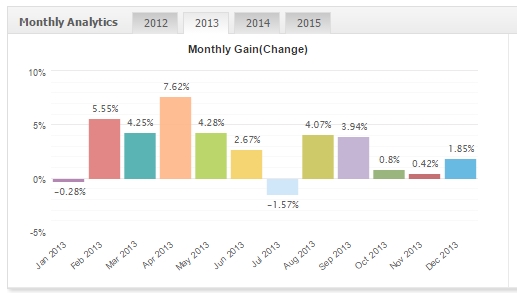
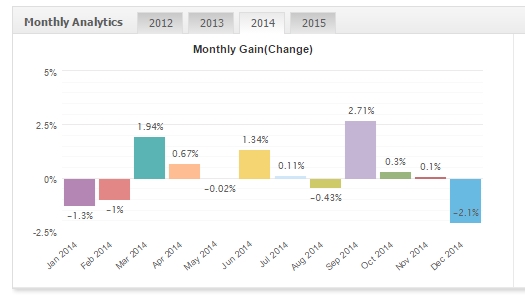
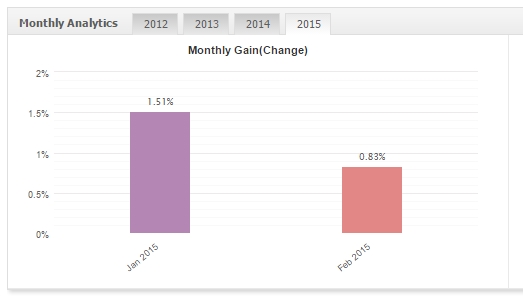
The test results are acceptable.
Links to the backtests used in the article (for independent analysis):
Using the EA Analyzer program, let us make a consolidated statement for all pairs.
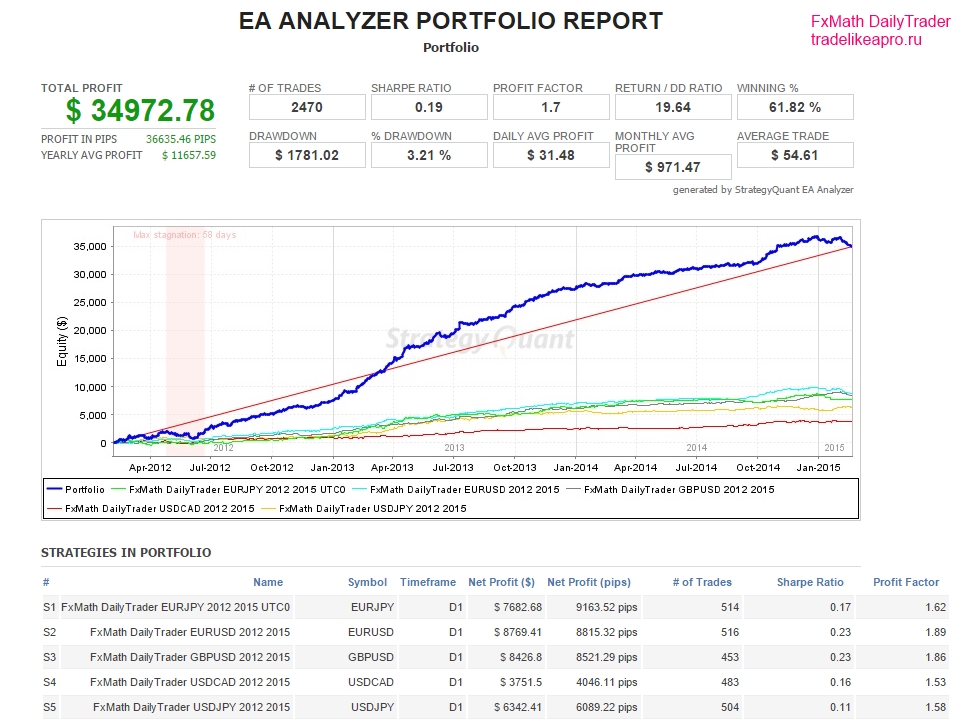
Conclusion: The expert advisor on all 5 pairs shows profit growth without serious drawdowns. However, you must be prepared for the fact that for some time the profitability of the expert advisor may "mark time".
Description of Settings
The robot settings look as follows:
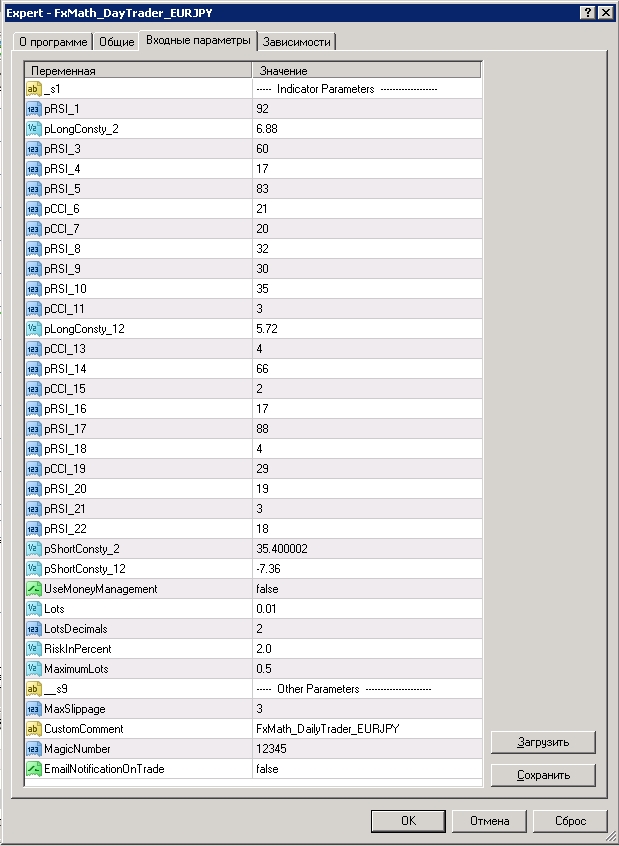
- _s1 - section of indicator parameter settings
- pRSI1...pRSI22 - period parameter settings for the RSI indicators
- pCCI6...pCCI19 - period parameter settings for the CCI indicators
- pLongConsty_2, pLongConsty_12 - parameters of filters for entry into buy positions
- pShortConsty_2, pShortConsty_12 - parameters of filters for entry into sell positions
- UseMoneyManagement - automatic lot calculation by computing it as a percentage of equity. If trading with a fixed lot is required, then this parameter must be equal to false.
- Lots - the size of the fixed lot, which the expert advisor uses if UseMoneyManagement is equal to false
- LotsDecimals - the fractional precision of the minimum lot. If the broker allows the use of minimum lots of 0.01, then LotsDecimals=2, if the minimum lots are 0.01, then LotsDecimals=1
- RiskInPercent - the size of the risk relative to equity, which the expert advisor uses if UseMoneyManagement is equal to true
- MaximumLots - sets the maximum possible lot. This parameter is made for additional protection against incorrectly set values of Lots or RiskInPercent
- _s1 - section of other settings
- MaxSlippage - the maximum permissible slippage at which orders will be placed
- CustomComment - comment for the expert advisor's orders
- Magic Number - the magic number of orders on this pair. Each pair must have its own Magic Number set.
- EmailNotificationOnTrade - enables and disables notifications to your email about the expert advisor's actions. If you want to receive these notifications, then the parameter must be true. To set up notifications, use the information from the article How to Set Up Email Notifications in MT4
Attention! Do not change anything in the expert advisor parameters and use only the recommended values unless you understand exactly what you are doing!
Recommended Money Management

A trade risk of 2 percent is recommended.
Results
The FxMath DailyTrader expert advisor is a stable and safe trading robot, the use of which is profitable over the long term. However, in the short term profitability may for some time remain in the neutral zone, and you need to be prepared for this.
Important!
For the expert advisor to work correctly, the trading terminal must be turned on from the market opening on Sunday evening until its closing on Friday evening. If you do not have the ability to keep your computer in operation 24/5, then it is recommended to use the VPS server service.
Download the "FxMath DailyTrader" Expert Advisor

Respectfully, Alexey aka Merlin TradeLikeaPro.ru