
Forex Insider Indicator - what you are not supposed to know

Hello, fellow forex traders. As we know, 90% of market participants lose. That means they are wrong. The crowd is always mistaken, the minority wins. But what if you could see the orders of that very crowd? What if you knew not only who currently has the upper hand in the market: buyers or sellers, but also knew the prices at which the bulk of players entered the market?
You have probably already come up with a couple of brilliant ideas on how this information could be used. And the Forex Insider indicator from the developers at http://forex21.com will help us obtain it. Today's review is about how to work and make money with this tool.
Characteristics of the Forex Insider indicator
Platform: Metatrader 4
Currency pairs: any
Timeframe: any
Trading time: depends on your strategy
Recommended dealing centers: Alpari, Forex4you
What is the Forex Insider indicator for?

- Real-time data using the Myfxbook API interface
- Information on more than 70 instruments
- Data on real traded volumes (among users of the myfxbook service)
- Data on the actual number of positions
- Average buy and sell prices shown as levels on the chart
The Forex Insider indicator is a truly unique trading tool that allows you to see the positions of other currency traders. Until now, only institutional traders had access to such data, which gave them a serious advantage over retail traders for obvious reasons. Forex Insider will finally also let you find out what other traders are doing, and this will help you easily defeat them on the battlefield of the currency market.
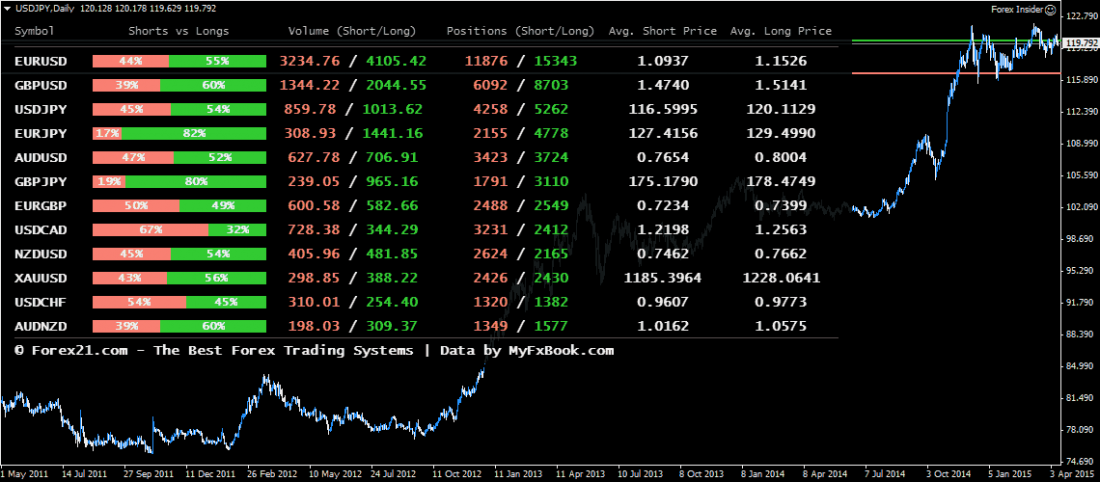
The information comes from the data feed of the MyFxbook.com analytical community, based on up to 100 000 trading positions in real time, and includes the following information:
- Ratio of short and long positions in percent
- Ratio of short and long position volumes
- Number of short and long positions
- Average price for short positions
- Average price for long positions
Because the data is updated every 60 seconds, the information provided by the Forex Insider indicator gives you a unique opportunity to look into how other currency traders are trading. As a result, you gain a strategic advantage that allows you to avoid high-risk positions and open positions with a high probability of winning.
This is what your charts will look like when using the Forex Insider indicator:
Installation

Although in essence Forex Insider is an indicator, technically it is implemented as an expert advisor. Therefore, it is installed like an expert advisor. However, there are a couple of nuances:
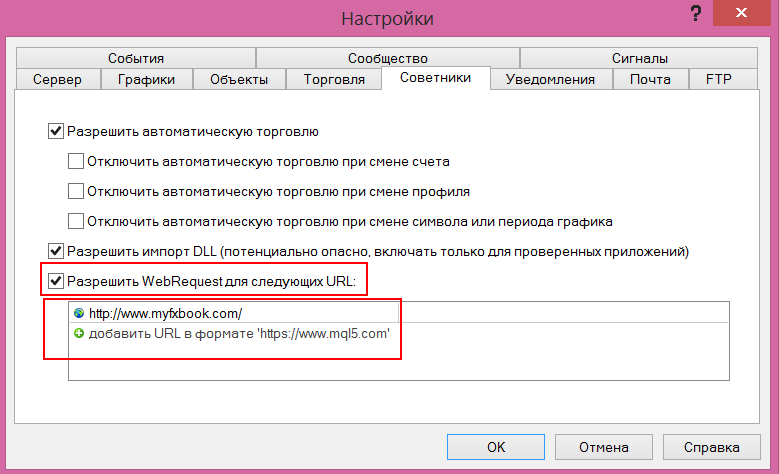
1) You need to allow requests to http://www.myfxbook.com/ in the terminal.
In the terminal, go to Tools -> Options -> Expert Advisors. You can also press CTRL+O on your keyboard.
Check the box "Allow WebRequest for listed URL:"
And add http://www.myfxbook.com/ to the list below.
2) You need to enter your myfxbook login (email address) and password in the expert advisor settings (see the description of the settings below). This is necessary for the indicator to work.
If you do not yet have a profile on Myfxbook, simply follow this link: http://www.myfxbook.com and create a new account. It is free and will take only a couple of minutes.
Settings description

- Login (Login): Your email address in Myfxbook
- Password (Password): Your password in Myfxbook
- Update Period, seconds (Update period, seconds): Lets you specify how often the data should be updated. Please note that the data is updated every 60 seconds. The recommended update periods are: 60, 120, 180, 240, 300 seconds, etc.;
- Show Mode (display mode): A drop-down menu that allows you to select "current symbol" or "all symbols".
- Symbols Count (Number of symbols): The number of symbols that will be displayed if the "Show Mode" function is set to "all symbols".
- Show Lines (Show lines): Lets you set the display of the average buy/sell price on the chart as levels
- Font Name (Font name): Lets you change the font. You can change it to any font supported by your MetaTrader 4 terminal.
- Font Size (Font size): Lets you change the font size.
- Font Interval (Font interval): Lets you choose the vertical space between lines of text.
- Progress Bar Width (Bar width): Lets you change the width of the position ratio bar. By default, it is 220 pixels.
- Header Color, Short Color, Long Color, Text Color and Background Color (Header color, short and long position colors, text color, and background color): Color settings let you customize and change all colors according to your preferences.
- Background Transparency (Background transparency): Lets you adjust the transparency of the "Background Color" function. The lower the value, the higher the transparency will be. The maximum value is 255.
Working with Presets

To avoid constantly entering your Myfxbook data when attaching Forex Insider to a chart, we recommend saving it to a .set file. If you do not know what that is, check out the lesson Working with Presets.
Since all parameters are fully adjustable, you can customize the appearance of the Forex Insider tool according to your personal preferences. Full information and a description of all parameters can be found above.
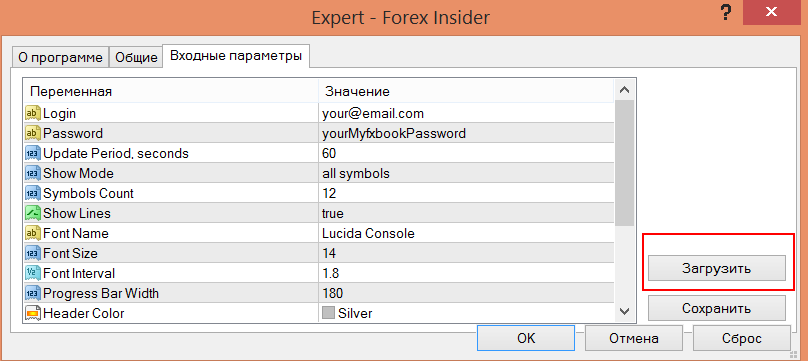
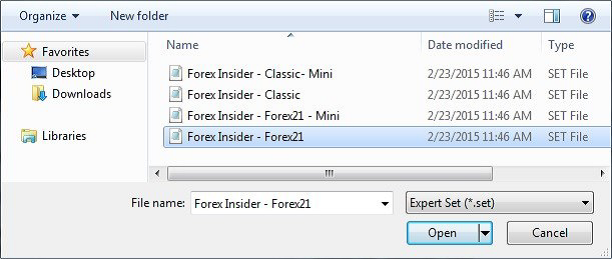
To load an existing set or one of the four files included with the indicator, click the "Load" button and select the setup file that you would like to load.
To save the .set settings file, click the "Save" button. In the new window, you can specify a name for the settings file. After clicking the "Save" button again, the file will be saved and can be loaded as described above.
How to Use the Indicator in Trading?

Forex Insider gives you detailed information about how other retail traders are trading. By applying this in your strategy, you can outsmart other traders.
Examples:
- If you believe that most traders are trading in the right direction, you can use this information by following the "crowd" and opening the corresponding position.
- If you believe that most traders are trading in the wrong direction, you can use this information to find opportunities to open a position at the most likely market reversal point, since the price is in a zone of strong oversold or overbought conditions.
The ways to use the indicator are described in more detail in the video lesson at the beginning of this review. I also advise you to familiarize yourself with the Supremacy strategy, based on working with these data.
Download the Forex Insider Indicator

Discussion on the Forum
Supremacy Strategy
Respectfully, Pavel Vlasov
TradeLikeaPro.ru