
Forex Calendar for the Desktop
 We have already looked at the economic calendar as an online page. This time we will talk about a fairly advanced option in the form of a PC program.
Installation and a bit about the features
- Download the archive at the end of the post, unpack it, and install it like a regular program by running the .exe file.
- Find the News Updater shortcut on the desktop and launch it.
We see the main program window:
There are two large horizontal sections here: "Past Events" (past events) and "Future Events" (future events). Since things that are already past are of little interest to us, you can drag the Future Events section wider with the mouse.
We also see the columns:
Date\time - the date and time of the event
Time left - how much time is left until the event
Timer - see the description of the timer function below
Curr. - the currency the news is related to
Event - the name of the news/event
Import. - the importance of the news: Low - low, Medium - medium, High - high.
Actual - the current value
Forecast - the forecast
Previous - the previous value
- Click the Options button
Here, on the Other tab, set in the small box how often the calendar should refresh.
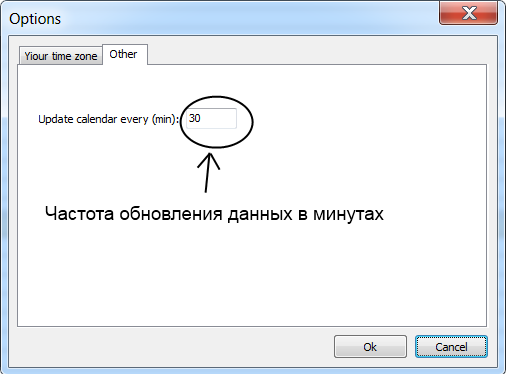
By default, the refresh frequency is once every half hour, but this is too infrequent. I would advise setting the refresh to once every 3-5 minutes. Click OK.
- If you click the button , the data in the calendar will be refreshed instantly.
- If you first click with the mouse on one of the future events, and then click the button , a timer setup window will appear that can remind us N minutes before the upcoming event, and even launch the trading platform.
- By pressing the LOW, MEDIUM and HIGH buttons ( ) you can turn the display of news in these categories on or off respectively.
- Using the button you can set the display of news only for specific currencies.
That is basically all. The program is quite simple, do not be afraid to click everywhere, try different options, and so on.