
Cool add-on for manual trading, everyone should watch!
 Hello everyone! Do you remember the amazing "DDSMM" formula? Many people use it in their trading because it is simply convenient. So, there is an automatic version of it where you do not need any table at all. Moreover, "Auto DDSMM" makes it possible not only to calculate the trade lot size automatically, according to that very formula, but also to open trades with one click, move the stop-loss/take-profit with the mouse right on the chart,
 sing, dance, and much more! By the way, this utility assistant costs as much as $1600, but for the readers of our forex blog, as usual, free of charge :)
Capabilities of the "DDSMM" assistant advisor
- Automatic lot calculation in accordance with the "DDSMM" formula.
- One-click trading, including pending orders.
- Easy and fast move of a trade to breakeven.
- Quick activation of the trailing stop.
- Changing Stop Loss/Take Profit with the mouse right on the chart.
Installing the "DDSMM" advisor
0. Download and install the Metatrader 4 terminal
1. Copy the contents of folder 1 into the folder with the installed Metatrader 4 program, agree to replace files when the names match.
2. Copy the contents of folder 2 into the terminal data directory.
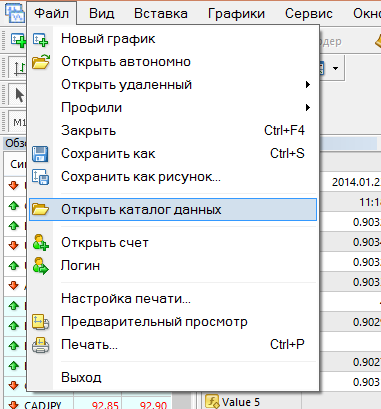
How do you get there?
To get to the data directory, in the terminal click File -> Open Data Folder
3. Restart the terminal.
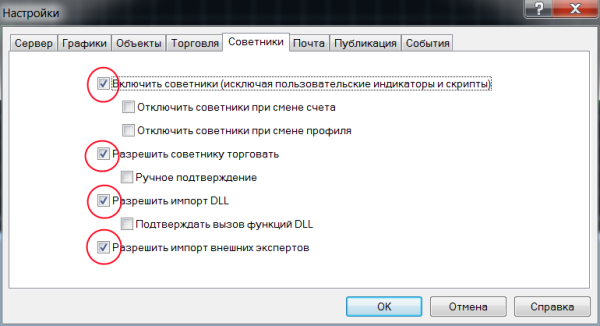
4. Open the Metatrader 4 terminal, go to Tools->Options
Select the Expert Advisors tab and check the boxes as in the picture below. Click OK.
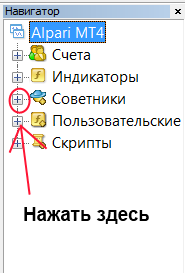
5. In the navigator panel (usually at the bottom left), click the plus sign next to the Expert Advisors section.
6. Next, drag the InstantDDSMM advisor with the mouse onto the previously opened chart with the currency and timeframe you need.
7. Change the settings according to your deposit level and risk level, click OK.
Settings description
Starting Point Account Balance - initial deposit
Max Drawdown Risk Percent - maximum allowable drawdown (in percent)
Max Risk Per Trade Percent - percentage of deposit risk per trade
Max Stop Loss Pips - maximum stop-loss used
Default Stop Loss Pips - the Stop Loss set by default when opening a trade.
Default Take Profit Pips - the Take Profit set by default when opening a trade.
Magic ID - identifier of orders opened by "Auto DDSMM"
Trade Comment - comment for positions
Enable Sounds - turn sounds on/off
BE Plus Pips - how many pips to add to the order open price when activating the move-to-breakeven function
Trail Stop Activate Pips - the order profit level for activating the trailing stop
Trail Stop Away From Price Pips - trailing stop size
What is a trailing stop?
Enable Stealth Trailing - enable/disable the use of the trailing stop at the software level. When this parameter is disabled, the trailing stop is sent to the broker's server.
Download the automatic assistant "DDSMM"

Best regards, Pavel TradeLikeaPro.ru