
Calculating Profit with the Iprofit Custom Indicator

Hello everyone!
Often you want to see your account statistics in front of you to lift your spirits. Some traders also deliberately set profit or loss limits in points or percentages of the balance, after exceeding which they stop trading until the next day, week, or month. How can this be done? Previously, you had to go to third-party sites with monitoring or calculate everything in your head, which, you must admit, is inconvenient.
Indicator Characteristics
Platform: Metatrader 4
Currency pairs: any
Timeframe: any
Indicator type: informational
Installation

The indicator is installed in the same way as any other.
Description

Today I will tell you about an interesting indicator from the programmer KimIV, widely known in narrow trading circles. This indicator shows profit or loss on the account in points, deposit units, and percentages, as well as the cumulative total lot size of positions. At the same time, this data is broken down by time: for today, yesterday, week, month, quarter, year, starting from a certain date set by the user in the settings.
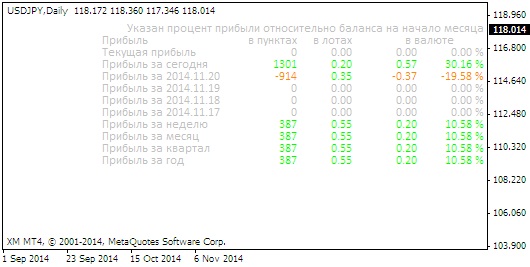
This indicator was improved by our colleague, forum member Dmitry aka ForexDE. In particular, the ability to change the anchor corner of the indicator information panel, the color and font size settings, as well as column alignment and some other small changes were added. Let us thank Dmitry! I also could not ignore one more small drawback, namely, I replaced some numeric designations in the indicator settings with text ones. In particular, the parameter for anchoring to a certain corner is now set not by a number from 0 to 3, but by choosing "upper left" or "lower right" corner from a dropdown menu. In my opinion, this is more convenient than remembering which number denotes which corner.
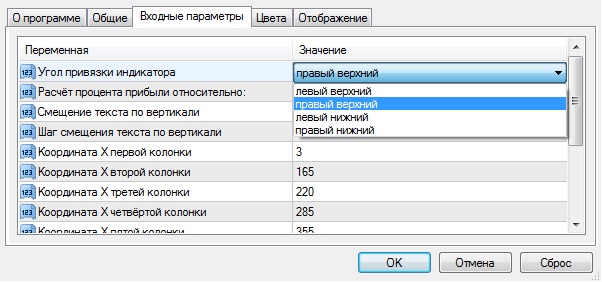
I did the same with choosing the start date of the period for profit calculation.
Settings
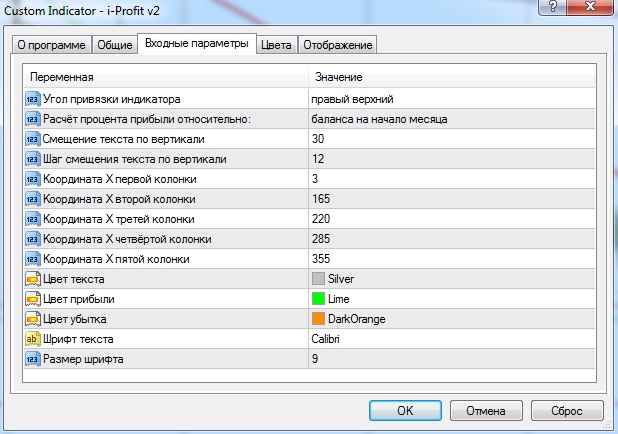
All indicator settings are displayed in the terminal in Russian and should not cause difficulties, but just in case I will tell you about them.
- Indicator anchor corner: upper left, lower left, upper right, lower right;
- Profit percentage calculation relative to: current balance, balance at the beginning of the day, balance at the beginning of the week, balance at the beginning of the month, balance at the beginning of the quarter, balance at the beginning of the year.
- Vertical text offset
- Vertical text offset step
- X coordinate of the first column, X coordinate of the second column, X coordinate of the third column, X coordinate of the fourth column, X coordinate of the fifth column: column coordinates needed to adjust columns when choosing a large font size
- Text color, profit color, loss color: text color settings
- Text font: font selection. If you want to change the font, you will have to type its name manually. The font must be one of the standard options available in Windows.
- Font size: font height.
Conclusion

This indicator is undoubtedly very convenient. It will save you from the need to constantly visit your page on myfxbook. The indicator is constantly in front of your eyes on the chart, shows only the main information; unlike monitoring, it is simpler, more convenient, more informative.
Download the Indicator

Respectfully, Dmitry aka Silentspec
TradeLikeaPro.ru