
Asia Advisor - Traders' Favorite, Investors' Friend

Hello, dear colleagues. Many traders prefer active work in the market, like to keep their finger on the pulse of the news, constantly test trading systems and new ideas. And there are forex traders who find it more convenient to be investors - to invest in PAMMs, use signals, trade copying, that is, to invest in the intellectual work of professionals. We present to your attention the Asia advisor, which is an excellent solution suitable for both active traders and moderate investors, due to its outstanding results both in many years of tests and on real accounts. In this article we will test it on several pairs and evaluate the results obtained.
Advisor Specifications
Platform: Metatrader 4
Advisor version: 1.4
Currency pairs: GBPUSD, USDJPY, GBPCAD, GBPCHF, EURGBP, EURCHF, USDCAD, USDCHF
Timeframe: M15
Working time: Asian session
Recommended brokers: Alpari (ECN accounts), Roboforex (ECN accounts)
Installation Guide

We install the advisor as usual. If you are encountering robots on Forex for the first time and have a lot of questions, download and watch the Forex on Autopilot course.
Attention! In this advisor, the settings significantly affect trading results, use the recommended set files (see the archive at the end of this article).
Advisor Strategy

The advisor is a trend scalper. Entry into a trade occurs on pullbacks from the main trend. Signal filtering from a channel indicator, based on volatility, may also be applied. Orders can be closed by stop loss, take profit, or by indicators built into the advisor indicators, also by offsets from the channel boundaries of the corresponding indicator; a trading time limit is possible.
The expert does not use martingale or order grids, but can apply a recovery mode, that is, restoration, with an increased lot (depends on the set).
The expert is a stable and profitable robot that is designed to work in various market conditions, for many years of profitable trading.
Advisor Backtests
Backtests were made for each pair separately, since the Metatrader 4 platform does not allow multi-currency tests.
The first series of tests is done with a fixed lot. This makes it possible to evaluate the testing results without taking money management into account.
Asia EURCHF 2000 2015 lot 0.1
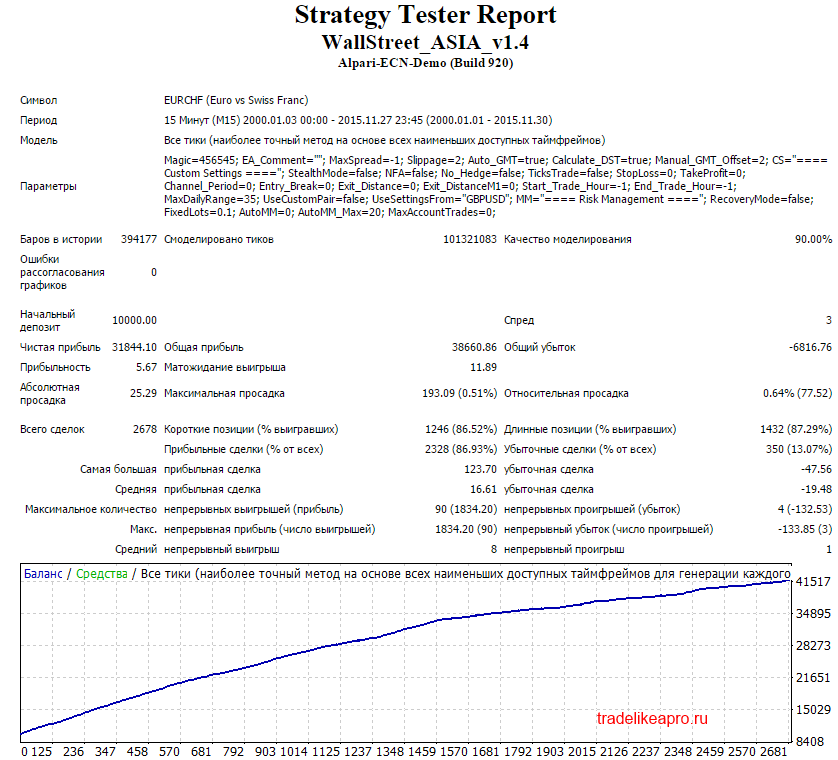
The test results are good
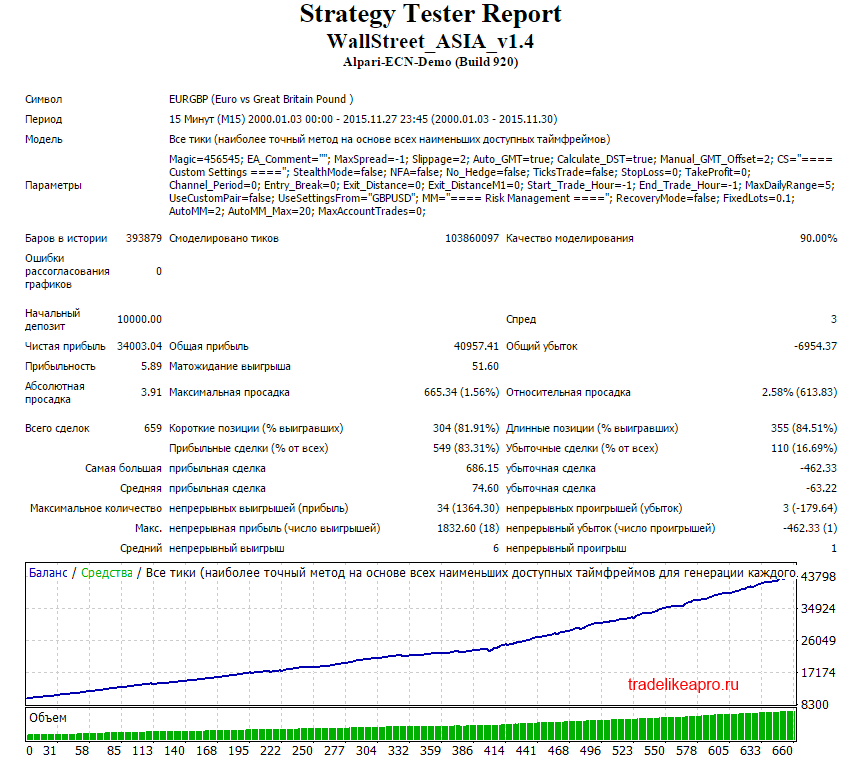
Asia EURGBP 2000 2015 lot 0.1
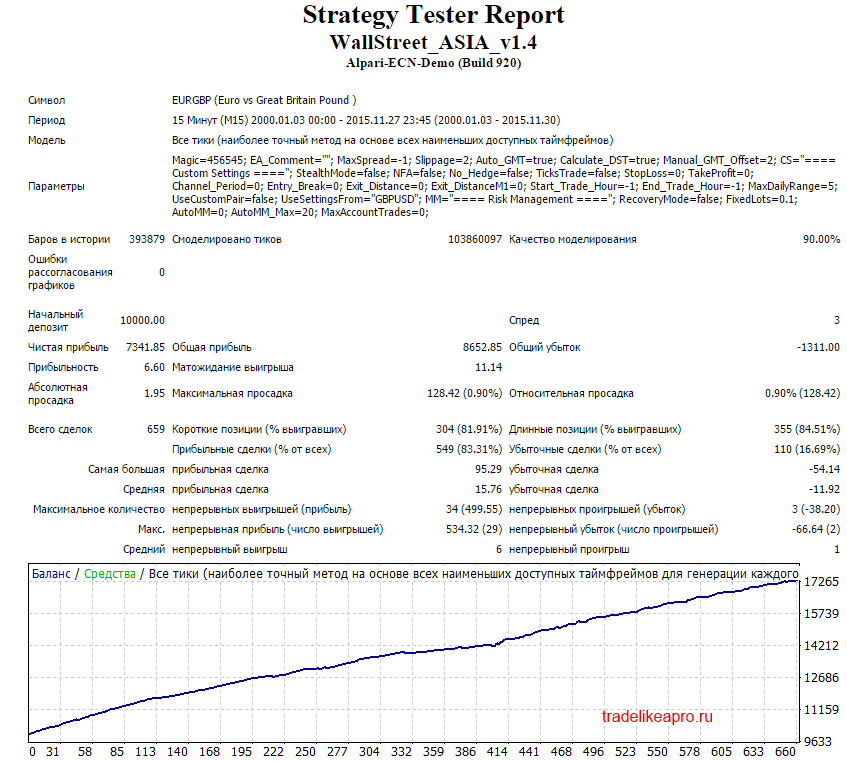
The test results are acceptable
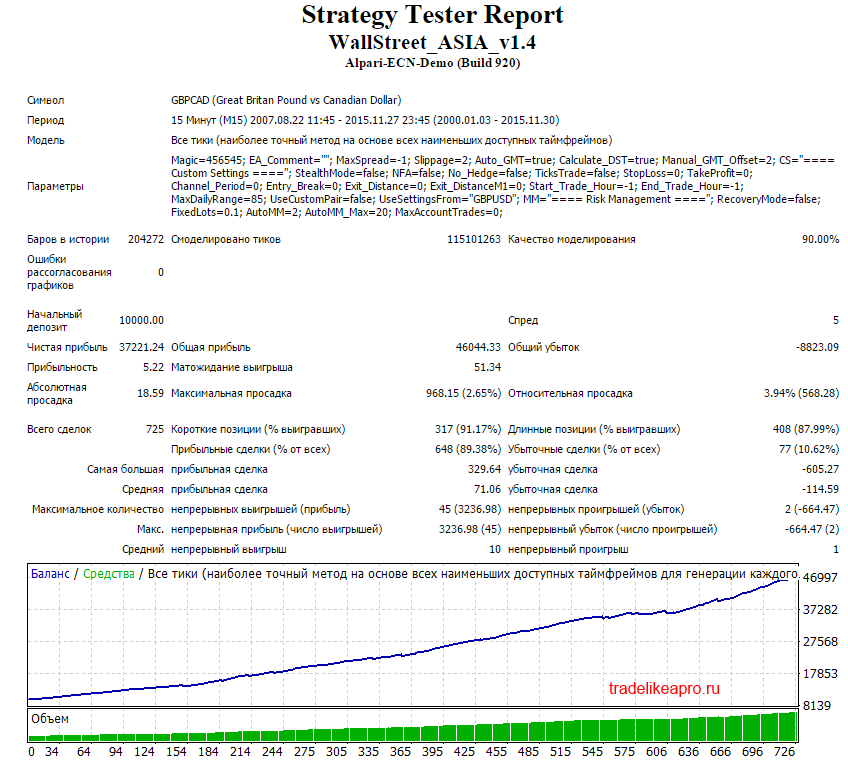
Asia GBPCAD 2000 2015 lot 0.1
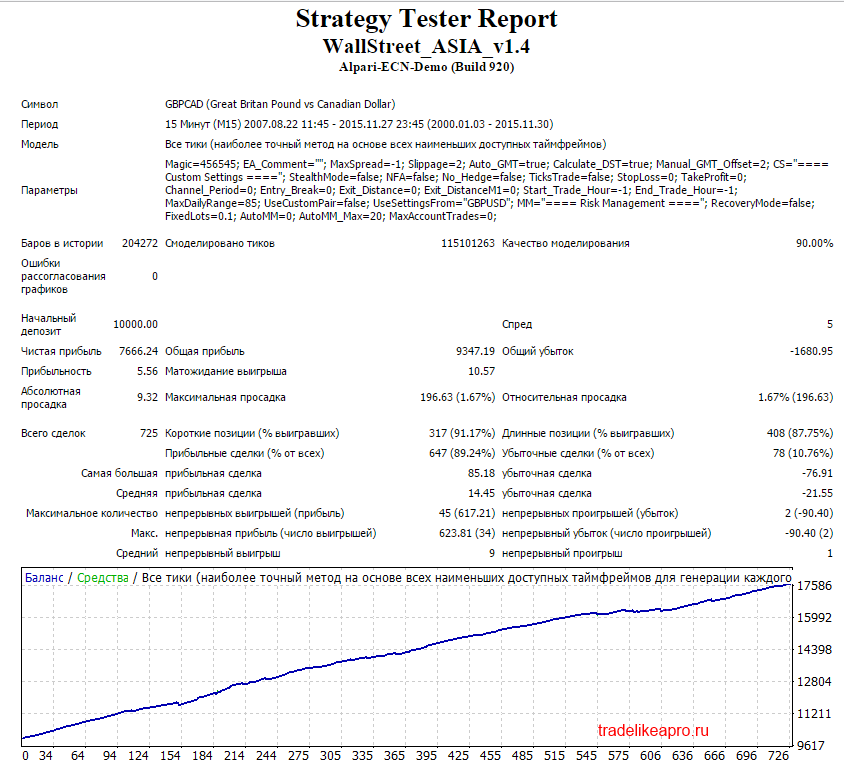
The test results are acceptable
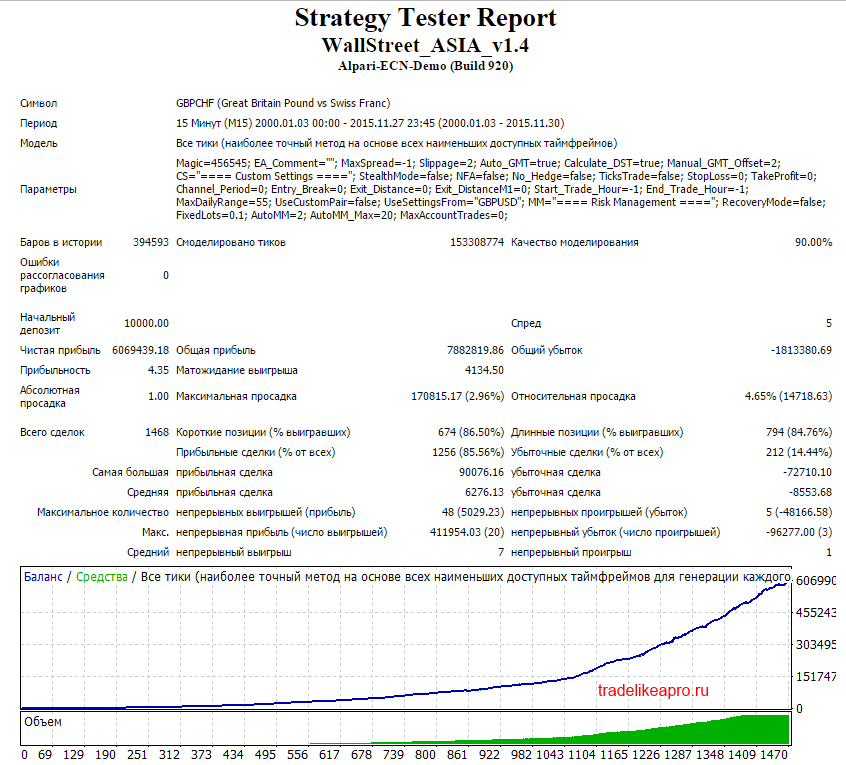
Asia GBPCHF 2000 2015 lot 0.1
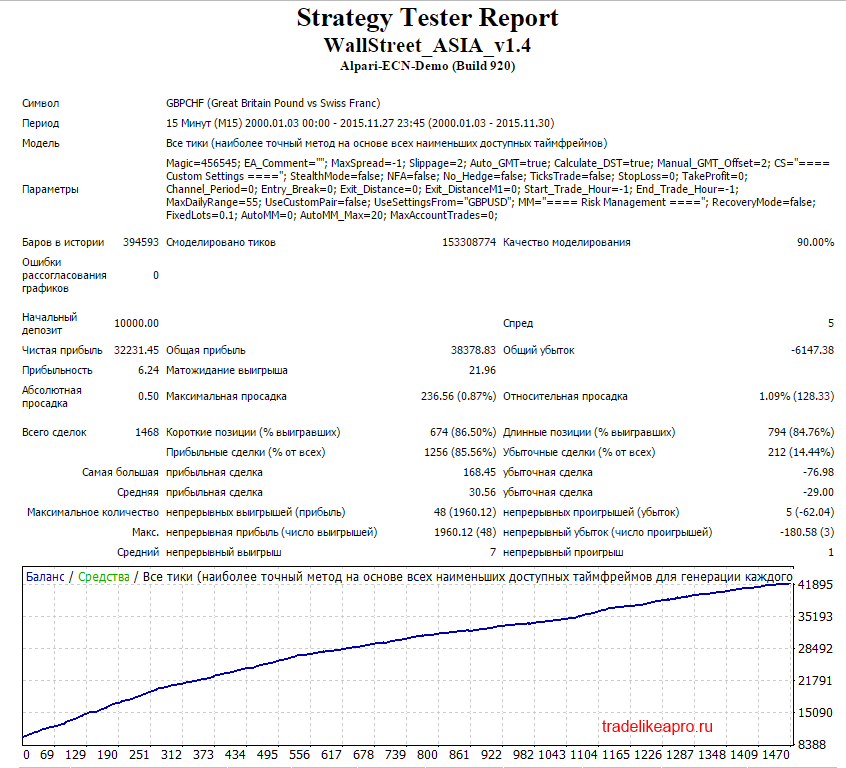
Test results are good
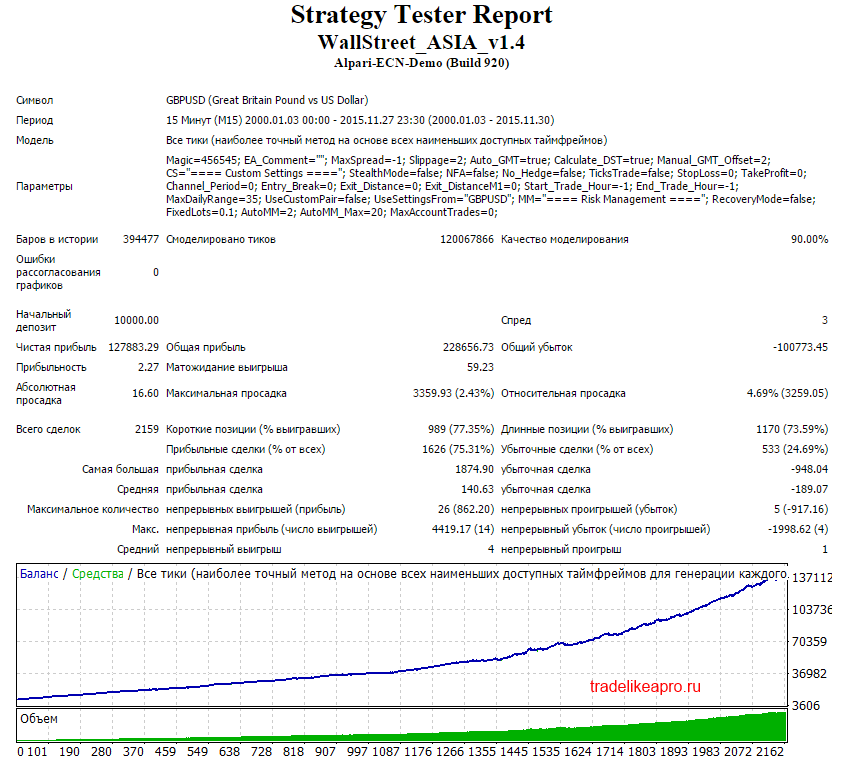
Asia GBPUSD 2000 2015 lot 0.1
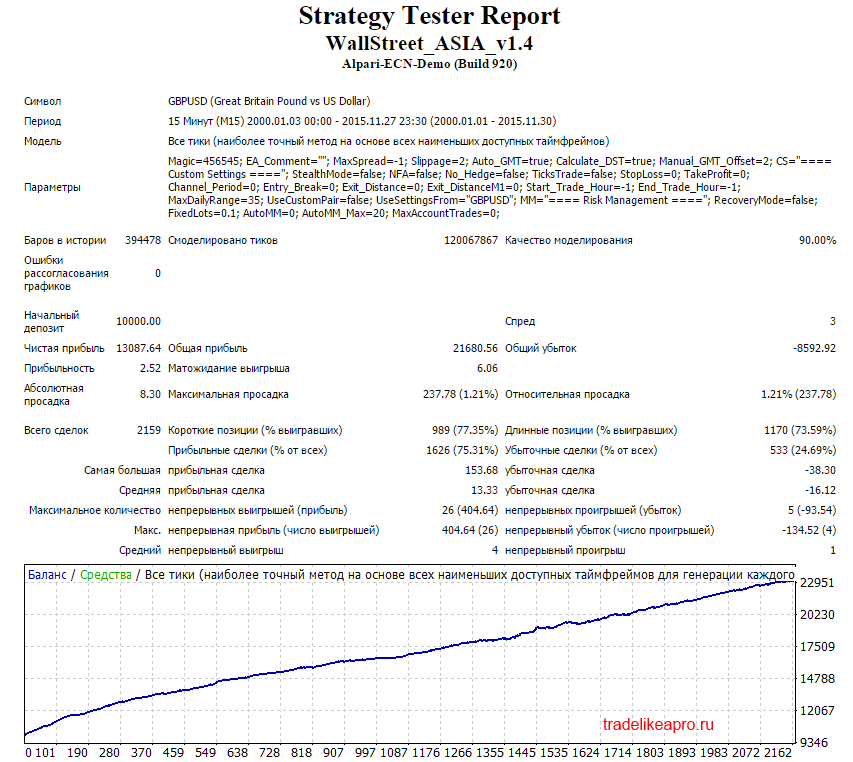
Test results are good
Asia USDCAD 2000 2015 lot 0.1
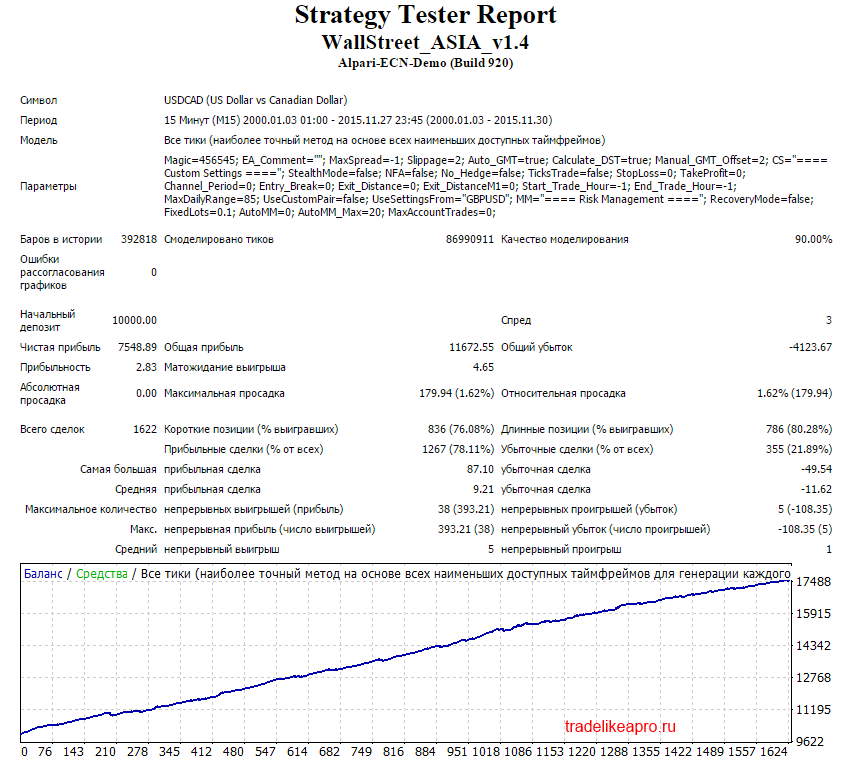
Test results are acceptable
Asia USDCHF 2000 2015 lot 0.1
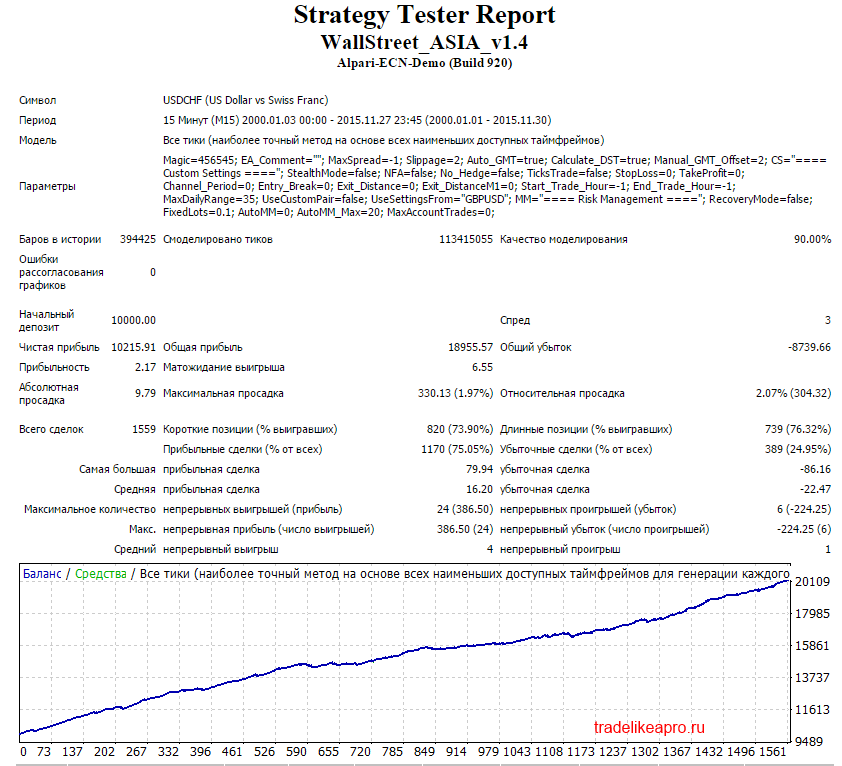
Test results are very good
Asia USDJPY 2000 2015 lot 0.1
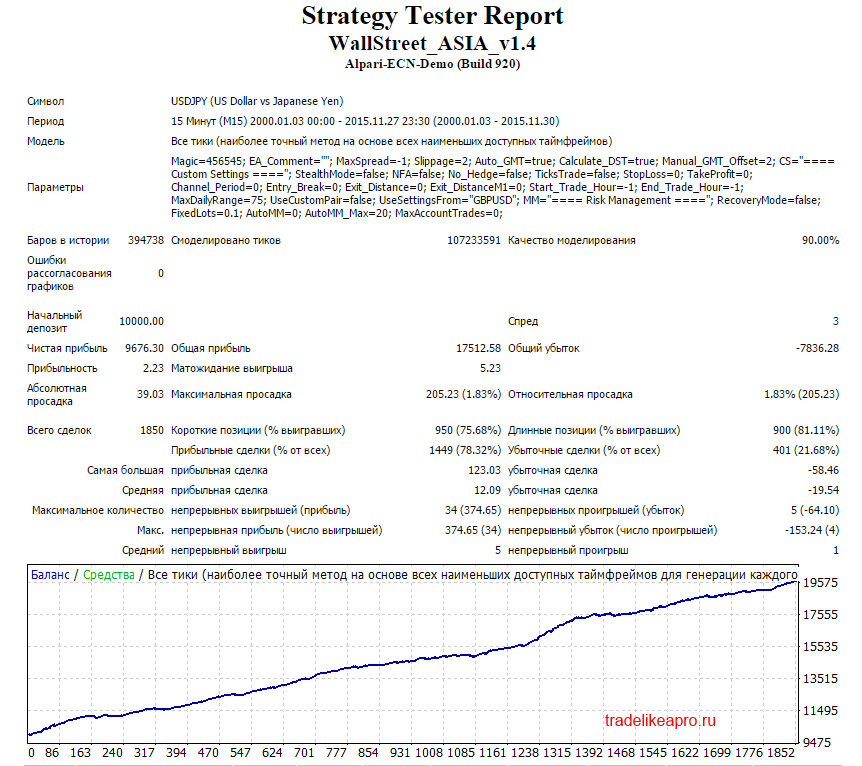
Test results are acceptable
The second series of tests is carried out with a dynamic proportional) lot. This makes it possible to evaluate the testing results taking money management into account.
Asia EURCHF 2000 2015 lot MM2
Asia EURGBP 2000 2015 lot MM2
Asia GBPCAD 2000 2015 lot MM2
Asia GBPCHF 2000 2015 lot MM2
Asia GBPUSD 2000 2015 lot MM2
Asia USDCAD 2000 2015 lot MM2
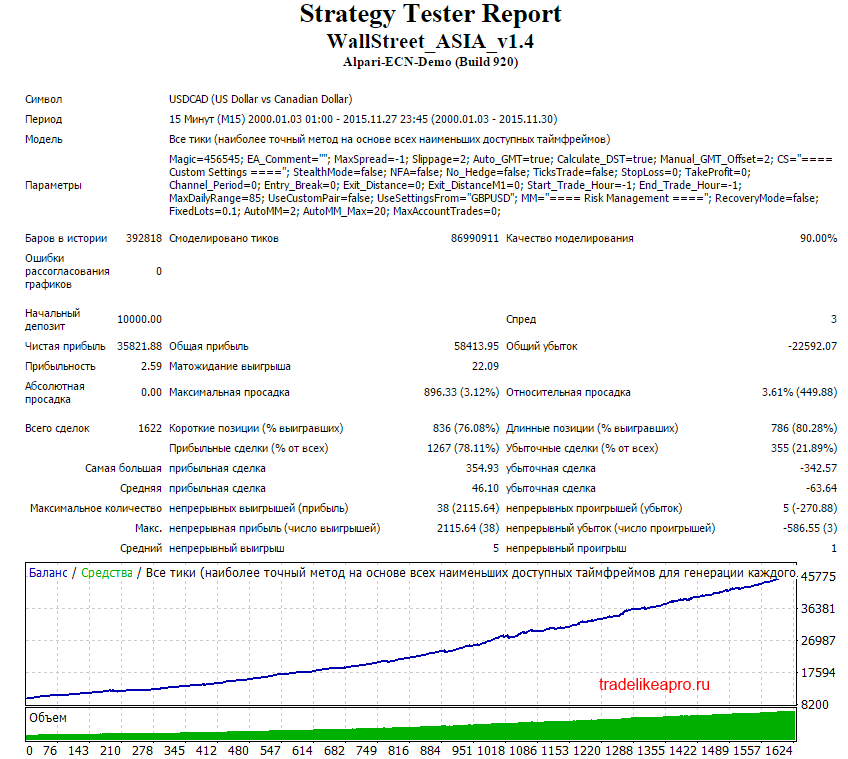
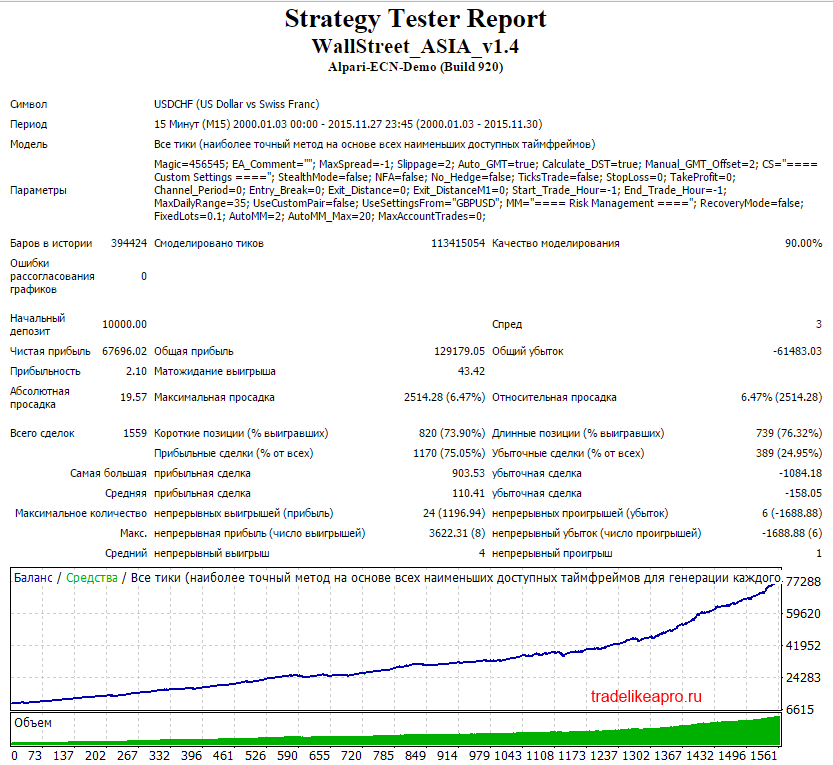
Asia USDCHF 2000 2015 lot MM2
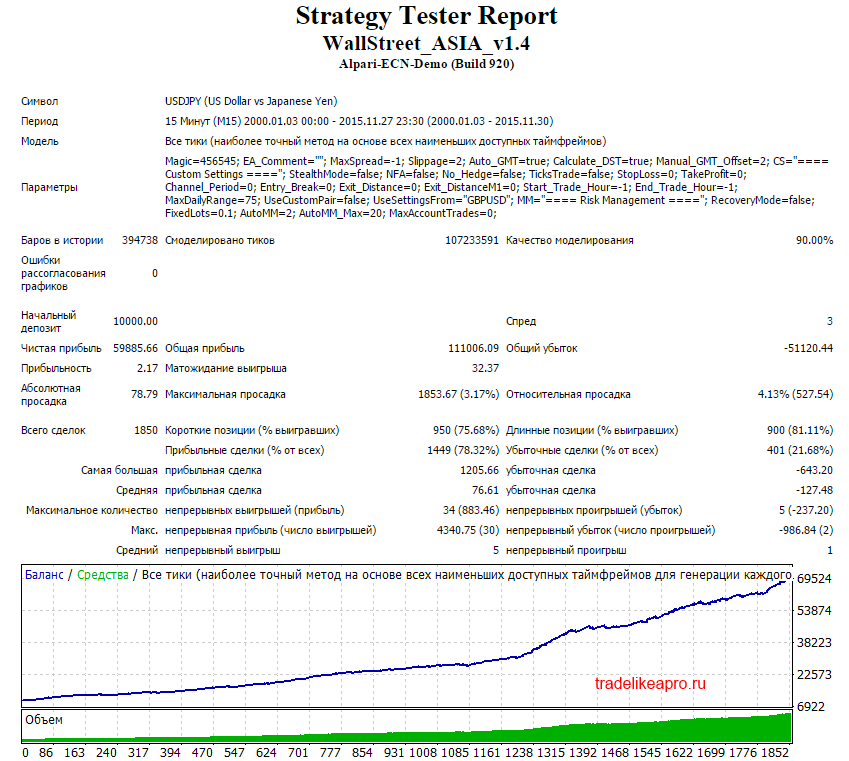
Asia USDJPY 2000 2015 lot MM2
Using the EA Analyzer program, let us make a summary statement for tests of all pairs with a proportional lot.
Asia 2000-2015 lot MM2
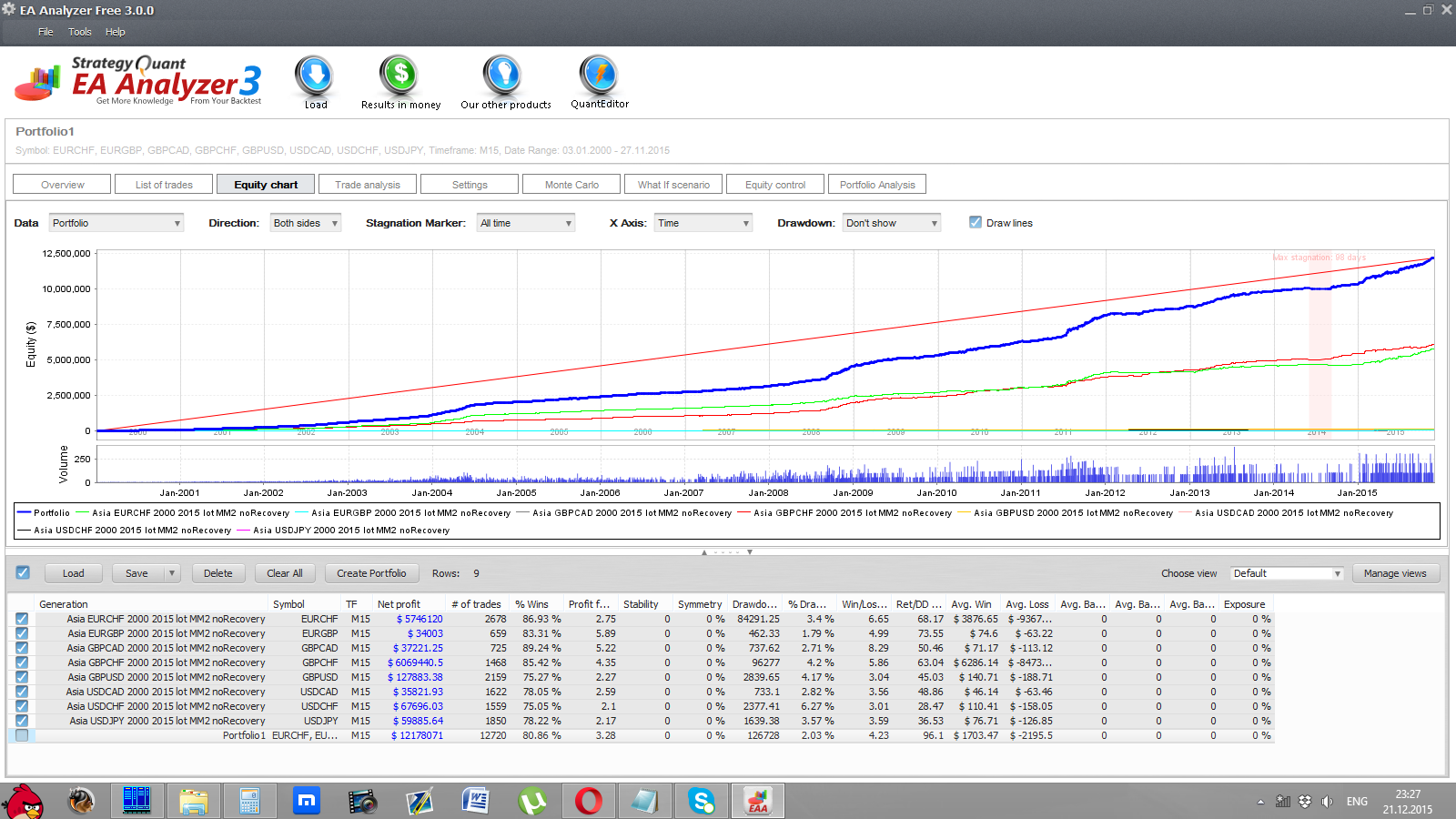
Conclusion: The Asia Expert Advisor, when working with a proportional lot on 8 pairs, shows very stable profit growth without significant drawdowns.
⇒Links to all backtests used in the article (for independent analysis) can be found in the forum thread Asia.
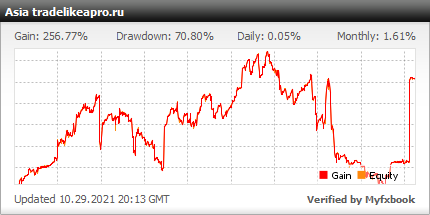
Real Account Monitoring
Settings Description
The robot settings look as follows:
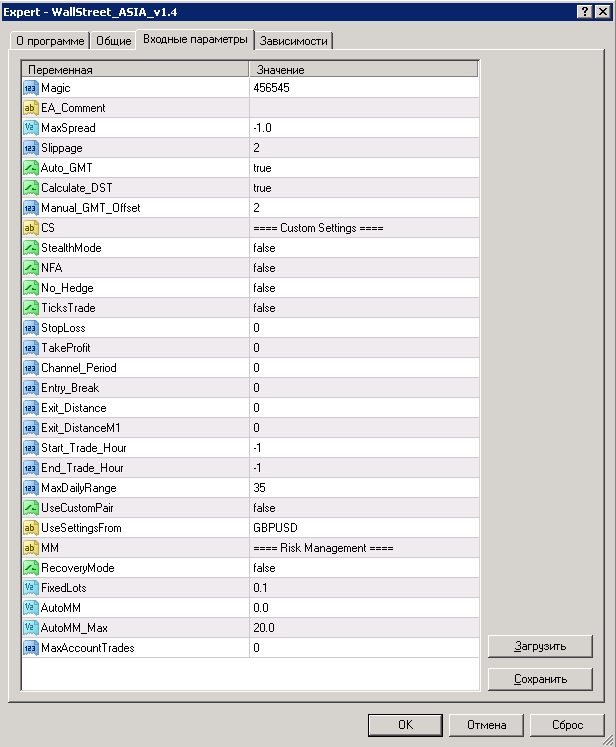
- Magic - magic of orders on this currency pair
- EA_Comment - comments for orders (optional parameter)
- MaxSpread - maximum allowed spread, at -1.0 it is not limited
- Slippage - slippage
- Auto_GMT - automatic detection of broker GMT, enabled when true
- Calculate_DST - accounting for the broker's daylight saving time (Daylight Saving Time), works with Auto_GMT=true
- Manual_GMT_Offset - manual GMT setting with Auto_GMT=false
Custom Settings
- StealthMode - "stealth" mode, when the Expert Advisor does not explicitly place stops and profits, i.e. hides them from the broker
- NFA - enables compatibility with brokers operating under regulation of the US National Futures Association (National Futures Association)
- No_Hedge - disabling the placement of hedge orders, i.e. open buy and sell positions at the same time
- TicksTrade - enables calculation mode on every tick (by default, calculations are used on the close of the M1 minute timeframe). It is recommended to use only after optimization for this parameter! Or not touch this parameter at all.
- StopLoss - stop loss
- TakeProfit - take profit
- Channel_Period - period of the channel indicator based on volatility
- Entry_Break - size of the offset from the channel walls in pips on entry
- Exit_Distance - size of the offset from the channel walls in pips for closing the order
- Exit_DistanceM1 - size of the offset from the channel walls in pips for closing the order, calculated on the minute timeframe
- Start_Trade_Hour - sets the start of the trading hour during the day, at "-1" it does not work
- End_Trade_Hour - sets the end of the trading hour during the day, at "-1" it does not work
- MaxDailyRange - value of the filter by maximum daily values, affects the frequency of entries
- UseCustomPair - allows use on pairs not included in the recommended ones
- UseSettingsFrom - if trading on non-recommended pairs is enabled, then UseSettingsFrom shows from which recommended pair the Expert Advisor's internal parameters are set. Makes sense only when entering recommended pairs.
Risk Management
- RecoveryMode - enables "recovery" mode, i.e. during drawdown the Expert Advisor will trade with increased lots until it exits the drawdown
- FixedLots - fixed lot size
- AutoMM - dynamic lot size
- AutoMM_Max - maximum allowed risk, affects the lot size set by the Expert Advisor, the risk is calculated for a stop loss of 100 pips
- MaxAccountTrades - maximum number of orders simultaneously opened by the Expert Advisor on the account, at "0" the number of orders is unlimited
In the Simple version of the Expert Advisor there are even fewer settings:
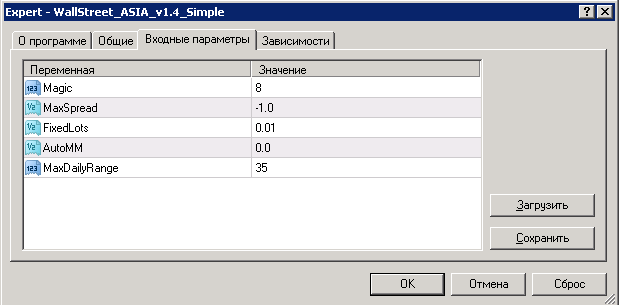
The Simple version can be installed only on recommended pairs.
Which version of the Expert Advisor should you use?

The Simple version differs from the regular one in that it has a minimum of settings brought "outside." If you want full access to all settings, if you want to use settings different from the author's presets, or if you want to run the Asia EA on pairs different from the recommended ones, only the regular version of the EA is suitable for you. For beginners and for those who do not like experiments, the Simple version may be convenient.
Attention! If you use the Simple version, do not forget to set the MaxDailyRange parameter for each pair:
- GBPUSD: MaxDailyRange = 35
- USDJPY: MaxDailyRange = 75
- EURCHF: MaxDailyRange = 35
- GBPCHF: MaxDailyRange = 55
- GBPCAD: MaxDailyRange = 85
- EURGBP: MaxDailyRange = 5
- USDCAD: MaxDailyRange = 85
- USDCHF: MaxDailyRange = 35
If you decide to use the regular version of the EA, it is recommended to use the presets provided at the end of the article (the MQL4 folder contains a Presets folder with the sets).
Attention! Do not change anything in the EA parameters and use only the recommended values unless you understand exactly what you are doing!
Recommended Money Management

A risk per trade of 2 percent of the deposit for each pair is recommended. The lot can be calculated using a special table, or you can simply set the risk level in the EA parameters, and everything will be calculated automatically.
Conclusions

The Asia EA is a multi-currency, stable, and profitable trend scalper, that is, a trading robot intended for operation on ECN accounts. Reliability, stability, and predictability are confirmed by tests and monitoring on a real account. Over the long term, profitability may remain in a neutral zone for some time. Also note that the EA does not trade often.
Important!
For the EA to work correctly, the trading terminal must be turned on from the market open on Sunday evening until its close on Friday evening. If you do not have the ability to keep your computer running 24/5, it is recommended to use a VPS server service.
Download the "Asia" EA

The Asia EA comes as a free bonus for buyers of the Wall Street robot
Respectfully, Alexey aka Merlin
TradeLikeaPro.ru