
Spring EA: Trading Pullbacks After Large Moves

Hello, dear fellow traders!
We present to your attention the Spring expert advisor, which trades using the trading system of the same name, based on the All-In strategy: if during a week a currency pair has "drawn" too large a candle, meaning the move was larger than typical for it, then a pullback in the opposite direction is highly likely. If instead of locking in losses we average with a grid of orders, then the quiet and calm All-In turns into the aggressive macho Spring!
So, let us review the description and settings of the Spring expert advisor, evaluate the results of forward tests of the sets developed on our forum, and choose the safest options among the available sets for profitable trading.
Development Team

Old Oleg - author of the trading system;
usver73 - EA development;
NickolaG - optimization and set creation.
EA Characteristics
Platform: Metatrader 4
EA version: 8.26
Currency pairs: AUDCHF, AUDJPY, AUDNZD, EURAUD, EURGBP, EURJPY, EURCHF, EURSGD, GBPJPY, USDSGD
Timeframe: does not matter
Operating time: around the clock
Recommended brokers: RoboForex, Forex4You, InstaForex
Installing the EA in MetaTrader 4
We install the EA as usual. If this is your first time dealing with robots on Forex and you have lots of questions, download and watch the free course Forex on Autopilot.
Attention! Since the EA is potentially dangerous, be sure to read the article on the basic principles of trading robots based on averaging.
Brief installation guide.
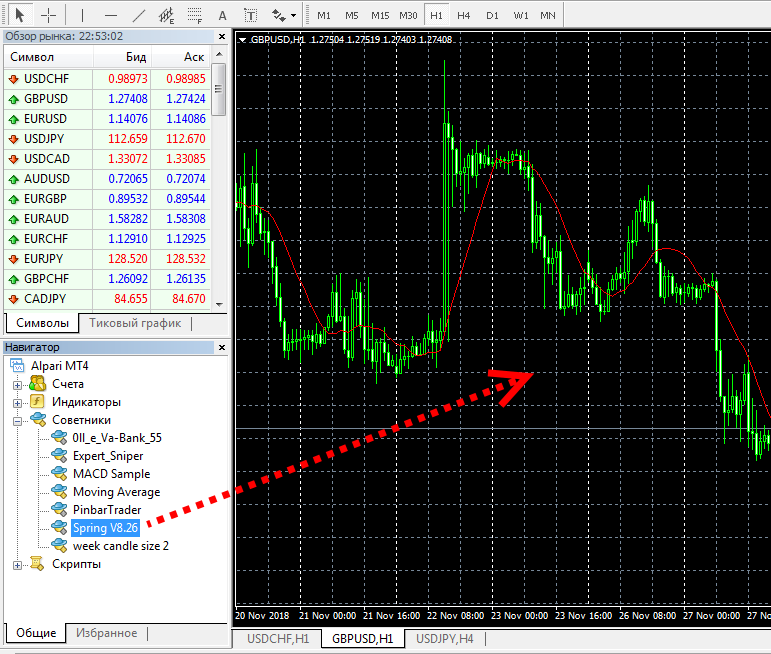
After restarting Metatrader, Spring will appear in the Navigator panel, then we drag it into the selected currency pair window on the required timeframe (in this case, any).
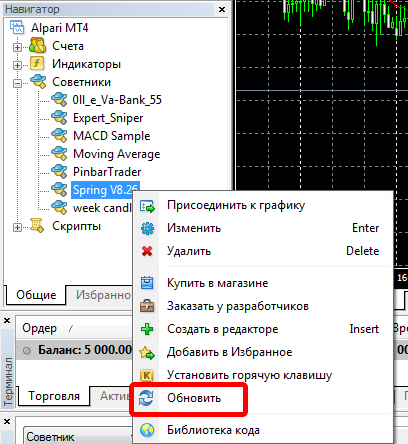
Instead of restarting the terminal, you can also click the Refresh button in the Navigator panel, and the EA will appear in the list:
(!) For trading, you must use only proven and tested presets (including those in this article).
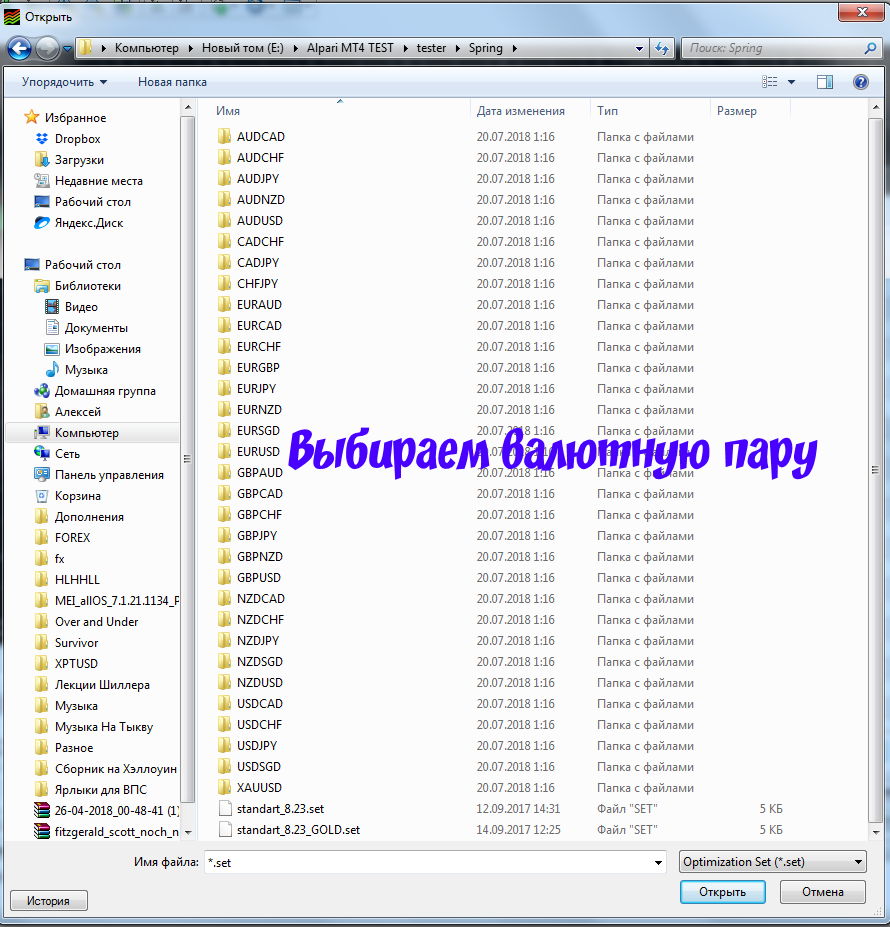
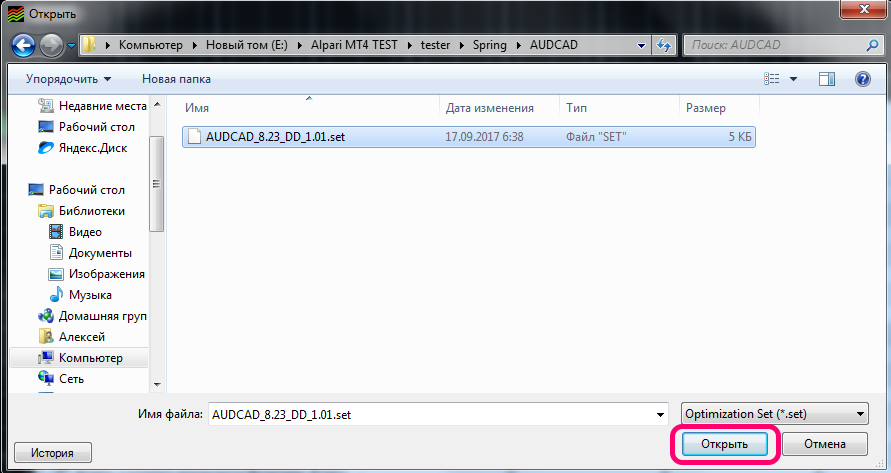
To load a preset when installing the EA on a chart, in the settings window you need to click the Load button and select the desired set.
EA Strategy

The strategy underlying the Spring expert advisor has a common basis with the All-In trading system: if the weekly movement of a currency pair is too large, then at the beginning of the next week a pullback is expected, which is connected with various reasons: central bank interventions, profit-taking by large participants, corrections after impulses, the impact of news on weekdays and weekends, and other reasons that lead to wave-like price movements on exchanges (including currency markets).
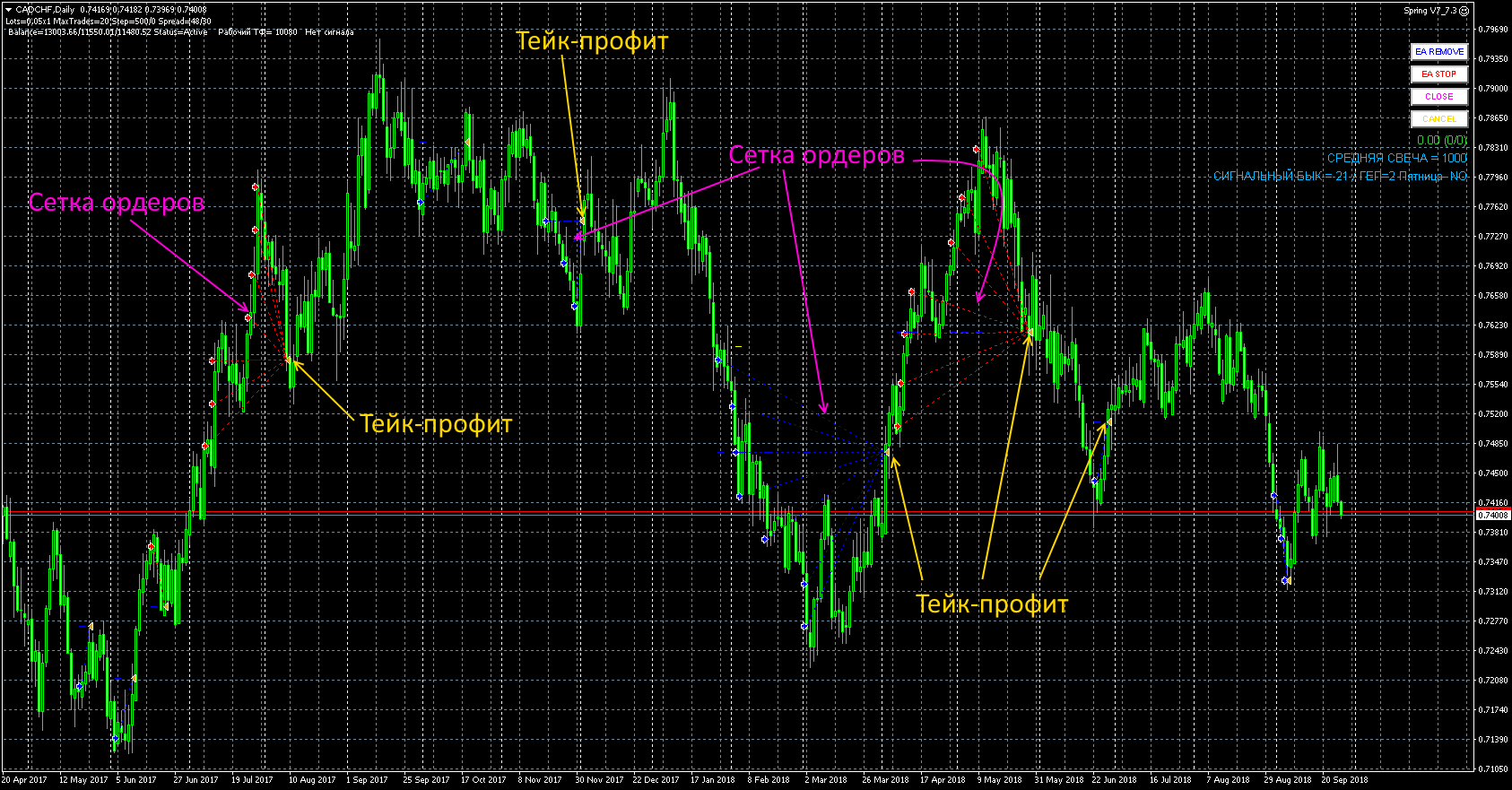
The basic idea behind how the Spring EA works is very simple. The size of the distance traveled in a week (that is, the size of the weekly candle) is compared with a preset value specified in advance, and if this distance is large enough, we enter in the direction opposite to the weekly candle. So, if the weekly candle was bullish, we will sell; if bearish, we will buy. A take profit is set, and when it is triggered we receive profit and wait for the next weekly candle for comparison. If the price goes the wrong way, then a grid of orders is built, allowing the entire series of trades to be pulled into profit. The EA has numerous parameters for placing orders, trailing, moving to breakeven, and so on.
(!) Unlike the All-In strategy, where profits are fixed (or losses accepted) after some time, in the Spring strategy, if the price moves against the open order, an order grid is built, which is closed on a pullback with profit. Using an order grid can lead to significant drawdowns, so we will consider the Spring EA a potentially dangerous robot, and for this reason we will pay primary attention to the selection of sets for trading.
Example of the EA in Action
EA Backtests

Before installing any EA on an account (especially a potentially dangerous one like Spring), it must be tested to identify suitable settings and analyze the results obtained. This will help you identify outdated or unacceptable sets, make sure you choose the right broker, and calculate appropriate money management. It is best to run tests on the fullest possible period of historical data, after first checking the quality of your quotes and downloading any missing data. In addition, do not forget to set a realistic spread level, also taking into account the slippage that will definitely occur.
Backtests in this article were done for each pair separately, since the MetaTrader 4 platform does not allow running multi-currency tests.
⇒The tests were done using the program Tick Data Suite on quotes from Dukascopy; the spread is real and variable.
A series of tests was done with a fixed lot. This makes it possible to evaluate the testing results for each set without taking money management into account.
The criteria for evaluating the obtained results are as follows:
- the chart should be free of sharp, visually obvious drops in balance and equity;
- the profit-to-drawdown ratio - the higher it is, the better.
Spring_8.26 01.01.2015-05.12.2018 AUDCAD
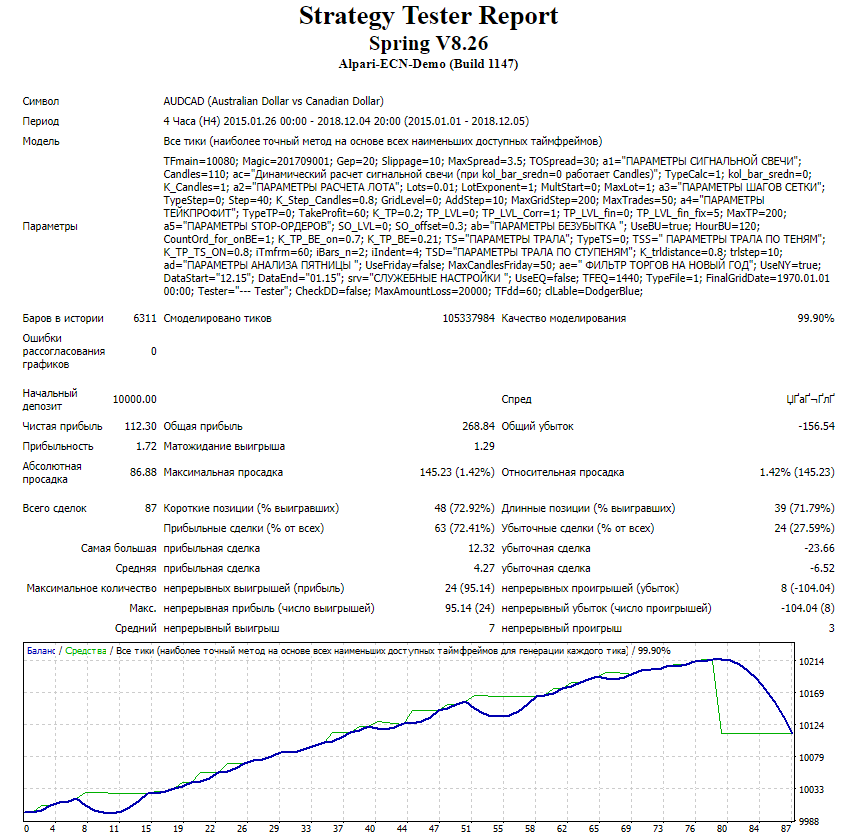
The test results are poor
Spring_8.26 01.01.2015-05.12.2018 AUDCHF
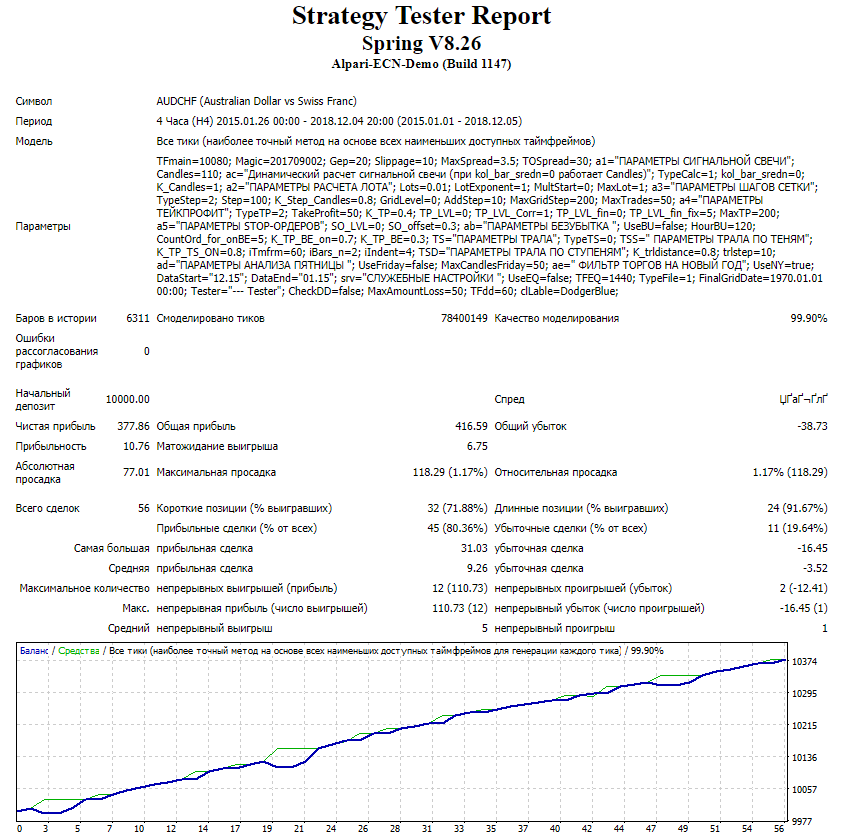
The test results are acceptable
Spring_8.26 01.01.2015-05.12.2018 AUDJPY
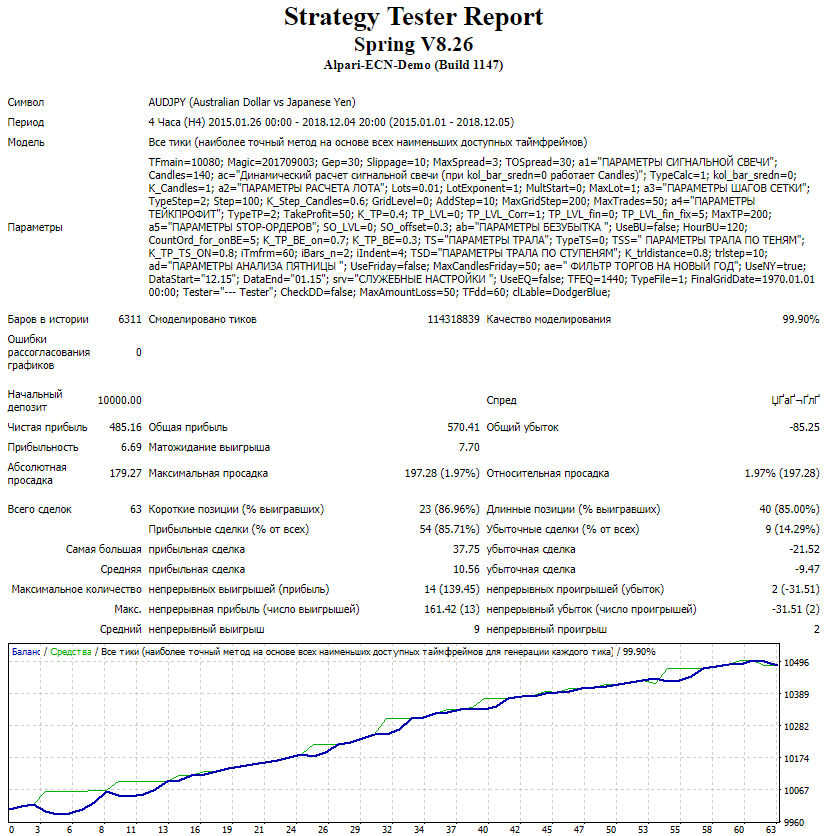
The test results are acceptable
Spring_8.26 01.01.2015-05.12.2018 AUDNZD
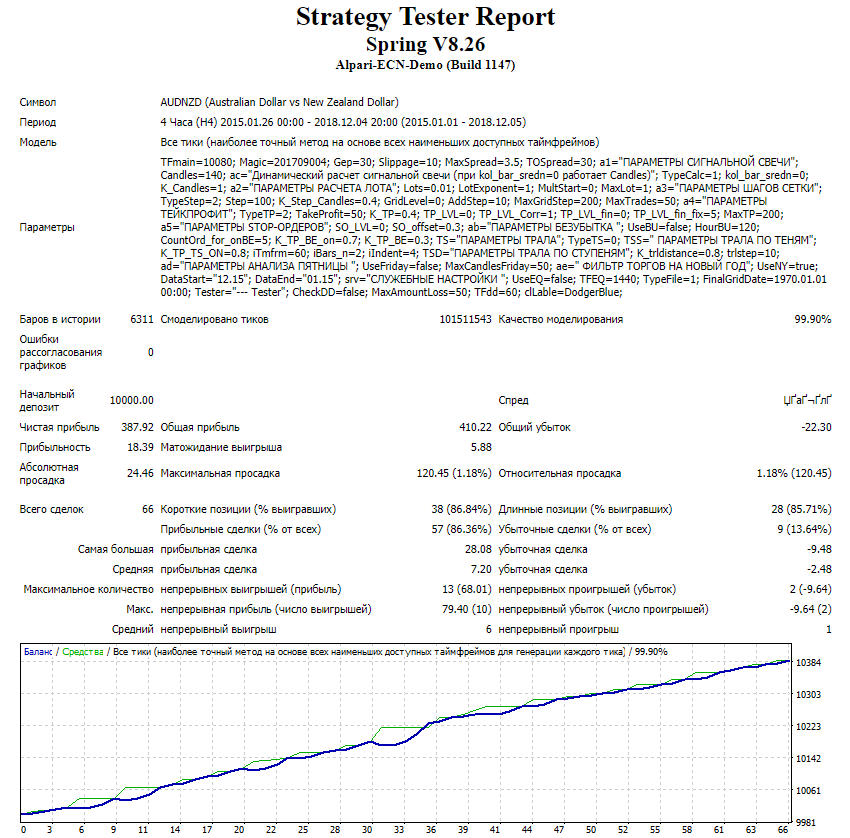
The test results are good
Spring_8.26 01.01.2015-05.12.2018 AUDUSD
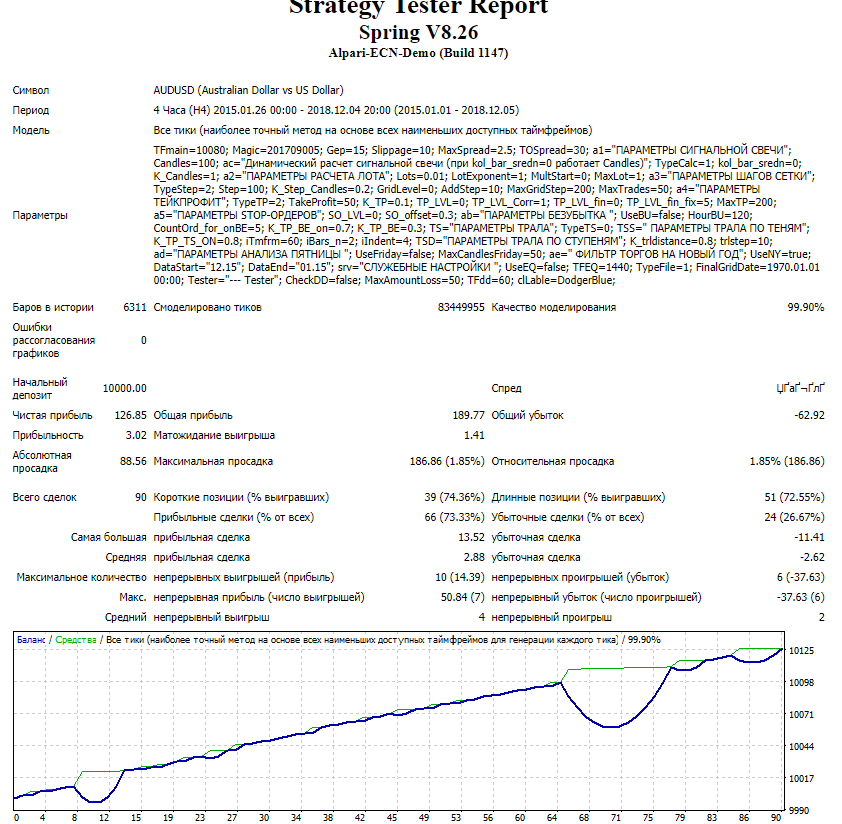
The test results are poor
Spring_8.26 01.01.2015-05.12.2018 CADCHF
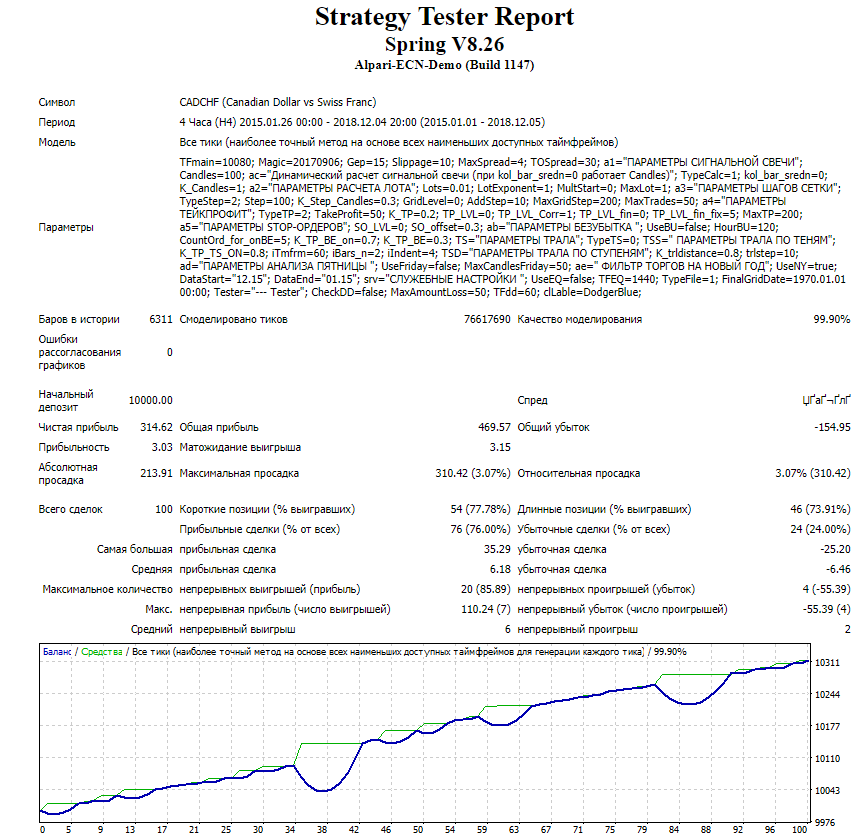
The test results are poor
Spring_8.26 01.01.2015-05.12.2018 CADJPY
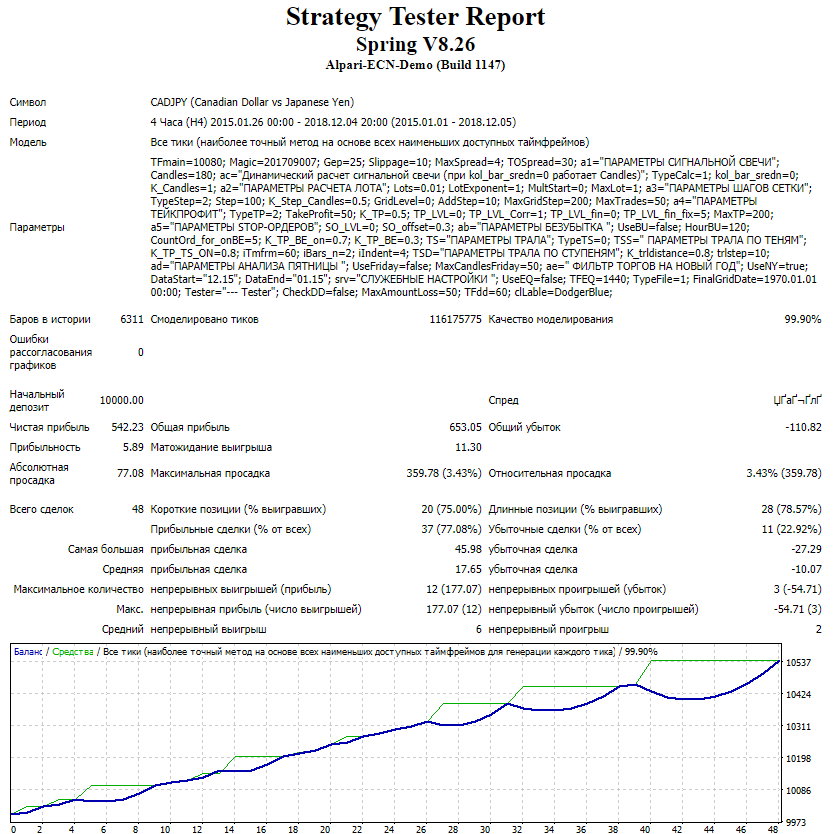
The test results are poor
Spring_8.26 01.01.2015-05.12.2018 CHFJPY
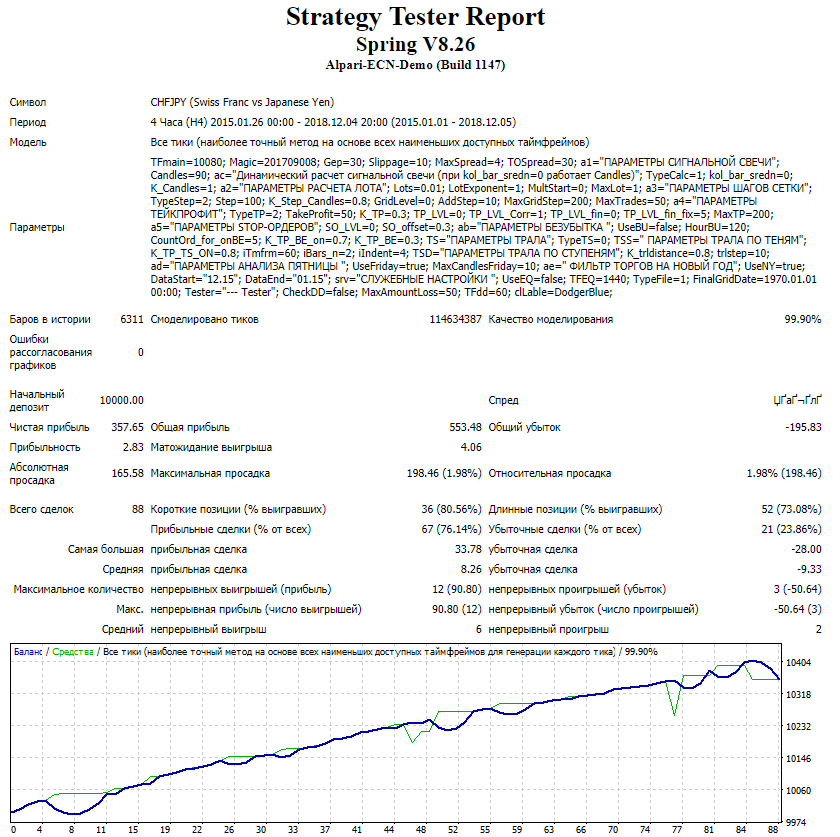
The test results are poor
Spring_8.26 01.01.2015-05.12.2018 EURAUD
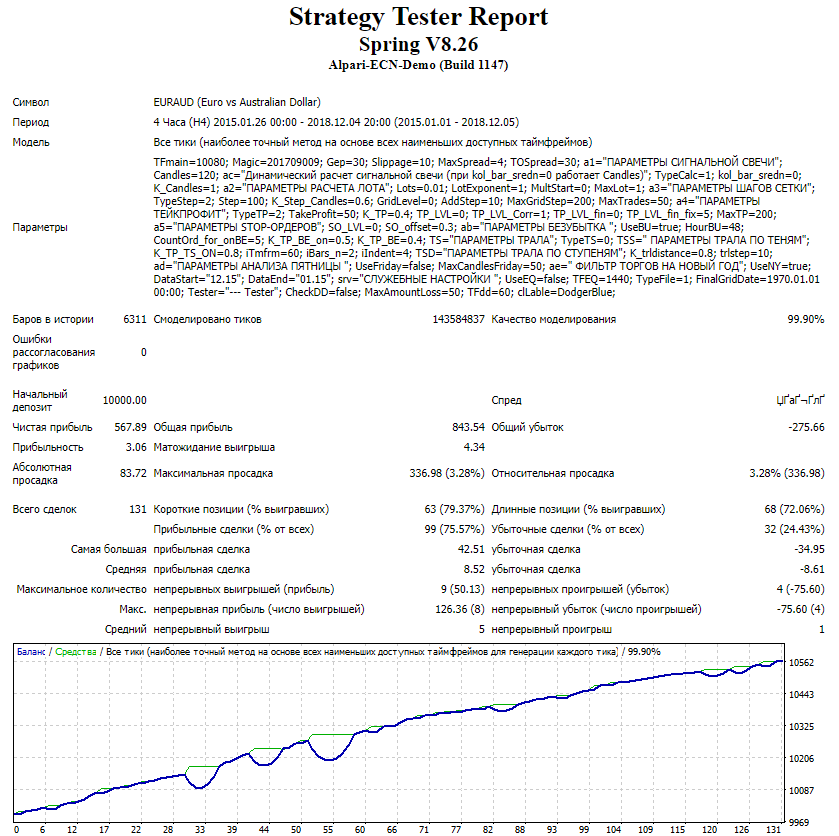
The test results are acceptable
Spring_8.26 01.01.2015-05.12.2018 EURCAD set2.32
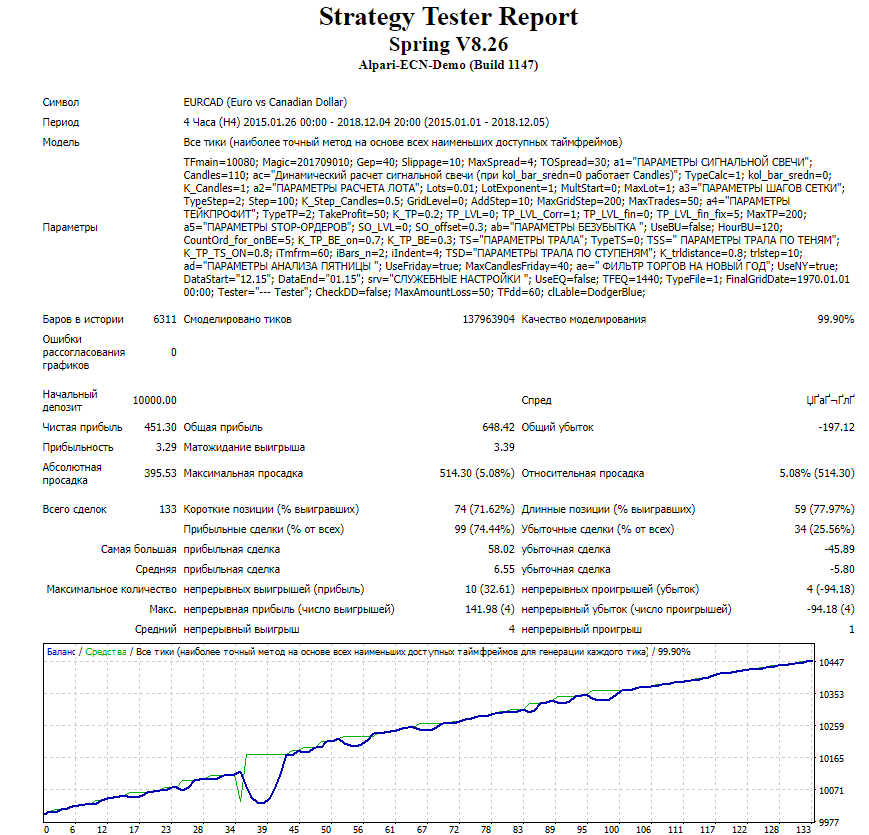
The test results are poor
Spring_8.26 01.01.2015-05.12.2018 EURCAD set2.75
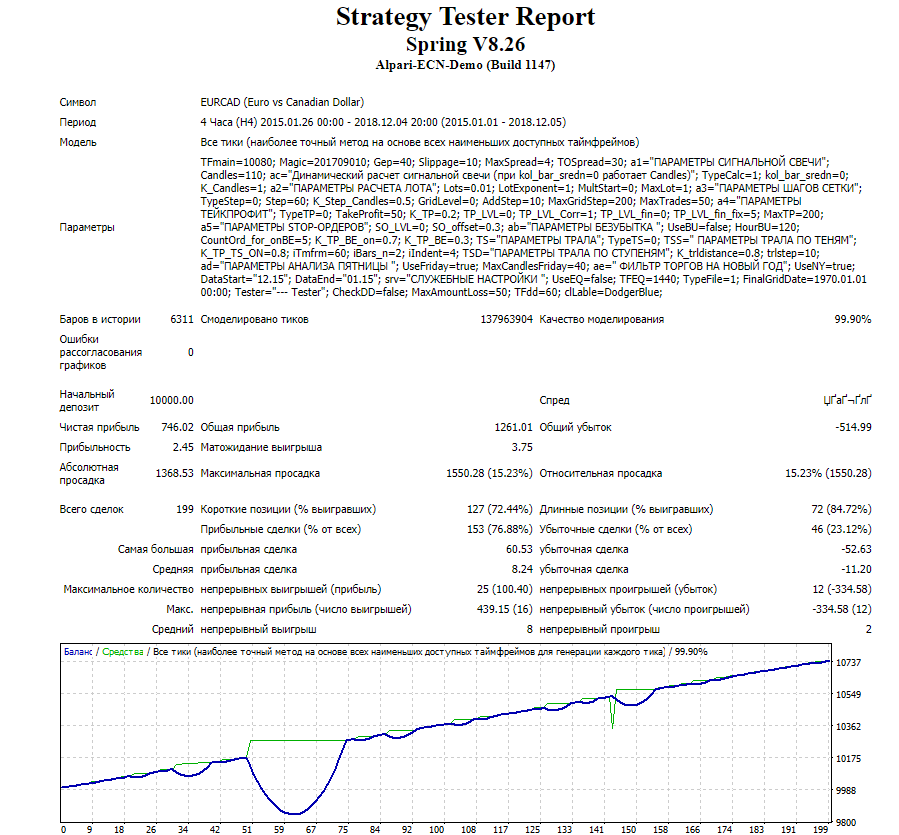
Test results are poor
Spring_8.26 01.01.2015-05.12.2018 EURCHF
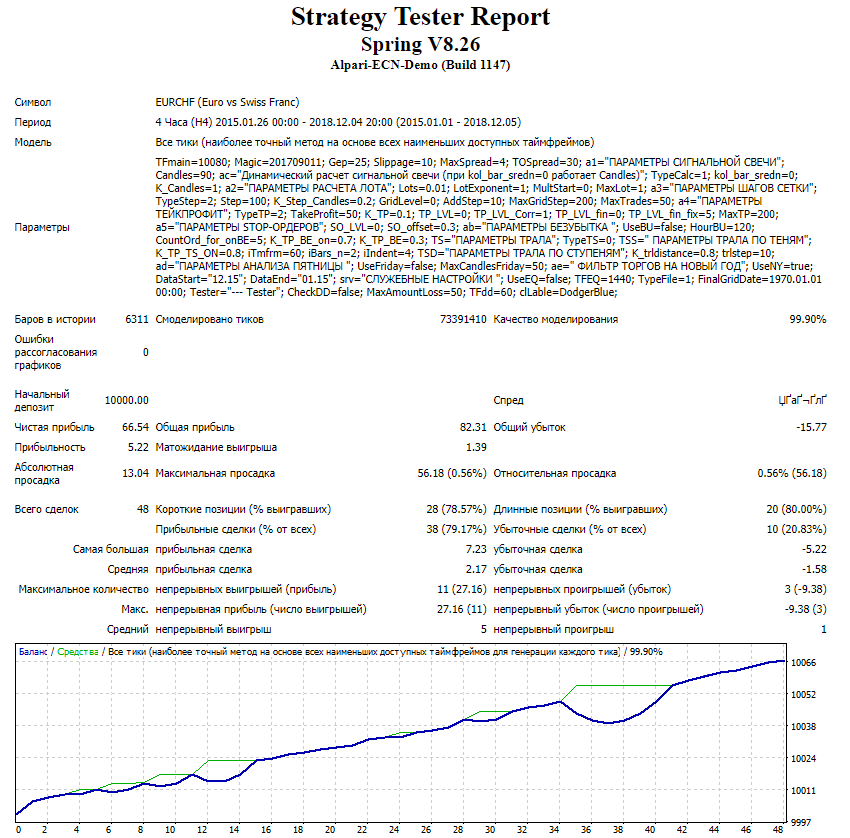
Test results are acceptable
Spring_8.26 01.01.2015-05.12.2018 EURGBP
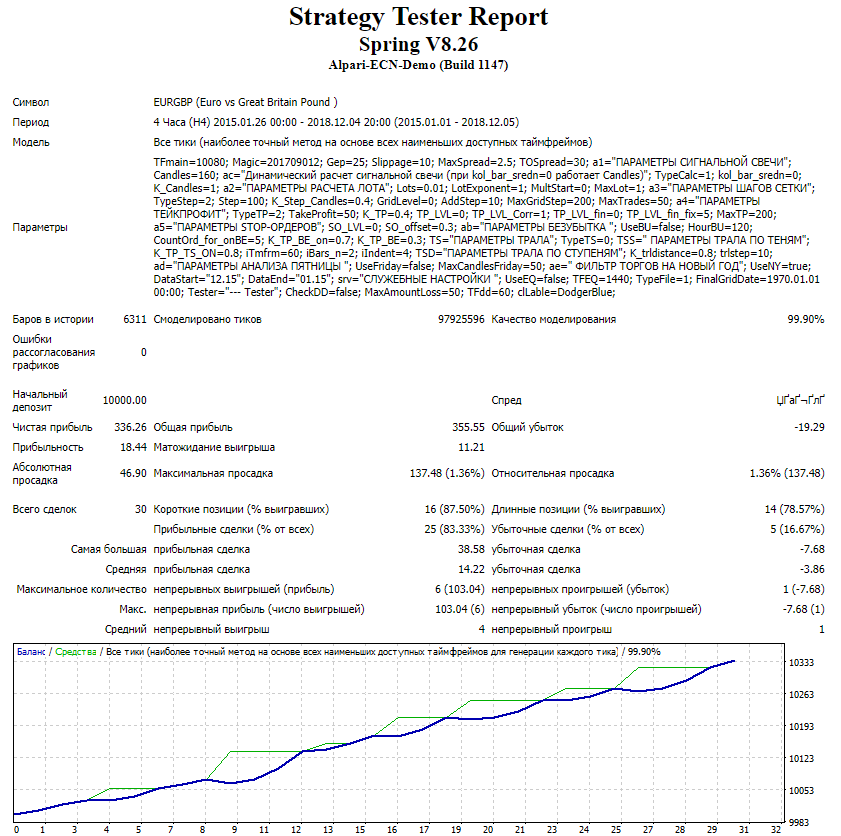
Test results are acceptable (feature: few trades)
Spring_8.26 01.01.2015-05.12.2018 EURJPY
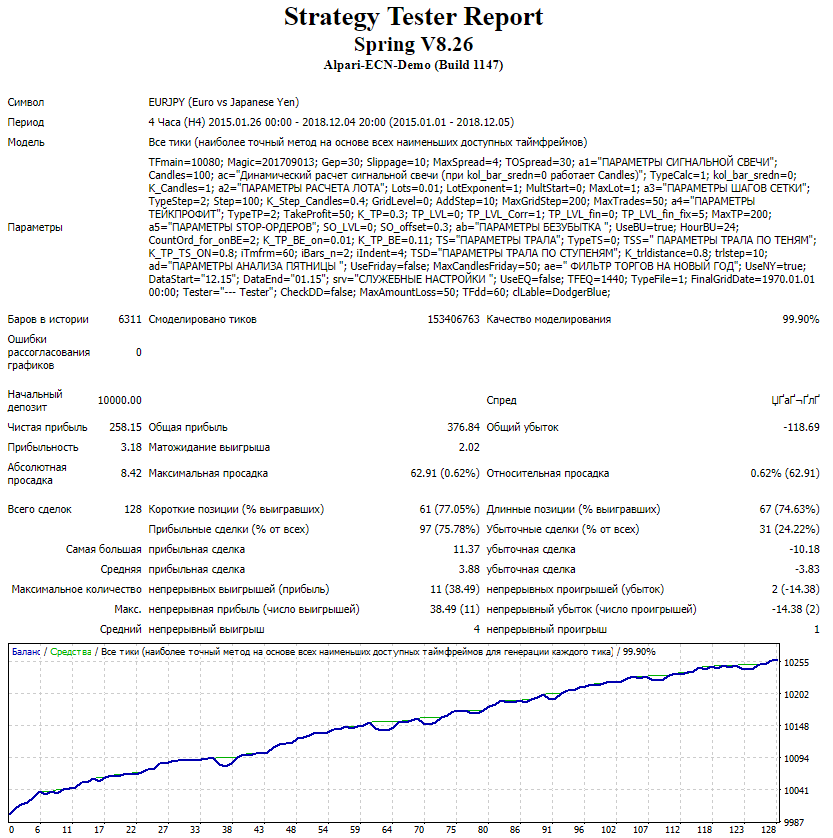
Test results are good
Spring_8.26 01.01.2015-05.12.2018 EURNZD
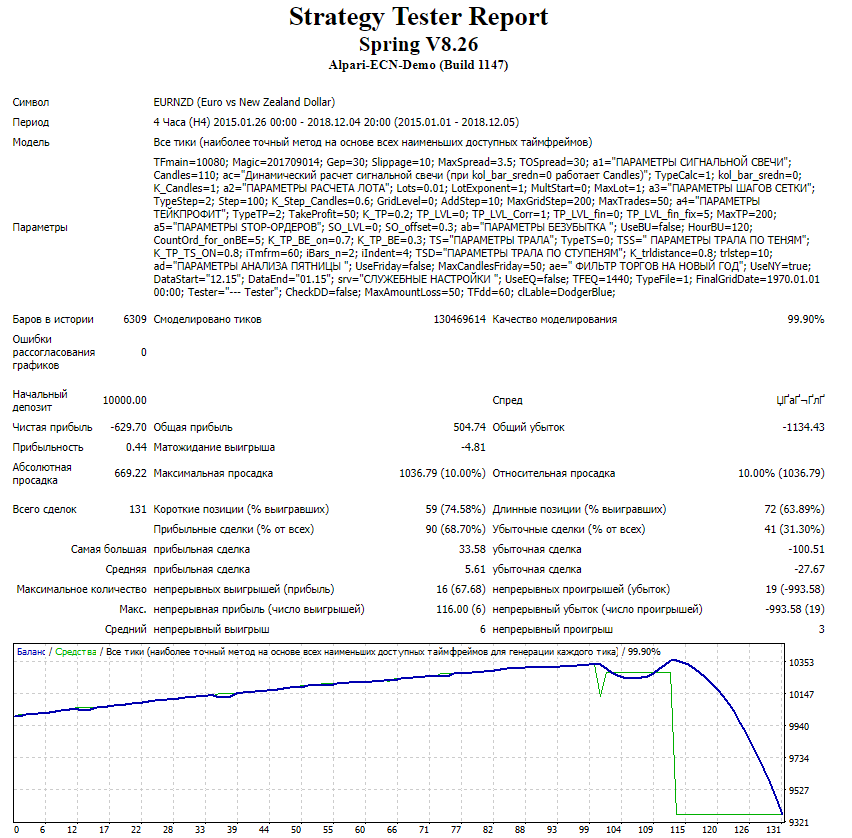
Test results are very poor
Spring_8.26 01.01.2015-05.12.2018 EURSGD set 1.8
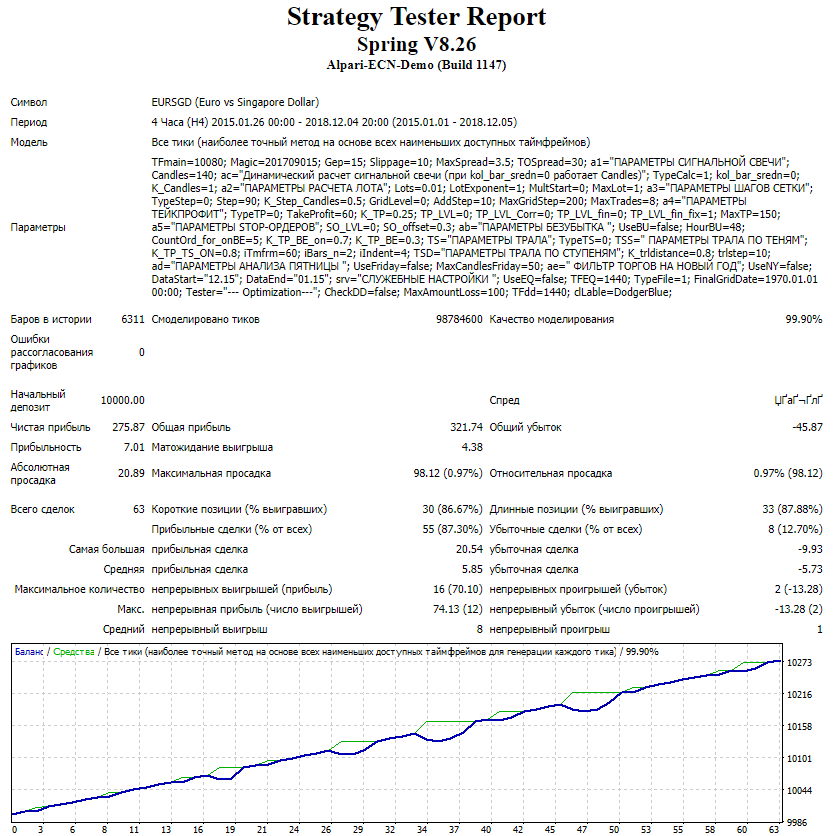
Test results are good
Spring_8.26 01.01.2015-05.12.2018 EURSGD set 2.05
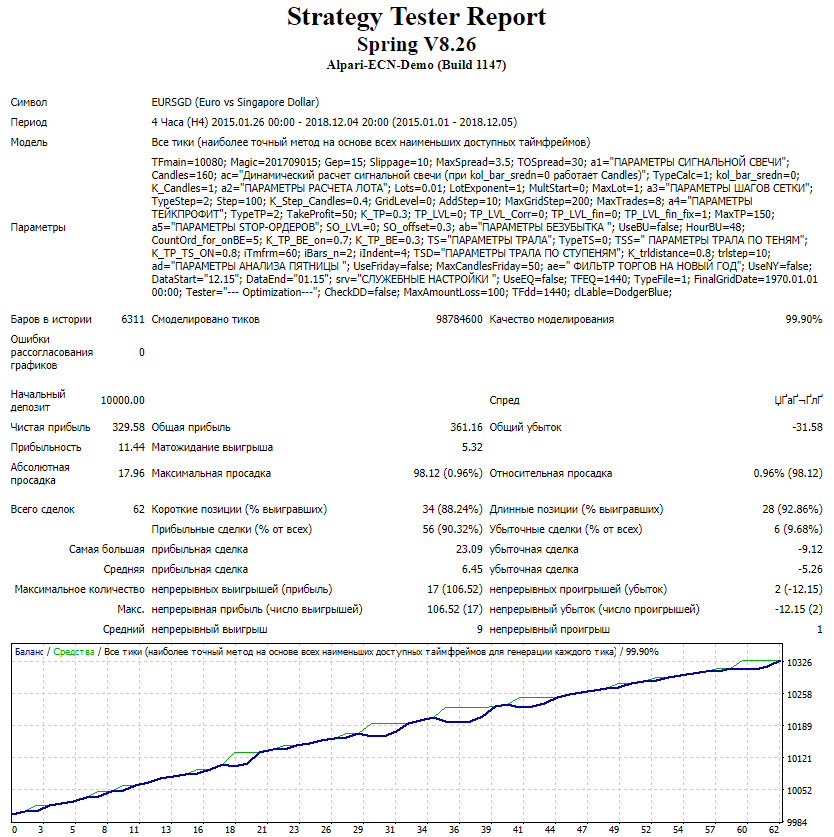
Test results are good
Spring_8.26 01.01.2015-05.12.2018 EURUSD
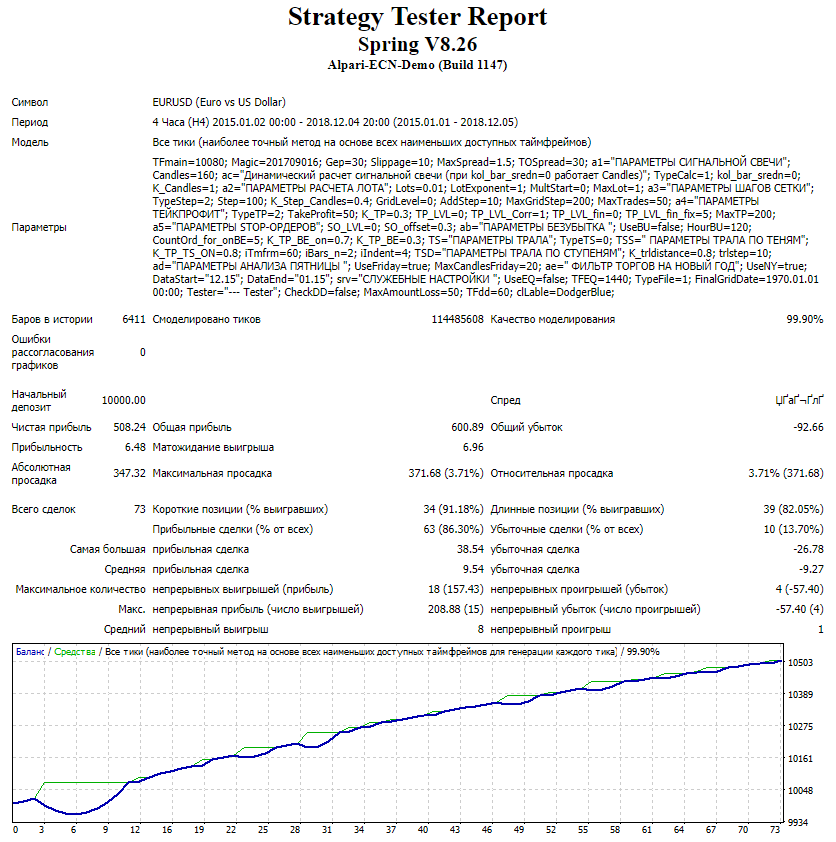
Test results are acceptable
Spring_8.26 01.01.2015-05.12.2018 GBPAUD
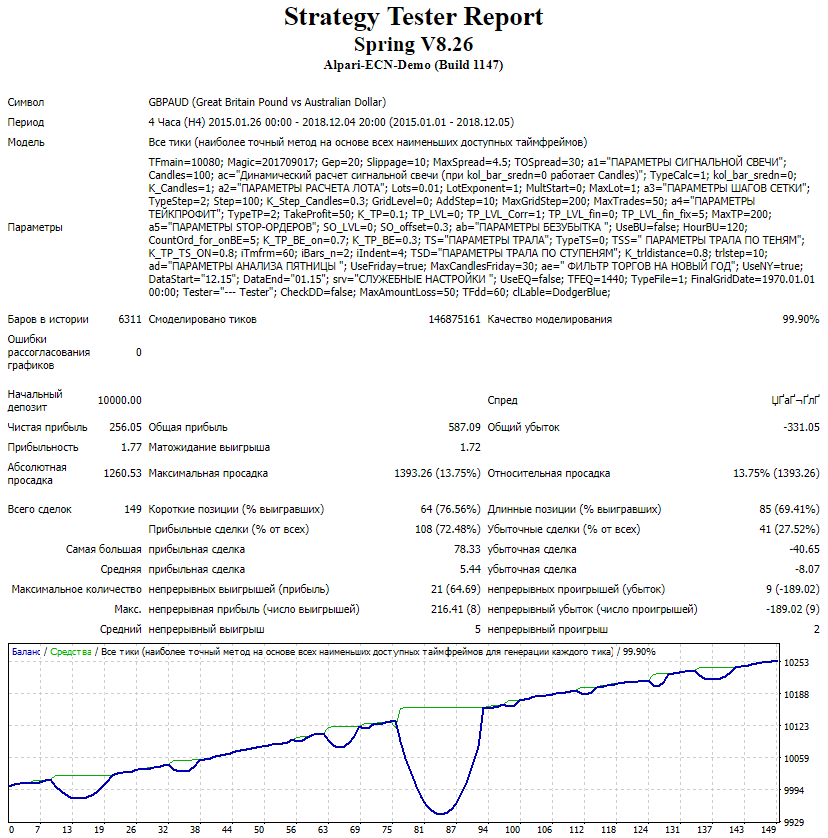
Test results are poor
Spring_8.26 01.01.2015-05.12.2018 GBPCAD set 1.62
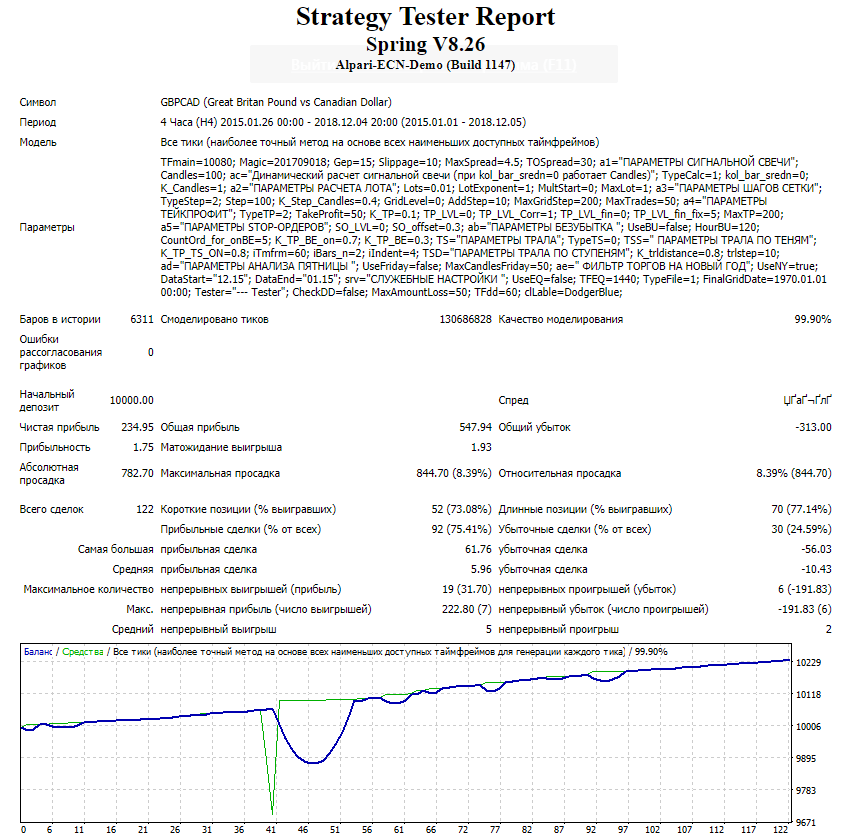
Test results are poor
Spring_8.26 01.01.2015-05.12.2018 GBPCAD set 1.69
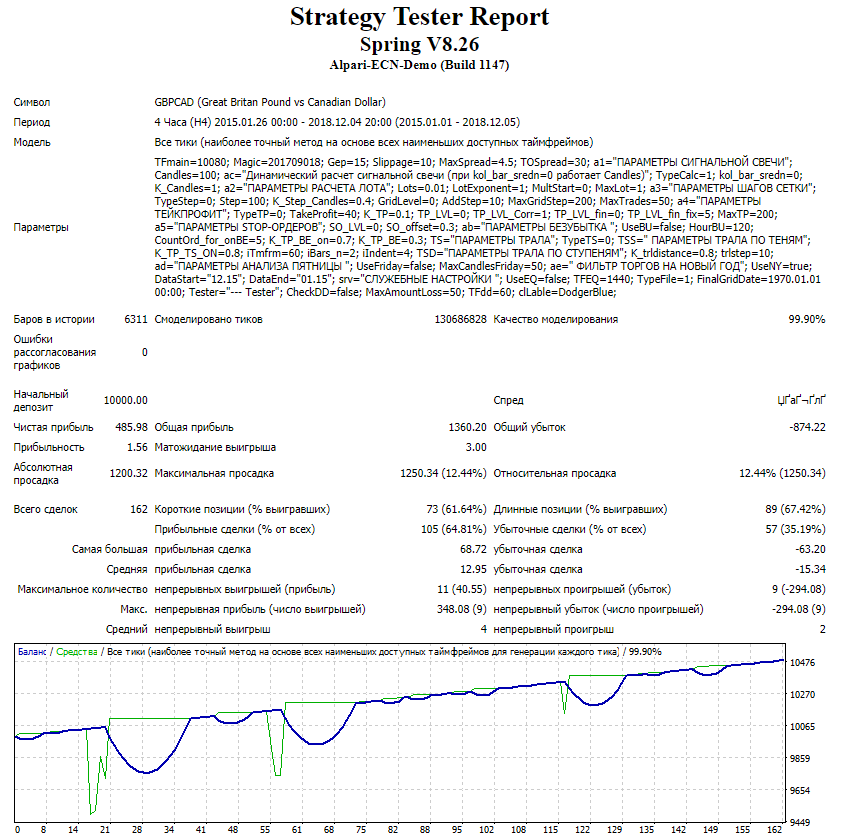
Test results are poor
Spring_8.26 01.01.2015-14.10.2018 GBPCHF
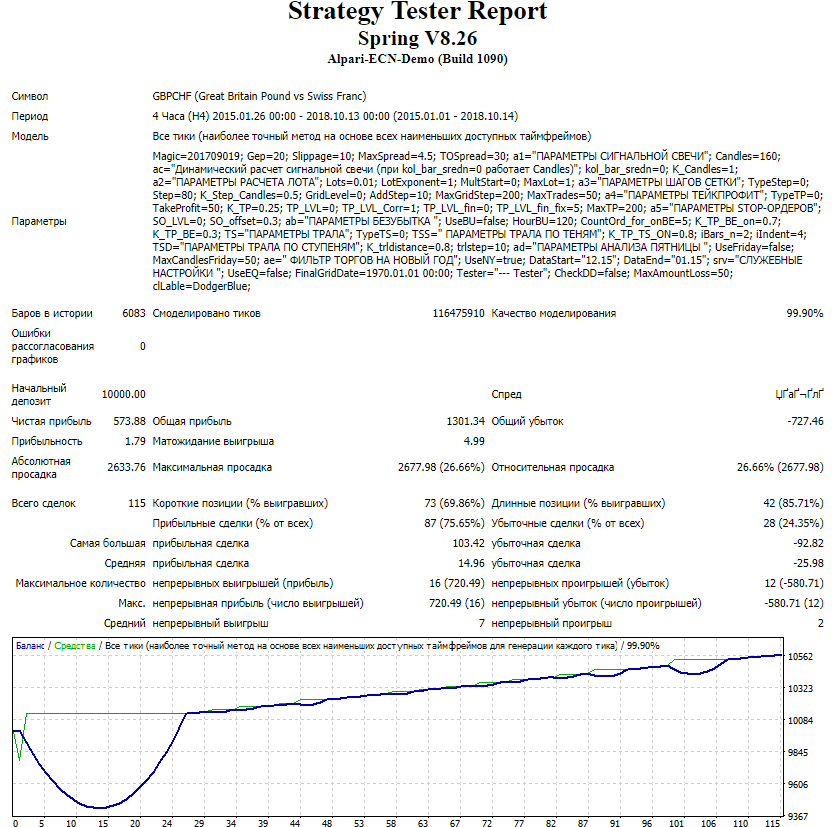
Test results are poor
Spring_8.26 01.01.2015-05.12.2018 GBPJPY
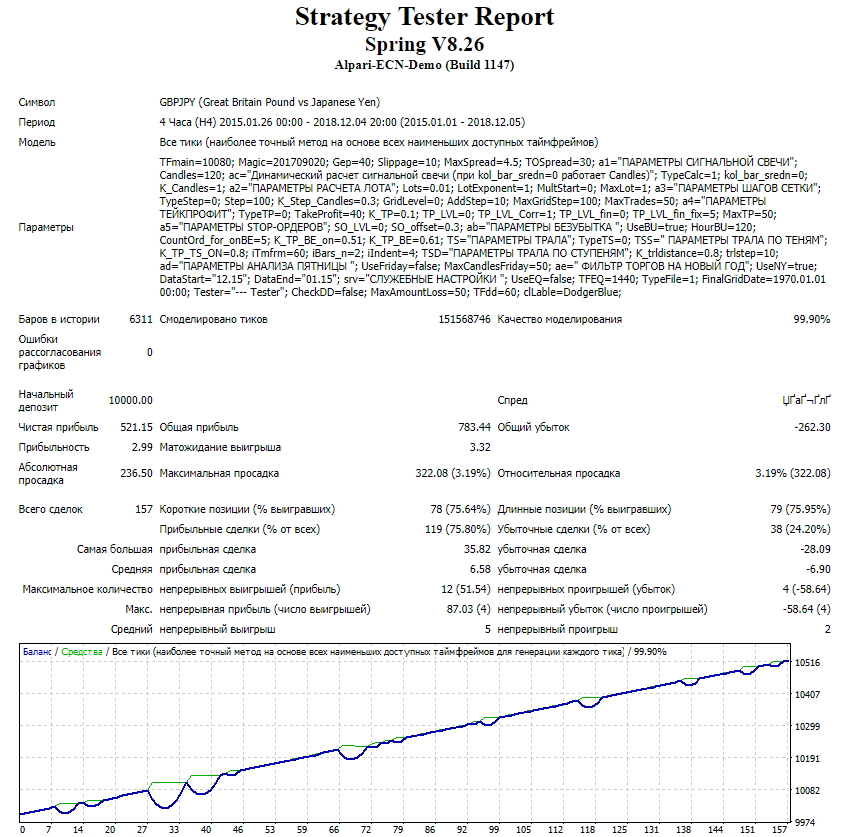
Test result is acceptable
Spring_8.26 01.01.2015-05.12.2018 GBPNZD
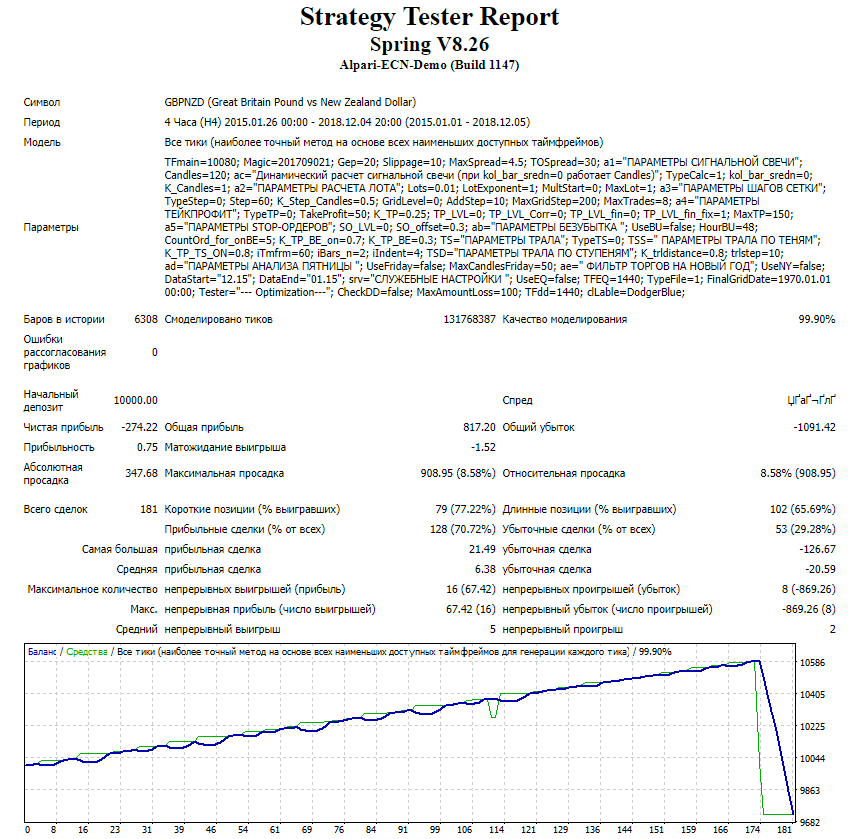
Test results are poor
Spring_8.26 01.01.2015-05.12.2018 GBPUSD
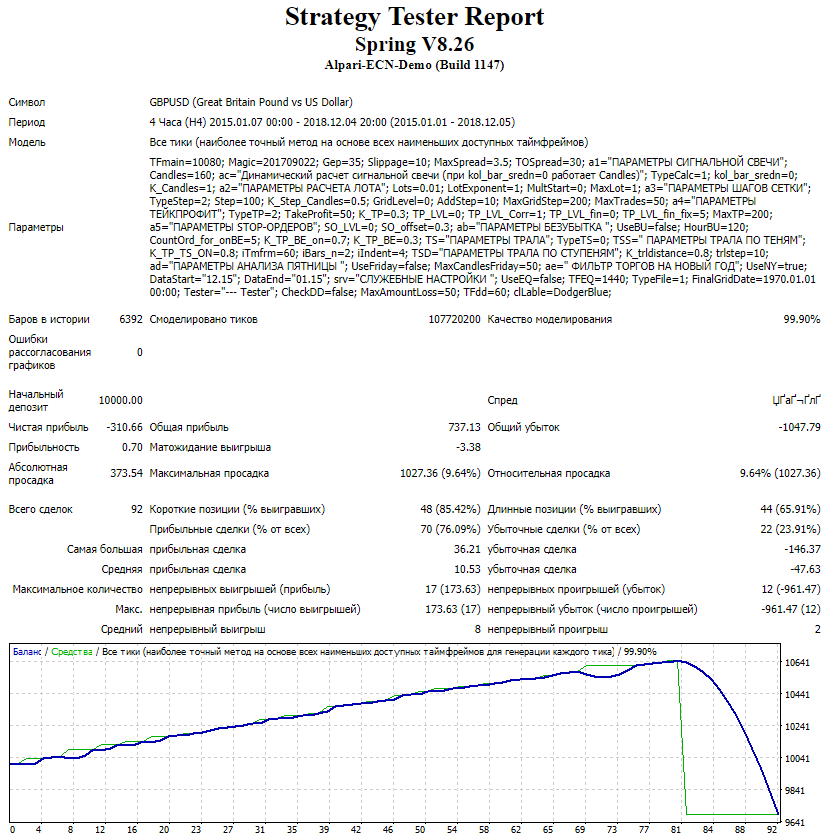
Test results are poor
Spring_8.26 01.01.2015-05.12.2018 NZDCAD
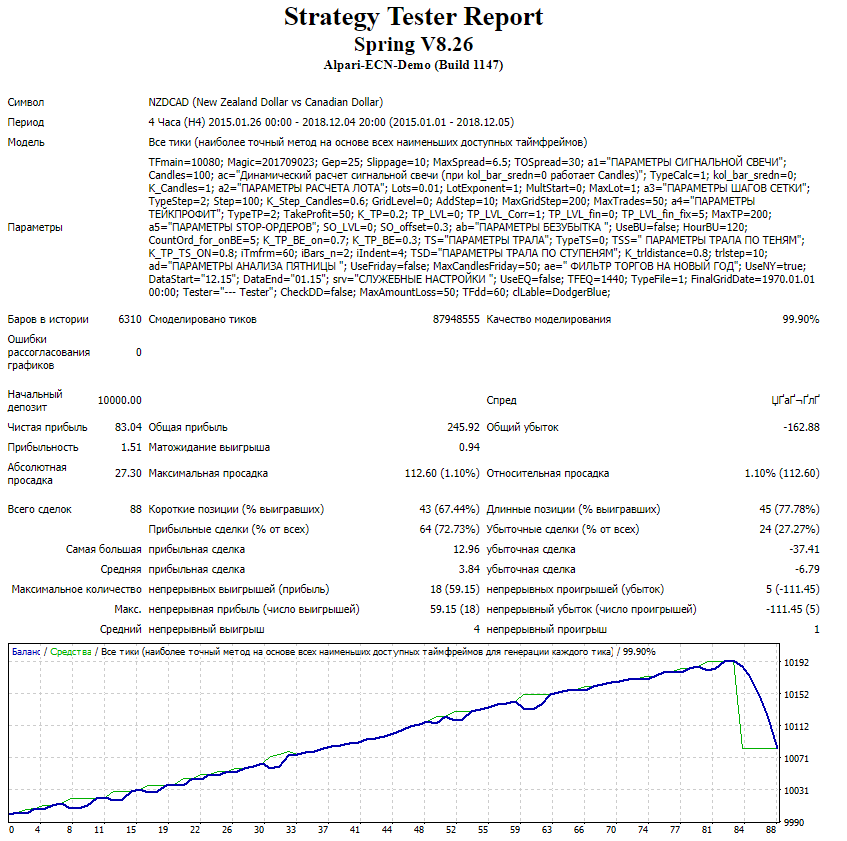
Test results are poor
Spring_8.26 01.01.2015-05.12.2018 NZDCHF
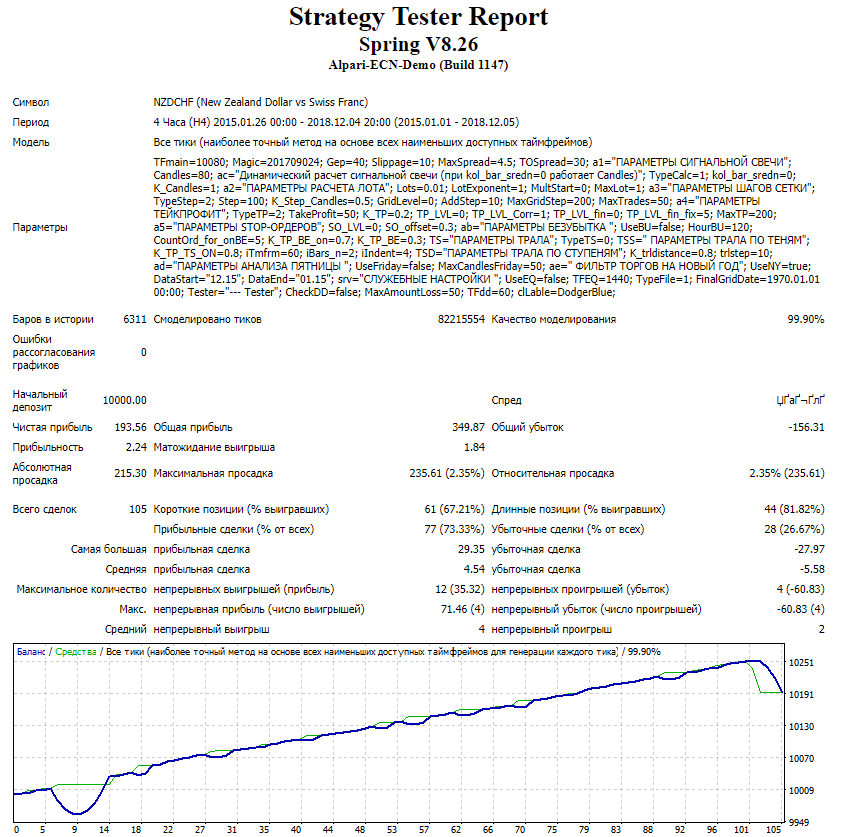
Test results are poor
Spring_8.26 01.01.2015-05.12.2018 NZDJPY
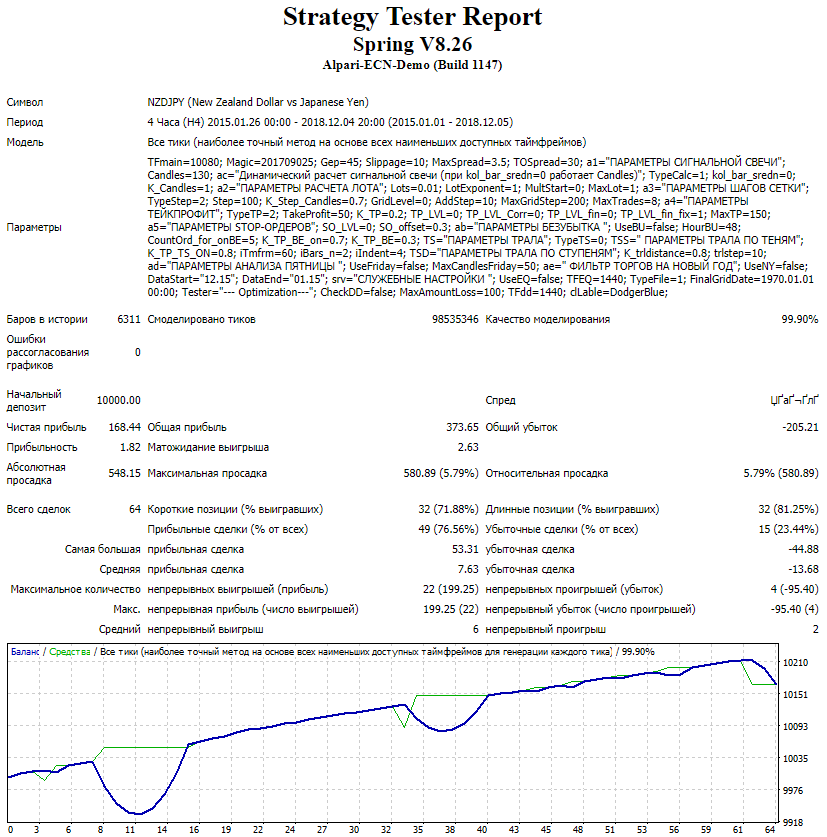
Test results are poor
Spring_8.26 01.01.2015-05.12.2018 NZDUSD
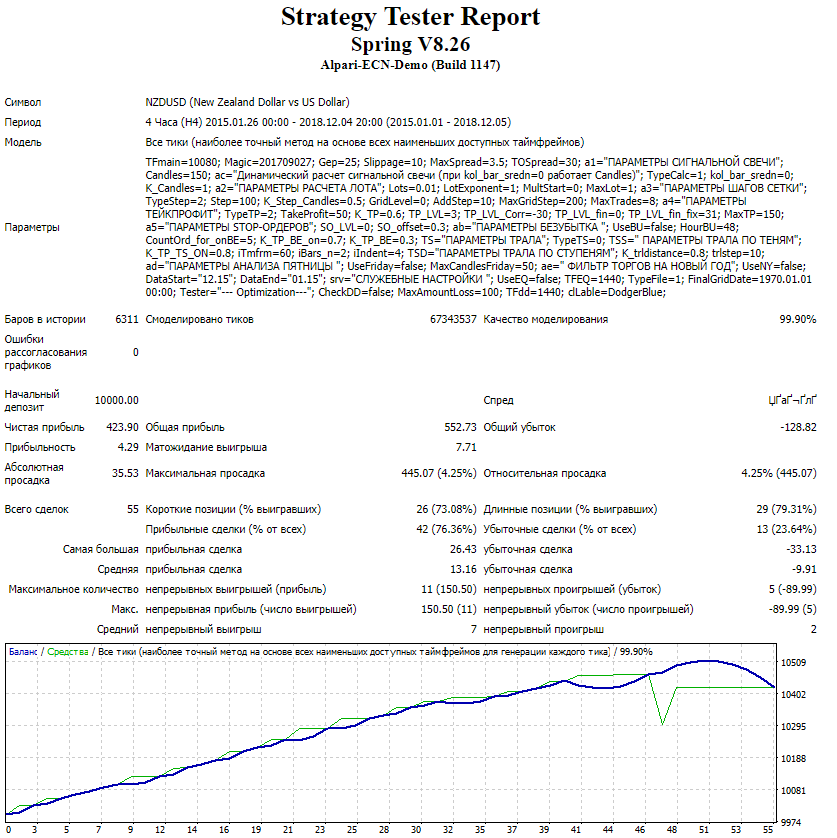
Test results are poor
Spring_8.26 01.01.2015-05.12.2018 USDCAD
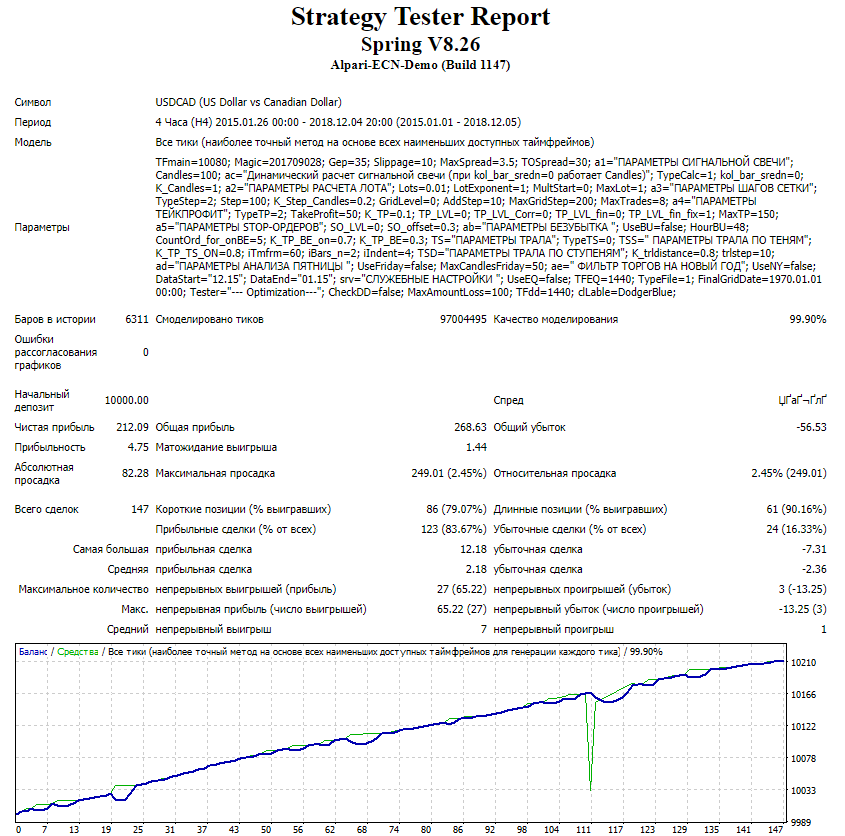
Test results are poor
Spring_8.26 01.01.2015-05.12.2018 USDCHF
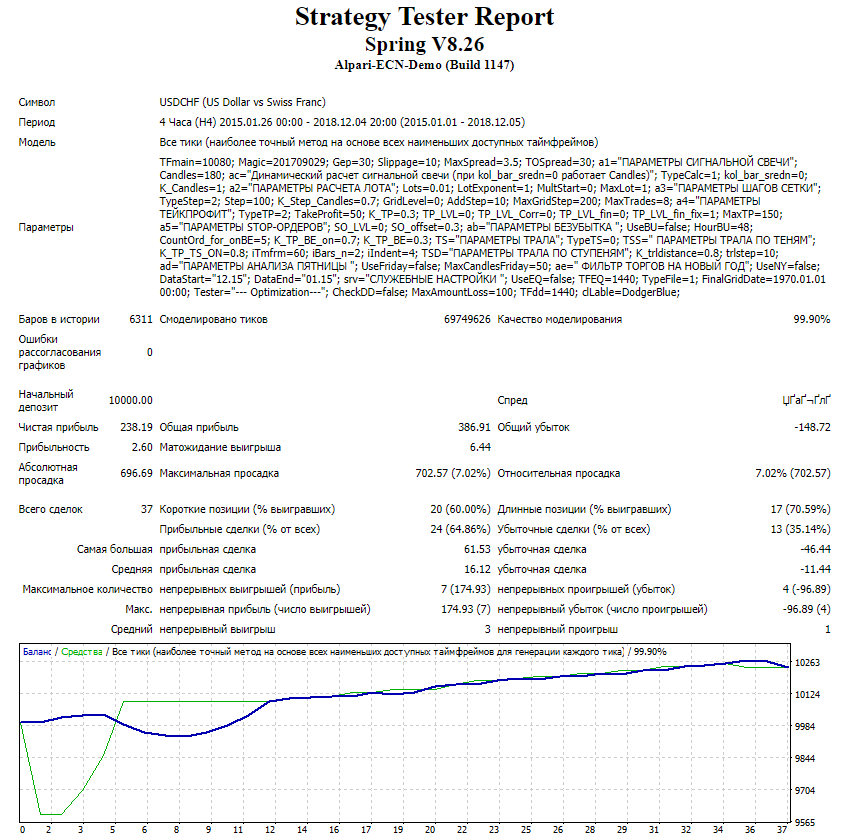
Test results are poor
Spring_8.26 01.01.2015-05.12.2018 USDJPY
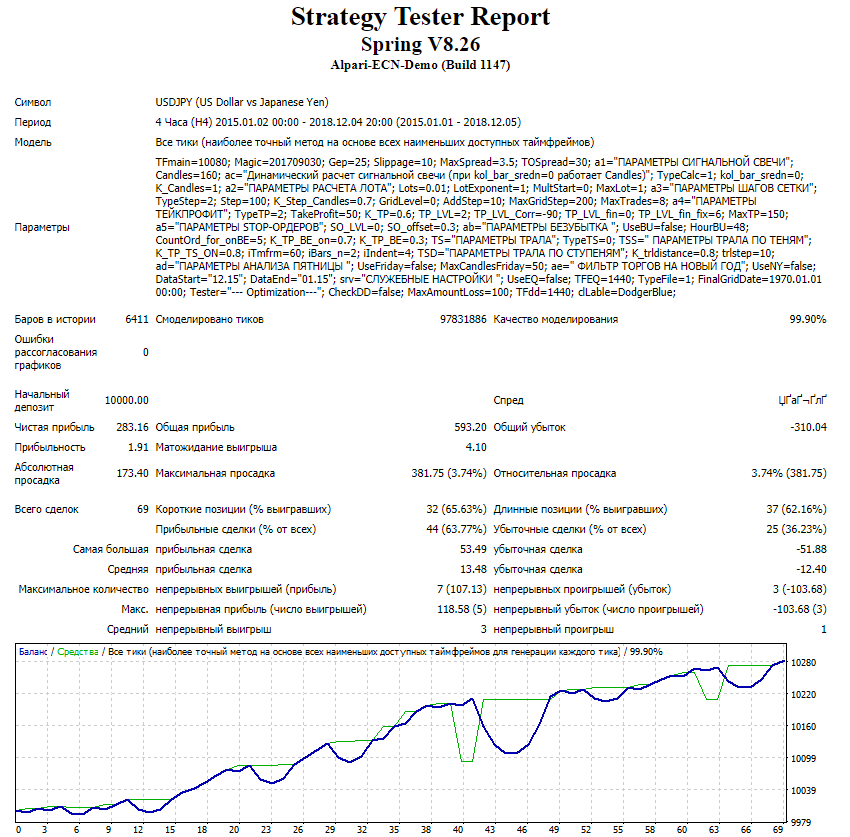
Test results are poor
Spring_8.26 01.01.2015-05.12.2018 USDSGD set 3.67
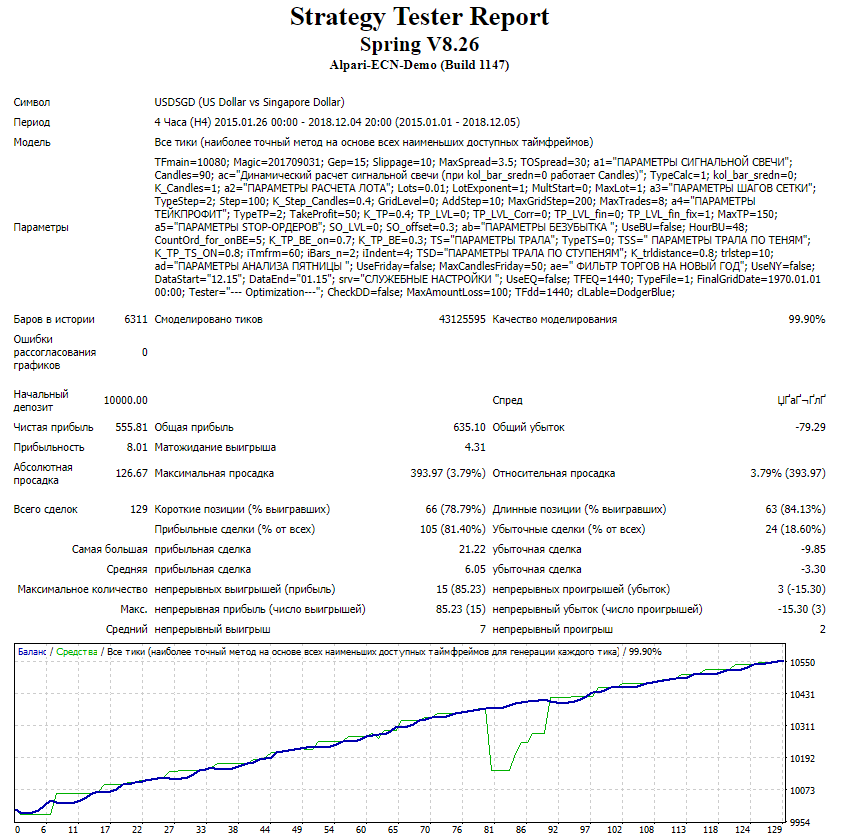
Test results are acceptable
Spring_8.26 01.01.2015-05.12.2018 USDSGD set 3.95
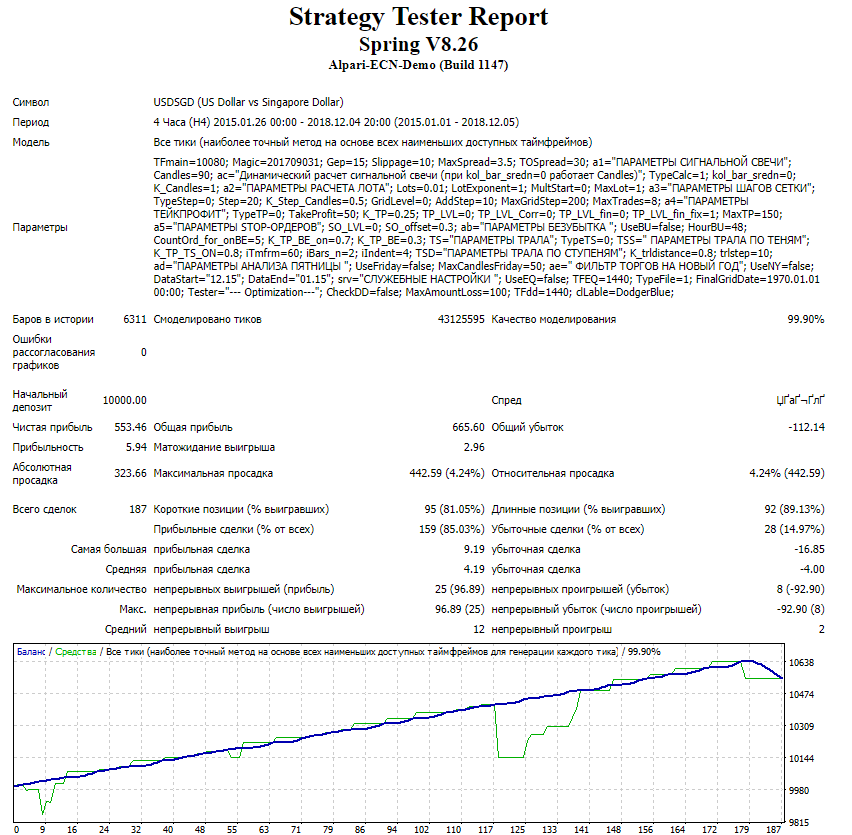
Test results are acceptable
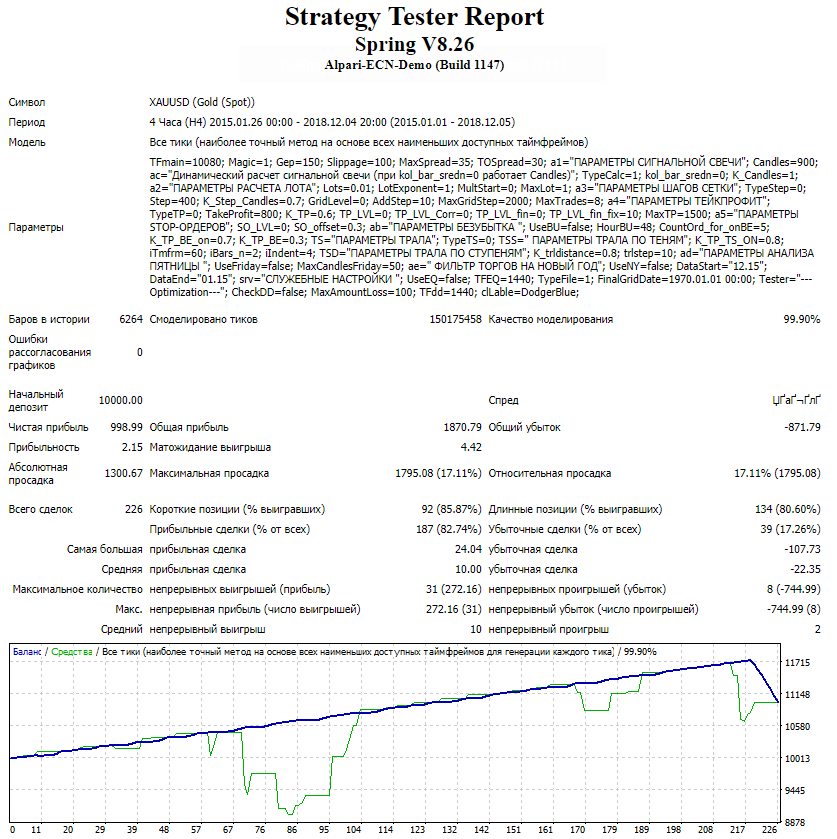
Spring_8.26 01.01.2015-05.12.2018 XAUUSD set 18.79Test results are poor
Spring_8.26 01.01.2015-05.12.2018 XAUUSD set 24.02
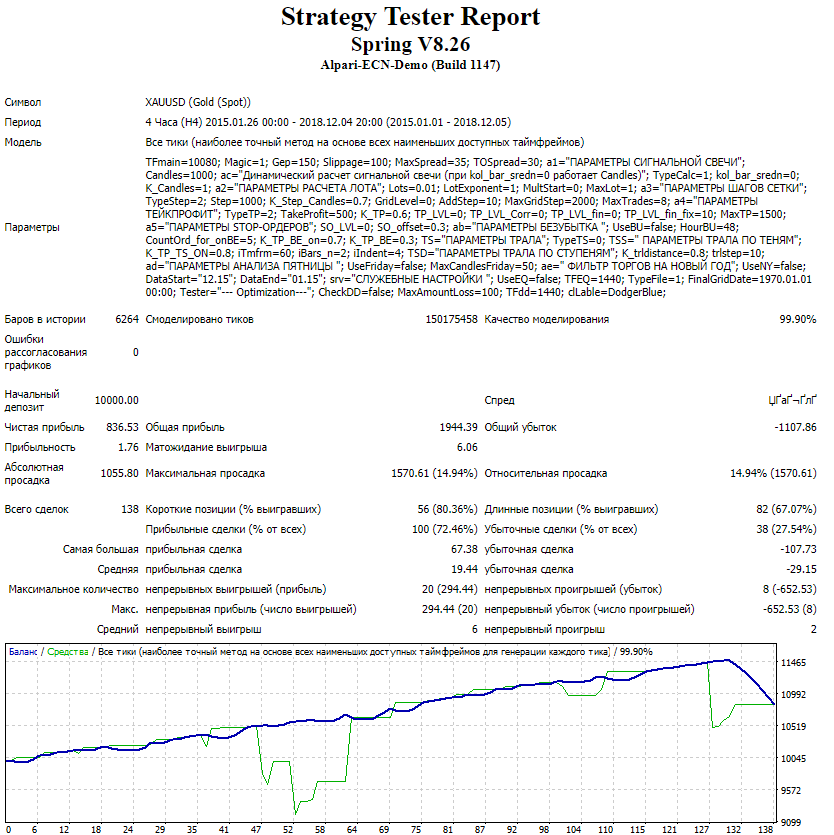
The test results are poor
Spring_8.26 01.01.2015-05.12.2018 XAUUSD gold set
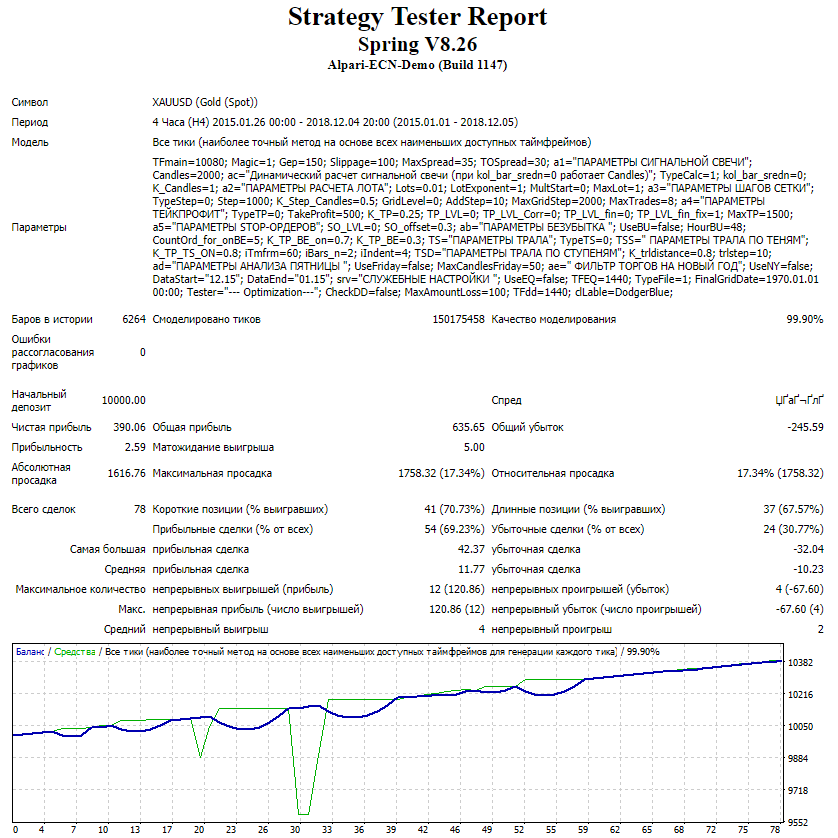
The test results are poor
So, based on the test results, the pairs suitable for trading were identified: AUDCHF, AUDJPY, AUDNZD, CHFJPY, EURAUD, EURCHF, EURGBP, EURJPY, EURSGD (set 1.8), EURUSD, GBPJPY, and USDSGD (set 3.67).
To visually combine the resulting statements into one chart and assess the total drawdown of the resulting portfolio, we use the EA Analyzer program.
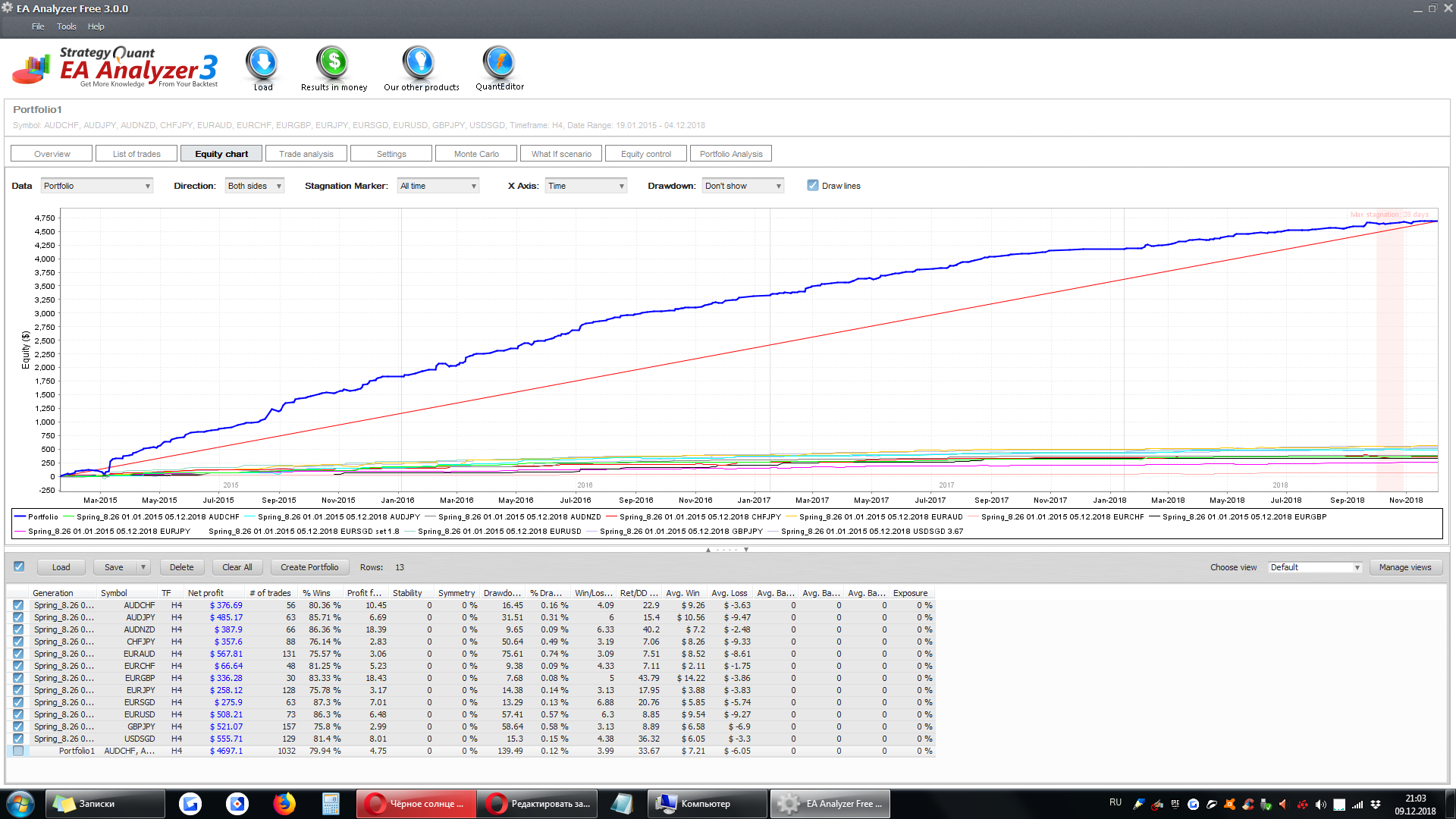
Conclusion: The Spring expert advisor shows steady growth, but it requires careful selection of suitable sets and currency pairs.
=>Links to all the backtests used in the article (for independent analysis) can be found in the expert advisor thread on the forum (link at the end of the article).
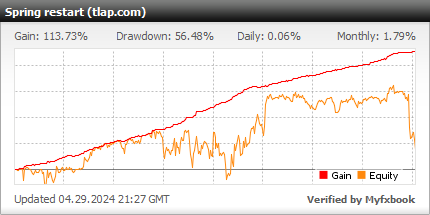
Monitoring of the Spring expert advisor
Attention! The monitoring includes all the sets selected in this article.
Description of settings

Attention! All points in the settings are specified for 4 digits (10 times smaller than 5-digit).
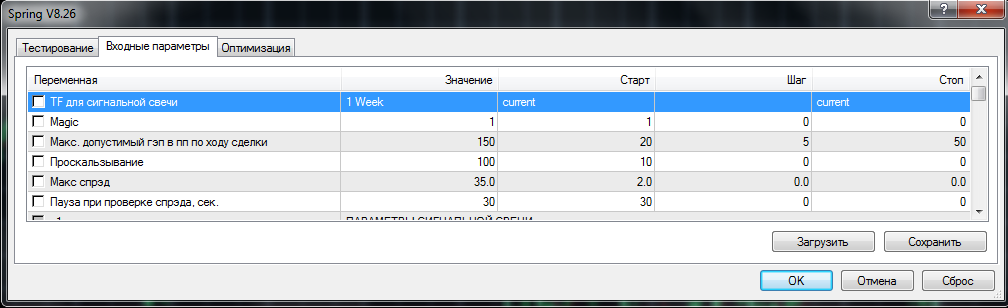
- TF for the signal candle - The option to choose is provided for those who want to experiment with timeframes. Left for set compatibility. Not used in the code;
- Magic - the magic number;
- Max. allowable gap in points during the trade - The size of the gap. If =0, the gap is not taken into account;
- Slippage - the slippage value;
- Max. spread - the maximum spread value;
- Pause when checking spread - a pause before checking the spread, in seconds.
SIGNAL CANDLE PARAMETERS
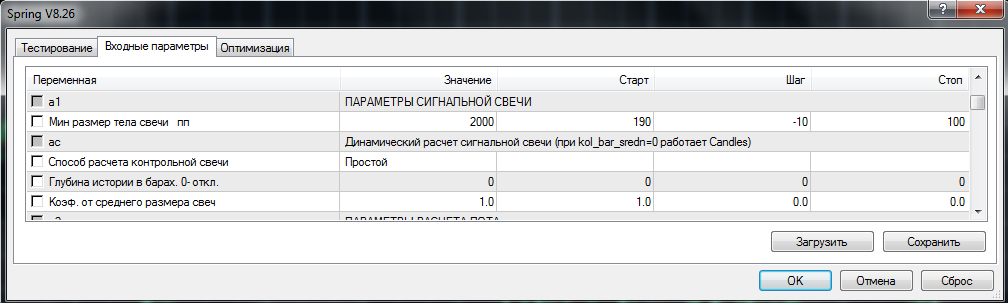
- Min candle body size, points - fixed minimum body size of the control candle.
Dynamic calculation of the signal candle
- Method for calculating the control candle - Options: simple (arithmetic mean) or weighted (the nearest candles have more "weight"). By analogy with the MA (moving average) calculation;
- History depth in bars - If = 0, then we use the fixed size of the control candle (Min. candle body size in points). If >0, then the size of the control candle is calculated as the arithmetic mean of the last N candles;
- Coeff. of the average candle size - A coefficient applied to the average size of the control candle, i.e. if K=0.8, then entry will be made when the size of the signal candle is greater than 0.8 * (control candle).
LOT CALCULATION PARAMETERS

- Initial lot size - fixed size of the first lot;
- Lot multiplier for the next grid step - taken into account only starting from the leg number (inclusive) from the next parameter;
- Leg from which the multiplier is applied - the leg (inclusive) from which the multiplier is applied;
- Maximum lot - if due to applying the multiplier the lot increases to the value of Maximum lot, then further orders are placed exclusively with the maximum lot.
GRID STEP PARAMETERS
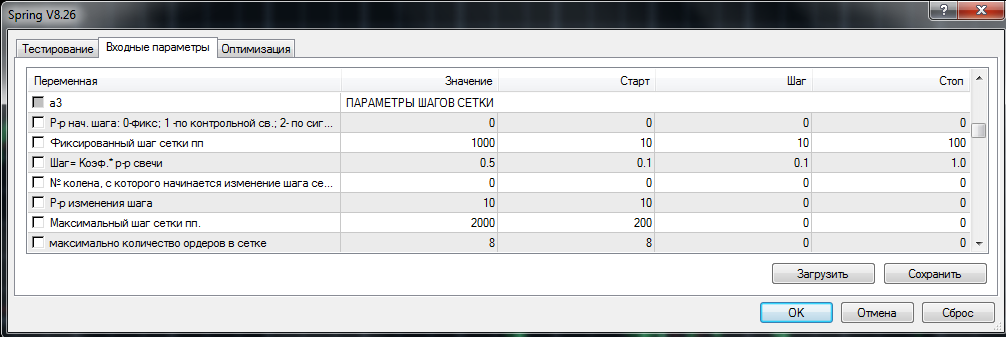
- Initial step size: 0 - fixed; 1 - by control candle; 2 - by signal candle;
- Fixed grid step - Method for determining the initial grid step: 0 - fixed; 1 - by the control candle; 2 - by the signal candle. Methods 1 and 2: Grid step = Candle size * Coeff.;
- Step=Coeff * candle size - the initial grid step in pips (distance between orders);
- Leg number from which the grid step starts changing - at 0, off;
- Step change size - Starting from the leg ("Leg Number...") (inclusive), the step increases by "Step change size...". The increase occurs until "Maximum grid step" is reached;
- Maximum grid step - maximum grid step in pips;
- Maximum number of orders in the grid - the maximum number of orders in the grid.
TAKE PROFIT PARAMETERS
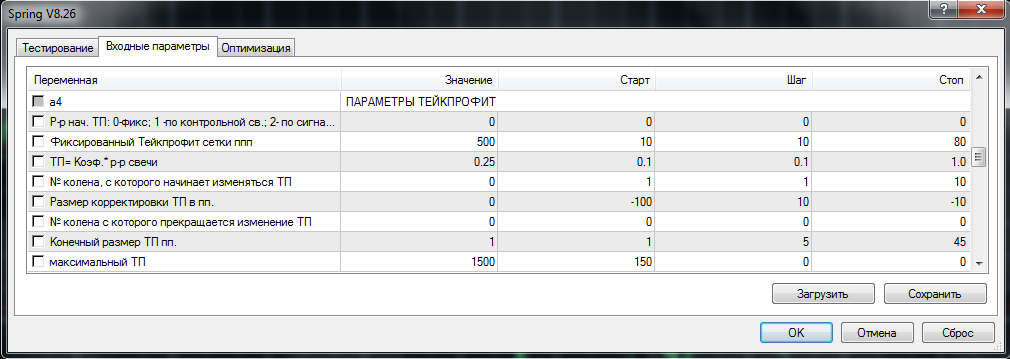
- Initial TP size: 0 - fixed; 1 - by control candle; 2 - by signal candle;
- Fixed grid take profit - the size of the fixed take profit in pips;
- TP=Coeff.* candle size - the coefficient applied to calculate the dynamic take profit;
- Leg number from which TP starts changing - starting from this leg number (inclusive), the take-profit size changes by "TP adjustment size in points." It can take both positive and negative values;
- TP adjustment size in points - the number of points by which the take-profit size changes;
- Leg number from which TP stops changing - the leg from which TP stops changing. Starting from this leg, TP = "Final TP size in points.";
- Final TP size in points - comes into effect from the "Leg number from which TP stops changing". This parameter is also a limiter for take-profit changes. That is, if in the previous parameters the take profit was reduced depending on the step, then it (the take profit) cannot be less than the specified value;
- Maximum TP - the maximum take-profit size; relevant when it is calculated dynamically.
STOP ORDER PARAMETERS

- Leg number from which pending orders are placed - starting from the leg number (inclusive), STOP orders are placed instead of market orders;
- Price offset coefficient. Offset = K * Step - If a market order is placed at the current price at a GRID STEP distance from the previous order, then a STOP order is placed after the price reaches a distance from the previous order = STEP * (1+K), while the order is offset from the current price by a distance of STEP * K. Example: step for market orders = 100 points. The STOP order is placed when the price moves away from the previous order by a distance of 100 * (1+0.5) = 150 points, and the offset from the price of the placed order will be 100 * 0.5 = 50 points.
BREAKEVEN PARAMETERS
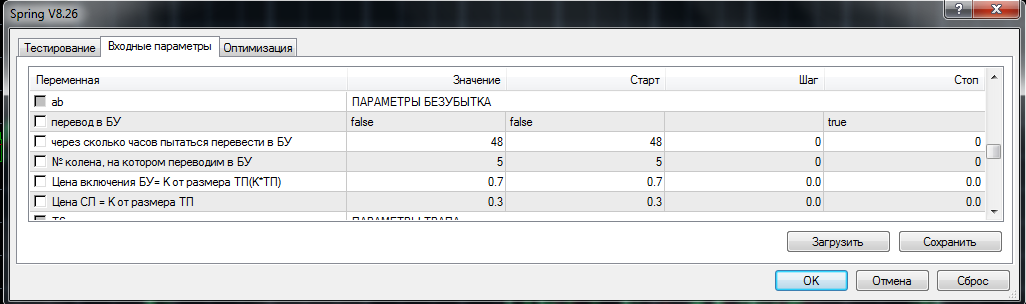
- Move to break-even - enable/disable the use of break-even;
- How many hours later to try moving to break-even - the number of hours after opening the first order after which the move to break-even will occur;
- Order number at which we move to break-even - the number of orders at which the move to break-even will occur. Together with the previous parameter it works by the "LOGICAL OR" principle, i.e. the move to break-even happens after either condition is met;
- Break-even activation price = K of TP size (K*TP) - after the condition for moving to break-even is met, we wait until the price reaches K*TP. Suppose TP = 50 points, K = 0.7. Break-even will activate when the price reaches 50 * 0.7 = 35 points;
- SL price = K of TP size - the price at which the stop-loss of the grid orders will be set. It is calculated as a coefficient of TP (take-profit).
TRAILING PARAMETERS

Trailing type - 0 - off, 1 - by shadows, 2 - stepwise.
SHADOW-BASED TRAILING PARAMETERS

- K of TP for enabling TS - the coefficient for the take-profit level from which this type of trailing starts working;
- Period whose bars should be used for trailing - the period of the analyzed bars;
- Number of bars to trail by - the number of analyzed bars;
- Offset from the bar shadow in points - the offset from the bar shadow at which the stop-loss is placed.
Operating logic: by checking each candle on the specified TF ("Period whose bars should be used for trailing"), the function finds the extreme over the specified number of candles. If the price of the found extreme is better than the price of the existing SL, then the SL is moved to the extreme price adjusted by the "Offset from the bar shadow in points" (usually Offset... = spread + 1-2 points).
STEP-BASED TRAILING PARAMETERS

- K of TP for enabling TS - the coefficient for the take-profit level from which this type of trailing starts working;
- SL movement step - the step by which the stop-loss is moved.
Operating logic: a distance from the break-even price is set at which trailing starts (in points) and the "step" by which it is moved (in points). Example: at +30 the stop is at +10, at +40 the stop is at +20, etc.
FRIDAY ANALYSIS PARAMETERS

- When opening an order, take into account the direction of the opening of the lower-TF candle - if true, the direction and size of the Friday candle are analyzed;
- Max size in points of the lower TFmain in the signal direction - the maximum size of the Friday candle, above which the entry is cancelled. If the working TF differs from W1, then the last candle on the lower TF is analyzed for control.
NEW YEAR TRADING FILTER

- Use NY - use/do not use the filter;
- DataStart - the start of the trade exclusion period;
- Data End - the end of the trade exclusion period.
SERVICE SETTINGS

- Calculate drawdown - keep a drawdown log by equity. If enabled, the current drawdown value is written to a csv file at the configured interval (useful for further analysis in Excel of test results across different pairs);
- Period for writing equity to file - the timeframe at whose interval equity is recorded in the file;
- File type (individual/common) - if we write drawdown to a file, you can choose to write each pair to its own file or write to a common one. In the second case it is easier to export to Excel;
- Do not open the first order after the date - it is recommended to set the date 1-2 months earlier than the end date of testing. This is necessary to exclude drawdown caused by unclosed grids at the end of testing.
---Optimization---

These parameters matter during optimization of sets in the MT4 tester.
- Take drawdown into account during optimization - to speed up optimization by forcibly interrupting a run (during optimization), once drawdown exceeds the amount of the initial deposit, the run will be interrupted;
- MaxAmountLoss - a service parameter. It must be greater than the potential number of losing orders in a row. Operating logic: if drawdown exceeds the initial deposit, a function is launched that opens and immediately closes the specified number of orders. During optimization, on the "Optimization" tab you need to set "Number of losing orders in a row" = 50. As a result, the run will be interrupted;
- Drawdown calculation frequency - the frequency of drawdown calculation;
- Text color of labels - the text color of the labels in the terminal window.
Attention! It is strongly recommended to use only those sets that were selected based on testing results!
Recommended money management

Money management is calculated from the analysis of the total drawdown in a portfolio of several pairs. In our case this drawdown is 139$ with fixed lots of 0.01. Accordingly, the safe deposit size for a lot of 0.01 starts from 1000$. For clarity, let us summarize the correspondence between lots and deposits for different types of broker trading accounts in a table:
| Account type | Minimum lot and lot step | Min. starting deposit | Brokers |
|---|---|---|---|
| Cent (with mini-lots) | 0.01 | 10$ (1000 cents) | Forex4you |
| Cent account | 0.1 | $10000 | Roboforex |
| Standard | 0.01 | $1000 | Alpari |
| Pro accounts | 0.1 | $10000 | Classic account type at most brokers |
⇒ Experienced traders are advised to optimize working sets periodically and carefully calculate pair combinations and drawdowns.
Conclusions

The Spring expert advisor is a promising and profitable robot that uses many settings, but it applies averaging during losses, which places it in the category of potentially dangerous systems. Only pre-tested sets should be used for trading.
Important!
For the expert advisor to work correctly, the trading terminal must remain on from the market open on Sunday evening until it closes on Friday evening. If you do not have the ability to keep your computer running 24/5, it is recommended to use a VPS server service.
Download the Spring expert advisor

Sincerely, Alexey aka Merlin
Tlap.io