
How to Store Cryptocurrency on Paper
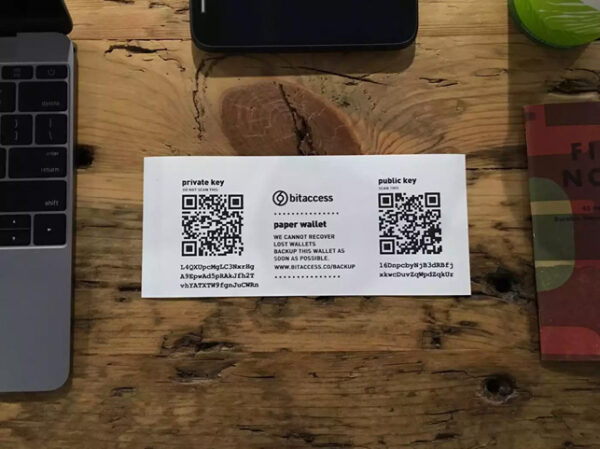 It is no secret that discerning crypto investors prefer "cold", that is, offline, storage of cryptocurrencies to "hot" storage in online wallets. And there are a number of solid reasons for that. First of all, this is done for security purposes. "Cold" crypto wallets provide the highest safety of funds, while online services such as exchanges and blockchain wallets are vulnerable to cyberattacks. Attackers can access a user's money without much difficulty through phishing or via various browser extensions, as happened, for example, with the Ethereum wallet MyEtherWallet. Desktop versions and hardware wallets can be hacked using malicious programs downloaded onto a computer.
Another reason lies in the fact that with "hot" storage, software errors or hardware failures can also lead to additional problems. The "cold" method of storing cryptocurrency will not cause difficulties and will be understandable even to beginners. There is also a completely radical method: storing cryptocurrency on Paper. Yes, yes, you heard that right. In this article, we will talk in more detail about how to safely store Bitcoin and other cryptocurrencies on paper media, how to create a paper wallet, fund it, and withdraw money from it.
What a Paper Wallet for Storing Cryptocurrency Is

By the principle of organization, paper crypto wallets do not differ from software wallets. Two keys are used to carry out transactions: a public key and a private key. The public key contains the address of the blockchain wallet and is used to receive cryptocurrency, while the private key provides access to the funds and allows funds to be transferred to other users. Losing the private key will result in loss of access to the wallet and the funds will remain frozen in the account forever.
The fundamental difference from software wallets is that the data are not stored electronically, but are placed on a physical medium, paper. The process is carried out through special integrator websites that generate keys in the form of unique QR codes.
How to Create a Paper Wallet: A Simple Guide for Beginners

To create a paper wallet, it is enough to obtain the necessary access keys using integrator websites. These keys can then be imported into online wallets. There are enough such services on the Internet and finding them is not difficult. Here are some popular ones:
- Walletgenerator.net (multicurrency wallet)
- Paper-wallet.ru (multicurrency)
- Bitaddress.org ( Bitcoin )
- MyEtherWallet.com ( Ethereum and ERC-20 tokens)
- Liteaddress.org ( Litecoin )
- Paper.dash.org ( Dashcoin )
It is worth noting that for each individual service, the order of actions may differ, but in general, the entire process of creating a paper wallet looks approximately the same. In addition, these services contain detailed instructions for creating a wallet and recommendations for the safe storage of cryptocurrency.
Let us consider the example of the generator Paper-wallet.ru.
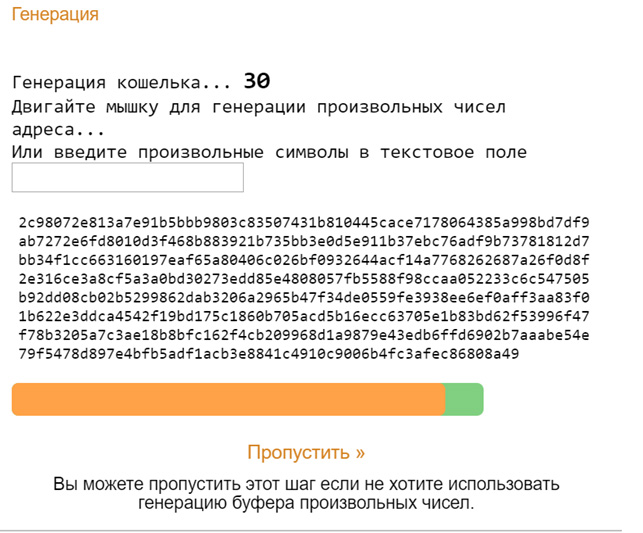
Step 1. Choose the cryptocurrency and create a buffer of random numbers. To do this, it is enough to move the mouse cursor until the orange bar is filled.
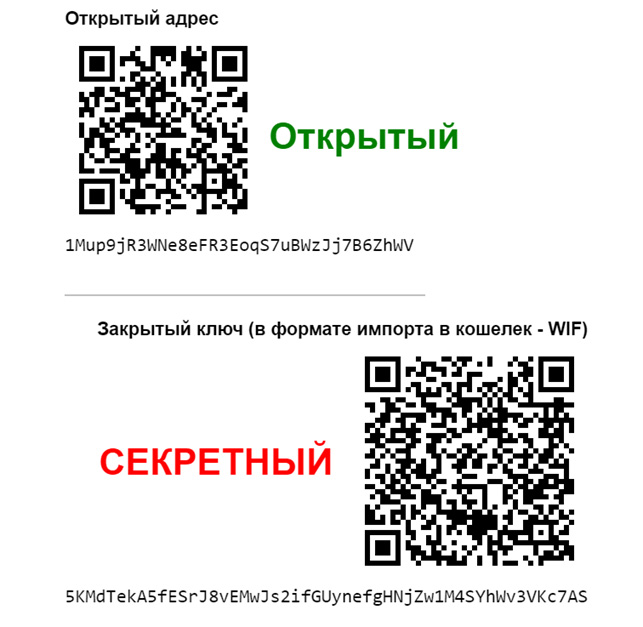
Step 2. We received the address and the private key of our wallet. Now the data can be sent to print and the paper wallet is ready. The site states that it is not recommended to save the QR codes in a PDF file in order to avoid information leakage.
How to Import a Paper Wallet

To perform transactions you will need:
- A smartphone with a built-in QR code scanner. For older models, they can be downloaded from the app store;
- A mobile wallet for storing cryptocurrency, for example, TrustWallet, Jaxx, Coinomi, and others.
After installing the application, import the paper wallet. To do this, you need to scan the QR code with the private key. This process is called sweeping. Open the application and tap the QR code icon:
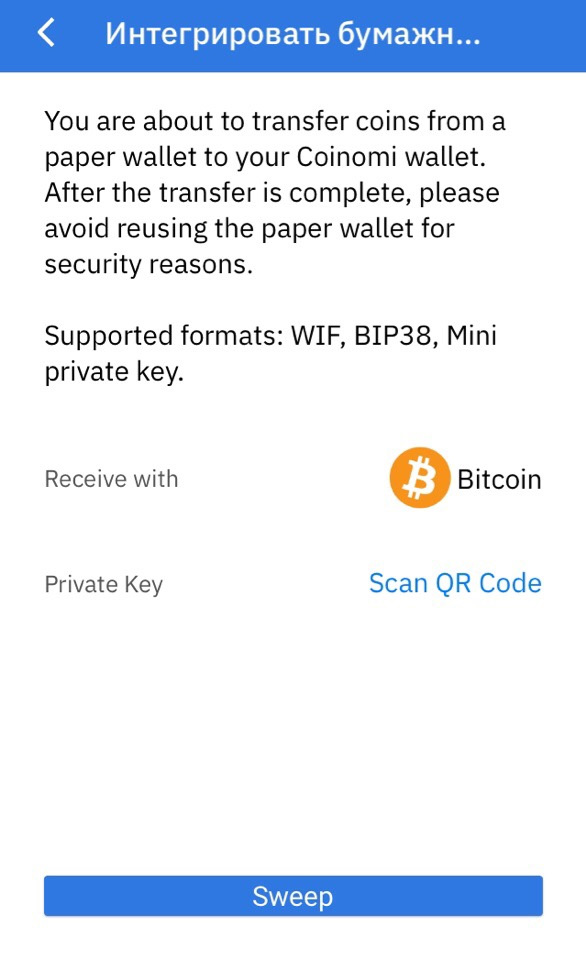 After that, press "sweep" and the wallet is integrated. In the Coinomi application, which was used for the example, the process is very simple. In some wallets, for integration you will need to go to other settings sections and find the item "Import My Private Key" or something similar, and the keys may need to be entered manually.
Some generator websites support additional encryption methods such as BIP38. In that case, the keys are printed in encrypted form, and even if a cybercriminal obtains the access keys, they will not be able to decrypt them, because in order to import the wallet, it is necessary to decrypt the key through the main online generator.
How to Fund It

You can fund a paper wallet in several ways, using a QR code or the wallet address:
- Through terminals with cash or a bank card;
- Use exchange services, for example LocalBitcoins or from the list of exchangers on BestChange . When funding in this way, a high commission is charged and there are also considerable restrictions on the minimum amount;
- Through crypto exchanges . Registration is required to receive cryptocurrency. But there is an opportunity to exchange at the market rate and withdraw with lower commissions.
You can also fund and exchange through payment systems, for example, WebMoney or Payeer, but you will have to buy at an unfavorable rate.
How to Withdraw Cryptocurrency from a Paper Wallet

All the methods described for funding a wallet are also valid for withdrawal, only instead of the address you need to use the QR code with the private key. It is necessary to scan the QR code through the mobile wallet application, or enter the public and private key manually, and then send the required amount to the specified electronic wallet address.
Advantages and Disadvantages of Paper Wallets

The main advantage lies in high reliability and the absence of risks, since the data is stored only on a physical medium, which will be an ideal option for long-term investors.
The disadvantages include the possibility of mechanical damage: fire and moisture should be avoided, surface defects may occur, etc. The paper should also be hidden from prying eyes so that no one can photograph the QR codes.
Another key disadvantage is impracticality. This type of storage is not suitable for regular transactions and is intended exclusively for long-term cryptocurrency storage.
Several Useful Recommendations

- When creating a paper wallet, it is recommended to disconnect from the Internet to eliminate the possibility of data interception. Under no circumstances should you create a wallet on public networks in order to avoid compromising the data;
- It is better to keep several copies of the paper wallet and hide each one in a secure place. This will allow you to retain access if one of the copies is lost;
- You should not carry a paper wallet with you unless necessary. It can simply be stolen, or it can be left somewhere in a public place along with a wallet, bag, and so on;
- One copy can be laminated, which will help avoid surface defects and other kinds of distortion, in particular fading or ink wear.
Conclusion

Using paper wallets to store cryptocurrency is the most reliable and secure, but it is not suitable for regular transactions and is intended more for long-term storage.
Creating and importing a paper wallet will not cause difficulties for beginners. As a rule, online resources contain the necessary instructions, and otherwise they can always be found on the Internet.
If you follow the instructions exactly and observe the necessary security measures, your funds will remain safe.
Sincerely, Alexey Vergunov TradeLikeaPro.ru
