
Argo Averager - the little secret of your profitable trades

Hello, fellow Forex traders! As we already discussed in the Safe Martingale article, with the right approach a couple of averaging tricks can significantly increase your trading profitability.
And today we will talk in more detail about how this can be automated. Namely, about the auxiliary managing expert advisor ArgoAverager from our friends at ArgoLab.
Averaging positions is one of the most popular capital management strategies. Many people use it without really realizing it. In Forex, averaging usually means increasing positions (raising lot size) in the loss zone. Abuse of this primitive mechanism is typical of almost any beginner trader. Unfortunately, lack of discipline spoils the impression of the strategy, which in no way cancels the fact of the method's high effectiveness.
The solution is to hand full control of the situation over to an auxiliary expert advisor that will manage positions until they are fully closed. This kills two birds with one stone: the advisor frees your hands and guarantees strict adherence to the rules. It was exactly such an advisor that was written by people from our forum. ArgoAverager is an automatic system with a wide range of settings that averages both manually opened orders and orders opened by other expert advisors.
What Averaging Is

Forex traders use averaging constantly, sometimes without even realizing it. Even when you look at a price chart, you are essentially seeing the market participants' averaged view of the current market situation. It is a powerful tool that, when used correctly, increases the probability of closing a trade or group of trades in profit.
Why is it actually called averaging? In essence, the average price of a position is the same as break-even. For a single order, the average price is equal to the opening price. When several orders are opened on one instrument, break-even will equal the average opening price of all orders, weighted by volume.
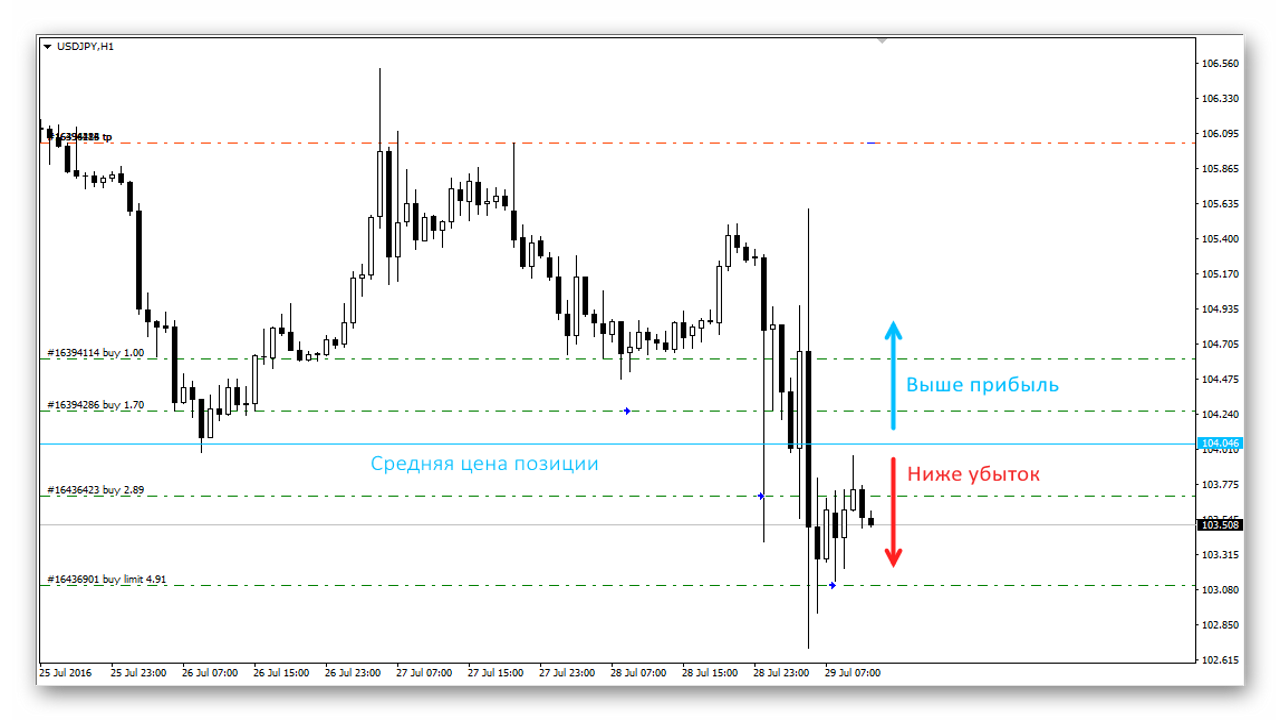
An averaging strategy is the manipulation of that very average price. That is, when price enters the losing zone, we open an averaging order, thanks to which the break-even level moves closer to the current price.
Installing the Expert Advisor

The AA installation process is no different from installing any other expert advisor for the MT4 platform. Our site has a detailed manual on installing expert advisors.
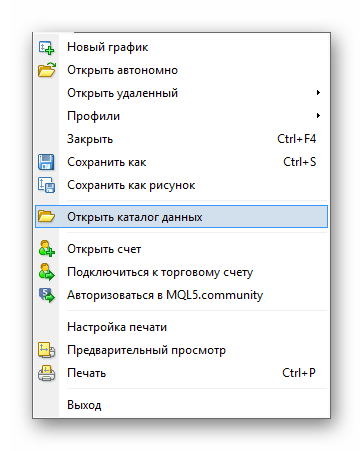
First, open the platform's data folder through "File" - "Open Data Folder".
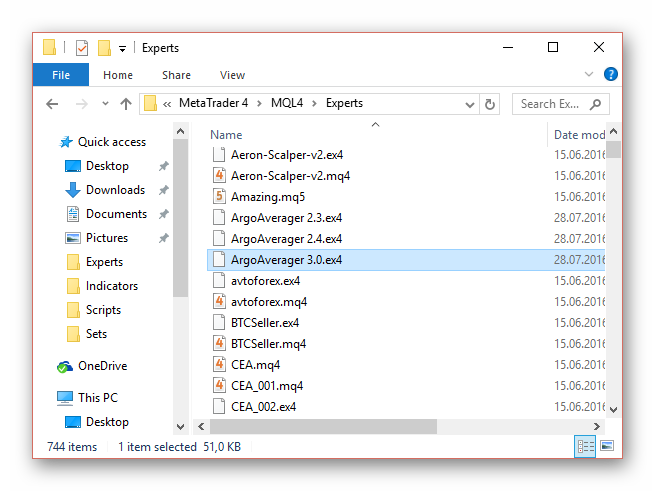
Then, the auxiliary expert file with the ".ex4" extension must be placed in the "MQL4" - "Experts" folder. After that, restart the terminal.
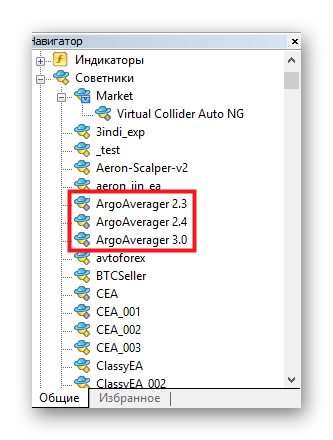
That is all, now the expert advisor should appear in the MT4 navigator window. To launch the advisor, simply drag it onto the currency pair chart or use a double click.
ArgoAverager can also be downloaded from the MQL5 Market.
Settings

Before launching the advisor, you first need to configure the order grid spacing. Set the grid step too small, and the position will build volume too quickly. Set it too large, and orders will not open at all, so the strategy will not produce the desired effect. The grid step is controlled by the GridStepPips parameter (in pips). Try to calculate this distance so that orders land on the nearest key levels. This should increase the probability of a pullback. Unfortunately, the developer did not provide for a dynamic grid step, so orders are always placed at the same distance from each other, except for the first one, whose distance can be changed through the GridDistFirst parameter.
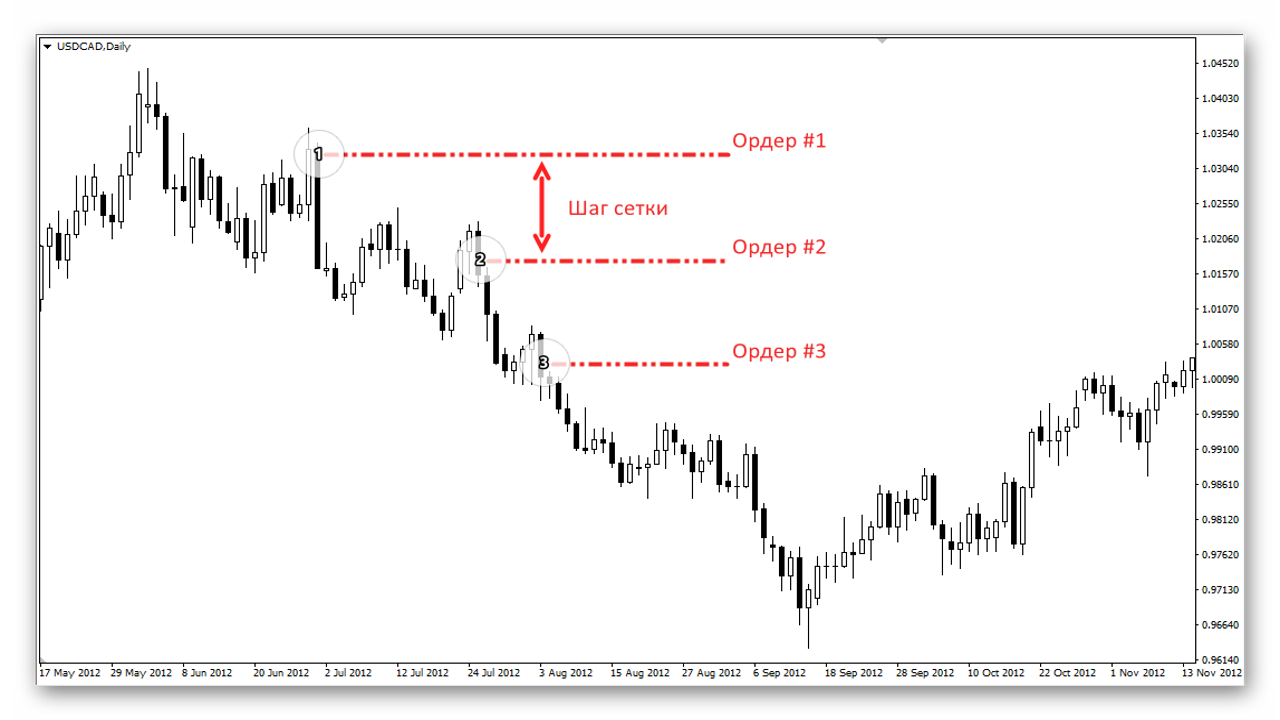
A common take-profit is set for all orders on the instrument. By default, take-profit is calculated from the break-even level. You cannot set take-profit by profit, but you can close orders at break-even. To close orders exactly when the break-even level is reached, simply set the value 0 for the TakeProfitPips parameter.
Another important parameter is LotMult, or the lot multiplier. The higher the multiplier value, the greater the risk. On the other hand, weighting toward additional orders makes it possible to reach break-even much faster. If you do not know exactly when to expect a reversal, it is better to put one in the LotMult field. In this case, the volume of each additional order will match the original volume of the position on the instrument. If you set the lot above one, the volume of each subsequent grid order will grow geometrically.
Full list of settings: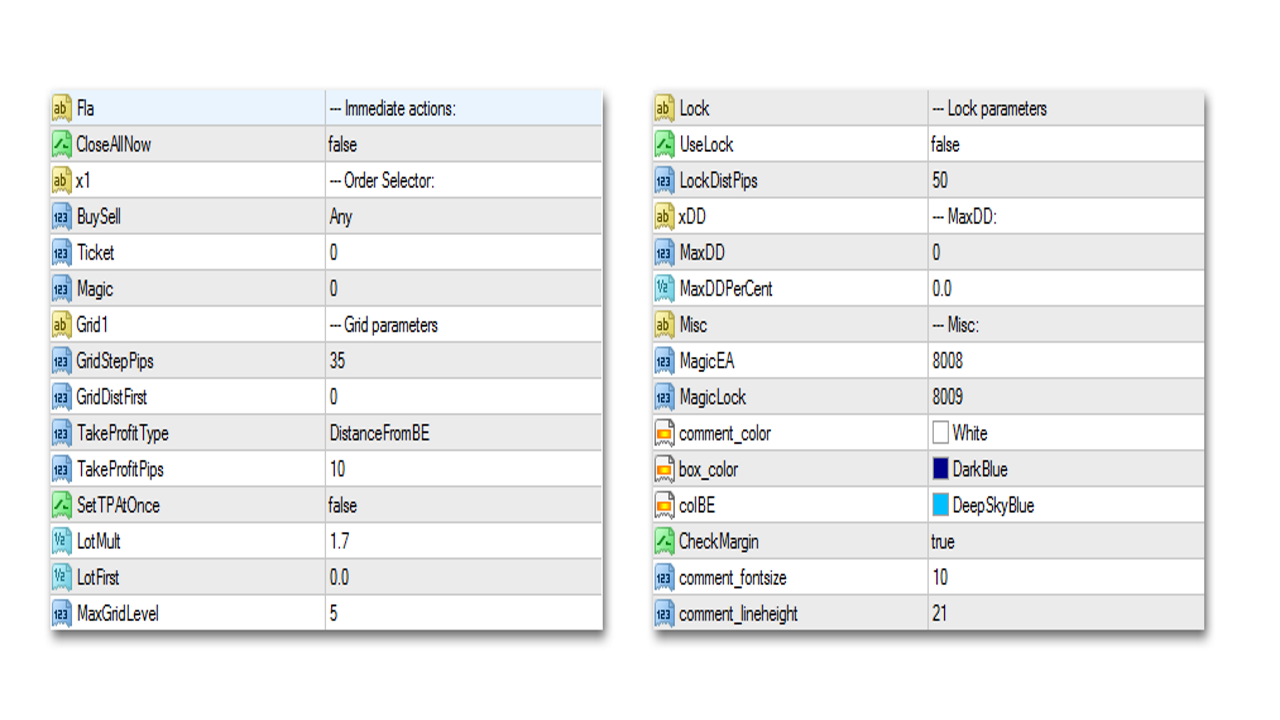
Instant actions:
- CloseAllNow - when the advisor starts, all orders selected by the order filter will be closed.
- BuySell - you can choose from Buy, Sell, Any - work only with buy orders, sell orders, or all orders without distinction, respectively;
- Ticket - work only with one specific order by ticket number (0 to disable);
- Magic - work only with orders opened with this Magic number.
- GridStepPips - grid step;
- GridDistFirst - offset for the first averaging order (0 to disable);
- TakeProfitType - you can choose from FixedTakeProfit and DistanceFromBE, which means calculating the take-profit level from the order with the best price and calculating take-profit from the break-even level, respectively;
- SetTPAtOnce - a choice of two options: either the advisor sets profit immediately after launch, or only after the first averaging order is triggered;
- LotMult - lot multiplication coefficient for additional orders. If a group of orders is averaged, the volume of the averaging order will equal the total volume of all orders multiplied by the coefficient;
- LotFirst - volume of the first averaging order (0 to disable);
- MaxGridLevel - the maximum number of grid orders placed by the advisor.
- UseLock - enable order locking;
- LockDistPips - distance for placing the locking position. When the price moves the specified number of pips from the extreme order of the series, the advisor hedges the position with an opposite order of the same volume and also removes all stop levels set earlier.
- MaxDD - the largest drawdown amount in the deposit currency, upon reaching which all positions will be closed (0 to disable);
- MaxDDPerCent - maximum drawdown as a percentage of the deposit (0 to disable).
- MagicEA - Magic number for orders placed by the advisor;
- MagicLock - Magic number for locking orders;
- comment_color - text color of the info panel on the chart;
- box_color - color of the panel;
- colBE - color of the break-even level;
- CheckMargin - free margin control. When the parameter is enabled, information about the number of grid legs available to open will be displayed on the chart. The amount of available margin is calculated with the specified maximum drawdown taken into account;
- comment_fontsize - font size of the info panel;
- comment_lineheight - spacing between the panel lines.
Example of operation

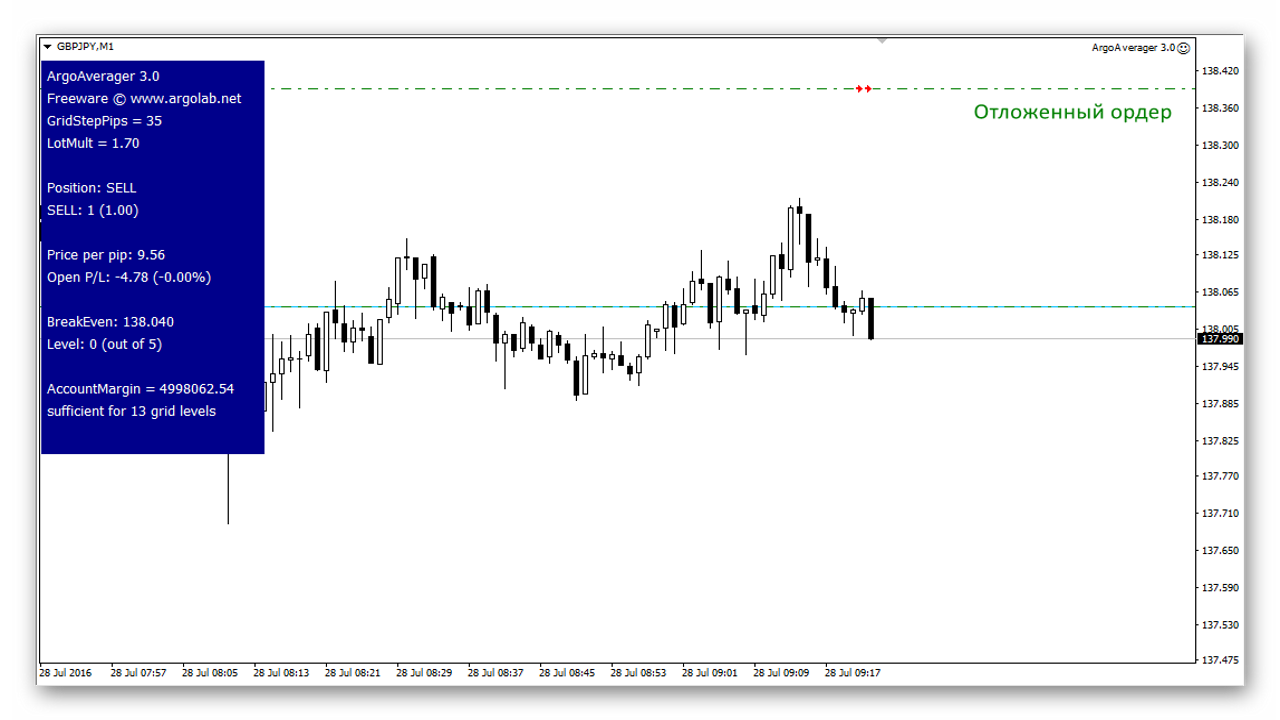
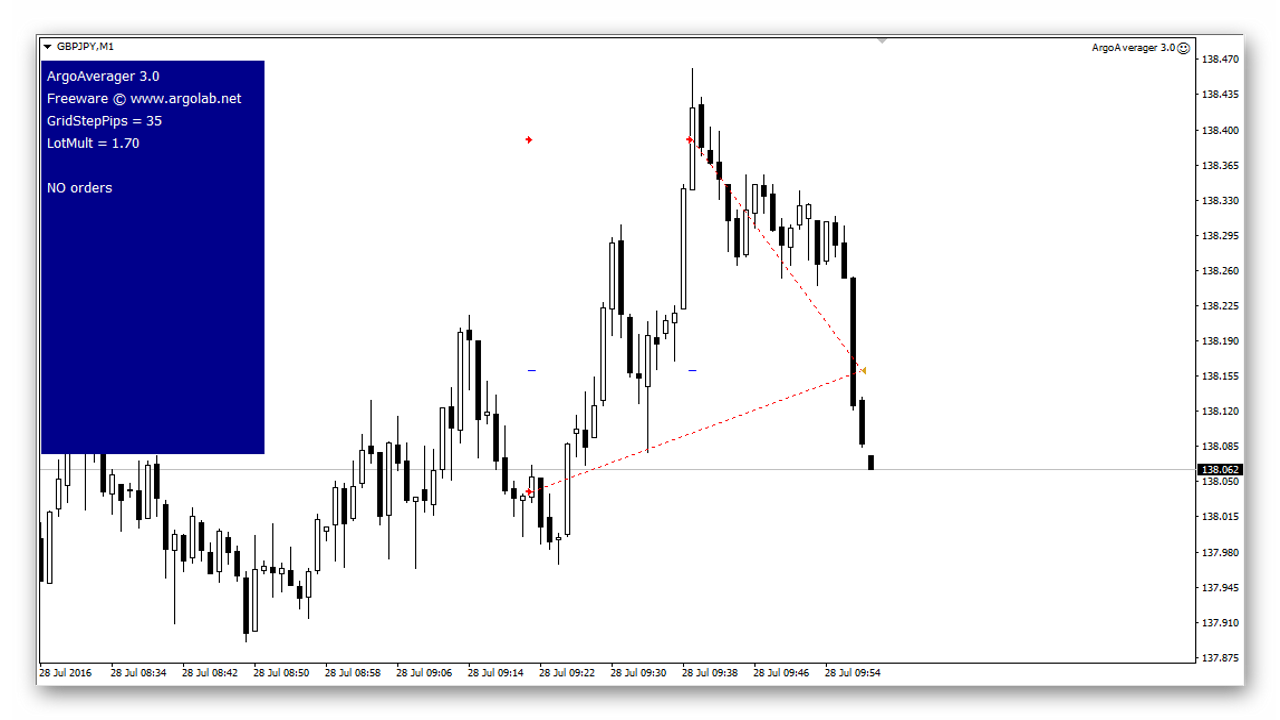
If there are already open positions on the symbol, then when the advisor is launched it will immediately place a pending averaging order at a distance of GridStepPips (or GridDistFirst, if specified). The blue line shows the break-even level, which in this case corresponds to the opening price of the order.
If the price goes against us and activates the averaging order, the advisor will mark a new break-even level and set take-profit for both orders (if setting after order activation is specified).
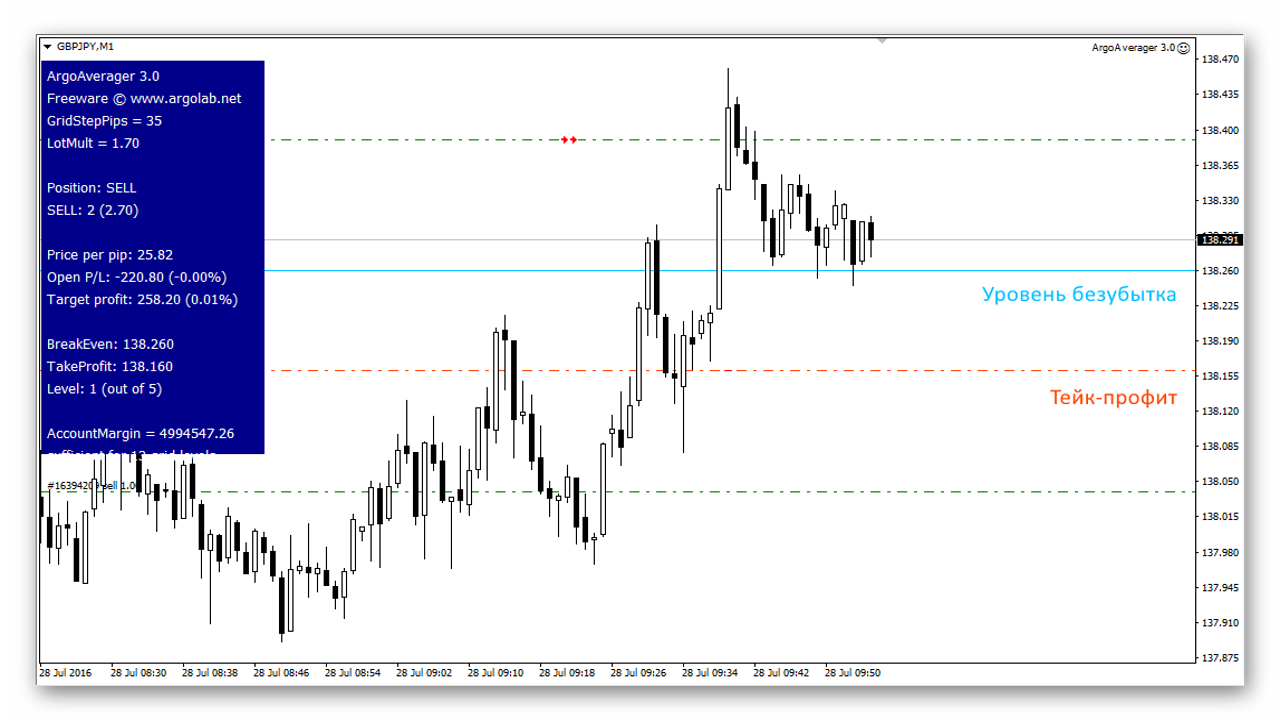
As a result, both orders will be closed automatically by the common take-profit. If desired, the advisor can also close orders at break-even. This option is preferable when we cannot say for sure whether there will be a pullback or not.
Conclusion

ArgoAverager is truly an indispensable assistant for the intraday trader. In day-to-day trading there is often a situation where averaging is almost the only way out of the current situation. By launching ArgoAverager, you could say, you throw a lifebuoy to your deposit, which at that moment is already sinking or about to sink. At the same time, ArgoAverager can be used simply as extra insurance, because, as is well known, the market can never be predicted 100%.
Download the Argo Averager advisor

Discussion on the forum
Respectfully, Alexey Vergunov
TradeLikeaPro.ru