
Yen Trader Trading System

Fast is slow, but without breaks. Japanese proverb
Hello, fellow forex traders! Today we will talk about a trading system with the telling name Yen Trader.
I like trading systems based on a very simple idea that is hard to "break" because it is so simple. The Yen Trader strategy is exactly one of those. By using a logical market inefficiency, we get a statistical edge, and thanks to automation, we can put time itself to work for us.
Characteristics
- Platform: MetaTrader 4 ;
- Currency pairs: GBPJPY is recommended, but AUDJPY, CHFJPY, and EURJPY are also suitable;
- Timeframe: H1-D1;
- Trading time: around the clock;
- Recommended brokers: Alpari, Exness
What Is Correlation

This strategy was first published on the foreign forum ForexFactory. The strategy is based on the principle of correlation, so to fully understand the concept, you need to know what correlation actually is. In the context of forex, the most common example is the correlation between EURUSD and USDCHF.
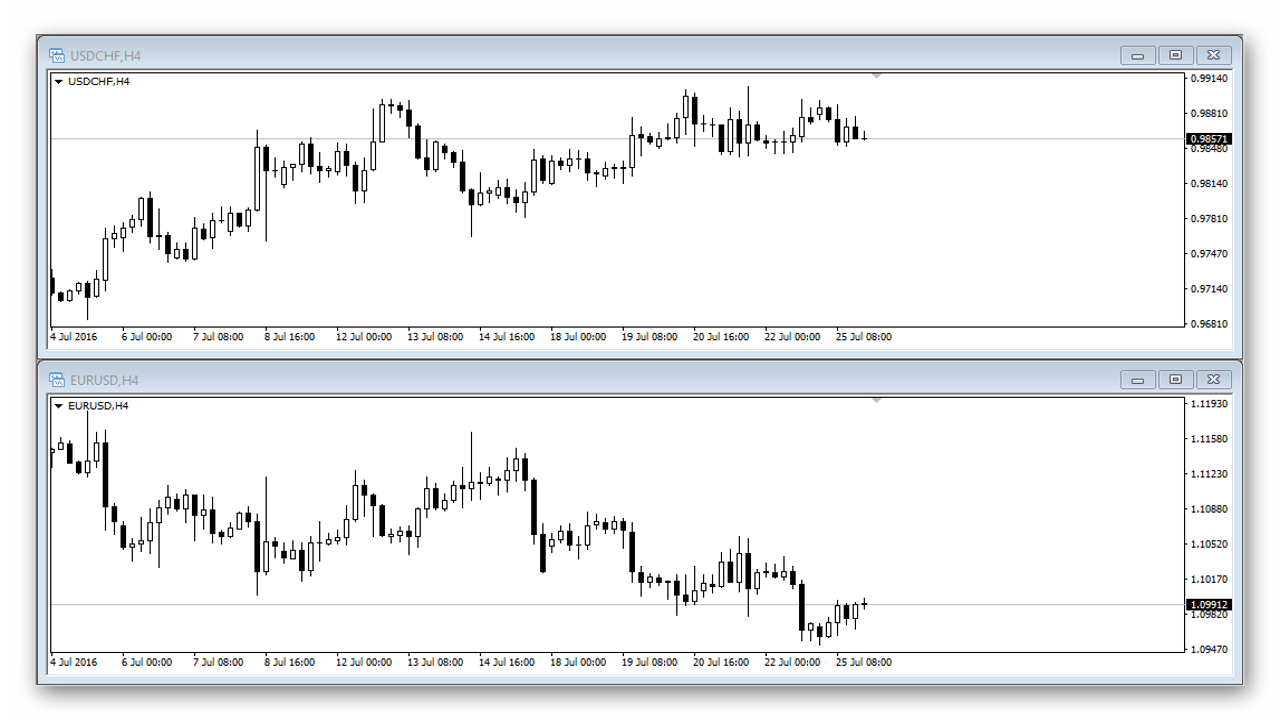
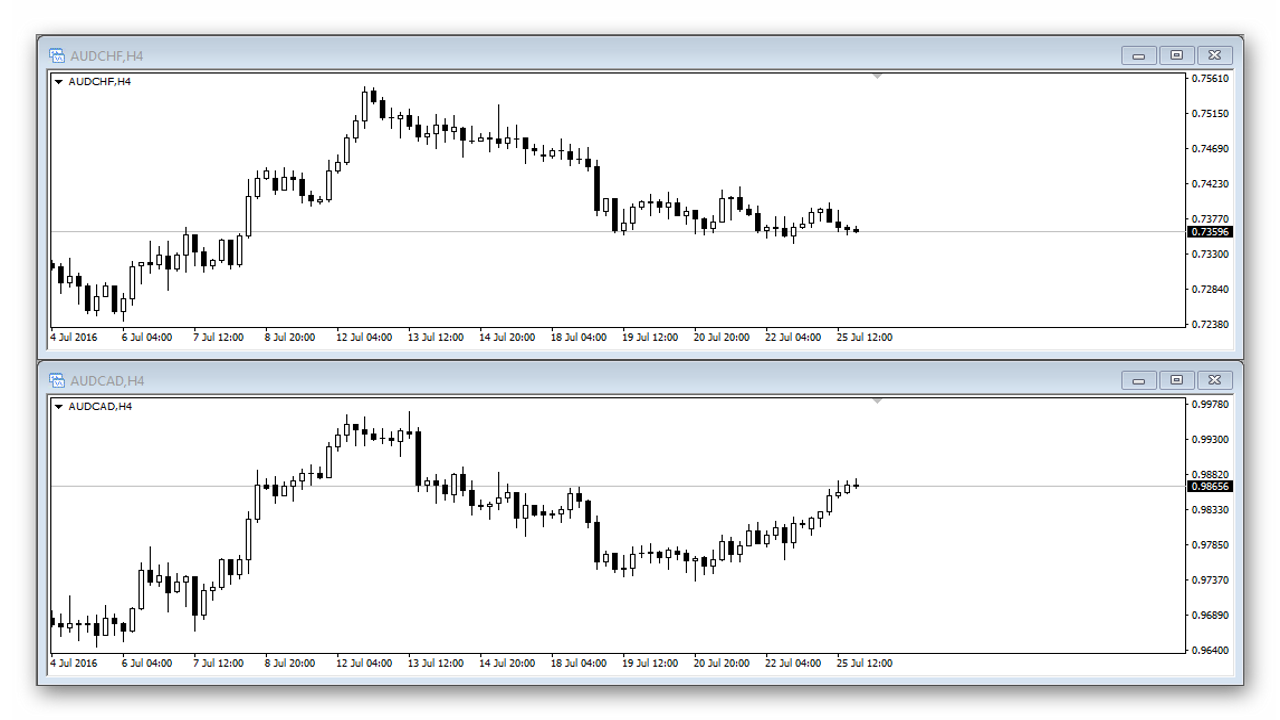
As we can see, most of the time the pairs live their own lives, but from time to time a fairly strong negative correlation is observed. Negative correlation means that if EURUSD falls, USDCHF will rise, and vice versa. Positive correlation means that the price of both instruments moves in the same direction. An example of positive correlation is the AUDCHF and AUDCAD pairs.
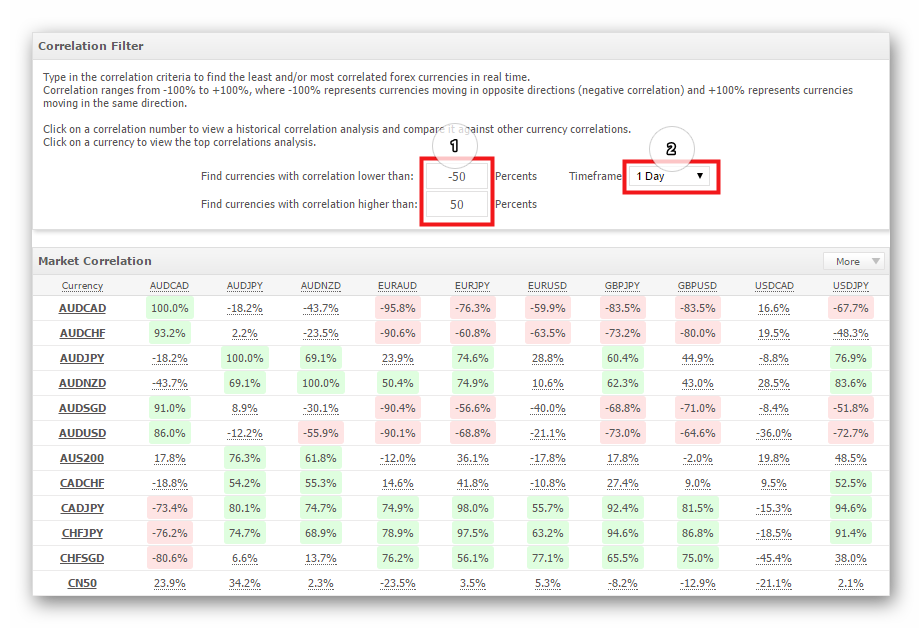
You can find a table of correlations for various currency pairs on the myfxbook website. Here you can highlight (1) pairs with a correlation above a specified value and set (2) the timeframe for calculating the correlation. The closer the value is to zero, the weaker the relationship. We are interested in strongly correlated pairs, with values approaching 100% (positive correlation) and -100% (negative correlation).
The Idea Behind the Strategy
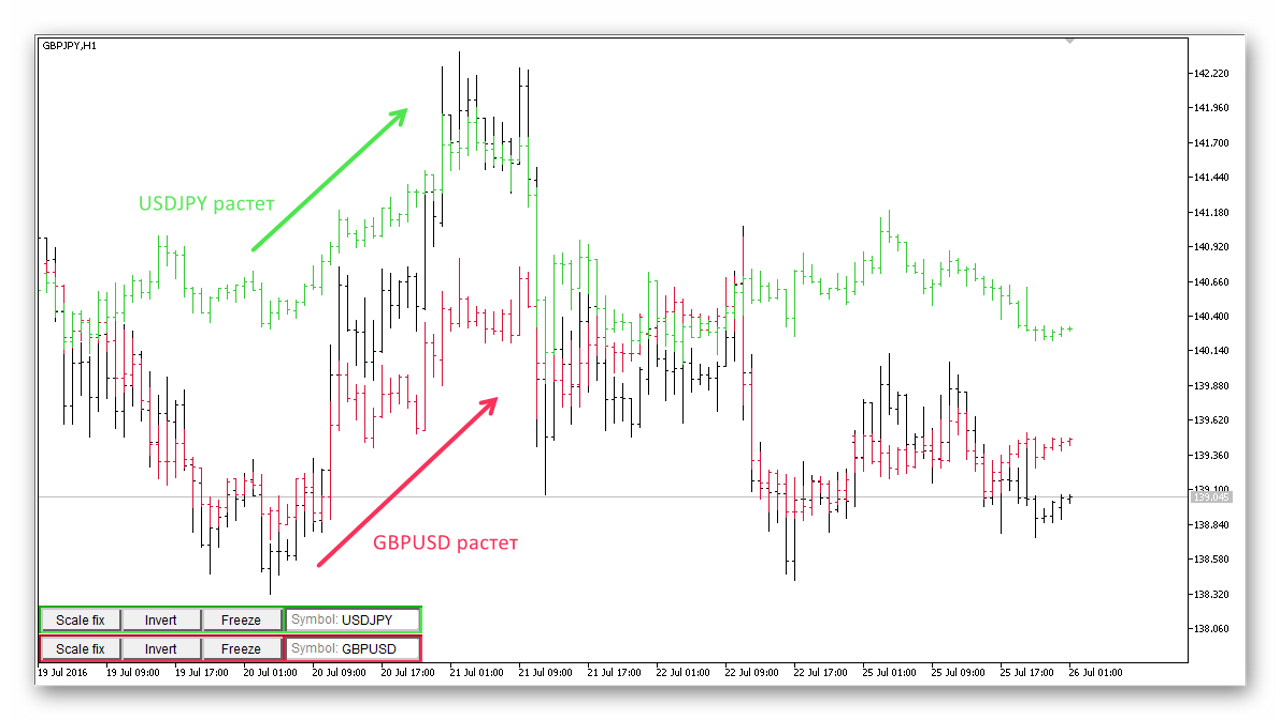
Now let us move directly to the idea of the strategy itself. The author's concept is to compare the movement of the major currency pairs with USDJPY. Roughly speaking, when the movements of the majors coincide, we enter on their cross. For example, if GBPUSD and USDJPY are rising, we buy GBPJPY as a derivative of those two pairs.
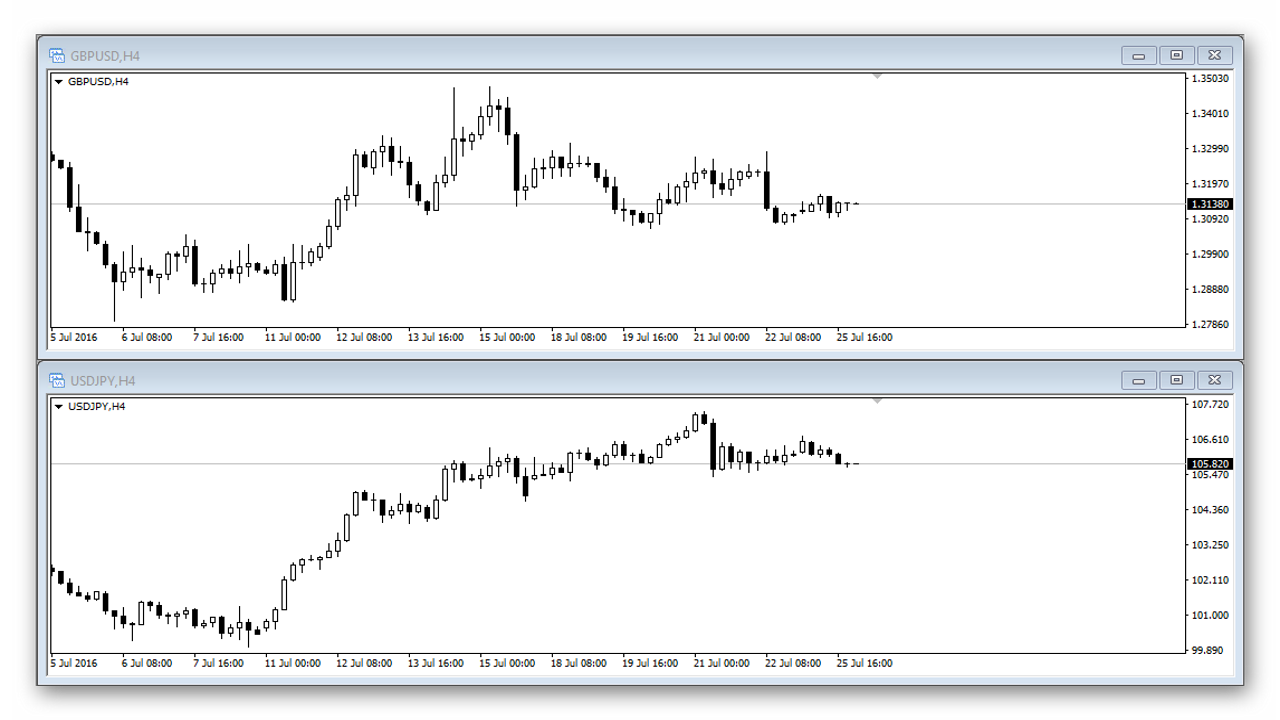
If you try comparing the charts of GBPUSD and USDJPY, you will see that most of the time they move out of sync and there is no visually obvious relationship. Therefore, it is important for us to catch the moment when a strong positive correlation appears between the pairs. When this happens and GBPUSD shows growth, the pound also rises. In turn, if USDJPY rises, the yen falls. When the value of the pound rises while the yen falls at the same time, we can expect upward movement in GBPJPY.
Look at the chart. As you can see, the strongest growth in GBPJPY is observed when both majors are rising. In fact, that is the principle of the strategy in a nutshell: as soon as we notice that both pairs are starting to rise, we buy GBPJPY. The same goes for the opposite situation, when both currency pairs are falling: we sell GBPJPY.
The same principle works with other pairs as well. For example, by analyzing EURUSD and USDJPY, you should enter on their cross, EURJPY. The same applies to the Australian dollar and the AUDJPY cross. You can also trade the CHFJPY cross with this system, but I would not advise it, since the franc has not been the most stable currency lately. Given the direct quotation, the entry rules will differ slightly. When USDCHF falls and USDJPY rises, we buy the cross; when USDCHF rises and USDJPY falls, we sell CHFJPY.
A logical question is: how will we determine when the price is rising and when it is not? In fact, the simplest filter based on a moving average will do for this task. Before entering a sell trade, we check that the price of both currencies is below the average and that the previous candle is bearish. For a buy, it is the opposite. If you wish, you can take into account not one previous candle but two, three, or even more (this is specified in the advisor settings).
Stop losses are calculated based on the volatility indicator ATR. You can also use a trailing stop. The ATR value is not used directly in the strategy, but normalized relative to the timeframe. Let us look at an example of calculating the normalized ATR value.
Example 1
Suppose you chose the M30 timeframe. The current ATR value on D1 is 332 points, on M30 it is 26 points. Instead of using 26 points, the normalized ATR is calculated using the following formula:
332 / square root of (1440 / 30) = 47 points
That is, the daily ATR value is divided by the square root of the result of dividing D1 by M30. Roughly speaking, this formula makes ATR slightly larger when the current value is too small and, conversely, slightly smaller when ATR is too high.
Example 2
Let us consider the H4 timeframe option. Suppose the ATR value on H4 equals 102 points, and on the monthly chart it is 1070 points. Accordingly, the calculation will be as follows:
1070 / square root of (43200 / 240) = 80 points
We will use this same ATR value with a multiplier as well (optionally). You will not have to calculate it manually, as the expert advisor handles this task.
Installing the Expert Advisor

The expert advisor is installed in the same way as any other expert advisor for the MT4 platform. Our website has a very detailed guide on this process.
The expert advisor should be installed on the cross, that is, on the pair we will trade. For the test we will use GBPJPY, as the most optimal currency pair for this system. So, open the GBPJPY chart with the desired timeframe (I do not recommend going below H1) and attach the expert advisor to the chart.
Expert Advisor Settings

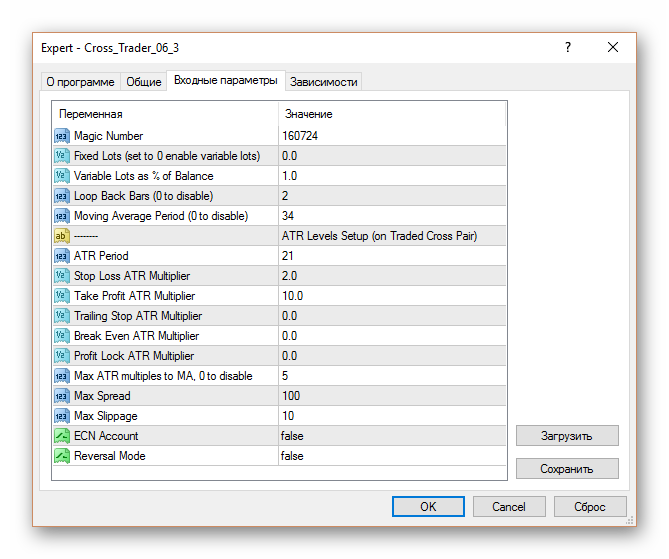
- Magic Number - the unique number of the expert advisor that allows it to distinguish its own orders from all others (manual and opened by other expert advisors);
- Fixed Lots - the fixed lot value if you do not want to trade with a dynamically changing lot;
- Variable Lots - lot calculation as a percentage of the account balance. You need to be very careful here. If you specify 1% in the parameter, it does not mean that in case of failure you will lose one percent of the balance. It means that 1% of the balance will be used as margin, and if the stop-loss is triggered you may lose much more. If you do not fully understand how lot calculation works, it is best to check this in the strategy tester beforehand;
Signal Filtration - the settings block responsible for signal filtering
- Signal TimeFrame - the timeframe on which the expert advisor will look for an entry signal. It can differ from the one on which you installed the bot;
- Loop Back Bars - how many candles to take before the current one to determine growth or decline. You cannot set less than two, because 1 is already the current candle. And, for example, if you set 3, the expert advisor will look at the 2 previous bars;
- Price Type of Loop Back Bars - which boundaries to use for the parameter described above: the candle High / Low or the closing price;
- Moving Average Period - the moving average period;
- Moving Average Method - the moving average type;
Signal Multiple Indicators - the block for optionally enabling additional indicators on the signal pairs (not on the cross)
- RSI - enable/disable the RSI indicator;
- RVI - enable/disable the RVI indicator;
- CCI - enable/disable the CCI indicator;
Pip Levels Setup - the block for setting fixed stops, take-profit, etc. If you do not want to use it, set zeros, then ATR-based values will be used
- Stop Loss - the stop value in points;
- Take Profit - the take-profit value in points;
- Break Even - the level for moving to break-even;
- Profit Lock - how many points into profit to move the stop when shifting to break-even;
- Trailing Stop - the size of the trailing stop;
- Trail stop shift - the level of possible trailing shift;
- Min Distance between orders - the minimum distance between orders;
ATR level settings
- Enable ATR based levels - enable/disable level calculation based on ATR. When enabled, the fixed values from the block above are completely disabled;
- ATR timeframe - the timeframe for ATR calculation. It can be any timeframe, current means the current one;
- ATR Period - the ATR period;
- Stop Loss ATR Multiplier - the ATR multiplier for stop-loss;
- Take Profit ATR Multiplier - the ATR multiplier for take-profit;
- Trailing Stop ATR Multiplier - the ATR multiplier for trailing stop;
- Break Even ATR Multiplier - the ATR multiplier for moving to break-even;
- Profit Lock ATR Multiplier - the ATR multiplier for moving the stop into the profit zone;
- Max ATR multiples to MA - the ATR multiplier for the maximum distance from the moving average at which entering a trade is allowed. As is known, when the price has run too far from the moving average, it is already too late to enter;
- Min Distance (ATR multiplies) between orders - the minimum distance between orders, an ATR multiplier;
ATR Normalisation - parameters limiting the ATR size
- Min ATR Pips - the minimum allowable ATR value in points;
- Max ATR Pips - the maximum allowable ATR value in points;
Trade Conditions - the block for configuring trading conditions
- Max Open Trades - the maximum allowable number of simultaneous positions;
- Close on opposite signal - whether to close a position when an opposite signal appears;
- Hedge on opposite signal - whether to open an opposite position when an opposite signal appears;
- Entry Type when Entry TF < Signal TF - how to enter trades when the Signal Timeframe is higher than the timeframe on which the advisor is installed: pyramiding, averaging, or both methods;
- Max Spread - maximum spread;
- Max Slippage - maximum slippage;
- ECN Account - set to true if the advisor is used on an ECN account;
- Reversal Mode - reversal of logic (swap buy for sell and vice versa);
Distance to moving average - block of settings for the distance to the moving average
- Cross Pair MA period - period of the moving average on the cross (traded pair), set to 0 if you do not want to use it;
- Cross Pair MA method - type of moving average;
- Max Pips to MA - maximum distance from the moving average for entry;
Cross Pair Higher TF Filters - block of settings for filters on higher timeframes of the traded cross
- Higher TimeFrame - which higher timeframe to use for filtering;
- MA Period - period of the moving average on the higher TF, 0 to disable;
- MA Method - type of this moving average;
- Enable Heiken Ashi on Higher TF - enable/disable Heiken Ashi candles on the higher TF.
Examples
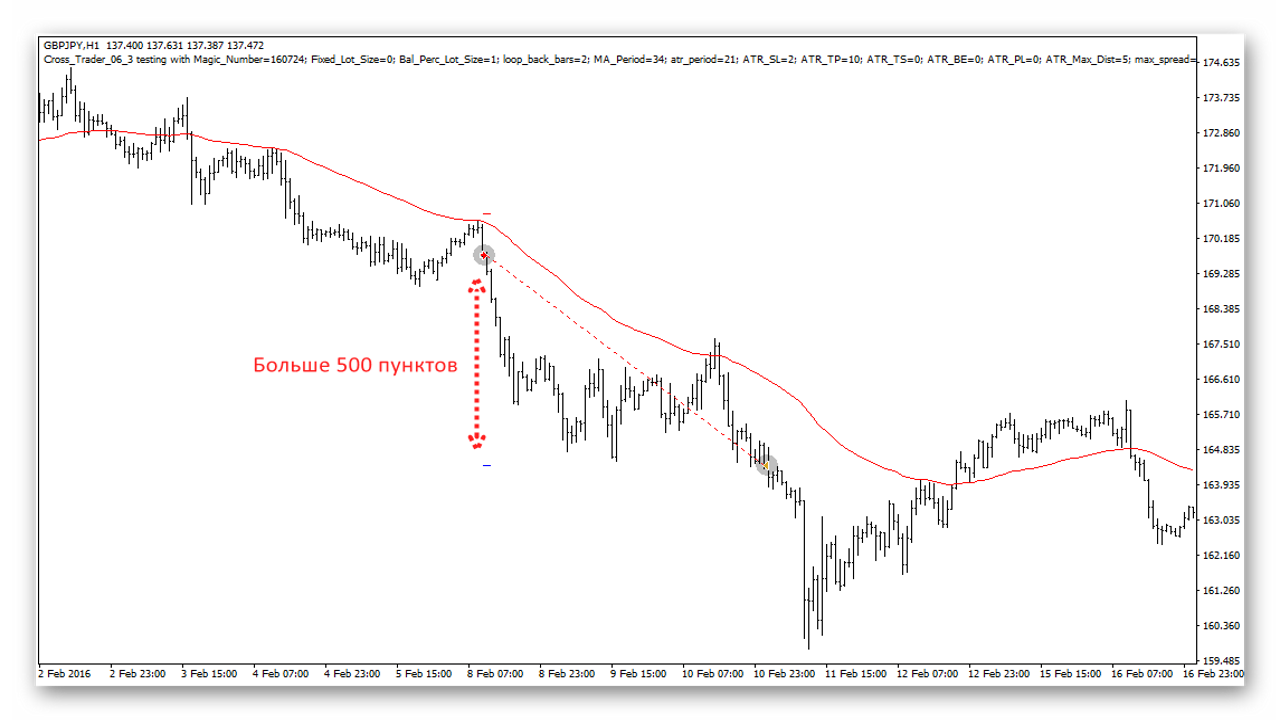
A test on GBPJPY for the current year with the default settings showed the following result:
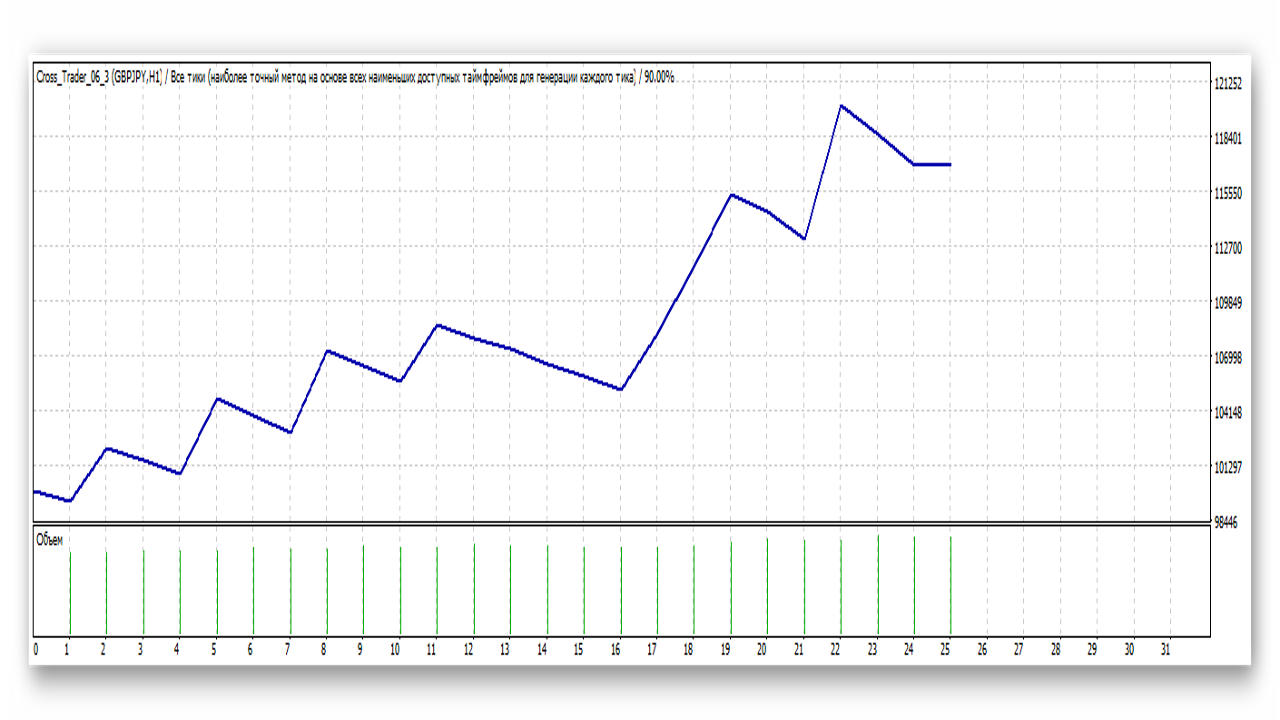
In the default settings, the take-profit multiplier is five times larger than the stop-loss, which is why the take-profit is more than 500 points. In principle, this value can be reduced to get a larger number of trades and, possibly, greater profit. A trailing stop can also be used.
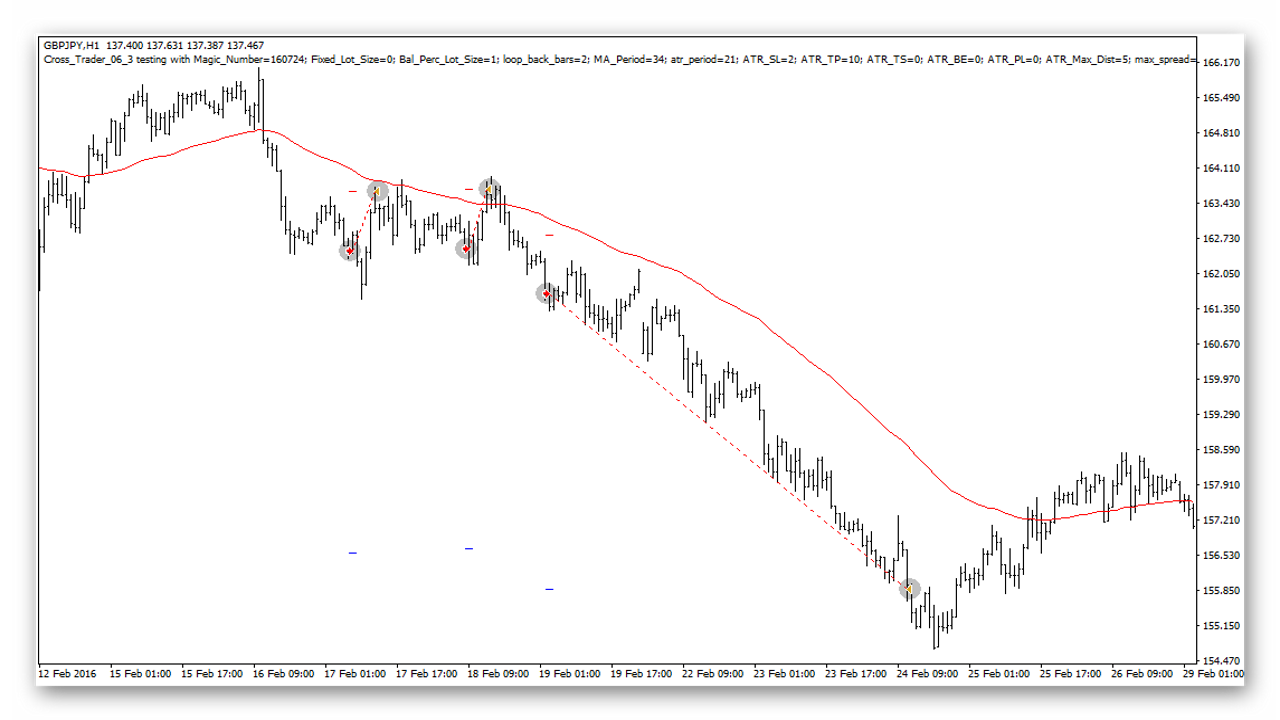
A positive side effect is that one take-profit covers 5 stops at once. In the example below, 2 trades closed at a stop, and one at a take-profit.
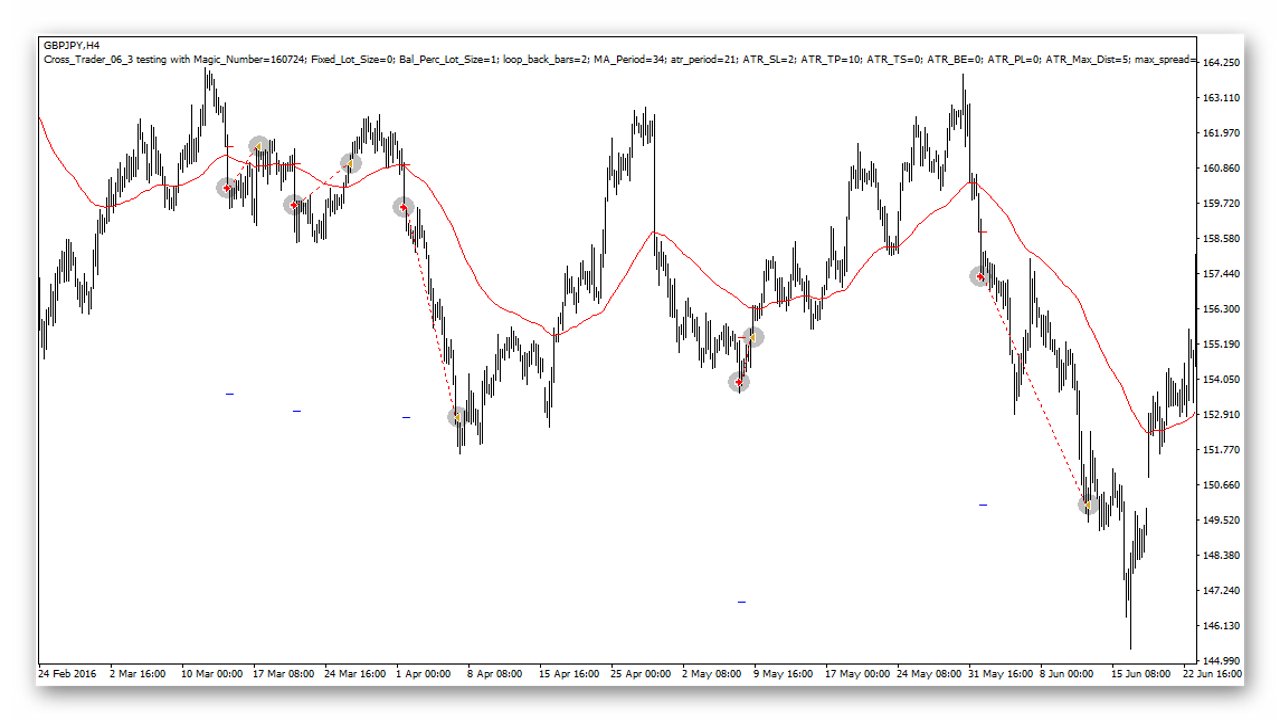
Moving to a higher timeframe makes entries more precise, but both the frequency of signals and profit decrease significantly.
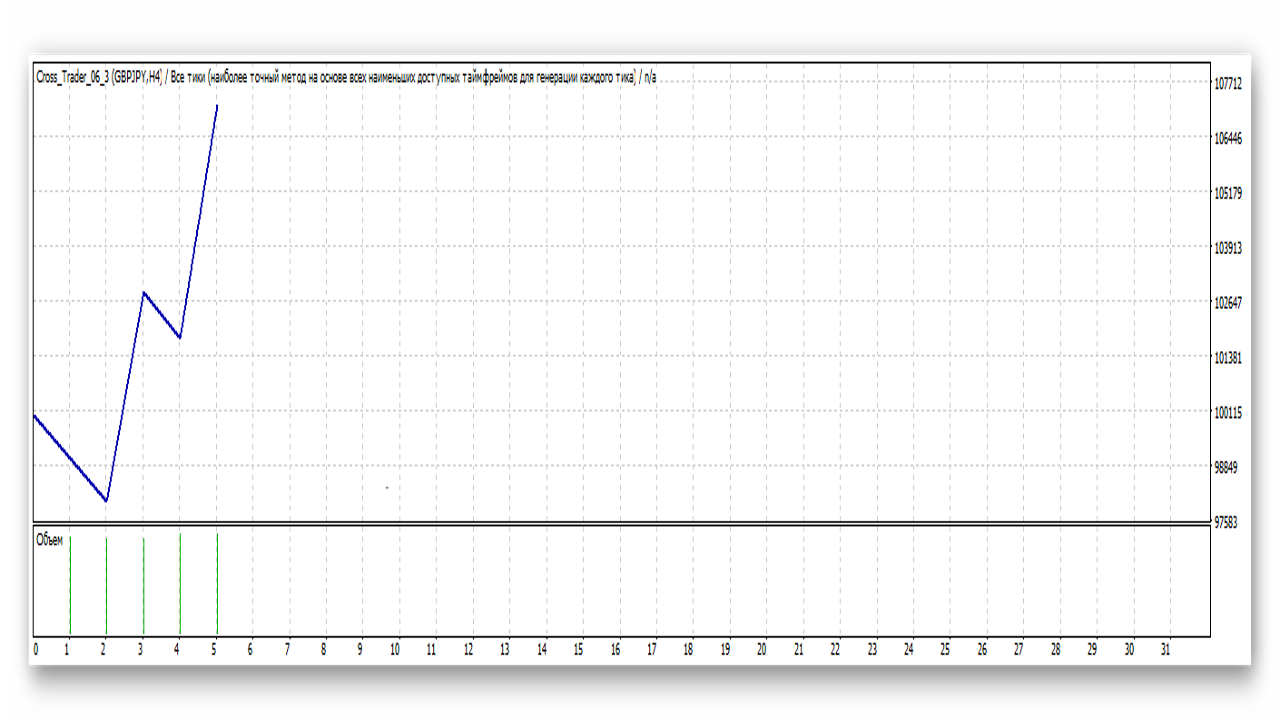
Actually, only 5 trades were made in 2016.
GBPJPY is the preferred pair for the system, but you can experiment with the parameters and try to find the optimal settings for other pairs. The advisor is designed to work with any crosses, for example, AUDCHF or EURCHF. The base currencies in the first case will be AUDUSD and USDCHF, and in the second EURUSD and USDCHF. And, of course, when selecting settings, use common sense and visual testing as your guide. At first, test everything on demo, and only then try it live.
Summary

The principle of the strategy is very simple, you could say, "old school." That is, we find very simple market inefficiencies, in the spirit of classic trading books, and use them. This approach works, and it is based on a simple and logical principle - the movement of the cross rate as a result of the trend in the majors. For this dependence to disappear, some incredible event would have to occur, so you can be confident in the system, and this is necessary in order to continue trading even during drawdown periods.
Download the Yen Trader strategy files

Forum thread
Sincerely, Pavel Vlasov TradeLikeaPro.ru
