
Wave This Magic Wand and Make Money for Yourself

The art of one-click trading. The ability to make decisions and quickly act in conditions where whether you make money or not depends on a few seconds.
This is a skill that is simply necessary for any intraday forex trader. When the standard MT4 capabilities are not enough, when you need precision and speed in the technical execution of your carefully thought-out strategy, ProTrader comes to the rescue - a professional trading panel for seriously minded Forex players.
A software tool for professional trading in the MetaTrader 4 terminal
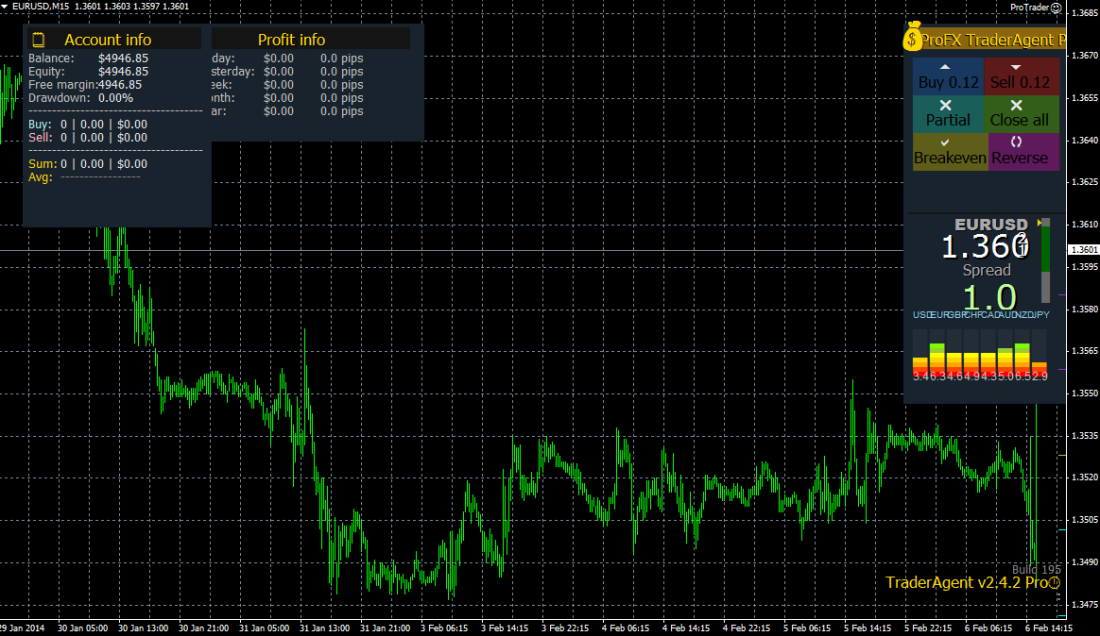
ProTrader is a real assistant for a trader working in the Forex market. It is not an automatic trading robot, does not make decisions, and does not open positions, but it helps you trade professionally on your own. All important information is displayed on the chart; thus, you can open a position with just one click. Managing an open position is just as easy: using drag-and-drop, you can easily set stop loss (SL) and take profit (TP) levels. After that, ProTrader will serve you for position management.
Unlike most similar programs available, ProTrader can help you manage risks during trading. To do this, you only need to define the maximum risk for one position, and ProTrader will automatically calculate the lot size for each new position.
Using the convenient graphical interface, anyone can quickly learn to work with the program and successfully use ProTrader for intraday trading.
Key features
- Fast position management
This program can be easily used to manage position(s). For example, if you want to open or close a position, you can do all this easily thanks to ProTrader with just one mouse click. Say goodbye to the order window that you usually use in the MetaTrader terminal.
- Fast position reversal (Position reverse)
If you are trading and you see that the market may go against you, with one press of a button the existing position will be closed immediately and a new one, opposite to the previous one, with the same lot size, will be opened. With this option, ProTrader can open the opposite position.
- Breakeven function (Move to breakeven)
If you have an open position(s), and the market is moving in the planned direction, you can move StopLoss into the profit zone of the open position (say, you move StopLoss to the breakeven point where there will be neither profit nor loss). This whole process can be carried out in ProTrader with a single click.
- Close all function (Close all)
If there is more than one open position (for example, if you use an averaging or martingale strategy), if you want to close all positions at the same time, you can close them with just one mouse click on the "Close all" button located on the control panel of the ProTrader panel.
- Auto-calculation of money management
With this ProTrader function, you can calculate the maximum risk you can be exposed to, as well as calculate the lot size based on the parameters you have predefined.
- Trailing stop function
The program supports trailing stop. With ProTrader, you can set trailing stops for open positions.
- MagicNumber
Using the MagicNumber function, the ProTrader program makes it possible to manage positions that have already been opened by any third-party expert advisor.
- Customize the interface to suit yourself
You can easily rearrange the panel windows on the chart or hide them, as you wish.
- Your trading statistics
You can clearly track the results of your trading in the Profit Info window. ProTrader displays daily, weekly, monthly, and annual profit results, expressed both in points and in currency.
- All data on open orders
The program displays all detailed information on your open position. You can clearly see the maximum loss (in points and in currency), maximum profit (in points and in currency), risk/reward ratio (R:R), current profit (in points and in currency), etc.
- Dashboard window
The dashboard information panel in the TraderAgent program can display the latest market information, such as the current bid/ask price, the current spread, daily price fluctuations, as well as MA, CCI, RSI, and Stochastic on various timeframes, etc.
- Hedging
When during trading you feel that the price may reverse and move in the opposite direction, you can hedge your open position with just one click, which can lock your position and avoid short-term losses.
- Stealth mode
The program provides the ability to hide the stop loss (SL) and take profit (TP) levels you set from your broker.
- Trend line opening function (Trading on trend line breakouts)
The program provides the ability to open a position not only manually, but also when manually placed trend lines are broken.
- Building an order grid (Grid)
If during an open position the price moves in the wrong direction, the ProTrader program provides the ability to "save" the position by using averaging. A robot with the specified averaging parameters (lot multiplier, step, maximum number of positions) starts the averaging process. This function can be used for each open position, so you can drag the TakeProfit (TP) and StopLoss (SL) lines; at the same time, the TrailingStop function is also fully compatible with averaging positions.
- 3 levels of partial position closing
ProTrader provides preset 3-level automatic partial closing of positions. When using the program, you can quite easily preconfigure what percentage of the volume of your open position will be partially closed when the desired market price is reached. And based on the preset values, the ProTrader program will automatically perform partial closing when the price reaches the specified levels.
- 5 types of trailing stop
If while working with ProTrader you use the "TrailingStop" function, you can choose it to be fixed or dynamic. To use a dynamic TrailingStop, you can choose any of its 4 types (ATR, EMA, PSAR, HighLow).
- Fast placement of pending orders
ProTrader provides hotkeys with which you can place an order or orders in one click at a certain distance (in points) from the current price value.
- Maximum spread level limit
You can set the maximum spread value. If the actual spread value is above this level, TraderAgent will not allow you to open a position or positions.
- 4 types of auto-closing by equity (funds in the account)
If profit and/or loss reaches a preset level (in percent and/or currency), the program will immediately close all positions in your account.
- Using channels
During trading, order opening can be tied not only to the breakout of trend lines, but also to channels.
- Creating screenshots
The program can take screenshots at each opening and closing of position(s) - you can professionally record your trades (this function is also available in "Backtest Mode").
- 3 types of lot increase mode during averaging
To manage positions for the purpose of averaging, ProTrader can set 3 types of lot increase mode (multiplication, shift, Fibo).
- Closing positions at a certain time
You can set in advance the date when the program will close a specified number of position(s) (or all of them). To do this, you only need to place a special vertical line on the chart.
Installation
ProTrader is installed in the same way as any advisor, since technically this utility is presented in the form of an expert. For installation, use the basic instruction.
Description of settings and use of the program

See the video at the beginning of the article. Also, a description of the settings in text form is available in the manual in the archive with the program.
Ready-made settings presets

The utility comes with a set of ready-made settings for different purposes.
- ProTrader - Classic - default settings mode
- ProTrader - Full - all windows in the utility are enabled
- ProTrader - Left Side - the utility windows are shifted to the left
- ProTrader - Minimal - only the order management window is open
- ProTrader - Robot Mode - semi-automatic mode for working with orders of other advisors.
When working with presets for the first time, be sure to check the settings for compliance with your tasks.
Download ProTrader

Forum thread
Respectfully, Andrey aka topepo241
TradeLikeaPro.ru