
Price Action indicators for identifying setups on ALL timeframes simultaneously!
 Hello, friends! For beginner Forex traders, it is not always easy to immediately recognize Price Action patterns on charts in real time. And you still need to take into account chart patterns that arise on higher timeframes: I think everyone understands perfectly well that a setup on the daily chart affects the intraday situation, and so on. What should you do? Open 100500 charts for all pairs and review each one until your eyes hurt? There is a simpler solution.
The world is not without good people, and indicators were created that not only identify Price Action patterns automatically, but also do so on all timeframes at once. You only need to install the indicator on any chart, and it will automatically let you know if a setup appears on one of the timeframes for this pair (the indicator tracks all timeframes from five-minute charts to weekly). That is, for each pair you will need to open just one chart.
What indicators are these?
So, we have 3 indicators (you can download them at the end of this review):
- MTF_IB_SCAN - indicator for identifying the Inside Bar pattern;
- MTF_OB_SCAN - indicator for identifying the Engulfing Pattern;
- MTF_PB_SCAN - indicator for searching for Pin Bars;
The indicators are installed very simply, detailed instructions are here.
After attaching the indicator to the chart of a currency pair, you will see approximately the following (the picture enlarges on click):
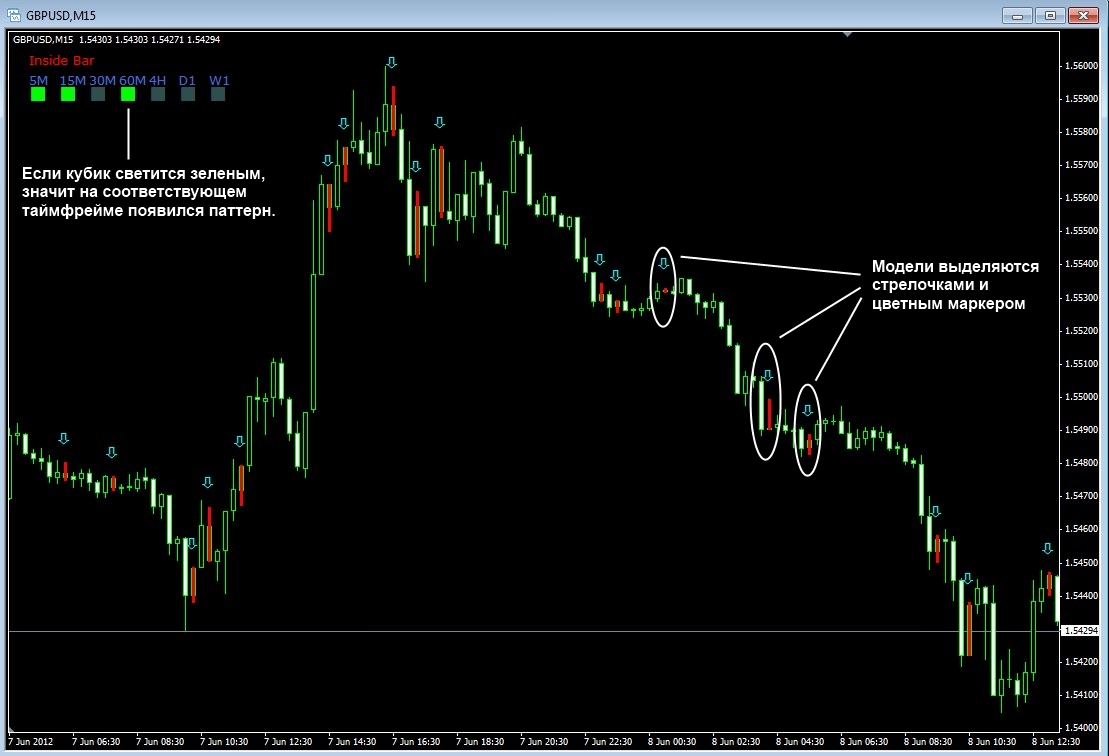
Since we have several indicators, I put together a template (called "price action patterns") that allows you to monitor the readings of all three indicators. Moreover, this template turns the chart into a kind of mini information window. It looks like this:
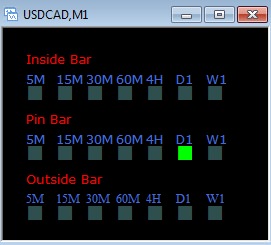
It is enough to hang the template on the chart of each of the currencies you trade, and as a result we get a minimized information panel that will let us know about the appearance of patterns on one of the timeframes (I remind you that the indicators track all patterns). You can read about installing and using templates in this instruction.
Description of settings
I will not describe the parameters for each indicator separately, because they mostly repeat. There are also settings for the nuances of identifying setups, and I will not go into those either: beginners have no need to change these add-ons, and advanced traders will figure them out without me.
barsback - how many recent candles to scan to find Price Action patterns
arrows - turn arrows on/off on the chart when a setup appears
arrowsize - size of the arrows
bullarrow, beararrow - color of bullish and bearish arrows respectively
paintbar - turn candlestick combination coloring on/off
barthickness - transparency level of the colored candles
bullishcol, bearishcol - coloring color for bullish and bearish signals respectively
alarm - turn sound alert on/off when a Price Action setup appears
sound - audio file for the alarm parameter. It must be located in the sounds folder of your terminal. You need to specify the file name together with the extension. For example Tick.wav
alert - turn the notification pop-up on/off when a setup appears
m5, m15, m30, m60 - the ability to disable pattern search on some of the timeframes
dist - distance between the squares signaling the appearance of patterns on other timeframes
oX, oY - left and top offsets for the indicator info panel
Download Price Action indicators

Best regards, Andrey aka topepo241 Tlap.io
Download free Price Action pattern indicators with no registration: pin bar, engulfing pattern, and inside bar.