PipSwinger Expert Advisor - Safe Martingale?

Hello, friends! Many of us are attracted by the high profitability of forex expert advisors based on martingale, but some traders are frightened by the potential danger of losing most of their deposit when trading with such robots. The developers of PipSwinger tried to combine all the advantages of using martingale in automated trading, while at the same time greatly reducing the probability of losing funds in the account with the help of the unique The Martingale Disrupter™ technology.
Characteristics of the PipSwinger expert advisor
Platform: Metatrader 4
Expert advisor version: 1.34
Currency pairs: any, the authors use GBPUSD, AUDCAD, AUDNZD
Timeframe: H1
Operating time: Around the clock
Recommended brokers: Forex4you (Cent-NDD accounts), Tradefort (Flex accounts)
What is martingale ?

I would like to start with an explanation using an example of the principle of using such a technique in trading as martingale.
Let us look at the use of martingale using roulette as an example. Imagine a roulette wheel where you can place bets only on red/black.
So, we bet 1$ on black.
Red comes up.
We lost. We bet 2$ on black.
We lose.
We bet 4$ on black again and lose again.
We bet 8$ on black, black comes up, and we recover all our previous losses, even remaining with a small profit. Naturally, in reality casinos have limits on the maximum bet, and online establishments use scripts that will make any "smart guys" lose in any case (I used to own an online casino, so I know what I am talking about). But I think you understand the principle itself.
The PipSwinger expert advisor tracks series of buy and sell orders separately. In the example below we are talking about buys, but for sells everything is the same, only the lot increases not when the price falls, but when it rises.
So, let us imagine that the PipSwinger expert advisor opened a buy order with a 0.01 lot at a price of 1.0000. A take-profit of 40 points is set at 1.0040.
The price goes down, our position is in the red, but still open. When the price goes down 40 points to 0.9960, the expert advisor opens another buy order, but now with a 0.02 lot. The take-profit of both orders is set at the opening price of the first order.
The price goes down again, our two orders are in the red, but still open. When the price goes down 40 points from the opening point of the second order, to 0.9920, PipSwinger will open another buy order, now with a 0.04 lot. The take-profit of all orders is moved to the opening price of the previous (second) position - 0.9960.
This time the price goes up by 40 points and all 3 positions are closed at 0.9960. Due to the 0.04 lot on the last order, we remain in profit, despite the fact that the first position closed at a loss, the second closed at breakeven, and the third brought 40 points.
The Martingale Disrupter™

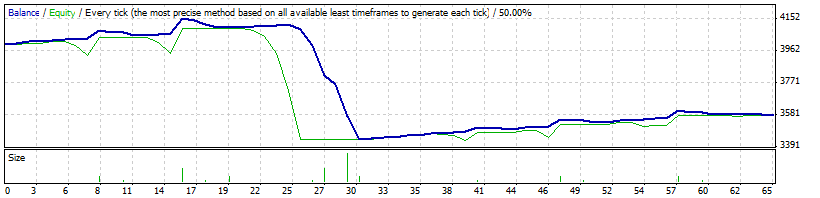
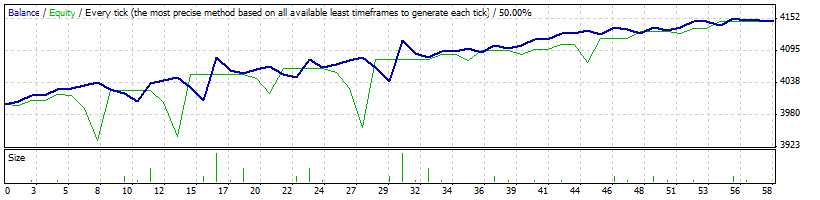
Since the forex market quite often shows strong one-way movements, and we are limited in margin, we do not want the lot doubling to happen quickly and sharply, as this may lead to a loss of the deposit. And starting from the 3rd or 4th step (depending on the settings), the expert advisor applies various elements of the risk-reduction technology The Martingale Disrupter™. You will see different order sizes in the grid, not always following a doubling pattern, and positions may also close before the take-profit. All this is needed in order to "slow down" the martingale component of the expert advisor, make it less aggressive, and reduce the overall risk.
Of course, the danger of losing the deposit still remains, but it is much lower than without the reduced-risk technology.
A graphical example of the expert advisor's behavior without the reduced-risk technology:
With The Martingale Disrupter™ applied:
Monitoring of real accounts
First of all, when analyzing expert advisors I pay attention to the presence of monitored accounts. In the case of PipSwinger we have accounts that have been operating since 2010 and continue to this day, while showing decent profitability. Do not focus on the drawdown, because compared with the initial versions, the expert advisor's algorithm is now much safer.


Backtesting
On historical data the expert advisor behaves quite predictably: profitability is not high, but the growth curve will not make you worry too much either. And for many people peace of mind is an important point.
GBPUSD 2009-2012
-clickable-
AUDCAD 2009-2012
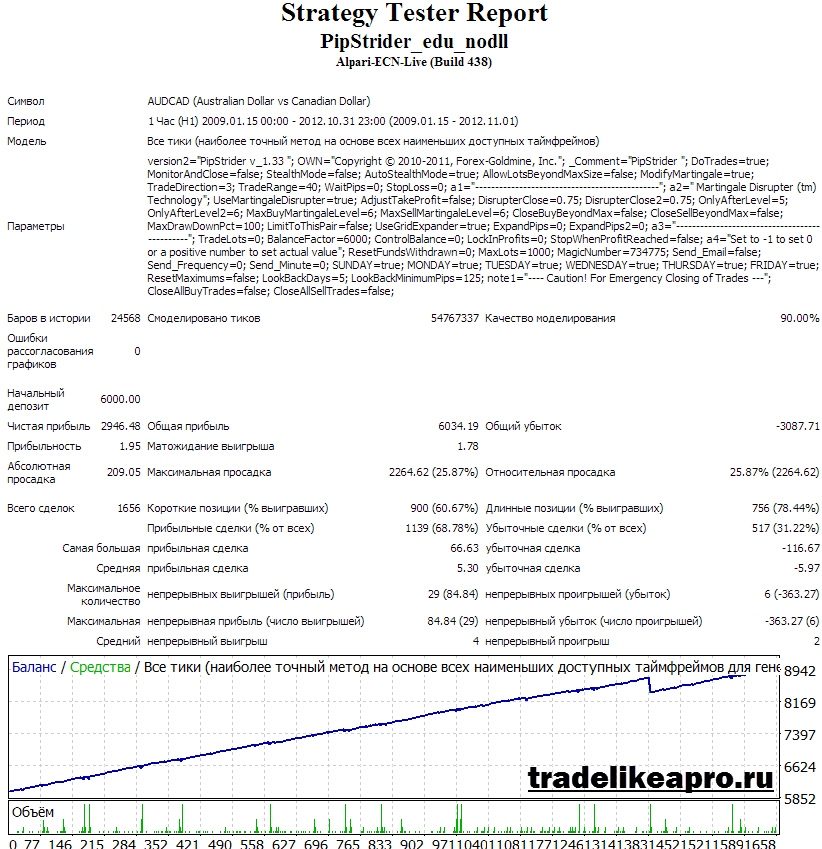
-clickable-
AUDNZD 2009-2012
-clickable-
Installation
Installing the PipSwinger expert advisor is not difficult, just follow the instructions in the article FAQ on trading with expert advisors. If you are not very familiar with automated trading, I advise you to watch the video course Forex on Autopilot.
P.S. do not forget to set your balance in the expert advisor settings (see the settings description below)
Recommended money management

Since the expert advisor, although with reduced risk, still uses martingale, you need to approach the selection of the correct starting capital size very carefully. The table below shows the recommended minimum deposit values for different account types. The values are given for 1 pair, that is, if you want to trade two pairs on one account, then the amount from the table must be multiplied by 2. If you trade three pairs, then by 3. And so on.
Description of the PipSwinger expert advisor settings

Although there are a lot of settings in the PipSwinger expert advisor, a beginner trader does not need to change anything except BalanceFactor.
DoTrades - allow/forbid opening new positions.
MonitorAndClose - when this function is enabled, the expert advisor will stop trading after the positions reach take profit.
StealthMode - if set to true, the broker does not see the profit target levels used in trading. But nevertheless they are controlled by the expert advisor at the software level.
AutoStealthMode - automatically enable StealthMode before weekends to avoid possible losses from price jumps (gaps) at market open.
AllowLotsBeyondMaxSize - a setting for very large accounts, when activated, when a position reaches the broker's maximum lot limit, the expert advisor will open several orders to bypass this restriction.
ModifyMartingale - when this parameter is enabled, the lot starts doubling only from the 3rd leg, not from the second.
TradeDirection - 0=open both sell and buy positions simultaneously, -1=sells only, 1=buys only, 2=alternate buys and sells. 3=decide what is currently better based on the expert advisor's internal algorithm.
TradeRange - the take-profit level and at the same time the level for opening the next leg (see the martingale operation description above). If set to 0, the expert advisor will determine this level itself based on ATR.
WaitPips - if a value greater than zero is set, the expert advisor will wait until the price moves X points against the possible position before opening an order.
StopLoss - the ability to set a stop-loss, disabled by default.
UseMartingaleDisrupter - enable/disable the risk reduction technology.
AdjustTakeProfit - enable/disable accounting for accumulated negative swaps when closing a series of orders.
OnlyAfterLevel - from which leg MartingaleDisrupter will start working.
DisrupterClose - which multiplier to apply to take profit after the primary activation of MartingaleDisrupter (OnlyAfterLevel)
OnlyAfterLevel2 - from which leg MartingaleDisrupter will become more active.
DisrupterClose2 - which multiplier to apply to take profit after the secondary activation of MartingaleDisrupter (OnlyAfterLevel2)
MaxSellMartingaleLevel and MaxBuyMartingaleLevel - the maximum allowed number of martingale legs for selling and buying.
CloseBuyBeyondMax and CloseSellBeyondMax - when these parameters are enabled, after reaching the maximum leg and another N points, the advisor will close all positions at a loss.
MaxDrawDownPct - an option to limit the maximum drawdown in percent.
LimitToThisPair - when the MaxDrawDownPct parameter is in use, count the drawdown only for one pair (true) or for the entire account (false).
UseGridExpander - when enabled, PipSwinger will gradually expand the grid for opening new orders after MartingaleDisrupter is activated.
ExpandPips and ExpandPips2 - by how many points to widen the grid during the primary and secondary activation of MartingaleDisrupter.
TradeLots - an option to change the size of the first order in a series. If set to zero, the advisor will determine the required size itself.
BalanceFactor - the balance of your account. Do not forget to change this parameter in accordance with your deposit.
ControlBalance - enter your balance here if you want to withdraw profit at certain levels in accordance with the next three parameters.
LockInProfits - the amount you want to withdraw from the account each time. This setting is needed so that the advisor subtracts this amount from the account balance when calculating the lot size.
StopWhenProfitReached - stop trading and close all positions when the funds in the account reach the sum of the ControlBalance and LockInProfits parameters.
MaxLots - if ControlBalance is enabled, you can set a limit on the maximum number of lots when using this method.
MagicNumber - the identifier for the advisor's trades.
Sunday, Monday, Tuesday, Wednesday, Thursday, Friday - turn trading on/off on specific days of the week.
ResetMaximums - an option to erase from the advisor's memory the data on the martingale legs that have been reached.
LookBackDays - the number of recent days for analysis when the TradeDirection parameter equals 3.
LookBackMinimumPips - the minimum number of points that the price must travel over the last X days from the LookBackDays parameter. If the movement range is smaller than this value, the number of days for analysis is increased.
CloseAllBuyTrades and CloseAllSellTrades - an option to close all buy trades and all sell trades respectively.
Trading Recommendations
As with other martingales, I highly recommend studying the post 9 rules for working with dangerous expert advisors. All the advice from that article is also relevant for PipSwinger. Perhaps the most important point is the systematic withdrawal of profits. The authors themselves recommend the following scheme: withdraw half of what you earn every month, and leave the other half in the expert's turnover. Quite a good idea.
Conclusion

PipSwinger is quite a noteworthy expert advisor and can serve as a good expert for diversifying your portfolio of automated systems (of course, use it only on a separate account); the reduced martingale risks will also be an important advantage for many. Personally, I find this bot likable, and although it will not bring any super-profits, it does inspire a certain confidence.
Can PipSwinger blow the deposit? It can. Under certain circumstances, like any other martingale bot, PipSwinger can lead to the loss of the deposit. As an example, you can run the GBPUSD pair in the tester for 2008 and see everything for yourself. Yes, of course, that year was the height of the crisis, but who said that something similar will not happen again? Therefore, do not forget the rules for working with martingale and withdraw what you earn every month.
Important !!!
For the advisor to work correctly, the trading terminal must be turned on from the market opening on Sunday evening until it closes on Friday evening. If you do not have the ability to keep your computer running 24/5, then I advise using a VPS server service.
Download the PipSwinger advisor