
Review of the Most Popular Platforms for Forex Trading
 Trading terminals or platforms are special programs with which forex traders execute their trades. At the moment, this is the simplest and fastest way to trade. Traders moved away from phone trades back in the last century, when it became clear what broad functionality, speed, and quality of order processing internet trading provides. There are now more than a dozen different programs and applications for trading on Forex, and these are only the most popular ones. How trading terminals differ and which one is optimal for effective internet trading is the subject of today’s material.
Types and Features of Trading Terminals

Trading terminals can be either universal or intended for some specific type of trading. For example, there are trading platforms suitable for any market. There are also terminals designed exclusively for stock exchange trading, and only through a specific broker. Forex traders, of course, are not interested in such platforms.
All trading terminals for forex trading can be divided into the following categories:
- Client platforms. To start trading on such a terminal, you will need to download and install it on your computer. Thus the trader becomes "tied" to the workplace, but it is precisely such platforms that have maximum functionality, and most of the additional trader toolkit (custom indicators, trading robots) can be installed only on them;
- Web terminals. Trading platforms that open directly in the browser. You can log into them from any device, you just need to sign in. In the future, thanks to cloud technologies and, perhaps, blockchain, such platforms will not be inferior to client ones in any way and will become objectively the best; however, at the moment their functionality is rather meager, and the terminals are often suitable only for intermediate control of the trading process;
- Mobile platforms. These are applications installed on a smartphone or tablet, allowing you to always stay aware of the state of your trades, and they also have basic functionality for trading. They are convenient in non-standard circumstances, but few traders use them as their main trading terminal.
In addition, there are special platforms, for example, for passive investing or for copying the trades of other traders. The functionality of such terminals is tailored to a specific operation, so in its own league such a platform will be better and more convenient than a universal one.
Let us look at several of the most popular trading platforms in all categories.
The Most Popular Platforms for Forex Trading

At the moment, most forex traders prefer client terminals. Despite the next version having been released about 7 years ago, MetaTrader 4 still holds the lead in this category.
MetaTrader 4

The most popular terminal for trading on Forex. Practically every broker provides it to its clients; otherwise traders move to the company that can provide this platform for work.
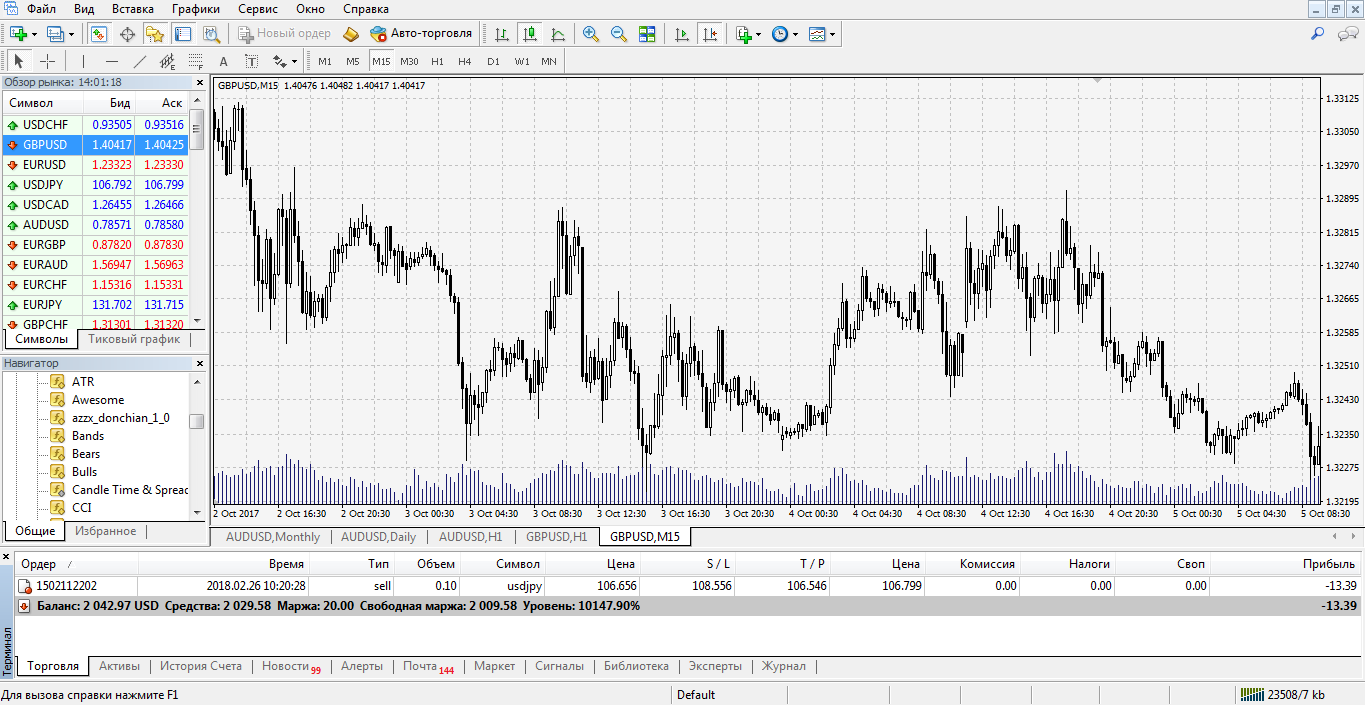 The terminal is easy to master, and even beginners in trading, though confused at the first launch, can study all the nuances of the platform after just a few hours of active use.
Most of the terminal is occupied by the price chart (if desired, it can be reduced or even collapsed altogether). Various graphical drawings, technical tools, and indicators can be overlaid on the chart, with a wide selection presented in the standard package. In addition, extra indicators can be loaded onto the platform, as well as various expert advisors and automated trading systems. Most of the tools can be installed on the chart by selecting them in the corresponding tab of the top menu.
To the left of the chart is a quotes screen for all assets available for trading. The chart of any currency pair or CFD from the list can be opened in a separate window; you can also open a trade at the market price with one click or place a pending order. Under the quotes window is the platform navigator, where all terminal functions are listed. Most often this window is used to install and configure custom indicators and expert advisors.
At the bottom of the platform is the orders window. Here there is information about all trades, both active and pending. You can also view the trading report for the selected period, the news feed, and other additional information.
MetaTrader 4 is valued for its versatility and flexibility; it is hard to find another terminal for trading on Forex with the same ergonomics and functionality.
MetaTrader 5

The fifth version of the trading terminal from MetaQuotes differs only very slightly from the fourth; perhaps that is why the overwhelming number of traders still stick with MT4 and are in no hurry to move to a newer version. Nevertheless, the fifth MetaTrader also has its own features and advantages.
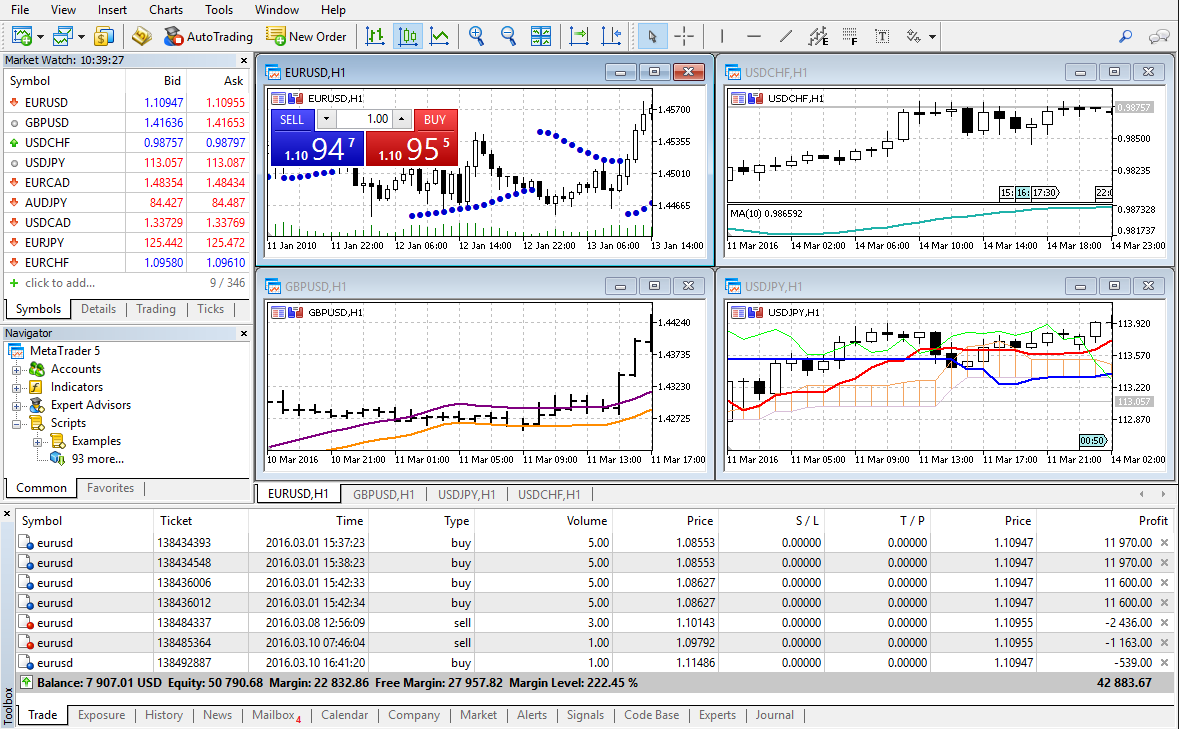 In terms of interface, the differences between MT5 and MT4 are minimal. The top panel has been changed slightly, and additional tabs have appeared in the quotes window; otherwise, this is still the same MetaTrader 4.
However, new functions were added to some old tabs and windows:
- In the quotes window ("Market Watch"), in addition to the asset list and the tick chart, there is now an opportunity to view details on a specific trading instrument, as well as to trade with one click without opening the chart;
- Even in the basic version of the platform, the user has the opportunity to start automated trading with the help of an expert advisor or script;
- An economic calendar has appeared in the lower window, as in the MT4 web terminal;
- In the "Navigator" there is now an opportunity to quickly choose and rent a VPS server (directly through the terminal, without going to other sites; for more details, see this article);
- The chart now has the ability to view the depth of market;
- A separate freelance marketplace has been developed for the platform, where you can order the development of your own trading robot. The security of cooperation and arbitration is ensured by MetaQuotes.
Even when opening a trading account, the trader chooses the type of trading: netting or hedging. The second type is the MT4-style trading you are used to, with the ability to enter several trades on the same asset. When choosing netting, all trades will be combined into one, which is closer to exchange realities but makes trading several strategies at once more difficult.
However, all the listed features are not enough for most of the trading community to switch from the penultimate version of the MT platform to the latest one. Especially since add-ons are still being developed for MT4 (in particular, several years ago one of MT5’s main functions, one-click trading, was also transferred to MT4).
Mirror Trader

Mirror Trader is considered one of the best platforms for social trading. It is mainly used to copy the trades of other traders (signal providers). However, each user can trade independently or make any changes to trades and close them at any moment. In addition, the trader can become a provider himself and earn commissions from subscribers (users who open profitable trades based on his signals).
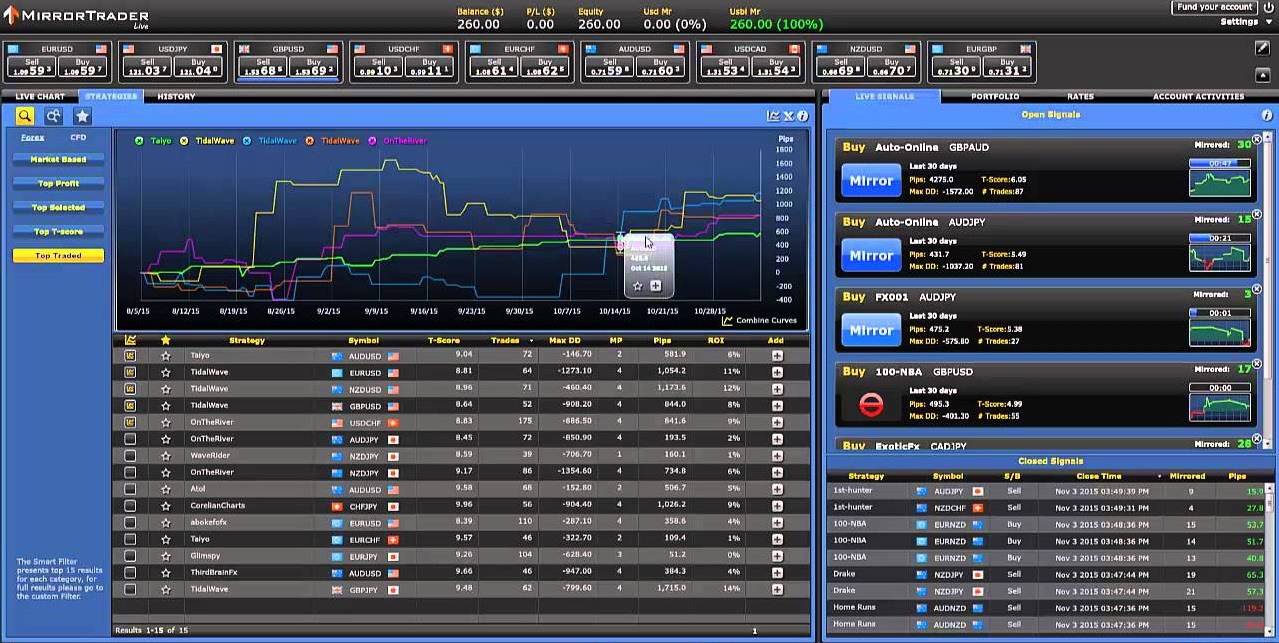 Mirror Trader's functionality is not as broad as that of MT4. In the main window, located on the left side, you can choose either the display of a live chart or a list of suggested strategies. On the live chart, independent trading is conducted; you can set any timeframe and install additional technical analysis tools. In the strategies tab, the user selects a ready-made trading system from those offered. Then the user becomes a subscriber to the strategy, and based on the signals of the selected strategy, trades automatically begin to open in the trading account.
There are also several tabs in the right window. The main one, "Signals," allows you to receive specific signals from strategies, choosing only those that the user considers truly promising. Each signal comes with brief information, such as a description of the strategy. There you can also manage the signals, open and close trades based on them, and make changes. In the same window, in other tabs, you can view the portfolio of selected strategies, trade history, and other information.
At the top of the terminal there is a panel of quotes changing in real time.
The Mirror Trader platform is excellent for social trading, but few people use it as their main terminal.
Ninja Trader

Ninja Trader is another universal trading platform, and to trade on it you need to install a client program. This terminal has even broader functionality than MetaTrader 4, but it is much more difficult to master. Through Ninja Trader you can trade not only on Forex, but also on stock and commodity futures markets, so this terminal is mainly provided by brokers covering several financial markets at once.
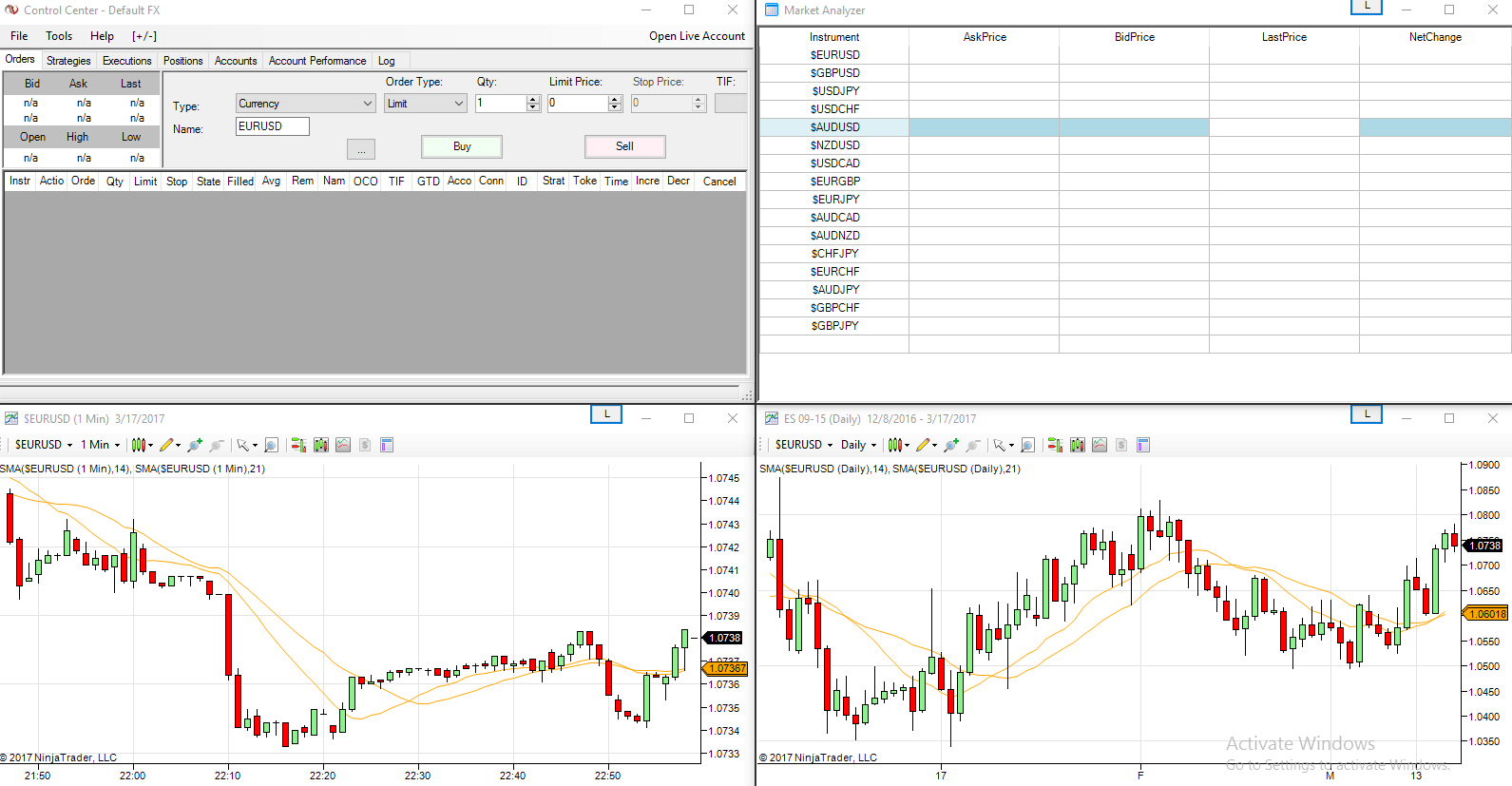 By default, after installation, four windows open in the terminal, but the main one is the upper left. Through it you can carry out all the basic operations: chart setup, opening and closing trades, trade monitoring, and so on. The other three perform an auxiliary function, providing analytical information.
In the main window, the primary tab is "Orders." Here the trader can choose a market (some brokers offer several for trading) and a trading instrument. Next, the chart is displayed in the window, and after conducting a preliminary analysis, the trader can open a trade. Open orders will be displayed there as well, allowing the trading process to be controlled in one window. In the same window you can view all trading account data; all the main information is located in the "Account Work" tab.
The additional "Market Analyzer" window provides the main price movement parameters over a certain period, such as the low and the high, as well as readings of the Stochastic, a moving average of a certain period, and others. The same things, but in graphical form, can be seen in the "Forex Chart" window. This is a standard live chart on which you can choose the display of any asset, configure the main parameters, and also install any indicator from their main package.
The ability to flexibly configure the interface allows you to arrange the windows in any order and also change their size as is convenient for the user. After mastering the platform's functionality, the trader gets a powerful analytical tool, suitable for trading in several markets at once.
MetaTrader 5 Web Terminal

The online version of the MT5 platform includes all the main functions of the original terminal but, for objective reasons, is deprived of some capabilities, such as installing custom indicators and robots.
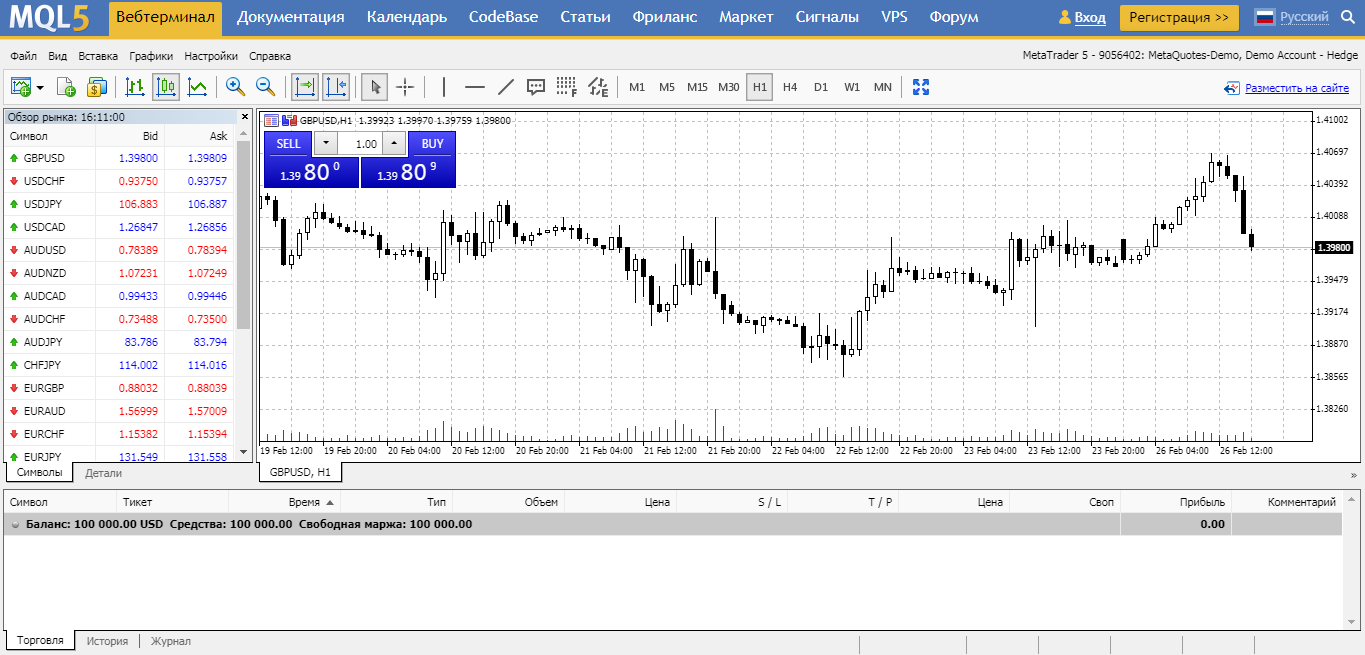 The main part of the trading platform consists of a live chart, on which you can install basic tools, a quotes window, and order panels, just like in the original MT5. In addition, in the service you can track the economic news calendar, and also download indicators and expert advisors for the client version of the terminal.
cTrader

The cTrader trading terminal is in many ways similar to MT4 and MT5, but it has several original "features." Thanks to these characteristics, the platform, although less popular, has its own circle of admirers.
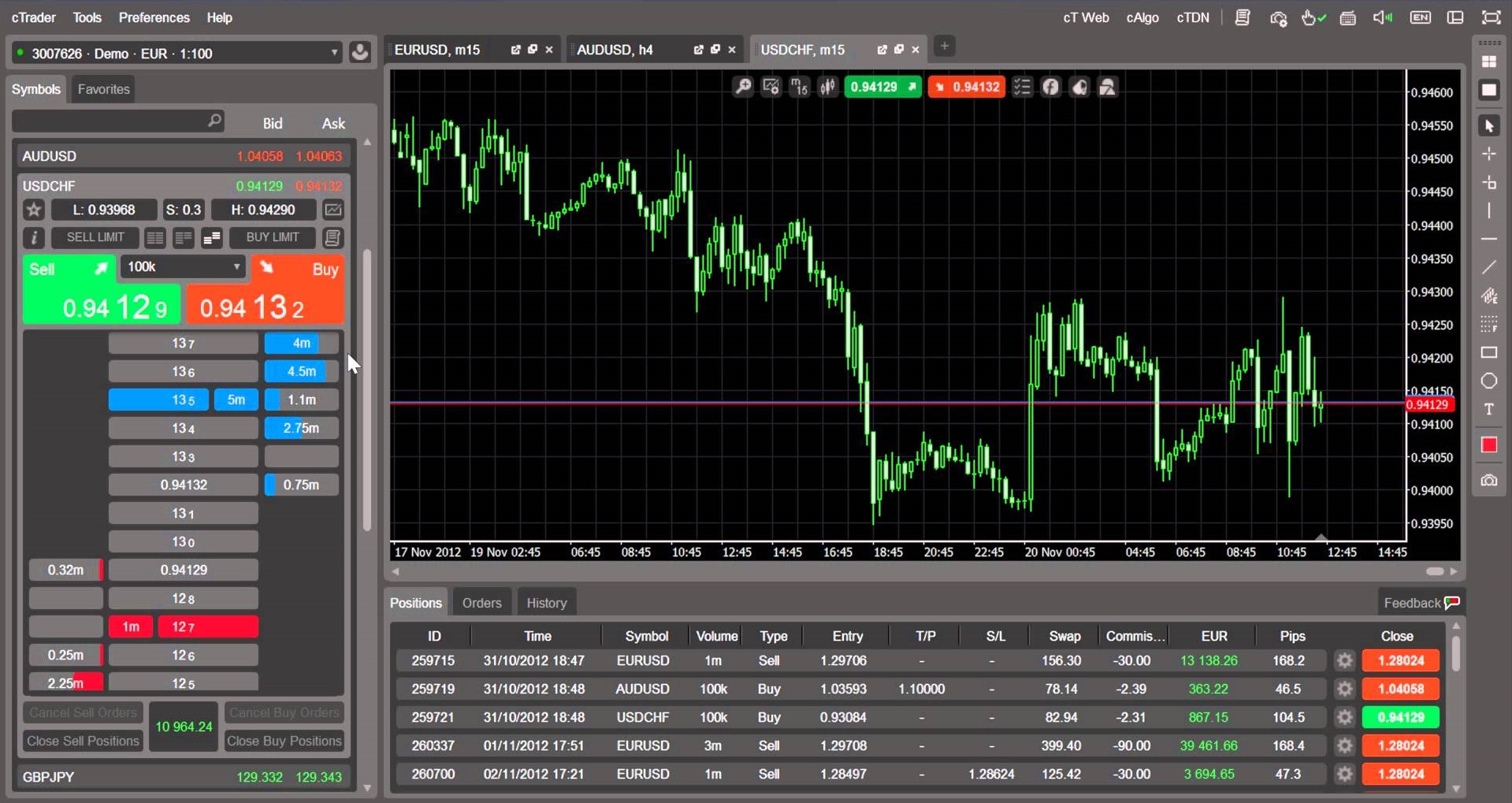 The terminal is in many ways similar to the client versions of MetaTrader, but at first glance the interface seems even simpler, and the design more stylish and pleasant. The chart window and the list of orders on the right side of the screen are very similar in design and functionality to their MetaTrader counterparts, while the left window with the market overview and list of assets has significant differences.
First, in the quotes window you can immediately view the order book, and in several display variants at that. Such a feature is already provided in MT5, but is absent in MT4. Second, through this same window you can work using the quick trading function, opening trades in one click without opening additional windows.
In addition to the main display style of the platform, several alternative ones are provided, for example, without the left instrument window. If desired, trading can be conducted using only the chart, although this narrows the possibilities for analysis.
Most of the functions are available through the top menu, just like in MT terminals. From there you can choose the platform view, configure an indicator or another technical tool. A detailed list of instruments is displayed to the right of the chart.
cTrader is a convenient and functional terminal with a pleasant design that is popular in a narrow circle of admirers. The only thing preventing it from reaching a larger audience and becoming the main trading platform for Forex traders is the fact that MetaTrader entered this market much earlier and had already managed to offer traders everything they needed.
Which terminal is better?

In addition to the trading platforms discussed above, there are many other trading terminals, including mobile MT, the social trading platform ZuluTrade, and others. However, the functionality of the mobile version of MT4 is similar to the online terminal, and ZuluTrade, in the opinion of many traders, is inferior to Mirror Trader as a social trading platform.
Despite the fact that most traders would unequivocally name MetaTrader 4 as the best Forex terminal, each of the platforms discussed above surpasses the others in some way. MT4 is the golden mean, suitable for almost any trader and for any trading style.
However, for traders who prefer to copy the trades of professionals, the Mirror platform is better suited (despite the fact that MetaTrader also has a similar extension based on MTQL). Those who want to trade not only on Forex but also on the stock exchange, and through a single broker while keeping everything under control in one terminal, cannot do without Ninja Trader.
Respectfully, Aleksey Vergunov TradeLikeaPro.ru