
Ilan Nikolaus Is No Kolyan, or Martingale Without Blowups
 Hello, ladies and gentlemen forex traders!
Is it possible to make money with martingale and not tremble over it every day, fearing a blowout? It is. Since 2013, many users on our forum have been testing/using monkey-style EAs from the Nikolaus family. The well-known Ilan 1.6 was taken as a basis and fundamentally reworked: the EA trades buys and sells simultaneously from one or two charts (depending on the modification), and a number of useful order-management functions were added, such as a variable step for building a flexible order grid resistant to prolonged one-way moves, plus a few other things.
A little later, our programmers (big respect to forum member LeoK) improved this expert a bit more and made it more convenient and practical to use while preserving the author's trading logic. The result was the Ilan1.7Refact EA, and today it is in our review.
EA Characteristics
Platform: Metatrader 4
EA version: 1.7
Currency pairs: EURUSD, GBPUSD, AUDUSD, EURJPY
Timeframe: M5
Operating time: around the clock
Recommended brokers: Forex4You, Roboforex
Installation Guide

The EA is installed according to the standard instructions. A fundamentally important point is that the EA trades buys and sells simultaneously. In addition, the expert that can be downloaded in this post already has different magic order numbers specified in the settings, so the user does not need to change anything (different magic numbers are needed so the bot correctly manages sell orders and buy orders without confusion).
EA Strategy

Ilan-Nikolaus is a modification of the well-known EA that uses the martingale principle. The EA trades buys and sells simultaneously from one chart of the instrument. As with all Ilans, readings of the RSI oscillator are considered for entering a trade. After installing the EA and allowing it to trade, after some time (maybe 15 minutes after launch, sometimes almost immediately) it opens a pair of buy and sell orders. The picture will look like in the screenshot below:
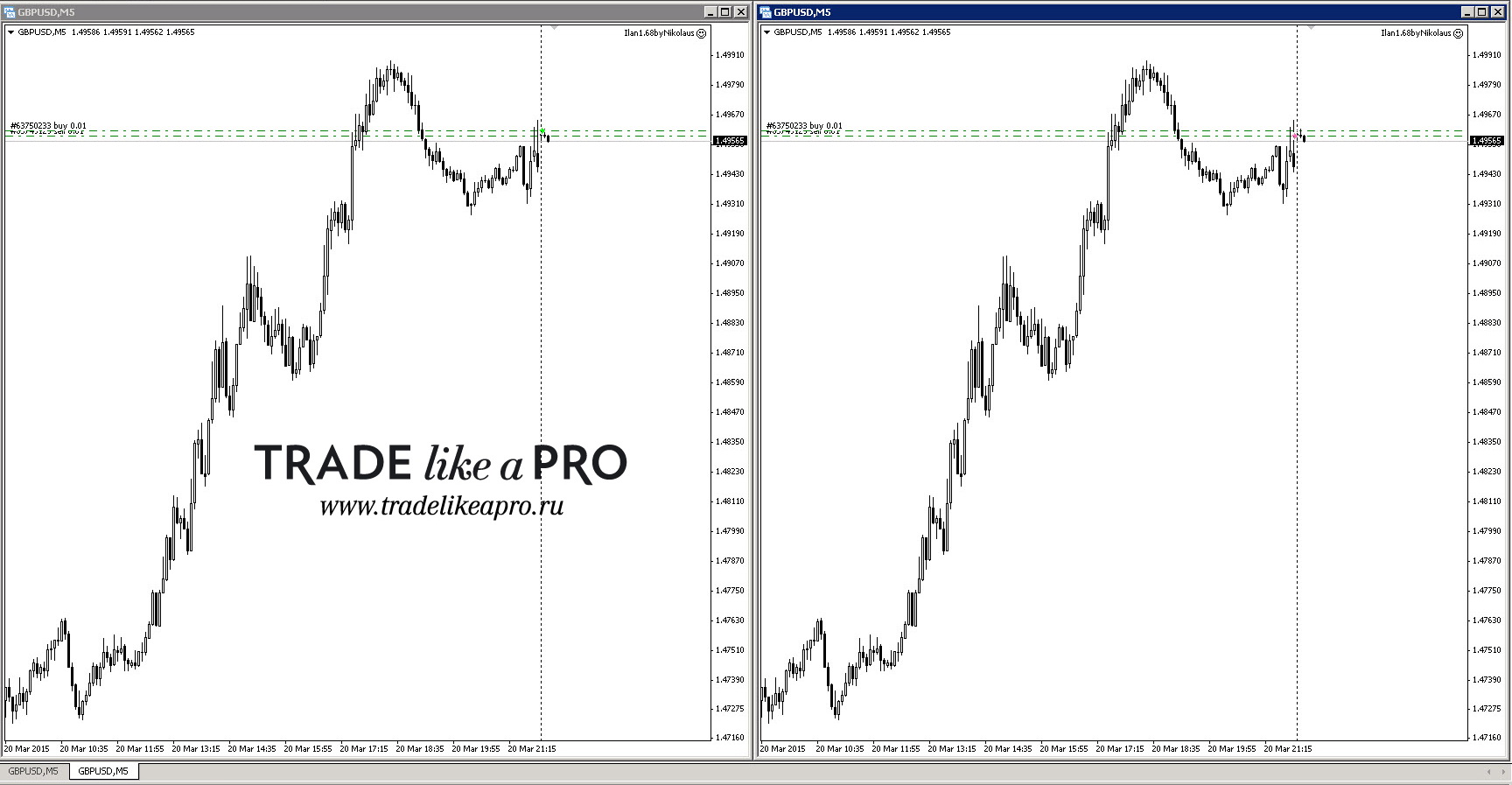 If the day turns out to be very flat, with no clear movement in either direction, and the price does not reach the level specified in the settings for opening the next order, then the pair of buy and sell orders will hang there all day.
An important feature is that initially the orders do not have stop loss or take profit instructions. Then, depending on where the market moves, up or down, the EA begins opening new orders against the trend: if the movement is upward, the EA sells; if the movement is downward, the EA buys. Here everything is like in all martingales, with no exceptions. And already in this case, from the second order opened against the trend, a take-profit instruction appears. Further, as soon as a price pullback occurs, the EA closes the order or orders according to the take profit, and it is again left in the market with a pair of buy and sell orders without a stop instruction and take-profit instruction. As in the screenshot below:
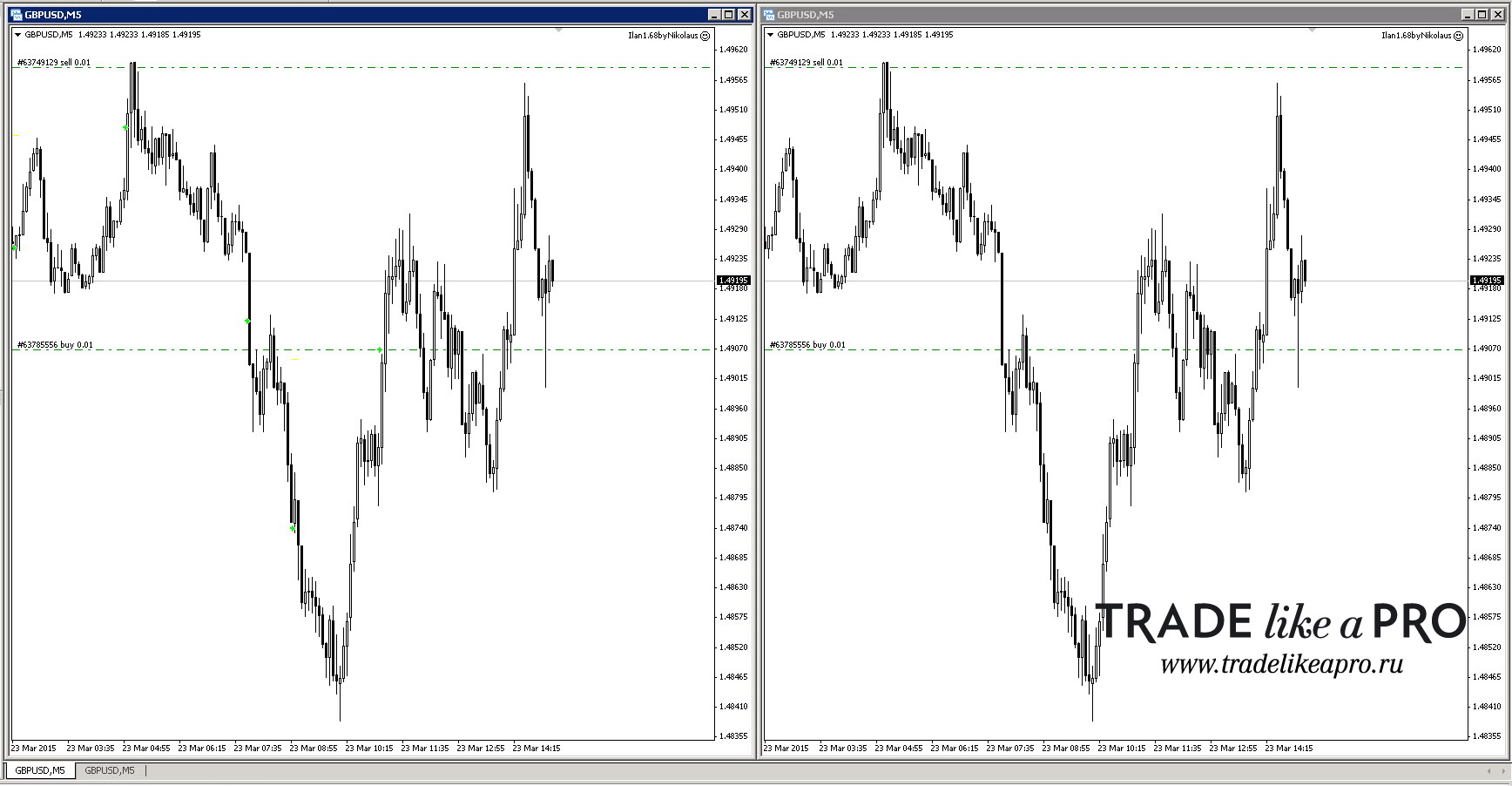 Next, the EA will repeat all of the actions described above on the new trend.
Please note that after the EA closes the order grid, the step between the buy-sell orders has increased. And this will happen every time after the grid is closed. The spacing between orders depends on market volatility and can reach 50-70 points. And after that, to "swing" the EA, you will have to wait for greater volatility. Sometimes, after very strong moves, this also happens, an example with two orders that are 150 points apart:
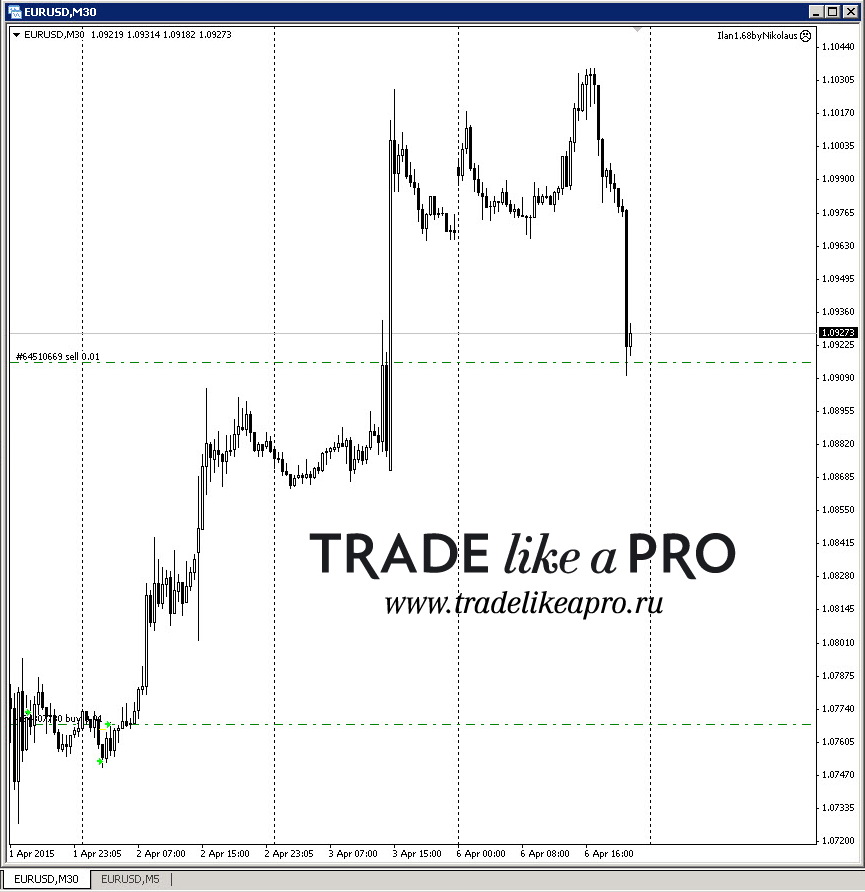 What should be done in such a case? Either close both of these orders, usually in a profitable lock, and restart the EA from scratch, or wait for an even bigger move in the market. This is a fundamental feature of all Nikolaus EAs. Therefore, when we analyze the EA Backtests block, you will understand that historical tests will differ from trading where you can or need to intervene manually from time to time, and sometimes quite significantly. The EA starts increasing the lot from the third order, while the first and second orders go with the lot set in the settings, which is a very important detail. A similar feature is used in the Forex Setka Trader EA, for example.
The EA implements an option for a variable step between orders. In addition to setting the distance from the opening of one order to the opening of the next, the user can choose the order from which to start and specify how many points need to be added to the accepted step. This option is very necessary and useful, especially during strong one-way moves without pullbacks. An example of how the variable step between orders works, with comments in the screenshot.
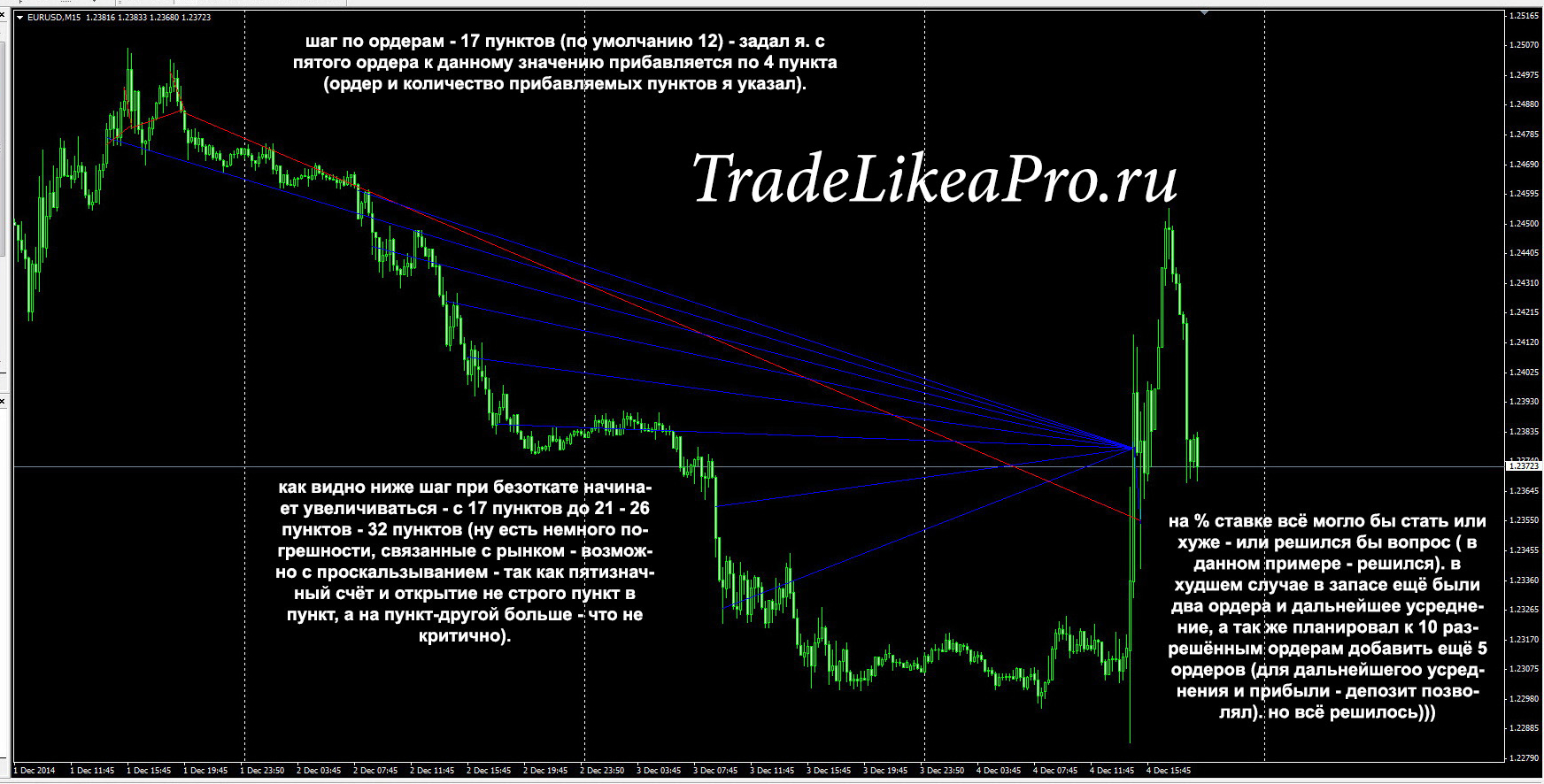 Another example of the EA at work. Blue lines mark buy orders, red lines mark sell orders. As can be seen, during a good downward move the EA built a grid of buy orders, while on the other side there was a sell order hanging without stops or takes, and it collected many hundreds of points of profit, compensating for the growing drawdown on the buy grid.
Currency Pairs

The currency pairs are the most famous and widespread ones: EURUSD, GBPUSD, AUDUSD, EURJPY. Pay attention to spreads: the smaller, the better; pay attention to leverage: the higher, the better. Theoretically, you can try other instruments as well. Here is an example with the "boys' cross," the GBPJPY pair. Since for this instrument flying a thousand points is no difficult task at all, the main step between orders is set to one hundred old points, and starting from the fourth order another 50 points of expansion is specified in the settings, meaning the step will then be 150-200-250-300 points and so on. I remind you that in this case you need to set the step to 1000 points if you have a five-digit account; for a four-digit account you only need to set 100. If you set a step of 100 on a five-digit account, it will open a new order every 10 points, because 10 old points on a 4-digit quote are 100 new points on a 5-digit quote.
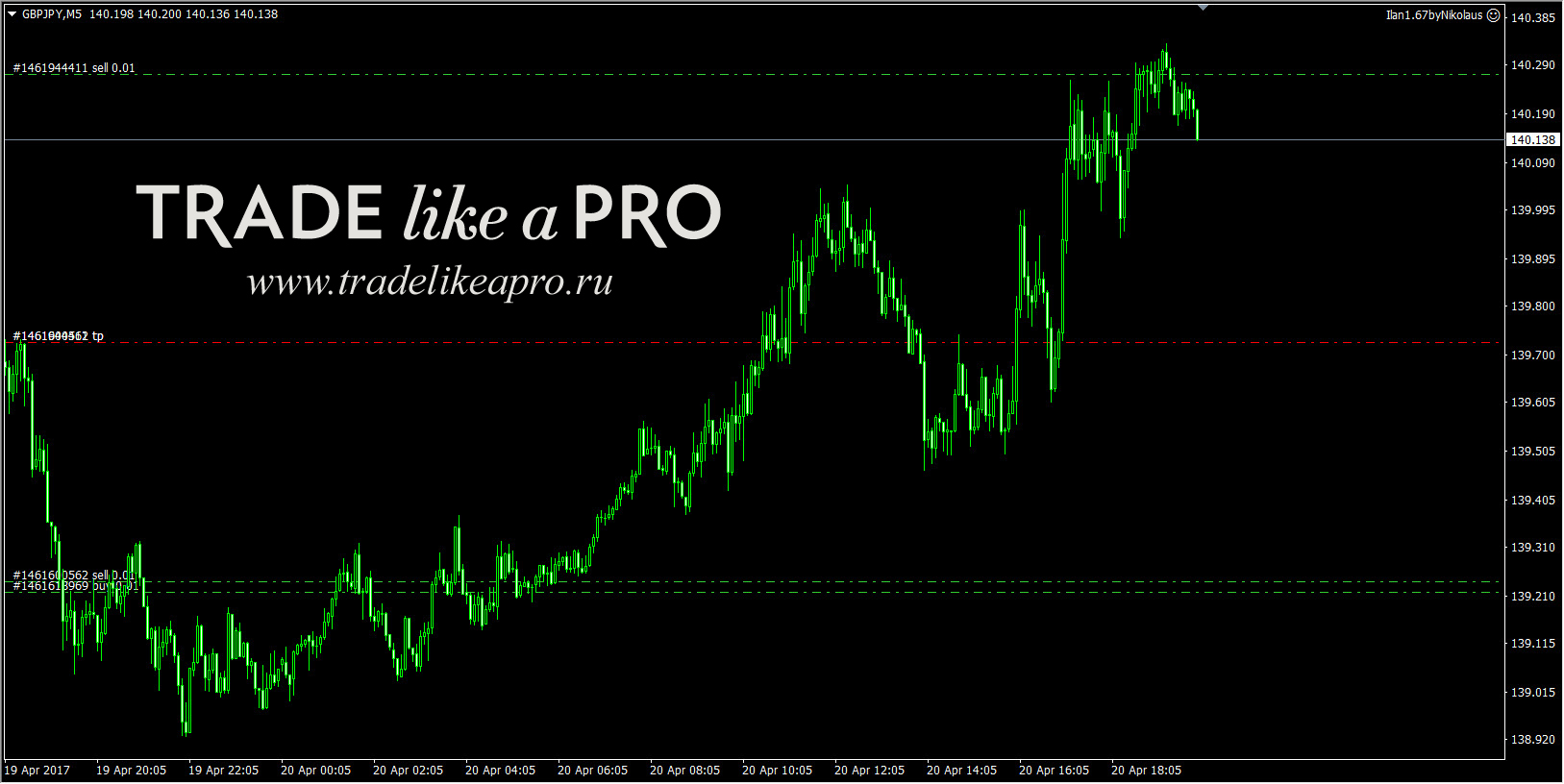 After opening two orders without stops or takes, the EA waited for a movement of 100 points to open a new order. As soon as the price passed the movement specified in the settings, the second order was opened and the take-profit instruction appeared.
Then the price covered the distance to the take profit, the grid was closed, and again there were two orders at work.
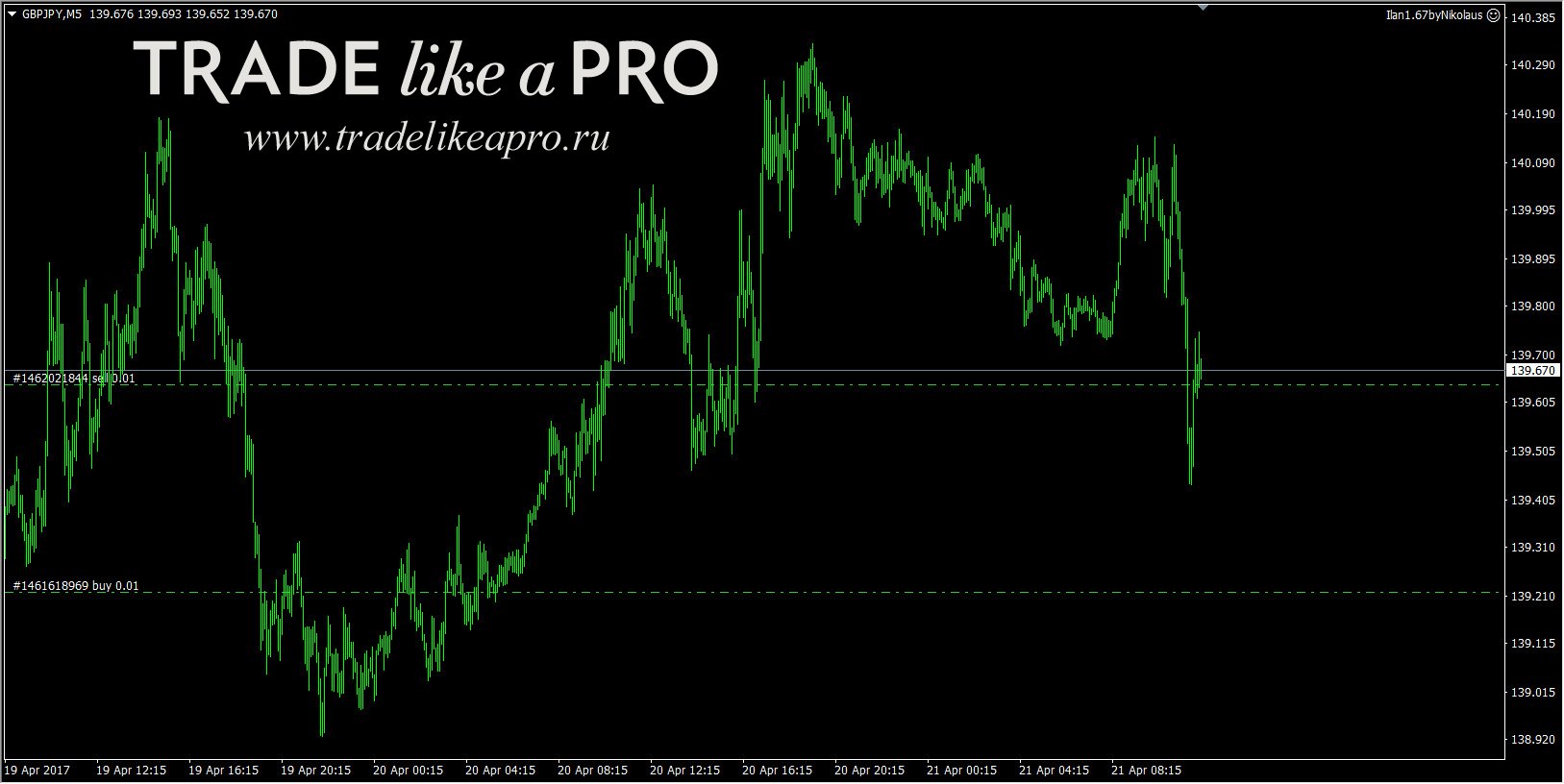 In other words, no one forbids you from trying something new and conducting an experiment.
The EA and News

There are many different contradictory statements on this subject: some people disable EAs during news releases, some do not. So what should be done? Below several different news situations will be presented; surely many of them will be very familiar to you. Some made money on this, while others, on the contrary, lost. First of all, we are interested in the question of how Nikolaus copes with news.
As a rule, during news there is increased volatility: currencies can fly several hundred points in one direction, with a subsequent return or no return back at all. Brokers thoughtfully widen spreads, and if orders are opened at all, they slip, and stop instructions, if they are not set very far away, are guaranteed to trigger. And an EA without stops trades...
10.07.2013
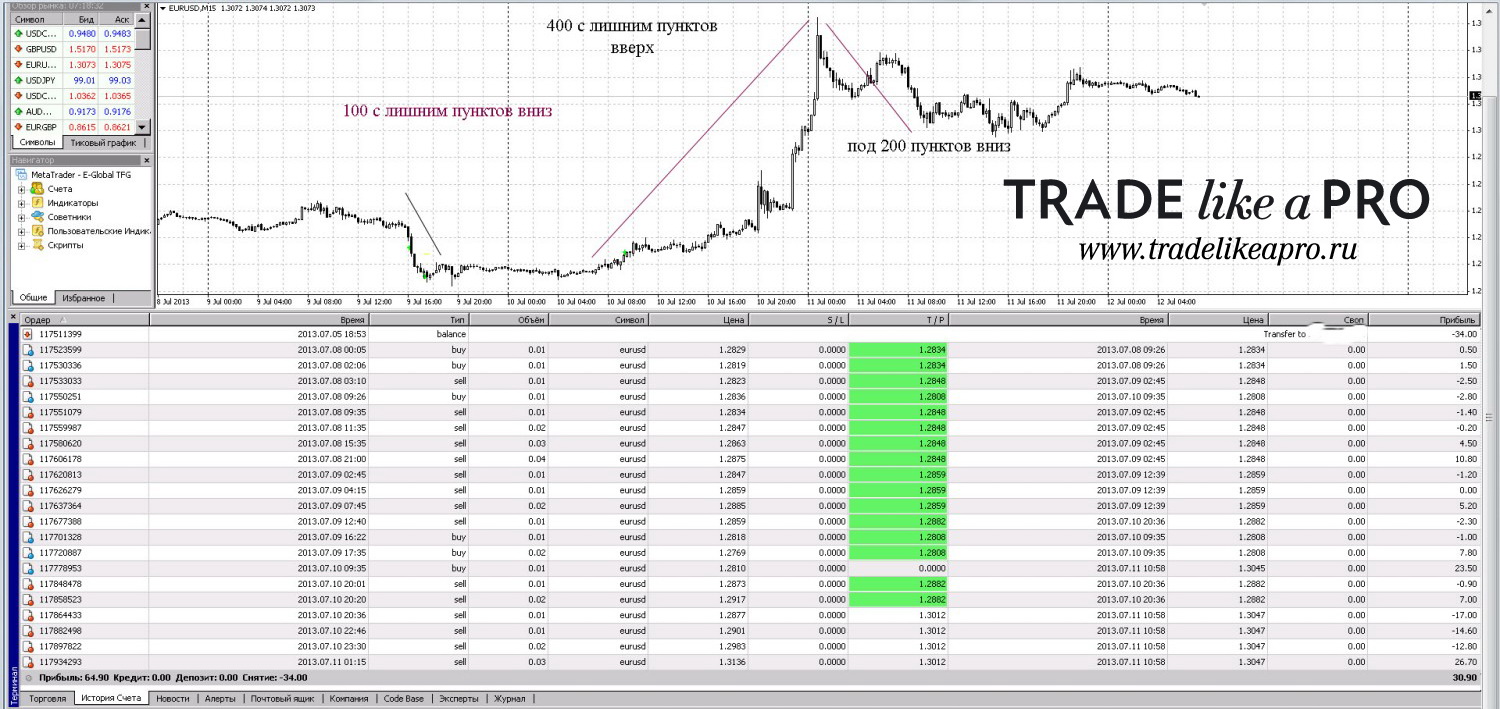
Perhaps one of the most famous screenshots. After Ben Bernanke's speech, the EURUSD pair flew more than 400 points in one evening. Broker Forex4you, real cent account - 200 cents. The lots were the minimum possible - 0.01 and 0.01 (buy/sell). The expert advisor did not wipe out the deposit - you can look at the trade history. Although many martingales could not survive this news.
 22.01.2015
Very important news came out on that day - brokers even sent warnings that they might reduce leverage to 1:100. In general, when you receive such messages, given the recent black swans, you need to be very attentive and careful. Instrument EURUSD, the trades were modeled by a script.
22.01.2015
Very important news came out on that day - brokers even sent warnings that they might reduce leverage to 1:100. In general, when you receive such messages, given the recent black swans, you need to be very attentive and careful. Instrument EURUSD, the trades were modeled by a script.
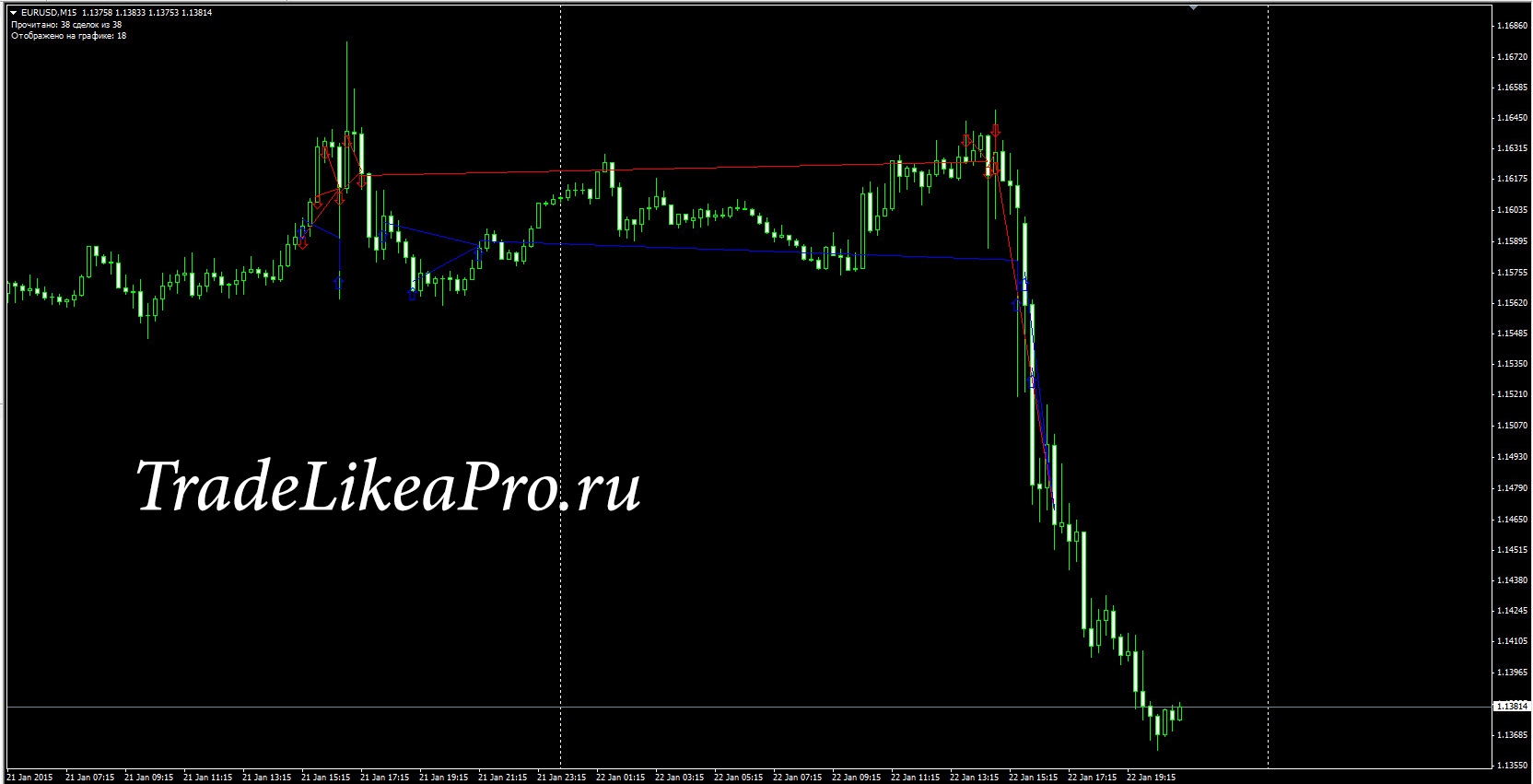 However, after the profitable lock was closed following the news and the expert advisor was turned off, there was a sharp one-way move of about 500 points with no pullback, which the expert advisor did not catch. Theoretically, there was later a pullback of more than 150 points, which suggests that the expert advisor, judging by the step/variable step between orders and money management, would have handled the situation.
17.09.2015
An important FRS meeting that had been talked about for half a year before it began. The special feature was that the expert advisor was launched at about 20:30 Moscow time, that is, about half an hour before the FRS meeting (21:00 Moscow time). No one had tested the expert advisor like that before. Moreover, instead of one pair, three were put to work at once - GBPUSD, EURUSD, EURJPY. As for the settings, on EURJPY I set the order step to 40 points (400 for 5 digits). But it should be noted that what was expected from this news did not happen, and similar martingale EAs handled that move normally, unlike July 2013.
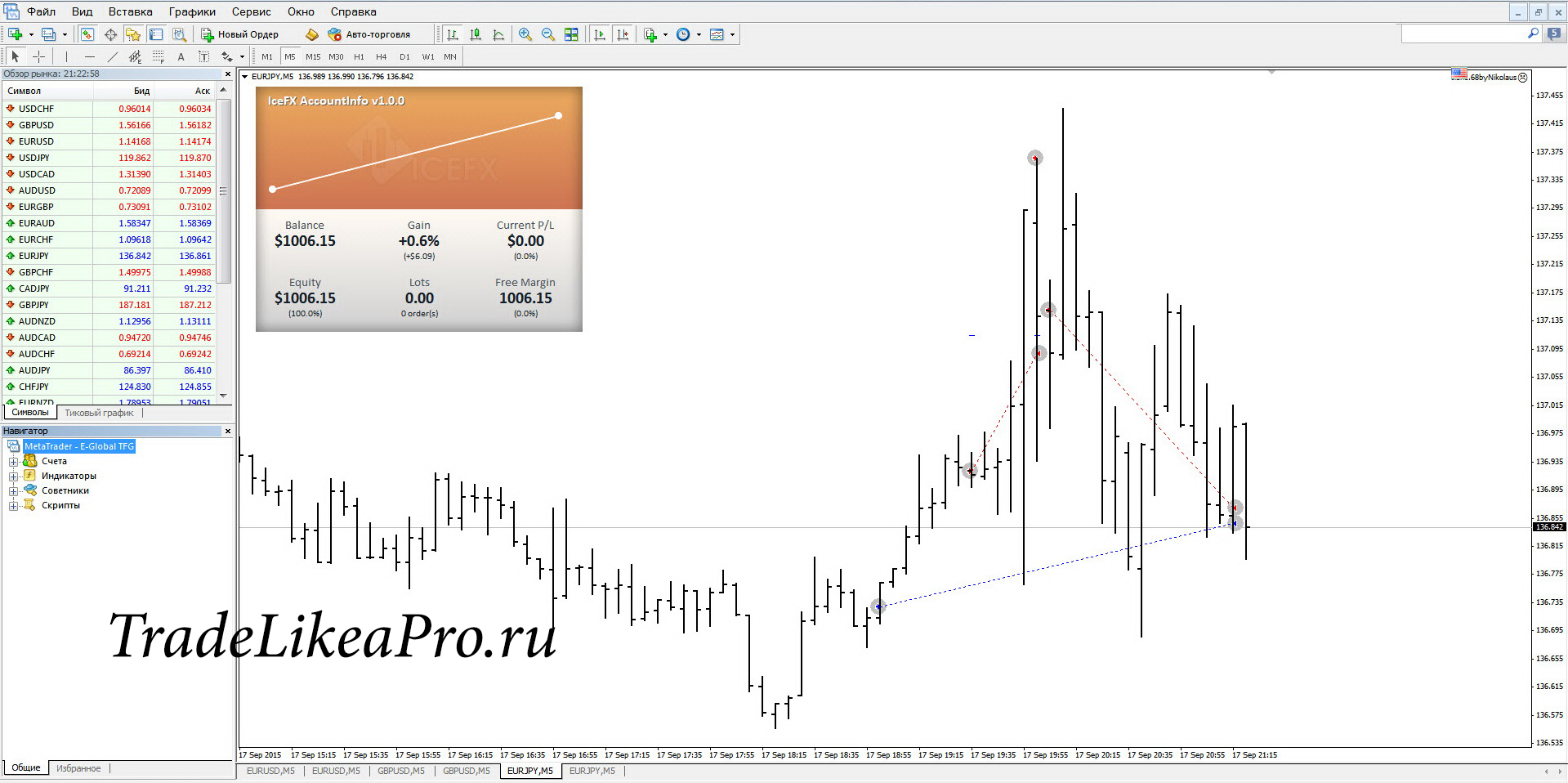 03.12.2015
So, the ECB meeting, the ECB press conference, and the interest rate decision. Usually everyone tries to turn expert advisors off - well, for all kinds of night scalpers that is very correct. This day was anticipated and discussed a lot on Forex forums, and for good reason: there were strong moves in EURUSD - 462 points, GBPUSD - 253 points, EURJPY - even 470 points. Below are the screenshots: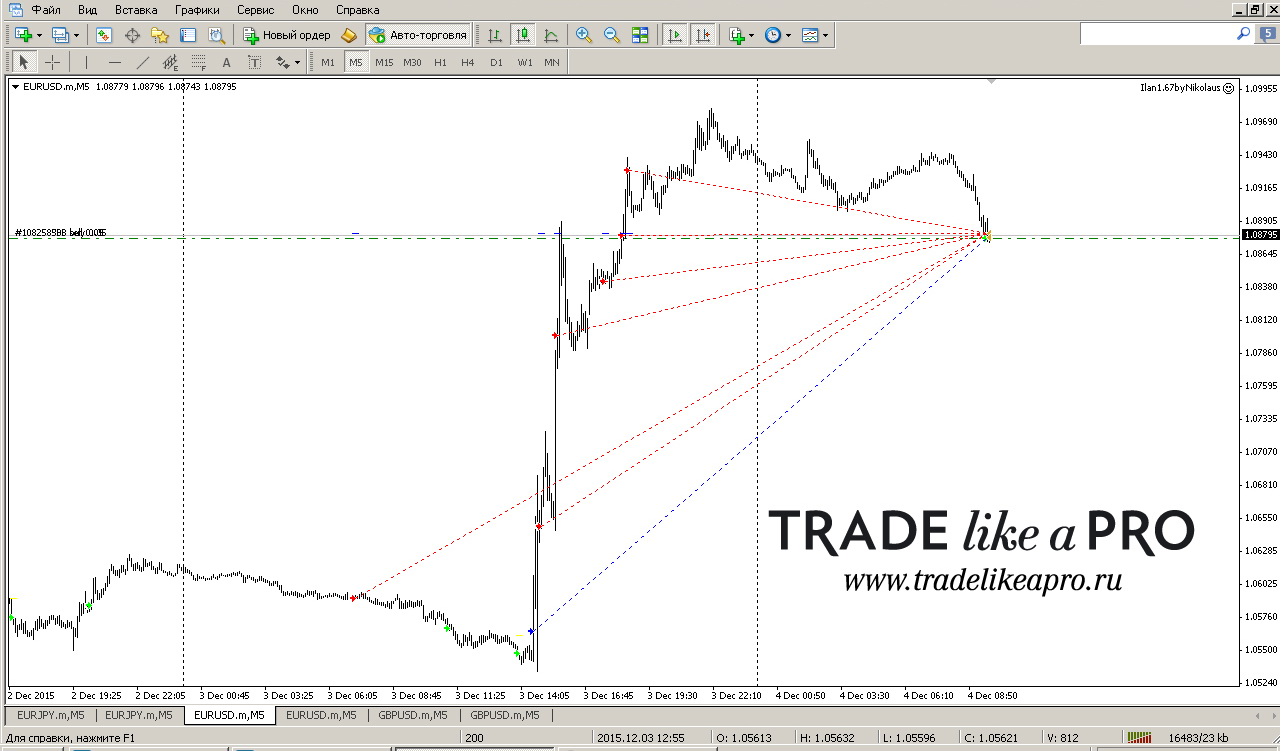
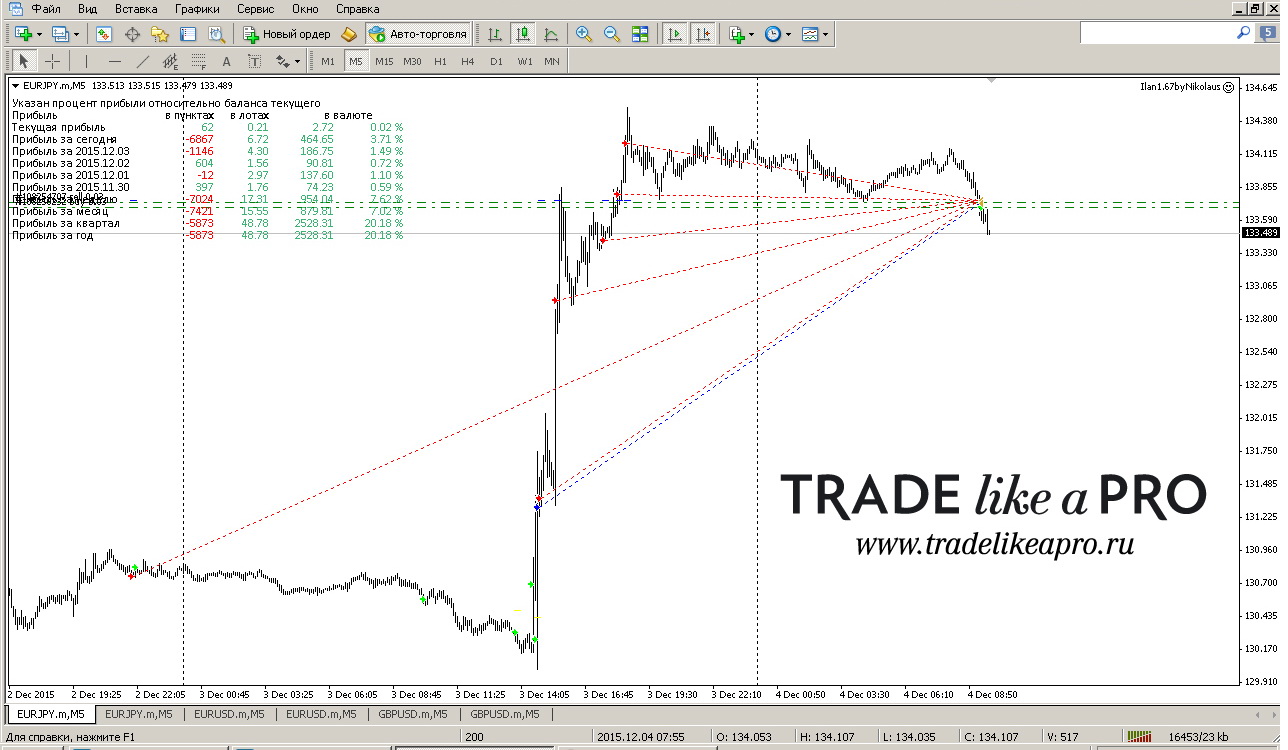
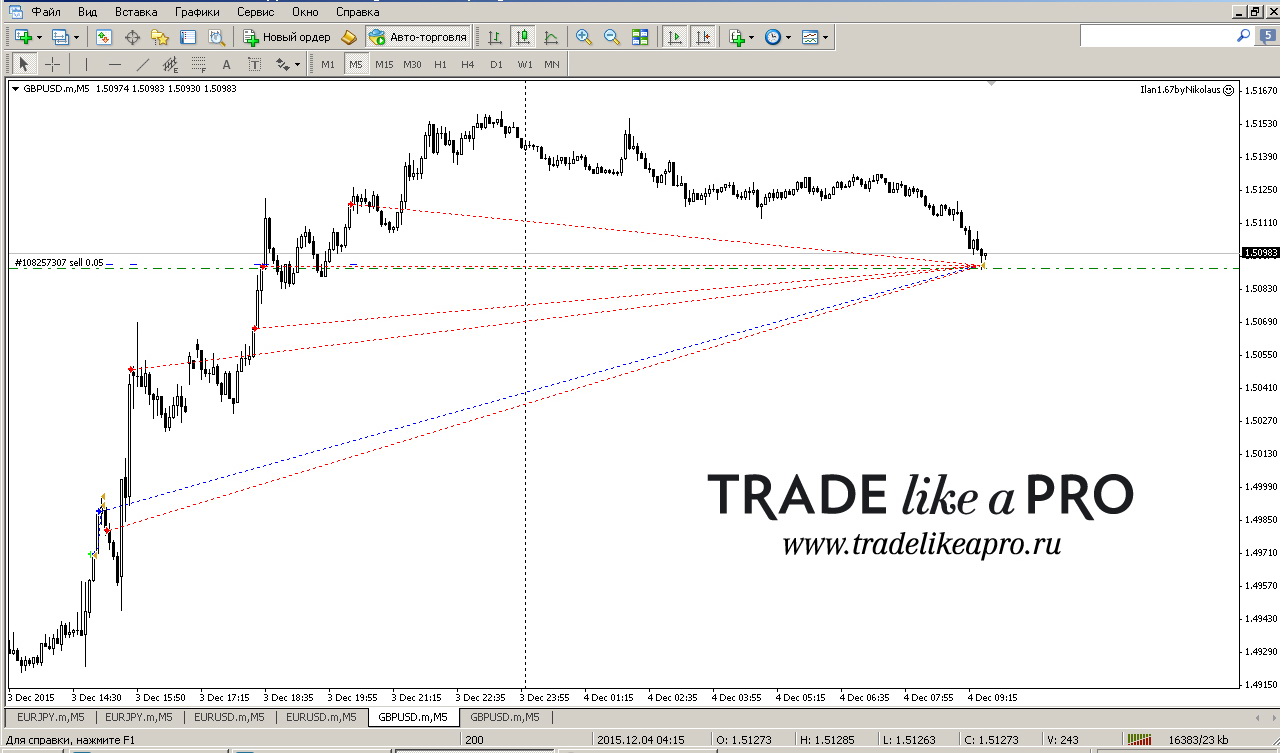 24.06.2016 (Brexit)
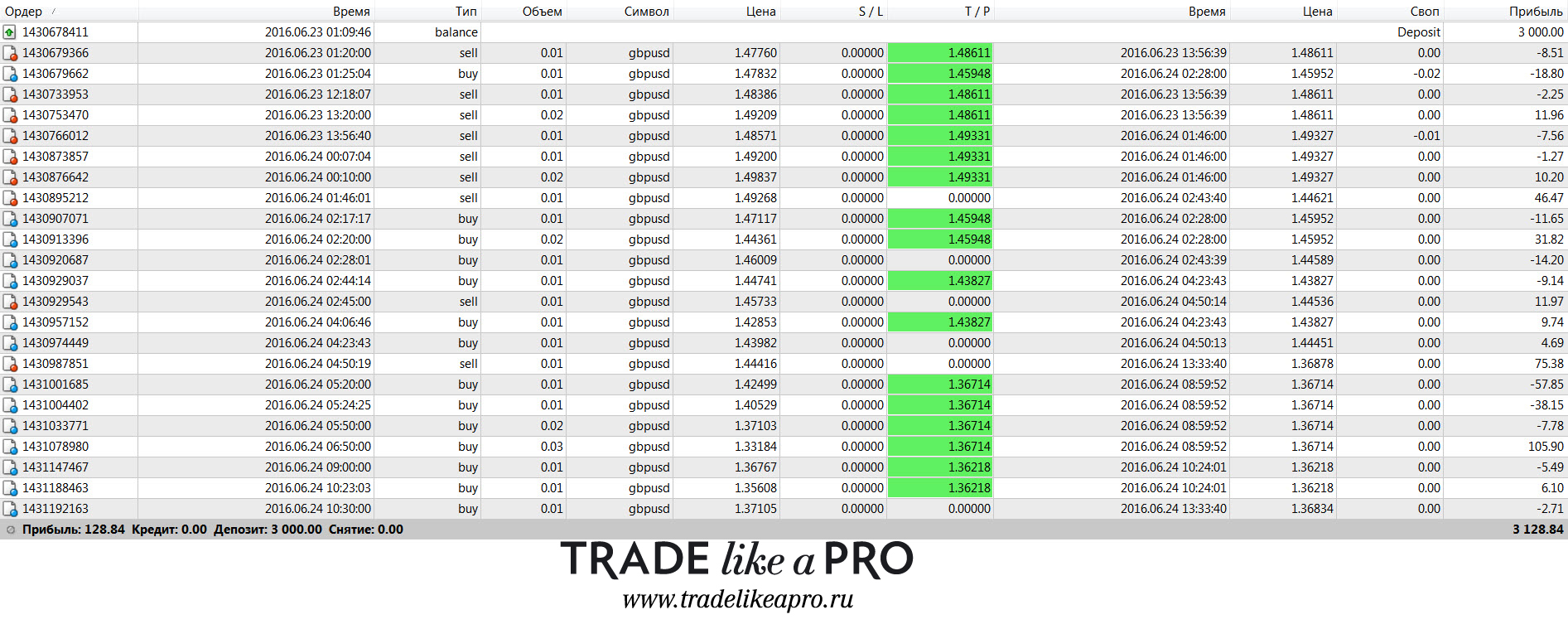
This news was very fundamental and significant. Probably even people far from Forex knew about Brexit thanks to the media. Brokers reduced leverage in advance and sent warnings; at Alpari, on the Pro-ECN trading account, they even set 1:10 leverage and enabled Close Only mode - it was impossible to open new positions, only to close them. For the average intraday trader, it would have been perfectly reasonable to spend that week resting. But since that was the case, it was decided to trade it on a demo account. Although it seems that on cent accounts the leverage remained the same. So what happened in the end? The trades were modeled with a special indicator:
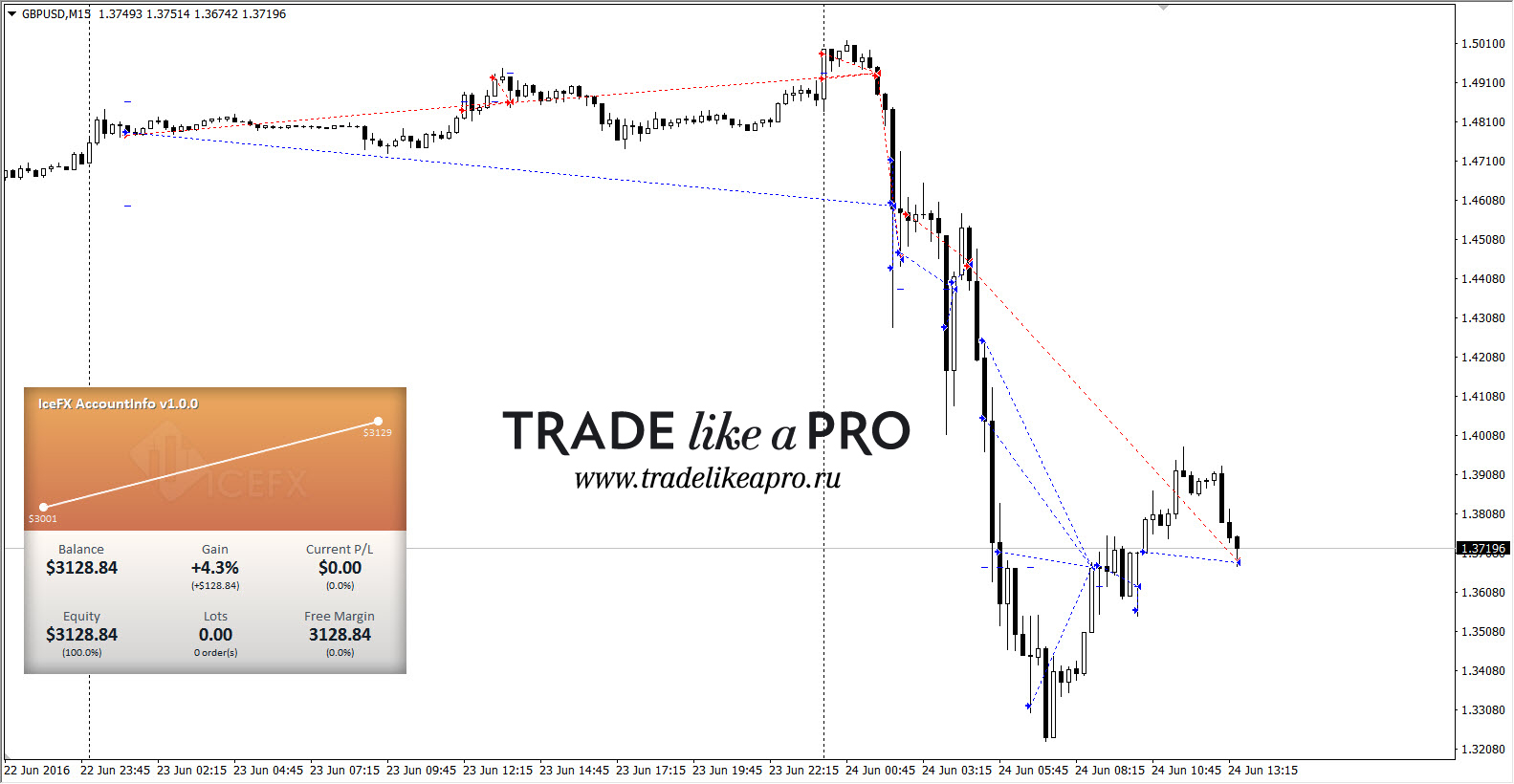 Trade history:
 Another example from the operation:
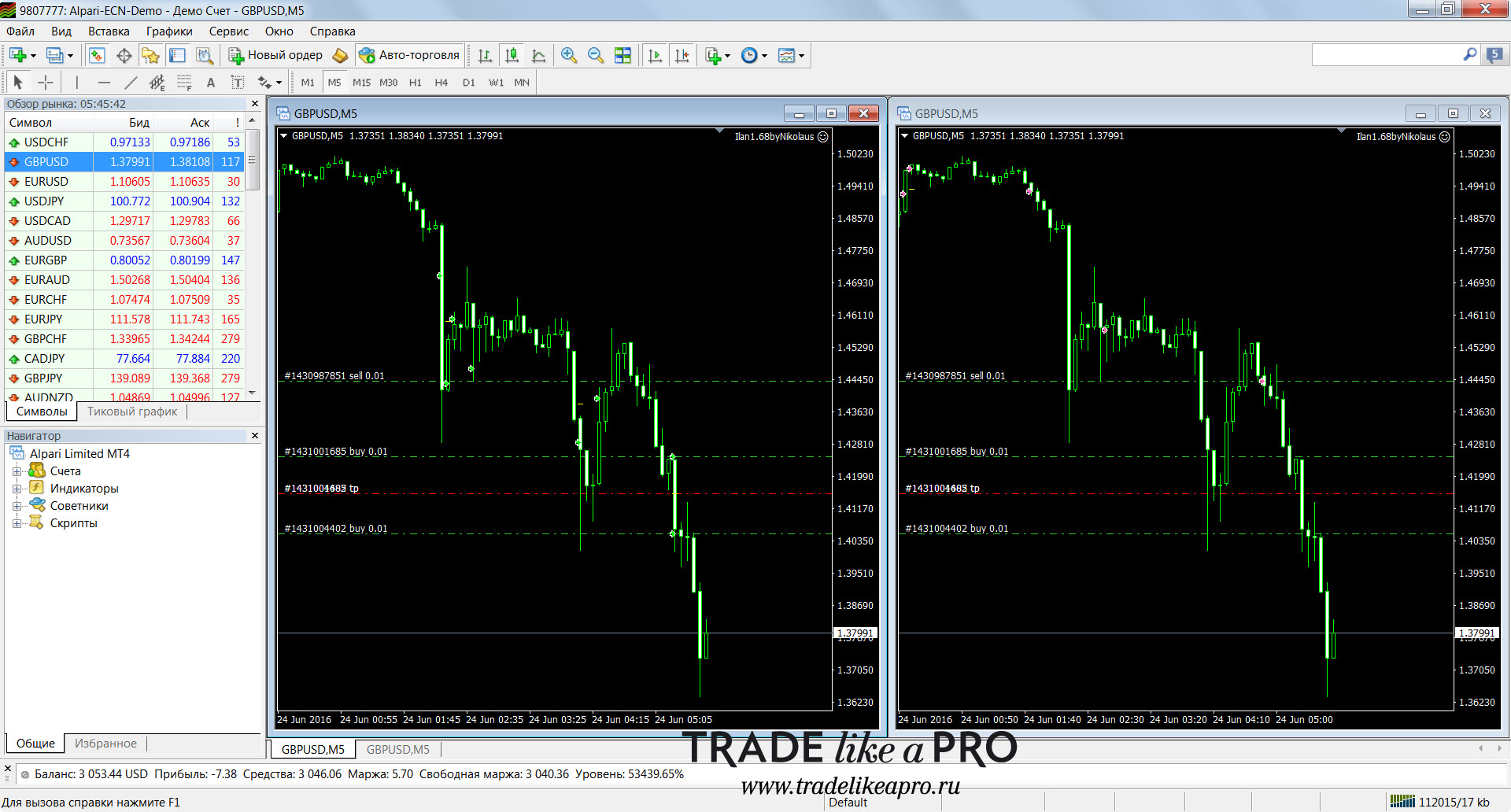 At one point there were as many as 500 points to take profit (5000 on five-digit quotes). In general, I collected all the materials on the expert advisor's work that day in a separate folder - you can view/download them in this forum post.
Thus, if we draw a small conclusion from how many times the expert advisor was tested during news events, it never once blew the deposit. As a result of these observations, it is possible to use the expert advisor during news. And if you have doubts, or the news is very important, nothing prevents you from checking it on a demo account to see how it behaves. That will be YOUR experience.
Expert advisor backtests
 There are some interesting nuances with testing that should be mentioned.
- It is impossible to properly test the versions of the expert advisors that work from two charts simultaneously (Nikolaus 1.67 and 1.68) in the MT4 terminal;
- The moment of market entry is fundamentally important: one trader launched the expert advisor at the start of a one-way move on Thursday and by Monday evening has a drawdown, while another trader launched the expert advisor on Monday at the market open and by that same evening is in profit;
- The expert advisor can work not on one, but on 2 or more currency pairs.
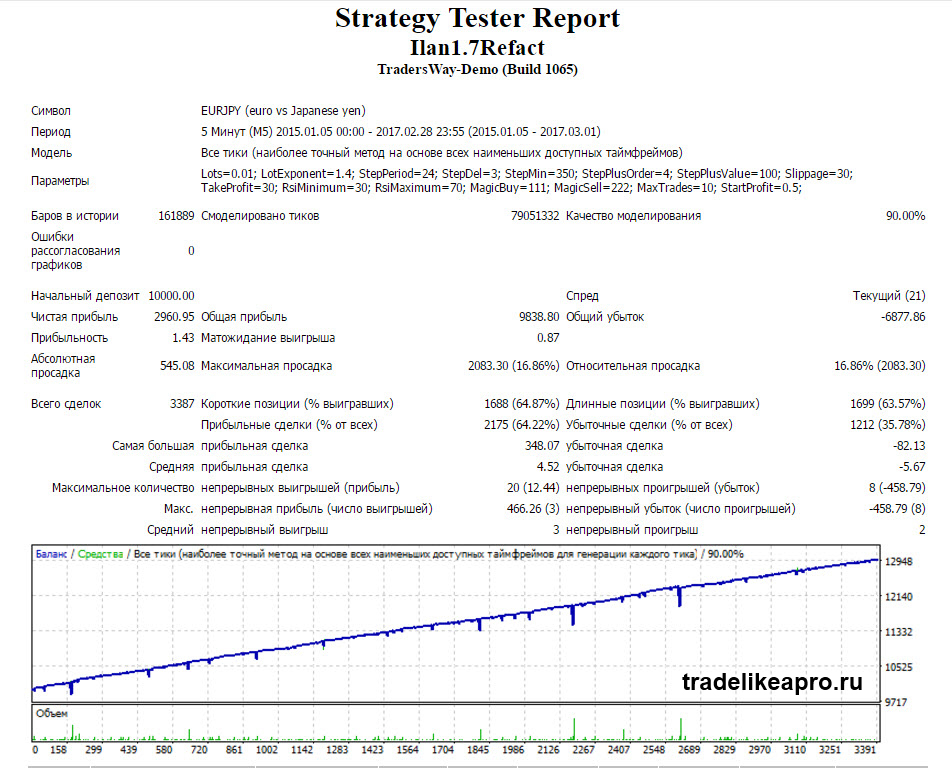
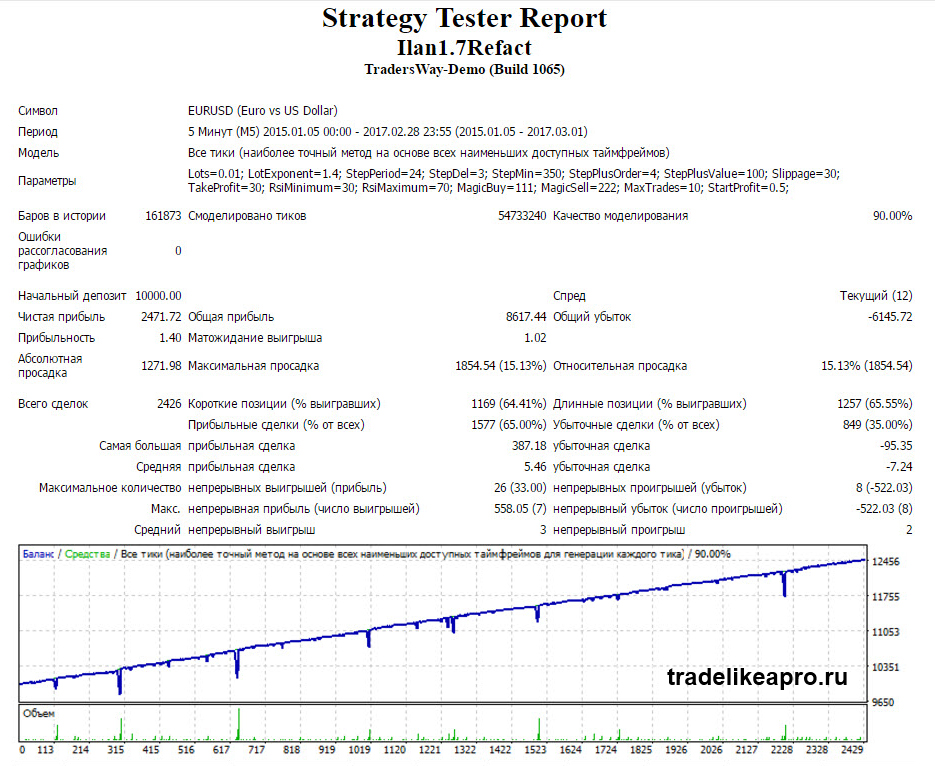
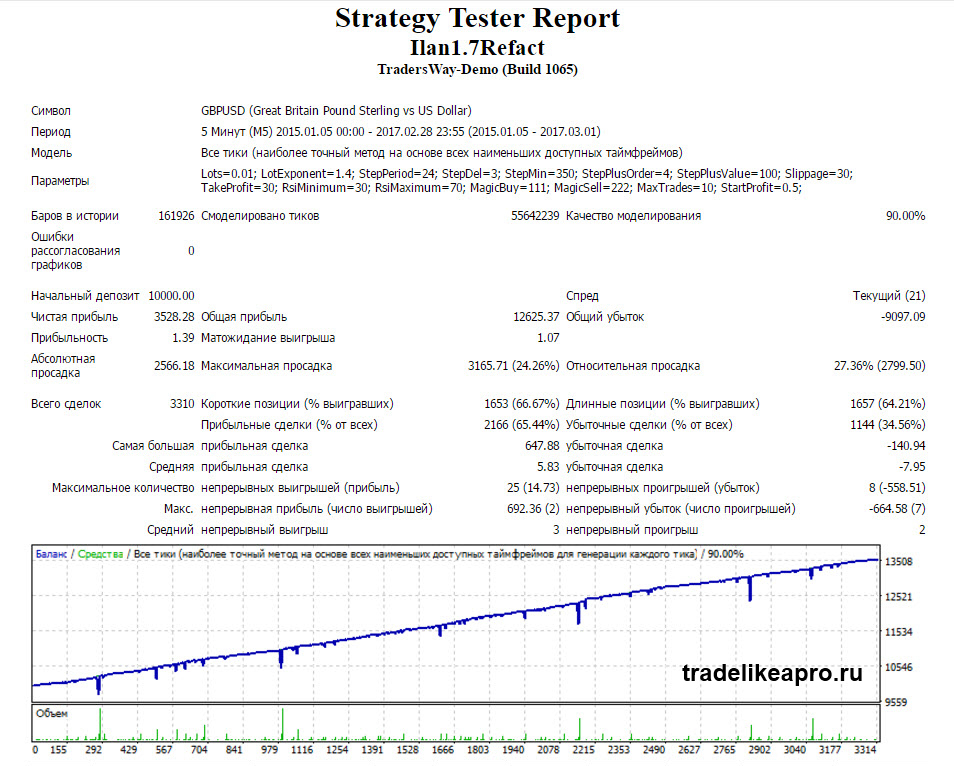
All these factors make the testing process itself difficult, and the test results will also be rather questionable. That is, the tester may show a blown deposit, while real trading may not. And if you intervene in the trading manually - sometimes forbidding trading yourself, sometimes allowing it, closing locks of two orders and then launching the bot again - in the end the test results will have almost nothing to do with reality (the tester does not account for that), so keep this in mind. Nevertheless, we still made tests for you so it would be clear: the expert advisor is quite interesting and deserves attention.
EURJPY M5 (2015-2017)
 EURUSD M5 (2015-2017)
 GBPUSD M5 (2015-2017)
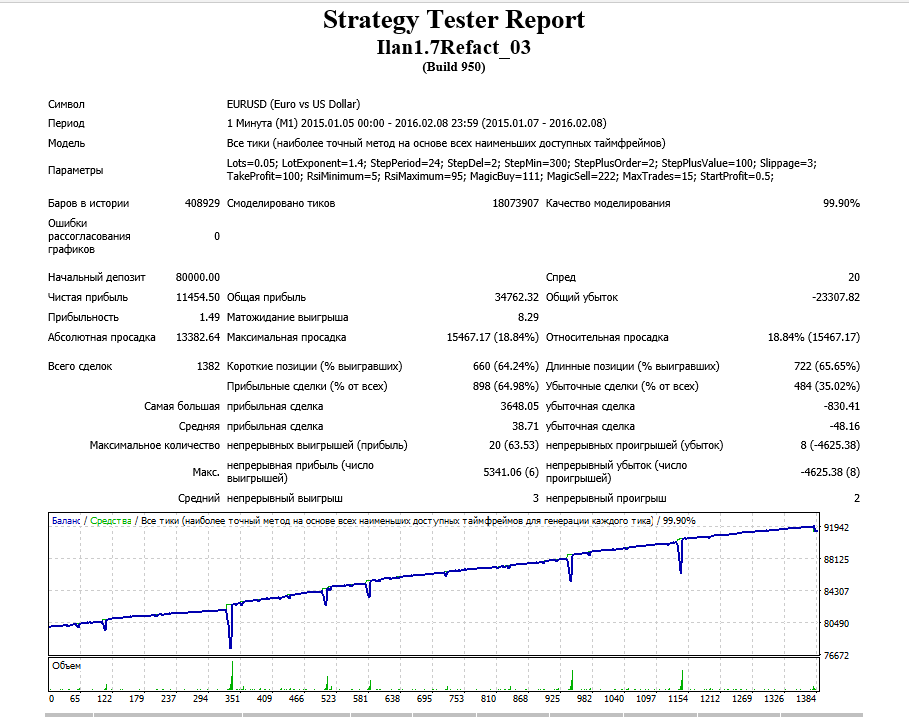
 Some 99% test results (from forum members in the expert advisor thread):
EURUSD M1 (2015-2016)
 EURUSD M5 (2015-2016)
Monitoring
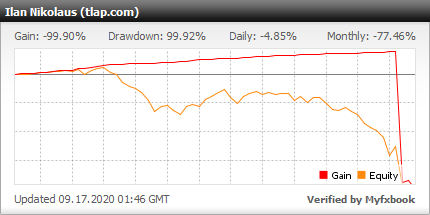
- Start: 01.05.2020
- Broker: Forex4you
- Expert advisor version on the monitoring: 1.7
- Settings: currency pairs: EURUSD, GBPUSD. Different magic numbers. Lot: 0.01. Lotexponent=1.4. Lotdemical=2. Timeframe: M5.
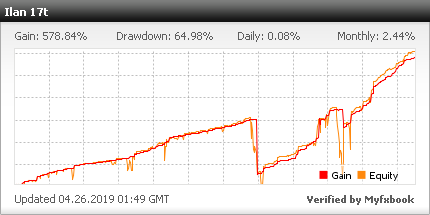
- Start: 15.10.2013
- Broker: Forex4you
- Expert advisor version on the monitoring: 1.7
- Settings: currency pairs: AUDNZD, CADCHF, GBPUSD, EURUSD, EURJPY. Different magic numbers. Lot: 0.01. Lotexponent=2.
A few comments on the monitorings.
The first monitoring is from our Robotest section. Many expert advisors are working there. What can be said is that this is not someone's personal monitoring, so it is what it is.
And the second monitoring is from our forum member Cerebellum. This is the oldest monitoring of the expert advisor - it has been running since 2013, and as can be seen from the history, which is open, the expert advisor works with a lot exponent of 2. How many such martingales do you know? The monitoring also shows a drawdown and the equity curve almost went downward. This happened at the beginning of 2016 on the CADCHF pair (see the daily chart of this instrument for that period). However, the deposit was not completely blown and now the expert advisor has practically recovered it. Why did this happen? The step between orders was 30 points and the lot exponent was 2 (two). The EA did not have quite enough room to average and bring the deposit into profit, although after the loss was fixed the pair reversed and went upward - theoretically the bot did everything correctly. In a word, a very interesting monitoring.
Settings description

Lots - initial lot size;
LotExponent - lot multiplier for a new grid order;
StepPeriod - period for determining the grid step;
StepDel - divisor of the grid step value for the period;
StepMin - minimum grid step value (in points);
StepPlusOrder - the order number in the grid after which the grid step begins to increase;
StepPlusValue - the amount by which the grid step increases after the StepPlusOrder order;
Slippage - allowable slippage during requotes (in points);
TakeProfit - after how many points of profit to close the order grid;
RsiMinimum - lower level of the RSI (14) indicator on the current timeframe;
RsiMaximum - upper level of the RSI (14) indicator on the current timeframe;
MagicBuy - MagicNumber for BUY orders;
MagicSell - MagicNumber for SELL orders;
MaxTrades - maximum number of orders in the grid;
StartProfit - profit of the starting order in deposit currency, upon reaching which it is closed if the paired order has not yet been opened.
Attention! Do not change anything in the expert advisor parameters and use only the recommended values if you do not clearly understand what you are doing!
Recommended money management

Here too there is a standard table, as with most monkeys.
| Account type | Minimum lot and lot step | Min. starting deposit | Broker examples |
|---|---|---|---|
| Cent (with mini lots) | 0.01 | 10$ (1000 cents) | Forex4you |
| Cent account | 0.1 | $100 | Roboforex |
| Standard | 0.01 | $1000 | Alpari |
| Pro accounts | 0.1 | $10000 | Classic account type at most brokers |
You can use various Excel tables to calculate lots in the order grid, especially since one of them is included with the expert advisor and manual.
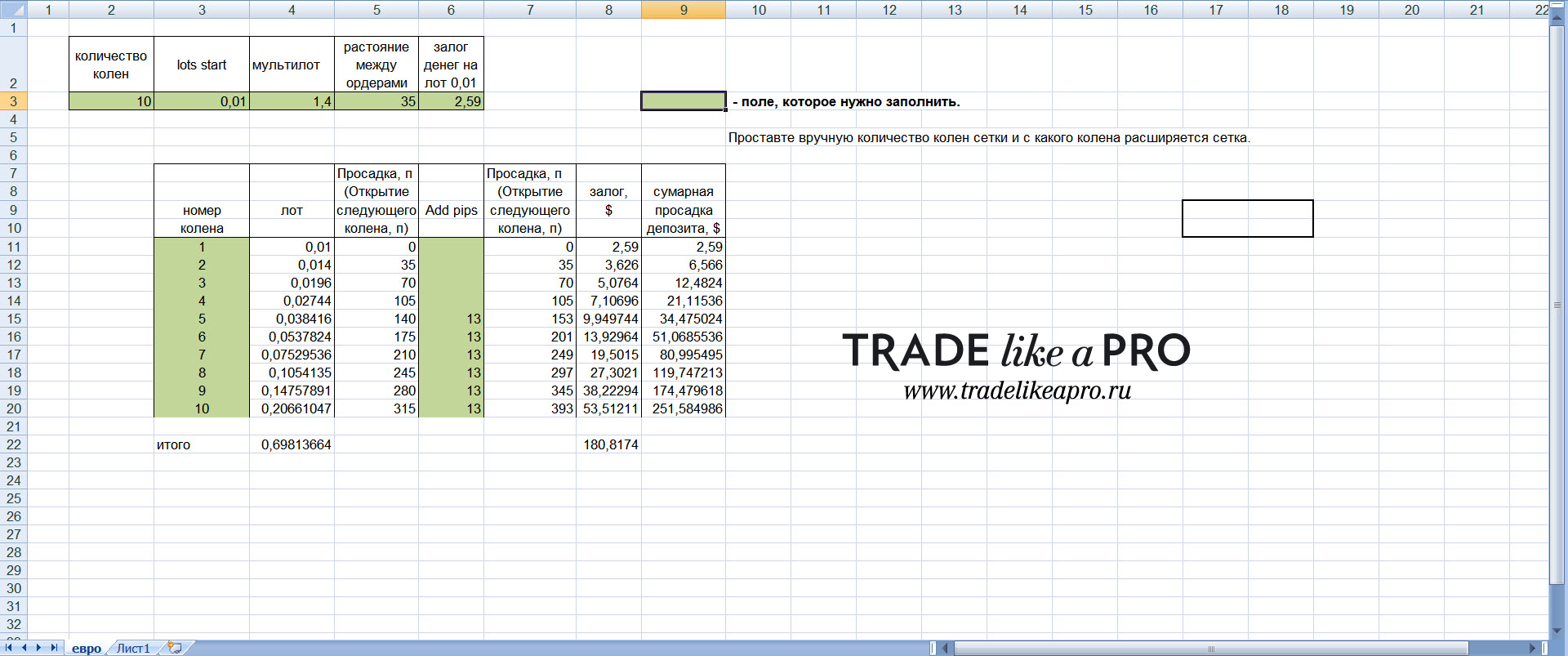 How do you work with the table? Everything there is intuitively clear: in the top row we set the desired settings and in the end get the data we need:
- Number of legs - how many orders the expert advisor is allowed to open (usually 10-15);
- Initial lot - the lot of the first order (usually 0.01 for cent or classic accounts);
- Multilot (or lot exponent) - the multiplier for increasing the lot size in subsequent orders; after all, this is martingale, so each new order will have a lot larger than the previous one, multiplied by this very multilot;
- Distance between orders - after how many points of movement against the position the expert advisor will open a new order. A very important setting;
- Margin - how much money will be frozen from your account for the minimum lot size (0.01 lot minimum). You can check what the margin will be for the minimum lot, as well as taking into account the leverage size (and leverage, let me remind you once again, should be the maximum possible), using the trader's calculator.
Thus, based on the data from the Excel table, we will know the maximum lot size of all orders and the amount of margin that will be frozen on our account if the expert advisor opens all 10 orders during a strong one-way move in the market. We will also know the drawdown in points and in money; this is how the minimum deposit size for working with the expert advisor is calculated. Below is an example of an order grid (with increasing lots for each new order) in operation:
 Once again, quite a lot of tables for lot calculation are presented, including on our forum. And if you study our free video course ExcelTrader, you will be able to independently program and calculate whatever tables you want.
I also recommend carefully reviewing the Money Management section for this expert advisor in the forum thread in the very first post (link to the thread at the end of the article).
Expert advisor and modifications

As was already noted at the very beginning, this is not one expert advisor: the author Nikolaus created quite a lot of different modifications. And in the forum thread, whoever studies it carefully will also be able to find/download various modifications of this bot. It is worth briefly discussing the most interesting ones here and how they differ from each other.
1.67 Nikolaus - described in detail in the forum topic. It was with this bot that TLP forum members began their acquaintance with the Nikolaus series; it was this one that survived the first 400-point no-pullback move on the EURUSD pair in July 2013 and did not blow a real cent deposit.
1.68 Nikolaus differs from version 1.67 by the presence of a trailing stop. If you do not use it, then these are two absolutely identical bots; I checked them by running them simultaneously, and the results were the same. If you looked carefully at the pictures, then these expert advisors are mainly shown in the screenshots; they were also tested very thoroughly in the article and not a single deposit was "hurt". A feature of versions 1.67 and 1.68 is that they trade from two charts, for buys and sells (one only long, the other only short), and the magic numbers must differ by more than 20 (2222 and 3333, for example). If you want to use these versions in your work, they are described in great detail in the very first post of the forum topic.
1.7 Nikolaus - this version has open code on our forum (unlike the previous two), and it also works from one chart for buys and sells, so there is no need to open a second chart of the instrument. Naturally, different magic numbers are already preset in the expert advisor settings from the start and nothing needs to be changed manually. It may be a simpler and more convenient expert advisor, but essentially all the working logic has been preserved, just as in the previous versions.
1.7 Nikolaus Refact (Ilan1.7Refact) - a modification of version 1.7 Nikolaus, improved by programmers from our forum. You can read more starting from this post and to the end of the thread. This review on the site is dedicated specifically to this bot, and it can also be downloaded for free via the link at the end of the article. All of Nikolaus's working logic has been preserved in the expert advisor, but unnecessary or unused functions have been removed, such as trailing stops or locks. On the one hand, their use with order grids is quite controversial and doubtful, and on the other hand, by and large monkeys do not need this anyway.
Working with attachments

So, once again briefly and clearly for those who are encountering such an expert advisor for the first time. In the attachments that you can download via the link below, there is the Nikolaus 1.7Refact expert advisor, the tp3refact settings set file, a manual describing the bot parameters, and an Excel table for lot calculation in the order grid.
- The expert advisor is installed according to the standard instructions;
- The Nikolaus package includes a settings file, so use it in your work if you do not know how to select settings yourself. The settings are intended for cent/classic accounts with 5-digit pricing. For those who do not know how accounts with 4 and 5 digits after the decimal point differ, look here;
- Carefully study the forum thread (link at the end of the article); this is the experience of people who used this EA from 2013 to 2017, and watch the expert advisor working on a demo account;
- Carefully study the manual with the expert advisor settings;
- Carefully read the article on the basic settings of martingale expert advisors.
Results

As you have already understood from the review, this expert advisor will not make you a millionaire in a short time; however, it also will not lose your deposit in the first news week of the month, which can happen with many monkeys. Nikolaus has been tested in operation by many forum members of the resource for more than four years already and has positive statistics during that time, so this expert advisor is worth paying attention to.
Yes, be sure to study the very first post of the topic on the forum, and also do not be lazy about looking through the entire thread of the expert advisor, if only because there are quite a lot of modifications of the expert advisor. In addition, there is one more point: forum members have been working with this expert since 2013, so studying someone else's experience without risking a single cent of your own money will not be superfluous. And of course, observe money management and the rules for working with "dangerous expert advisors"!
Important!
For the expert advisor to work correctly, the trading terminal must be turned on from the market opening on Sunday evening until its closing on Friday evening. If you do not have the ability to keep your computer running 24/5, then it is recommended to use a VPS server service.
Download the "Nikolaus" expert advisor

Respectfully, Pavel aka Pavel888 TradeLikeaPro.ru
