
Forex TrailinRobot - Become a Master of the Trailing Stop

Good day, ladies and gentlemen, this time we will get acquainted with a tool that will undoubtedly be useful to everyone who uses a trailing stop in forex trading.
This tool is called Forex TrailinRobot, and its author is the well-known Margarita Lasker. Forex TrailinRobot is made in the form of an expert advisor and is quite simple to use. As Rita assures, this is the fastest software for managing a trailing stop.
A small note for beginner traders. What is a trailing stop or, as it is also called, a following stop?
Trailing stop is an algorithm for managing the Stop Loss level of an order. After setting a trailing stop (for example, at X pips), the following happens:
- MetaTrader does not take any action until the open position shows a profit of X pips. After that, MetaTrader places a Stop Loss order at a distance of X pips from the current price (in this case, at the breakeven level).
- After completing the first step, MetaTrader sends a command to change the Stop Loss order level to a distance of X pips from the current quote each time the distance between it and the old order level exceeds X pips. As a result, the Stop Loss order is "pulled up" to the current price.
How do we enable this very trailing? We open a position, in the "Terminal" window, on the "Trade" tab we right-click our order and, in the menu that appears, select Trailing Stop->X points.
So, a trailing stop is our insurance in case the price reverses and goes against us.
Trailing stop always follows the price and moves the stop loss after it as the price moves in the direction of our position.
Trailing stop will close our order in profit (provided that the level in points set when the following stop was installed has been reached) if the price goes against our position.
A small illustration of how the following stop works:
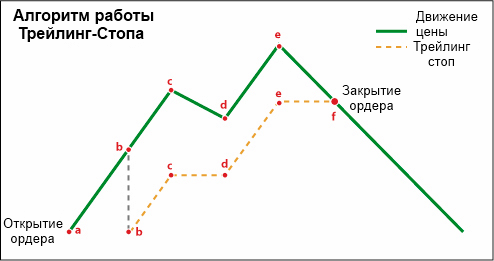
- Point a - We open a buy order (Buy)
- Point b - the trailing stop is activated and moves the position stop loss after the price.
- Point c - The price begins to decline and goes against our buy, the stop loss remains unchanged.
- Point d - the price goes up again, the trailing moves the order stop after it.
- Point e - the price reached its maximum and went down. The stop loss does not change.
- Point f - the stop loss was triggered, preventing us from losing the profit received earlier.
Thus, the trailing stop constantly moves the stop loss level after the price, helping us preserve profit.
We have figured out simple trailing, but what advantages does Forex TrailinRobot have compared to the standard following stop?
- Setting standard trailing takes time, Traingator turns on automatically
- If you use pending orders, the standard trailing stop can only be added after the pending order is executed. Forex Trailingator, however, will automatically start trailing the order after it is executed.
- Also, with Forex TrailinRobot you can set the trailing stop step (see below).
What is the Trailing Stop Step? By default, the trailing stop moves the stop loss after the price after reaching X points of profit (the trailing stop level), and then moves the stop each time the profit increases by 1 point (more than X). That is, by default the trailing stop step is 1. But if we change the trailing step (using Forex TrailinRobot), then after reaching the level of X points, the order stop loss will move next only after the price passes another N points more (toward profit). N is the trailing stop step. Thus, the stop loss will move every N points after reaching level X.
Forex TrailinRobot is installed in the same way as any other expert advisor, here is the instruction if you have any problems.
After you have copied the expert advisor into the folder with the MT4 terminal, attach it to the chart of the currency on which you want to use trailing (the timeframe is not important, you can open additional charts with the expert so that it works on many pairs simultaneously) and set the necessary parameters in the settings. After that, the Forex TrailinRobot expert advisor will start working.
Forex Trailingator does not open positions by itself! It only controls orders opened manually or by other robots.
Description of the Forex TrailinRobot expert advisor settings:
ProfitTrailing - if you enable this function, the expert advisor activates the trailing stop only after the position goes into profit. When this setting is disabled, trailing is activated immediately when the position is opened.
TrailingStop - trailing stop level
TrailingStep - trailing stop step
MagicNumber - if it is set to -1, the expert advisor will trail all orders on this currency pair. If 0, then only positions opened manually. You can set the magic from another expert advisor and then Trailingator will control only the orders opened by the expert advisor with the specified magic.
Download the Forex TrailinRobot expert advisor

Respectfully, Pavel Vlasov TradeLikeaPro.ru
