
Forex Strategies: Apocalypse - an Avalanche of Profit You Can't Hide From
 Good day, fellow Forex traders! Many have heard, including from trading books, that the market is directly in a trend only 25% of the time. And during the remaining 75%, either a flat or zigzag up-and-down movements are observed. Everything is clear with the trend, but how can you profit from 75% of chaotic movements? There is a solution: with the help of the forex strategy Apocalypse, you will squeeze the market dry.
Characteristics of the Apocalypse Trading Strategy
Platform: Metatrader 4
Currency pairs: EURAUD, EURJPY, GBPAUD
Timeframe: M5
Trading time: from 9 to 17 Moscow time
Recommended brokers: Roboforex, Forex4You (accounts with market execution are recommended because of the low spread)
Reference Section

- Installing and configuring expert advisors
- Installing indicators
- Working with scripts
- What new and old points are
- How and where to watch economic news
Strategy Basis

First, a bit of theory. In many trading books, you can find the statement that the market is directly in a trend only 25% of the time. Let us try to look at this statement from a practical point of view.
Below in the photo you can see the EURUSD chart, H1 time frame:
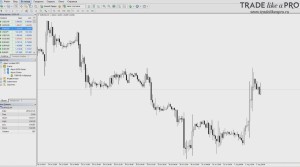
Let us mark on the chart the segments where a trend noticeable to the naked eye was observed:
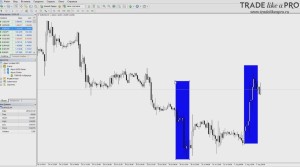
Here are the obvious sections. Then there was an unclear flat and several more sections:
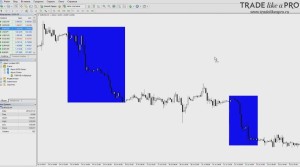
It is visible to the naked eye that the market, even if not to the exact percent, is in a trend about 25% of the time. Moreover, I did not specifically select a pair or a chart. This observation generally holds on any chart. So what should we do with this? Naturally, profit from it!
So, if the market is in a trend 25% of the time, and most of the time it is in a flat or in zigzag movements, then we need to monetize them. What monetizes zigzag movements well? A flat with high volatility monetizes well with Martingale, because we expect that the price will not go far. When the position is in the negative zone, we increase it. And when the price returns, we take our profit.
The downside of Martingale is that when there is a trend, a "blowout" occurs, because the lot sizes increase while the price moves farther and farther away. And if the price does not reverse, then a margin call occurs. Therefore, our task is to limit the work of Martingale only to a zigzag flat. How can this be done? First of all, by excluding major pairs. That is, pairs that have the US dollar (USD) in their composition. And replacing these pairs only with crosses. Since cross rates themselves are less subject to trends than major pairs.
How else can we limit the work only to a flat? Try to avoid news. And trade only at a certain time. That is, not wait for a trend to appear, but limit the work.
Naturally, positions can be opened manually. But it is better if an expert advisor does this for us, while we manage its operation. Accordingly, turn it on at a certain time and avoid news, while assessing the situation. And one more way to filter the trend is to assess the morning flat (more on this below).
Strategy Rules: When to Turn the Expert Advisor On/Off

We move on to filtering the operation of the expert advisor. To the moment when it needs to be turned on/off. And also on which days it is better not to turn it on at all. Let me say right away that we do not trade every day. Remember that you have no obligation to turn on the expert advisor every day. If the conditions are not favorable for trading, then we do not turn on the expert advisor that day. Or we turn it on, but, for example, on one pair out of three. Where there is no visible danger.
The possible start time for the expert advisor is approximately from 9 to 11 a.m. Moscow time. The end of work is approximately from 15 to 17, again Moscow time. We do not keep the expert advisor running around the clock. We turn it on only during the most active time of the day.
First of all, we make sure that during the operation time of the expert advisor there are no red news releases for the currencies that are present in our trading pairs:
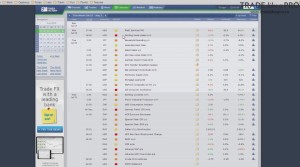
I personally watch economic news on ForexFactory. We have already covered how to use this calendar more than once. There are dozens of sites with an economic calendar. You can use any of them. There is no particular difference.
Check that there are no important news items for the currencies involved in our pairs. If there is such news, then it is better not to trade on that day. Moreover, the author advises ignoring news on the euro. With the exception of interest rate changes, which happen extremely rarely, and speeches.
That is, we ignore news on the euro. If there are red news items for one of the traded currencies, then we do not use this pair in trading on that day. There are also sometimes situations when some news came out overnight and there was a very strong move, as in the screenshot below:
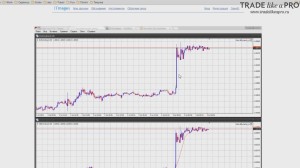
If there were such inadequate moves overnight and you observe them, then it is better not to trade. Why? Because the pair becomes unpredictable and goes into a small flat. And a small flat is not interesting to us. Only a zigzag one matters to us, when the price moves up and down with high volatility.
If a sharp move is observed overnight, then it is not worth trading in the morning. This applies to all pairs. Moreover, such moves can happen even without news. If they occurred, then it is better not to turn on the EA.
Another important point that it is recommended to pay attention to is the morning flat:
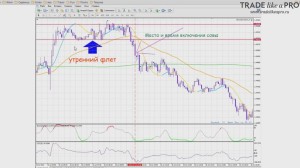
Why exactly is the condition for turning the EA on within the interval from 9 to 11 in the morning? Because we are waiting for the currency pair to come out of the morning flat. That is, at 9 in the morning you draw a channel like this with horizontal lines:
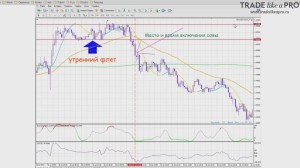
And when the price clearly breaks through it, we turn on the robot. It is not easy for beginners to make such constructions right away, and it may seem to them that a simpler solution is to turn on the EA immediately at 9:15 and forget about it. But I strongly advise doing such an analysis, because it will help avoid unnecessary losses.
And one more point. Try to avoid a low-volatility flat:
That is, try not to trade on holidays or when the release of Non farm Payrolls is expected. As a rule, before "nonfarms" the market is quiet. And where it will shoot afterward is unknown. Therefore, on such days we do not get into the market. We try to avoid a low-volatility flat. Our task is to extract profit from a highly volatile flat. From zigzag movements.
We have figured out on which days and exactly when to turn the EA on. Now let us move on to the moment of turning it off. We turn off the EAs on all pairs approximately from 15:00 to 17:00 Moscow time depending on what is convenient for you. First we turn off all EAs, and then we close the trades that remain open in the terminal. And it does not matter whether they have profit or not. We close everything anyway.
If there is a tangible but not very large loss, then it is also better to close it. And accept a certain minus for that day. To close all positions, you can use the CloseAllOrders script, which comes together with the strategy files. You simply drag it onto the chart and all orders in the terminal will be closed.
It is undesirable to leave orders for the next day, but if no news is expected overnight and the positions are hanging in a loss that may turn into a profit, then the positions can be left. But the priority is still on closing.
The author recommends setting goals for one day. For him it is about 2-3% profit on the deposit. And when the goal is reached, turn off the EA without regret. Or, if say the goal is 2% for the day, but a profit of 5% has already been reached, while -2% is hanging in the red, then you can safely close the open positions. And as a result, the final profit will be 3%.
We try to close positions and not leave them for the next day. Percentage goals depend on the aggressiveness of your trading. On the money management you use (see below).
How does the EA work?
Before launching the magic machine, let us figure out how it works. Let us understand how our particular Ilan opens trades. Since there are a great many Ilan modifications, we will examine how exactly the specific version used in this strategy works. By what logic it opens positions.
Although the EA is placed on the M5 timeframe, the signals are taken from H1:
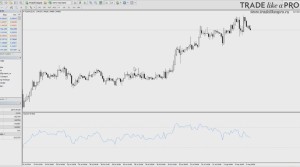
I switched the EURUSD currency pair to the hourly chart and added the RSI indicator, since it is used to obtain the signal for the EA to open a position. The EA follows RSI signals with a period of 14 from the hourly chart.
How does the expert advisor open positions?
Let me remind you that this is an Ilan, and Ilan is aimed primarily at a large number of orders, so there are no sophisticated filters here. The filters for opening positions are very simple. RSI is used. The current candle is not taken into account.
The expert advisor looks at the preceding 2 closed candles. And if the closing prices of the two candles before the current one are consistently decreasing and RSI is not in the oversold zone, that is, above the 30 level, then the expert advisor opens a sell position.
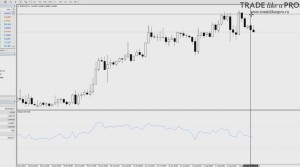
For buys, it is the other way around:
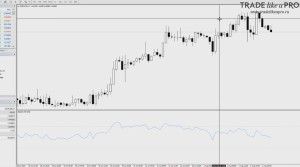
If the closing prices of the candles are consistently rising, and RSI is below the overbought zone, that is, below the 70 level, then the expert advisor buys.
If the price moves against the position, additional orders are opened with a lot size increased threefold. This may sound aggressive and scary, but we will return to the issue of risk later.
This is how the expert advisor works. You can run it in the strategy tester in demonstration mode with visualization:
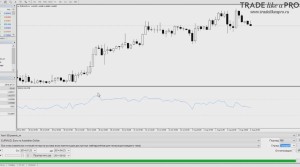
And watch live how it opens positions. I will say right away that putting it on a live account is a rash step. At first, demo only, to understand the essence of the method.
How to turn the expert advisor on and off?
If you want to use the robot on three currencies, you open three charts and attach one expert advisor to each. To forbid the expert advisor from trading, simply press the AutoTrading button at the top of the terminal so that it shows a small red circle:
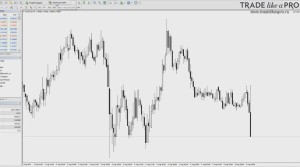
This way, all expert advisors installed in the terminal will stop working. But if you want to forbid trading not for all expert advisors in the terminal, but only for specific ones, there is an alternative option. Leave the AutoTrading button green:
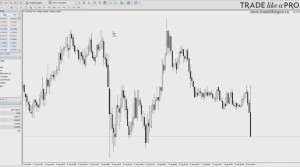
And go into the settings of a specific expert advisor:
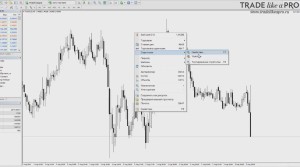
On the "Common" tab, uncheck "Allow the expert advisor to trade":
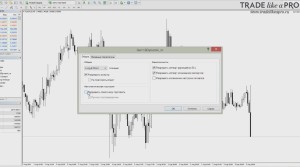
Now trading is forbidden for the expert advisor. It will not open new positions. And at the same time, this does not affect the other expert advisors. This is how you can very simply turn expert advisors on and off without removing them from the chart.
Description of the expert advisor settings

- LotExponent - This parameter tells the robot by how much to multiply each subsequent lot (bet, leg). Example of using LotExponent: Suppose you set LotExponent=1.3 and the initial lot = 0.10, then the bets will be placed as follows - the first 0.10, the second 0.10 (initial lot) * 1.3 (LotExponent) = 0.13, the next 0.13 * 1.3 = 0.169 (the program will round it to 0.17), and so on. Theoretically, the higher LotExponent is, the more profitable trading becomes, but do not forget that even with a small increase in the parameter, your initial deposit must be significantly higher to withstand drawdowns.
- DynamicPips - this setting is responsible for the choice between dynamic trading and static trading (the default is true). With dynamic (true) trading, the robot itself will choose at what moment to open a new lot, while with static (false) trading, the lot will be opened strictly at the moment you specify, which is determined by the DefaultPips parameter;
- DefaultPips - is responsible for the distance between open orders (the higher the parameter, the less frequently orders will be placed; increasing the parameter helps well during a prolonged movement of the pair in one direction);
- Glubina - a parameter responsible for market analysis before trading begins (the larger the number, the greater the number of candles that will be analyzed before opening an order);
- DEL - a parameter that defines DefaultPips. Works only if the DynamicPips setting is set to true;
- Slip - the slippage parameter. Determines how far the price may deviate from the requested one;
- Lots - specifies the size of the initial lot;
- Lotdemical - lot definition (full, micro, and mini). Depends on the account and broker you opened;
- TakeProfit - determines the number of profit points at which the robot will close the current session and open a new one;
- Drop - an indicator of automatic position closing during sharp movements of the currency pair;
- RsiMinimum, RsiMaximum - the lower and, accordingly, the upper boundaries of the RSI indicator. According to this indicator, the EA enters the market and also places subsequent orders;
- MagicNumber - a unique number thanks to which the expert advisor can find exactly its own orders;
- MaxTrades - with this parameter, you specify the maximum number of lots opened by the robot (the first order counts as 0, the second as 1, and so on);
- TotalEquityRisk - a parameter that enables (true) or disables (false) the UseTrailingStop settings, which are responsible for closing orders when the drawdown you specified is reached;
- UseEquityStop - a numeric value specified in percent (for example, if you set the value 25, then this will mean that when a 25% drawdown is reached, all open orders will be closed automatically);
- UseTrailingStop - this parameter activates the so-called trailing stop (automatic shifting of takeprofit when the price moves in the desired direction);
- UseTimeOut - disables (false) or enables (true) the closing of trades by time (after a specified time interval, the trade will be closed regardless of whether it is losing or profitable);
- MaxTradeOpenHours - is responsible for the time after which the current trading session will be closed.
Recommended money management

1. High Profit/Risk Ratio
The option used by the author of the strategy. It implies a 0.01 lot for every 500 units of currency in the account for 1 pair. That is, if you want to trade all 3 recommended pairs with a starting lot of 0.01, you will need 1500 units of currency in the account.
The table below shows the recommended minimum deposit values for 1 pair for different account types.
| Account type | Minimum lot and lot step | Min. starting deposit | Broker examples |
|---|---|---|---|
| Cent-NDD | 0.01 | 5$ (500 cents) | Forex4you |
| Cent | 0.1 | $50 | Roboforex |
| Standard | 0.01 | $500 | Alpari |
| Pro accounts | 0.1 | $5000 | Classic account type at most brokers |
2. Moderate risk
| Account type | Minimum lot and lot step | Min. starting deposit | Broker examples |
|---|---|---|---|
| Cent-NDD | 0.01 | 10$ (1000 cents) | Forex4you |
| Cent | 0.1 | $100 | Roboforex |
| Standard | 0.01 | $1000 | Alpari |
| Pro accounts | 0.1 | $10000 | Classic account type at most brokers |
An option with lower risks. A 0.01 lot for every 1000 units of currency in the account for 1 pair. For 3 pairs, accordingly, at least 3000 units will be needed.
3. Conservative option
The lowest-risk option. The profit, naturally, will also be lower. A 0.01 lot is used for every 10000 units of currency in the deposit. But for all 3 pairs.
How to work with risks?

Will there be a margin call one day? One day there will be. Because martingale is used. The lot increases by three when the price moves against our position. Therefore, sooner or later you will either make a mistake and forget to turn off the expert advisor, or decide that "it will work out" and leave positions overnight, and that will turn out to be the wrong decision. Sooner or later, the deposit will be blown.
But since the strategy is highly profitable, we can do the following:
- Withdraw profits upon reaching 100% return
- Withdraw profits every week
- Withdraw profits every N%
We can neutralize the risks, namely, withdraw the money that we originally put into the deposit. And then work exclusively with the money earned. How can we do this?
Profit withdrawal is possible upon reaching a return of 100%. This is the most ideal option for us. Roughly speaking, your initial deposit was 1000$. You earned another 1000$ and withdrew the half that we originally put in. In fact, you are risking nothing. You earned another 1000 and withdrew it. One fine day, a blow-up happened, you lost 1000$, but at the same time earned 5000$. Thus, the loss of such an amount becomes not something frightening, but an imperceptible reduction in overall profit. But such a strategy is suitable when using not the most conservative money management.
It is also possible to withdraw profits every week. Suppose you earned 30% in a week and withdrew it. If we again take the example with 1000$, then you earned 300$ and withdrew it. We keep trading. The next week you earned another 300$, withdrew it, and so on.
And it is also possible to withdraw profits every N%. Set a threshold for yourself to withdraw profits after every 20%. And withdraw every 200$ from a 1000$ deposit. Regardless of how you earned them. In a week, in a day, or over some other period.
In general, our task is to withdraw profits and continue working only with the money earned by this strategy. Without risking our own funds. Since we know that a margin call will happen, our task is to withdraw profits constantly and risk only the money that we have earned.
What might this look like?
1000 + 200 + 300 + 500 + 600 + 800 + 400 - 1000 = 2800$
You earned 200 in a week and withdrew it immediately, then another 300 and withdrew it. As soon as the margin call happens, our thousand gets wiped out. And regardless of what happened, in the final tally we have 2800$ of net profit.
What do we do after the wipeout? We open a new account or put 1000$ from the profits into this same one and start over. That is, we constantly withdraw profits and leave in operation only the money that, so to speak, is allocated for our risky working venture part.
Thus, we turn a high-risk strategy into simply a highly profitable one. We thereby reduce our own risks. And do not forget about filtering the days on which it is better not to trade. This was written about above.
Conclusion

The Apocalypse forex strategy is a powerful weapon for working in the currency market. But just as a worker operating a milling machine must follow safety precautions, a trader using this system should observe safety rules as well: namely money management, risk control, and filtering the days when it is better not to trade. Everything about this is written above. Be attentive, and profit will not keep you waiting.
Important !!!
For stable operation of the expert advisor, the trading terminal must be turned on! If you do not have the ability to keep the computer in working condition, it is recommended to use the VPS server service.
Download the Apocalypse strategy files

Respectfully, Pavel Vlasov
TradeLikeaPro.ru