
Equilibrium Advisor: Trend-Following Robot with Precise Entries
 Hello, dear Forex traders. Who among us has not dreamed of getting a tool in our hands that lets us enter the market accurately and exit at the very first sign of danger? And for this tool to be free of emotions, require no supervision, and be safe to use? Such a tool exists, and today it has become available to the ordinary trader, available to you.
We present to your attention the forex advisor Equilibrium. Its distinguishing feature is work in trending market movements, and it does not use dangerous trading methods such as martingale, order grids, locking, and the like. In this review, we will test this notable expert advisor and look at its pros and cons.
Advisor Characteristics
Platform: Metatrader 4
Advisor version: 1.7
Currency pairs: EURUSD, GBPUSD
Timeframe: M15, H1
Operating time: around the clock
Recommended broker: Alpari (ECN accounts)
Installation Guide

We install the advisor as usual. If this is your first encounter with Forex robots and you have a lot of questions, download and watch the course Forex on Autopilot.
In this advisor, the settings for each pair are already built into the code, so simply open the required pairs on the required timeframe and attach the advisor to each chart.
Advisor Strategy

The trading strategy uses small movements within the main trend based on indicator signals. The two most trending pairs are used, EURUSD and GBPUSD, in which the main movement is determined, and entries are calculated when volatility increases and during corrections. The advisor does not use loss-averaging methods such as martingale, grid trading, and the like, and is a low-risk and stable trading robot.
Testing on Historical Data

Backtests were done for each pair and each timeframe separately, since the Metatrader 4 platform does not allow multicurrency tests.
The tests were run with a fixed lot. This makes it possible to evaluate the test results without taking money management into account.
Equilibrium EURUSD M15 2007-2014
Let us look at the results for each year:
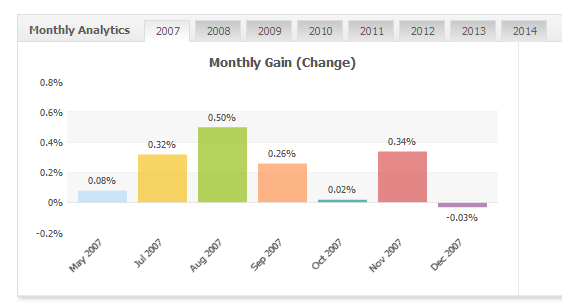
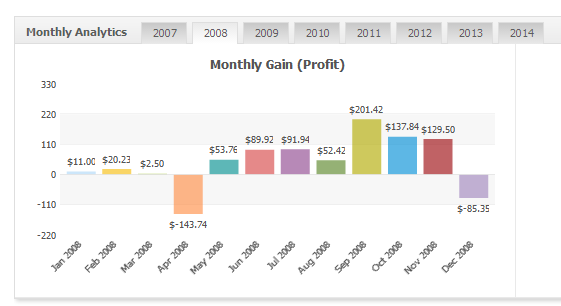
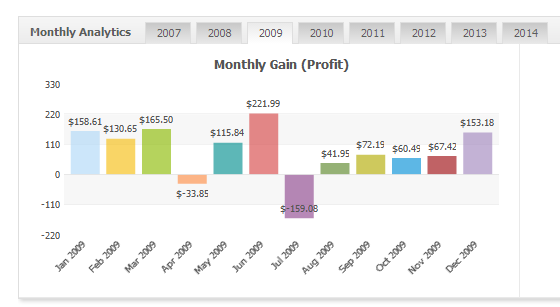
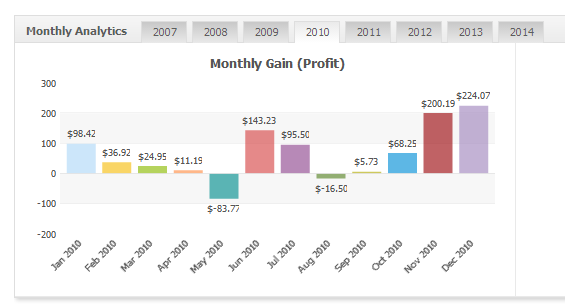
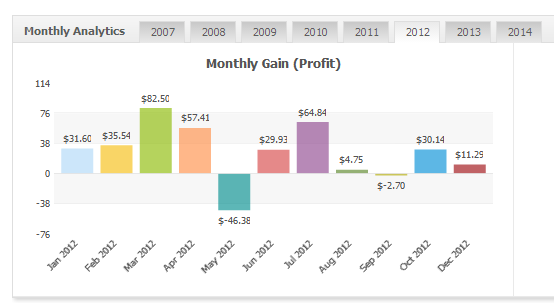
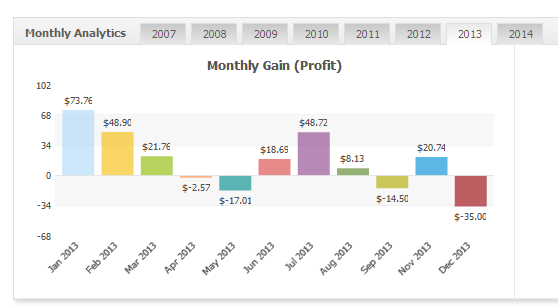
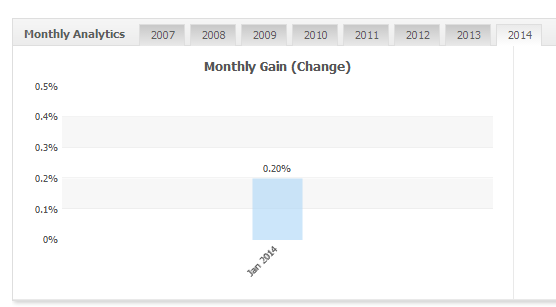
The results show that on the EURUSD M15 pair it is possible to incur losses for two months in a row.
Equilibrium EURUSD H1 2007-2014
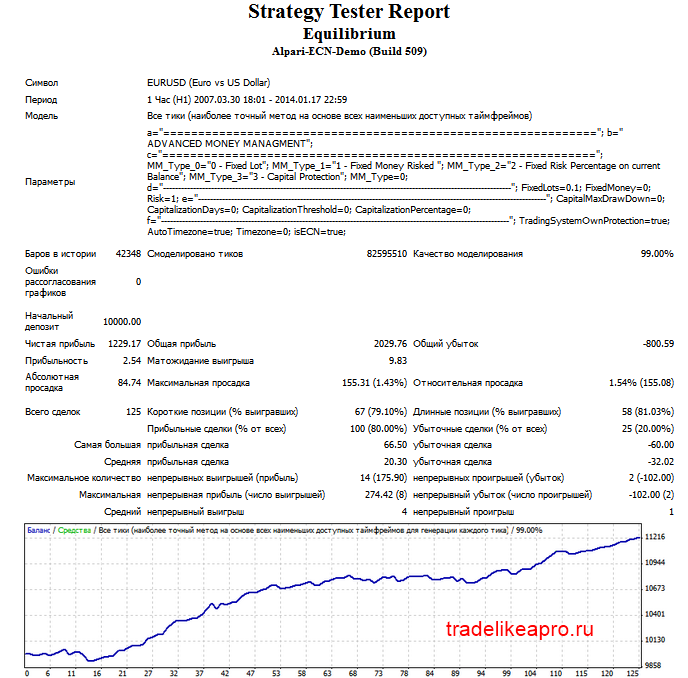
Let us consider the results for each year:
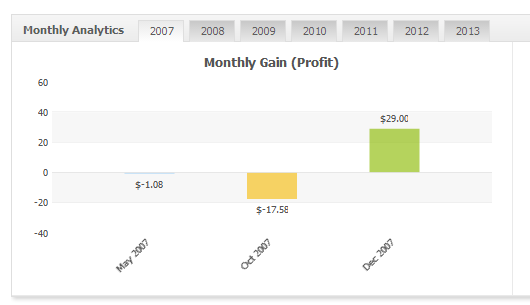
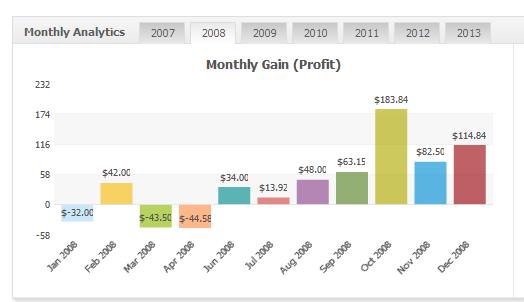
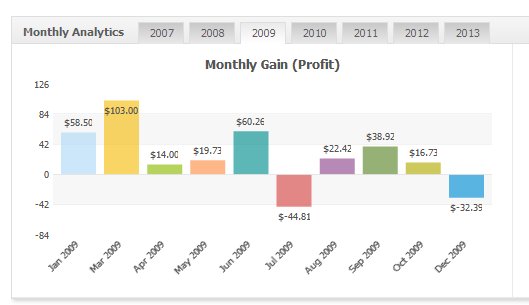
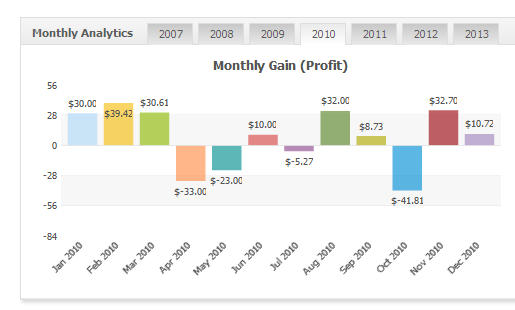
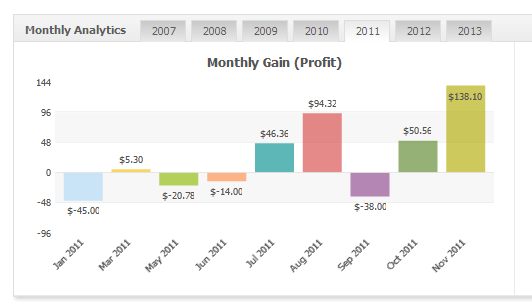
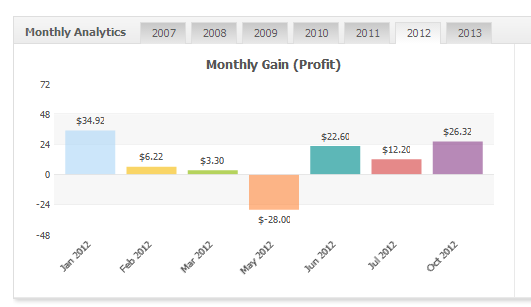
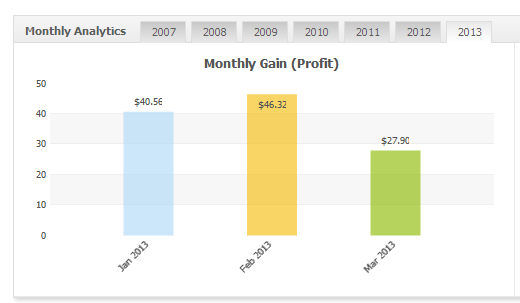
The results show that on EURUSD H1 it is also possible to incur losses for two months in a row.
Equilibrium GBPUSD M15 2007-2014
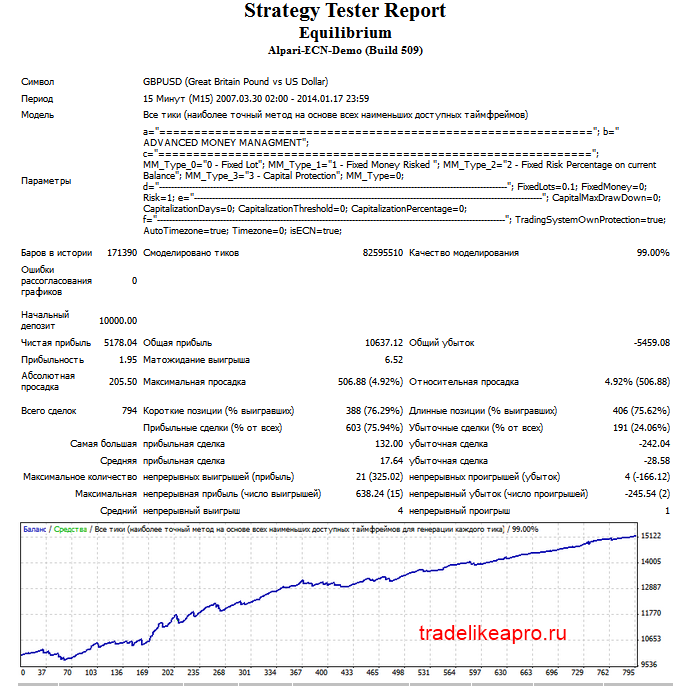
Let us consider the results for each year:
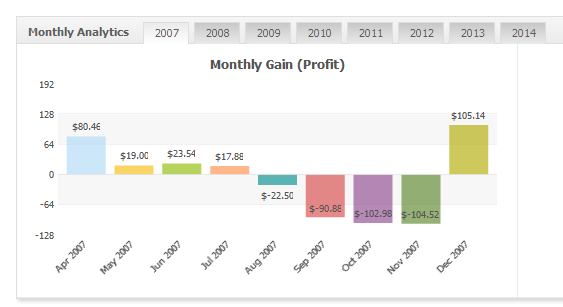
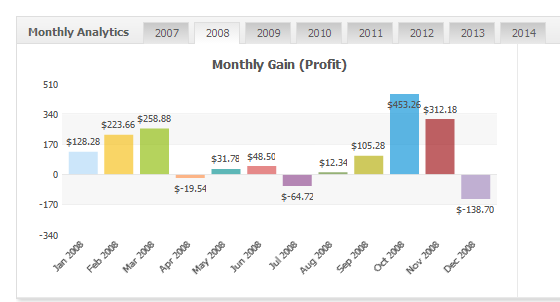
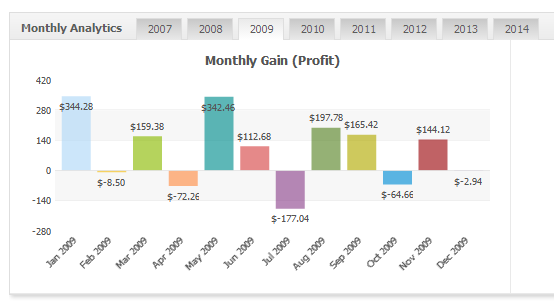
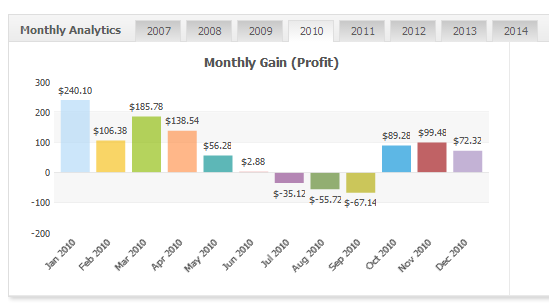
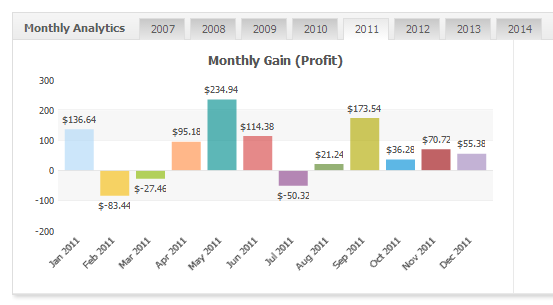
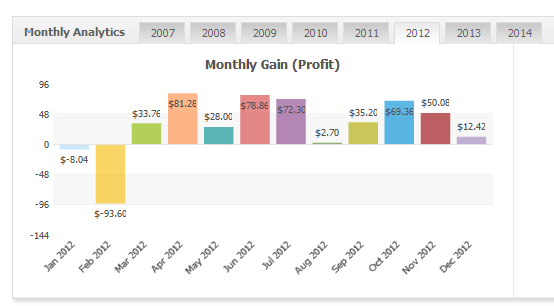
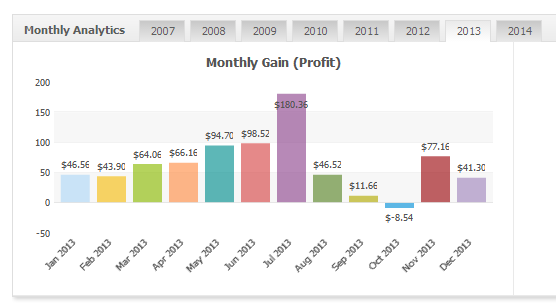
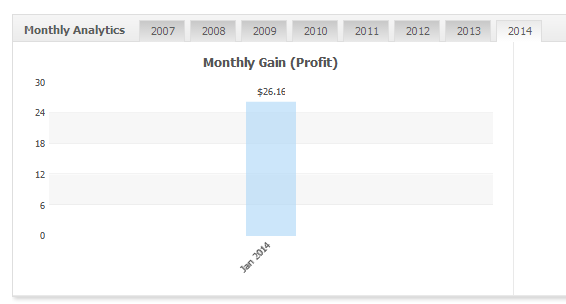
The results show that on GBPUSD M15 it is possible to incur losses for four months in a row.
Equilibrium GBPUSD H1 2007-2014
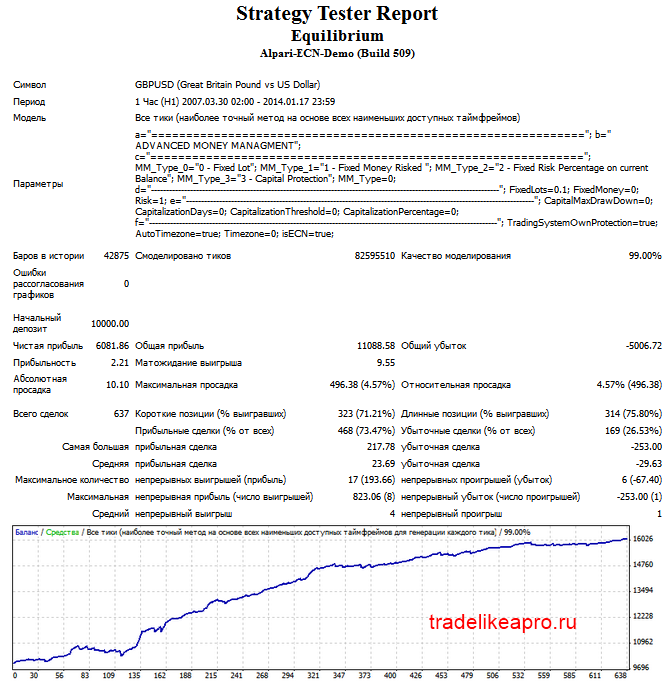
Let us look at the results for each year:
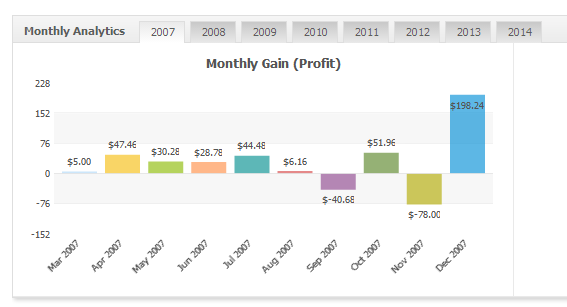
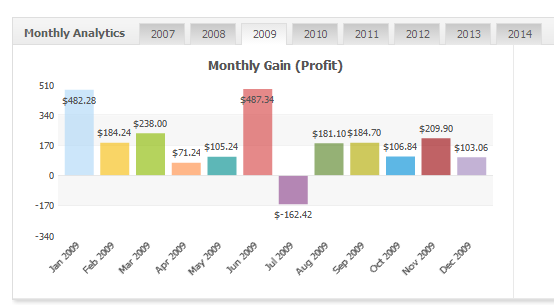
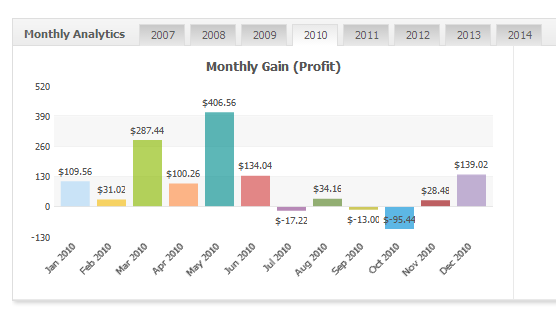
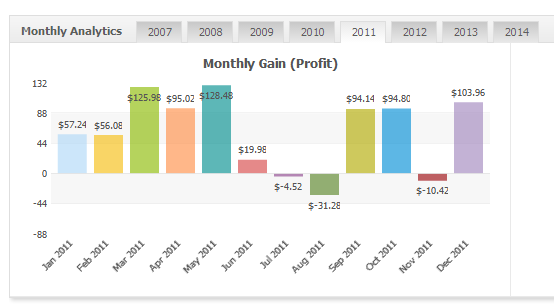
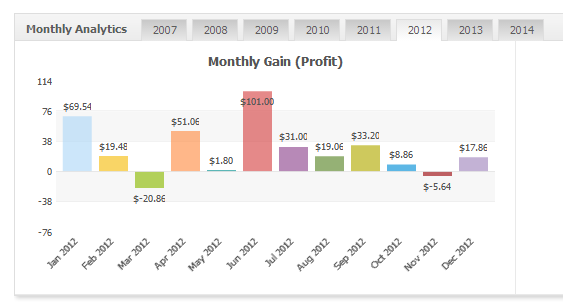
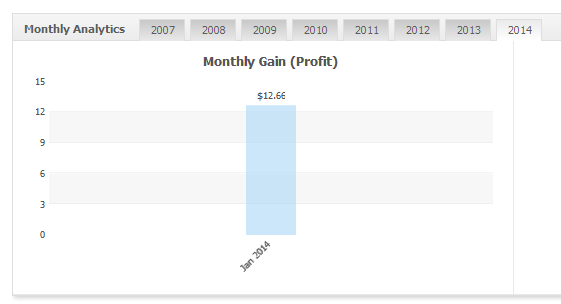
The results show that losses on GBPUSD H1 are also possible for four consecutive months.
All four tests show overall profitability and steady recovery after loss periods.
Settings description
ADVANCED MONEY MANAGMENT - the money management settings section
- MM_Type - money management type: 0 - fixed lot; 1 - with a limit on the specified loss, while lots are calculated automatically; 2 - a fixed risk percentage relative to the balance at the moment this setting is activated; 3 - a specific "capital protection" mode, in which special parameters are used (see below); in this mode money management is calculated dynamically based on the built-in algorithm
- FixedLots - fixed lot size
- FixedMoney - specified loss amount
- Risk - risk amount relative to the balance
- CapitalMaxDrawDown - maximum drawdown size in "capital protection" mode
- CapitalizationDays - the number of days during which the CapitalMaxDrawDown parameter applies
- CapitalizationTreshold - the threshold value for the operation of "capital protection"
- Capitalization Percentage - capitalization percentage
In effect, the "capital protection" system reduces the value of the calculated balance for lot calculations, for example, with CapitalizationTreshold=10 and CapitalizationPercentage =50 the calculated balance amount, when the account size increases by 10% over the last CapitalizationDays days, increases by 50% of the profit received; this reduces risks over the long term, although they decrease stepwise.
- TradingSystemOwnProtection - the trading system protection function in the expert advisor, enabled by default
- Auto Timezone - automatic timezone detection
- Timezone - setting the timezone manually
- isECN - enabling the operating mode for ECN-type accounts, enabled by default
Recommended money management
It is recommended to use a fixed lot or a 2% risk on each chart.
Conclusion
The Equilibrium expert advisor is a reliable and profitable robot whose use is safe and profitable over the long term.
Important!
For the expert advisor to work correctly, the trading terminal must be switched on from the market opening on Sunday evening until its closing on Friday evening. If you do not have the ability to keep your computer running 24/5, then it is recommended to use a VPS server service.
Download the "Equilibrium" expert advisor

Important! Nuances of installation in new builds of Metatrader 4
Respectfully, Alexey aka Merlin
TradeLikeaPro.ru
Hello, dear Forex traders. Who among us has not dreamed of getting a tool in our hands that lets us enter the market accurately and exit at the very first sign of danger?