
Piplane Expert Advisor: Like a Swiss Bank

Hello, friends! It has been a very long time since we last had reviews of night scalpers, and now, at last, an interesting specimen has appeared: the Piplane Forex expert advisor from the authors of the famous Forex Megadroid.
Characteristics of the Piplane Expert Advisor
Platform: Metatrader 4
EA version: 1.02
Currency pair: USDCAD
Timeframe: H1
Operating time: Asian session
Recommended brokers: Alpari (ECN accounts), Tradefort (Flex accounts)
For those who are not aware, night scalpers trade exclusively during the calm Asian session on small fluctuations. To put it very simply, they open sell trades near the upper boundary of the price channel, and buy trades near the lower boundary. That is, we need a horizontal flat.
The developers' previous creation, the Megadroid expert advisor (also a night scalper), has been on the market since 2009 and remains profitable to this day. Small profit, but profit nonetheless.
The strategy of the Piplane robot is quite complex and takes many factors into account. Was there a trend during the American session and, if so, how strong and prolonged was it? Has tick volume fallen to 30% of New York session values (we need a calm market for scalping)? Does the size of the price channel exceed 30 points half an hour before trading begins? Is this channel safe? Does it have a trend direction? And many other small details. The advisor takes a small profit, but the probability of receiving it is high (see the backtest below).
Historical Testing
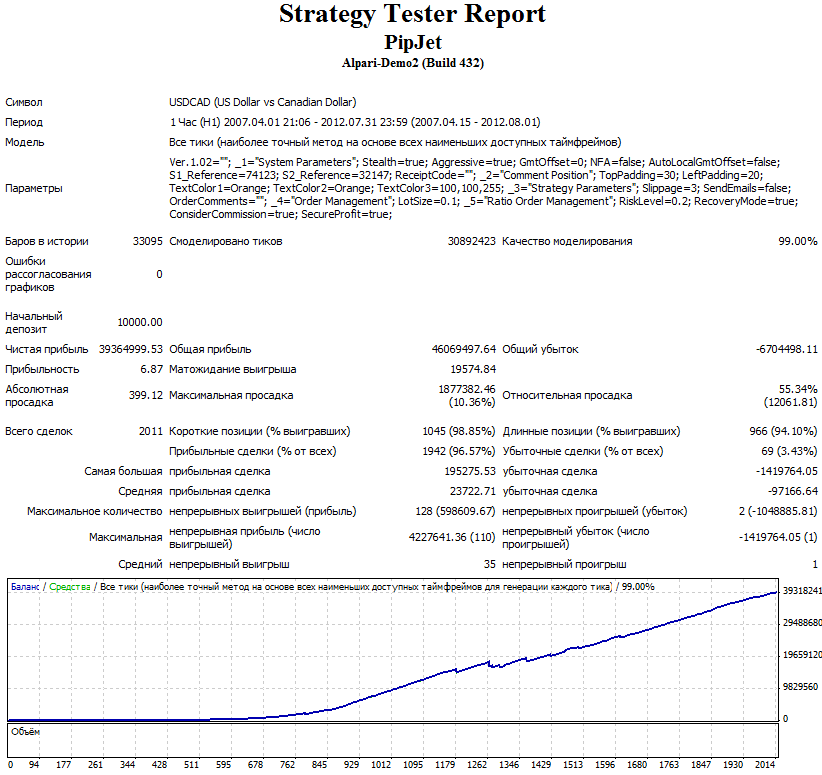
Since the strategy of the Piplane expert advisor is extremely sensitive to the slightest price fluctuations, it should be tested with 99% modeling quality. Results obtained with standard testing will be too far from reality. And do not forget to disable auto GmtOffset during testing; for backtesting it must be set manually.
USDCAD 2007-2012 (click the image to enlarge)
Account Monitorings
The authors provide us with a 2-year monitoring of Piplane on a real account:
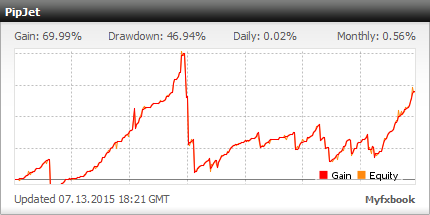
We can also watch a recently started independent forward test:
Description of the Piplane Expert Advisor Settings
Aggressive - when set to true (by default), the advisor uses both a more cautious and a more speculative strategy at the same time, which allows profits to grow somewhat faster.
NFA - this setting is needed for traders registered in the USA. Leave it unchanged.
GMToffset - if you want to test the advisor in the Strategy Tester (F6), set the AutoLocalGMToffset parameter to false, and change this parameter according to your broker (see How to Set the Correct GMT offset)
AutoLocalGMToffset - automatic detection of the GMToffset parameter for real-time trading.
S1_Reference and S2_Reference: parameters needed by the advisor to distinguish positions opened by it from positions opened by other advisors or manually. Leave unchanged.
TopPadding / LeftPadding / TextColor1,2,3 - these settings are responsible for the appearance and placement of the information from the advisor on the chart.
Slippage - allowable slippage
OrderComments - comment for the advisor's positions, may be anything
LotSize - the fixed lot level for trading with the advisor, will be used if the RiskLevel parameter is set to 0.0
RiskLevel – money management for automatically determining lot size based on the set risk. If you set 0.01, then the risk per trade if the stop is triggered will be 1% of the funds in the account. If you set 0.05 - 5%, if 0.1 - 10%, and so on. If this parameter is set to 0.0, the fixed lot specified in the LotSize parameter will be used.
RecoveryMode - be extremely careful with this parameter. When it is enabled, after a losing trade the advisor will trade with an increased lot size until the losses are recovered.
ConsiderCommission – enable/disable accounting for broker commission when closing trades. Leave it enabled.
SecureProfit - when this parameter is enabled, the expert advisor will close half of the position with a profit of five points if weak volatility is observed in the market. For the best results, leave it enabled.
In summary, I can say that Piplane belongs to those robots that "shoot rarely, but accurately". It may go a whole week without opening trades - THIS IS NORMAL. There is no need to panic. If you have only recently begun your acquaintance with forex expert advisors, be sure to study from beginning to end the FAQ on trading with expert advisors. There is a 99% chance that the answer to your question will be found there.
Download the Piplane Expert Advisor

Important! Nuances of Installation in New MetaTrader 4 Builds
Hello, friends! It has been a very long time since we last reviewed night scalpers, and now, at last, an interesting specimen has appeared: the Piplane Forex expert advisor from the authors of the famous Forex Megadroid.