
Support for Metatrader 4 below build 600 ends on August 1

Hello, trader friends! Starting August 1, 2014, Metaquotes will discontinue support for the highly popular Metatrader 4 terminal below build 600. What does this mean? It means that if the build (version) of your terminal is 509, 574, or any other lower than 600, then starting August 1 you simply will not be able to connect to your broker's server and place trades. Read below to find out what is important to know in connection with this news.
How to check the build version of your terminal?
First of all, check which version (build) of MT4 you have. This is very easy to do: you need to go to the Help->About tab.
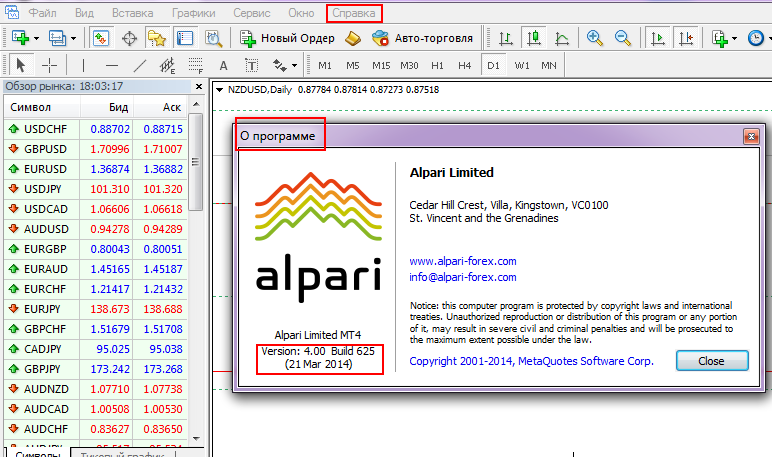
The terminal updates automatically, but if for some reason you have an outdated version, then simply download the MT4 installation package from your broker's website and install it over the old build.
New procedure for installing expert advisors / indicators / strategies
It is also worth remembering that starting from build 574, the procedure for installing external indicators, expert advisors, scripts, and so on has changed. Updated instructions are available on our website:
- Instructions for installing indicators
- Instructions for installing expert advisors
- Instructions for installing strategies
What to do if an expert advisor/indicator in mq4 format does not work
If you suddenly downloaded an indicator somewhere in the form of mq4 source code and it does not work in the new build, then you may need to compile it in the old build. The instructions are here.
For those who have programming skills, a lesson was recently recorded: How to adapt old expert advisors for new builds.
Working with the portable version of the terminal
The procedure for installing the terminal for portable use has also changed. See the material How to install Metatrader 4 on a flash drive.
Sincerely, Pavel TradeLikeaPro.ru

Hello, trader friends! Starting August 1, 2014, Metaquotes will discontinue support for the highly popular Metatrader 4 terminal below build 600.