
Hedge Manager for Your Expert Advisor
 Greetings to everyone who dropped by this forex blog. Today we will get acquainted with the auxiliary tool FxVoodoo Supplement, originally intended for the account-draining FxVooDoo, but capable of working with any expert advisor. What does it do? Supplement places pending limit orders at a distance of N points from the entry point of your expert advisor (any one) and thus allows you to extract profit in cases when the advisor position goes into the red, but then returns to profit. Let us look at this with an example so it is clearer.
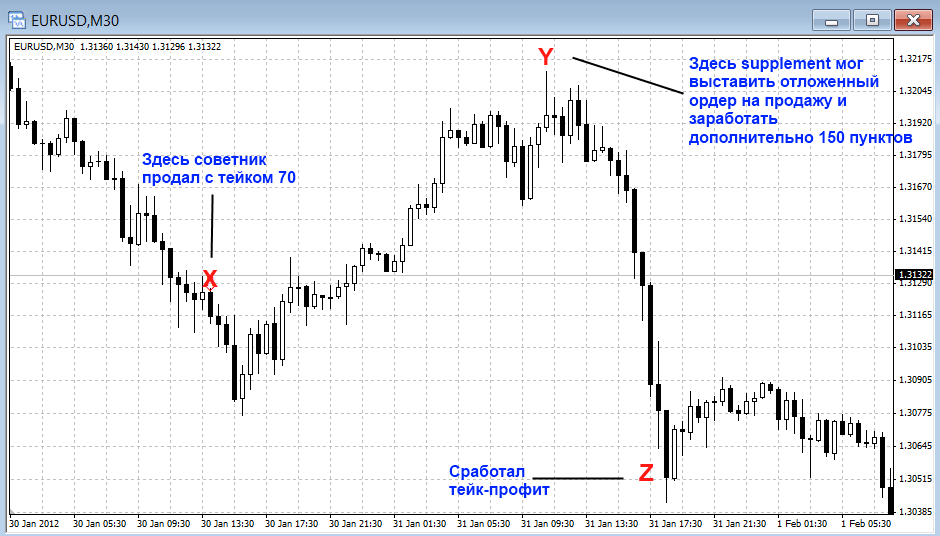
Take a look at the screenshot above (it enlarges when you click with the mouse). Suppose one of your expert advisors opened a sell position at point X with a take-profit of 70 points. As we can see later, at point Z the take-profit was triggered, but before that the price reached point Y and our order went negative by as much as 87 points. The auxiliary expert Supplement could have placed a pending Sell Limit order at the same distance from our entry point and we could have received an additional 150 points of profit.
If the position of the main (our) expert advisor immediately goes into profit, and the price does not reach the pending orders placed by Supplement, then all pending orders are deleted when the take-profit is reached. Supplement allows you to place up to three pending orders at different distances from the entry point into the position.
For a better understanding of how this auxiliary expert works, put it on a demo account and observe it for some time.
Installation
1. Open another identical chart, with the same currency pair and timeframe on which your expert advisor is running. Suppose your expert advisor is on the EURUSD M1 chart, then open another identical EURUSD M1 chart and attach FxVooDoo Supplement to it.
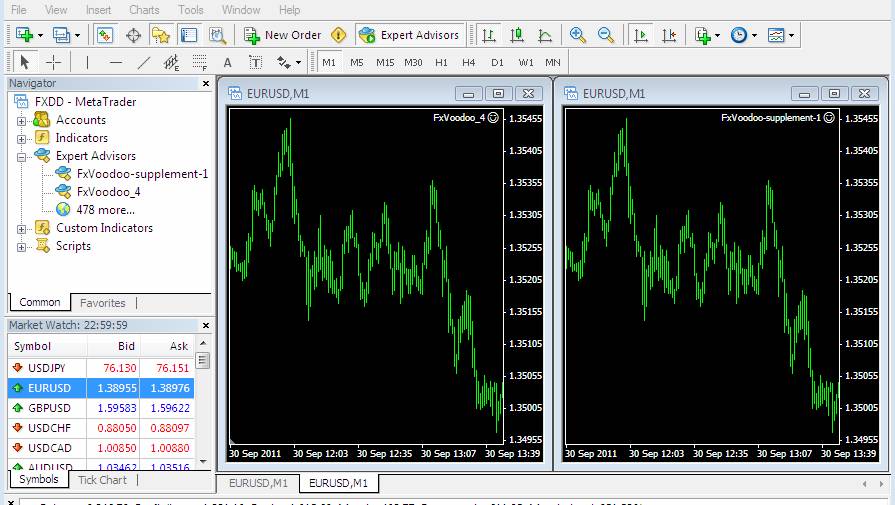
2. Go into the Supplement settings and in the Voodoo_MagicNumber parameter set the same magic number as your main expert advisor (the magic number can usually be seen in the expert settings), whose positions we are going to average.
3. Enter the values you need for stops, takes, the distance for placing pending orders, etc. in the Supplement settings. Press Ok.
Description of FxVooDoo Supplement settings
Voodoo_MagicNumber - the magic number (identifier) of the expert advisor whose positions Supplement will average.
RiskPercentage - if all positions opened by both the main expert and Supplement together reach this level of loss (in percent), then all positions will be closed. By default it is set to 100% - that is, this option is not enabled.
TotalPositions - how many pending orders to use in Supplement operation.
Next comes a description of the parameters for the first pending order of Supplement; exactly the same settings are also present for the 2nd and 3rd orders, so I will not repeat myself and write the same thing three times.
Lots1 - the lot size for the first pending order of Supplement
Distance1 - the distance (in points) from the position of our expert advisor at which Supplement will place the first pending order
TP1 - the take-profit of the pending order
SL1 - the stop-loss of the order
TrailingSL1 - enable/disable trailing stop for the first pending order.
BEP1 - how many points to add to the opening price when moving a position to breakeven
Pips_forBEP_setup1 - the profit level of the order (in points) for moving it to breakeven.
MagicNumber1 - the magic number for the first pending order. It is needed so that our main expert advisor does not touch Supplement orders.
Comments - a comment for the pending orders. It can be anything.
Of course, we should not forget that if the price continues moving against our position, then by opening additional orders with Supplement, we may ultimately receive an even larger loss. This is not a holy grail, but merely a tool.
To sum up: FxVoodoo Supplement can be used if you have an expert advisor that trades profitably, but its positions often go into the red before closing with a profit.
Download FxVooDoo Supplement

Today we will get acquainted with the auxiliary tool FxVoodoo Supplement, originally intended for FxVooDoo but capable of working with any expert advisor.