
Forex Remover - a janitor for your account

Hello, friends! I hope everyone has already recovered from the holidays (I still can't start waking up before noon again) and is ready to return to trading in the forex market. Today I want to present to your attention the long-term Forex Remover expert advisor. There is no martingale, averaging, or other dangerous tactics in it. As the authors state, - "it is time to clear up the mess in automated forex trading" :)
Platform: Metatrader 4
EA version: 1.02
Currency pair: EURUSD
Timeframe: M30
Operating time: Around the clock
Recommended brokers: Alpari, RoboForex
Note: Before asking silly questions in the comments, be sure to read the FAQ on installing, setting up, and trading expert advisors. From beginning to end.
The EA's strategy is based on finding overbought and oversold points using Bollinger Bands; ATR and a moving average are also applied. Trades are opened both with the trend and against it. Unfortunately, my knowledge of code does not allow me to describe the expert's strategy more precisely.
The take-profit and stop-loss in Forex Remover are dynamic, meaning they change depending on the market situation. Interestingly, it is hard to call the EA a scalper, since the take-profit can exceed 200 points in some cases. That cannot but please. The stop-loss level is 135 points; however, when using stealth mode (when the EA does not send stop data to the broker's server but controls them virtually), it is possible to get a loss exceeding this level. Because Forex Remover closes positions only at the opening of a 30-minute candle. Backtests show even better results when using stealth mode, since this allows the expert in some cases to "sit through" a loss.
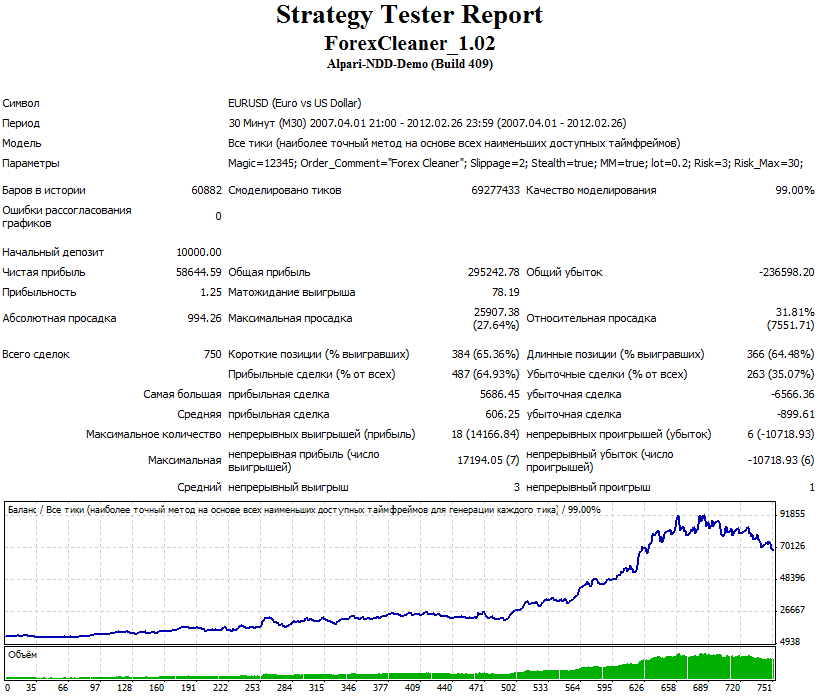
Backtest
EURUSD 2007-2011 (Risk=3,stealth=true, 99% modeling quality)
Account monitoring
From the developers (most likely demo):
Independent monitoring:


Description of Forex Remover settings
Magic – identifier of orders belonging to Forex Remover
Order_Comment – comment for the EA's orders.
Slippage – maximum slippage (in points) when opening a position
Stealth – when this mode is enabled, the EA does not send take-profit and stop-loss data to the broker's server. It is better to keep this parameter enabled (true).
MM – enable/disable automatic lot calculation
Lot – fixed trading lot when MM is disabled.
Risk – the risk level as a percentage of the deposit for each position. Used when MM is enabled.
Risk_Max – the maximum allowable risk level. A kind of safety fuse.
It should be noted that on different brokers, the behavior of the Forex Remover EA differs somewhat. This is due to the fact that Bollinger Bands (namely, this indicator the EA uses for entries and exits) may be displayed with slight differences on the charts of different dealing centers because of differences in the quote feed.
So what do we have in the end? Forex Remover does not provide large profits; however, an adequate strategy (watch the EA test in visual mode), pleasing backtests, and many positive reviews online (I mean real users, not marketers) allow us to conclude that the "Cleaner" is a reliable, as far as this word applies in forex realities, long-term advisor that will not make you a millionaire, but will generally bring a certain profit.
Download the Forex Remover EA

Important! Installation nuances for new Metatrader 4 builds
Hello, friends! I hope everyone has already recovered from the holidays and is ready to return to trading in the forex market.