
Forex Advisors: QuantumFxBot
 The QuantumFxBot advisor appeared at the beginning of summer, but somehow I had not gotten around to writing about it. Before us is a round-the-clock scalper for 4 pairs (doesn't it remind you of anything? ;) ) with decent monitoring results.
Platform: Metatrader4
Working time: round the clock
Currency pairs: EURUSD, GBPUSD, USDCHF, USDJPY
Timeframe: M5
The QuantumFxBot advisor appeared at the beginning of summer, but somehow I had not gotten around to writing about it. Before us is a round-the-clock scalper for 4 pairs (doesn't it remind you of anything? ;) ) with decent monitoring results.
Platform: Metatrader4
Working time: round the clock
Currency pairs: EURUSD, GBPUSD, USDCHF, USDJPY
Timeframe: M5
Guide to installing and working with advisors
Some say that QuantumFxBot is a reworked copy of the Wall Street Forex Robot, but I think it is not that simple. Perhaps some ideas were borrowed, but in the end we have a completely different product. First, QuatumFxBot has a stop loss of only 28 pips. And pending orders are used to enter the market. Quantum, like Wall Street, enters on pullbacks, but overall I would not call it a copy. A similar idea, a different implementation. By the way, the developers took into account that many people like to watch advisors at work, and to entertain those who are eager they added an indication of the current trend and several filters with moving arrows, to make watching the advisor more interesting. All these features are displayed on the chart with QuantumFxBot installed: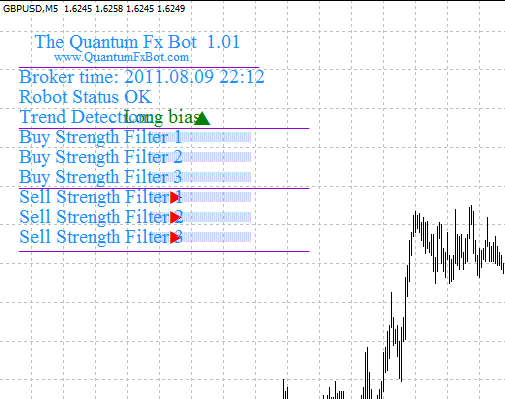 Well then, I suggest starting with the bad news, namely the historical tests. As usual, a fixed lot of 0.1 was used in the tests.
EURUSD
2007-2011
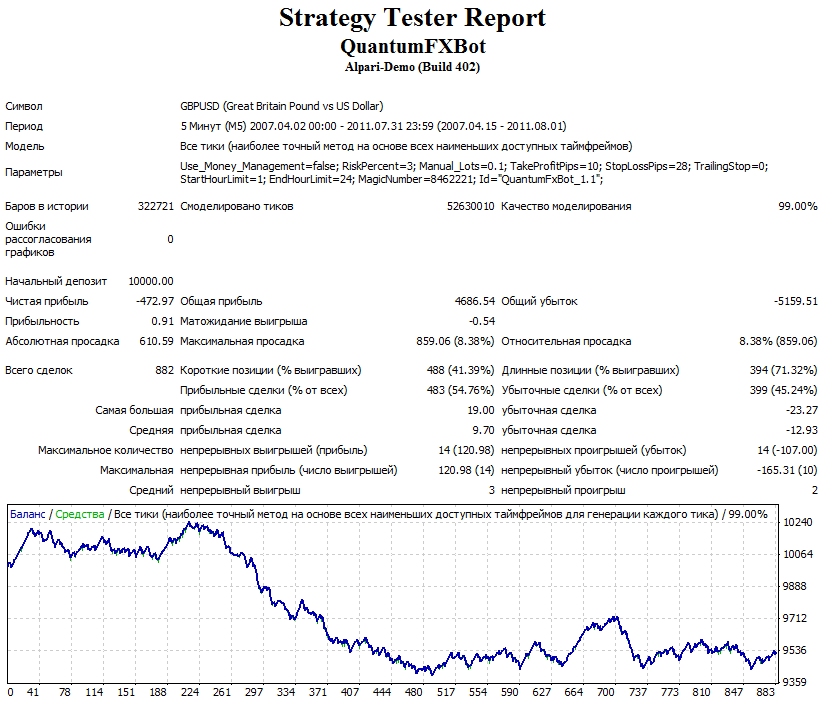
GBPUSD
2007-2011
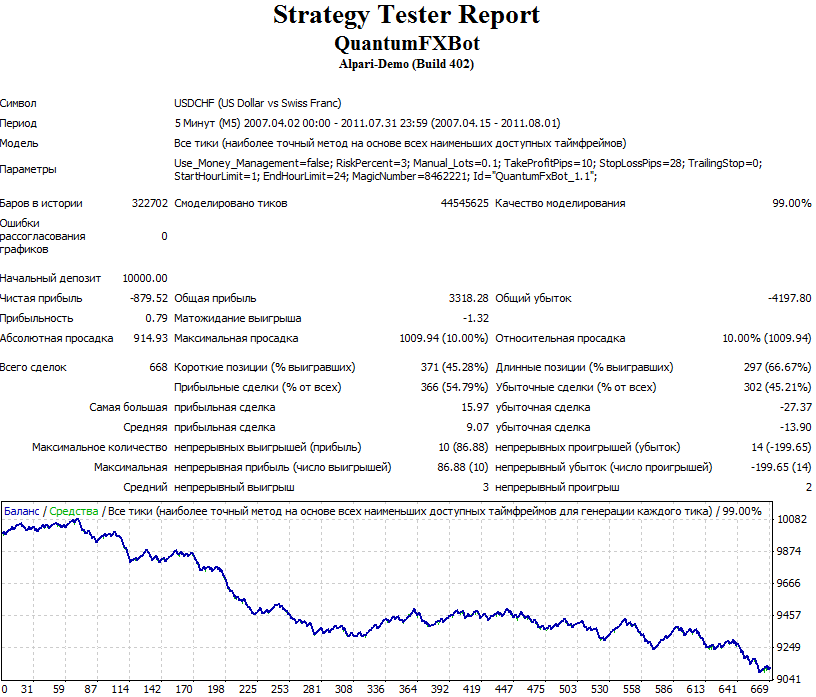
USDCHF
2007-2011
USDJPY
2007-2011
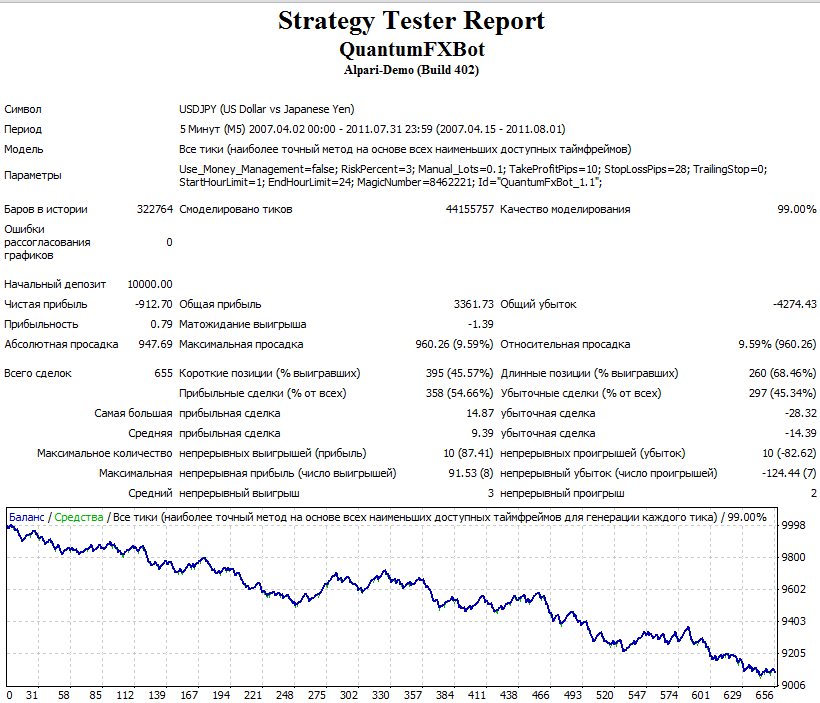
Well, the backtests definitely do not inspire optimism. But, since the live trades do not match the tests at all, I think we are dealing with one of the frequent cases when the tester is absolutely useless. On the official site, we are offered monitoring of the advisor's work on a demo account, with much more favorable results than in the historical tests:
Please note that starting in March, the developers completely abandoned the EURUSD pair in their test.
Also, Bert, the author of the influential blog eareview.net, the other day started a forward test of this advisor on a real account:

Not much time has passed on the real account yet, but the trend is positive. Personally, I will watch the EA on Bert's real test account and on my own account for some time, perhaps later I will launch a separate QuantumFxBot test in the RoboTest section.
Update: the trend has turned negative, we continue to observe.
Description of QuantumFxBot settings
Use_Money_Management - turn automatic money management (capital management) on/off
RiskPercent - the percentage of risk per trade (what percentage of the deposit will be lost in case of a loss) when money management is enabled.
TakeProfitPips, StopLossPips, TrailingStop - the ability to change the parameters for limiting losses and profits, and add a trailing stop to the position. If you are not an advanced user, do not change anything. All values are specified in old pips.
StartHourLimit, EndHourLimit - the advisor's working hours. By default, QuantumFxBot works around the clock. But you can limit its operating time by changing these parameters. The hours should be changed according to your broker's time, since that is exactly the time the trading expert uses as a reference.
MagicNumber - the unique number with which QuantumFxBot marks its orders. It is needed so that the advisor does not confuse its own positions with positions opened by other robots and manually. Do not touch it.
Download QuantumFxBot
Important! Installation nuances in new Metatrader 4 builds
The QuantumFxBot advisor appeared at the beginning of summer, but somehow I had not gotten around to writing about it.